Page 280 of 532
280
3-2. Using the audio system
Optimal use of the audio system
Using the audio control function■ Changing sound quality modes
Press .
Turn to select “SOUND”.
Press .
Turn to select the desired mode.
“BAS”, “TRE”, “FAD”, “BAL”, or “ASL”
Press .
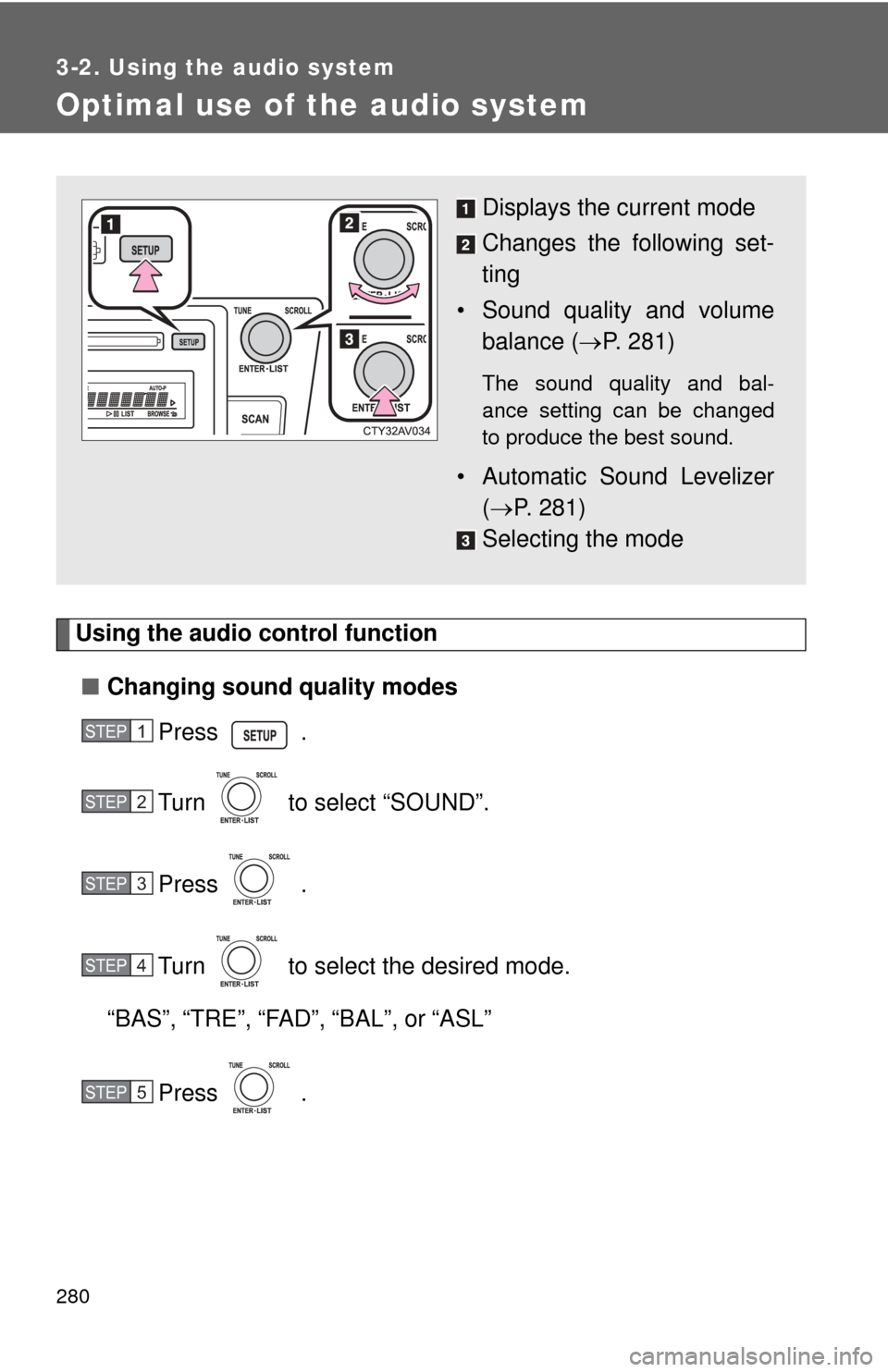
Displays the current mode
Changes the following set-
ting
• Sound quality and volume balance ( P. 281)
The sound quality and bal-
ance setting can be changed
to produce the best sound.
• Automatic Sound Levelizer
( P. 281)
Selecting the mode
STEP1
STEP2
STEP3
STEP4
STEP5
Page 281 of 532
281
3-2. Using the audio system
3
Interior features
■
Adjusting sound quality
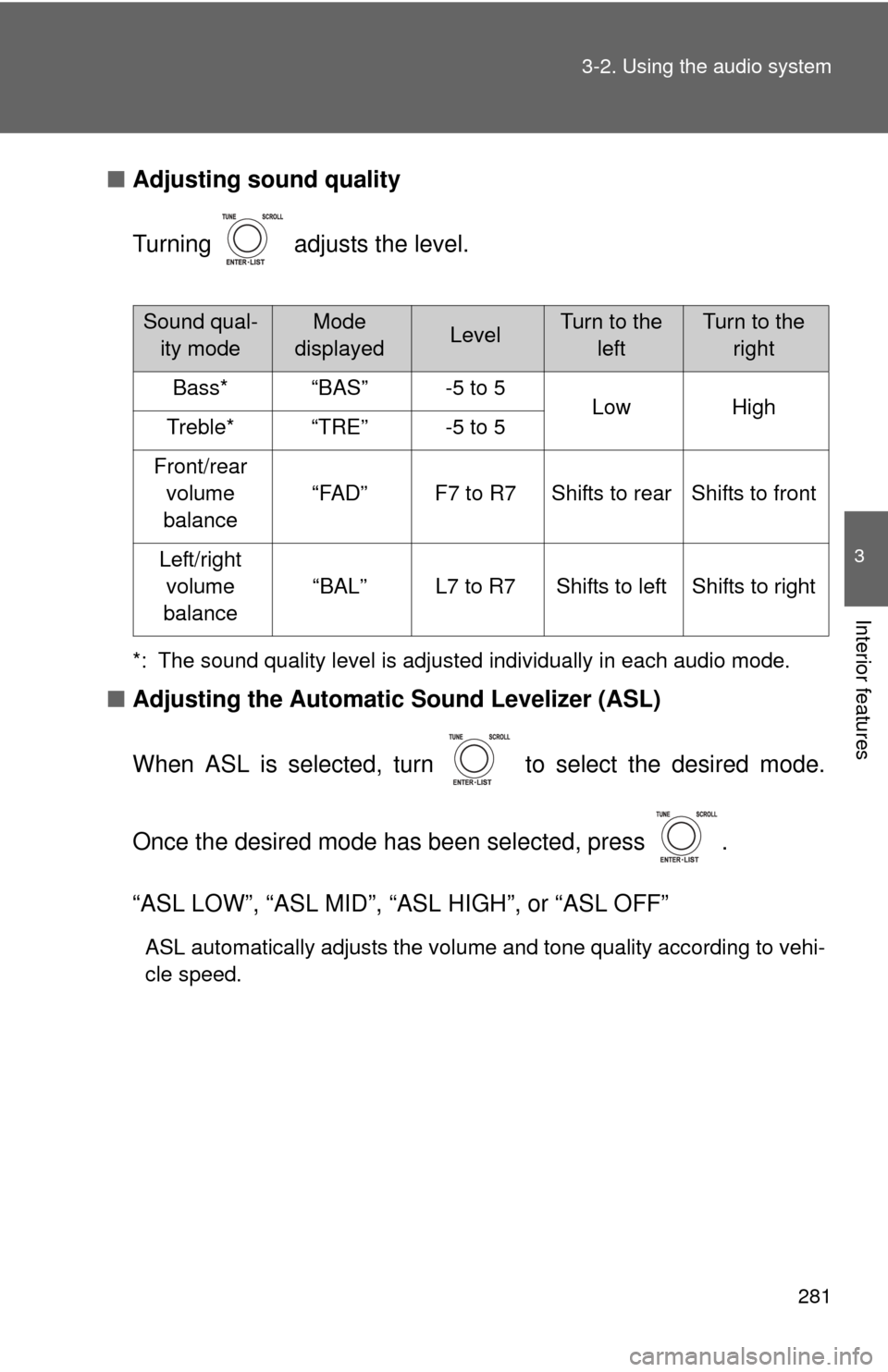
Turning adjusts the level.
*: The sound quality level is adjusted individually in each audio mode.
■Adjusting the Automatic Sound Levelizer (ASL)
When ASL is selected, turn to select the desired mode.
Once the desired mode has been selected, press .
“ASL LOW”, “ASL MID”, “ASL HIGH”, or “ASL OFF”
ASL automatically adjusts the volume and tone quality according to vehi-
cle speed.
Sound qual- ity modeMode
displayedLevelTurn to the leftTurn to the right
Bass*“BAS”-5 to 5LowHighTreble*“TRE”-5 to 5
Front/rear volume
balance
“FAD”F7 to R7Shifts to rearShifts to front
Left/right volume
balance
“BAL”L7 to R7Shifts to leftShifts to right
Page 283 of 532
283
3-2. Using the audio system
3
Interior features
Using the AUX port
■Operating portable audio devices connected to the audio system
The volume can be adjusted using the vehicle's audio controls. All other
adjustments must be made on the portable audio device itself.
■ When using a portable audio devi ce connected to the power outlet
Noise may occur during playback. Use the power source of the portable
audio device.
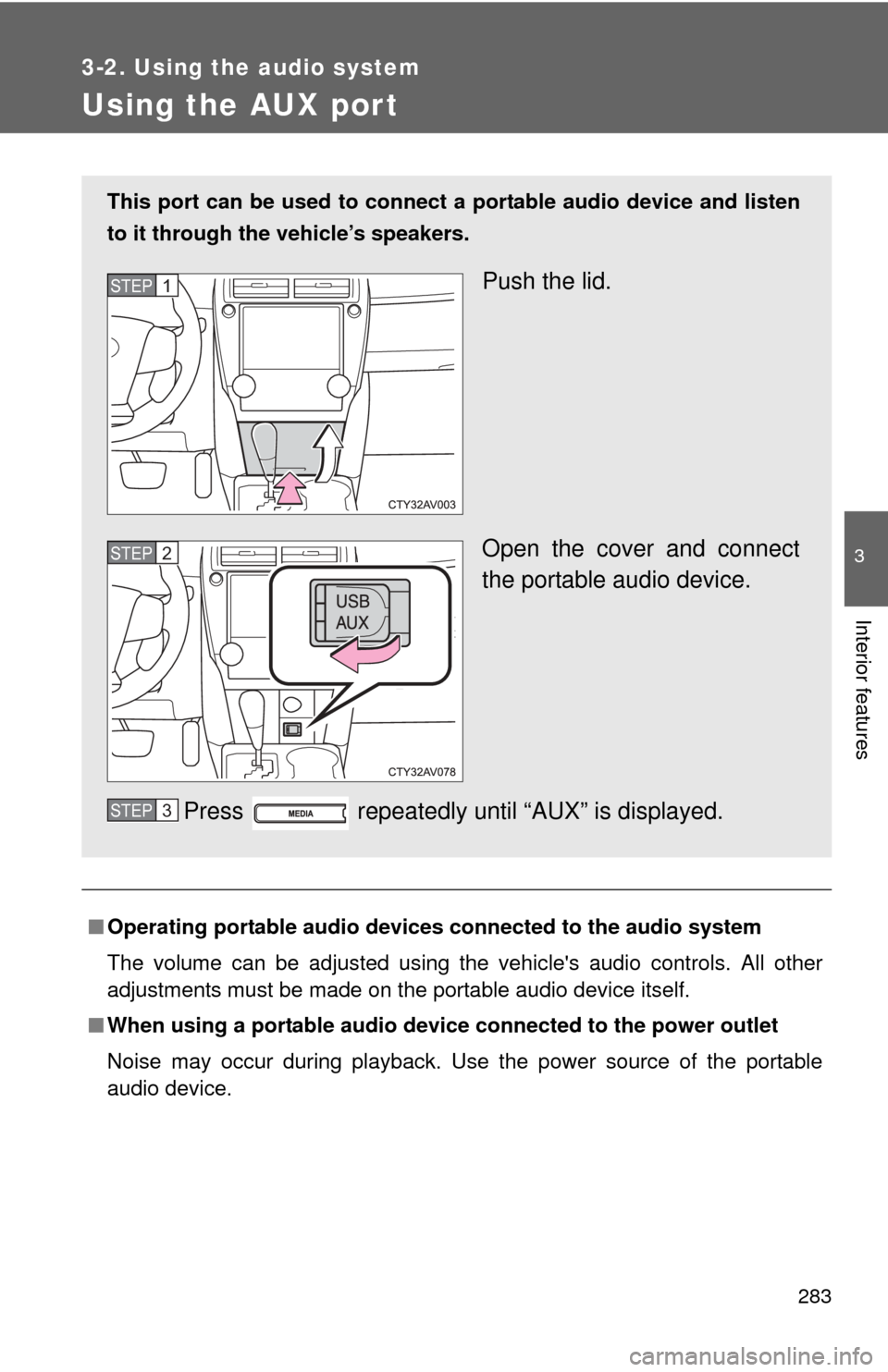
This port can be used to connect a portable audio device and listen
to it through the vehicle’s speakers.
Push the lid.
Open the cover and connect
the portable audio device.
Press repeatedly until “AUX” is displayed.STEP1
STEP2
STEP3
Page 300 of 532
300
3-5. Other interior features
Clock
■The clock is displayed when
Vehicles without a smart key system
The engine switch is in the “ACC” or “ON” position.
Vehicles with a smart key system
The “ENGINE START STOP” switch is in ACCESSORY or IGNITION ON
mode.
■ When disconnecting and reco nnecting battery terminals
The time display will automatically be set to 1:00.
Adjusts the hours
Adjusts the minutes
Page 301 of 532
301
3-5. Other interior features
3
Interior features
Outside temperature display
■The outside temperatur e is displayed when
Vehicles without a smart key system
The engine switch is in the “ON” position.
Vehicles with a smart key system
The “ENGINE START STOP” switch is in IGNITION ON mode.
The temperature display shows te mperatures within the range of
-40°F (-40°C) and 122°F (50°C).
Ty p e A
Ty p e B
Page 302 of 532
302 3-5. Other interior features
■Display
In the following situations, the correct outside temperature may not be dis-
played, or the display may take longer than normal to change:
●When the vehicle is stopped, or moving at low speeds (less than 16 mph
[25 km/h])
● When the outside temperature has changed suddenly (at the entrance/
exit of a garage, tunnel, etc.)
■ When “E” is displayed
The system may be malfunctioning. Take your vehicle to your Toyota dealer.
Page 322 of 532
322
3-5. Other interior features
Compass
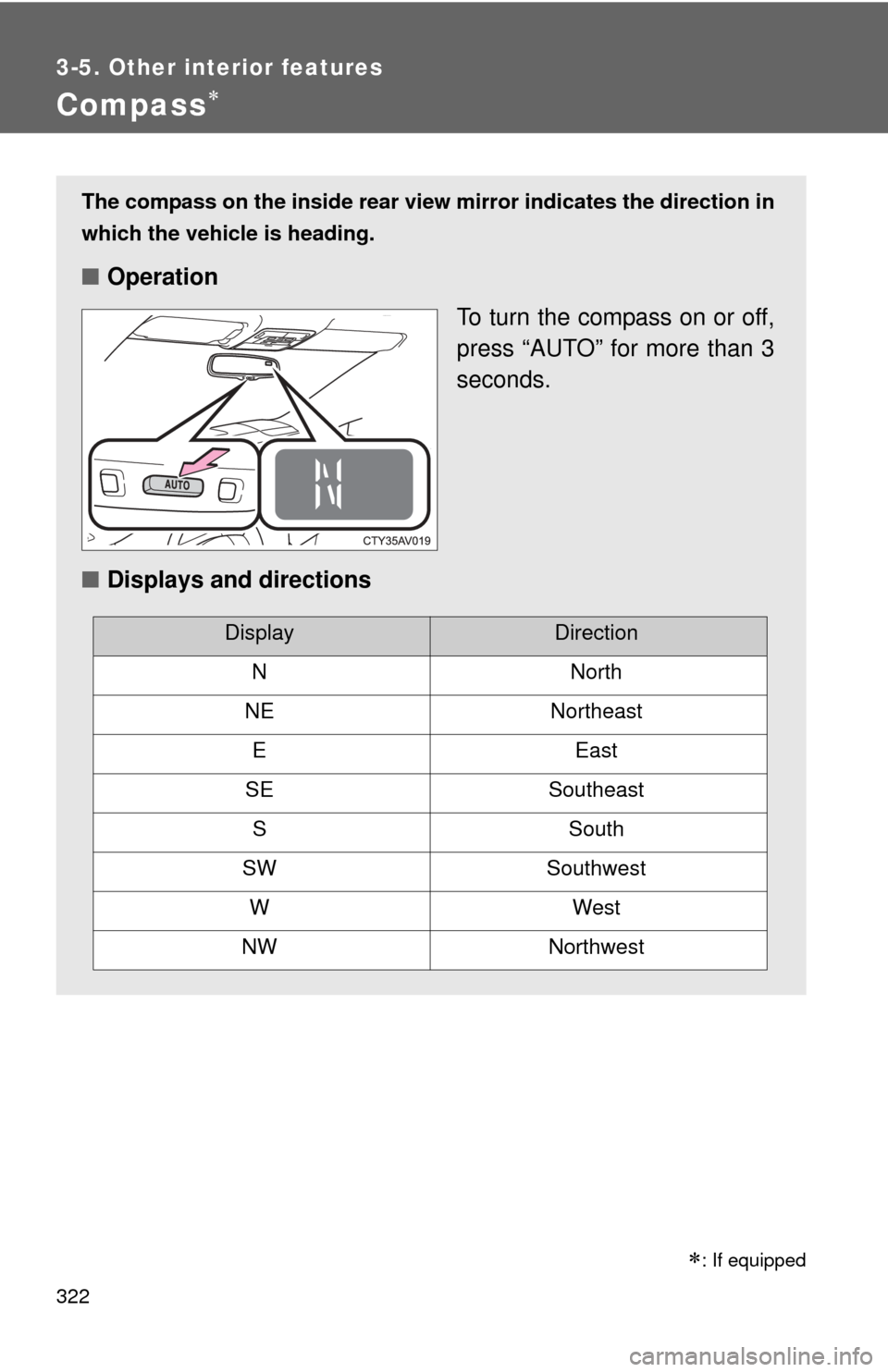
The compass on the inside rear view mirror indicates the direction in
which the vehicle is heading.
■ Operation
To turn the compass on or off,
press “AUTO” for more than 3
seconds.
■ Displays and directions
DisplayDirection
NNorth
NENortheast
EEast
SESoutheast
SSouth
SWSouthwest
WWest
NWNorthwest
: If equipped
Page 323 of 532
323
3-5. Other interior features
3
Interior features
Calibrating the compass
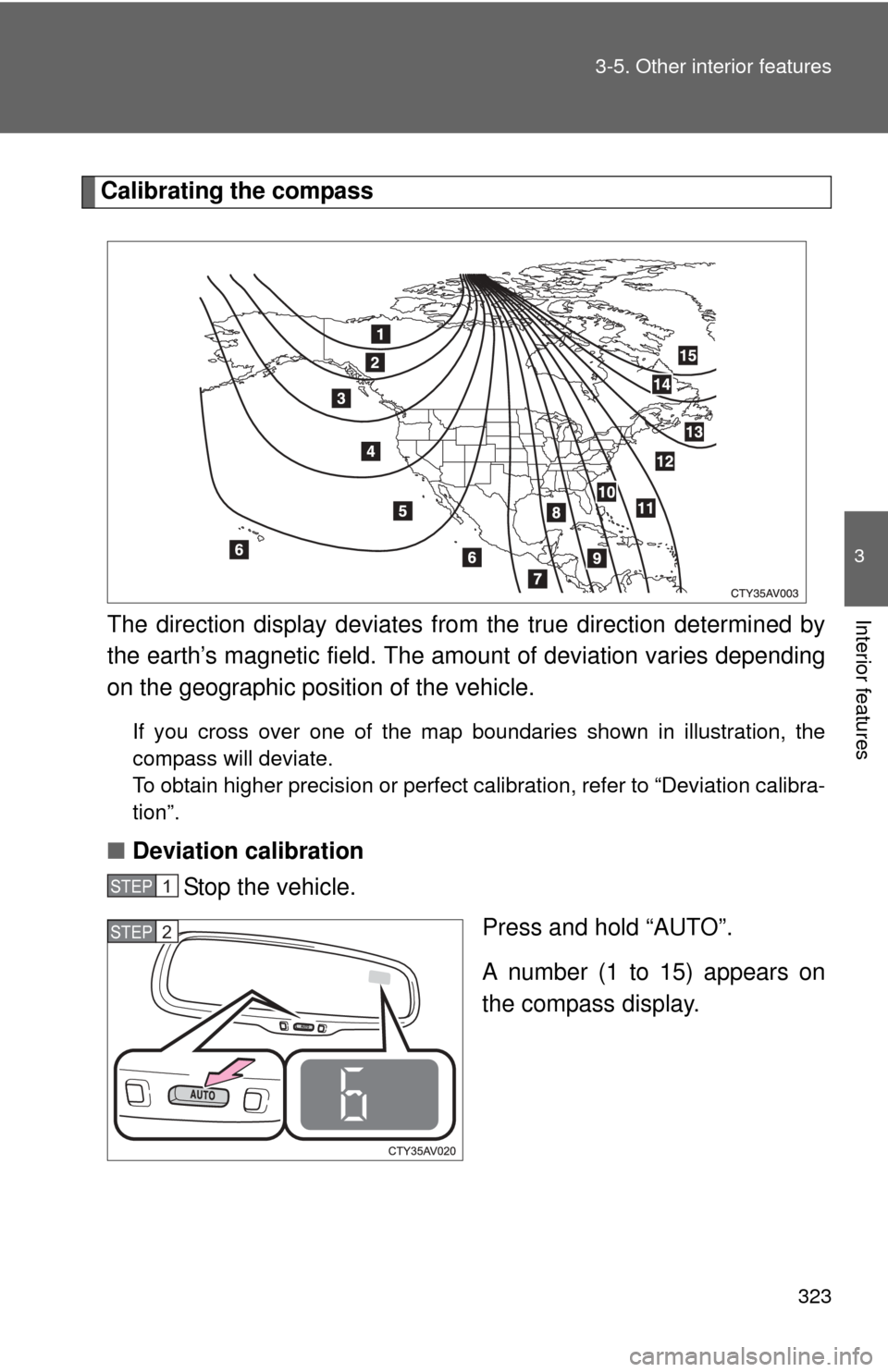
The direction display deviates fr om the true direction determined by
the earth’s magnetic field. The amount of deviation varies depending
on the geographic position of the vehicle.
If you cross over one of the map boundaries shown in illustration, the
compass will deviate.
To obtain higher precision or perfect calibration, refer to “Deviation calibra-
tion”.
■ Deviation calibration
Stop the vehicle.
Press and hold “AUTO”.
A number (1 to 15) appears on
the compass display.
STEP1
STEP2