Page 324 of 532
324 3-5. Other interior features
Referring to the map above, press “AUTO” to select the num-
ber of the zone you are in.
If the direction is displayed several seconds after adjustment, the
calibration is complete.
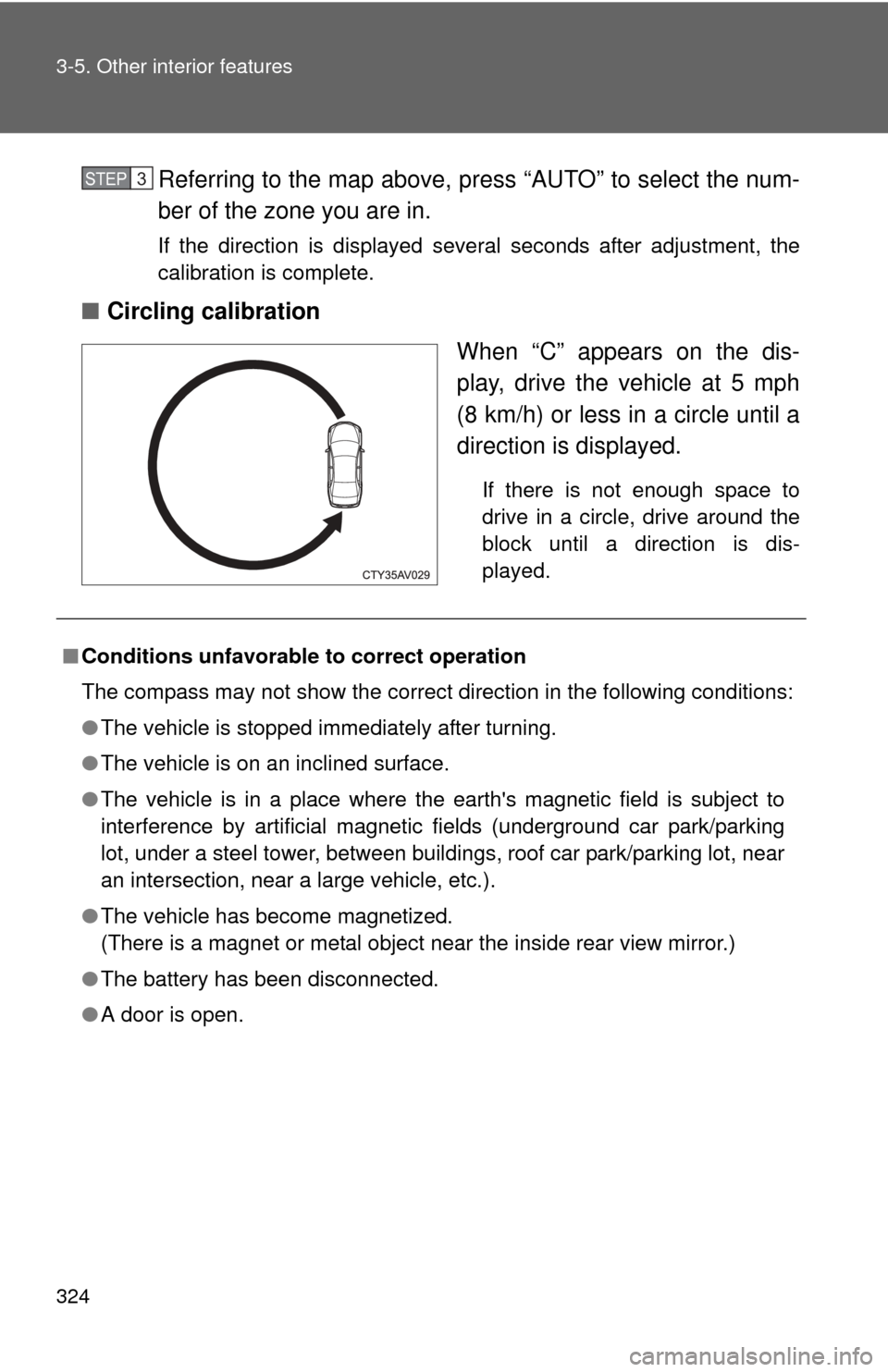
■Circling calibration
When “C” appears on the dis-
play, drive the vehicle at 5 mph
(8 km/h) or less in a circle until a
direction is displayed.
If there is not enough space to
drive in a circle, drive around the
block until a direction is dis-
played.
STEP3
■Conditions unfavorable to correct operation
The compass may not show the correct direction in the following conditions:
●The vehicle is stopped immediately after turning.
● The vehicle is on an inclined surface.
● The vehicle is in a place where the earth's magnetic field is subject to
interference by artificial magnetic fields (underground car park/parking
lot, under a steel tower, between buildings, roof car park/parking lot, near
an intersection, near a large vehicle, etc.).
● The vehicle has become magnetized.
(There is a magnet or metal object near the inside rear view mirror.)
● The battery has been disconnected.
● A door is open.
Page 325 of 532
325
3-5. Other interior features
3
Interior features
CAUTION
■
While driving the vehicle
Do not adjust the display. Adjust the display only when the vehicle is
stopped.
■ When doing the circling calibration
Secure a wide space, and watch out for people and vehicles in the vicinity.
Do not violate any local traffic rules while performing circling calibration.
NOTICE
■To avoid compass malfunctions
Do not place magnets or any metal objects near the inside rear view mirror.
Doing this may cause the compass sensor to malfunction.
■ To ensure normal operation of the compass
●Do not perform a circling calibration of the compass in a place where the
earth's magnetic field is subject to interference by artificial magnetic fields.
● During calibration, do not operate electric systems (moon roof, power win-
dows, etc.) as they may interfere with the calibration.
Page 341 of 532
341
4-2. Maintenance
4
Maintenance and care
Turn the engine switch (vehicles without a smart key system) or the
“ENGINE START STOP” switch (vehicles with a smart key system)
off with the trip meter A reading shown. (
P. 172)
While pressing the display change button ( P. 169), turn the
engine switch to the “ON” position (vehicles without a smart key
system) or “ENGINE START STOP” switch to IGNITION ON mode
(vehicles with a smart key system)
Continue to press and hold the knob until the trip meter displays
“000000”.
■ Allow inspection and repairs to be performed by a Toyota dealer
● Toyota technicians are well-trained specialists and are kept up to date
with the latest service information. They are well informed about the
operations of all systems on your vehicle.
● Keep a copy of the repair order. It proves that the maintenance that has
been performed is under warranty coverage. If any problem should arise
while your vehicle is under warranty, your Toyota dealer will promptly
take care of it.
CAUTION
■If your vehicle is not properly maintained
Improper maintenance could result in serious damage to the vehicle and
possible serious injury or death.
■ Handling of the battery
●Engine exhaust, some of its constituents, and a wide variety of automobile
components contain or emit chemicals known to the State of California to
cause cancer and birth defects and other reproductive harm. Work in a
well ventilated area.
● Oils, fuels and fluids contained in vehicles as well as waste produced by
component wear contain or emit chemicals known to the State of
California to cause cancer and birth defects or other reproductive harm.
Avoid exposure and wash any affected area immediately.
● Battery posts, terminals and related accessories contain lead and lead
compounds which are known to cause brain damage. Wash your hands
after handling. ( P. 363)
STEP1
STEP2
STEP3
Page 375 of 532
375
4-3. Do-it-yourself maintenance
4
Maintenance and care
Tire inflation pressure
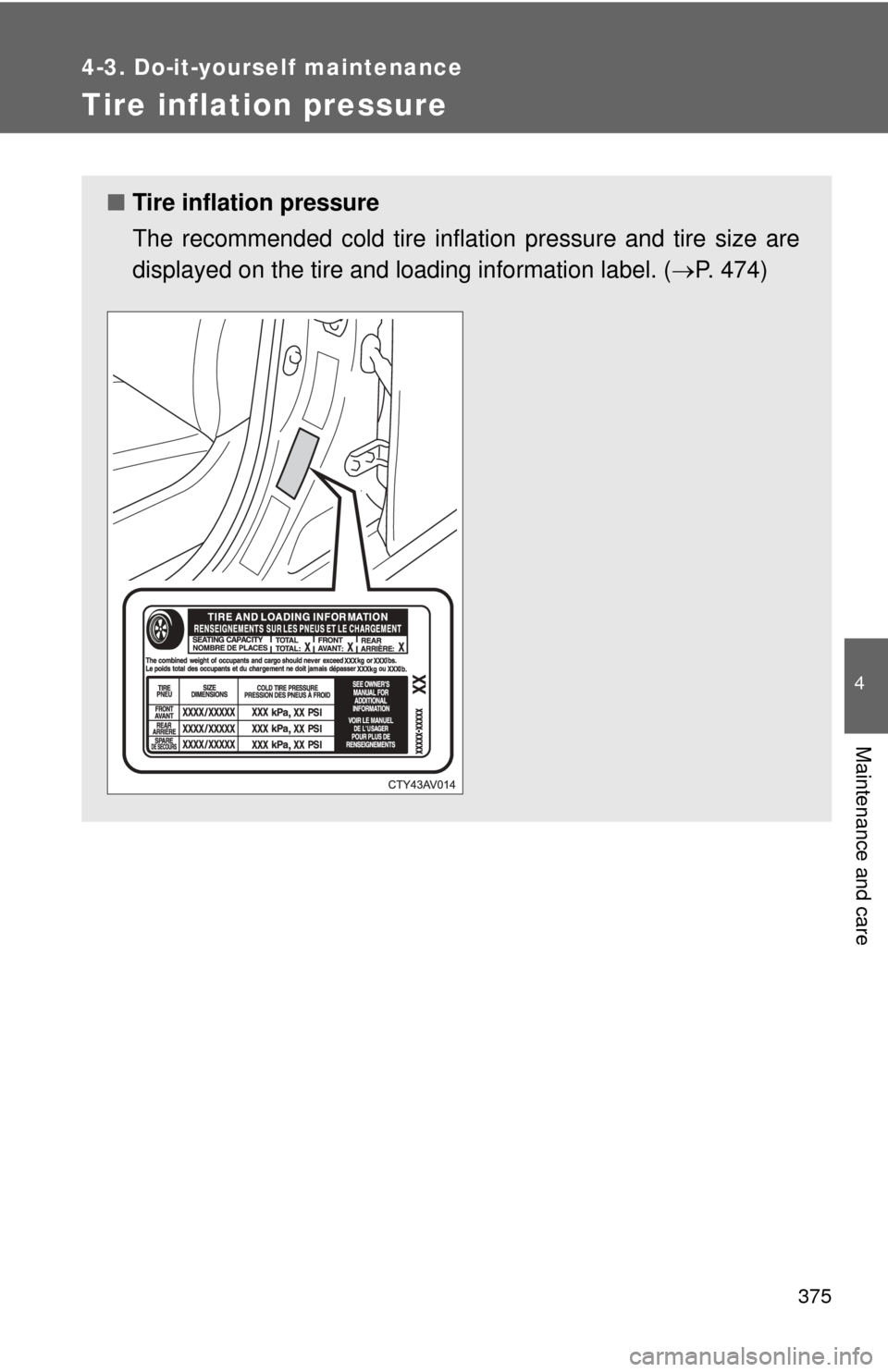
■Tire inflation pressure
The recommended cold tire inflation pressure and tire size are
displayed on the tire and loading information label. ( P. 474)
Page 421 of 532
5
When trouble arises
421
5-2. Steps to take in an emergency
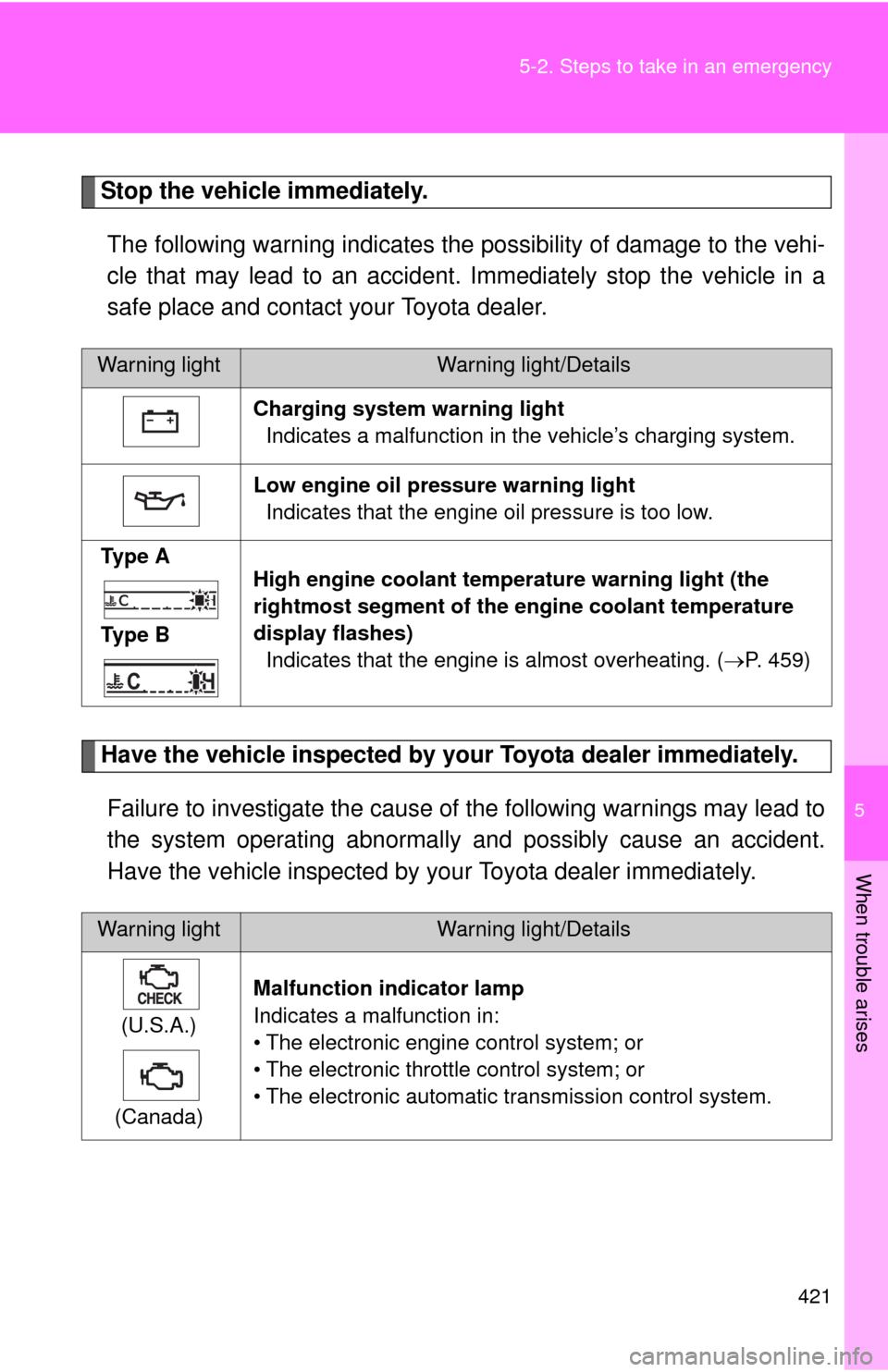
Stop the vehicle immediately.
The following warning indicates the possibility of damage to the vehi-
cle that may lead to an accident. Immediately stop the vehicle in a
safe place and contact your Toyota dealer.
Have the vehicle inspected by your Toyota dealer immediately.Failure to investigate the cause of the following warnings may lead to
the system operating abnormally and possibly cause an accident.
Have the vehicle inspected by your Toyota dealer immediately.
Warning lightWarning light/Details
Charging system warning light Indicates a malfunction in the vehicle’s charging system.
Low engine oil pressure warning light Indicates that the engine oil pressure is too low.
Ty p e A
Ty p e B High engine coolant temper
ature warning light (the
rightmost segment of the engine coolant temperature
display flashes) Indicates that the engine is almost overheating. ( P. 459)
Warning lightWarning light/Details
(U.S.A.)
(Canada) Malfunction indicator lamp
Indicates a malfunction in:
• The electronic engine control system; or
• The electronic throttle control system; or
• The electronic automatic transmission control system.
Page 460 of 532
460 5-2. Steps to take in an emergency
■Overheating
If you observe the following, your vehicle may be overheating:
●The rightmost segment of the engine coolant temperature display is
flashing or a loss of power is experienced.
● Steam comes out from under the hood.
CAUTION
■To prevent an accident or injury when inspecting under the hood of
your vehicle
● If steam is seen coming from under the hood, do not open the hood until
the steam has subsided. The engine compartment may be very hot, caus-
ing serious injuries such as burns.
● Keep hands and clothing away from the fans and drive belt while the
engine is running.
● Do not loosen the coolant reservoir cap while the engine and radiator are
hot.
Serious injury, such as burns, may result from hot coolant and steam
released under pressure.
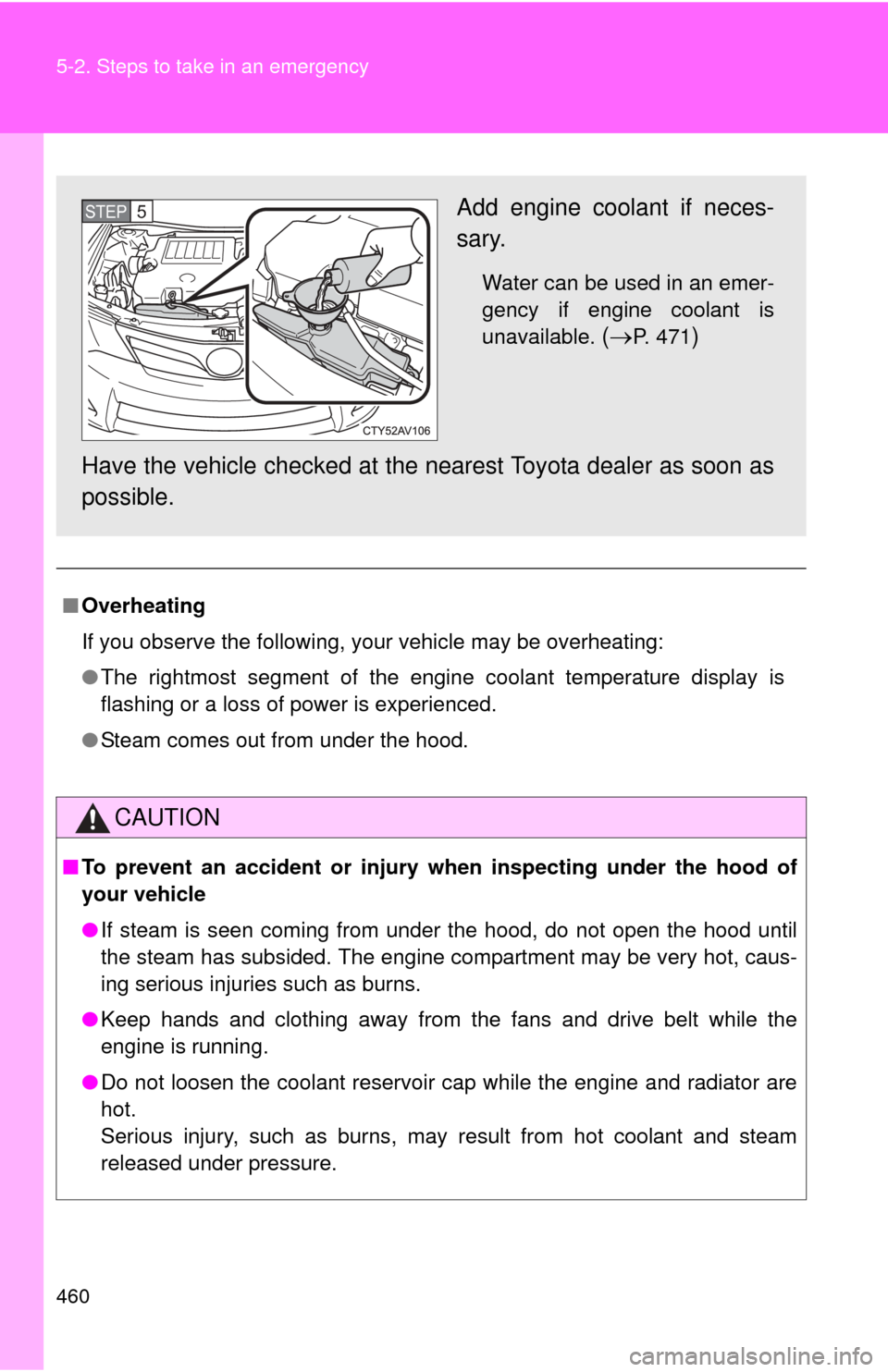
Add engine coolant if neces-
sary.
Water can be used in an emer-
gency if engine coolant is
unavailable.
(P. 471)
Have the vehicle chec ked at the nearest Toyota dealer as soon as
possible.
STEP5
Page 493 of 532
493
6
Vehicle specifications
6-2. Customization
Customizable features
Customizable FeaturesVehicles with a Display Audio system: Settings that can be
changed using the Display Audio system
(For further information on custom izing settings using the Display
Audio system, refer to the “Dis play Audio System Owner’s Man-
ual”.)
Vehicles with a navigation syst em: Settings that can be changed
using the navi gation system
(For further information on cust omizing settings using the naviga-
tion system, refer to the “Navig ation System Owner’s Manual”.)
Settings that can be chan ged by your Toyota dealer
Definition of symbols: O = Available, — = Not available
Your vehicle includes a variety of electronic features that can be per-
sonalized to suit your prefer ences. Programming these preferences
requires specialized equipment and may be performed by your
Toyota dealer.
Some function settings are changed simultaneously with other functions
being customized. Contact your Toyota dealer for further details.
Page 515 of 532
Index
515
Abbreviation list ..................... 516
Alphabetical index .................. 518
What to do if... ........................ 528
Vehicles with a Display Audio system:
For details of equipment related to the Display Audio
system, such as the audio system, refer to the “Display
Audio System Owner's Manual”.
Vehicles with a navigation system:
For details of equipment related to the navigation sys-
tem, such as the audio system, refer to the “Navigation
System Owner's Manual”.