2012 SKODA YETI parking brake
[x] Cancel search: parking brakePage 5 of 225

Table of Contents
Abbreviations
Using the system
Cockpit 7
Overview 6
Instruments and Indicator Lights 8
Instrument Cluster 8
Multifunction display (onboard computer) 12
MAXI DOT (information display) 15
Indicator lights 18
Unlocking and locking 26
Vehicle key 26
Child safety lock 27
Central locking system 27
Remote control 30
Anti-theft alarm system 31
Boot lid 33
Electric power windows 34
Panoramic sliding roof 36
Lights and visibility 39
Lights 39
Interior light 46
Visibility 47
Windscreen wipers and washers 48
Rear window 52
Seats and Stowage 55
Front seats 55
Head restraints 59
Rear seats 60
Boot 62
Variable loading floor in the boot 66Variable loading floor with spare wheel 68
Roof rack system 68
Cup holder 69
Ashtray 70
Cigarette lighter, 12-volt power socket 71
Storage compartments 72
Through-loading bag 78
Clothes hooks 78
Parking ticket holder 79
Heating and air conditioning system 80
Heating and air conditioning system 80
Air outlet vents 81
Heating 82
Air conditioning system (manual air conditioning
system) 83
Climatronic (automatic air conditioning
system) 86
Auxiliary heating (auxiliary heating and
ventilation) 88
Starting-off and Driving 92
Starting and stopping the engine 92
Brakes and brake assist systems 94
OFF ROAD mode 98
Shifting (manual gearbox) 100
Pedals 100
Parking aid 100
Park assist 101
Cruise control system (CCS) 104
START/STOP 106
Fatigue detection system (break
recommendation) 107
Automatic gearbox 109
Automatic gearbox 109
Communication 114
Mobile phones and two-way radio systems 114
Operating the phone on the multifunction
steering wheel 115Symbols in the information display 116
Phone Phonebook 116
Universal telephone preinstallation GSM II 116
Universal telephone preinstallation GSM IIl 119
Voice control 123
Multimedia 125
Safety
Passive Safety 128
General information 128
Correct seated position 129
Seat belts 132
Seat belts 132
Airbag system 137
Description of the airbag system 137
Front airbags 138
Driver’s knee airbag 139
Side airbags 140
Head airbags 141
Deactivating airbags 141
Transporting children safely 143
Child seat 143
Driving Tips
Driving and the Environment 146
The first 1 500 km 146
Catalytic converter 146
Economical and environmentally friendly
driving 147
Environmental compatibility 149
Driving abroad 150
Avoiding damage to your vehicle 150
3
Table of Contents
Page 21 of 225

Antilock brake system (ABS)
» page 22
Rear fog light
» page 23
Bulb failure
» page 23
Exhaust inspection system
» page 23
Glow plug system (diesel engine)
» page 23
EPC fault light (petrol engine)
» page 23
Diesel particle filter (diesel engine)
» page 23
Fuel reserve
» page 24
Airbag system
» page 24
Tyre control display
» page 24
Windscreen washer fluid level
» page 25
Turn signal (left/right).
» page 25
Low beam
» page 25
Fog lights
» page 25
Speed regulating system
» page 25
Selector lever lock
» page 25
Downhill Drive Support
» page 25
Main beam
» page 25 WARNING
■ If illuminated indicator lights and the corresponding descriptions and warn-
ing notes are not observed, this may result in severe injuries or major vehicle
damage.
■ The engine compartment of your car is a hazardous area. There is a risk of
injuries, scalding, accidents and fire when working in the engine compart-
ment, e.g. inspecting and replenishing oil and other fluids. It is essential to ob-
serve safety notes »
page 169, Engine compartment . Ð Handbrake
The indicator light
comes on if the handbrake is applied. An audible warning is
also given if you drive the vehicle for at least 3 seconds at a speed of more than
6 km/h.
The following is displayed in the information display:
Release parking brake! Ð Brake system
The indicator light illuminates if the brake fluid level is too low or there is a
fault in the ABS.
The following is displayed in the information display:
Brake fluid: Owner's manual!
Stop the vehicle, switch off the engine, and check the level of the brake flu-
id » page 175. WARNING
■ If you have to stop for technical reasons, then park the vehicle at a safe dis-
tance from the traffic, switch off the engine and activate the hazard warning
light system » page 44.
■ The following guidelines should be observed when opening the bonnet and
checking the brake fluid level » page 169, Engine compartment .£
19
Instruments and Indicator Lights
Page 98 of 225
Faults in the brake surface
If it is found that the braking distance has suddenly become longer and that the
brake pedal can be depressed further, the brake system may be faulty. Visit a
ŠKODA specialist garage immediately and adjust your style of driving appropriate-
ly as you will not know how great the damage is.
Low brake fluid level
An insufficient level of brake fluid may result in problems in the brake system. The
level of the brake fluid is monitored electronically
» page 19, Brake system .
Brake booster
The brake booster increases the pressure generated with the brake pedal. The
brake booster only operates when the engine is running. ÐHandbrake
Fig. 96
Centre console: Handbrake
First read and observe the introductory information and safety warn-
ings on page 94.
Apply
›
Pull the handbrake lever firmly upwards.
Loosening
› Pull the handbrake lever up slightly and
at the same time push in the locking
button » Fig. 96 .
› Move the lever right down while pressing the lock button.
The handbrake indicator light lights up when the handbrake is applied, provi-
ded the ignition is on.
A warning signal sounds if the vehicle is inadvertently driven off with the hand-
brake applied.
The following is displayed in the information display: ä Release parking brake!
The handbrake warning is activated if the vehicle is driven at a speed of more
than 6 km/h for more than 3
seconds. Ð Stabilisation Control (ESC)
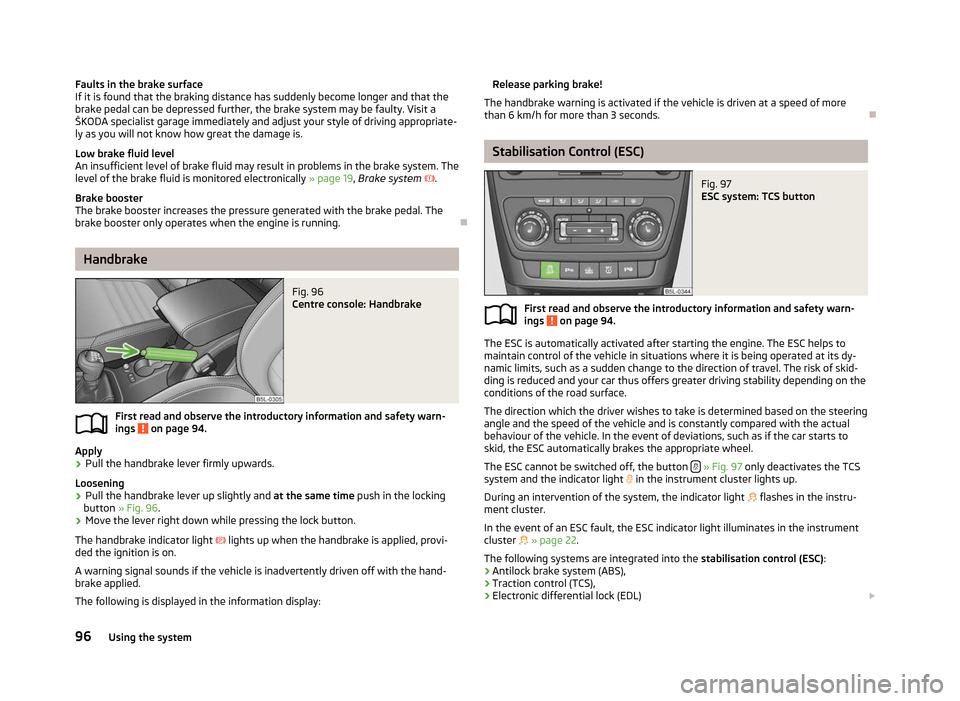
Fig. 97
ESC system: TCS button
First read and observe the introductory information and safety warn-
ings on page 94.
The ESC is automatically activated after starting the engine. The ESC helps to
maintain control of the vehicle in situations where it is being operated at its dy-
namic limits, such as a sudden change to the direction of travel. The risk of skid-
ding is reduced and your car thus offers greater driving stability depending on the
conditions of the road surface.
The direction which the driver wishes to take is determined based on the steering
angle and the speed of the vehicle and is constantly compared with the actual
behaviour of the vehicle. In the event of deviations, such as if the car starts to
skid, the ESC automatically brakes the appropriate wheel.
The ESC cannot be switched off, the button » Fig. 97 only deactivates the TCS
system and the indicator light in the instrument cluster lights up.
During an intervention of the system, the indicator light flashes in the instru-
ment cluster.
In the event of an ESC fault, the ESC indicator light illuminates in the instrument
cluster » page 22.
The following systems are integrated into the stabilisation control (ESC):
› Antilock brake system (ABS),
› Traction control (TCS),
› Electronic differential lock (EDL)
£
ä
96 Using the system
Page 111 of 225

Automatic gearbox
Automatic gearbox
ä
Introduction
This chapter contains information on the following subjects:
Introductory information 109
Starting-off and driving 110
Selector lever positions 110
Manual shifting of gears (Tiptronic) 111
Selector lever lock 111
Kickdown function 112
Dynamic shift programme 112
Emergency programme 112
Selector lever-emergency unlocking 113
WARNING
■ Do not depress the accelerator if changing the position of the selector lever
when the vehicle is stationary and the engine is running - risk of accident!
■ Never move the selector lever into position R or P when driving - risk of an
accident!
■ When the engine is running and the vehicle is stationary, it is necessary to
hold the car with the brake pedal in all the positions of the selector lever (ex-
cept P and N) since the power transmission is never completely interrupted,
also not when the engine is idling - the vehicle creeps.
■ The selector lever must be placed into position P and the handbrake firmly
applied before the bonnet can be opened and work on the running engine can
be completed - risk of accident! The safety guidelines must always be ob-
served » page 169 , Engine compartment .
■ If stopping on a hill (downhill gradient), never try to maintain the vehicle sta-
tionary with the gear engaged by means of the “accelerator pedal”, i.e. by let-
ting the clutch slip. This can lead to overheating of the clutch. If there is a risk
of overheating of the clutch due to overload, the clutch is opened automati-
cally and the vehicle rolls backward - risk of accident! WARNING (Continued)
■ If you have to stop on a slope, depress and hold the brake pedal to prevent
the vehicle from rolling back.
■ On a smooth or slippery road surface using the kickdown function can cause
the driven wheels to spin - risk of skidding! CAUTION
■ The double clutch on the automatic gearbox DSG is equipped with an overload
protection. If the uphill function is used when the vehicle is stationary or driving
slowly uphill, the thermal stress on the clutches is increased. ■ If the clutch system overheats, the symbol is shown in the information dis-
play along with the message Gearbox overheated. Stop! Owner's man.! appears.
An audible signal sounds as a warning signal. Stop the vehicle, switch off the en-
gine, and wait until the symbol disappears - risk of gearbox damage! You can
continue your journey as soon as the symbol disappears. Ð Introductory information
First read and observe the introductory information and safety warn-
ings on page 109.
Shifting up and down through the gears is performed automatically. The gearbox
can also be switched to
Tiptronic mode. This mode makes it possible for you to
also shift gears manually » page 111.
The engine can only be started when the selector lever is in position P or N . If
the selector lever is not in the P or N positions when locking the steering, switch-
ing the ignition on or off or when leaving the engine on, the following message
will appear in the Information display Move selector lever to position P/N! or, in
the instrument cluster display: P/N .
At temperatures below -10 °C the engine can only be started in the selector lever
position P.
When parking on a level road surface, it suffices to engage selector lever position
P. When parking on a slope, the handbrake should be applied firmly before the
park position is selected. This ensures that there is no excessive pressure on the
lock mechanism and that it is subsequently easier to move the selector lever out
of position P. £
ä
109
Automatic gearbox
Page 112 of 225

If the selector lever position
N is accidentally selected while driving, it is first nec-
essary to release pressure on the accelerator pedal and wait for the idling speed
of the engine to be reached before the selector lever can be engaged in the drive
position. ÐStarting-off and driving
First read and observe the introductory information and safety warn-
ings on page 109.
Starting off
›
Firmly depress and hold the brake pedal.
› Press the Shiftlock button (button in the selector lever handle), move the selec-
tor lever into the desired position » page 110 and then release the Shiftlock
button.
› Release the brake pedal and accelerate.
Stop
› The selector lever position
N does not have to be selected when stopping for a
short time, such as at a cross roads. It is sufficient to hold the vehicle stationary
using the foot brake. The engine can, however, be allowed just to idle.
Parking
› Depress the brake pedal.
› Firmly apply the handbrake.
› Press and Shiftlock button in the selector lever, move the selector lever to
P
and then release the Shiftlock button. Ð
ä Selector lever positions
Fig. 107
Selector lever/information display: Selector lever positions
First read and observe the introductory information and safety warn-
ings on page 109.
The current selector lever position is indicated in the information display of the
instrument cluster
1
» Fig. 107.
P
- Parklock
The driven wheels are locked mechanically in this position.
The Parklock must only be engaged when the vehicle is stationary.
If you wish to move the selector lever into/out of this position, the Shiftlock but-
ton in the selector lever handle and the brake pedal must be actuated at the
same time.
If the battery is used, the selector lever cannot be moved out of the position P. R
- Reverse gear
Reverse gear must only be engaged when the vehicle is stationary and the en-
gine is idling.
The brake pedal must be depressed and at the same time the Shiftlock must be
pressed, if you wish to obtain the selector lever positions R, P or N.
When the ignition is switched on and the selector lever is in position R, the re-
verse lights will come on. N
- Neutral
The transmission is in Neutral in this position. £
ä
110 Using the system
Page 162 of 225

General Maintenance
Taking care of and cleaning the vehicle
Taking care of your vehicle
ä
Introduction
This chapter contains information on the following subjects:
Washing the vehicle 161
Automatic car wash systems 161
Washing by hand 161
Washing with a high-pressure cleaner 161
Preserving and polishing the vehicle paintwork 162
Chrome parts 162
Paint damage 162
Plastic parts 162
De-icing windows and exterior mirrors 163
Radio reception and aerial 163
Headlight lenses 163
Rubber seals 163
Door lock cylinders 163
Wheels 164
Underbody protection 164
Protection of hollow spaces 164
Artificial leather and materials 165
Fabric covers on electrically heated seats 165
Natural leather 165
Seat belts 166
Regular and proper care help to retain the efficiency and value of your vehicle. It
may also be one of the requirements for the acceptance of warranty claims relat-
ing to corrosion damage and paint defects on the bodywork.
We recommend using care products from
ŠKODA Original Accessories that are
available from ŠKODA Service Partners. The instructions for use on the package
must be observed. WARNING
■ Care products may be harmful to your health if not used according to the in-
structions.
■ Always store care products in a safe place, out of the reach of children - risk
of poisoning! ■ When washing your vehicle in the winter: Water and ice in the brake system
can affect the braking efficiency - risk of accident! ■ Only wash the vehicle when the ignition is switched off - risk of accident!
■ Protect your hands and arms from sharp-edged metal parts when cleaning
the underfloor, the inside of the wheel housings or the wheel trims - risk of
cuts!
■ Air fresheners and scents can be hazardous to heath when the temperature
inside the vehicle is high. CAUTION
■ Be sure to check clothing for colourfastness to avoid any damage or visible
stains on the material (leather), panels and textiles.
■ Cleaners containing solvents can damage the material being cleaned.
■ Do not wash your vehicle in bright sunlight - risk of paint damage.
■ If washing the vehicle in the winter using a hose or high-pressure cleaner, en-
sure that the jet of water is not aimed directly at the locking cylinders or the
door/panel joints - risk of freezing!
■ Do not use any insect sponges, rough kitchen sponges or similar cleaning prod-
ucts - risk of damaging the surface of paintwork.
■ Do not stick any stickers on the inside of the rear windows, the rear side win-
dows and in the vicinity of the heating elements on the windscreen or near the
window aerial. These may get damaged. With regard to the antenna, they may in-
terfere with the radio or navigation system.
■ Do not clean the inside of the windows with sharp-edged objects or corrosive
and acidic cleaning agents - risk of damaging the heating elements or window
aerial.
■ Do not attach scents and air fresheners to the dashboard - risk of damage to
the dashboard.
■ To avoid damaging the parking aid sensors while cleaning with high-pressure
cleaners or steam jets, the sensors must only be directly sprayed for short periods
while a minimum distance of 10
cm must be observed.
■ Do not clean the roof trim with a brush - risk of damage to the trim surface. £
160 General Maintenance
Page 204 of 225

Fuses in the dash panel
Fig. 165
Fuse box cover in the dash panel/schematic diagram of the fuse
box
First read and observe the introductory information and safety warn-
ings on page 201.
The fuses are located on the left side of the dash panel behind a cover.
›
Remove the cover for the fuse box using the key to the ignition
» Fig. 165.
› Replace the cover once the fuse has been changed.
Fuse assignment in the dash panel No. Power consumer
1 Heating of the gearbox ventilation (diesel engine)
Control unit for automatic gearbox DSG
2-3 Towing device
4 Instrument cluster, windshield wiper lever, turn signal light lever,
camera
5 Air blower for heating, radiator fan, air conditioning system, Clima-
tronic
6 Rear window wiper 7 Phone
8 Towing device
9 Vehicle voltage control unit - interior lights
Rear fog light
10 Rain sensor, light switch, diagnostic socket 11 Left side cornering lights ä
No. Power consumer
12 Right side cornering lights
13 Radio, changer for mobile navigation
14 Towing device 15 Light switch
16 Haldex 17 Control unit for headlamp beam adjustment and headlight swivel
18 Diagnostic socket, engine control unit, brake sensor
19 Control unit for ABS, ESP, switch for tyre air pressure control, control
unit for parking aid, switch for
OFF ROAD mode, START STOP button
20 Switch and airbag control unit
21 WIV, tail light, dimming mirrors, pressure sensor, telephone preinstal-
lation, air mass meter
22 Instrument cluster, control unit for electromechanical power steering
23 Central locking system and bonnet lid
24 Rear power window 25 Rear window heater, auxiliary heating and ventilation
26 Power socket in the boot 27 Electric sliding/tilting roof, electric sun screen
28 Fuel pump, injection valves 29 Front power window
30 front and rear lighter 31 Headlight cleaning system
32 Front seat heating, regulator for seat heating
33 Heating, air conditioning, Climatronic, remote control for auxiliary
heating
34 Alarm, spare horn 35 Control unit for automatic gearbox DSG
36 DVD Ð
202 Do-it-yourself
Page 208 of 225

Fog lights and daytime running lights
Fig. 170
Removing: Bulb for fog lights/daytime running lights
First read and observe the introductory information and safety warn-
ings on page 204.
Changing light bulbs for fog lights
›
Remove the rubber cover A
» Fig. 167 on page 205.
› Disconnect plug 1
» Fig. 170.
› Take the faulty bulb out of the fixture 2
by pressing the light socket down-
wards and insert a new one.
› Insert the rubber cover.
Changing the bulb for the daytime running light
› Remove the rubber cover A
» Fig. 167 on page 205.
› Disconnect plug 3
» Fig. 170.
› Remove the faulty lamp from the fixture 4
by turning it in the direction of ar-
row. Insert a new lamp using the reverse procedure.
› Insert the rubber cover. Ð
ä Tail lamp assembly
Fig. 171
Removing the tail light assembly/disconnecting the plug connection Fig. 172
Remove the middle part of the light/tail light: Bulb arrangement
First read and observe the introductory information and safety warn-
ings on page 204.
Overview of the location of the bulbs
» Fig. 172. 1
- Brake lights
2
- Reversing light
3
- Rear fog light
4
- Turn signal lights
5
- parking lights
£
ä
206 Do-it-yourself