Page 192 of 283
Mobile phone preparation BluetoothCOMMUNICATIONS
191
Selecting an entry
Adjusting volume
Turn knob during announcement.
>The volume remains the same, even if the
volume of other audio sources is changed.
> The volume is stored for the remote control
currently in use.
Notes
Do not use the voice operation system to initiate
an emergency call. In st ressful situations, the
voice and vocal pitch can change. This can
unnecessarily delay the establishment of a tele-
phone connection.
Ambient conditions
> Say the commands, numbers and letters
smoothly and with normal volume, empha-
sis and speed.
> Always say the commands in the language
of the system. The language for voice oper-
ation system is preset and can not be
changed via the Control Display.
> Keep doors, windows, glass sunroof/pan-
oramic sunroof, or convertible top closed to
avoid noise interference.
> Avoid ambient noise in the vehicle while
speaking.
Snap-in adapter
General information
Detailed information on snap-in adapters that
compatibly support mobile phone functions can
be found at your MINI dealer.
Do not expose your mobile phone to extreme
ambient conditions, for example, very high tem-
peratures; otherwise, functions on your mobile
phone may not work. Follow the operating
instructions for your mobile phone.
Installation location
In the center armrest.
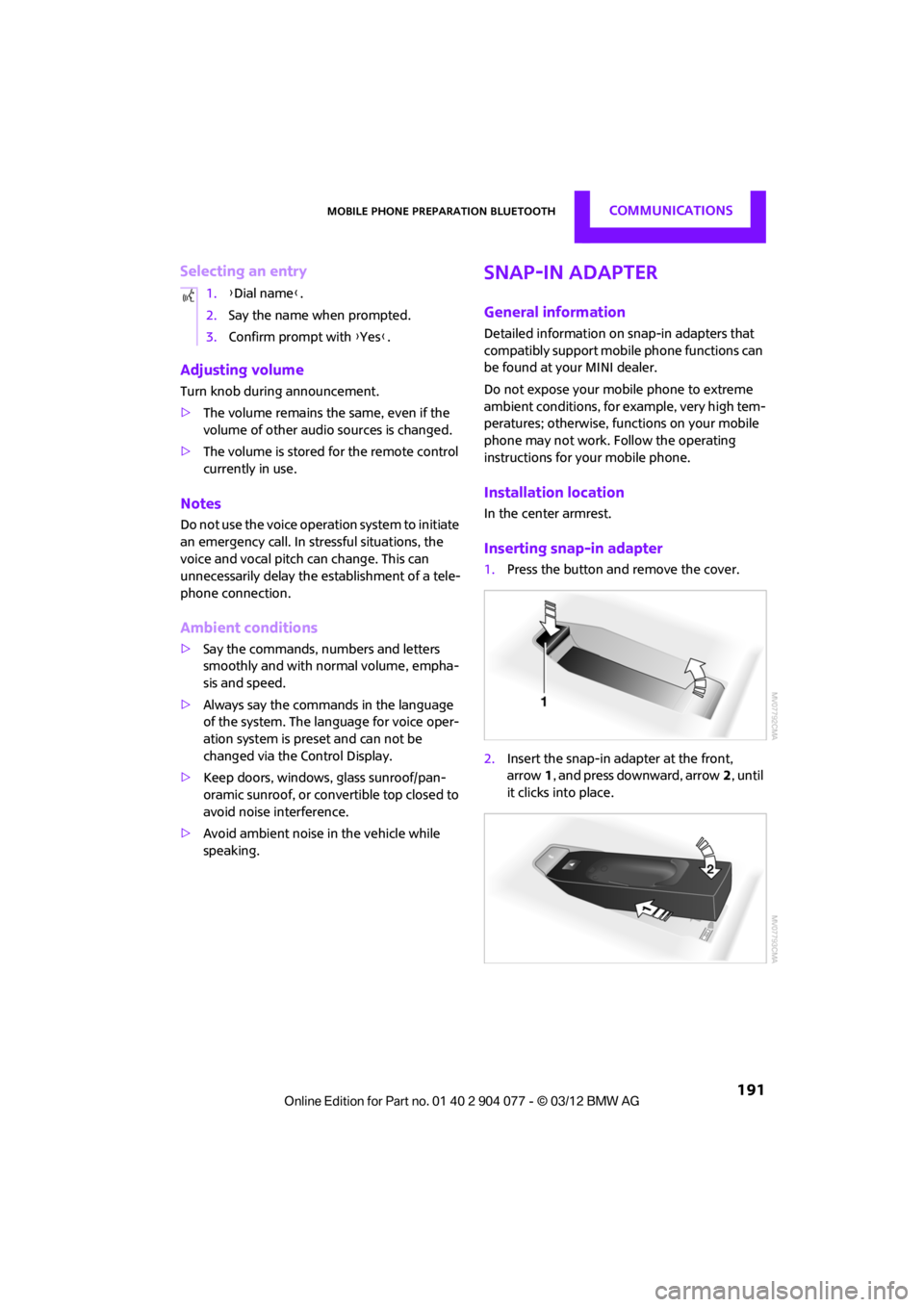
Inserting snap-in adapter
1.Press the button an d remove the cover.
2. Insert the snap-in adapter at the front,
arrow 1, and press downward, arrow 2, until
it clicks into place.
1.
{Dial name }.
2. Say the name when prompted.
3. Confirm prompt with {Yes }.
00320051004F004C00510048000300280047004C0057004C005200510003
Page 267 of 283
REFERENCEShort commands for the voice activation system
266
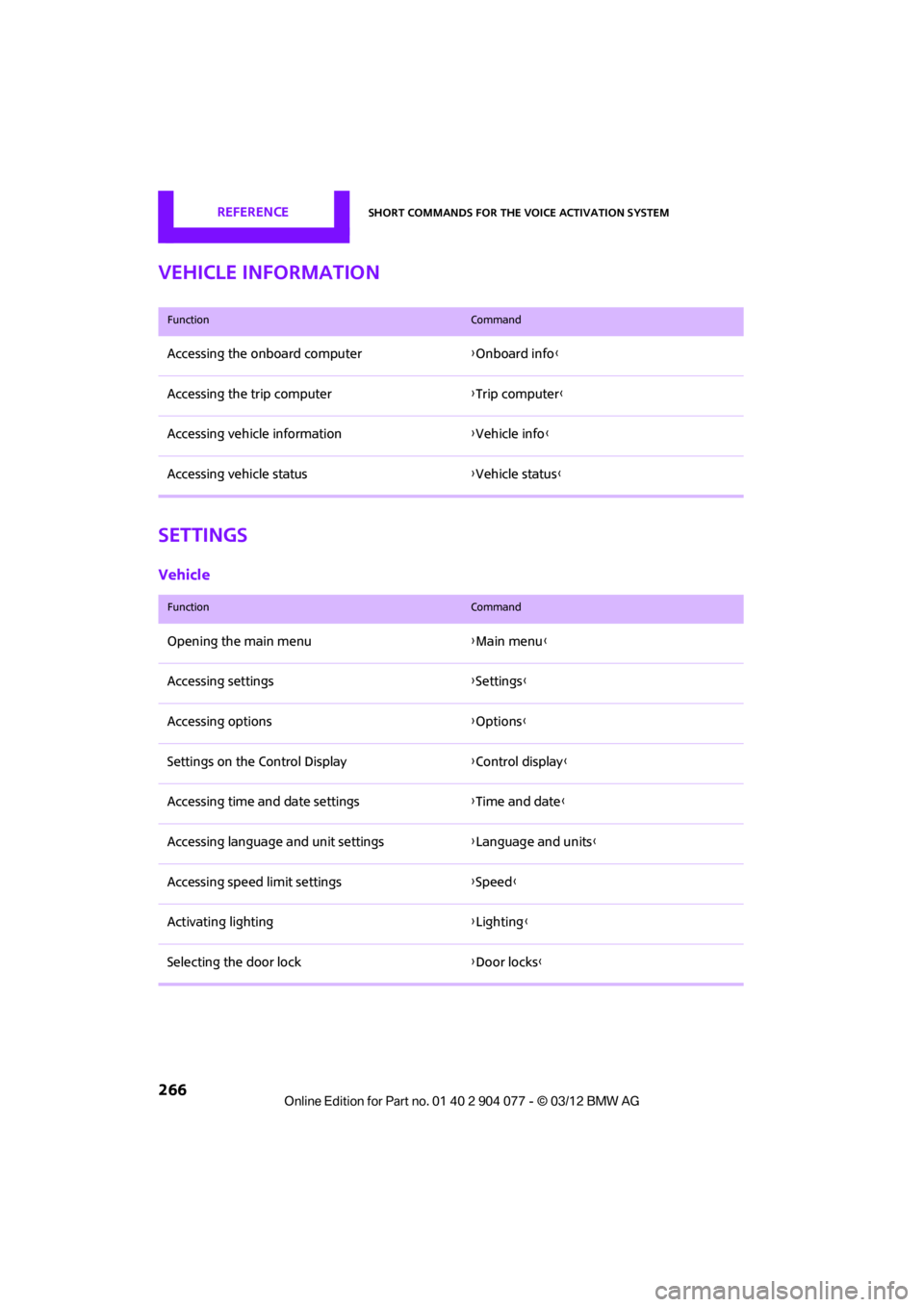
Vehicle information
Settings
Vehicle
FunctionCommand
Accessing the onboard computer{Onboard info }
Accessing the trip computer {Trip computer}
Accessing vehicle information {Vehicle info}
Accessing vehicle status {Vehicle status }
FunctionCommand
Opening the main menu {Main menu}
Accessing settings {Settings }
Accessing options {Options}
Settings on the Control Display {Control display }
Accessing time and date settings {Time and date }
Accessing language and unit settings {Language and units }
Accessing speed limit settings {Speed }
Activating lighting {Lighting }
Selecting the door lock {Door locks}
00320051004F004C00510048000300280047004C0057004C005200510003
Page 271 of 283

REFERENCEEverything from A to Z
270
Carpets, care230
Car phone
– installation location, refer to Center armrest 108
– refer to Telephone 108
Car phone, refer to Telephone 170,180
Car radio, refer to Radio 149
Car wash, care 227
Car washes 227
Catalytic conver ter, refer to
Hot exhaust system 115
CD, audio playback 157
CD player 157
– controls 146
– fast forward/reverse 158
– random order 158
– selecting a track 157
– switching on/off 146
– tone control 147
– volume 147
Center armrest 108
Center brake lamp 236
Center console, refer to Around the center
console 14
Central locking system 29
– Comfort Access 36
– from inside 32
– from outside 29
Changing bulbs 232
Changing the language on the Control Display 80
Changing the measurement units on the Control
Display 74
Changing wheels 239
Charging the battery 241
Chassis number, refer to
Engine compartment 221
Check Control 77
Child restraint fixing system
LATCH 57
Child restraint systems 56
Child seats 56 Chrome parts, care
229
Chrome parts, refer to Care 227
Cigarette lighter 109
Cleaning headlamps 67
– washer fluid 67
Clock
– setting time 76
– 12 h/24 h mode 76
Closing
– from inside 32
– from outside 29
Cl ot
hes hooks 108
Cockpit 10
Cold start, refer to Starting the engine 61
Comfort Access 36
– replacing the battery 38
– what to observe before
entering a car wash 37
Comfort area, refer to Around the center console 14
Compartment for remote control, refer to Ignition
lock 60
Computer 71
– displays on Control Display 73
Condensation, refer to When the vehicle is parked 116
Condition Based Service CBS 225
Configuring settings, refer to
Personal Profile 28
Connecting vacuum cleaner, refer to Connecting electrical
appliances 110
Consumption, refer to Average fuel consumption 72
Contact editing 178
Contacts 177,194
– new contact 195
Continuing route guidance 135
Control Display
– settings 73 Control Display, refer to iDrive
– switching on/off
17
Control Display, refer to Onboard computer 17
Controls and displays 10
Control stick, refer to Onboard computer 17
Control unit, refer to Onboard computer 17
Convenience operation
– convertible top 32
– windows 30
Convenient access, refer to
Comfort Access 36
Convenient star t, refer to
Starting the engine 61
Convertible top 39
– manual 44
– mechanical 44
Coolant 224
– checking level 224
– filling 224
Coolant temperature 224
Cooling, maximum 104
Cooling fluid, refer to
Coolant 224
Copyright 2
Corneri n
g li
ght, refer to
Adaptive Light Control 97
Criteria for route 135
Cruise control
– indicator lamp 13
Cruising range 71
Cupholders 109
Curb weight, refer to Weights 257
Current fuel consumption 72
Current playback
– external devices 162
D
Dashboard, refer to Cockpit 10
Dashboard instruments, refer to Displays 12
Dashboard lighting, refer to Instrument lighting 99
00320051004F004C00510048000300280047004C0057004C005200510003
Page 277 of 283

REFERENCEEverything from A to Z
276
Oil types223
Old batteries, refer to
Disposal 242
Onboard computer 17
– adjusting brightness 80
– changing language 80
– menu guidance 18
– operating principles 17
– overview 17
Opening and closing
– Comfort Access 36
– from inside 32
– from outside 29
– using the door lock 31
– using the remote control 30
Opening and unlocking
– from inside 32
Options, selecting for navigation 135
Orientation menu, refer to Main menu 18
Outlets
– refer to Ventilation 106
Outlets, refer to Air vents 101
Output, refer to Engine
data 250
Outside-air mode
– automatic climate
control 104
Overheated engine, refer to
Coolant temperature 224
P
Paintwork, care229
Park Distance Control PDC 82
Parking
– vehicle 61
Parking aid, refer to Park
Distance Control PDC 82
Parking brake 62
– indicator lamp 13
Parking lamps, replacing bulb 234
Parking lamps/low beams 96
Parts and accessories, see Vehicle equipment 4Pathway lighting
97
Personal Profile 28
Phone numbers
– dialing 174,186
Plastic parts, care 230
Pollen
– refer to Microfilter/activated-
charcoal filter for automatic
climate control 105
– refer to Microfilter for air
conditioner 103
Power convertible top 40
Power failure 242
Power windows 38
Power windows, refer to Windows 38
Pressure, tires 209
Pressure monitoring, tires 87
– Flat Tire Monitor 87
Pressure monitoring of tires, refer to Tire Pressure Monitor
TPM 89
Puncture
– Flat Tire Monitor 87
R
Radio
– controls146
– HD Radio 150
– satellite radio 151
– select waveband 149
– storing stations 150
– switching on/off 146
– tone control 147
– volume 147
Radio key, refer to Integrated key/remote control 28
Radio position, refer to Radio
readiness 60
Radio readiness 60
– switched off 61
– switched on 60
Rain sensor 66
Random play sequence
– external devices 162Range, refer to Cruising
range 71
Reading aloud 199
Reading lamps 99
Rear fog lamp 99
– indicator lamp 13
– replacing bulb 236
Rear lamps
– bulb replacement 235
Rear lamps, refer to Tail
lamps 235
Rear-mounted luggage rack 120
Rear spoiler, see Automatic rear spoiler 85
Rearview mirror, refer to
Mirrors 54
Rear window defroster 103,105
Reception
– quality 150
– radio station 150
Recirculated-air mode 102,104
Recirculation of air, refer to
Recirculated-air
mode 102,104
Reclining seat , refer to
Backrest 51
Refueling 206
Rejecting a call 173,186
Releasing
– hood 222
Reminders 198
Remote control 28
– battery renewal 38
– Comfort
Acces
s 36
– malfunctions 31,37
– service data 225
– tailgate 31
Replacement remote control 28
Replacing bulbs, refer to Lamps and bulbs 232
Replacing tires, refer to New
wheels and tires 219
Reporting safety defects 6
00320051004F004C00510048000300280047004C0057004C005200510003