2012 MERCEDES-BENZ G-CLASS SUV display
[x] Cancel search: displayPage 160 of 357
would result in damage to the fuel system and
engine, which could lead to a vehicle fire.
! Do not use petrol to refuel vehicles with a
diesel engine. Do not use diesel to refuel
vehicles with a petrol engine. Even small
amounts of the wrong fuel result in damage
to the fuel system and the engine.
! Do not switch on the ignition if you acci-
dentally refuel with the wrong fuel. Other-
wise, the fuel will enter the fuel lines .Notify
a qualified specialist workshop and have
the fuel tank and fuel lines drained com-
pletely.
! Overfilling the fuel tank could damage the
fuel system.
! Take care not to spill any fuel on painted
surfaces. You could otherwise damage the
paintwork.
! Use a filter when adding fuel from a fuel
can. The fuel lines and/or the diesel injec-
tion system could otherwise be blocked by
particles from the fuel can.
For further information on fuel and fuel quality
(Y page 341). Refuelling
Fuel filler flap !
AdBlue ®
is not a fuel additive and must
not be added to the fuel tank.IfA dBlue®
is
added to the fuel tank, this can lead to
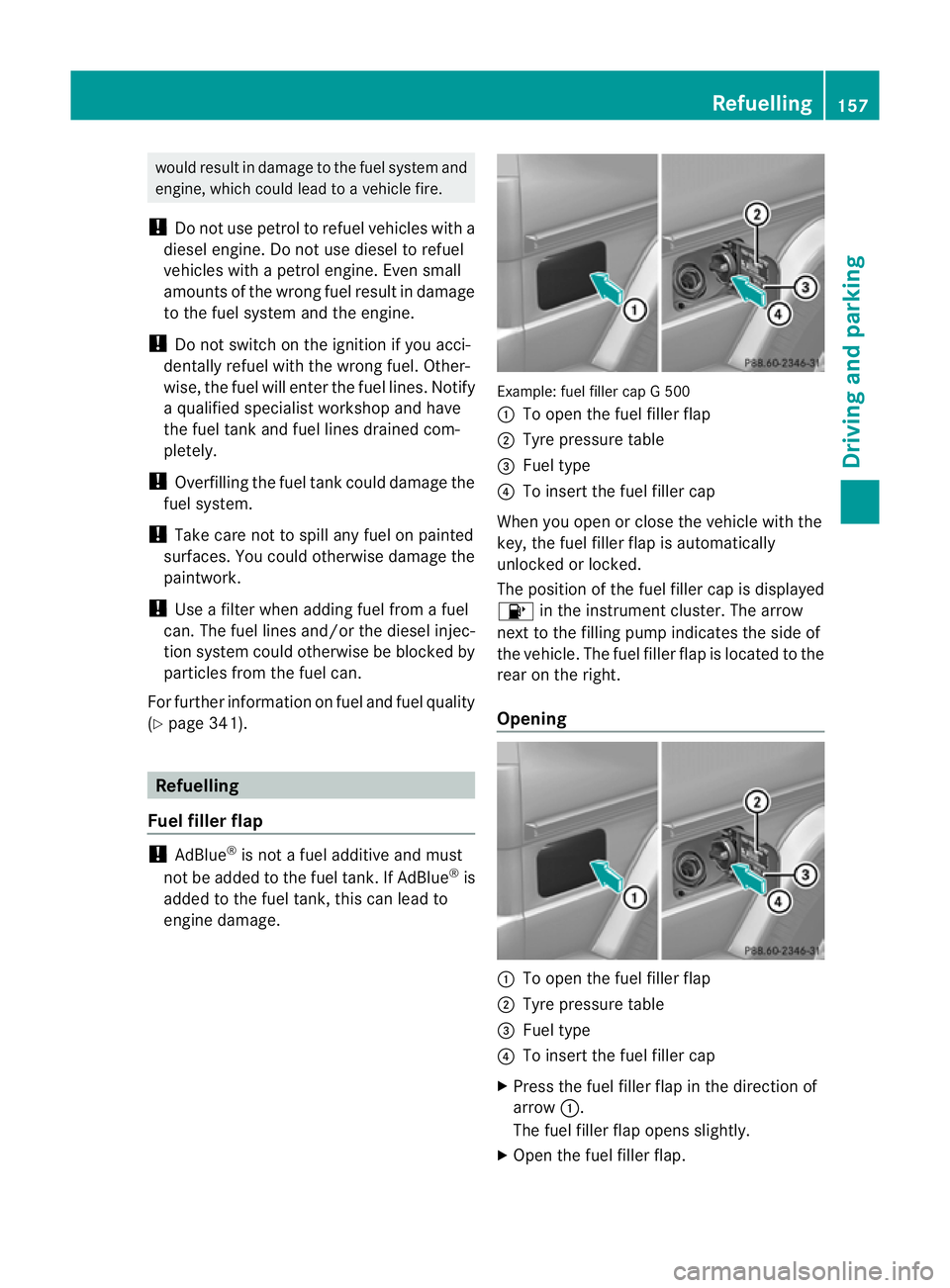
engine damage. Example: fuel filler cap G 500
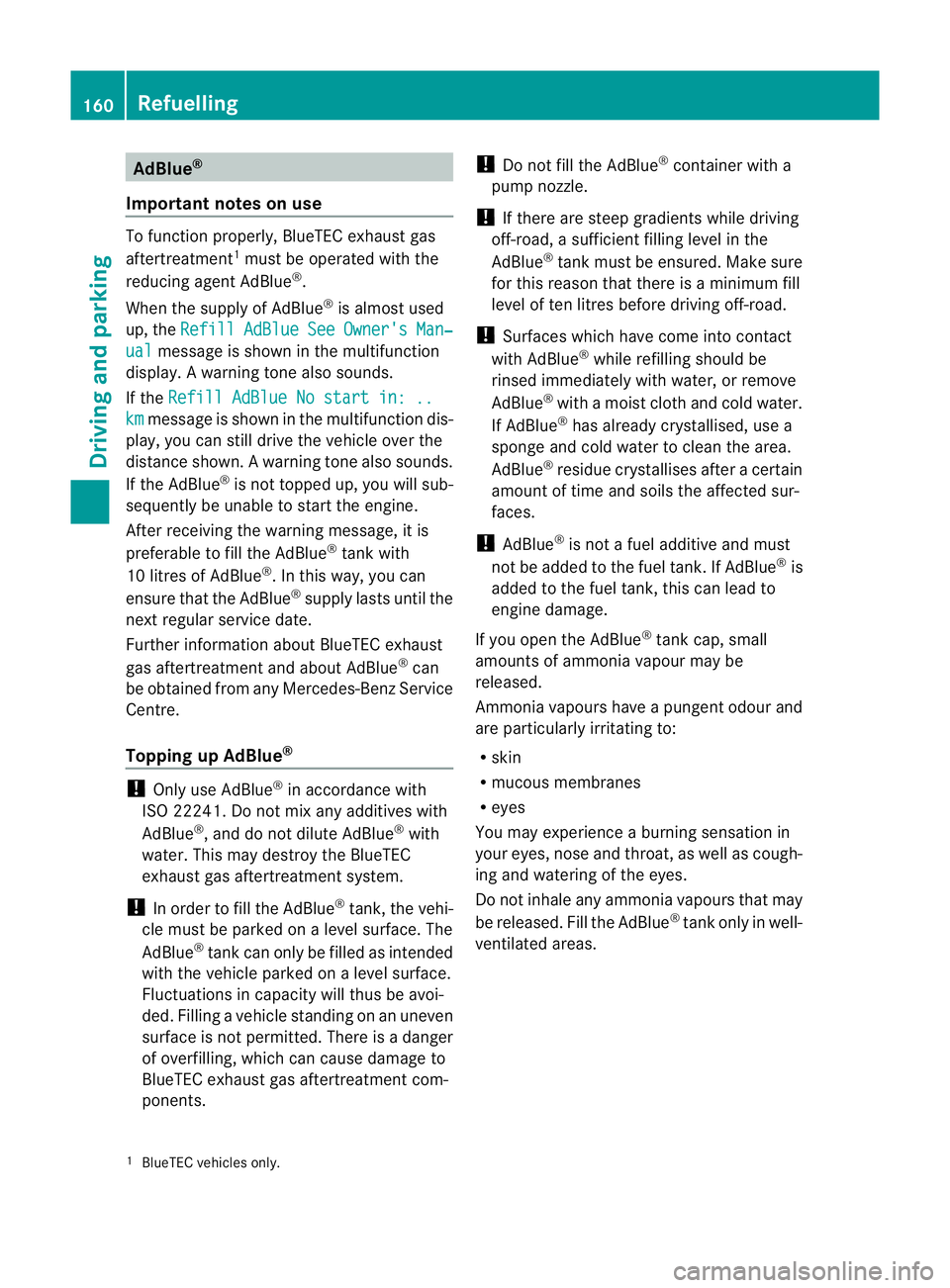
:
To open the fuel filler flap
; Tyre pressure table
= Fuel type
? To insert the fuel filler cap
When you open or close the vehicle with the
key, the fuel filler flap is automatically
unlocked or locked.
The position of the fuel filler cap is displayed
8 in the instrument cluster. The arrow
nex tto the filling pump indicates the side of
the vehicle. The fuel filler flap is located to the
rear on the right.
Opening :
To open the fuel filler flap
; Tyre pressure table
= Fuel type
? To insert the fuel filler cap
X Press the fuel filler flap in the direction of
arrow :.
The fuel filler flap opens slightly.
X Open the fuel filler flap. Refuelling
157Driving and parking Z
Page 163 of 357
AdBlue
®
Important notes on use To function properly, BlueTEC exhaust gas
aftertreatment 1
mus tbe operated with the
reducing agent AdBlue ®
.
When the supply of AdBlue ®
is almost used
up, the Refill AdBlue See Owner's Man‐
ual message is shown in the multifunction
display. Awarning tone also sounds.
If the Refill AdBlue No start in: .. km message is shown in the multifunction dis-
play, you can still driv ethe vehicle over the
distance shown. Awarning tone also sounds.
If the AdBlue ®
is no ttopped up, you will sub-
sequently be unable to start the engine.
After receiving the warning message, it is
preferable to fill the AdBlue ®
tank with
10 litres of AdBlue ®
.Int his way, you can
ensure that the AdBlue ®
supply lasts until the
next regular service date.
Further information about BlueTEC exhaust
gas aftertreatment and about AdBlue ®
can
be obtained from any Mercedes-Ben zService
Centre.
Topping up AdBlue ®!
Only use AdBlue ®
in accordance with
ISO 22241. Do not mix any additives with
AdBlue ®
, and do not dilute AdBlue ®
with
water. This may destroy the BlueTEC
exhaust gas aftertreatmen tsystem.
! In order to fill the AdBlue ®
tank, the vehi-
cle mus tbe parked on a level surface. The
AdBlue ®
tank can only be filled as intended
with the vehicle parked on a level surface.
Fluctuations in capacity will thus be avoi-
ded. Filling a vehicle standing on an uneven
surface is not permitted. There is a danger
of overfilling, which can cause damage to
BlueTEC exhaust gas aftertreatmen tcom-
ponents. !
Do not fill the AdBlue ®
container with a
pump nozzle.
! If there are steep gradients while driving
off-road, a sufficient filling level in the
AdBlue ®
tank must be ensured. Make sure
for this reason that there is a minimum fill
level of ten litres before driving off-road.
! Surfaces which have come into contact
with AdBlue ®
while refilling should be
rinsed immediately with water, or remove
AdBlue ®
with a moist cloth and cold water.
If AdBlue ®
has already crystallised, use a
sponge and cold water to clean the area.
AdBlue ®
residue crystallises after a certain
amount of time and soils the affected sur-
faces.
! AdBlue ®
is not a fuel additive and must
not be added to the fuel tank.IfA dBlue®
is
added to the fuel tank, this can lead to
engine damage.
If you open the AdBlue ®
tank cap, small
amounts of ammonia vapour may be
released.
Ammonia vapours have a pungen todour and
are particularly irritating to:
R skin
R mucous membranes
R eyes
You may experience a burning sensation in
your eyes, nose and throat, as well as cough-
ing and watering of the eyes.
Do not inhale any ammonia vapours that may
be released. Fill the AdBlue ®
tank only in well-
ventilated areas.
1 BlueTEC vehicles only. 160
RefuellingDriving and parking
Page 177 of 357
Do not use cruise control:
R
in traffi cconditions that do not allow you
to drive at a constant speed, e.g. heavy
traffic, on winding roads or off-road
R on slippery road surfaces. Braking or accel-
erating could cause the drive wheels to lose
traction and the vehicle could then skid.
R when there is poor visibility, e.g. due to fog,
heavy rain or snow
General notes Cruise control maintains a constant road
speed for you. On long and steep downhill
gradients, especially if the vehicle is laden or
towing a trailer, you must select shift range
1,
2or 3in good time. By doing so, you will
make use of the braking effect of the engine.
This relieves the load on the brake system and
prevents the brakes from overheating and
wearing too quickly.
Use cruise control only if road and traffic con-
ditions make it appropriate to maintain a
steady speed for a prolonged period. You can
store any road speed above 30 km/h.
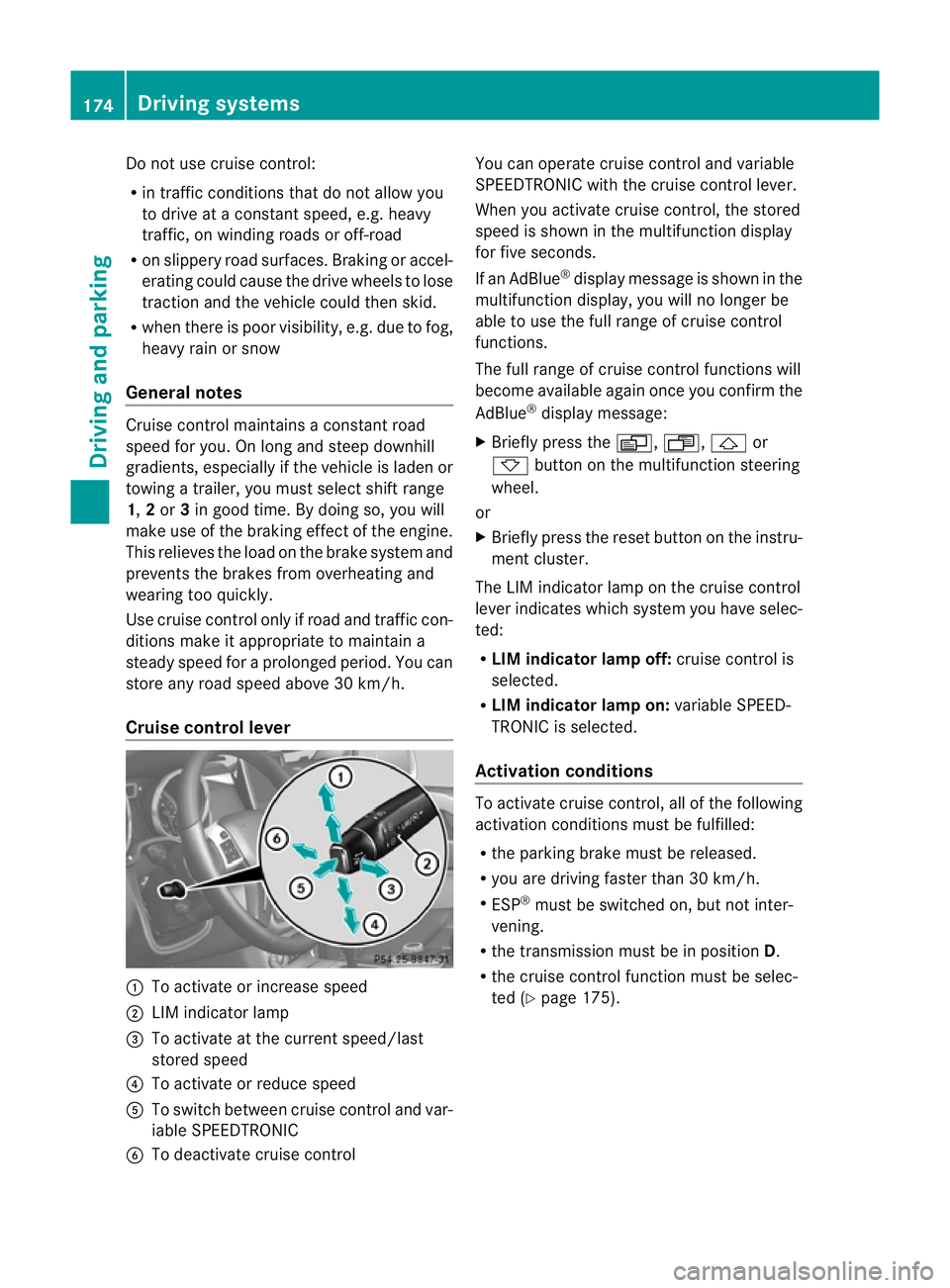
Cruise control lever :
To activate or increase speed
; LIM indicator lamp
= To activate at the current speed/last
stored speed
? To activate or reduce speed
A To switch between cruise control and var-
iable SPEEDTRONIC
B To deactivate cruise control You can operate cruise control and variable
SPEEDTRONIC with the cruise control lever.
When you activate cruise control, the stored
speed is shown in the multifunction display
for five seconds.
If an AdBlue ®
display message is shown in the
multifunction display, you will no longer be
able to use the full range of cruise control
functions.
The full range of cruise control functions will
become available again once you confirm the
AdBlue ®
display message:
X Briefly press the V,U,&or
* button on the multifunction steering
wheel.
or
X Briefly press the reset button on the instru-
ment cluster.
The LIM indicator lamp on the cruise control
lever indicates which system you have selec-
ted:
R LIM indicator lamp off: cruise control is
selected.
R LIM indicator lamp on: variable SPEED-
TRONIC is selected.
Activation conditions To activate cruise control, all of the following
activation conditions must be fulfilled:
R
the parking brake must be released.
R you are driving faster than 30 km/h.
R ESP ®
must be switched on, but not inter-
vening.
R the transmission must be in position D.
R the cruise control function must be selec-
ted (Y page 175). 174
Driving systemsDriving and parking
Page 183 of 357
to the vehicle in front, for vehicle speed, for
braking in good time and for staying in lane.
Only engage SPEEDTRONIC when the current
road, weather and traffi
cconditions permit it
to be done safely. Drive carefully and main-
tain a suitable distance to the vehicle in front.
X Check whether LIM indicator lamp ;is on.
If it is on, variable SPEEDTRONIC is already
selected.
If it is not, press the cruise control lever in
the direction of arrow A.
LIM indicator lamp ;in the cruise control
lever lights up. Variable SPEEDTRONIC is
selected.
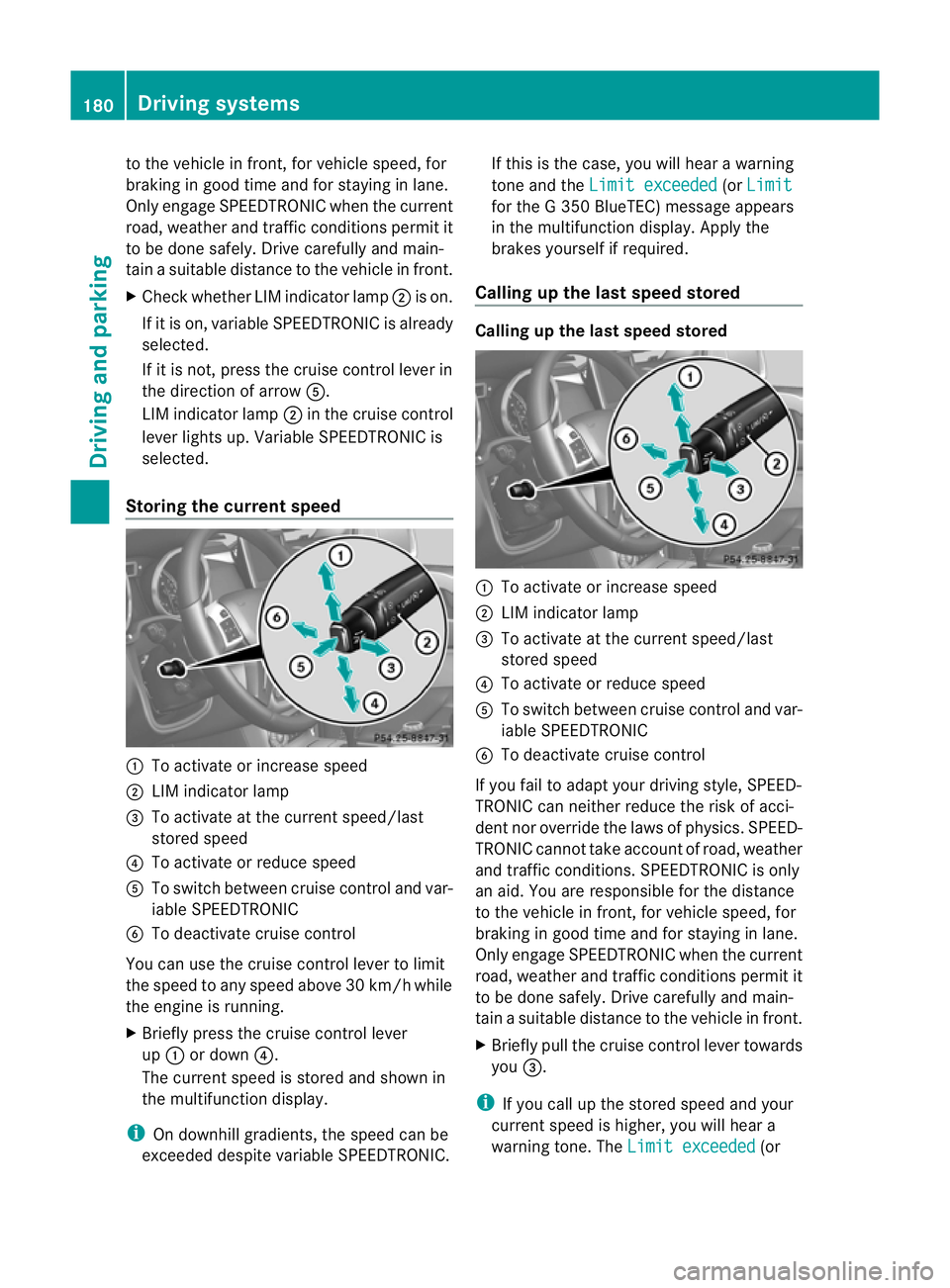
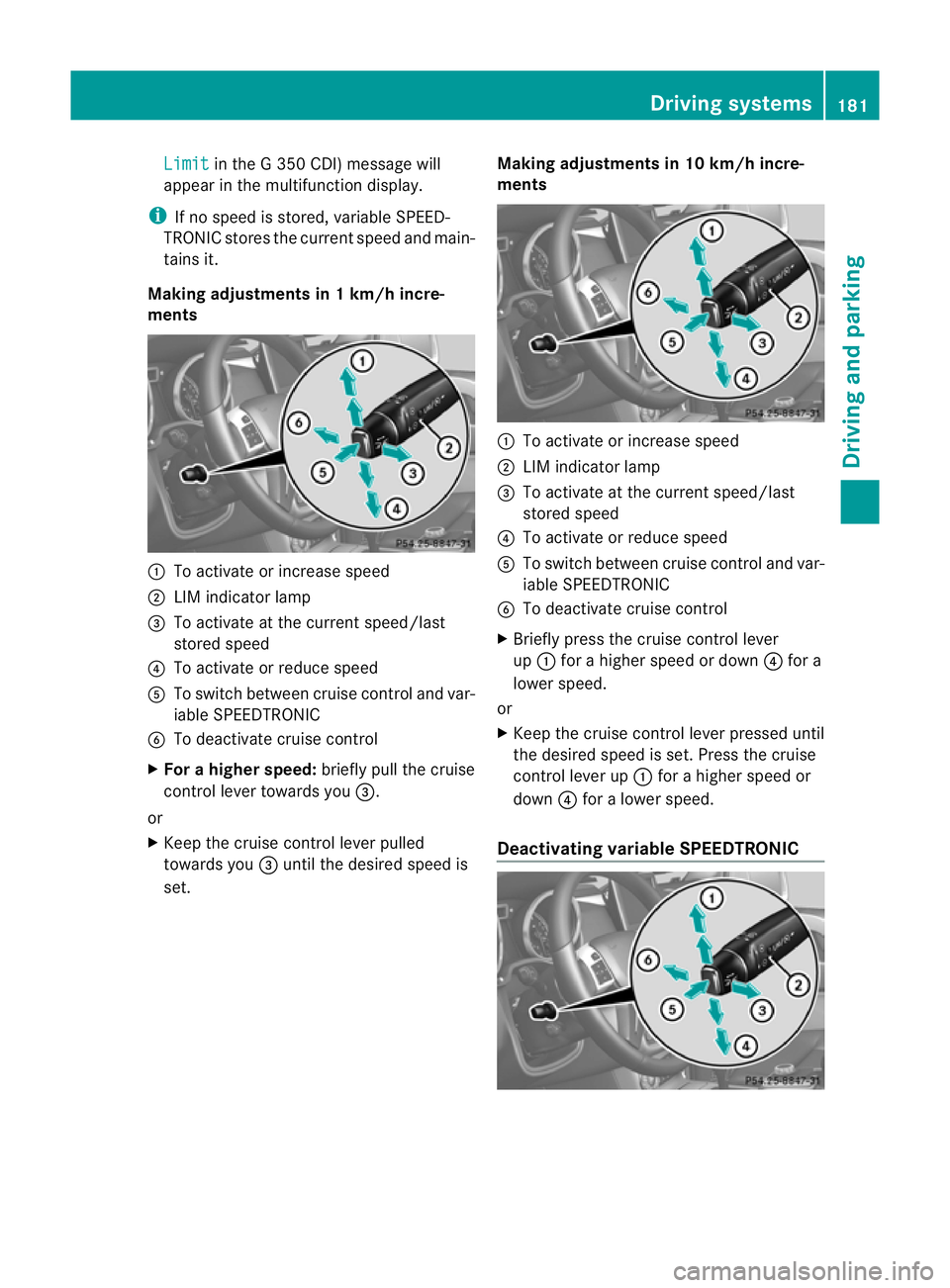
Storing the current speed :
To activate or increase speed
; LIM indicator lamp
= To activate at the current speed/last
stored speed
? To activate or reduce speed
A To switch between cruise control and var-
iable SPEEDTRONIC
B To deactivate cruise control
You can use the cruise control lever to limit
the speed to any speed above 30 km/hw hile
the engine is running.
X Briefly press the cruise control lever
up : or down ?.
The current speed is stored and shown in
the multifunction display.
i On downhill gradients, the speed can be
exceeded despite variable SPEEDTRONIC. If this is the case, you will hear a warning
tone and the
Limit exceeded (or
Limit for the G 350 BlueTEC) message appears
in the multifunction display. Apply the
brakes yourself if required.
Calling up the last speed stored Calling up the last speed stored
:
To activate or increase speed
; LIM indicator lamp
= To activate at the current speed/last
stored speed
? To activate or reduce speed
A To switch between cruise control and var-
iable SPEEDTRONIC
B To deactivate cruise control
If you fail to adapt your driving style, SPEED-
TRONIC can neither reduce the risk of acci-
dent nor override the laws of physics. SPEED-
TRONIC cannot take account of road, weather
and traffic conditions. SPEEDTRONIC is only
an aid. You are responsible for the distance
to the vehicle in front, for vehicle speed, for
braking in good time and for staying in lane.
Only engage SPEEDTRONIC when the current
road, weather and traffic conditions permit it
to be done safely. Drive carefully and main-
tain a suitable distance to the vehicle in front.
X Briefly pull the cruise control lever towards
you =.
i If you call up the stored speed and your
current speed is higher, you will hear a
warning tone. The Limit exceeded (or180
Driving systemsDriving and parking
Page 184 of 357
Limit in the G 350 CDI) message will
appearint he multifunction display.
i If no speed is stored, variable SPEED-
TRONIC stores the current speed and main-
tains it.
Making adjustments in 1 km/h incre-
ments :
To activate or increase speed
; LIM indicator lamp
= To activate at the current speed/last
stored speed
? To activate or reduce speed
A To switch between cruise control and var-
iable SPEEDTRONIC
B To deactivate cruise control
X For a higher speed: briefly pull the cruise
control lever towards you =.
or
X Keep the cruise control lever pulled
towards you =until the desired speed is
set. Making adjustments in 10 km/h incre-
ments :
To activate or increase speed
; LIM indicator lamp
= To activate at the current speed/last
stored speed
? To activate or reduce speed
A To switch between cruise control and var-
iable SPEEDTRONIC
B To deactivate cruise control
X Briefly press the cruise control lever
up : for a higher speed or down ?for a
lower speed.
or
X Keep the cruise control lever pressed until
the desired speed is set. Press the cruise
control lever up :for a higher speed or
down ?for a lower speed.
Deactivating variable SPEEDTRONIC Driving systems
181Driving and parking Z
Page 185 of 357
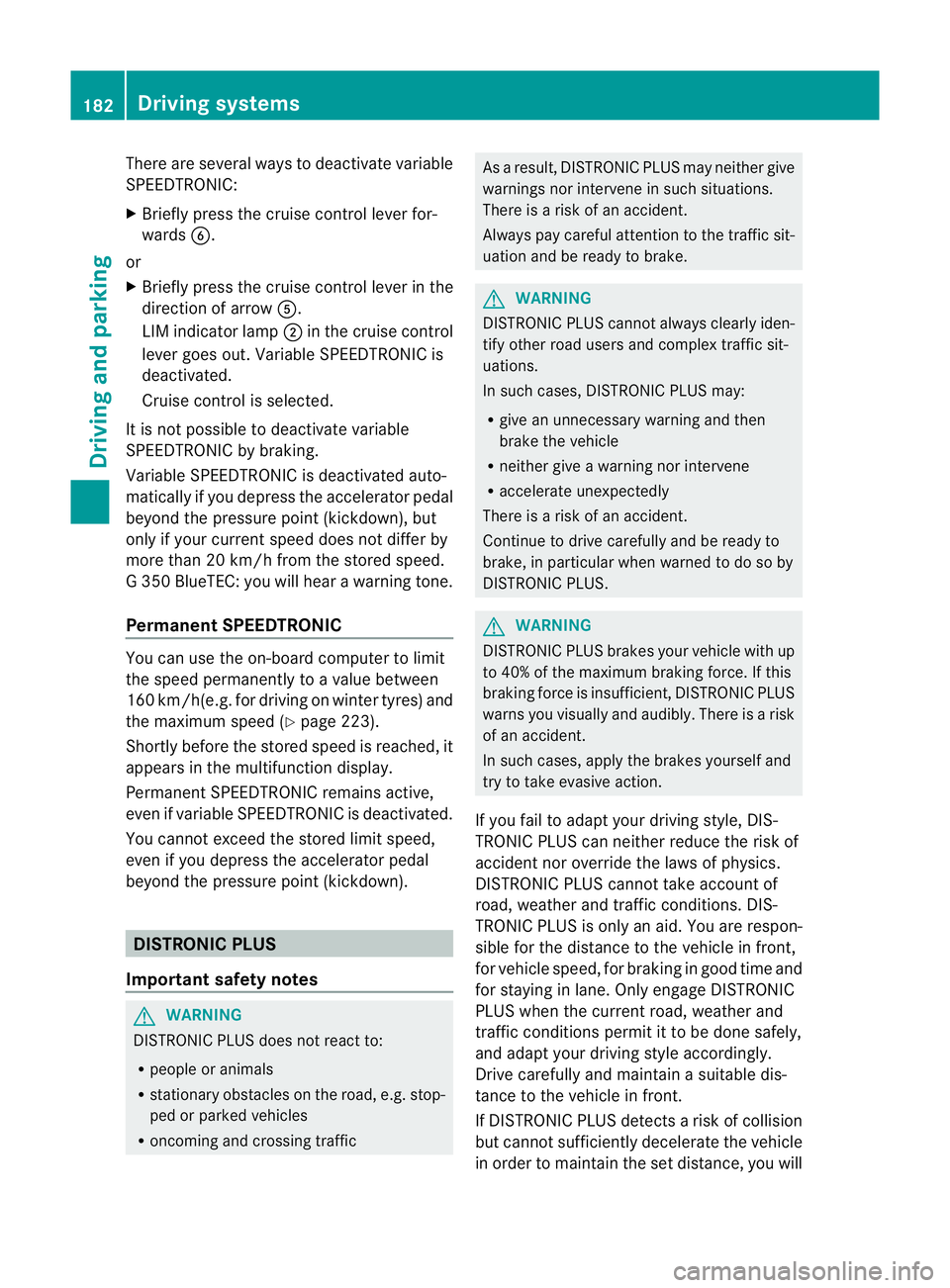
There are several ways to deactivate variable
SPEEDTRONIC:
X
Briefly press the cruise control lever for-
wards B.
or
X Briefly press the cruise control lever in the
direction of arrow A.
LIM indicator lamp ;in the cruise control
lever goes out. Variable SPEEDTRONIC is
deactivated.
Cruise control is selected.
It is not possible to deactivate variable
SPEEDTRONIC by braking.
Variable SPEEDTRONIC is deactivated auto-
matically if you depress the accelerator pedal
beyond the pressure point (kickdown), but
only if your curren tspeed does not differ by
more than 20 km/h from the stored speed.
G 350 BlueTEC: you will hear a warning tone.
Permanent SPEEDTRONIC You can use the on-board computer to limit
the speed permanently to avalue between
160 km/h(e.g. for driving on winter tyres) and
the maximum speed ( Ypage 223).
Shortly before the store dspeed is reached, it
appears in the multifunction display.
Permanent SPEEDTRONIC remains active,
even if variable SPEEDTRONIC is deactivated.
You cannot exceed the stored limit speed,
even if you depress the accelerator pedal
beyond the pressure point (kickdown). DISTRONIC PLUS
Important safety notes G
WARNING
DISTRONIC PLUS does not react to:
R people or animals
R stationary obstacles on the road, e.g. stop-
ped or parked vehicles
R oncoming and crossing traffic As a result, DISTRONIC PLUS may neither give
warnings nor intervene in such situations.
There is a risk of an accident.
Always pay careful attention to the traffic sit-
uation and be ready to brake. G
WARNING
DISTRONIC PLUS cannot always clearly iden-
tify other road users and complex traffic sit-
uations.
In such cases, DISTRONIC PLUS may:
R give an unnecessary warning and then
brake the vehicle
R neither give a warning nor intervene
R accelerate unexpectedly
There is a risk of an accident.
Continue to drive carefully and be ready to
brake, in particular when warned to do so by
DISTRONIC PLUS. G
WARNING
DISTRONIC PLUS brakes your vehicle with up
to 40% of the maximum braking force. If this
braking force is insufficient, DISTRONIC PLUS
warns you visually and audibly. There is a risk
of an accident.
In such cases, apply the brakes yourself and
try to take evasive action.
If you fail to adapt your driving style, DIS-
TRONIC PLUS can neither reduce the risk of
acciden tnor override the laws of physics.
DISTRONIC PLUS cannot take account of
road, weather and traffic conditions. DIS-
TRONIC PLUS is only an aid. You are respon-
sible for the distance to the vehicle in front,
for vehicle speed, for braking in good time and
for staying in lane. Only engage DISTRONIC
PLUS when the current road, weather and
traffic conditions permit it to be done safely,
and adapt your driving style accordingly.
Drive carefully and maintain a suitable dis-
tance to the vehicle in front.
If DISTRONIC PLUS detects a risk of collision
but cannot sufficiently decelerate the vehicle
in order to maintain the set distance, you will 182
Driving systemsDriving and parking
Page 187 of 357

cruise control lever in the direction of arrow
B.
LIM indicator lamp =on the cruise control
lever indicates which function you have selec-
ted:
R LIM indicator lamp = off:
DISTRONIC
PLUS is selected.
R LIM indicator lamp = on:
variable
SPEEDTRONIC is selected.
Activating DISTRONIC PLUS Activation conditions
To activate DISTRONIC PLUS, the following
conditions mus
tbe fulfilled:
R the engine must be running. It may take up
to two minutes of driving before DIS-
TRONIC PLUS is ready for use.
R the parking brake must be released.
R the differential lock must be deactivated.
R ESP ®
must be switched on, but not inter-
vening.
R the transmission must be in position D.
R the driver's door must be closed when you
shift from Pto Dor your seat belt must be
fastened.
R the front-passenger door and the rear
doors must be closed.
R the vehicle must not be skidding.
R the DISTRONIC PLUS function must be
selected (Y page 183).
R the transfer case must be in the HIGH
RANGE transmission position.
R the vehicle must not be on an uphill or
downhill gradient of more than 22-25%.
R the radar sensor must be free from dirt
(Y page 298). Activating while driving When driving at speeds below 30 km/h, you
can activate DISTRONIC PLUS if the vehicle
in fron
thas been detected and is shown in the
multifunction display. If the vehicle in fron tis
no longe rdetected and displayed, DIS-
TRONIC PLUS switches off and you will hear
a tone.
X Briefly pull the cruise control lever towards
you ?, or press it up :or down A.
DISTRONIC PLUS is selected.
X Press the cruise control lever up :or
down Arepeatedly until the desired speed
is set.
X Remove your foot from the accelerator
pedal.
Your vehicle adapts its speed to that of the
vehicle in front, but only up to the desired
stored speed.
i If you do not fully release the accelerator
pedal, the DISTRONIC PLUS inactive message appears in the multifunction dis-
play. The set distance to a slower-moving
vehicle in fron
twill the nnot be maintained.
You will be driving at the speed you deter-
mine by the position of the accelerator
pedal. 184
Driving systemsDriving and parking
Page 188 of 357
Switching on while stationary
This function may be useful if you want to
keep up with the traffic flow, e.g. at the end
of a tailback.
You can only activate DISTRONIC PLUS if:
R the vehicle in front and
R your vehicle are stationary
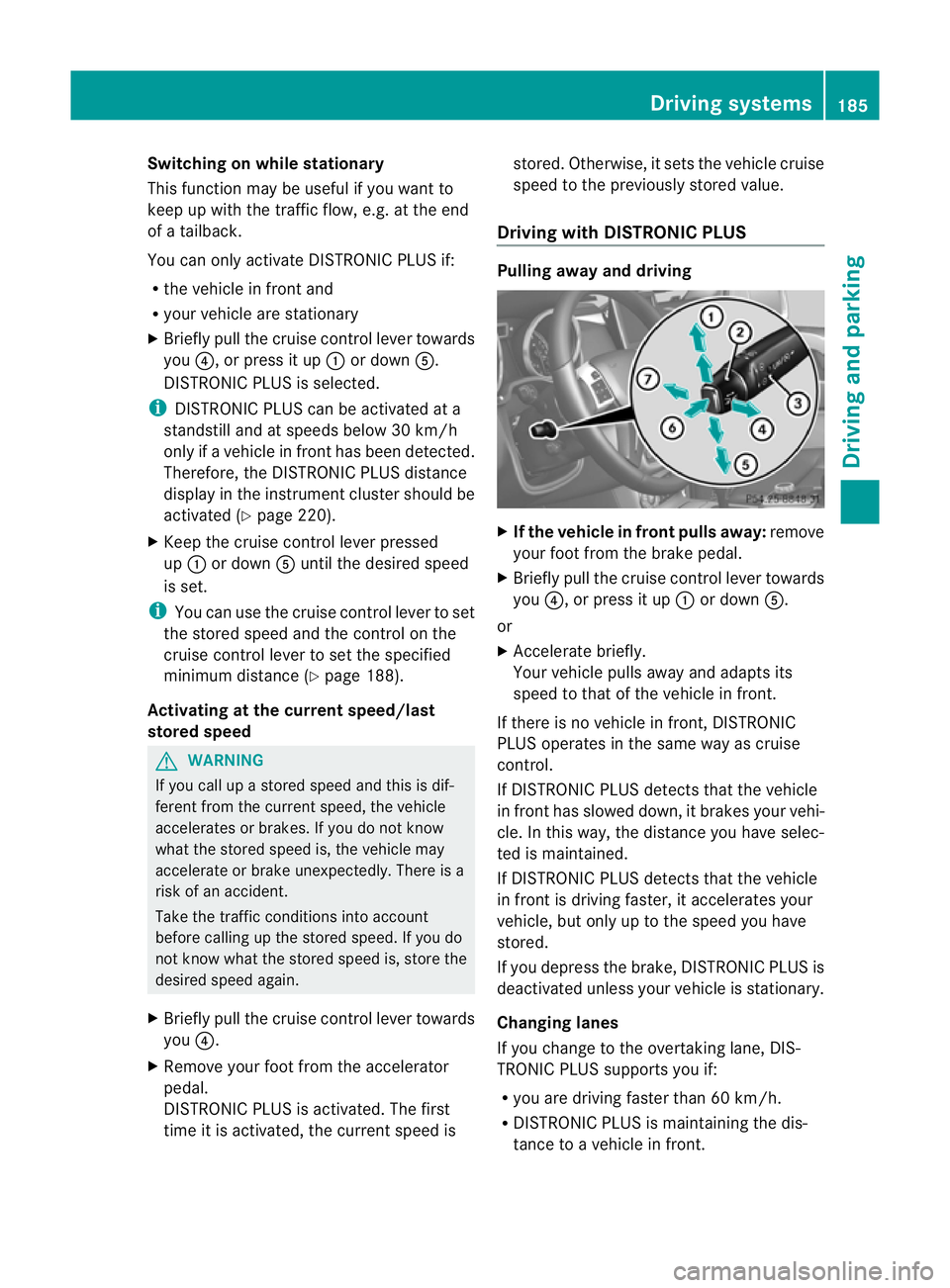
X Briefly pull the cruise control lever towards
you ?, or press it up :or down A.
DISTRONIC PLUS is selected.
i DISTRONIC PLUS can be activated at a
standstill and at speeds below 30 km/h
only if a vehicle in front has been detected.
Therefore, the DISTRONIC PLUS distance
display in the instrumen tcluster should be
activated (Y page 220).
X Keep the cruise control lever pressed
up : or down Auntil the desired speed
is set.
i You can use the cruise control lever to set
the stored speed and the control on the
cruise control lever to set the specified
minimum distance (Y page 188).
Activating at the current speed/last
stored speed G
WARNING
If you call up a stored speed and this is dif-
ferent from the current speed, the vehicle
accelerates or brakes. If you do not know
what the stored speed is, the vehicle may
accelerate or brake unexpectedly. There is a
risk of an accident.
Take the traffic conditions into account
before calling up the stored speed. If you do
not know what the stored speed is, store the
desired speed again.
X Briefly pull the cruise control lever towards
you ?.
X Remove your foot fro mthe accelerator
pedal.
DISTRONIC PLUS is activated. The first
time it is activated, the current speed is stored. Otherwise, it sets the vehicle cruise
speed to the previously stored value.
Driving with DISTRONIC PLUS Pulling away and driving
X
If the vehicle in front pulls away: remove
your foot from the brake pedal.
X Briefly pull the cruise control lever towards
you ?, or press it up :or down A.
or
X Accelerate briefly.
Your vehicle pulls away and adapts its
speed to that of the vehicle in front.
If there is no vehicle in front, DISTRONIC
PLUS operates in the same way as cruise
control.
If DISTRONIC PLUS detects that the vehicle
in front has slowed down, it brakes your vehi-
cle. In this way, the distance you have selec-
ted is maintained.
If DISTRONIC PLUS detects that the vehicle
in front is driving faster, it accelerates your
vehicle, but only up to the speed you have
stored.
If you depress the brake, DISTRONIC PLUS is
deactivated unless your vehicle is stationary.
Changing lanes
If you change to the overtaking lane, DIS-
TRONIC PLUS supports you if:
R you are driving faster than 60 km/h.
R DISTRONIC PLUS is maintaining the dis-
tance to a vehicle in front. Driving systems
185Driving and parking Z