2012 MERCEDES-BENZ G-CLASS SUV garage door opener
[x] Cancel search: garage door openerPage 13 of 357

Front-passenger seat
Display message ............................ 249
Fuel
Additives ........................................ 343
Consumption statistics ..................215
Displaying the current consump-
tion ................................................ 215
Displaying the range ......................215
Fuel gauge ..................................... 211
Grade (petrol) ................................ 342
Important safety notes ..................341
Notes for AMG vehicles .................343
Premium-grade unleaded petrol ..... 342
Problem (malfunction) ...................159
Quality (diesel )............................... 343
Refuelling ...................................... .156
Tank content/reserve fuel .............342
Fuel/water separator
Service .......................................... .295
Fuel filler flap
Emergency release ........................158
Opening/closing ............................ 157
Fuel filte r(white display message) .240
Fuel level Calling up the range (on-board
computer) ...................................... 215
Gauge ............................................ 211
Fuel reserve
see Fuel
Fuel tank
Capacity ........................................ 342
Problem (malfunction) ...................159
Fuse allocation chart ........................318
Fuse box Battery case ................................... 320
Dashboard ..................................... 319
Front-passenger footwell ...............319
Transmission tunnel ....................... 319
Fuse extractor ................................... 318
Fuses Allocation chart ............................. 318
Before changing ............................. 318
Dashboard fuse box .......................319
Fuse allocation chart .....................318
Fuse box in the front-passenger
footwell .......................................... 319
Fuse box in the transmission tun-
nel ................................................. 319Important safety notes
..................318
In the battery case .........................320 G
Garage door opener Clearing the memory .....................283
Frequencies ................................... 283
Important safety notes ..................280
Opening/closing the garage door ..282
Programming the remote control ...280
Gear indicator (on-board computer) 225
Gearshift program SETUP (on-board computer) ..........226
Genuine Mercedes-Benz parts .........338
Genuine wood trim and trim strips
(cleaning instructions) ......................300
Glove compartment ..........................267
Gradient-climbing capability (max-
imum) ................................................. 173 H
Hazard warning lamps ......................109
Headlamp Cleaning system (function) ............108
Cleaning system (notes) ................347
Headlamps
Cleaning ......................................... 298
Misting up ...................................... 110
Topping up the cleaning system ....294
see Automatic headlamp mode
Head restraints
Adjusting ......................................... 92
Adjusting (rear) ................................ 93
Fitting/removing (rear) ....................93
Luxury .............................................. 92
Resetting (front) ............................... 93
Heating
see Climate control
High-pressure cleaners ....................296
Hill start assist .................................. 145
HOLD function Function/notes ............................. 19610
Index
Page 17 of 357

Resetting the current lap
...............227
Starting anew lap .......................... 226
Stopping ........................................ 226
RACETIMER (on-board computer) ....226
Radar sensors Overview ........................................ 351
Radiator cover ................................... 291
Radio Selecting astation ......................... 217
see separate operating instructions
Reading lamp ..................................... 110
Rear bench seat Folding forward .............................. 270
Rear compartment
Setting the airv ents...................... 140
Rear-compartment seat belt sta-
tus indicator ........................................ 47
Rear door Closing ............................................ .76
Display message ............................ 249
Important safety notes ....................75
Opening ........................................... 75
Opening/closing .............................. 75
Rear foglamp
Display message ............................ 236
Switching on/off ........................... 107
Rear lamps
see Lights
Rear seat bench
Folding into an upright position .....270
Rear-view mirror
Anti-dazzle mode (automatic) ........100
Rear window heating
Problem (fault) ............................... 133
Switching on/off ........................... 133
Rear window wiper
Switching on/off ........................... 120
Refuelling
Fuel gauge ..................................... 211
Important safety notes ..................156
Refuelling proces s......................... 157
see Fuel
Remote control
Auxiliary heating/ventilation .......... 135
Changing the batteries (auxiliary
heating) ......................................... 137
Programming (garage door opener) 280 Reserve (fuel tank)
see Fuel
Reserve fuel
Display message ............................ 240
Warning lamp ................................. 260
Residual heat
Switching on/off ........................... 133
Restraint systems
see SRS (Supplemental Restraint
System)
Rev counter ........................................ 212
Reversing camera Function/notes ............................. 200
Reversing camera (cleaning
instructions) ...................................... 299
Reversing lamp Changing bulbs .............................. 118
Reversing lamp (display message) ..236
Roof see Soft top
Roof load (maximum) ........................348
Route (navigation) see Route guidance (navigation)
Route guidance (navigation) ............216 S
Safety Childre ninthe vehicle ..................... 48
Child restraint systems ....................48
Safety net
Detaching and storing .................... 274
Important safety information .........272
Releasing ....................................... 274
with luggage compartment
enlargement .................................. 273
without luggage compartment
enlargement .................................. 272
Safety systems
see Driving safety systems
Seat
Folding the front seat backrests
forwards (EASY-ENTRY feature) .......94
Seat backrest
Folding back .................................. 269
Seat belt
Adjusting the height ......................... 46
Belt force limiter .............................. 4714
Index
Page 37 of 357

Overhea
dcontrol panel Function Page
:
p
Switches the left-
hand reading lamp on/off 110
;
c
Switches the front
interio rlighting on 112
=
u
Switches the rear
interior lighting on/off 112
?
|
Switches the front
interior lighting/automatic
interior lighting control off 111
A
p
Switches the right-
hand reading lamp on/off 110 Function Page
B
¡
Opens/closes the
sliding sunroof 79
C
ë
Deactivates tow-
away protection 65
D
Rear-view mirror 99
E
Buttons for the garage door
opener 282
F
ê
Deactivates the inte-
rior motion sensor 6534
Overhead control panelAt a glance
Page 283 of 357

Operating the mobile phone
You can operate the telephon
eusing the
6 and~ buttons on the multifunction
steering wheel. You can operate other mobile
phone functions via the on-board computer
(Y page 218).
When you remove the key from the ignition
lock, the mobile phone remains switched on
for approximately ten minutes (run-on time).
If you make a call during this time, the mobile
phone will be switched off approximately ten
minutes after you have ended the call. Garage door opener
Important safety notes You can use the HomeLink
®
garage door
opener integrated into the rear-view mirror to
operate up to three different gate/garage
door opener systems.
i The garage door opener is only available
for certain countries. Observe the legal
requirements for each individual country.
The HomeLink ®
garage door opener is
compatible with most European garage and
gate opener drives. More information on
HomeLink ®
and/or compatible products is
available from:
R any Mercedes-Benz Service Centre
R the HomeLink ®
hotline
(0) 08000 466 354 65 (free of charge) or
+49 (0) 6838 907 277 (charges apply)
R on the Internet at:
http://www.homelink.com
Programming the remote control Programming
G
WARNING
Only press the button on the integrated
garage door opener if there are no persons or
objects present within the sweep of the garage door. Persons could otherwise be
injured as the door moves.
Remote control in the rear-view mirror
:
Indicator lamp
;=? Transmitter buttons
A Garage door remote control
B Transmitter button on the garage
door remote control
Garage door remote control Ais not part of
the garage door opener.
i To achieve the best result, insert new bat-
teries in garage door remote control Aof
your garage door drive before program-
ming.
X Delete the memory of the integrated
remote control (Y page 283) before pro-
gramming it for the first time.
X Turn the key to position 2(Ypage 143) in
the ignition lock.
X Press and hold transmitter button ;,=
or ?.
After a short time, indicator lamp :will
start flashing. It flashes abouto nce per
second.
i Indicato rlamp :flashes immediately
th ef irst tim ethat the transmitter button is
programmed. If this transmitter button has
already been programmed, indicator
lamp :will only start flashing at a rate of
once a second after 20 seconds have
elapsed.
X Keep the transmitter button depressed. 280
FeaturesStowing and features
Page 284 of 357

X
Point transmitter button Bof garage door
remote control Atowards the transmitter
buttons on the rear-view mirror at a dis-
tance of 5to 30 cm.
i The distance between garage door
remote control Aand the integrated
garage door opener depends on the system
of the garage door drive. Several attempts
may be required. You should test every
position for at least 20 seconds before try-
ing another position.
X Keep transmitter button Bon garage door
remote control Apressed until indicator
lamp :starts to flash rapidly.
The programming has been successful if
indicator lamp :flashes rapidly.
X Release transmitter buttons ;,=or?
on the integrated remot econtrol and trans-
mitter button Bon the garage door remote
control.
If indicator lamp :goes out after approx-
imately 20 seconds and has not flashed rap-
idly:
X Release transmitter buttons ;,=or?
on the integrated remote control and trans-
mitter button Bon the garage door remote
control.
X Repeat the procedure for the other trans-
mitter buttons. When doing so, vary the
distance between the garage door's
remote control and the transmitter buttons
in the rear-view mirror.
i If the garage door system works with a
rolling code, you must synchronise the
remote control integrated into the rear-
view mirror with the garage door system
receiver after programming.
You will find further information in the
garage door system's operating instruc-
tions, e.g. the section son"Synchronising
the transmitter" or "Registering a new
transmitter". You can also call the hotline
mentioned above. Synchronising the rolling code
Remote control in the rear-view mirror
:
Indicator lamp
;=? Transmitter buttons
A Garage doo rremote control
B Transmitter button on the garage
door remote control
Your vehicle must be within range of the
garage door or exterior gate drive. Make sure
that neither your vehicle nor any persons/
objects are present within the sweep of the
door or gate.
Observe the safety notes when performing
the rolling code synchronisation
(Y page 280).
X Turn the key to position 2(Ypage 143) in
the ignition lock.
X Press the programming button of the door
or gate drive (see the door or gate drive
operating instructions, e.g. under "Pro-
gramming of additional remote controls").
i Usually, you now have 30 seconds to ini-
tiate the next step.
X Press previously programmed button ;,
= or? of the integrated garage door
opener until the door closes.
The rolling code synchronisation is then
complete. Features
281Stowing and features Z
Page 285 of 357
Problems when programming
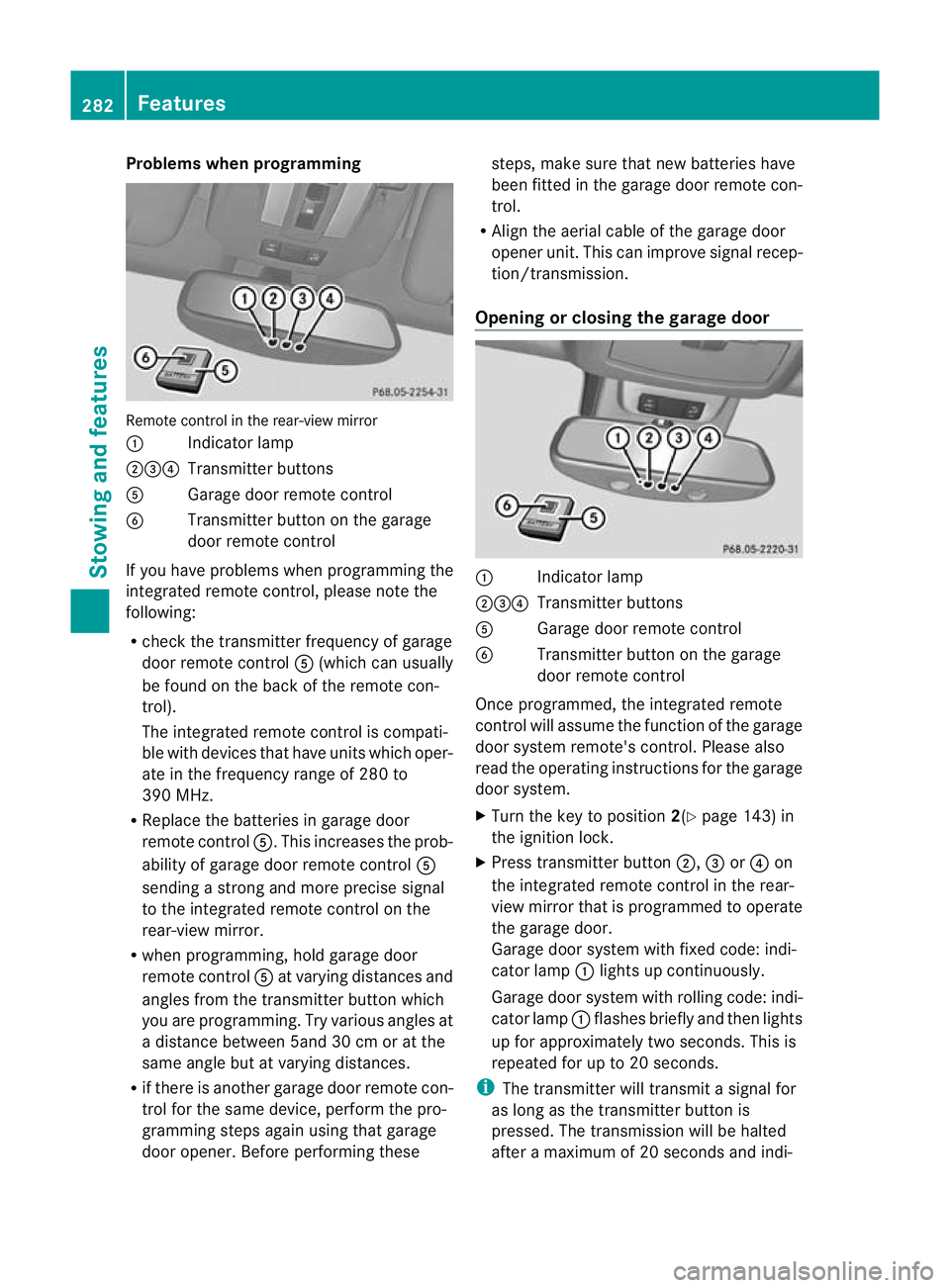
Remote control in the rear-view mirror
:
Indicator lamp
;=? Transmitter buttons
A Garage door remote control
B Transmitter button on the garage
door remote control
If you have problems when programming the
integrated remote control, please note the
following:
R check the transmitter frequency of garage
door remote control A(which can usually
be found on the back of the remote con-
trol).
The integrated remote control is compati-
ble with devices that have units which oper-
ate in the frequency range of 280 to
390 MHz.
R Replace the batteries in garage door
remote control A.This increases the prob-
ability of garage door remote control A
sending a strong and more precise signal
to the integrated remote control on the
rear-view mirror.
R when programming, hold garage door
remote control Aat varying distances and
angles from the transmitter button which
you are programming. Try various angles at
a distance between 5and 30 cm or at the
same angle but at varying distances.
R if there is another garage door remote con-
trol for the same device, perform the pro-
gramming steps again using that garage
door opener. Before performing these steps, make sure that new batteries have
been fitted in the garage door remote con-
trol.
R Align the aerial cable of the garage door
opener unit. This can improve signal recep-
tion/transmission.
Opening or closing the garage door :
Indicator lamp
;=? Transmitter buttons
A Garage door remote control
B Transmitter button on the garage
door remote control
Once programmed, the integrated remote
control will assume the function of the garage
door system remote's control. Please also
read the operating instructions for the garage
door system.
X Turn the key to position 2(Ypage 143) in
the ignition lock.
X Press transmitter button ;,=or? on
the integrated remote control in the rear-
view mirror that is programmed to operate
the garage door.
Garage door system with fixed code: indi-
cator lamp :lights up continuously.
Garage door system with rolling code: indi-
cator lamp :flashes briefly and then lights
up for approximately two seconds. This is
repeated for up to 20 seconds.
i The transmitter will transmit a signal for
as long as the transmitter button is
pressed. The transmission will be halted
after a maximum of 20 seconds and indi- 282
FeaturesStowing and features
Page 286 of 357
cator lamp
:will flash. Press the trans-
mitter button agai nifnecessary.
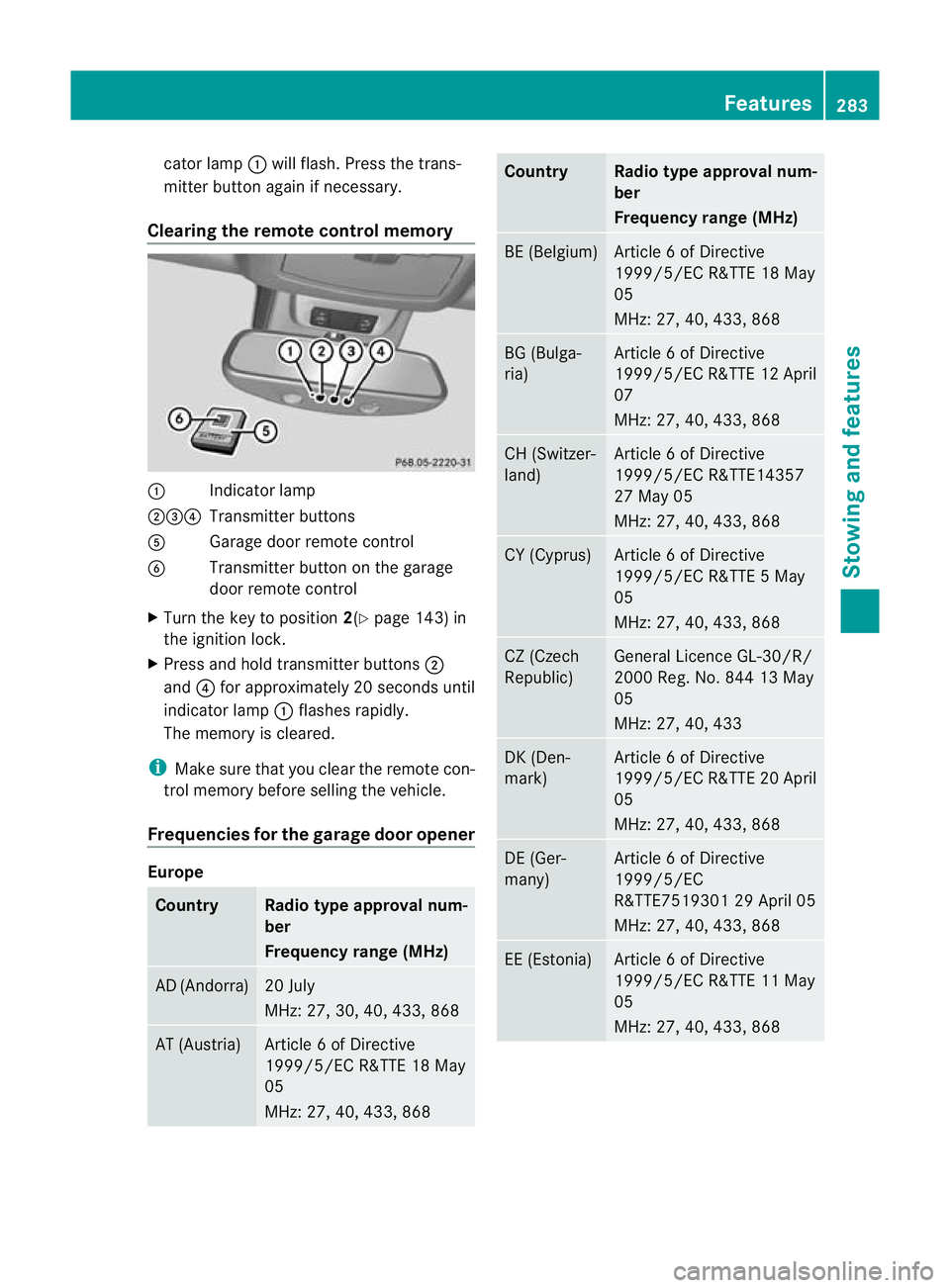
Clearing the remote control memory :
Indicator lamp
;=? Transmitter buttons
A Garage door remote control
B Transmitter button on the garage
door remote control
X Turn the key to position 2(Ypage 143) in
the ignition lock.
X Press and hold transmitter buttons ;
and ?for approximately 20 seconds until
indicator lamp :flashes rapidly.
The memory is cleared.
i Make sure that you clear the remote con-
trol memory before selling the vehicle.
Frequencies for the garage door opener Europe
Country Radio type approval num-
ber
Frequency range (MHz)
AD (Andorra) 20 July
MHz: 27, 30, 40, 433, 868
AT (Austria) Article 6 of Directive
1999/5/EC R&TTE 18 May
05
MHz: 27, 40, 433, 868 Country Radio type approval num-
ber
Frequency range (MHz)
BE (Belgium) Article 6 of Directive
1999/5/EC R&TTE 18 May
05
MHz: 27, 40, 433, 868
BG (Bulga-
ria) Article 6 of Directive
1999/5/ECR
&TTE 12 April
07
MHz: 27, 40, 433, 868 CH (Switzer-
land) Article 6 of Directive
1999/5/EC R&TTE14357
27 May 05
MHz: 27, 40, 433, 868
CY (Cyprus) Article 6 of Directive
1999/5/EC R&TTE 5 May
05
MHz: 27, 40, 433, 868
CZ (Czech
Republic) General Licence GL-30/R/
2000 Reg. No. 844 13 May
05
MHz: 27, 40, 433
DK (Den-
mark) Article 6 of Directive
1999/5/EC R&TTE 20 April
05
MHz: 27, 40, 433, 868
DE (Ger-
many) Article 6 of Directive
1999/5/EC
R&TTE7519301 29 April 05
MHz: 27, 40, 433, 868
EE (Estonia) Article 6 of Directive
1999/5/EC R&TTE 11 May
05
MHz: 27, 40, 433, 868 Features
283Stowing and features Z