Page 391 of 914
3815-1. Remote Touch screen
5
Interior features
GS350/250_EE (OM30C36E)
Updating the past record data
Update the average fuel consumption by selecting “Update” to measure the
current fuel consumption again.
Resetting the data
The data can be deleted by selecting “Clear”.
Cruising range
Displays the estimated maximum distance that can be driven with the quan-
tity of fuel remaining.
This distance is computed based on your average fuel consumption.
As a result, the actual distance that can be driven may differ from that dis-
played.
Page 392 of 914
3825-1. Remote Touch screen
GS350/250_EE (OM30C36E)
Set up screen
*: Bluetooth is a registered trademark of Bluetooth SIG. Inc.
You can change the Remote Touch screen to your desired settings.
Press the “MENU” button on the Remote Touch, then select
“Setup” on the “Menu” screen.
Owners of models equipped with a navigation system should refer
to the “Navigation System Owner’s Manual”.
Vehicles without a navigation
systemVehicles with a navigation
system
SwitchPage
“General”P. 383/
Navigation System Owner’s Manual
“Voice”P. 398/
Navigation System Owner’s Manual
“Navigation”Navigation System Owner’s Manual
“Vehicle”P. 399/
Navigation System Owner’s Manual
“Telephone”P. 4 0 0
“Bluetooth*”P. 4 0 0
“Audio”P. 4 0 1
“Info”Navigation System Owner’s Manual
Page 393 of 914
3835-1. Remote Touch screen
5
Interior features
GS350/250_EE (OM30C36E)This screen is used for language selection and the on/off settings of
operation sounds and automatic screen change, etc.
Select “General” on the “Setup” screen.
System time settings
Selecting a language
Selecting a voice recognition
language
Changing home screen
*1
Changing the opening image
Changing the screen off image
Auto screen change
*2
Selecting a button color
Unit of measurement
*2
Selection sound on/off
Pointer sound on/off
Error sound on/off
Pointer sound volume settings
Setting a feedback force
Delete personal data
Software update
*3
Select “OK” after changing set-
tings.
*1: Vehicles with a 8-inch display
navigation system.
*2: Vehicles with a navigation sys-
tem.
*3: For details, contact any autho-
rized Lexus dealer or repairer, or
General settings
1
2
3
4
5
6
7
8
9
10
11
12
13
14
15
16
Page 394 of 914
3845-1. Remote Touch screen
GS350/250_EE (OM30C36E)
another duly qualified and
equipped professional.
Page 395 of 914
3855-1. Remote Touch screen
5
Interior features
GS350/250_EE (OM30C36E)
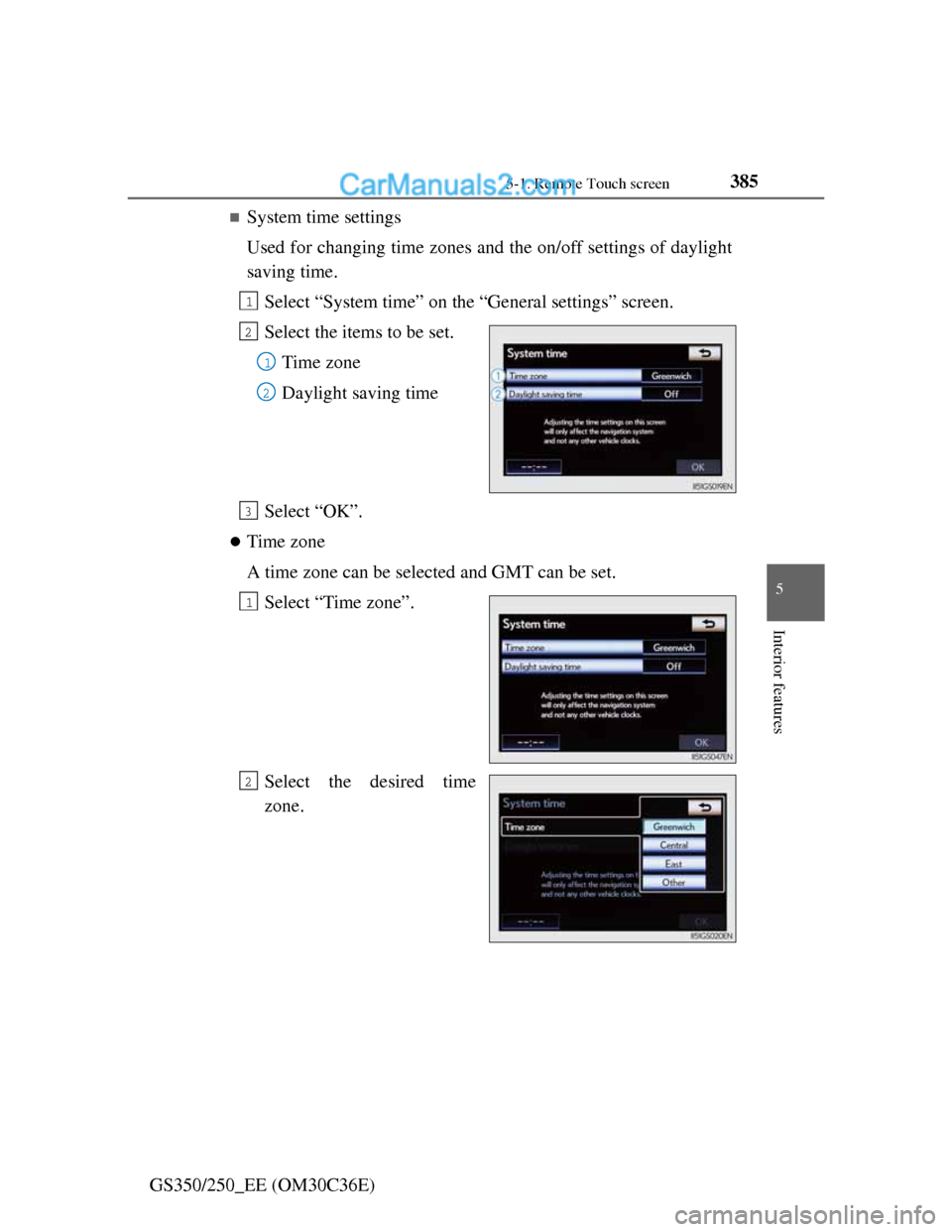
System time settings
Used for changing time zones and the on/off settings of daylight
saving time.
Select “System time” on the “General settings” screen.
Select the items to be set.
Time zone
Daylight saving time
Select “OK”.
Time zone
A time zone can be selected and GMT can be set.
Select “Time zone”.
Select the desired time
zone.
1
2
1
2
3
1
2
Page 396 of 914
3865-1. Remote Touch screen
GS350/250_EE (OM30C36E)If “Other” is selected, the zone
can be adjusted manually.
Select “+” or “-” to adjust the
time zone and then select
“OK”.
Daylight saving time
To select “On” or “Off” for daylight saving time.
Selecting a language
The language can be changed.
Select “Language” on the “General settings” screen.
Select the desired screen
button.
The previous screen will be dis-
played.
Select “OK”.
1
2
3
Page 397 of 914
3875-1. Remote Touch screen
5
Interior features
GS350/250_EE (OM30C36E)
Selecting a voice recognition language
The voice recognition language can be changed.
Select “Voice recognition lang.” on the “General settings”
screen.
Select the desired screen
button.
A confirmation message will be
displayed. Select “Yes” to com-
plete the settings and return to
the “General setting” screen.
Select “OK”.
Home screen settings (except for 12.3-inch display)
Changing between the audio and fuel consumption screens, and
the displaying of the climate screen can be set on or off.
Select “Home screen” on the “General settings” screen.
The “Home screen” can also be accessed by pressing the “HOME” but-
ton on the Remote touch.
Select the items to be set.
Select “OK”.
1
2
3
1
2
3
Page 398 of 914
3885-1. Remote Touch screen
GS350/250_EE (OM30C36E)
Unit of measurement (vehicles with a navigation system)
Distance unit can be changed.
This function is available only in English. To change language,
see “Selecting a language”. (P. 386)
Select “Unit of measurement” on the “General settings”
screen.
Select “km” or “mile”.
Select “OK”.
Selecting a button color
The colour of the screen buttons can be changed.
Select “Button color” on the “General settings” screen.
Select the desired screen
button color.
The previous screen will be dis-
played.
Select “OK”.
1
2
3
1
2
3