Page 300 of 429
When VSA is off, the VSA OFF
indicator comes on as a reminder.
When VSA activates, you will see the
VSA system indicator blink.
If this indicator comes on while
driving, pull to the side of the road
when it is saf e, and turn of f the
engine. Reset the system by
restarting the engine. If the VSA
system indicator stays on or comes
back on while driving, have the VSA
system inspected by your dealer.The main f unction of the
VSA system is generally known as
Electronic Stability Control (ESC).
The system also includes a traction
control f unction. If the low tire pressure/TPMS
indicator comes on, see page .
Or, if the multi-inf ormation display
shows a ‘‘CHECK TPMS
SYSTEM
Page 301 of 429
Driving with varying tire or wheel
sizes may cause the VSA to
malf unction. When replacing tires,
makesuretheyareof thesamesize
and type as your original tires (see
page ).
If you install winter tires, make sure
they are the same size as those that
were originally supplied with your
vehicle. Exercise the same caution
during winter driving as you would if
your vehicle was not equipped with
VSA.
VSA is turned on every time you
start the engine, even if you turned it
off the last time you drove the
vehicle.
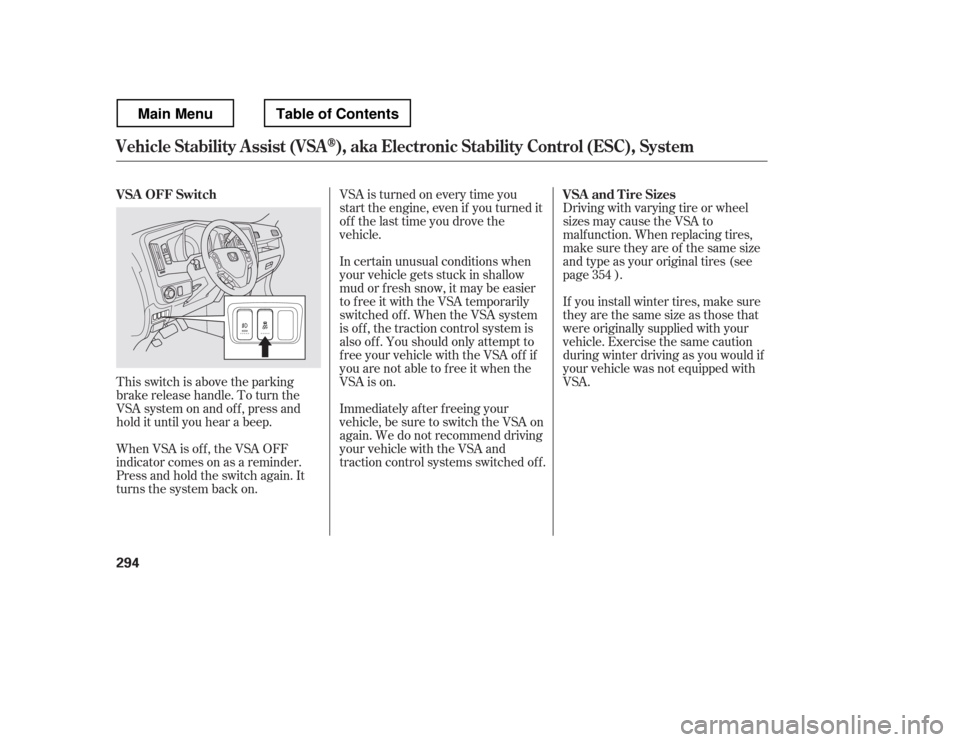
This switch is above the parking
brake release handle. To turn the
VSA system on and of f , press and
hold it until you hear a beep.
When VSA is off, the VSA OFF
indicator comes on as a reminder.
Press and hold the switch again. It
turns the system back on. In certain unusual conditions when
your vehicle gets stuck in shallow
mud or f resh snow, it may be easier
to free it with the VSA temporarily
switched of f . When the VSA system
is of f , the traction control system is
alsooff.Youshouldonlyattemptto
f ree your vehicle with the VSA of f if
you are not able to f ree it when the
VSA is on.
Immediately af ter f reeing your
vehicle, be sure to switch the VSA on
again. We do not recommend driving
your vehicle with the VSA and
traction control systems switched off.
354
VSA OFF Switch
VSA and Tire Sizes
Vehicle St abilit y A ssist (VSA), aka Electronic Stability Control (ESC), System
294
Main MenuTable of Contents
Page 318 of 429
The banks and surf ace under the
water provide good traction. The
water may hide hazards such as
rocks, holes, or mud.
Bef ore driving through water, stop,
get out if necessary, and make sure
that:
If you decide it is saf e to drive
through water, choose a suitable
speed, and proceed without shif ting,
changing speeds, stopping, or
shutting of f the engine.
Do not try to cross water at high
speeds, as this may cause severe
damage to the cooling system or
result in loss of control.
After driving through water, test
your brakes. If they got wet, gently
‘‘pump
Page 320 of 429

This section explains why it is
important to keep your vehicle well
maintained and how to f ollow basic
maintenance saf ety precautions.
This section also includes
instructions on how to read the
Maintenance Minder messages on
the inf ormation display or multi-
inf ormation display (depending on
the model), and instructions for
simple maintenance tasks you may
want to take care of yourself.U.S. Vehicles:
If you have the skills and tools to
perf orm more complex maintenance
tasks on your vehicle, you may want
to purchase the service manual. See
page f or inf ormation on how to
obtain a copy, or see your dealer. ......................
Maintenance Saf ety . 314
.................
Maintenance Minder . 315
..............................
Fluid Locations . 327
........................
Adding Engine Oil . 328
Changing the Engine Oil and
...........................................
Filter . 329
..............................
Engine Coolant . 331
....................
Windshield Washers . 332
....
Automatic Transmission Fluid . 333
....................................
Brake Fluid . 335
....................
Power Steering Fluid . 336
....................................
Timing Belt . 337
.............................................
Lights . 337
................
Cleaning the Seat Belts . 345
.....................................
Floor Mats . 346
..................
Dust and Pollen Filter . 346
.................................
Wiper Blades . 347
...........................................
Wheels . 349
...............................................
Tires . 349
...................
Checking the Battery . 357
.............................
Vehicle Storage . 358
..................................
Interior Care . 359
409
Maintenance
Maintenance, replacement, or
repair of emissions control
devices and systems may be done
by any automotive repair
establishment or individual using
parts that are ‘‘certif ied
Page 321 of 429
To eliminate potential hazards, read
the instructions bef ore you begin,
and make sure you have the tools
and skills required.
All service items not detailed in this
section should be perf ormed by a
certif ied technician or other qualif ied
mechanic.
Make sure your vehicle is parked
on level ground, the parking brake
is set, and the engine is of f .
To clean parts, use a commercially
available degreaser or parts
cleaner, not gasoline.
To reduce the possibility of f ire or
explosion, keep cigarettes, sparks,
and flames away from the battery
and all f uel-related parts.
Wear eye protection and
protective clothing when working
with the battery or compressed air. Be sure there is
adequate ventilation whenever you
operate the engine. Some of the most important saf ety
precautions are given here. However,
we cannot warn you of every
conceivable hazard that can arise in
perf orming maintenance. Only you
can decide whether or not you
should perf orm a given task.Do
not run the engine unless
instructed to do so.
Let the
engine and exhaust system cool
down bef ore touching any parts.
Maintenance Saf ety
Important Saf ety Precautions
Carbon Monoxide poison f rom
engine exhaust.
Potential Vehicle Hazards Injury f rom moving parts.
Burns f rom hot parts.
314 Improperly maintaining this
vehicle, or failing to correct a
problem before driving can
cause a crash in which you can
be seriously hurt or killed.
Always follow the inspection
and maintenance
recommendations and
schedules in this owner
Page 322 of 429

�µ
�µ �µ �µ�µ�µ�µ �µ �µ�µ �µ
�µ
Your vehicle displays engine oil lif e
and maintenance service items on
the inf ormation display or multi-
inf ormation display (depending on
the model) to show you when you
should have your dealer perf orm
engine oil replacement and indicated
maintenance services.
Based on the engine operating
conditions and accumulated engine
revolutions, the onboard computer in
your vehicle calculates the remaining
engine oil lif e and displays it as a
percentage. The remaining engine oil lif e is
shownonthedisplayaccordingto
this table:
To see the current engine oil lif e,
turn the ignition switch to the ON
(II) position, and press the SELECT
button repeatedly until the engine oil
lif e display appears (see page ).78
CONT INUED
Calculated Engine
Oil Lif e (%)
100% 91% 90% 81%
80% 71%
70% 61%
60% 51%
50% 41%
40% 31%
30% 21%
20% 16%
15% 11%10% 6%
5% 1% 0% Displayed
Engine Oil Lif e (%) 100%90% 80% 70%60%50%40% 30% 20%15%10%5% 0%
On models without navigation system
Engine Oil L if e Display
Maintenance Minder
Maint enance
315
SELECT BUTTON
ENGINE OIL LIFE DISPLAY
U.S. model is shown.
TM
Main MenuTable of Contents
Page 323 of 429
The 15 and 10 percent oil lif e
indicator reminds you that the time
is coming soon to take your vehicle
in f or the required maintenance.
If the remaining engine oil lif e is 15
to 6 percent, you will see the engine
oil lif e indicator every time you turn
the ignition switch to the ON (II)
position. The Maintenance Minder
indicator will also come on, and the
maintenance item code(s) for other
scheduled maintenance items
needing service will be displayed
near the ‘‘OIL LIFE
Page 324 of 429

The maintenance item code or codes
indicate the main and sub items
required at the time of the oil change
(see page ).When the remaining engine oil lif e is
0 percent, the engine oil lif e indicator
will blink. The display comes on
everytimeyouturntheignition
switch to the ON (II) position. The
Maintenance Minder indicator
( ) also comes on and remains
on in the instrument panel. When
you see this message, immediately
have the indicated maintenance done
by your dealer. If you do not perf orm the indicated
maintenance, negative distance
traveled is displayed and begins to
blink af ter the vehicle has been
driven 10 miles (10 km) or more.
Negative distance traveled means
your vehicle has passed the
maintenance required point.
Immediately have the indicated
maintenance done by your dealer.
You can switch the information
display f rom the engine oil lif e
display to the odometer or the trip
meter. Press and release the
SELECT button on the dashboard.
Whentheengineoillifeis15to1
percent, the Maintenance Minder
indicator ( ) comes on every
time you turn the ignition switch to
the ON (II) position, then it goes out
if you switch the inf ormation display.
When you see this message, have
the indicated maintenance
perf ormed by your dealer as soon as
possible.
318
CONT INUED
Maintenance Minder
Maint enance
317
U.S. model is shown.
TM
Main MenuTable of Contents