Page 10 of 429
�Î
�Î
�Î
CONT INUED: If equipped
Your Vehicle at a Glance
Your Vehicle at a Glance
3
POWER WINDOW
SWITCHES
HOOD RELEASE
HANDLE
MIRROR CONTROLS
ACCESSORY POWER SOCKETS
FUEL FILL DOOR
RELEASE HANDLE
POWER DOOR LOCK
MASTER SWITCH
(P.134)
(P.103)
(P.128)
INSTRUMENT PANEL INDICATORS
GAUGES
(P.62)
(P.76)
PARKING BRAKE
RELEASE HANDLE
(P.132)
(P.139)
Vehicle with navigation system is shown. PARKING BRAKE PEDAL
(P.132) (P.136)
CENTER CONSOLE AUXILIARY INPUT JACK
AUDIO SYSTEM
(P.159)
PASSENGER’S FRONT
AIRBAG
HEATING/COOLING
CONTROLS
CLIMATE CONTROL
SYSTEM
GLOVE BOX
(P.138) (P.9, 25)
(P.146)
(P.152)
(P.205)
DRIVER’S FRONT
AIRBAG
(P.9, 25)
(P.213)
(P.254)
(P.250) REARVIEW MIRROR WITH
COMPASS
Main Menu
Page 66 of 429

This section gives inf ormation about
the controls and displays that
contribute to the daily operation of
your vehicle. All the essential
controls are within easy reach............................
Control Locations . 60
............................
Instrument Panel . 61
..........
Instrument Panel Indicators . 62
.............................................
Gauges . 76
..............
Multi-Inf ormation Display .82
Controls Near the Steering
...........................................
Wheel . 93
........................
Multi-Control Lever . 94
........................................
Headlights . 95
...............
Headlight Control Dial . 95
........................................
Fog Lights . 97
........
Instrument Panel Brightness . 98
.................
Hazard Warning Button . 99
..........
Steering Wheel Adjustment . 99
................................................
Keys . 100
......................
Immobilizer System . 101
..............................
Ignition Switch . 102
....................................
Door Locks . 103
............
Childproof Door Locks . 104
Auto Door Locking/
..............................
Unlocking . 104
.....................
Remote Transmitter . 110
.....................
Dual-Action Tailgate . 113
...............................
In-Bed Trunk
. 116
...............................................
Seats . 119
..................................
Seat Heaters . 126 ............................
Power Windows . 128
.......................................
Moonroof . 131
...............................
Parking Brake . 132
...........................................
Mirrors . 133
.........
Interior Convenience Items . 135
.........................
Center Console . 136
.......
Console Compartments . 136
.........................
Cargo Hooks . 137
.....................
Beverage Holders . 137
..................................
Glove Box . 138
................................
Coat Hooks . 138
....................
Sunglasses Holder . 138
........
Accessory Power Sockets . 139
...................................
Sun Visor . 140
............................
Vanity Mirror . 140
........................
AC Power Outlet .141
...............................
Interior Lights . 142
.....................................
Bed Lights . 144
Instruments and Controls
Inst rument s and Cont rols
59
Main MenuINDEX
Page 67 of 429
�Î
�Î
�Î
: If equipped
Control L ocations
60
Vehicle with navigation system is shown. (P.103)
POWER DOOR LOCK
MASTER SWITCH
MIRROR CONTROLS
ACCESSORY POWER SOCKETS
(P.134)
(P.139)
(P.132)
PARKING BRAKE
RELEASE HANDLE
INSTRUMENT PANEL INDICATORS
GAUGES (P.76)
(P.62)
POWER WINDOW
SWITCHES
(P.128) PARKING BRAKE PEDAL
(P.132) (P.136) CENTER CONSOLE
HOOD RELEASE HANDLE
FUEL FILL DOOR RELEASE
HANDLE AUXILIARY INPUT JACK
(P.205)
AUDIO SYSTEM
HEATING/COOLING
CONTROLS
CLIMATE CONTROL
SYSTEM
GLOVE BOX
(P.138) (P.146)
(P.152)
(P.159)
(P.254)
(P.250) REARVIEW MIRROR WITH COMPASS
(P.213)
Main MenuTable of Contents
Page 140 of 429
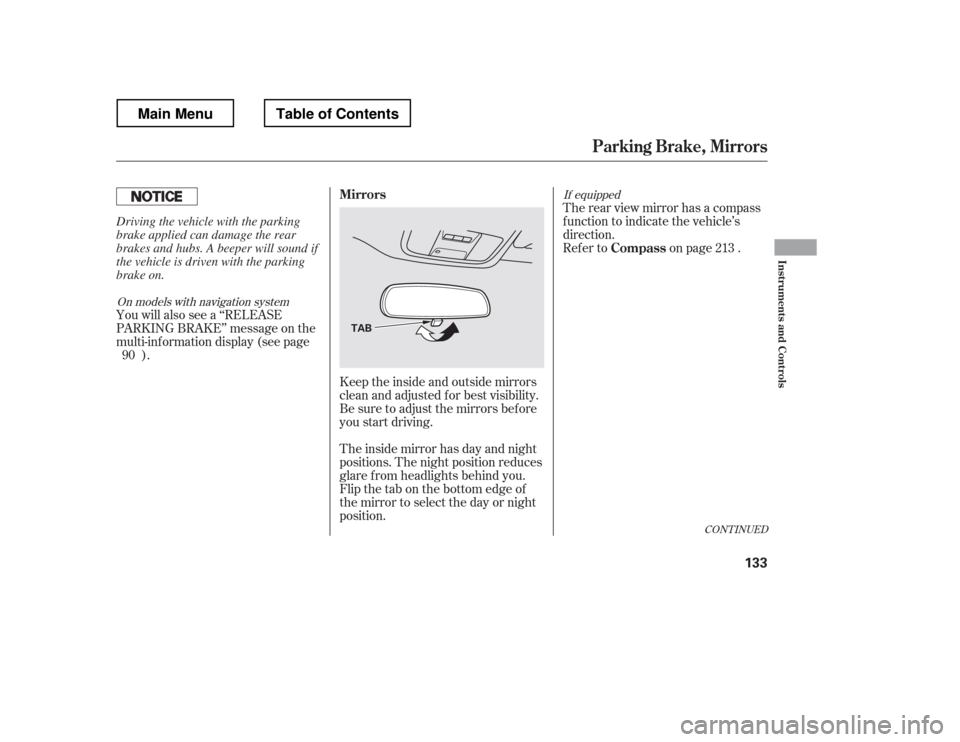
Keeptheinsideandoutsidemirrors
clean and adjusted f or best visibility.
Be sure to adjust the mirrors bef ore
you start driving.
The inside mirror has day and night
positions. The night position reduces
glare f rom headlights behind you.
Flip the tab on the bottom edge of
the mirror to select the day or night
position.Therearviewmirrorhasacompass
function to indicate the vehicle
Page 141 of 429
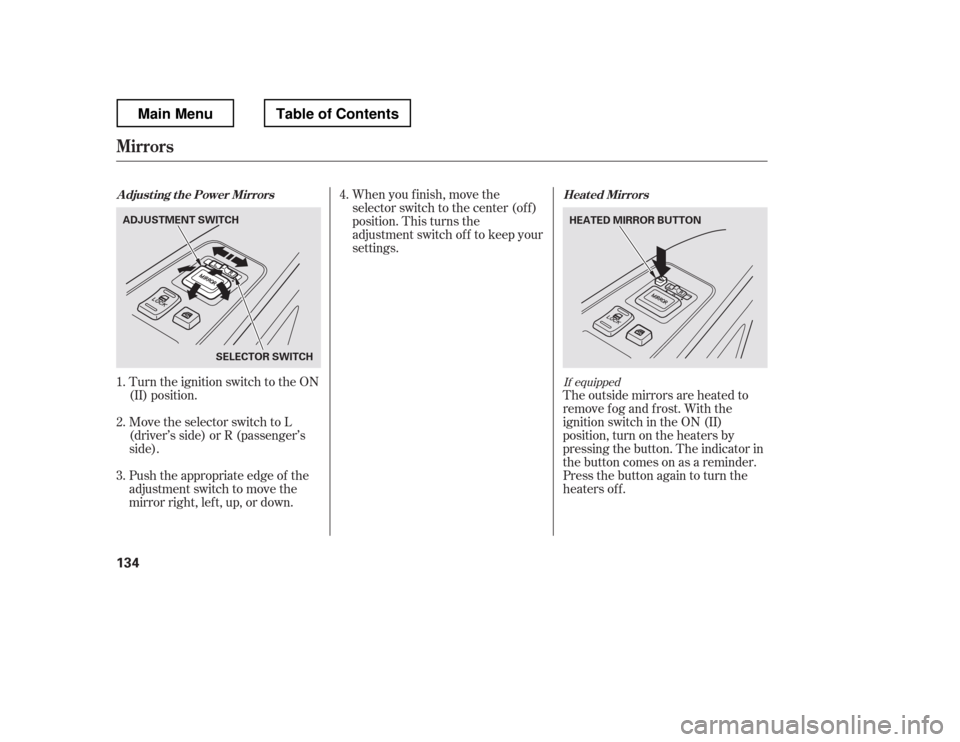
Turn the ignition switch to the ON
(II) position.When you f inish, move the
selector switch to the center (off)
position. This turns the
adjustment switch of f to keep your
settings.
The outside mirrors are heated to
remove fog and frost. With the
ignition switch in the ON (II)
position, turn on the heaters by
pressing the button. The indicator in
the button comes on as a reminder.
Press the button again to turn the
heaters off.
Push the appropriate edge of the
adjustment switch to move the
mirrorright,left,up,ordown.
Move the selector switch to L
(driver
Page 142 of 429
�Î
�Î
Interior Convenience Items
Inst rument s and Cont rols
135
GLOVE BOX ACCESSORY POWER
SOCKET
CENTER UPPER
POCKET
CENTER POCKET CENTER LOWER POCKET BEVERAGE HOLDERS
: On vehicle without navigation system CONSOLE COMPARTMENT
ACCESSORY
POWER SOCKETS SUN VISOR VANITY MIRROR
BEVERAGE HOLDER
COAT HOOK
CENTER CONSOLE
SUNGLASSES
HOLDER
Main MenuTable of Contents
Page 147 of 429
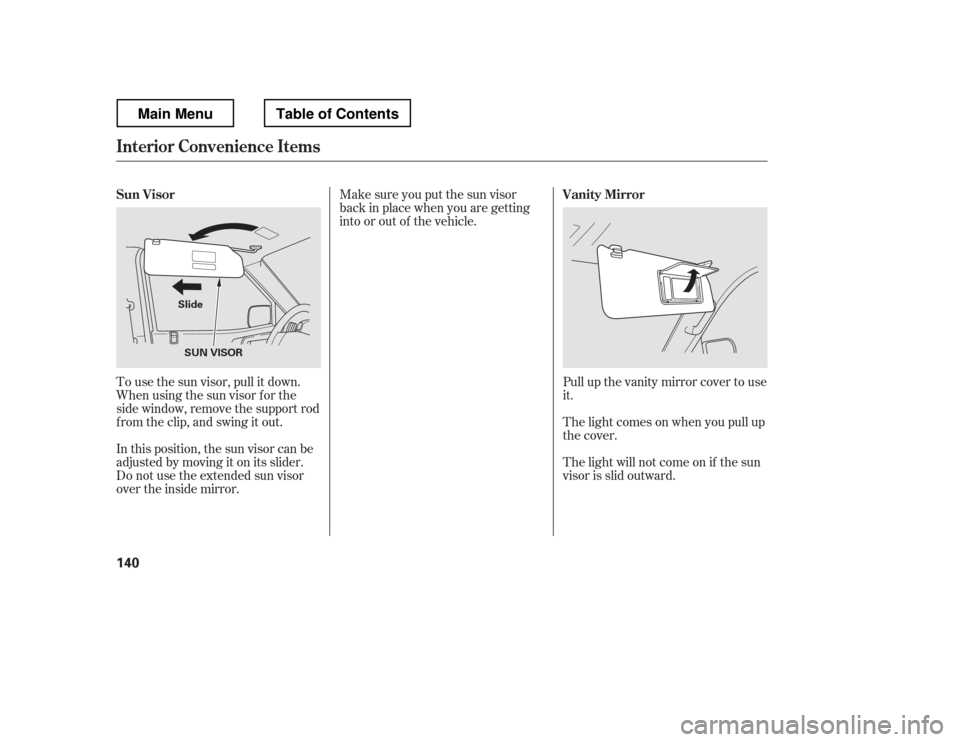
Pull up the vanity mirror cover to use
it.
The light comes on when you pull up
the cover.
The light will not come on if the sun
visor is slid outward.
Make sure you put the sun visor
back in place when you are getting
into or out of the vehicle.
In this position, the sun visor can be
adjusted by moving it on its slider.
Do not use the extended sun visor
over the inside mirror.
To use the sun visor, pull it down.
Whenusingthesunvisorforthe
side window, remove the support rod
f rom the clip, and swing it out.
Sun Visor
Vanity Mirror
Interior Convenience Items
140
SUN VISOR
Slide
Main MenuTable of Contents
Page 220 of 429
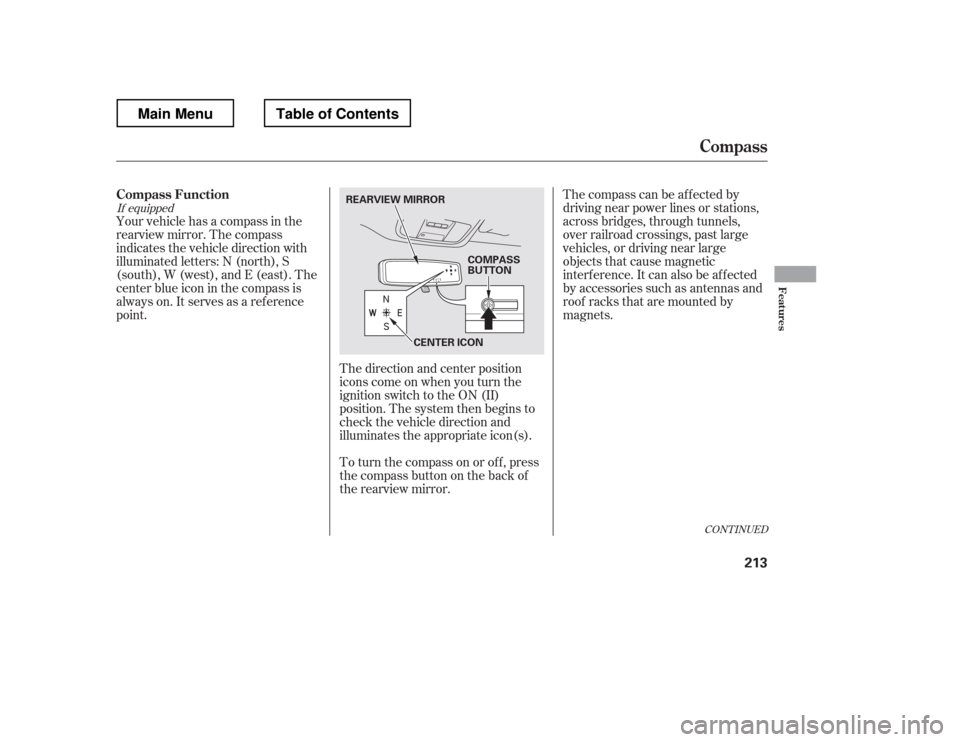
The direction and center position
icons come on when you turn the
ignition switch to the ON (II)
position. The system then begins to
check the vehicle direction and
illuminates the appropriate icon(s).The compass can be af f ected by
driving near power lines or stations,
across bridges, through tunnels,
over railroad crossings, past large
vehicles, or driving near large
objects that cause magnetic
interference. It can also be affected
by accessories such as antennas and
roof racks that are mounted by
magnets.
Your vehicle has a compass in the
rearview mirror. The compass
indicates the vehicle direction with
illuminated letters: N (north), S
(south), W (west), and E (east). The
center blue icon in the compass is
always on. It serves as a ref erence
point.
To turn the compass on or of f , press
the compass button on the back of
the rearview mirror.
If equipped
CONT INUED
Compass Function
Compass
Features
213
COMPASS
BUTTON
CENTER ICON
REARVIEW MIRROR
Main MenuTable of Contents