Page 1 of 454
Introduction 4
Instrument Cluster 14
Warning lights and chimes 14
Gauges 21
Message center 22
Entertainment Systems 61
AM/FM stereo 61
AM/FM stereo with CD 63
Auxiliary input jack 71
USB port 72
Satellite radio information 76
Navigation system 79
SYNC�79
Climate Controls 80
Manual heating and air conditioning 80
Dual electronic automatic temperature control 83
Rear window defroster 87
Lights 89
Headlamps 89
Turn signal control 93
Bulb replacement 94
Driver Controls 100
Windshield wiper/washer control 100
Steering wheel adjustment 101
Power windows 105
Mirrors 108
Speed control 113
Upfitter controls 117
Locks and Security 133
Keys 133
Locks 141
Anti-theft system 153
Table of Contents
1
2012 F-250/350/450/550(f23)
Owners Guide, 1st Printing
USA(fus)
Page 14 of 454
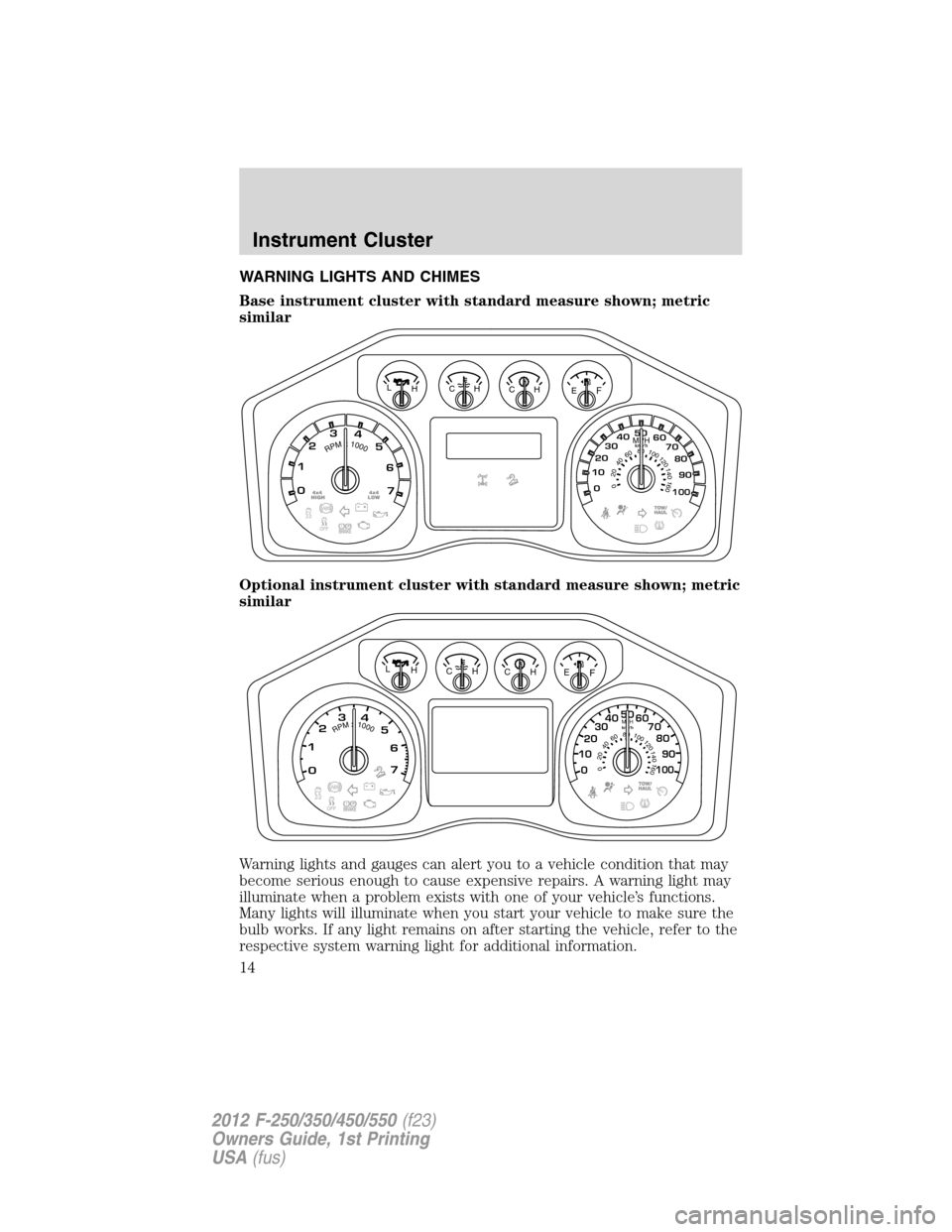
WARNING LIGHTS AND CHIMES
Base instrument cluster with standard measure shown; metric
similar
Optional instrument cluster with standard measure shown; metric
similar
Warning lights and gauges can alert you to a vehicle condition that may
become serious enough to cause expensive repairs. A warning light may
illuminate when a problem exists with one of your vehicle’s functions.
Many lights will illuminate when you start your vehicle to make sure the
bulb works. If any light remains on after starting the vehicle, refer to the
respective system warning light for additional information.
km/hRPMx1000
00 1020304050
60
70
80
90100
123
4
5
6
7
E CH CH H LF
02
040608
01001201
4
0160
MPH
km/hRPMx1000
00 1020304050
60
70
80
90100
123
4
5
6
7
H L
0204060801001
2
01
4
01
6
0
MPH
EFCHCH
Instrument Cluster
14
2012 F-250/350/450/550(f23)
Owners Guide, 1st Printing
USA(fus)
Page 15 of 454

Standard message center
Note:Some warning lights are
reconfigurable telltale (RTT)
indicator lights and will illuminate in
the message center. These lights
function the same as the other
warning lights.
Optional message center
Note:Some warning lights are
reconfigurable telltale (RTT)
indicator lights and will illuminate in
the message center. These lights
function the same as the other
warning lights. The first three
positions will only display one
warning telltale at a time; the last
three positions can cycle between
different warning telltales.
Service engine soon:The service
engine soon indicator
illuminates when the ignition is first
turned to the on position to check
the bulb and to indicate whether the vehicle is ready for
Inspection/Maintenance (I/M) testing. Normally, the service engine soon
indicator will stay on until the engine is cranked, then turn itself off if no
malfunctions are present. However, if after 15 seconds the service engine
soon indicator blinks eight times, it means that the vehicle is not ready
for I/M testing. See theReadiness for Inspection/Maintenance (I/M)
testingin theMaintenance and Specificationschapter.
Solid illumination after the engine is started indicates the on-board
diagnostics system (OBD-II) has detected a malfunction. Refer to
On-board diagnostics (OBD-II)in theMaintenance and Specifications
chapter. If the light is blinking, engine misfire is occurring which could
damage your catalytic converter. Drive in a moderate fashion (avoid
heavy acceleration and deceleration) and have your vehicle serviced
immediately by your authorized dealer.
Instrument Cluster
15
2012 F-250/350/450/550(f23)
Owners Guide, 1st Printing
USA(fus)
Page 18 of 454

Door ajar (RTT):Displays when
the ignition is in the on position and
any door is not completely closed.
Engine coolant temperature
(RTT):Illuminates when the engine
coolant temperature is high. Stop
the vehicle as soon as possible, switch off the engine and let cool. Refer
toEngine coolantin theMaintenance and Specificationschapter.
WARNING:Never remove the coolant reservoir cap while the
engine is running or hot.
Low tire pressure warning (if
equipped):Illuminates when your
tire pressure is low. If the light
remains on at start up or while
driving, the tire pressure should be
checked. Refer toInflating your tiresin theTires, Wheels and
Loadingchapter. When the ignition is first turned to on, the light will
illuminate for three seconds to ensure the bulb is working. If the light
does not turn on, have the system inspected by your authorized dealer.
For more information on this system, refer toTire pressure monitoring
system (TPMS)in theTires, Wheels and Loadingchapter.
Hill descent (if equipped):
Displays when using the hill descent
mode. Refer to theDrivingchapter
for transmission function and
operation.
Transmission Tow/Haul Feature
(if equipped):Displays when the
Tow/Haul feature has been
activated. Refer to theDriving
chapter for transmission function and operation. If the light flashes
steadily, have the system serviced immediately, damage to the
transmission could occur.
Instrument Cluster
18
2012 F-250/350/450/550(f23)
Owners Guide, 1st Printing
USA(fus)
Page 20 of 454
•On (amber light):Illuminates when the speed control system is
turned on. Turns off when the speed control system is engaged or
turned off.
•Engaged (green light):Illuminates when the speed control system is
engaged. Turns off when the speed control system is disengaged.
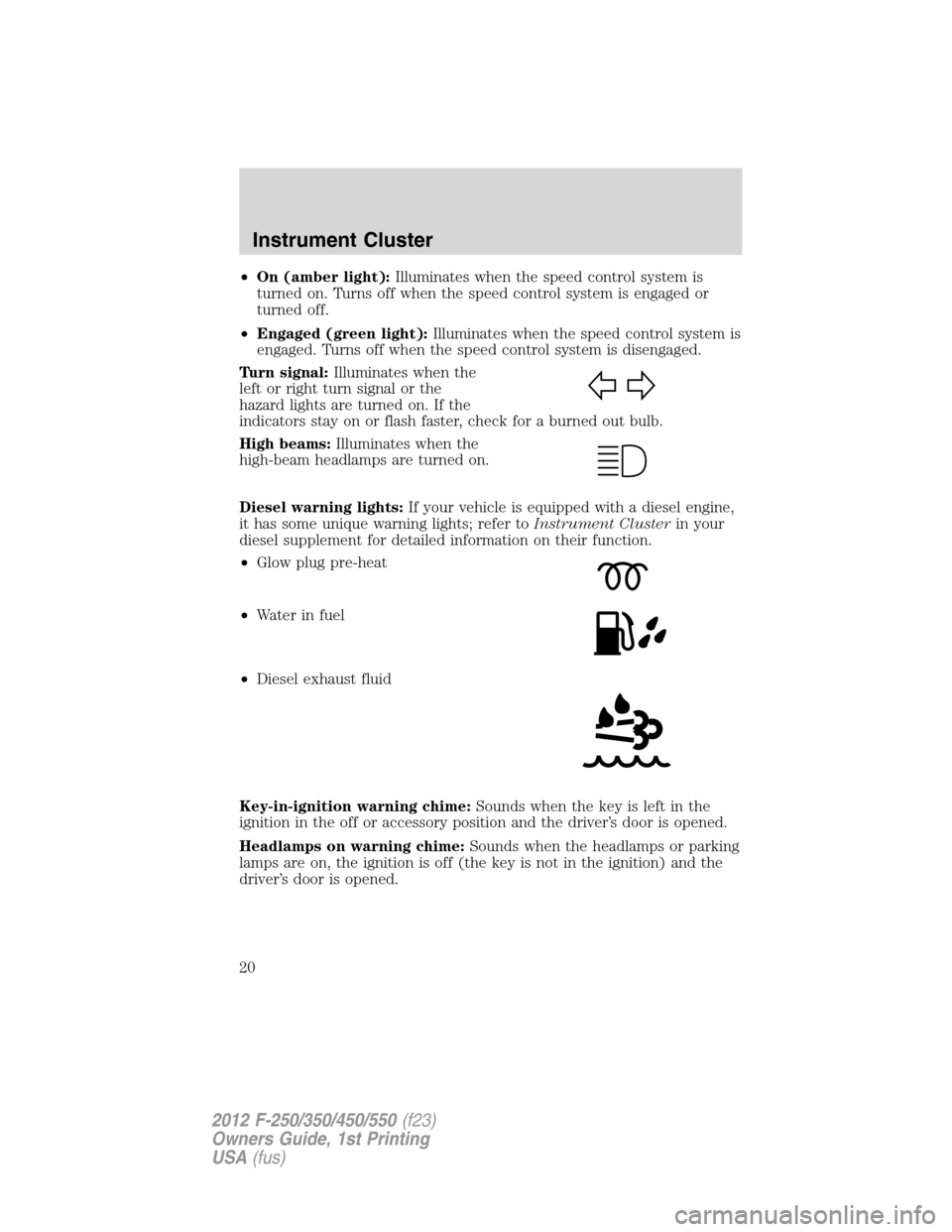
Turn signal:Illuminates when the
left or right turn signal or the
hazard lights are turned on. If the
indicators stay on or flash faster, check for a burned out bulb.
High beams:Illuminates when the
high-beam headlamps are turned on.
Diesel warning lights:If your vehicle is equipped with a diesel engine,
it has some unique warning lights; refer toInstrument Clusterin your
diesel supplement for detailed information on their function.
•Glow plug pre-heat
•Waterinfuel
•Diesel exhaust fluid
Key-in-ignition warning chime:Sounds when the key is left in the
ignition in the off or accessory position and the driver’s door is opened.
Headlamps on warning chime:Sounds when the headlamps or parking
lamps are on, the ignition is off (the key is not in the ignition) and the
driver’s door is opened.
Instrument Cluster
20
2012 F-250/350/450/550(f23)
Owners Guide, 1st Printing
USA(fus)
Page 94 of 454
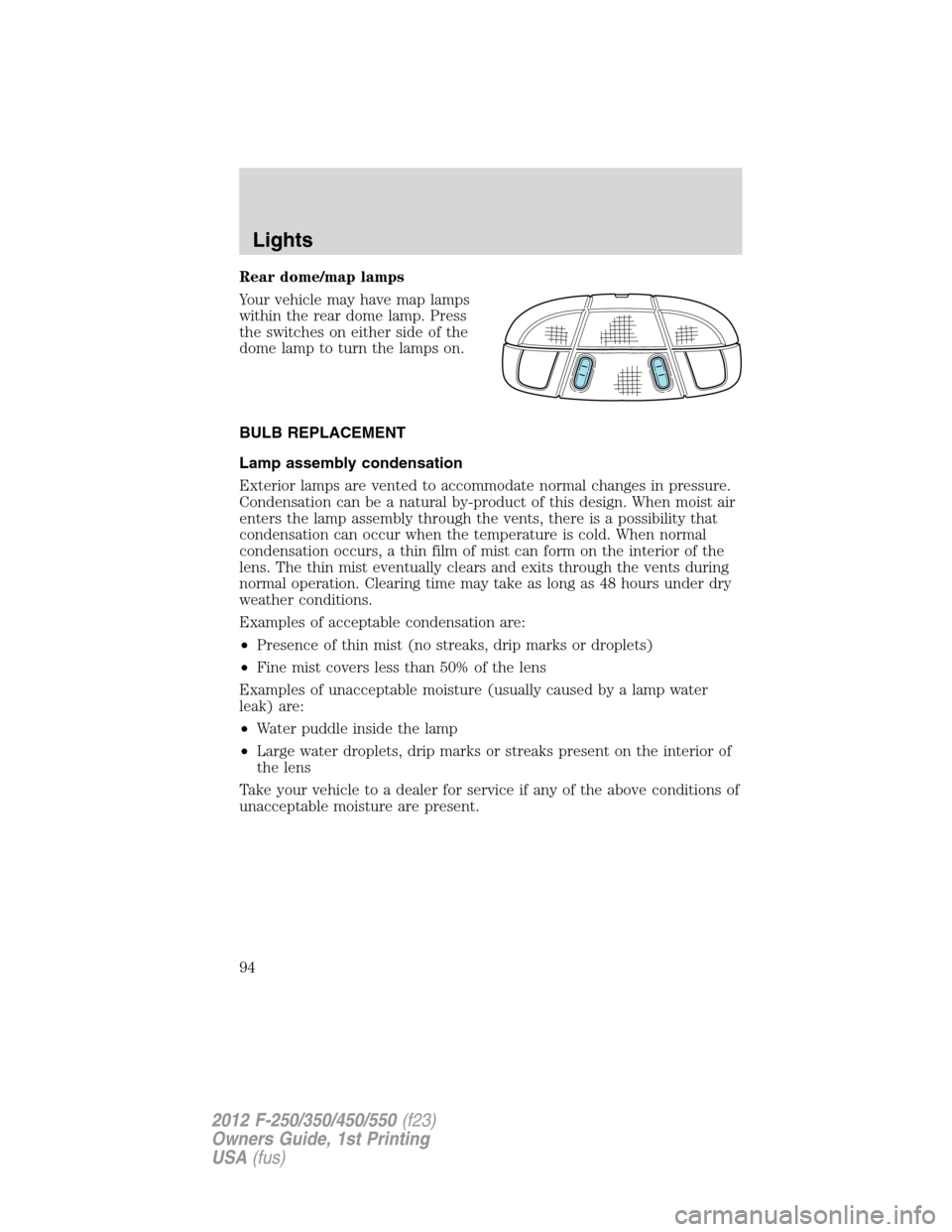
Rear dome/map lamps
Your vehicle may have map lamps
within the rear dome lamp. Press
the switches on either side of the
dome lamp to turn the lamps on.
BULB REPLACEMENT
Lamp assembly condensation
Exterior lamps are vented to accommodate normal changes in pressure.
Condensation can be a natural by-product of this design. When moist air
enters the lamp assembly through the vents, there is a possibility that
condensation can occur when the temperature is cold. When normal
condensation occurs, a thin film of mist can form on the interior of the
lens. The thin mist eventually clears and exits through the vents during
normal operation. Clearing time may take as long as 48 hours under dry
weather conditions.
Examples of acceptable condensation are:
•Presence of thin mist (no streaks, drip marks or droplets)
•Fine mist covers less than 50% of the lens
Examples of unacceptable moisture (usually caused by a lamp water
leak) are:
•Water puddle inside the lamp
•Large water droplets, drip marks or streaks present on the interior of
the lens
Take your vehicle to a dealer for service if any of the above conditions of
unacceptable moisture are present.
Lights
94
2012 F-250/350/450/550(f23)
Owners Guide, 1st Printing
USA(fus)
Page 95 of 454
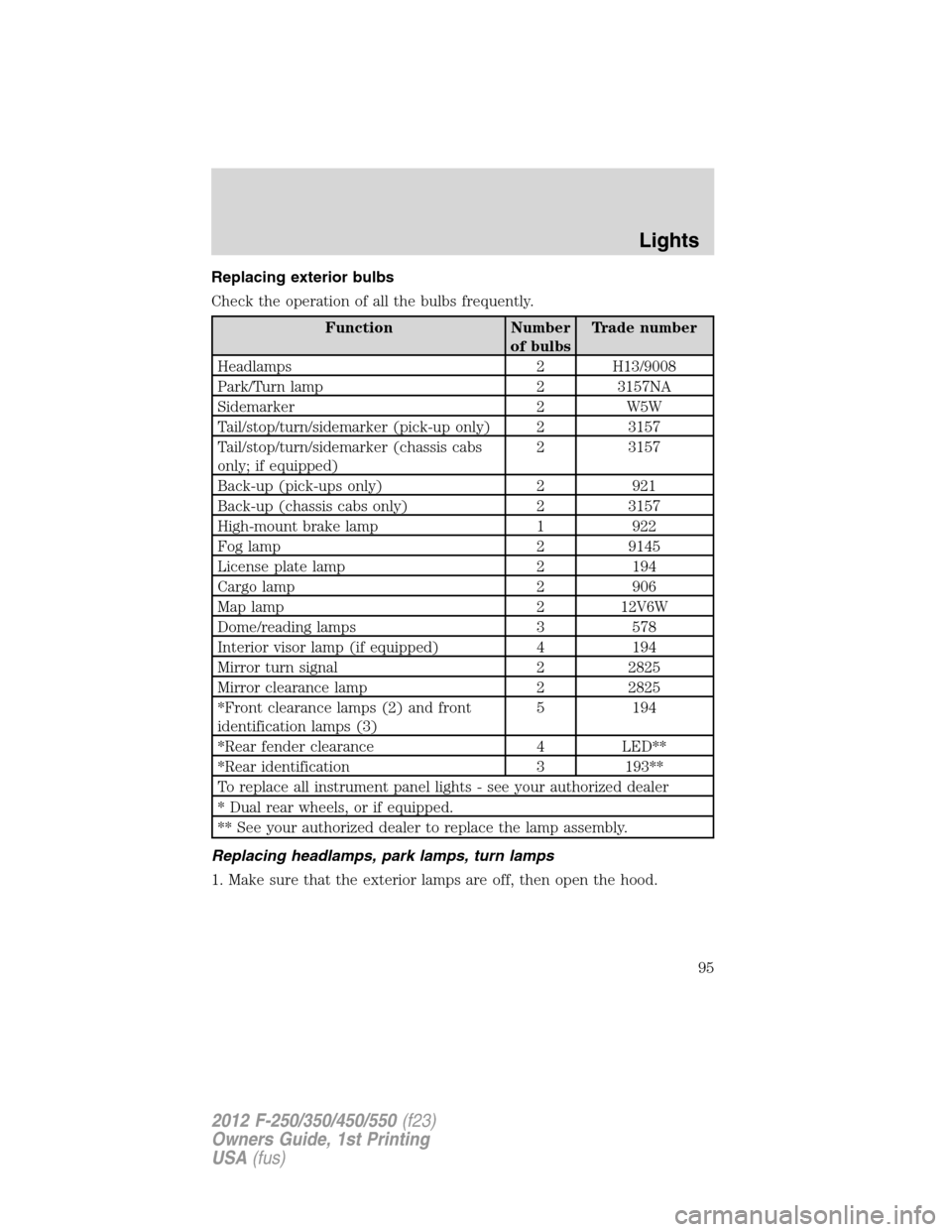
Replacing exterior bulbs
Check the operation of all the bulbs frequently.
Function Number
of bulbsTrade number
Headlamps 2 H13/9008
Park/Turn lamp 2 3157NA
Sidemarker 2 W5W
Tail/stop/turn/sidemarker (pick-up only) 2 3157
Tail/stop/turn/sidemarker (chassis cabs
only; if equipped)2 3157
Back-up (pick-ups only) 2 921
Back-up (chassis cabs only) 2 3157
High-mount brake lamp 1 922
Fog lamp 2 9145
License plate lamp 2 194
Cargo lamp 2 906
Map lamp 2 12V6W
Dome/reading lamps 3 578
Interior visor lamp (if equipped) 4 194
Mirror turn signal 2 2825
Mirror clearance lamp 2 2825
*Front clearance lamps (2) and front
identification lamps (3)5 194
*Rear fender clearance 4 LED**
*Rear identification 3 193**
To replace all instrument panel lights - see your authorized dealer
* Dual rear wheels, or if equipped.
** See your authorized dealer to replace the lamp assembly.
Replacing headlamps, park lamps, turn lamps
1. Make sure that the exterior lamps are off, then open the hood.
Lights
95
2012 F-250/350/450/550(f23)
Owners Guide, 1st Printing
USA(fus)
Page 96 of 454
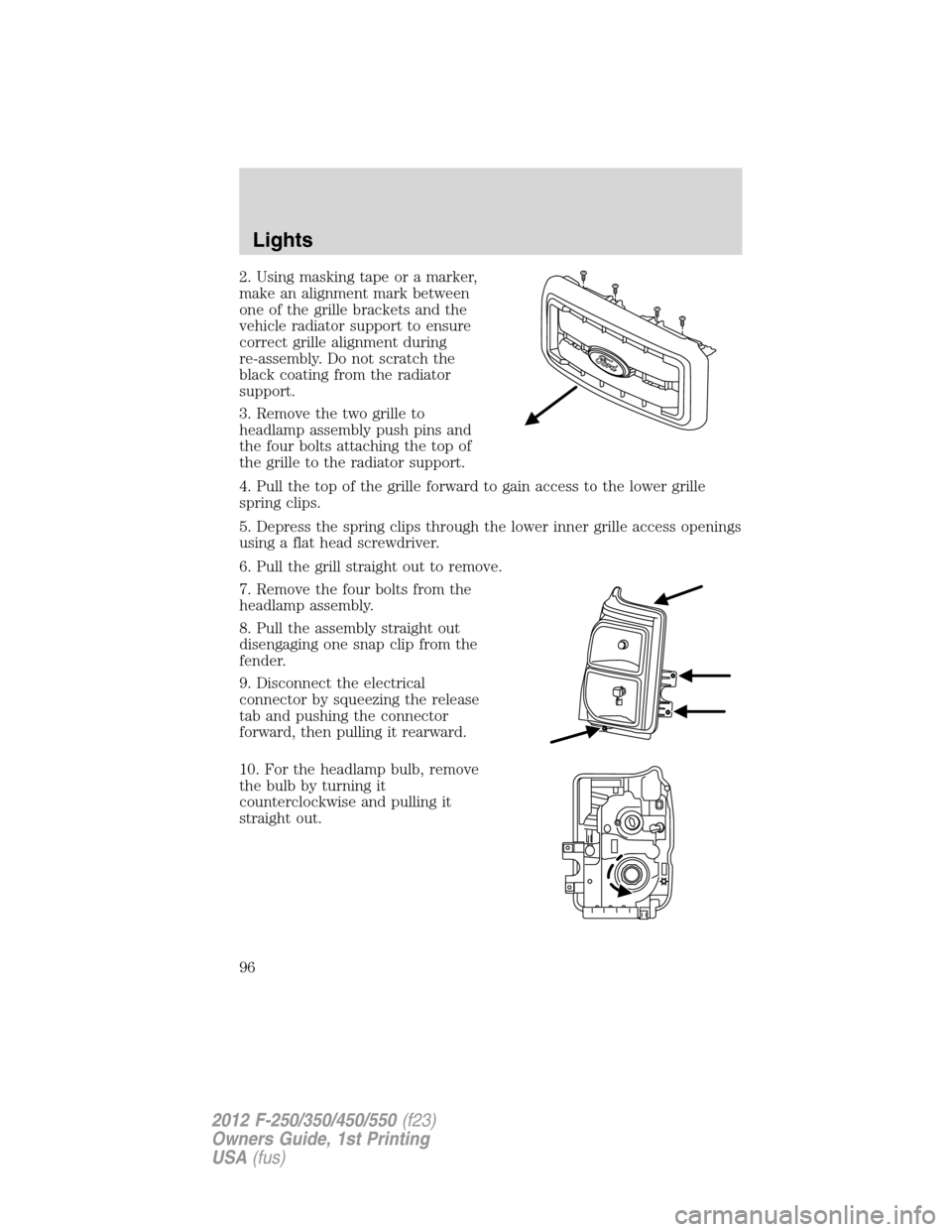
2. Using masking tape or a marker,
make an alignment mark between
one of the grille brackets and the
vehicle radiator support to ensure
correct grille alignment during
re-assembly. Do not scratch the
black coating from the radiator
support.
3. Remove the two grille to
headlamp assembly push pins and
the four bolts attaching the top of
the grille to the radiator support.
4. Pull the top of the grille forward to gain access to the lower grille
spring clips.
5. Depress the spring clips through the lower inner grille access openings
using a flat head screwdriver.
6. Pull the grill straight out to remove.
7. Remove the four bolts from the
headlamp assembly.
8. Pull the assembly straight out
disengaging one snap clip from the
fender.
9. Disconnect the electrical
connector by squeezing the release
tab and pushing the connector
forward, then pulling it rearward.
10. For the headlamp bulb, remove
the bulb by turning it
counterclockwise and pulling it
straight out.
Lights
96
2012 F-250/350/450/550(f23)
Owners Guide, 1st Printing
USA(fus)