Page 303 of 396
301
03
For a detailed global view of the menus available, refer to the"Screen menu map" section.
For cleaning the screen, the use of a soft, non-abrasive cloth (spectacles cloth) is recommended, with no additional product. " RADIO / MEDIA "
"
TELEPHONE"
(If conversation in progress)
SETUP
: PARAMETERS
date and time, display parameters, sound.
Changing the audio source:
RADIO:
radio broadcasts.
MUSIC: playing MEDIA.
Press the MODE
button several times in succession for access to the following displays:
GENERAL OPERATION
"FULL SCREEN MAP"
"
MAP IN WINDOW"
(If navigation guidance in progress)
Page 306 of 396
04
1
2
3
4
5
7
9
10
8
6
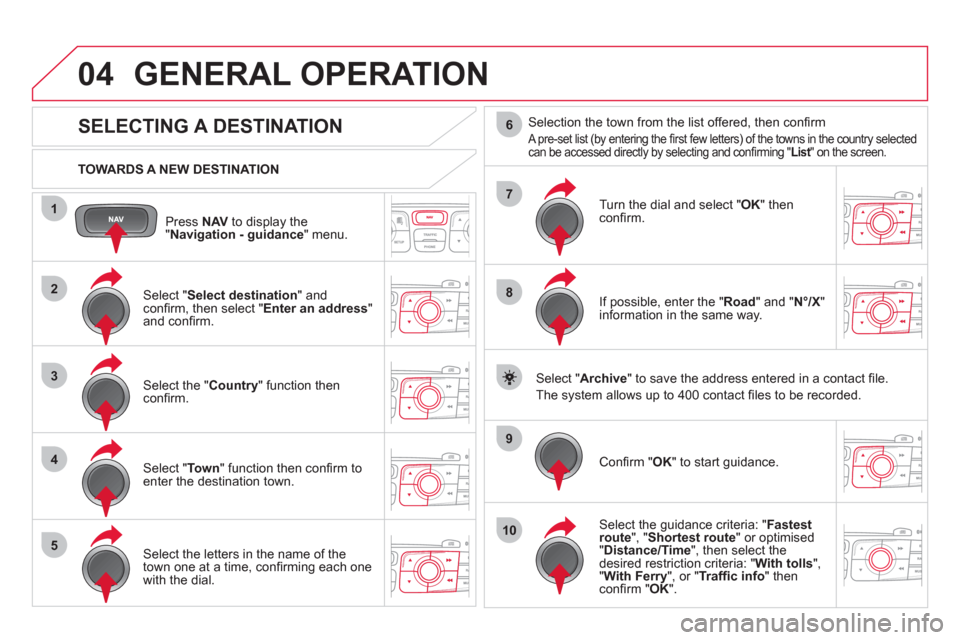
Press NAVto display the"Navigation - guidance " menu.
TOWARDS A NEW DESTINATION
GENERAL OPERATION
SELECTING A DESTINATION
Select "Select destination
" and confi rm, then select " Enter an address"and confi rm.
Select the " Country
" function then confi rm.
Select "Town" function then confi rm to enter the destination town.
Select the letters in the name of the
town one at a time, confi rming each one
with the dial.
Selection the town from the list offered, then confi rm
A pre-set list (by entering the fi rst few letters) of the towns in the country selectedcan be accessed directly by selecting and confi rming " List" on the screen. t
Turn the dial and select "OK" thenconfi rm.
If possible, enter the "
Road
" and "N°/X"
information in the same way.
Select "Archive
" to save the address entered in a contact fi le.
The s
ystem allows up to 400 contact fi les to be recorded.
Confi rm " OK
" to start guidance.
Select the guidance criteria: "Fastest
route", " Shortest route" or optimised "Distance/Time ", then select thedesired restriction criteria: "With tolls","With Ferry", or "Traffi c info" thenconfi rm "OK".
Page 317 of 396
315
04
3
1
2
GENERAL OPERATION
MALE VOICE/FEMALE VOICE
Press SETUP
to display theconfi guration menu.
Select "Select male voice " or "Select
female voice" then confi rm "Ye s" to activatea male or female voice. The system restarts.
Select "Voice synthesis
" and confi rm.
Page 319 of 396
317
05
1
2
3
4
TRAFFIC INFORMATION
CONFIGURE THE FILTERING AND DISPLAY OF TMC MESSAGES
TMC (Traffi c Message Channel) messages contain information on traffi c and weather conditions, received in real time and transmitted to the
driver in the form of audible announcements and symbols on the navigation map.
The navi
gation system can then suggest an alternative route to avoid a traffi c problem.
Pr
ess the TRAFFICbutton to display the Traffi c informationmenu.
Select the "Geographic fi lter" function rand confi rm. The s
ystem offers a choice of:
- " Retain all the messa
ges",
or
-"Retain the messa
ges"
●
"Around the vehicle ", (confi rm
the mileage to modify and select
the distance),
●
" On the rout
e".
Confi rm " OK
" to save the modifi cations.
We recommend:
-
a fi lter on the route and
-
a fi lter around the vehicle of:
- 12 miles
(20 km) in urban areas,
- 30 miles
(50 km) on motorways.
Page 323 of 396
321
8
7
06
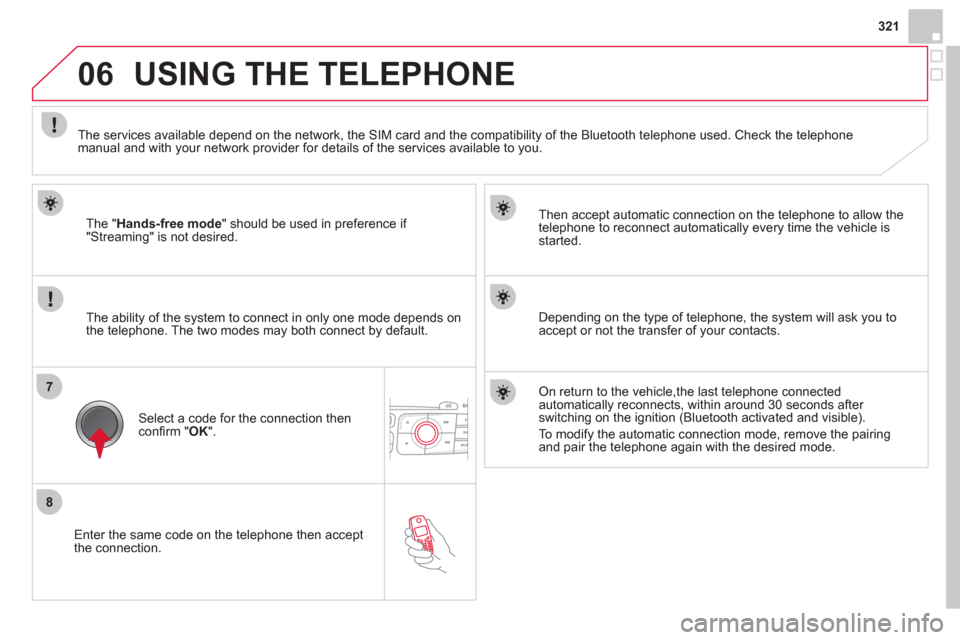
Enter the same code on the telephone then accept
the connection.
Then accept automatic connection on the telephone to allow the
te
lephone to reconnect automatically every time the vehicle is started.
The abilit
y of the system to connect in only one mode depends on
the telephone. The two modes may both connect by default.
USING THE TELEPHONE
The "Hands-free mode
" should be used in preference if "Streaming" is not desired.
The services available depend on the network, the
SIM card and the compatibility of the Bluetooth telephone used. Check the telephone manual and with your network provider for details of the services available to you.
Select a code for the connection thenconfi rm "OK".
Depending on the type of telephone, the system will ask you to
accept or not the transfer of your contacts.
On return to the vehicle,the last telephone connected
automatically reconnects, within around 30 seconds after switching on the ignition (Bluetooth activated and visible).
To modi
fy the automatic connection mode, remove the pairingand pair the telephone again with the desired mode.
Page 324 of 396
06
1
2a
2b
2c
2d
2e
USING THE TELEPHONE
DIRECTORY/SYNCHRONIZING CONTACTS
Press PHONE
then select "
Contacts
management " and confi rm.
Select "New contact
" to enter a new contact.
Select "Delete all contacts" to delete
the contacts saved in the system.
Select "Import all the entries
" to import
all the contacts in the telephone andsave them in the system.
Once imported, a contact remains visible whatever telephone is connected.
Selection "Synchronization options":
- No s
ynchronization: only the contacts saved in the system (always present).
- Displa
y telephone contacts: only the contacts saved in the telephone.
- Displa
y SIM card contacts: only thecontacts saved on the SIM card.
- Display all phone contacts:
contacts on the SIM card and in thetelephone.
Select "Contact mem. status" to see thenumber of contacts saved in the systemor imported, and the free memory.
Page 325 of 396
323
06
1
2
3
4
5
6
7
MANAGING CONTACTS
Press PHONEthen select "Directory of contacts" and confi rm.
Select the desired contact and confi rm.
Select " Import" to copy one contact to
the system.
Select " Call" to start the call.
Select " Open
" to view an external contact
or modify a contact saved in the system.
Select OK
or ESC
to exit this menu.
Select " Delete" to delete a contact savedin the system.
It is necessar
y to import an external contact to modify the record.
It will be saved in the system. It is not possible to modify or delete contacts in the telephone or the SIM card via the Bluetoothconnection.
USING THE TELEPHONE
Page 326 of 396
1
2
2
3
1
3
4
06USING THE TELEPHONE
Press PHONEtwice.
Select " Dial" then confi rm.
Select " Directory of contacts" thenconfi rm.
Dial the telephone number using the
virtual keypad selecting each number in turn.
Confi rm " OK
" to make the call.
Press TELor twice on PHONE.
CALLING A NEW NUMBER CALLING A CONTACT
Select the desired contact and confi rm.
If
access was via the PHONEbutton, select "Call" and confi rm.
Select the number and confi rm to start
the call.
MAKING A CALL
Use of the telephone is not recommended while driving.We recommended that you park safely or make use of the steeringmounted controls.


