2012 CHEVROLET ORLANDO ignition
[x] Cancel search: ignitionPage 44 of 378
Black plate (16,1)Chevrolet Orlando Owner Manual - 2012
2-16 Keys, Doors, and Windows
To program each front window:
1. With the ignition in ACC/ACCESSORY or ON/RUN,
or when Retained Accessory
Power (RAP) is active, close
all doors.
2. Press and hold the power window switch until the window
is fully open.
3. Pull the power window switch up until the window is fully closed.
4. Continue holding the switch up for approximately two seconds
after the window is completely
closed.
The window is now reprogrammed.
Repeat the process for the other
windows.Window Lockout
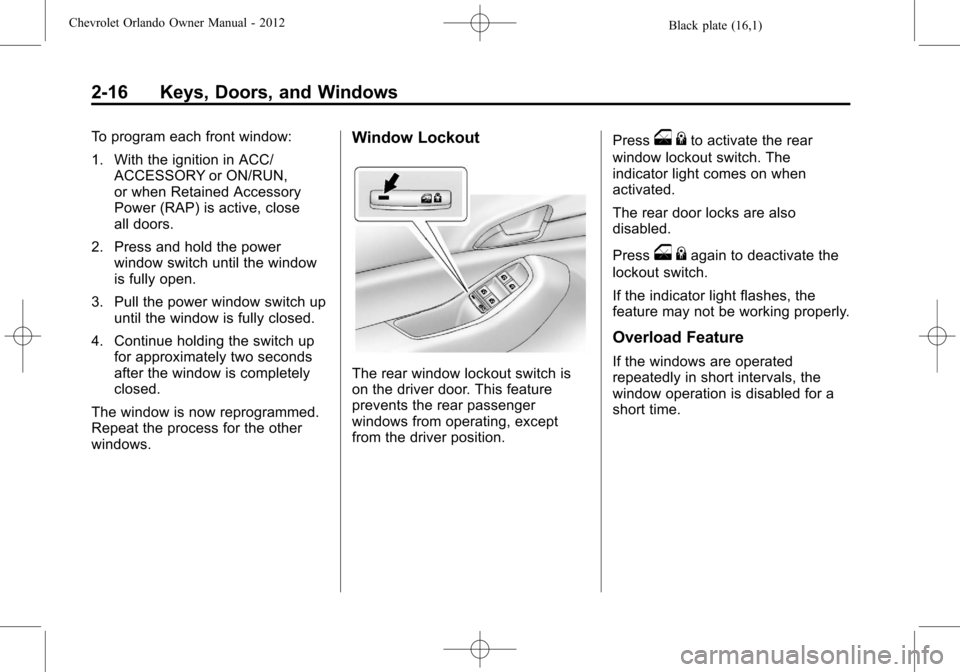
The rear window lockout switch is
on the driver door. This feature
prevents the rear passenger
windows from operating, except
from the driver position. Press
o
{to activate the rear
window lockout switch. The
indicator light comes on when
activated.
The rear door locks are also
disabled.
Press
o {again to deactivate the
lockout switch.
If the indicator light flashes, the
feature may not be working properly.
Overload Feature
If the windows are operated
repeatedly in short intervals, the
window operation is disabled for a
short time.
Page 45 of 378
Black plate (17,1)Chevrolet Orlando Owner Manual - 2012
Keys, Doors, and Windows 2-17
Sun Visors
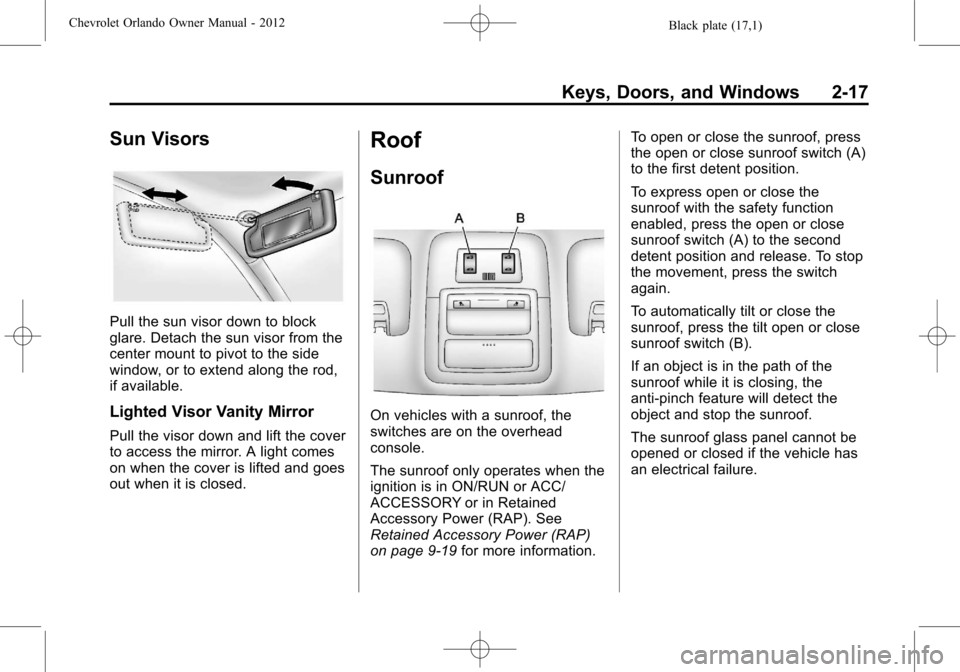
Pull the sun visor down to block
glare. Detach the sun visor from the
center mount to pivot to the side
window, or to extend along the rod,
if available.
Lighted Visor Vanity Mirror
Pull the visor down and lift the cover
to access the mirror. A light comes
on when the cover is lifted and goes
out when it is closed.
Roof
Sunroof
On vehicles with a sunroof, the
switches are on the overhead
console.
The sunroof only operates when the
ignition is in ON/RUN or ACC/
ACCESSORY or in Retained
Accessory Power (RAP). See
Retained Accessory Power (RAP)
on page 9‑19for more information. To open or close the sunroof, press
the open or close sunroof switch (A)
to the first detent position.
To express open or close the
sunroof with the safety function
enabled, press the open or close
sunroof switch (A) to the second
detent position and release. To stop
the movement, press the switch
again.
To automatically tilt or close the
sunroof, press the tilt open or close
sunroof switch (B).
If an object is in the path of the
sunroof while it is closing, the
anti-pinch feature will detect the
object and stop the sunroof.
The sunroof glass panel cannot be
opened or closed if the vehicle has
an electrical failure.
Page 54 of 378
Black plate (8,1)Chevrolet Orlando Owner Manual - 2012
3-8 Seats and Restraints
The passenger seat may take
longer to heat up.
Remote Start Heated Seats
When it is cold outside, the heated
seats can be programmed to turn
on automatically during a remote
vehicle start. The heated seats will
be canceled when the ignition is
turned on. Press the heated seat
button to use the heated seats after
the vehicle is started.
The heated seat button lights will
not turn on during a remote start.
The temperature of an unoccupied
seat may be reduced.
To program the heated seat feature
to enabled, seeVehicle
Personalization on page 5‑32 for
more information.
Rear Seats
Second Row Seats
Adjusting the Seatbacks
{WARNING
If either seatback is not locked, it
could move forward in a sudden
stop or crash. That could cause
injury to the person sitting there.
Always push and pull on the
seatbacks to be sure they are
locked.
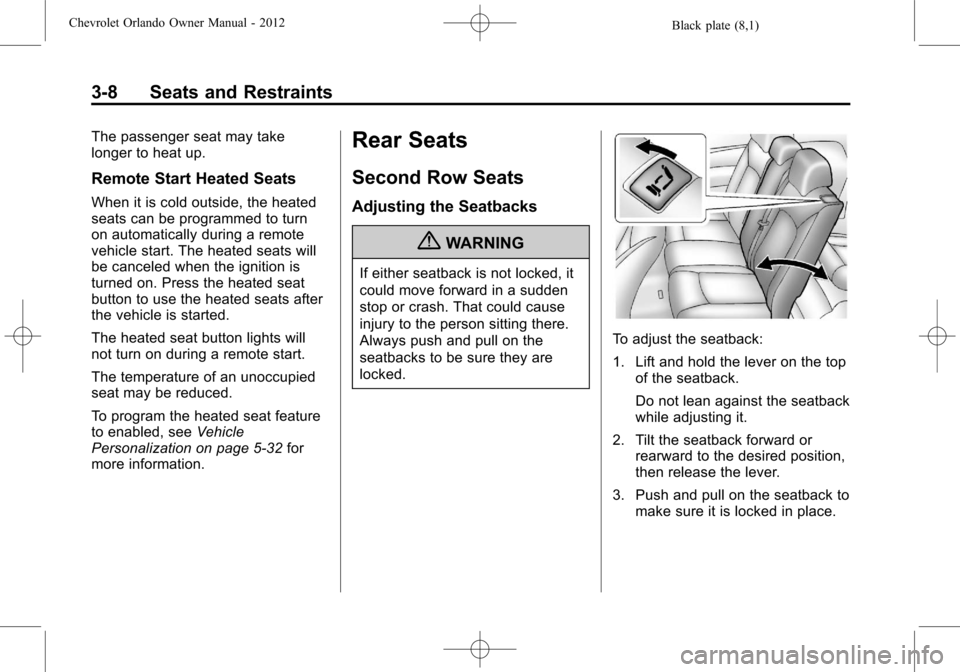
To adjust the seatback:
1. Lift and hold the lever on the top of the seatback.
Do not lean against the seatback
while adjusting it.
2. Tilt the seatback forward or rearward to the desired position,
then release the lever.
3. Push and pull on the seatback to make sure it is locked in place.
Page 108 of 378

Black plate (4,1)Chevrolet Orlando Owner Manual - 2012
5-4 Instruments and Controls
3(Adjustable Interval Wipes):
Turn the
3band up for more
frequent wipes or down for less
frequent wipes.
1 (Low Speed): Use for slow
wipes.
2 (High Speed): Use for fast wipes.
Clear snow and ice from the wiper
blades before using them. If frozen
to the windshield, carefully loosen or
thaw them. Damaged wiper blades
should be replaced. See Wiper
Blade Replacement on page 10‑24.
Heavy snow or ice can overload the
wiper motor. A circuit breaker will
stop the motor until it cools down. Wipe Parking
If the ignition is turned to LOCK/
OFF while the wipers are on 1, 2,
or
3, they will immediately stop.
If the windshield wiper lever is then
moved to OFF before the driver
door is opened, or within
10 minutes, the wipers will restart
and move to the base of the
windshield.
If the ignition is turned to LOCK/
OFF during a windshield wash, the
wipers will stop when they reach the
base of the windshield.
Windshield Washer
Pull the windshield wiper lever
toward you to spray windshield
washer fluid and activate the wipers.
The wipers will continue until the
lever is released or the maximum
wash time is reached. When the windshield wiper lever is
released, additional wipes may
occur depending on how long the
windshield washer had been
activated. See
Washer Fluid on
page 10‑18 for information on filling
the windshield washer fluid
reservoir.
{WARNING
In freezing weather, do not use
the washer until the windshield is
warmed. Otherwise the washer
fluid can form ice on the
windshield, blocking your vision.
Page 111 of 378

Black plate (7,1)Chevrolet Orlando Owner Manual - 2012
Instruments and Controls 5-7
Cigarette Lighter
For vehicles with a cigarette lighter,
it is located in the center floor
console.
The ignition must be turned to ACC/
ACCESSORY or ON/RUN.
To activate the cigarette lighter,
push it into the heating element and
let go. When the lighter is ready it
will pop back out.
Notice:Holding a cigarette lighter
in while it is heating does not let
the lighter back away from the
heating element when it is hot.
Damage from overheating can
occur to the lighter or heating
element, or a fuse could be
blown. Do not hold a cigarette
lighter in while it is heating.
Ashtrays
The vehicle may have a removable
ashtray.
The removable ashtray can be
placed in the front cupholders. To
open the removable ashtray, lift the
lid of the ashtray. After using, close
the lid.
Notice: If papers, pins, or other
flammable items are put in the
ashtray, hot cigarettes or other
smoking materials could ignite
them and possibly damage the
vehicle. Never put flammable
items in the ashtray.
Warning Lights,
Gauges, and
Indicators
Warning lights and gauges can
signal that something is wrong
before it becomes serious enough
to cause an expensive repair or
replacement. Paying attention to the
warning lights and gauges could
prevent injury.
Warning lights come on when there
could be a problem with a vehicle
function. Some warning lights come
on briefly when the engine is started
to indicate they are working.
Page 114 of 378

Black plate (10,1)Chevrolet Orlando Owner Manual - 2012
5-10 Instruments and Controls
Speedometer
The speedometer shows the
vehicle's speed in either kilometers
per hour (km/h) or miles per
hour (mph).
Odometer
The odometer shows how far the
vehicle has been driven, in either
kilometers or miles.
This vehicle has a tamper‐resistant
odometer. The digital odometer will
read 999,999 if it is turned back.
If the vehicle needs a new odometer
installed, it must be set to the
mileage total of the old odometer.
If that is not possible, then it must
be set at zero and a label must be
put on the driver door to show the
old mileage reading when the new
odometer was installed.
Tachometer
The tachometer displays the
engine speed in revolutions per
minute (rpm).
Notice:If the engine is operated
with the tachometer in the shaded
warning area, the vehicle could
be damaged, and the damages
would not be covered by the
vehicle warranty. Do not operate
the engine with the tachometer in
the shaded warning area.
Fuel Gauge
When the ignition is on, the fuel
gauge tells you about how much
fuel you have left in your tank.
An arrow on the fuel gauge
indicates the side of the vehicle the
fuel door is on.
A FUEL LEVEL LOW message may
appear in the Driver Information
Center (DIC). See Fuel System
Messages on page 5‑29 for more
information.
Page 115 of 378

Black plate (11,1)Chevrolet Orlando Owner Manual - 2012
Instruments and Controls 5-11
Here are four things that some
owners ask about. None of these
show a problem with your fuel
gauge:
.At the service station, the fuel
pump shuts off before the gauge
reads full.
.It takes a little more or less fuel
to fill up than the gauge
indicated. For example, the
gauge may have indicated the
tank was half full, but it actually
took a little more or less than
half the tank's capacity to fill
the tank.
.The gauge moves a little while
turning a corner or speeding up.
.The gauge takes a few seconds
to stabilize after the ignition is
turned on, and will go back to
empty when the ignition is
turned off.
Engine Coolant
Temperature Gauge
This gauge shows the engine
coolant temperature.
If the indicator needle moves to the
hot side of the gauge, the engine is
too hot.
If the vehicle has been operated
under normal driving conditions, pull
off the road, stop the vehicle, and
turn off the engine as soon as
possible.
Safety Belt Reminders
Driver Safety Belt Reminder
Light
There is a driver safety belt
reminder light on the instrument
panel cluster.
When the vehicle is started, this
light flashes and a chime may come
on to remind the driver to fasten
their safety belt. Then the light stays
on solid until the belt is buckled.
This cycle may continue several
times if the driver remains or
becomes unbuckled while the
vehicle is moving.
If the driver safety belt is buckled,
neither the light nor the chime
comes on.
Page 116 of 378

Black plate (12,1)Chevrolet Orlando Owner Manual - 2012
5-12 Instruments and Controls
Passenger Safety Belt
Reminder Light
When the vehicle is started, this
light flashes and a chime may come
on to remind front passengers to
fasten their safety belt. Then the
light stays on solid until the belt is
buckled.
This cycle continues several times if
the front passenger remains or
becomes unbuckled while the
vehicle is moving.
If the front passenger safety belt is
buckled, neither the chime nor the
light comes on.
The front passenger safety belt
reminder light and chime may turn
on if an object is put on the seat
such as a briefcase, handbag,
grocery bag, laptop, or otherelectronic device. To turn off the
reminder light and/or chime, remove
the object from the seat or buckle
the safety belt.
Airbag Readiness Light
This light shows if there is an
electrical problem. The system
check includes the airbag sensor(s),
the pretensioners (if equipped), the
airbag modules, the wiring, and the
crash sensing and diagnostic
module. For more information on the
airbag system, see
Airbag System
on page 3‑25.
The airbag readiness light comes on
and stays on for several seconds
when the vehicle is started. Then
the light goes out.
{WARNING
If the airbag readiness light stays
on after the vehicle is started or
comes on while driving, it means
the airbag system might not be
working properly. The airbags in
the vehicle might not inflate in a
crash, or they could even inflate
without a crash. To help avoid
injury, have the vehicle serviced
right away.
Charging System Light
The charging system light comes on
briefly when the ignition is turned
on, but the engine is not running, as
a check to show the light is working.