2012 CHEVROLET MALIBU engine
[x] Cancel search: enginePage 129 of 398
Black plate (23,1)Chevrolet Malibu Owner Manual - 2012
Instruments and Controls 5-23
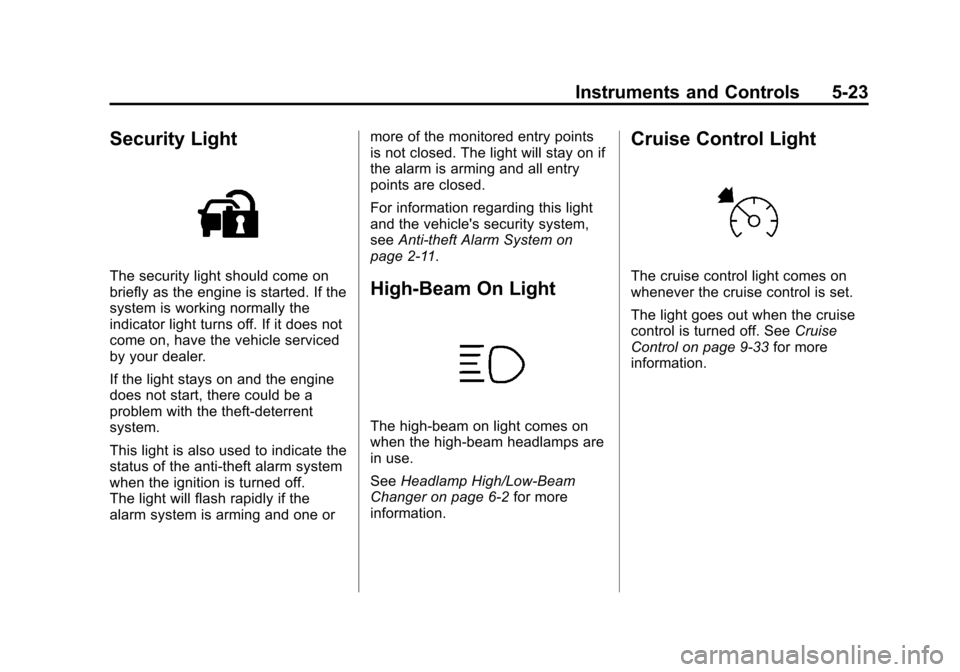
Security Light
The security light should come on
briefly as the engine is started. If the
system is working normally the
indicator light turns off. If it does not
come on, have the vehicle serviced
by your dealer.
If the light stays on and the engine
does not start, there could be a
problem with the theft-deterrent
system.
This light is also used to indicate the
status of the anti-theft alarm system
when the ignition is turned off.
The light will flash rapidly if the
alarm system is arming and one ormore of the monitored entry points
is not closed. The light will stay on if
the alarm is arming and all entry
points are closed.
For information regarding this light
and the vehicle's security system,
see
Anti-theft Alarm System on
page 2‑11.High-Beam On Light
The high‐beam on light comes on
when the high-beam headlamps are
in use.
See Headlamp High/Low-Beam
Changer on page 6‑2 for more
information.
Cruise Control Light
The cruise control light comes on
whenever the cruise control is set.
The light goes out when the cruise
control is turned off. See Cruise
Control on page 9‑33 for more
information.
Page 132 of 398
Black plate (26,1)Chevrolet Malibu Owner Manual - 2012
5-26 Instruments and Controls
OIL LIFE
Press the information button until
OIL LIFE displays. The engine oil
life system shows an estimate of the
oil's remaining useful life. It shows
100% when the system is reset
after an oil change. It alerts you to
change the oil on a schedule
consistent with your driving
conditions.
In addition to the engine oil life
system monitoring the oil life,
additional maintenance is
recommended in the Maintenance
Schedule in this manual. See
Engine Oil on page 10‑10and
Maintenance Schedule on
page 11‑2.
Always reset the engine oil life
system after an oil change. See
“How to Reset the Engine Oil Life
System” underEngine Oil Life
System on page 10‑12. Tire Pressure
On vehicles with the Tire Pressure
Monitor System (TPMS), the
pressure for each tire can be viewed
in the DIC. The tire pressure is
shown in either kilopascals (kPa)
or pounds per square inch (psi).
Press the information button until
LF ## PSI (kPa) ## RF displays
for the front tires. Press the
information button again until
LR ## PSI (kPa) ## RR displays
for the rear tires.
If a low tire pressure condition is
detected by the system while
driving, a message advising you to
add air will appear in the display.
See
Tire Pressure on page 10‑50
and Tire Messages on page 5‑30
for more information.Vehicle Messages
The following messages appear if
there is a problem detected in one
of your vehicle's systems.
A message clears when the
vehicle's condition is no longer
present. To acknowledge a
message and clear it from the
display, press and hold any of the
DIC buttons. If the condition is still
present, the warning message
comes back on the next time the
vehicle is turned off and back on.
With most messages, a warning
chime sounds when the message
displays. Your vehicle may have
other warning messages.
Page 133 of 398
Black plate (27,1)Chevrolet Malibu Owner Manual - 2012
Instruments and Controls 5-27
Brake System Messages
BRAKE FLUID
This message displays, while the
ignition is on, when the brake fluid
level is low. The brake system
warning light on the instrument
panel cluster also comes on. See
Brake System Warning Light on
page 5‑18for more information.
Have the brake system serviced by
your dealer as soon as possible.
PUSH PARK PEDAL
This message displays if the parking
brake is left engaged. See Parking
Brake on page 9‑29 for more
information.
Cruise Control Messages
CRUISE ENGAGED
This message displays when the
cruise control system is active.
See Cruise Control on page 9‑33 for
more information.
Door Ajar Messages
DOOR AJAR
This message displays if one or
more of the vehicle's doors are not
closed properly. Make sure that the
door(s) are closed completely.
TRUNK AJAR
This message displays when the
trunk is not closed completely.
Make sure that the trunk is closed
completely. See Trunk on page 2‑9
for more information.
Engine Oil Messages
CHANGE OIL SOON
This message displays when the life
of the engine oil has expired and it
should be changed.
When this message is
acknowledged and cleared from
the display, the engine oil life
system must still be reset
separately. See Engine Oil Life System on page 10‑12,
Engine Oil
on page 10‑10, and Maintenance
Schedule on page 11‑2 for more
information.
Engine Power Messages
ENG (Engine) PWR (Power)
REDUCED
This message displays when the
vehicle's engine power is reduced.
Reduced engine power can affect
the vehicle's ability to accelerate.
If this message is on, but there is
no reduction in performance,
proceed to your destination.
The performance may be reduced
the next time the vehicle is driven.
The vehicle may be driven at a
reduced speed while this message
is on, but acceleration and speed
may be reduced. Anytime this
message stays on, the vehicle
should be taken to your dealer for
service as soon as possible.
Page 136 of 398
Black plate (30,1)Chevrolet Malibu Owner Manual - 2012
5-30 Instruments and Controls
TRACTION OFF
If your vehicle has the Traction
Control System (TCS), this
message displays and the ESC/TCS
light on the instrument panel cluster
comes on solid when the system is
turned off. Adjust your driving
accordingly. SeeTraction Control
System (TCS) on page 9‑30 and
Electronic Stability Control (ESC)/
Traction Control System (TCS)
Indicator/Warning Light on
page 5‑20 for more information.
Airbag System Messages
SERVICE AIR BAG
This message displays when there
is a problem with the airbag system.
Have your vehicle serviced by your
dealer immediately.
Service Vehicle Messages
ENGINE DISABLED
This message displays if the starting
of the engine is disabled. Have your
vehicle serviced by your dealer
immediately.
POWER STEERING
On some vehicles, this message
displays if a problem has been
detected with the electric power
steering. Have your vehicle serviced
by your dealer immediately.
Tire Messages
SVC (Service) TIRE MONITOR
On vehicles with the Tire Pressure
Monitor System (TPMS), this
message displays if a part on the
TPMS is not working properly.
The tire pressure light also flashes
and then remains on during the
same ignition cycle. See Tire
Pressure Light on page 5‑21. Several conditions may cause this
message to appear. See
Tire
Pressure Monitor Operation on
page 10‑53 for more information.
If the warning comes on and stays
on, there may be a problem with the
TPMS. See your dealer.
TIRE LOW ADD AIR
On vehicles with the Tire Pressure
Monitor System (TPMS), this
message displays when the
pressure in one or more of the
vehicle's tires is low on air. The low
tire pressure warning light also
comes on. See Tire Pressure Light
on page 5‑21. If this message
appears on the DIC, stop as soon
as you can. Have the tire pressures
checked and set to those shown on
the Tire Loading Information label.
See Tires on page 10‑42, Vehicle
Load Limits on page 9‑11, and Tire
Pressure on page 10‑50. The DIC
also shows the tire pressure values.
See Driver Information Center (DIC)
on page 5‑24.
Page 138 of 398
Black plate (32,1)Chevrolet Malibu Owner Manual - 2012
5-32 Instruments and Controls
Personalization Menu Modes
OIL LIFE RESET
When this feature is displayed, you
can reset the engine oil life system.
To reset the system, seeEngine
Oil Life System on page 10‑12.
See “OIL LIFE” underDriver
Information Center (DIC) on
page 5‑24 for more information.
UNITS
This feature allows you to select
the units of measurement in which
the DIC will display the vehicle
information. When UNITS appears
on the display, press and hold the
reset button for at least one second
to scroll through the available
settings:
ENGLISH (default in United
States): All information will be
displayed in English units.
METRIC (default in Canada):
All information will be displayed in
metric units. To select a setting and move on
to the next feature, press the
information button while the desired
setting is displayed on the DIC.
REMOTE START
If your vehicle has remote start, this
feature allows remote start to be
turned off or on. Remote start allows
you to start the engine from outside
of the vehicle using your Remote
Keyless Entry (RKE) transmitter.
When REMOTE START appears on
the display, press and hold the reset
button for at least one second to
scroll through the available settings:
OFF:
The remote start feature will
be disabled.
ON (default): The remote start
feature will be enabled.
See Remote Vehicle Start on
page 2‑5 for more information.
To select a setting and move on to
the next feature, press the
information button while the desired
setting is displayed on the DIC. LOCK HORN
This feature, which allows the
vehicle's horn to chirp every time
the lock button on the Remote
Keyless Entry (RKE) transmitter
is pressed, can be enabled or
disabled. When LOCK HORN
appears on the display, press and
hold the reset button for at least
one second to scroll through the
available settings:
OFF (default):
The horn will not
chirp on the first press of the lock
button on the RKE transmitter.
The horn will still chirp on the
second press.
ON: The horn will chirp on the first
press of the lock button on the RKE
transmitter.
See Remote Keyless Entry (RKE)
System Operation on page 2‑3 for
more information.
To select a setting and move on
to the next feature, press the
information button while the desired
setting is displayed on the DIC.
Page 149 of 398
Black plate (7,1)Chevrolet Malibu Owner Manual - 2012
Lighting 6-7
This is because the generator
(alternator) may not be spinning
fast enough at idle to produce all of
the power needed for very high
electrical loads.
A high electrical load occurs when
several of the following are on, such
as: headlamps, high beams, fog
lamps, rear window defogger,
climate control fan at high speed,
heated seats, engine cooling fans,
trailer loads, and loads plugged into
accessory power outlets.
EPM works to prevent excessive
discharge of the battery. It does this
by balancing the generator's output
and the vehicle's electrical needs.
It can increase engine idle speed to
generate more power whenever
needed. It can temporarily reduce
the power demands of some
accessories.Normally, these actions occur in
steps or levels, without being
noticeable. In rare cases at the
highest levels of corrective action,
this action may be noticeable to the
driver. If so, a DIC message might
be displayed, such as BATTERY
SAVER ACTIVE, BATTERY
VOLTAGE LOW, or LOW BATTERY.
If one of these messages displays,
it is recommended that the driver
reduce the electrical loads as much
as possible. See
Driver Information
Center (DIC) on page 5‑24.
Battery Power Protection
The vehicle has a battery run-down
protection feature designed to
protect the vehicle's battery.
When any interior lamp (trunk,
reading, or visor vanity) is left on
while the ignition is turned off, the
battery run-down protection system
will automatically shut the lamp(s)
off after 20 minutes. This will avoid
draining the battery. To reactivate the interior lamps,
do one of the following:
.Turn on the ignition.
.Turn the exterior lamp control off
and then on.
.Open a door.
.Press any Remote Keyless
Entry (RKE) transmitter button
(if equipped).
.Press the remote trunk release
button.
.Press the power door lock
switch.
The battery run-down feature will
also be activated when any door
on the vehicle is left open and the
ignition is in LOCK/OFF.
Page 151 of 398
Black plate (1,1)Chevrolet Malibu Owner Manual - 2012
Infotainment System 7-1
Infotainment
System
Introduction
Infotainment . . . . . . . . . . . . . . . . . . . 7-1
Theft-Deterrent Feature . . . . . . . 7-2
Operation . . . . . . . . . . . . . . . . . . . . . 7-2
Radio
AM-FM Radio . . . . . . . . . . . . . . . . . 7-6
Satellite Radio . . . . . . . . . . . . . . . . 7-9
Radio Reception . . . . . . . . . . . . . 7-13
Backglass Antenna . . . . . . . . . . 7-14
Satellite Radio Antenna . . . . . . 7-14
Audio Players
CD Player . . . . . . . . . . . . . . . . . . . 7-15
Auxiliary Devices . . . . . . . . . . . . 7-20
Phone
Bluetooth . . . . . . . . . . . . . . . . . . . . 7-25
Introduction
Infotainment
Determine which radio the vehicle
has and read the following pages to
become familiar with its features.
{WARNING
Taking your eyes off the road for
extended periods could cause a
crash resulting in injury or death
to you or others. Do not give
extended attention to
entertainment tasks while driving.
This system provides access to
many audio and non audio listings.
To minimize taking your eyes off the
road while driving, do the following
while the vehicle is parked:
.Become familiar with the
operation and controls of the
audio system.
.Set up the tone, speaker
adjustments, and preset radio
stations. For more information, see
Defensive
Driving on page 9‑3.
Notice: Contact your dealer
before adding any equipment.
Adding audio or communication
equipment could interfere with
the operation of the engine, radio,
or other systems, and could
damage them. Follow federal
rules covering mobile radio and
telephone equipment.
Notice: The chime signals related
to safety belts, parking brake,
and other functions of your
vehicle operate through the
radio/entertainment system.
If that equipment is replaced or
additional equipment is added to
your vehicle, the chimes may
not work. Make sure that
replacement or additional
equipment is compatible
with your vehicle before
installing it. See Accessories
and Modifications on page 10‑3.
Page 184 of 398
Black plate (2,1)Chevrolet Malibu Owner Manual - 2012
8-2 Climate Controls
Operation
Temperature Control:Turn
clockwise or counterclockwise to
increase or decrease the
temperature inside the vehicle.
When it is cold outside −18°C (0°F)
or lower, use the engine coolant
heater, if vehicle has one, to provide
warmer air faster to the vehicle.
An engine coolant heater warms
the coolant the engine uses that
provides heat to warm the inside of
the vehicle. For more information,
see Engine Heater on page 9‑20.
9(Fan Control): Turn clockwise
or counterclockwise to increase or
decrease the fan speed. The fan
must be on to run the
air-conditioning compressor.
Air Delivery Mode Control:
Turn clockwise or counterclockwise
to change the current airflow mode. Select from the following:
H(Vent):
Air is directed to the
instrument panel outlets.
)(Bi-Level): Air is divided
between the instrument panel and
floor outlets. Some air will be
directed toward the side windows.
6(Floor): Air is directed to the
floor outlets with some air directed
to the windshield and side window
outlets.
-(Defog): This mode clears the
windows of fog or moisture. Air is
directed to the windshield and floor
outlets, with some air directed to the
side windows. When this mode is
selected, the system automatically
turns off recirculation and runs the
air-conditioning compressor unless
the outside temperature is at or
below freezing. The air-conditioning
compressor operates although
the indicator light is not on.
The air-conditioning indicator light
turns off when defog is selected. If the air-conditioning button is
pressed while in defog mode, the
indicator light will turn on. If the
button is pressed again, the light
will turn off. The recirculation mode
cannot be selected while in the
defog mode. Do not drive the
vehicle until all the windows are
clear.
1(Defrost):
This mode quickly
clears the windshield of fog or frost.
Air is directed to the windshield with
some air directed to the floor vents.
In this mode, outside air is pulled
into the vehicle. The air-conditioning
compressor will not run unless the
outside temperature is at or below
freezing. The air-conditioning
compressor operates although
the indicator light is not on.
The air-conditioning indicator light
turns off when defrost is selected.