2012 CHEVROLET MALIBU change time
[x] Cancel search: change timePage 133 of 398
Black plate (27,1)Chevrolet Malibu Owner Manual - 2012
Instruments and Controls 5-27
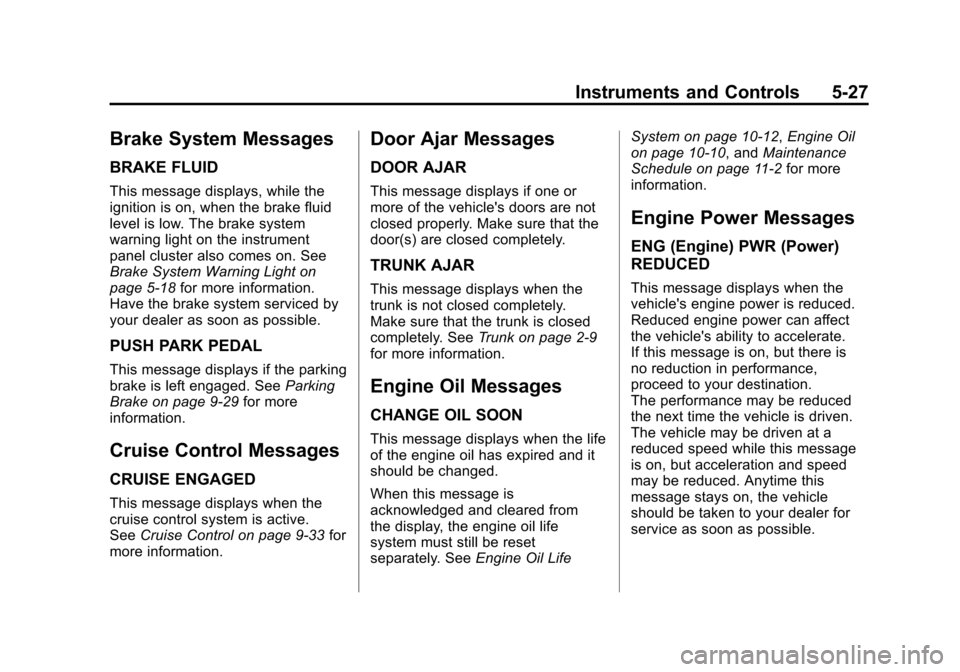
Brake System Messages
BRAKE FLUID
This message displays, while the
ignition is on, when the brake fluid
level is low. The brake system
warning light on the instrument
panel cluster also comes on. See
Brake System Warning Light on
page 5‑18for more information.
Have the brake system serviced by
your dealer as soon as possible.
PUSH PARK PEDAL
This message displays if the parking
brake is left engaged. See Parking
Brake on page 9‑29 for more
information.
Cruise Control Messages
CRUISE ENGAGED
This message displays when the
cruise control system is active.
See Cruise Control on page 9‑33 for
more information.
Door Ajar Messages
DOOR AJAR
This message displays if one or
more of the vehicle's doors are not
closed properly. Make sure that the
door(s) are closed completely.
TRUNK AJAR
This message displays when the
trunk is not closed completely.
Make sure that the trunk is closed
completely. See Trunk on page 2‑9
for more information.
Engine Oil Messages
CHANGE OIL SOON
This message displays when the life
of the engine oil has expired and it
should be changed.
When this message is
acknowledged and cleared from
the display, the engine oil life
system must still be reset
separately. See Engine Oil Life System on page 10‑12,
Engine Oil
on page 10‑10, and Maintenance
Schedule on page 11‑2 for more
information.
Engine Power Messages
ENG (Engine) PWR (Power)
REDUCED
This message displays when the
vehicle's engine power is reduced.
Reduced engine power can affect
the vehicle's ability to accelerate.
If this message is on, but there is
no reduction in performance,
proceed to your destination.
The performance may be reduced
the next time the vehicle is driven.
The vehicle may be driven at a
reduced speed while this message
is on, but acceleration and speed
may be reduced. Anytime this
message stays on, the vehicle
should be taken to your dealer for
service as soon as possible.
Page 137 of 398
Black plate (31,1)Chevrolet Malibu Owner Manual - 2012
Instruments and Controls 5-31
Vehicle Reminder
Messages
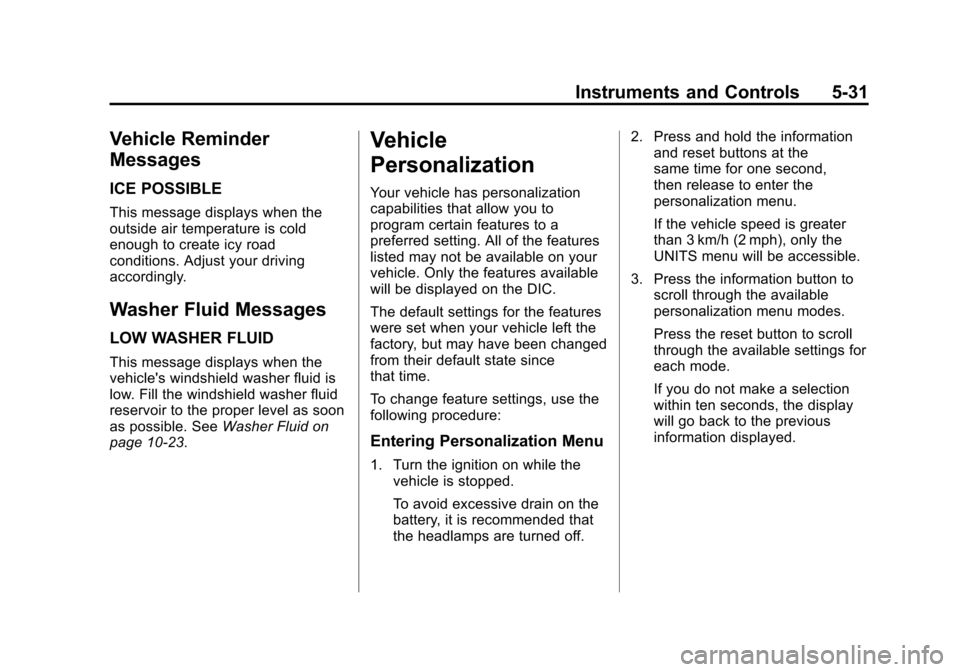
ICE POSSIBLE
This message displays when the
outside air temperature is cold
enough to create icy road
conditions. Adjust your driving
accordingly.
Washer Fluid Messages
LOW WASHER FLUID
This message displays when the
vehicle's windshield washer fluid is
low. Fill the windshield washer fluid
reservoir to the proper level as soon
as possible. SeeWasher Fluid on
page 10‑23.
Vehicle
Personalization
Your vehicle has personalization
capabilities that allow you to
program certain features to a
preferred setting. All of the features
listed may not be available on your
vehicle. Only the features available
will be displayed on the DIC.
The default settings for the features
were set when your vehicle left the
factory, but may have been changed
from their default state since
that time.
To change feature settings, use the
following procedure:
Entering Personalization Menu
1. Turn the ignition on while the
vehicle is stopped.
To avoid excessive drain on the
battery, it is recommended that
the headlamps are turned off. 2. Press and hold the information
and reset buttons at the
same time for one second,
then release to enter the
personalization menu.
If the vehicle speed is greater
than 3 km/h (2 mph), only the
UNITS menu will be accessible.
3. Press the information button to scroll through the available
personalization menu modes.
Press the reset button to scroll
through the available settings for
each mode.
If you do not make a selection
within ten seconds, the display
will go back to the previous
information displayed.
Page 143 of 398
Black plate (1,1)Chevrolet Malibu Owner Manual - 2012
Lighting 6-1
Lighting
Exterior Lighting
Exterior Lamp Controls . . . . . . . . 6-1
Exterior Lamps OffReminder . . . . . . . . . . . . . . . . . . . . 6-2
Headlamp High/Low-Beam Changer . . . . . . . . . . . . . . . . . . . . . 6-2
Flash-to-Pass . . . . . . . . . . . . . . . . . 6-2
Daytime Running Lamps (DRL) . . . . . . . . . . . . . . . . 6-2
Automatic Headlamp System . . . . . . . . . . . . . . . . . . . . . . 6-3
Delayed Headlamps . . . . . . . . . . 6-4
Hazard Warning Flashers . . . . . 6-4
Turn and Lane-Change Signals . . . . . . . . . . . . . . . . . . . . . . 6-4
Fog Lamps . . . . . . . . . . . . . . . . . . . . 6-5
Interior Lighting
Instrument Panel Illumination Control . . . . . . . . . . . . . . . . . . . . . . 6-5
Dome Lamps . . . . . . . . . . . . . . . . . 6-6
Reading Lamps . . . . . . . . . . . . . . . 6-6
Lighting Features
Entry/Exit Lighting . . . . . . . . . . . . . 6-6
Parade Dimming . . . . . . . . . . . . . . 6-6
Battery Load Management . . . . 6-6
Battery Power Protection . . . . . . 6-7
Exterior Lighting
Exterior Lamp Controls
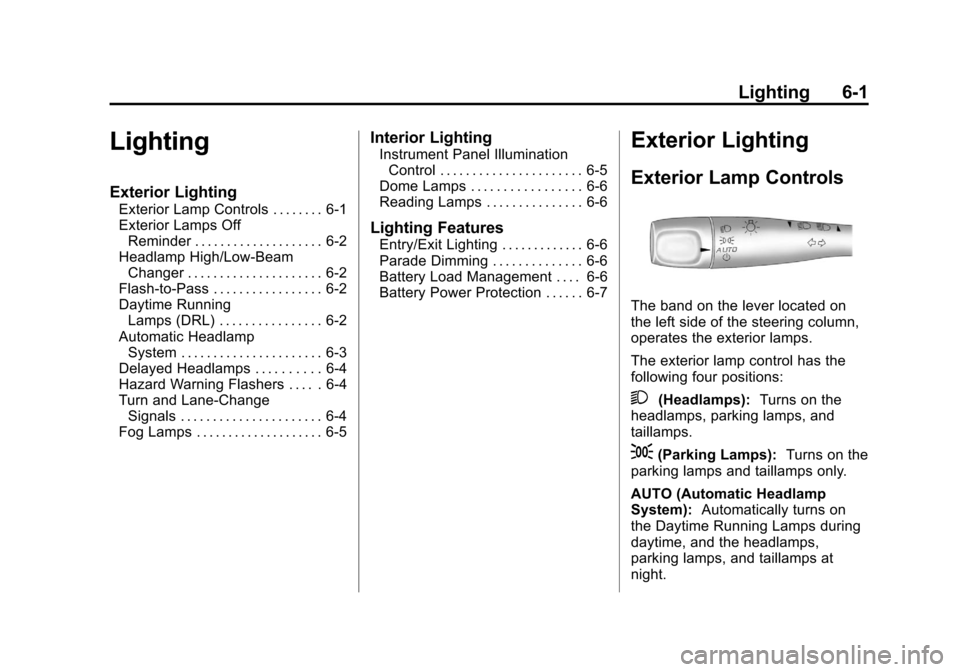
The band on the lever located on
the left side of the steering column,
operates the exterior lamps.
The exterior lamp control has the
following four positions:
2(Headlamps): Turns on the
headlamps, parking lamps, and
taillamps.
;(Parking Lamps): Turns on the
parking lamps and taillamps only.
AUTO (Automatic Headlamp
System): Automatically turns on
the Daytime Running Lamps during
daytime, and the headlamps,
parking lamps, and taillamps at
night.
Page 144 of 398
Black plate (2,1)Chevrolet Malibu Owner Manual - 2012
6-2 Lighting
P(Off/On):Turn the band to this
position to turn on the Automatic
Headlamp System. In Canada,
this position only works when a
vehicle is in the P (Park) position.
To turn on the Automatic Headlamp
System, turn the switch to off/on.
To turn them off, turn the switch to
off/on again. This is a momentary
control switch that springs back
when released. The Automatic
Headlamp System always turns on
at the beginning of an ignition cycle.
Exterior Lamps Off
Reminder
If the drivers door is opened and the
ignition is turned off while leaving
the lamps on, a warning chime will
sound.
Headlamp High/
Low-Beam Changer
To change the headlamps from low
beam to high beam, push the turn
signal/multifunction lever away
from you.
This instrument panel cluster
light
3comes on if the high beam
lamps are turned on while the
ignition is in ON/RUN.
To change the headlamps from
high beam to low beam, pull the
turn signal lever toward you.
Flash-to-Pass
This feature lets the high-beam
headlamps be used to signal a
driver in front of you that you want
to pass.
Pull the turn signal/multifunction
lever toward you until the high-beam
headlamps come on, then release
the lever to turn them off.
Daytime Running
Lamps (DRL)
Daytime Running Lamps (DRL) can
make it easier for others to see the
front of your vehicle during the day.
Fully functional DRL are required on
all vehicles first sold in Canada.
The vehicle has a light sensor on
top of the instrument panel that
controls the DRL. Do not cover this
sensor or the head lamps will be on
when they are not needed.
The DRL system makes the
low-beam headlamps come on at
a reduced brightness when the
following conditions are met:
.The ignition is on.
.The exterior lamps control is
in AUTO.
.The exterior lamps control is in
the parking lamps only position
(This applies only to vehicles
that are first sold in Canada).
Page 145 of 398
Black plate (3,1)Chevrolet Malibu Owner Manual - 2012
Lighting 6-3
.The light sensor detects
daytime light.
.The parking brake is released or
the vehicle is not in P (Park).
When the DRL system is on, the
taillamps, sidemarker lamps,
parking lamps, and instrument panel
lights are not on unless you turn the
exterior lamps control to the parking
lamp position.
The regular headlamp system
should be turned on when they are
needed.
Automatic Headlamp
System
When it is dark enough outside, the
automatic headlamp system turns
on the headlamps at the normal
brightness along with other lamps
such as the taillamps, sidemarker,
parking lamps, and the instrument
panel lights. The radio lights will
also be dim.
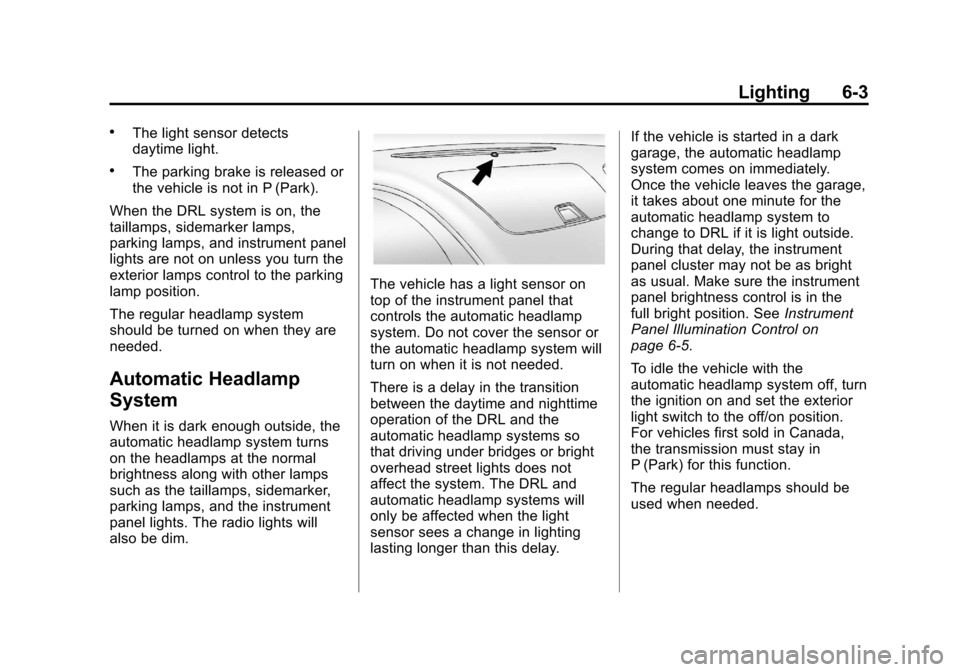
The vehicle has a light sensor on
top of the instrument panel that
controls the automatic headlamp
system. Do not cover the sensor or
the automatic headlamp system will
turn on when it is not needed.
There is a delay in the transition
between the daytime and nighttime
operation of the DRL and the
automatic headlamp systems so
that driving under bridges or bright
overhead street lights does not
affect the system. The DRL and
automatic headlamp systems will
only be affected when the light
sensor sees a change in lighting
lasting longer than this delay. If the vehicle is started in a dark
garage, the automatic headlamp
system comes on immediately.
Once the vehicle leaves the garage,
it takes about one minute for the
automatic headlamp system to
change to DRL if it is light outside.
During that delay, the instrument
panel cluster may not be as bright
as usual. Make sure the instrument
panel brightness control is in the
full bright position. See
Instrument
Panel Illumination Control on
page 6‑5.
To idle the vehicle with the
automatic headlamp system off, turn
the ignition on and set the exterior
light switch to the off/on position.
For vehicles first sold in Canada,
the transmission must stay in
P (Park) for this function.
The regular headlamps should be
used when needed.
Page 146 of 398
Black plate (4,1)Chevrolet Malibu Owner Manual - 2012
6-4 Lighting
Delayed Headlamps
The delayed headlamps feature
keeps the headlamps on for
20 seconds after the key is turned to
LOCK/OFF, then the headlamps
automatically turn off.
To override the 20 second delayed
headlamp feature while it is active
turn the turn signal/multifunction
lever up one position and then back
to AUTO.
Hazard Warning Flashers
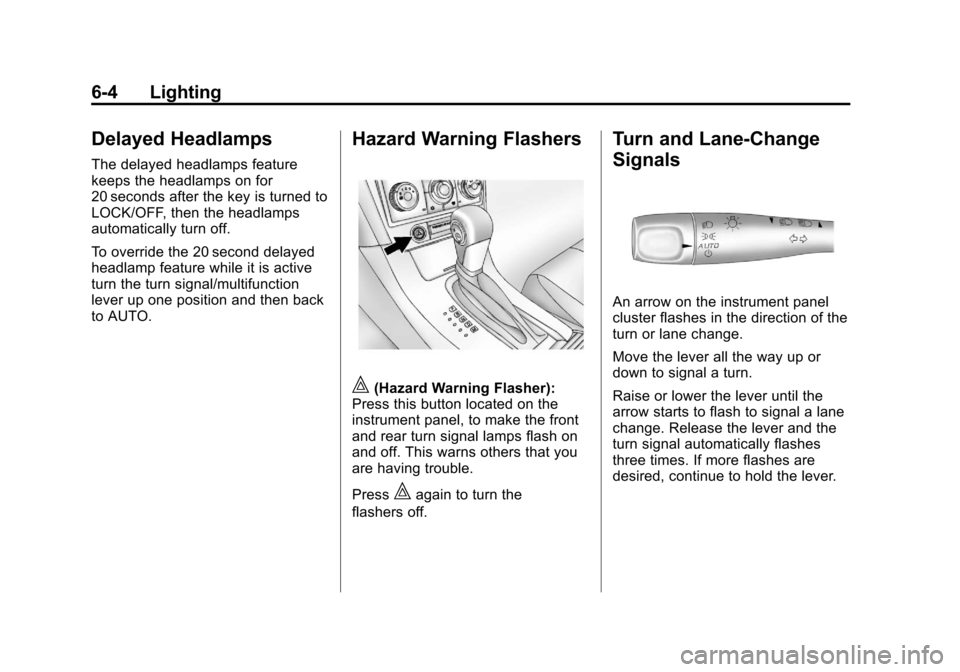
|(Hazard Warning Flasher):
Press this button located on the
instrument panel, to make the front
and rear turn signal lamps flash on
and off. This warns others that you
are having trouble.
Press
|again to turn the
flashers off.
Turn and Lane-Change
Signals
An arrow on the instrument panel
cluster flashes in the direction of the
turn or lane change.
Move the lever all the way up or
down to signal a turn.
Raise or lower the lever until the
arrow starts to flash to signal a lane
change. Release the lever and the
turn signal automatically flashes
three times. If more flashes are
desired, continue to hold the lever.
Page 176 of 398
Black plate (26,1)Chevrolet Malibu Owner Manual - 2012
7-26 Infotainment System
Voice Recognition
The Bluetooth system uses voice
recognition to interpret voice
commands to dial phone numbers
and name tags.
For additional information, say
“Help”while you are in a voice
recognition menu.
Noise: Keep interior noise levels to
a minimum. The system may not
recognize voice commands if there
is too much background noise.
When to Speak: A short tone
sounds after the system responds
indicating when it is waiting for a
voice command. Wait until the tone
and then speak.
How to Speak: Speak clearly in a
calm and natural voice.
Audio System
When using the in‐vehicle Bluetooth
system, sound comes through the
vehicle's front audio system
speakers and overrides the audio
system. Use the audio system
volume knob, during a call, to
change the volume level. The
adjusted volume level remains in
memory for later calls. To prevent
missed calls, a minimum volume
level is used if the volume is turned
down too low.
Bluetooth Controls
Use the buttons located on the
steering wheel to operate the
in‐vehicle Bluetooth system.
See Steering Wheel Controls on
page 5‑2 for more information.
b/g(Push To Talk): Press to
answer incoming calls, to confirm
system information, and to start
speech recognition.
x/c(Mute/End Call): Press to
end a call, reject a call, or to cancel
an operation.
Pairing
A Bluetooth cell phone must be
paired to the Bluetooth system and
then connected to the vehicle before
it can be used. See your cell phone
manufacturers user guide for
Bluetooth functions before pairing
the cell phone. If a Bluetooth phone
is not connected, calls will be made
using OnStar
®Hands‐Free Calling,
if available. See OnStar Overview
on page 14‑1 for more information.
Pairing Information
.A Bluetooth phone with MP3
capability cannot be paired to
the vehicle as a phone and an
MP3 player at the same time.
.Up to five cell phones can be
paired to the Bluetooth system.
.The pairing process is disabled
when the vehicle is moving.
.Pairing only needs to be
completed once, unless the
pairing information on the cell
phone changes or the cell phone
is deleted from the system.
Page 178 of 398
Black plate (28,1)Chevrolet Malibu Owner Manual - 2012
7-28 Infotainment System
Connecting to a Different Phone
To connect to a different cell phone,
the Bluetooth system looks for the
next available cell phone in the
order in which all the available cell
phones were paired. Depending on
which cell phone you want to
connect to, you may have to use
this command several times.
1. Press and hold
b/gfor
two seconds.
2. Say “Bluetooth.”
3. Say “Change phone.”
.If another cell phone is
found, the response will be
“
connected.”
.If another cell phone is not
found, the original phone
remains connected.
Storing and Deleting Phone
Numbers
The system can store up to
30 phone numbers as name tags in
the Hands Free Directory that is
shared between the Bluetooth and
OnStar systems.
The following commands are used
delete and store phone numbers.
Store:This command will store a
phone number, or a group of
numbers as a name tag.
Digit Store: This command allows
a phone number to be stored as a
name tag by entering the digits one
at a time.
Delete: This command is used to
delete individual name tags.
Delete All Name Tags: This
command deletes all stored
name tags in the Hands Free
Calling Directory and the OnStar
Turn‐by‐Turn Destinations Directory. Using the
“Store”Command
1. Press and holdb/gfor
two seconds.
2. Say “Store.”
3. Say the phone number or group of numbers you want to store all
at once with no pauses, then
follow the directions given by the
system to save a name tag for
this number.
Using the “Digit Store” Command
If an unwanted number is
recognized by the system, say
“Clear” at any time to clear the last
number.
To hear all of the numbers
recognized by the system, say
“Verify” at any time.
1. Press and hold
b/gfor
two seconds.
2. Say “Digit Store.”