2012 CHEVROLET MALIBU clock
[x] Cancel search: clockPage 18 of 398
Black plate (12,1)Chevrolet Malibu Owner Manual - 2012
1-12 In Brief
Steering Wheel
Adjustment
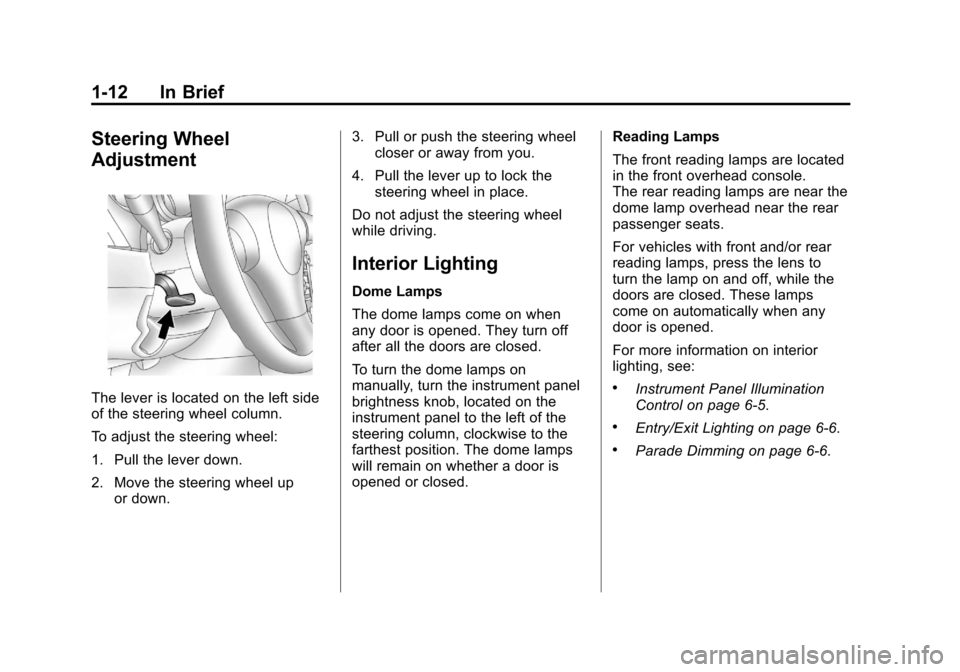
The lever is located on the left side
of the steering wheel column.
To adjust the steering wheel:
1. Pull the lever down.
2. Move the steering wheel upor down. 3. Pull or push the steering wheel
closer or away from you.
4. Pull the lever up to lock the steering wheel in place.
Do not adjust the steering wheel
while driving.
Interior Lighting
Dome Lamps
The dome lamps come on when
any door is opened. They turn off
after all the doors are closed.
To turn the dome lamps on
manually, turn the instrument panel
brightness knob, located on the
instrument panel to the left of the
steering column, clockwise to the
farthest position. The dome lamps
will remain on whether a door is
opened or closed. Reading Lamps
The front reading lamps are located
in the front overhead console.
The rear reading lamps are near the
dome lamp overhead near the rear
passenger seats.
For vehicles with front and/or rear
reading lamps, press the lens to
turn the lamp on and off, while the
doors are closed. These lamps
come on automatically when any
door is opened.
For more information on interior
lighting, see:
.Instrument Panel Illumination
Control on page 6‑5.
.Entry/Exit Lighting on page 6‑6.
.Parade Dimming on page 6‑6.
Page 23 of 398
Black plate (17,1)Chevrolet Malibu Owner Manual - 2012
In Brief 1-17
Storing a Favorite Station
Depending on which radio the
vehicle has, radio stations are
stored as either favorites or presets.
For radios with a FAV button, a
maximum of 36 stations can be
stored as favorites using the six
softkeys located below the radio
station frequency tabs and by using
the radio FAV button. Press FAV
to go through up to six pages of
favorites, each having six favorite
stations available per page.
Each page of favorites can contain
any combination of AM, FM,
or XM™stations.
For radios without a FAV button,
up to 18 stations (six FM1, six FM2,
and six AM), can be programmed
on the six numbered buttons.
See Operation on page 7‑2.
Setting the Clock
To set the time and date for the
Radio with CD (MP3) and USB port
or Radio with a Single CD (MP3)
player:
1. Turn the ignition key to
ACC/ACCESSORY or ON/RUN.
2. Press
Oto turn the radio on.
3. Press
Hand the HR, MIN, MM,
DD, YYYY (hour, minute, month,
day, and year) displays.
4. Press the softkey located below any one of the tabs that you
want to change.
5. Increase or decrease the time or date by turning
fclockwise or
counterclockwise.
For detailed instructions on setting
the clock for your specific audio
system, see Clock on page 5‑6.
Satellite Radio
XM is a satellite radio service based
in the 48 contiguous United States
and 10 Canadian provinces.
XM satellite radio has a wide
variety of programming and
commercial-free music, coast to
coast, and in digital-quality sound.
A fee is required to receive the
XM service.
For more information, refer to:
.www.xmradio.com or call
1-800-929-2100 (U.S.)
.www.xmradio.ca or call
1-877-438-9677 (Canada)
See Satellite Radio on page 7‑9.
Page 37 of 398
Black plate (7,1)Chevrolet Malibu Owner Manual - 2012
Keys, Doors, and Windows 2-7
Door Locks
{WARNING
Unlocked doors can be
dangerous.
.Passengers, especially
children, can easily open the
doors and fall out of a moving
vehicle. When a door is
locked, the handle will not
open it. The chance of being
thrown out of the vehicle in a
crash is increased if the
doors are not locked. So, all
passengers should wear
safety belts properly and the
doors should be locked
whenever the vehicle is
driven.
.Young children who get into
unlocked vehicles may be
unable to get out. A child can
be overcome by extreme heat
and can suffer permanent(Continued)
WARNING (Continued)
injuries or even death from
heat stroke. Always lock the
vehicle whenever leaving it.
.Outsiders can easily enter
through an unlocked door
when you slow down or stop
the vehicle. Locking the doors
can help prevent this from
happening.
There are several ways to lock and
unlock your vehicle.
From the outside, turn the key in the
driver door lock counterclockwise to
lock the door and clockwise to
unlock it, or use the Remote
Keyless Entry (RKE) transmitter.
From the inside, move the manual
lock control on the door or use the
power door lock switch.
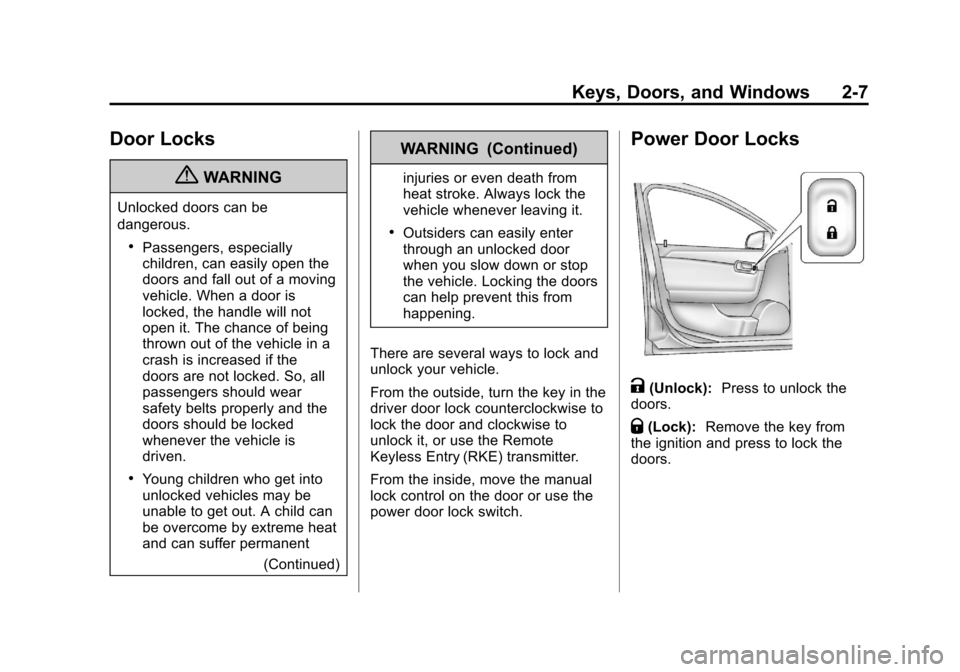
Power Door Locks
K(Unlock): Press to unlock the
doors.
Q(Lock): Remove the key from
the ignition and press to lock the
doors.
Page 107 of 398
Black plate (1,1)Chevrolet Malibu Owner Manual - 2012
Instruments and Controls 5-1
Instruments and
Controls
Controls
Steering Wheel Adjustment . . . 5-2
Steering Wheel Controls . . . . . . 5-2
Horn . . . . . . . . . . . . . . . . . . . . . . . . . . 5-3
Windshield Wiper/Washer . . . . . 5-4
Compass . . . . . . . . . . . . . . . . . . . . . 5-5
Clock . . . . . . . . . . . . . . . . . . . . . . . . . 5-6
Power Outlets . . . . . . . . . . . . . . . . . 5-7
Warning Lights, Gauges, and
Indicators
Warning Lights, Gauges, andIndicators . . . . . . . . . . . . . . . . . . . . 5-9
Instrument Cluster . . . . . . . . . . . 5-10
Speedometer . . . . . . . . . . . . . . . . 5-11
Odometer . . . . . . . . . . . . . . . . . . . . 5-11
Trip Odometer . . . . . . . . . . . . . . . 5-11
Tachometer . . . . . . . . . . . . . . . . . . 5-11
Fuel Gauge . . . . . . . . . . . . . . . . . . 5-12
Engine Coolant Temperature Gauge . . . . . . . . . . . . . . . . . . . . . . 5-13
Safety Belt Reminders . . . . . . . 5-13
Airbag Readiness Light . . . . . . 5-14 Passenger Airbag Status
Indicator . . . . . . . . . . . . . . . . . . . . 5-15
Charging System Light . . . . . . 5-16
Malfunction Indicator Lamp . . . . . . . . . . . . . 5-16
Brake System Warning Light . . . . . . . . . . . . . . . . . . . . . . . 5-18
Antilock Brake System (ABS) Warning Light . . . . . . . . . . . . . . 5-19
Traction Off Light . . . . . . . . . . . . 5-20
Electronic Stability Control (ESC) Off Light . . . . . . . . . . . . . 5-20
Electronic Stability Control (ESC)/Traction Control
System (TCS) Indicator/
Warning Light . . . . . . . . . . . . . . 5-20
Engine Coolant Temperature Warning Light . . . . . . . . . . . . . . 5-21
Tire Pressure Light . . . . . . . . . . 5-21
Engine Oil Pressure Light . . . . 5-22
Security Light . . . . . . . . . . . . . . . . 5-23
High-Beam On Light . . . . . . . . . 5-23
Cruise Control Light . . . . . . . . . 5-23
Information Displays
Driver Information Center (DIC) . . . . . . . . . . . . . . . 5-24
Vehicle Messages
Vehicle Messages . . . . . . . . . . . 5-26
Brake System Messages . . . . 5-27
Cruise Control Messages . . . . 5-27
Door Ajar Messages . . . . . . . . . 5-27
Engine Oil Messages . . . . . . . . 5-27
Engine Power Messages . . . . 5-27
Fuel System Messages . . . . . . 5-28
Key and Lock Messages . . . . . 5-28
Lamp Messages . . . . . . . . . . . . . 5-28
Ride Control SystemMessages . . . . . . . . . . . . . . . . . . 5-28
Airbag System Messages . . . . 5-30
Service Vehicle Messages . . . 5-30
Tire Messages . . . . . . . . . . . . . . . 5-30
Vehicle Reminder Messages . . . . . . . . . . . . . . . . . . 5-31
Washer Fluid Messages . . . . . 5-31
Vehicle Personalization
Vehicle Personalization . . . . . . 5-31
Page 112 of 398
Black plate (6,1)Chevrolet Malibu Owner Manual - 2012
5-6 Instruments and Controls
Clock
Without Date Display
AM/FM Base Radio with a
Single CD Player
To set the time:
1. Turn the ignition key toACC/ACCESSORY or ON/RUN.
Press the
Oknob to turn the
radio on.
2. Press the
Hbutton until the hour
begins flashing on the display.
Press the
Hbutton a second
time and the minute begins
flashing on the display.
3. While either the hour or the minute numbers are flashing,
turn the
fknob to increase or
decrease the time.
4. Press the
Hbutton again until
the clock display stops flashing
to set the currently displayed
time; otherwise, the flashing
stops after five seconds and
the current time displayed is
automatically set. To change the time default setting
from 12 hour to 24 hour, press
the
Hbutton until 12H or 24H is
displayed. Once 12H or 24H is
displayed, turn the
fknob to the
desired option to select the setting.
Press the
Hbutton again to apply
the setting, or let the screen
time out.
With Date Display
Radio with CD (MP3) and
USB Port, and Radio with
Single CD (MP3) Player
To set the time and date:
1. Turn the ignition key to ACC/ACCESSORY or ON/RUN.
Press the
Oknob to turn the
radio on.
2. Press the
Hbutton and the HR,
MIN, MM, DD, YYYY (hour,
minute, month, day, and year)
displays. 3. Press the softkey located below
any one of the tabs that you
want to change.
4. To increase the time or date do one of the following:
.Press the softkey located
below the selected tab.
.Press the¨SEEK, or
\FWD button.
.Turn thefknob clockwise.
5. To decrease the time or date do one of the following:
.Press the©SEEK or
sREV button.
.Turn thefknob
counterclockwise.
Page 147 of 398
Black plate (5,1)Chevrolet Malibu Owner Manual - 2012
Lighting 6-5
The lever returns to its starting
position when it is released.
If a turn signal arrow flashes rapidly
or does not come on, a signal bulb
may need to be replaced. See
Fuses on page 10‑34.
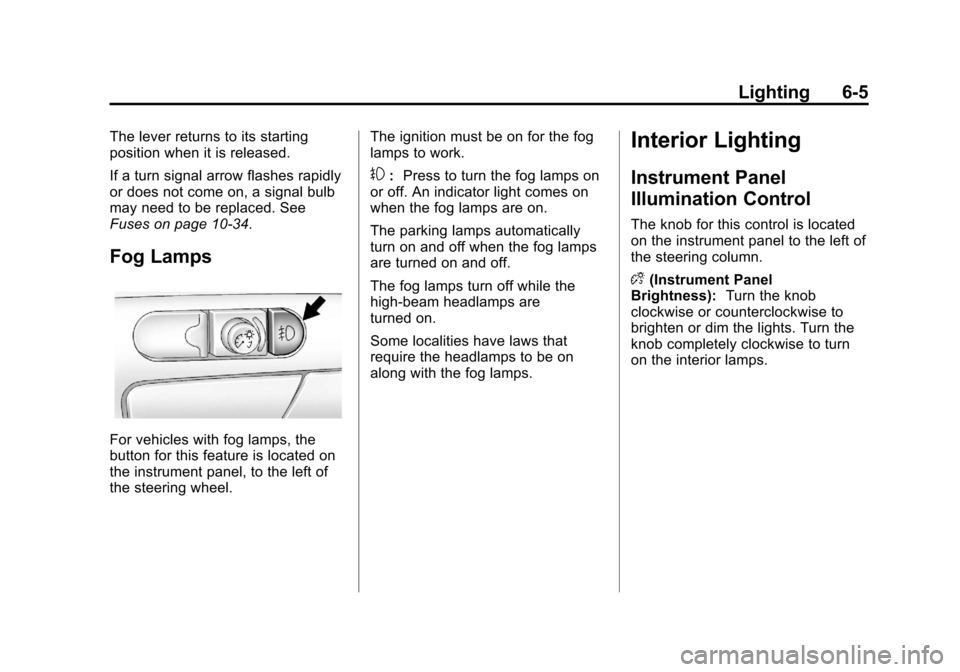
Fog Lamps
For vehicles with fog lamps, the
button for this feature is located on
the instrument panel, to the left of
the steering wheel.The ignition must be on for the fog
lamps to work.
#:
Press to turn the fog lamps on
or off. An indicator light comes on
when the fog lamps are on.
The parking lamps automatically
turn on and off when the fog lamps
are turned on and off.
The fog lamps turn off while the
high-beam headlamps are
turned on.
Some localities have laws that
require the headlamps to be on
along with the fog lamps.
Interior Lighting
Instrument Panel
Illumination Control
The knob for this control is located
on the instrument panel to the left of
the steering column.
D (Instrument Panel
Brightness): Turn the knob
clockwise or counterclockwise to
brighten or dim the lights. Turn the
knob completely clockwise to turn
on the interior lamps.
Page 148 of 398
Black plate (6,1)Chevrolet Malibu Owner Manual - 2012
6-6 Lighting
Dome Lamps
The dome lamps come on when any
door is opened. They turn off after
all the doors are closed.
The dome lamps can also be turned
on by turning the instrument panel
brightness knob, located on the
instrument panel to the left of the
steering column, clockwise to the
farthest position. In this position, the
dome lamps remain on whether a
door is opened or closed.
Reading Lamps
For vehicles with front and rear
reading lamps, press the lens to
turn the lamp on and off, while the
doors are closed. These lamps
come on automatically when any
door is opened.
Lighting Features
Entry/Exit Lighting
The lamps inside the vehicle come
on when any door is opened. These
lamps fade out about 20 seconds
after all of the doors have been
closed or when the ignition is turned
to ON/RUN. They also come on
when the unlock symbol button or
the horn symbol is pressed on the
Remote Keyless Entry (RKE)
system transmitter.
The lamps inside the vehicle stay on
for about 20 seconds after the key is
removed from the ignition to provide
light as you exit.
Parade Dimming
Parade dimming is a separate
lighting mode that comes on while
the parking lamps are turned on
during the day. It prevents the
display lights and indicator lights
from being dim, while the parking
lamps are used during the day.
Battery Load
Management
The vehicle has Electric Power
Management (EPM) that estimates
the battery's temperature and state
of charge. It then adjusts the voltage
for best performance and extended
life of the battery.
When the battery's state of charge
is low, the voltage is raised slightly
to quickly bring the charge back up.
When the state of charge is high,
the voltage is lowered slightly to
prevent overcharging. If the vehicle
has a voltmeter gauge or a voltage
display on the Driver Information
Center (DIC), you may see the
voltage move up or down. This is
normal. If there is a problem, an
alert will be displayed.
The battery can be discharged at
idle if the electrical loads are very
high. This is true for all vehicles.
Page 154 of 398
Black plate (4,1)Chevrolet Malibu Owner Manual - 2012
7-4 Infotainment System
To activate SCV:
1. Set the radio volume to thedesired level.
2. Press MENU to display the radio setup menu.
3. Press the softkey under the AUTO VOLUM tab on the radio
display.
4. Press the softkey under the desired Speed Compensated
Volume setting (OFF, Low, Med,
or High) to select the level of
radio volume compensation.
The display times out after
approximately 10 seconds.
Each higher setting allows
for more radio volume
compensation at faster
vehicle speeds.Setting the Tone (Bass/Treble)
Radio with CD
To adjust the bass, or treble:
1. Press the
fknob until Bass or
Treble displays.
2. To adjust the setting, do one of the following:
.Turn thefknob.
.Press either¨SEEK,
or
©SEEK button.
.Press either\FWD,
or
sREV button.
EQ (Equalization): Press this
button to choose bass and treble
equalization settings designed for
different types of music. Selecting
MANUAL or changing bass or
treble, returns the EQ to the manual
bass and treble settings.
Unique EQ settings can be saved
for each source.
Setting the Tone (Bass/
Midrange/Treble) Radio with
CD (MP3) and USB Port,
Radio with CD (MP3)
BASS/MID/TREB (Bass, Midrange,
or Treble): To adjust the bass,
midrange, or treble:
1. Press the
fknob until the tone
control tabs display.
2. Highlight the desired tone control tab by doing one of the
following:
.Pressing thefknob..Press the softkey under the
desired tab.
3. Adjust the setting by doing one of the following:
.Turn thefknob clockwise
or counterclockwise.
.Press the¨SEEK,
or
©SEEK button.
.Press the\FWD,
or
sREV button.