2011 TOYOTA VERSO S battery
[x] Cancel search: batteryPage 204 of 664
2044-1. Key information
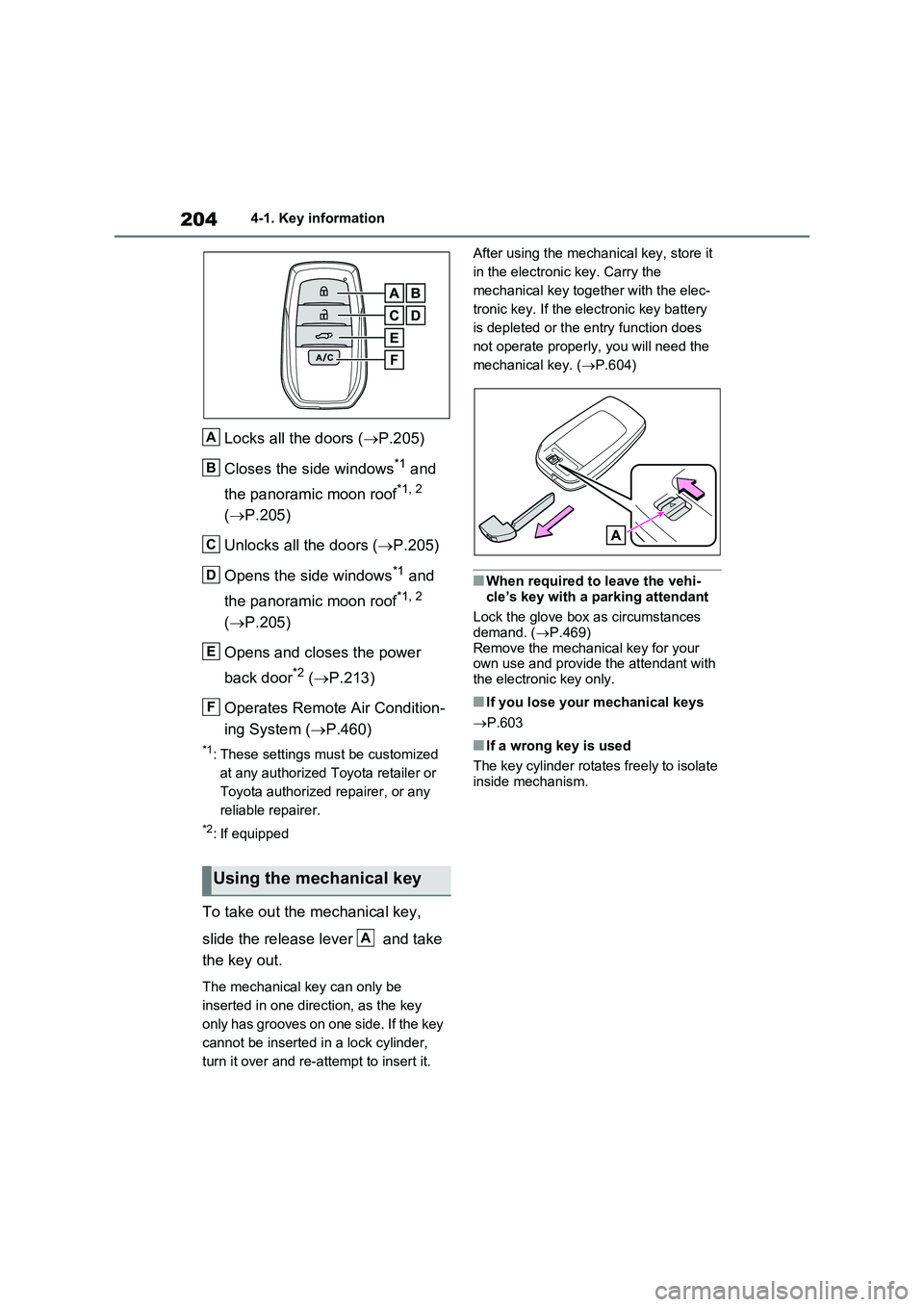
Locks all the doors (P.205)
Closes the side windows*1 and
the panoramic moon roof*1, 2
( P.205)
Unlocks all the doors ( P.205)
Opens the side windows*1 and
the panoramic moon roof*1, 2
( P.205)
Opens and closes the power
back door*2 ( P.213)
Operates Remote Air Condition-
ing System ( P.460)
*1: These settings must be customized
at any authorized Toyota retailer or
Toyota authorized repairer, or any
reliable repairer.
*2: If equipped
To take out the mechanical key,
slide the release lever and take
the key out.
The mechanical key can only be
inserted in one direction, as the key
only has grooves on one side. If the key
cannot be inserted in a lock cylinder,
turn it over and re-attempt to insert it.
After using the mechanical key, store it
in the electronic key. Carry the
mechanical key together with the elec-
tronic key. If the electronic key battery
is depleted or the entry function does
not operate properly, you will need the
mechanical key. ( P.604)
■When required to leave the vehi-
cle’s key with a parking attendant
Lock the glove box as circumstances demand. ( P.469)
Remove the mechanical key for your own use and provide the attendant with the electronic key only.
■If you lose your mechanical keys
P.603
■If a wrong key is used
The key cylinder rotates freely to isolate inside mechanism.
Using the mechanical key
A
B
C
D
E
F
A
Page 207 of 664
207
4
4-2. Opening, closing and locking the doors
Before driving
■Setting the alarm (if equipped)
Locking the doors will set the alarm sys- tem. ( P.78)
■Conditions affecting the operation of the smart entry & start system or
wireless remote control
P.225
■If the smart entry & start system or the wireless remote control does
not operate properly
●Use the mechanical key to lock and
unlock the doors. ( P.604)
●Replace the key battery with a new
one if it is depleted. ( P.543)
■If the 12-volt battery is discharged
The doors cannot be locked and unlocked using the smart entry & start
system or wireless remote control. Lock or unlock the doors using the mechani-cal key. ( P.604)
■Rear seat reminder function
●In order to remind you not to forget luggage, etc. in the rear seat, when
the power switch is turned to OFF after any of the following conditions are met, a buzzer will sound and a
message will be displayed on the multi-information display for approxi-mately 6 seconds.
• The hybrid system is started within 10 minutes after opening and closing a rear door.
• A rear door has been opened and closed after the hybrid system was started.
However, if a rear door is opened and
then closed within approximately 2 sec-
onds, the rear seat reminder function
may not operate.
●The rear seat reminder function deter- mines that luggage, etc. has been
placed in a rear seat based on open- ing and closing of a rear door. There-fore, depending on the situation, the
rear seat reminder function may not operate and you may still forget lug-gage, etc. in the rear seat, or it may
operate unnecessarily.
●The rear seat reminder function can be enabled/disabled. ( P.629)
■Customization
Settings (e.g. unlocking function using a key) can be changed.(Customizable features: P.633)
WARNING
■To prevent an accident
Observe the following precautions while driving the vehicle.
Failure to do so may result in a door opening and an occupant could be thrown out of the vehicle, resulting in
death or serious injury.
●Ensure that all doors are properly closed.
●Do not pull the inside handle of the doors while driving.
Be especially careful for the front doors, as the doors may be opened even if the inside lock buttons are in
locked position.
●Set the rear door child-protector
locks when children are seated in the rear seats.
■When opening or closing a door
Check the surroundings of the vehicle such as whether the vehicle is on an
incline, whether there is enough space for a door to open and whether a strong wind is blowing. When open-
ing or closing the door, hold the door handle tightly to prepare for any unpredictable movement.
Page 220 of 664
2204-2. Opening, closing and locking the doors
WARNING
●If the operating conditions of the power back door are no longer met,
a buzzer may sound and the back door may stop opening or closing. The back door then has to be oper-
ated manually. Take extra care when on an incline, as the back door may open or close abruptly.
●On an incline, the back door may suddenly shut after it opens. Make
sure the back door is fully open and secure.
●In the following situations, the power back door may detect an abnormality and automatic opera-
tion may be stopped. In this case, the back door has to be operated manually. Take extra care when on
an incline, as the back door may open or close abruptly.
• When the back door contacts an
obstacle
• When the 12-volt battery voltage suddenly drops, such as when the
power switch is turned to ON or the hybrid system is started during automatic operation
●If a bicycle carrier or similar heavy object is attached to the back door,
the power back door may not oper- ate, causing itself to malfunction, or the back door may suddenly shut
again after being opened, causing someone’s hands, head or neck to be caught and injured. When
installing an accessory part to the back door, using a genuine Toyota part is recommended.
■Jam protection function
Observe the following precautions.
Failure to do so may cause death or serious injury.
●Never use any part of your body to
intentionally activate the jam pro- tection function.
●The jam protection function may not work if something gets caught just before the back door fully closes.
Be careful not to catch fingers or anything else.
●The jam protection function may not work depending on the shape of the object that is caught. Be careful not
to catch fingers or anything else.
■Hands Free Power Back Door (if
equipped)
Observe the following precautions when operating the Hands Free
Power Back Door. Failure to do so may cause death or serious injury.
●Check the safety of the surrounding area to make sure there are no obstacles or anything that could
cause any of your belongings to get caught.
●When putting your foot near the lower center part of the rear bumper and moving it from the rear bumper,
be careful not to touch the exhaust pipes until they have cooled down sufficiently, as touching hot exhaust
pipes can cause burns.
●Do not leave the electronic key
within the effective range (detection area) of the luggage compartment.
Page 224 of 664
2244-2. Opening, closing and locking the doors
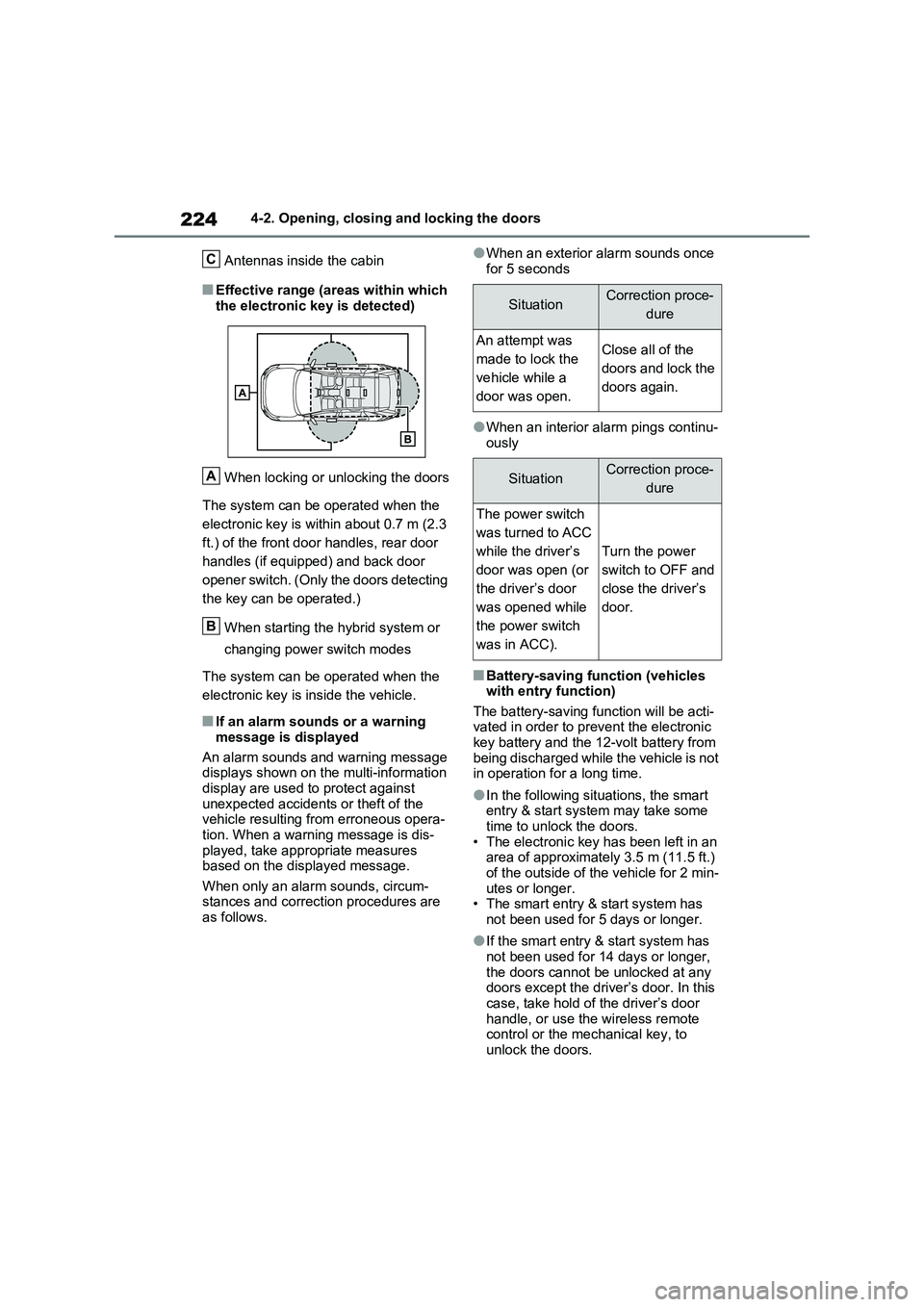
Antennas inside the cabin
■Effective range (areas within which
the electronic key is detected)
When locking or unlocking the doors
The system can be operated when the
electronic key is within about 0.7 m (2.3
ft.) of the front door handles, rear door
handles (if equipped) and back door
opener switch. (Only the doors detecting
the key can be operated.)
When starting the hybrid system or
changing power switch modes
The system can be operated when the
electronic key is inside the vehicle.
■If an alarm sounds or a warning
message is displayed
An alarm sounds and warning message displays shown on the multi-information
display are used to protect against unexpected accidents or theft of the vehicle resulting from erroneous opera-
tion. When a warning message is dis- played, take appropriate measures based on the displayed message.
When only an alarm sounds, circum- stances and correction procedures are as follows.
●When an exterior alarm sounds once
for 5 seconds
●When an interior alarm pings continu- ously
■Battery-saving function (vehicles with entry function)
The battery-saving function will be acti- vated in order to prevent the electronic key battery and the 12-volt battery from
being discharged while the vehicle is not in operation for a long time.
●In the following situations, the smart entry & start system may take some time to unlock the doors.
• The electronic key has been left in an area of approximately 3.5 m (11.5 ft.) of the outside of the vehicle for 2 min-
utes or longer. • The smart entry & start system has not been used for 5 days or longer.
●If the smart entry & start system has not been used for 14 days or longer,
the doors cannot be unlocked at any doors except the driver’s door. In this case, take hold of the driver’s door
handle, or use the wireless remote control or the mechanical key, to unlock the doors.
C
A
B
SituationCorrection proce-
dure
An attempt was
made to lock the
vehicle while a
door was open.
Close all of the
doors and lock the
doors again.
SituationCorrection proce-
dure
The power switch
was turned to ACC
while the driver’s
door was open (or
the driver’s door
was opened while
the power switch
was in ACC).
Turn the power
switch to OFF and
close the driver’s
door.
Page 225 of 664
225
4
4-2. Opening, closing and locking the doors
Before driving
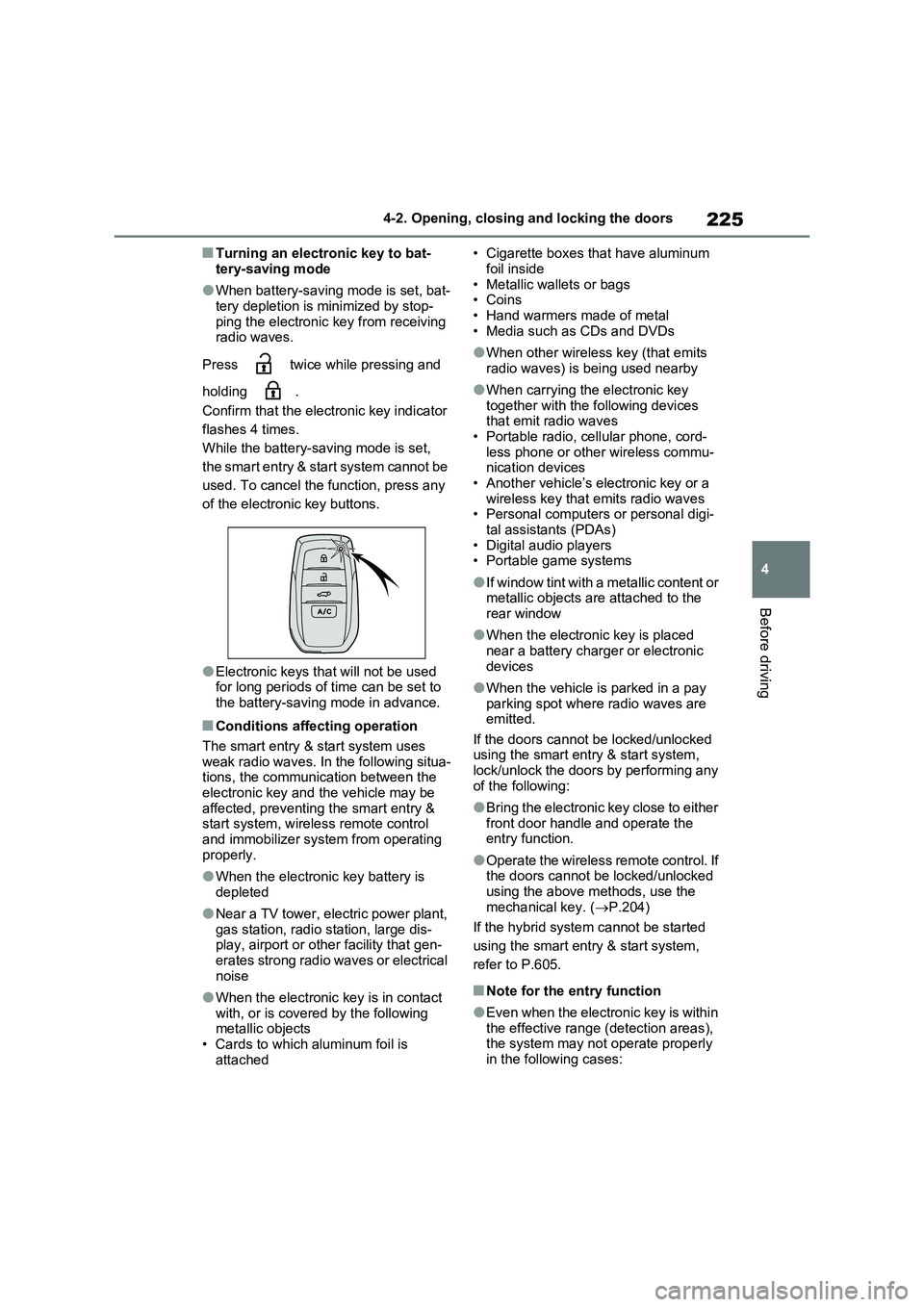
■Turning an electronic key to bat-
tery-saving mode
●When battery-saving mode is set, bat-
tery depletion is minimized by stop- ping the electronic key from receiving radio waves.
Press twice while pressing and
holding .
Confirm that the electronic key indicator
flashes 4 times.
While the battery-saving mode is set,
the smart entry & start system cannot be
used. To cancel the function, press any
of the electronic key buttons.
●Electronic keys that will not be used for long periods of time can be set to
the battery-saving mode in advance.
■Conditions affecting operation
The smart entry & start system uses
weak radio waves. In the following situa- tions, the communication between the electronic key and the vehicle may be
affected, preventing the smart entry & start system, wireless remote control and immobilizer system from operating
properly.
●When the electronic key battery is
depleted
●Near a TV tower, electric power plant,
gas station, radio station, large dis- play, airport or other facility that gen-erates strong radio waves or electrical
noise
●When the electronic key is in contact
with, or is covered by the following metallic objects• Cards to which aluminum foil is
attached
• Cigarette boxes that have aluminum
foil inside • Metallic wallets or bags•Coins
• Hand warmers made of metal • Media such as CDs and DVDs
●When other wireless key (that emits radio waves) is being used nearby
●When carrying the electronic key together with the following devices that emit radio waves
• Portable radio, cellular phone, cord- less phone or other wireless commu-nication devices
• Another vehicle’s electronic key or a wireless key that emits radio waves• Personal computers or personal digi-
tal assistants (PDAs) • Digital audio players• Portable game systems
●If window tint with a metallic content or metallic objects are attached to the
rear window
●When the electronic key is placed
near a battery charger or electronic devices
●When the vehicle is parked in a pay parking spot where radio waves are emitted.
If the doors cannot be locked/unlocked using the smart entry & start system, lock/unlock the doors by performing any
of the following:
●Bring the electronic key close to either
front door handle and operate the entry function.
●Operate the wireless remote control. If the doors cannot be locked/unlocked using the above methods, use the
mechanical key. ( P.204)
If the hybrid system cannot be started
using the smart entry & start system,
refer to P.605.
■Note for the entry function
●Even when the electronic key is within
the effective range (detection areas), the system may not operate properly in the following cases:
Page 226 of 664

2264-2. Opening, closing and locking the doors
• The electronic key is too close to the
window or outside door handle, near
the ground, or in a high place when
the doors are locked or unlocked.
• The electronic key is on the instru-
ment panel, luggage cover or floor, or
in the door pockets or glove box when
the hybrid system is started or power
switch modes are changed.
●Do not leave the electronic key on top
of the instrument panel or near the
door pockets when exiting the vehicle.
Depending on the radio wave recep-
tion conditions, it may be detected by
the antenna outside the cabin and the
door will become lockable from the
outside, possibly trapping the elec-
tronic key inside the vehicle.
●As long as the electronic key is within
the effective range, the doors may be
locked or unlocked by anyone. How-
ever, only the doors detecting the
electronic key can be used to lock or
unlock the vehicle.
●Even if the electronic key is not inside
the vehicle, it may be possible to start
the hybrid system if the electronic key
is near the window.
●The doors may unlock if a large
amount of water splashes on the door
handle, such as in the rain or in a car
wash when the electronic key is within
the effective range. (The doors will
automatically be locked after approxi-
mately 30 seconds if the doors are not
opened and closed.)
●If the wireless remote control is used
to lock the doors when the electronic
key is near the vehicle, there is a pos-
sibility that the door may not be
unlocked by the entry function. (Use
the wireless remote control to unlock
the doors.)
●Touching the door lock sensor while
wearing gloves may delay or prevent
lock operation. Remove the gloves
and touch the lock sensor again.
●When the lock operation is performed
using the lock sensor, recognition sig-
nals will be shown up to two consecu-tive times. After this, no recognition
signals will be given.
●If the door handle becomes wet while
the electronic key is within the effec-
tive range, the door may lock and
unlock repeatedly. In that case, follow
the following correction procedures to
wash the vehicle:
• Place the electronic key in a location 2
m (6 ft.) or more away from the vehi-
cle. (Take care to ensure that the key
is not stolen.)
• Set the electronic key to battery-sav-
ing mode to disable the smart entry &
start system. (P.225)
●If the electronic key is inside the vehi-
cle and a door handle becomes wet
during a car wash, a message may be
shown on the multi-information dis-
play and a buzzer will sound outside
the vehicle. To turn off the alarm, lock
all the doors.
●The lock sensor may not work prop-
erly if it comes into contact with ice,
snow, mud, etc. Clean the lock sensor
and attempt to operate it again, or use
the lock sensor on the lower part of
the door handle.
●A sudden approach to the effective
range or door handle may prevent the
doors from being unlocked. In this
case, return the door handle to the
original position and check that the
doors unlock before pulling the door
handle again.
●If there is another electronic key in the
detection area, it may take slightly lon-
ger to unlock the doors after the door
handle is gripped.
■When the vehicle is not driven for
extended periods
●To prevent theft of the vehicle, do not
leave the electronic key within 2 m (6
ft.) of the vehicle.
●The smart entry & start system can be
deactivated in advance. (P.633)
●Battery-saving mode can reduce the
power consumption of electronic keys.
(P.225)
Page 274 of 664
2744-3. Adjusting the seats
will be overwritten.
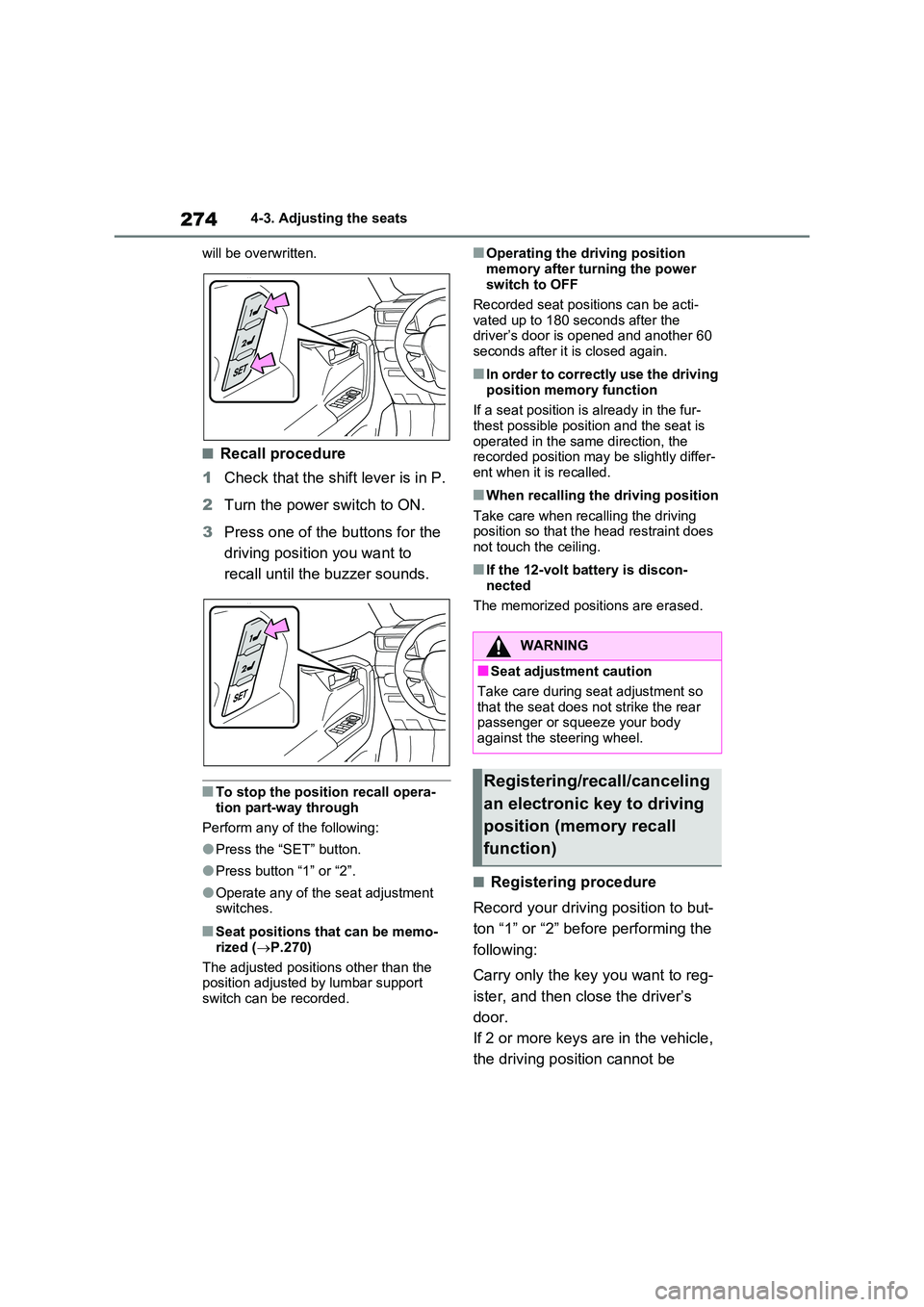
■Recall procedure
1 Check that the shift lever is in P.
2 Turn the power switch to ON.
3 Press one of the buttons for the
driving position you want to
recall until the buzzer sounds.
■To stop the position recall opera-
tion part-way through
Perform any of the following:
●Press the “SET” button.
●Press button “1” or “2”.
●Operate any of the seat adjustment switches.
■Seat positions that can be memo-
rized ( P.270)
The adjusted positions other than the position adjusted by lumbar support
switch can be recorded.
■Operating the driving position
memory after turning the power switch to OFF
Recorded seat positions can be acti-
vated up to 180 seconds after the driver’s door is opened and another 60 seconds after it is closed again.
■In order to correctly use the driving
position memory function
If a seat position is already in the fur- thest possible position and the seat is
operated in the same direction, the recorded position may be slightly differ-ent when it is recalled.
■When recalling the driving position
Take care when recalling the driving position so that the head restraint does not touch the ceiling.
■If the 12-volt battery is discon-
nected
The memorized positions are erased.
■Registering procedure
Record your driving position to but-
ton “1” or “2” before performing the
following:
Carry only the key you want to reg-
ister, and then close the driver’s
door.
If 2 or more keys are in the vehicle,
the driving position cannot be
WARNING
■Seat adjustment caution
Take care during seat adjustment so that the seat does not strike the rear passenger or squeeze your body
against the steering wheel.
Registering/recall/canceling
an electronic key to driving
position (memory recall
function)
Page 293 of 664
293
4
4-5. Opening, closing the windows and moon roof
Before driving
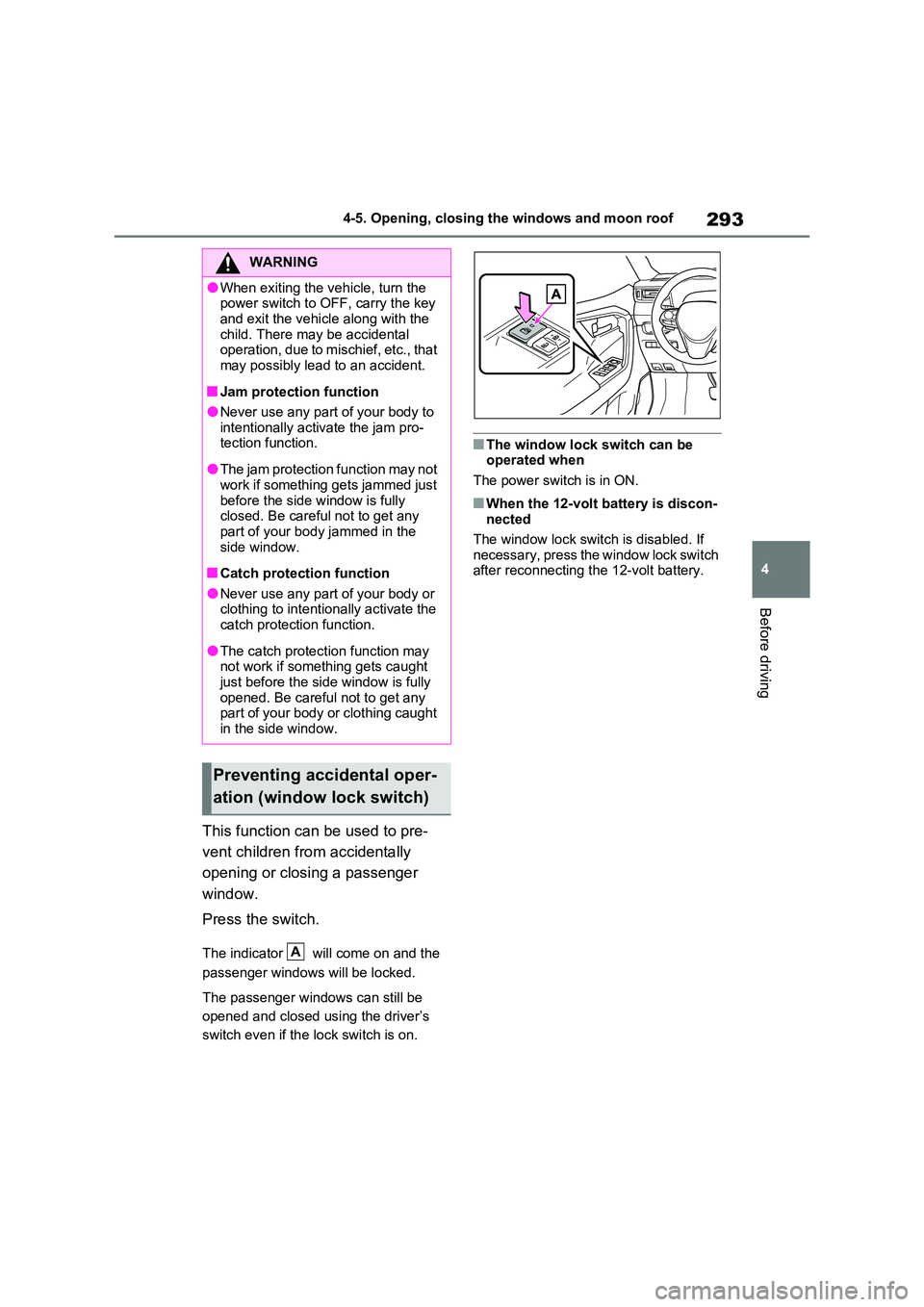
This function can be used to pre-
vent children from accidentally
opening or closing a passenger
window.
Press the switch.
The indicator will come on and the
passenger windows will be locked.
The passenger windows can still be
opened and closed using the driver’s
switch even if the lock switch is on.
■The window lock switch can be operated when
The power switch is in ON.
■When the 12-volt battery is discon- nected
The window lock switch is disabled. If
necessary, press the window lock switch after reconnecting the 12-volt battery.
WARNING
●When exiting the vehicle, turn the power switch to OFF, carry the key
and exit the vehicle along with the child. There may be accidental operation, due to mischief, etc., that
may possibly lead to an accident.
■Jam protection function
●Never use any part of your body to intentionally activate the jam pro-tection function.
●The jam protection function may not work if something gets jammed just
before the side window is fully closed. Be careful not to get any part of your body jammed in the
side window.
■Catch protection function
●Never use any part of your body or clothing to intentionally activate the catch protection function.
●The catch protection function may not work if something gets caught
just before the side window is fully opened. Be careful not to get any part of your body or clothing caught
in the side window.
Preventing accidental oper-
ation (window lock switch)
A