2011 TOYOTA VERSO S light
[x] Cancel search: lightPage 340 of 664
3405-3. Operating the lights and wipers
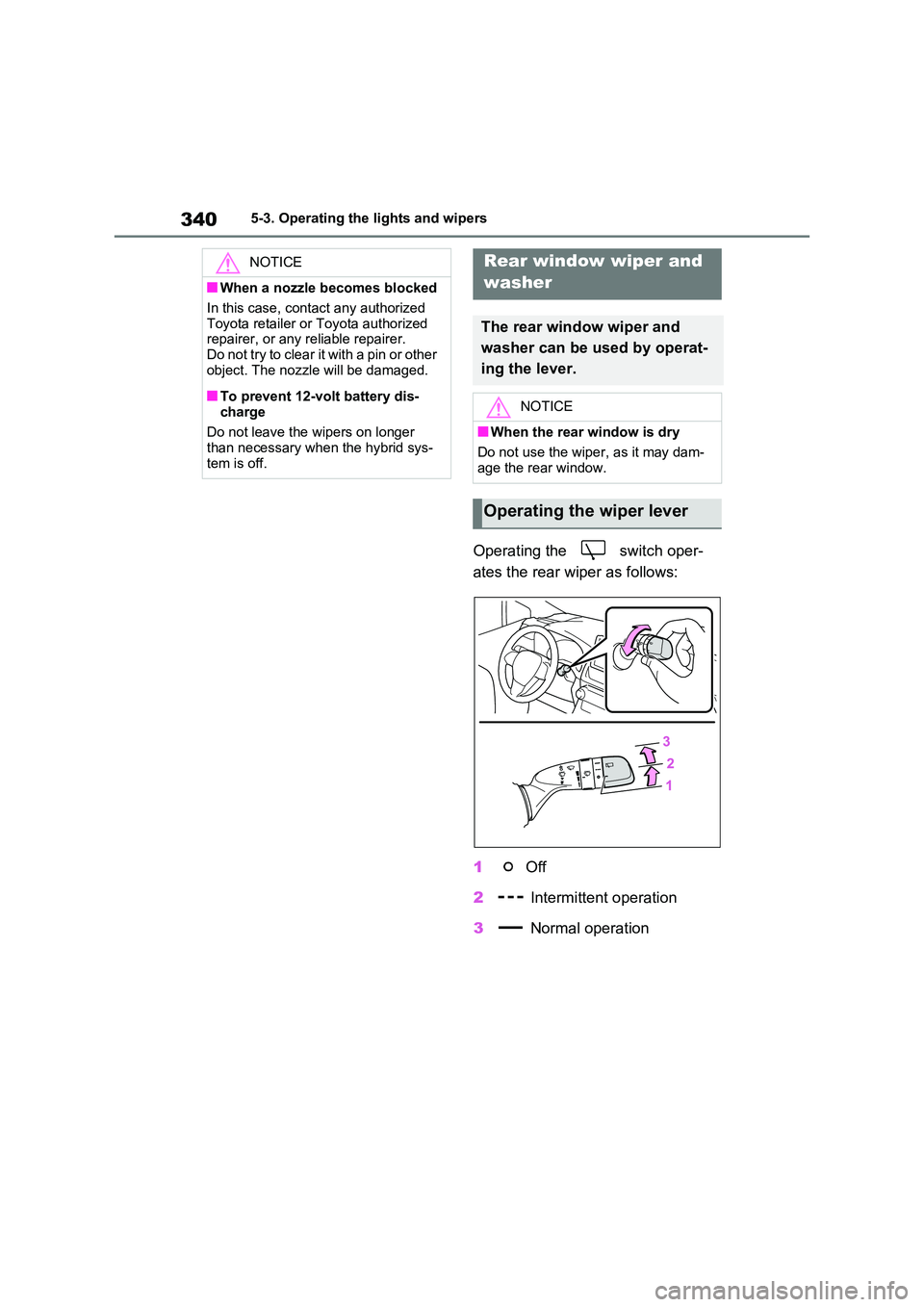
Operating the switch oper-
ates the rear wiper as follows:
1 Off
2 Intermittent operation
3 Normal operation
NOTICE
■When a nozzle becomes blocked
In this case, contact any authorized
Toyota retailer or Toyota authorized repairer, or any reliable repairer.Do not try to clear it with a pin or other
object. The nozzle will be damaged.
■To prevent 12-volt battery dis-
charge
Do not leave the wipers on longer than necessary when the hybrid sys-
tem is off.
Rear window wiper and
washer
The rear window wiper and
washer can be used by operat-
ing the lever.
NOTICE
■When the rear window is dry
Do not use the wiper, as it may dam-
age the rear window.
Operating the wiper lever
Page 341 of 664
341
5
5-3. Operating the lights and wipers
Driving
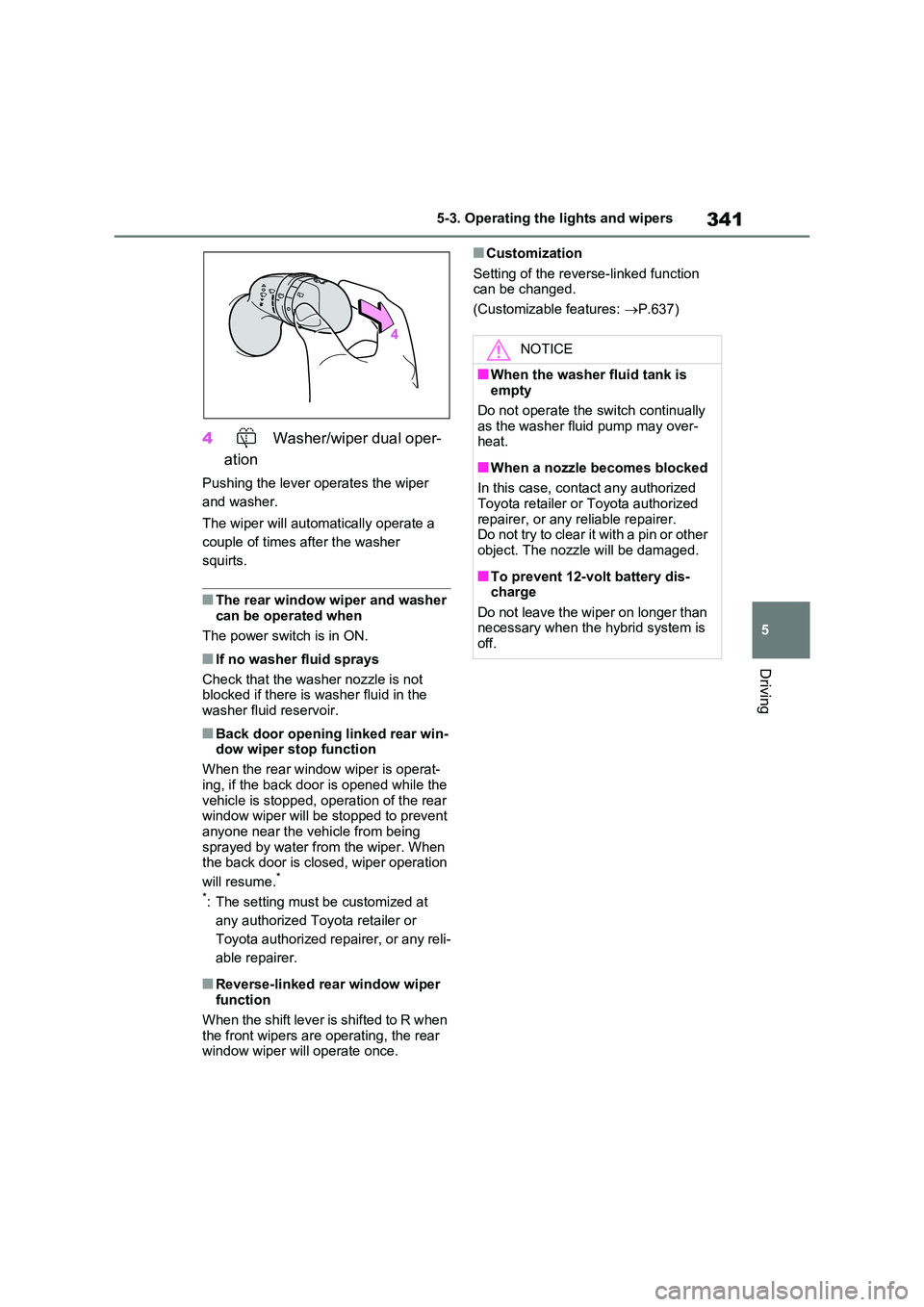
4 Washer/wiper dual oper-
ation
Pushing the lever operates the wiper
and washer.
The wiper will automatically operate a
couple of times after the washer
squirts.
■The rear window wiper and washer can be operated when
The power switch is in ON.
■If no washer fluid sprays
Check that the washer nozzle is not blocked if there is washer fluid in the
washer fluid reservoir.
■Back door opening linked rear win- dow wiper stop function
When the rear window wiper is operat-
ing, if the back door is opened while the vehicle is stopped, operation of the rear window wiper will be stopped to prevent
anyone near the vehicle from being sprayed by water from the wiper. When the back door is closed, wiper operation
will resume.*
*: The setting must be customized at
any authorized Toyota retailer or
Toyota authorized repairer, or any reli-
able repairer.
■Reverse-linked rear window wiper function
When the shift lever is shifted to R when
the front wipers are operating, the rear window wiper will operate once.
■Customization
Setting of the reverse-linked function can be changed.
(Customizable features: P.637)
NOTICE
■When the washer fluid tank is empty
Do not operate the switch continually
as the washer fluid pump may over- heat.
■When a nozzle becomes blocked
In this case, contact any authorized Toyota retailer or Toyota authorized
repairer, or any reliable repairer. Do not try to clear it with a pin or other object. The nozzle will be damaged.
■To prevent 12-volt battery dis-charge
Do not leave the wiper on longer than necessary when the hybrid system is off.
Page 343 of 664
343
5
5-4. Refueling
Driving
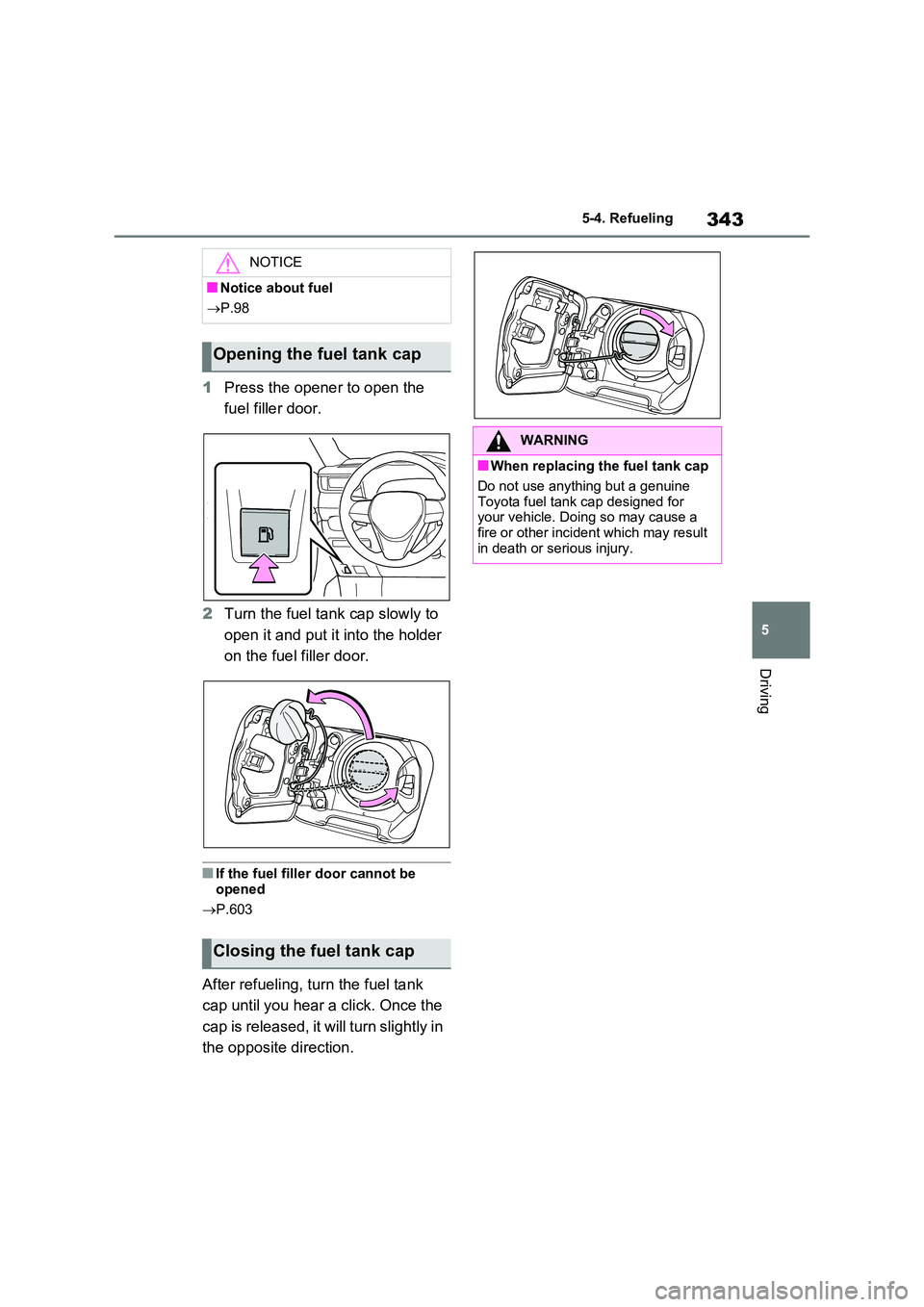
1 Press the opener to open the
fuel filler door.
2 Turn the fuel tank cap slowly to
open it and put it into the holder
on the fuel filler door.
■If the fuel filler door cannot be
opened
P.603
After refueling, turn the fuel tank
cap until you hear a click. Once the
cap is released, it will turn slightly in
the opposite direction.
NOTICE
■Notice about fuel
P.98
Opening the fuel tank cap
Closing the fuel tank cap
WARNING
■When replacing the fuel tank cap
Do not use anything but a genuine
Toyota fuel tank cap designed for your vehicle. Doing so may cause a fire or other incident which may result
in death or serious injury.
Page 346 of 664
3465-5. Using the driving support systems
WARNING
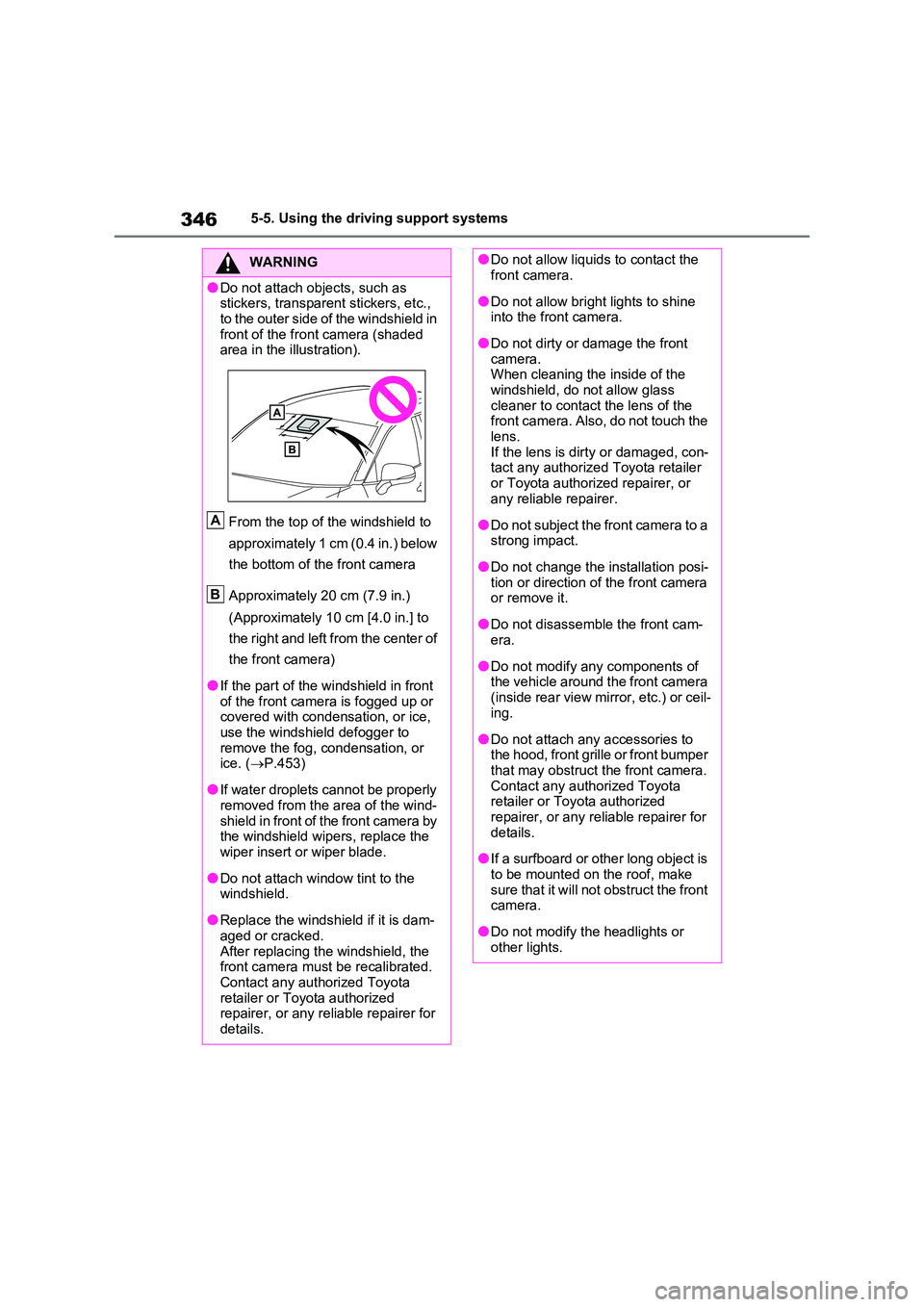
●Do not attach objects, such as stickers, transparent stickers, etc.,
to the outer side of the windshield in front of the front camera (shaded area in the illustration).
From the top of the windshield to
approximately 1 cm (0.4 in.) below
the bottom of the front camera
Approximately 20 cm (7.9 in.)
(Approximately 10 cm [4.0 in.] to
the right and left from the center of
the front camera)
●If the part of the windshield in front of the front camera is fogged up or covered with condensation, or ice,
use the windshield defogger to remove the fog, condensation, or ice. ( P.453)
●If water droplets cannot be properly removed from the area of the wind-
shield in front of the front camera by the windshield wipers, replace the wiper insert or wiper blade.
●Do not attach window tint to the windshield.
●Replace the windshield if it is dam-aged or cracked.
After replacing the windshield, the front camera must be recalibrated. Contact any authorized Toyota
retailer or Toyota authorized repairer, or any reliable repairer for details.
A
B
●Do not allow liquids to contact the front camera.
●Do not allow bright lights to shine into the front camera.
●Do not dirty or damage the front camera. When cleaning the inside of the
windshield, do not allow glass cleaner to contact the lens of the front camera. Also, do not touch the
lens. If the lens is dirty or damaged, con-tact any authorized Toyota retailer
or Toyota authorized repairer, or any reliable repairer.
●Do not subject the front camera to a strong impact.
●Do not change the installation posi-tion or direction of the front camera or remove it.
●Do not disassemble the front cam-era.
●Do not modify any components of the vehicle around the front camera
(inside rear view mirror, etc.) or ceil- ing.
●Do not attach any accessories to the hood, front grille or front bumper that may obstruct the front camera.
Contact any authorized Toyota retailer or Toyota authorized repairer, or any reliable repairer for
details.
●If a surfboard or other long object is
to be mounted on the roof, make sure that it will not obstruct the front camera.
●Do not modify the headlights or other lights.
Page 354 of 664

3545-5. Using the driving support systems
●In the following situations, if the situation has changed (or the vehicle has been
driven for some time) and the normal operating conditions are detected, the mes-
sage will disappear and the system will become operational.
If the message does not disappear, contact any authorized Toyota retailer or Toyota
authorized repairer, or any reliable repairer.
• When the temperature around the radar sensor is outside of the operational range,
such as when the vehicle is in the sun or in an extremely cold environment
• When the front camera cannot detect objects in front of the vehicle, such as when
driving in the dark, snow, or fog, or when bright lights are shining into the front
camera
When the temperature around the front
camera is outside of the operational
range, such as when the vehicle is in the
sun or in an extremely cold environment
If the front camera is hot, such as after
the vehicle had been parked in the sun,
use the air conditioning system to
decrease the temperature around the
front camera.
If a sunshade was used when the vehicle
was parked, depending on its type, the
sunlight reflected from the surface of the
sunshade may cause the temperature of
the front camera to become excessively
high.
If the front camera is cold, such as after
the vehicle is parked in an extremely cold
environment, use the air conditioning
system to increase the temperature
around the front camera.
The area in front of the front camera is
obstructed, such as when the hood is
open or a sticker is attached to the part of
the windshield in front of the front cam-
era.
Close the hood, remove the sticker, etc.
to clear the obstruction.
SituationActions
Page 357 of 664

357
5
5-5. Using the driving support systems
Driving
■Enabling/disabling the pre-col-
lision system
The pre-collision system can be
enabled/disabled on the screen
( P.186) of the multi-information
display.
The system is automatically enabled
each time the power switch is turned to
ON.
If the system is disabled, the PCS
warning light will turn on and a
message will be displayed on the
multi-information display.
■Changing the pre-collision
warning timing
The pre-collision warning timing
can be changed on the screen
( P.186) of the multi-information
display.
The warning timing setting is retained
when the power switch is turned to
OFF. However, if the pre-collision sys-
tem is disabled and re-enabled, the
operation timing will return to the
default setting (middle).
WARNING
●When inspecting the vehicle using a drum tester such as a chassis
dynamometer or speedometer tes- ter, or when using an on vehicle wheel balancer
●When a strong impact is applied to the front bumper or front grille, due
to an accident or other reasons
●If the vehicle cannot be driven in a
stable manner, such as when the vehicle has been in an accident or is malfunctioning
●When the vehicle is driven in a sporty manner or off-road
●When the tires are not properly inflated
●When the tires are very worn
●When tires of a size other than specified are installed
●When tire chains are installed
●When a compact spare tire or an
emergency tire puncture repair kit is used
●If equipment (snow plow, etc.) that may obstruct the radar sensor or front camera is temporarily installed
to the vehicle
Changing settings of the
pre-collision system
Page 360 of 664

3605-5. Using the driving support systems
• When there is a metal object (man-
hole cover, steel plate, etc.), steps, or
a protrusion in front of your vehicle
• When passing under an object (road
sign, billboard, etc.)
• When approaching an electric toll gate
barrier, parking area barrier, or other
barrier that opens and closes
• When using an automatic car wash
• When driving through or under objects
that may contact your vehicle, such as
thick grass, tree branches, or a ban-
ner
• When driving through steam or smoke
• When driving near an object that
reflects radio waves, such as a large
truck or guardrail
• When driving near a TV tower, broad-
casting station, electric power plant, or
other location where strong radio
waves or electrical noise may be pres-
ent
■Situations in which the system may
not operate properly
●In some situations such as the follow-
ing, an object may not be detected by
the radar sensor and front camera,
preventing the system from operating
properly:
• When a detectable object is
approaching your vehicle
• When your vehicle or a detectable object is wobbling
• If a detectable object makes an abrupt
maneuver (such as sudden swerving,
acceleration or deceleration)
• When your vehicle approaches a
detectable object rapidly
• When a detectable object is not
directly in front of your vehicle
• When a detectable object is near a
wall, fence, guardrail, manhole cover,
vehicle, steel plate on the road, etc.
• When a detectable object is under a
structure
• When part of a detectable object is
hidden by an object, such as large
baggage, an umbrella, or guardrail
• When multiple detectable objects are
close together
• If the sun or other light is shining
directly on a detectable object
• When a detectable object is a shade
of white and looks extremely bright
• When a detectable object appears to
be nearly the same color or brightness
as its surroundings
• If a detectable object cuts or suddenly
emerges in front of your vehicle
• When the front of your vehicle is hit by
water, snow, dust, etc.
• When a very bright light ahead, such
as the sun or the headlights of oncom-
ing traffic, shines directly into the front
camera
• When approaching the side or front of
a vehicle ahead
• If a vehicle ahead is a motorcycle
• If a vehicle ahead is narrow, such as a
personal mobility vehicle
• If a preceding vehicle has a small rear
end, such as an unloaded truck
• If a preceding vehicle has a low rear
end, such as a low bed trailer
Page 362 of 664
3625-5. Using the driving support systems
●The PCS warning light will turn on and
“VSC Turned OFF Pre-Collision Brake
System Unavailable” will be displayed
on the multi-information display.
*: If equipped
LTA (Lane Tracing
Assist)
*
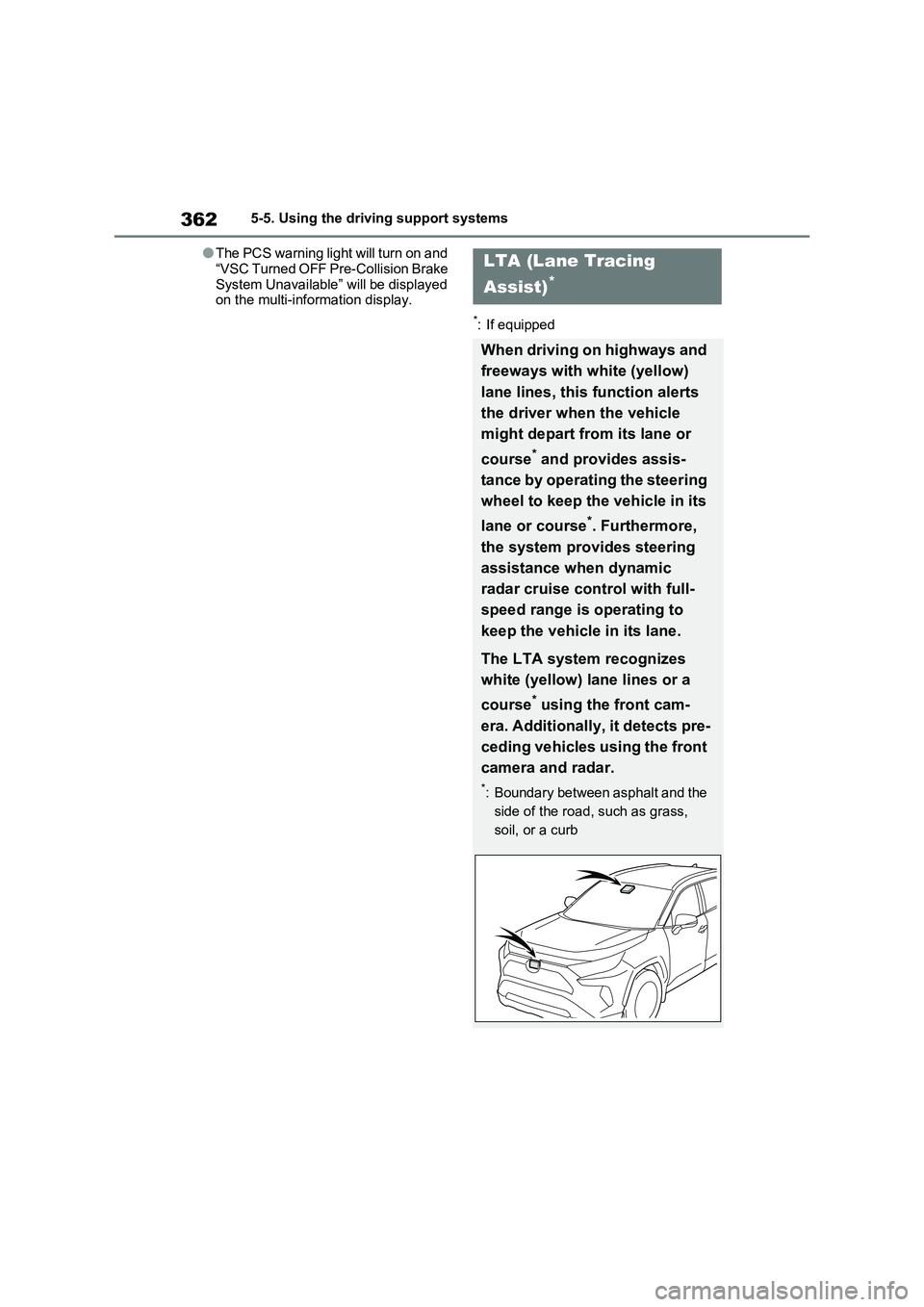
When driving on highways and
freeways with white (yellow)
lane lines, this function alerts
the driver when the vehicle
might depart from its lane or
course
* and provides assis-
tance by operating the steering
wheel to keep the vehicle in its
lane or course
*. Furthermore,
the system provides steering
assistance when dynamic
radar cruise control with full-
speed range is operating to
keep the vehicle in its lane.
The LTA system recognizes
white (yellow) lane lines or a
course
* using the front cam-
era. Additionally, it detects pre-
ceding vehicles using the front
camera and radar.
*: Boundary between asphalt and the
side of the road, such as grass,
soil, or a curb