2011 TOYOTA VERSO S light
[x] Cancel search: lightPage 480 of 664
4806-4. Using the other interior features
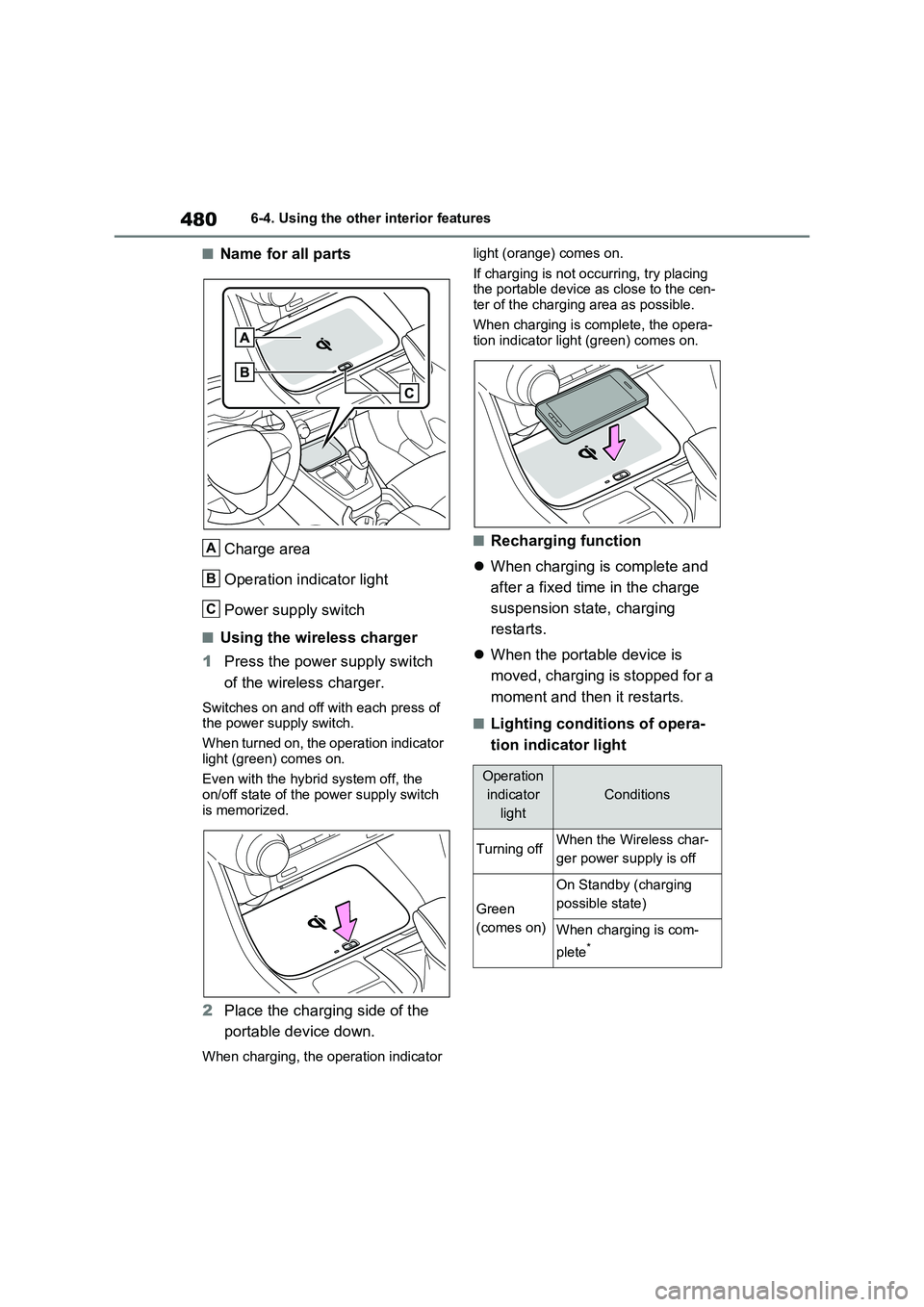
■Name for all parts
Charge area
Operation indicator light
Power supply switch
■Using the wireless charger
1Press the power supply switch
of the wireless charger.
Switches on and off with each press of
the power supply switch.
When turned on, the operation indicator
light (green) comes on.
Even with the hybrid system off, the
on/off state of the power supply switch
is memorized.
2Place the charging side of the
portable device down.
When charging, the operation indicator light (orange) comes on.
If charging is not occurring, try placing
the portable device as close to the cen-
ter of the charging area as possible.
When charging is complete, the opera-
tion indicator light (green) comes on.
■Recharging function
When charging is complete and
after a fixed time in the charge
suspension state, charging
restarts.
When the portable device is
moved, charging is stopped for a
moment and then it restarts.
■Lighting conditions of opera-
tion indicator light
A
B
C
Operation
indicator
light
Conditions
Turning offWhen the Wireless char-
ger power supply is off
Green
(comes on)
On Standby (charging
possible state)
When charging is com-
plete
*
Page 481 of 664
481
6 6-4. Using the other interior features
Interior features
*: Depending on the portable device,
there are cases where the operation
indicator light will continue being lit
up orange even after the charging is
complete.
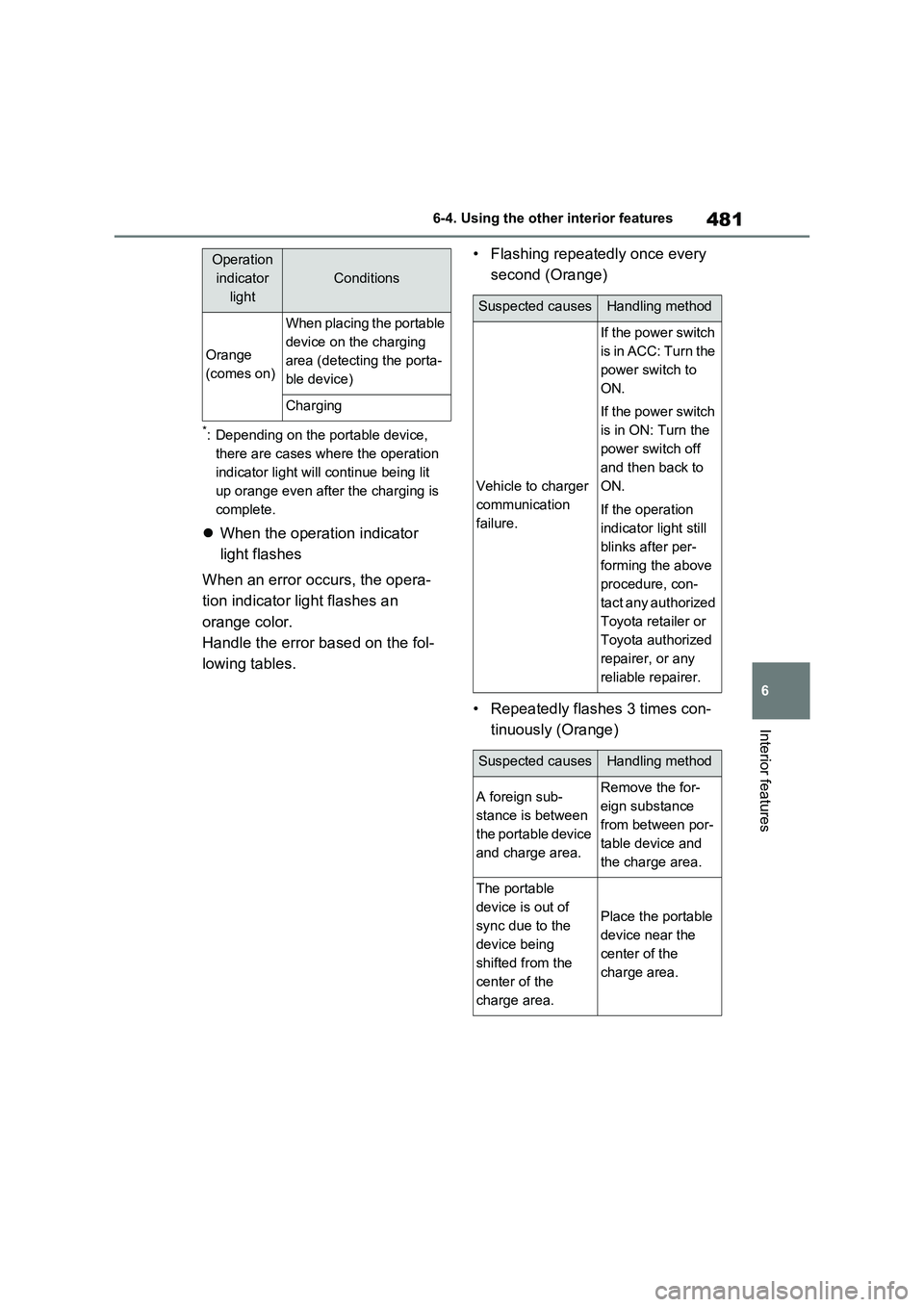
When the operation indicator
light flashes
When an error occurs, the opera-
tion indicator light flashes an
orange color.
Handle the error based on the fol-
lowing tables.• Flashing repeatedly once every
second (Orange)
• Repeatedly flashes 3 times con-
tinuously (Orange)
Orange
(comes on)
When placing the portable
device on the charging
area (detecting the porta-
ble device)
Charging
Operation
indicator
light
Conditions
Suspected causesHandling method
Vehicle to charger
communication
failure.
If the power switch
is in ACC: Turn the
power switch to
ON.
If the power switch
is in ON: Turn the
power switch off
and then back to
ON.
If the operation
indicator light still
blinks after per-
forming the above
procedure, con-
tact any authorized
Toyota retailer or
Toyota authorized
repairer, or any
reliable repairer.
Suspected causesHandling method
A foreign sub-
stance is between
the portable device
and charge area.Remove the for-
eign substance
from between por-
table device and
the charge area.
The portable
device is out of
sync due to the
device being
shifted from the
center of the
charge area.
Place the portable
device near the
center of the
charge area.
Page 482 of 664
4826-4. Using the other interior features
• Repeatedly flashes 4 times con-
tinuously (Orange)
■The wireless charger can be oper-
ated when
The power switch is in ACC or ON.
■Usable portable devices
Qi standard wireless charge standard
can be used on compatible devices.
However, not all Qi standard devices
and compatibility are guaranteed.
Starting with mobile phones and
smartphones, it is aimed for low power
electrically supplied portable devices of
no more than 5W.
■When covers and accessories are
attached to portable devices
Do not charge in situations where cover
and accessories not able to handle Qi
are attached to the portable device.
Depending on the type of cover and
accessory, it may not be possible to
charge. When charging is not performed
even with the portable device placed on
the charge area, remove the cover and
accessories.
■While charging, noise enters the
AM radio
Turn off the wireless charger and con-
firm that the noise has decreased. If the
noise decreases, continuously pushing
the power supply switch of the wireless
charger for 2 seconds, the frequency of
the charger can be changed and the
noise can be reduced.Also, on that
occasion, the operation indicator light
will flash orange 2 times.
■Important points of the wireless
charger
●If the electronic key cannot be detected within the vehicle interior,
charging cannot be done. When the
door is opened and closed, charging
may be temporarily suspended.
●When charging, the wireless charging
device and portable device will get
warmer, however this is not a mal-
function.
When a portable device gets warm
while charging, charging may stop
due to the protection function on the
portable device side. In this case,
when the temperature of the portable
device drops significantly, charge
again.
●Depending on usage of the portable
device, it may not be fully charged.
This is not a malfunction.
●When using a mobile phone near a
wireless charger, the call sensitivity
and communication speed may be
reduced.
■Operation sounds
When the power supply is turned on,
while searching for the portable device a
sound will be produced, however this is
not a malfunction.
■Cleaning the wireless charger
P.492
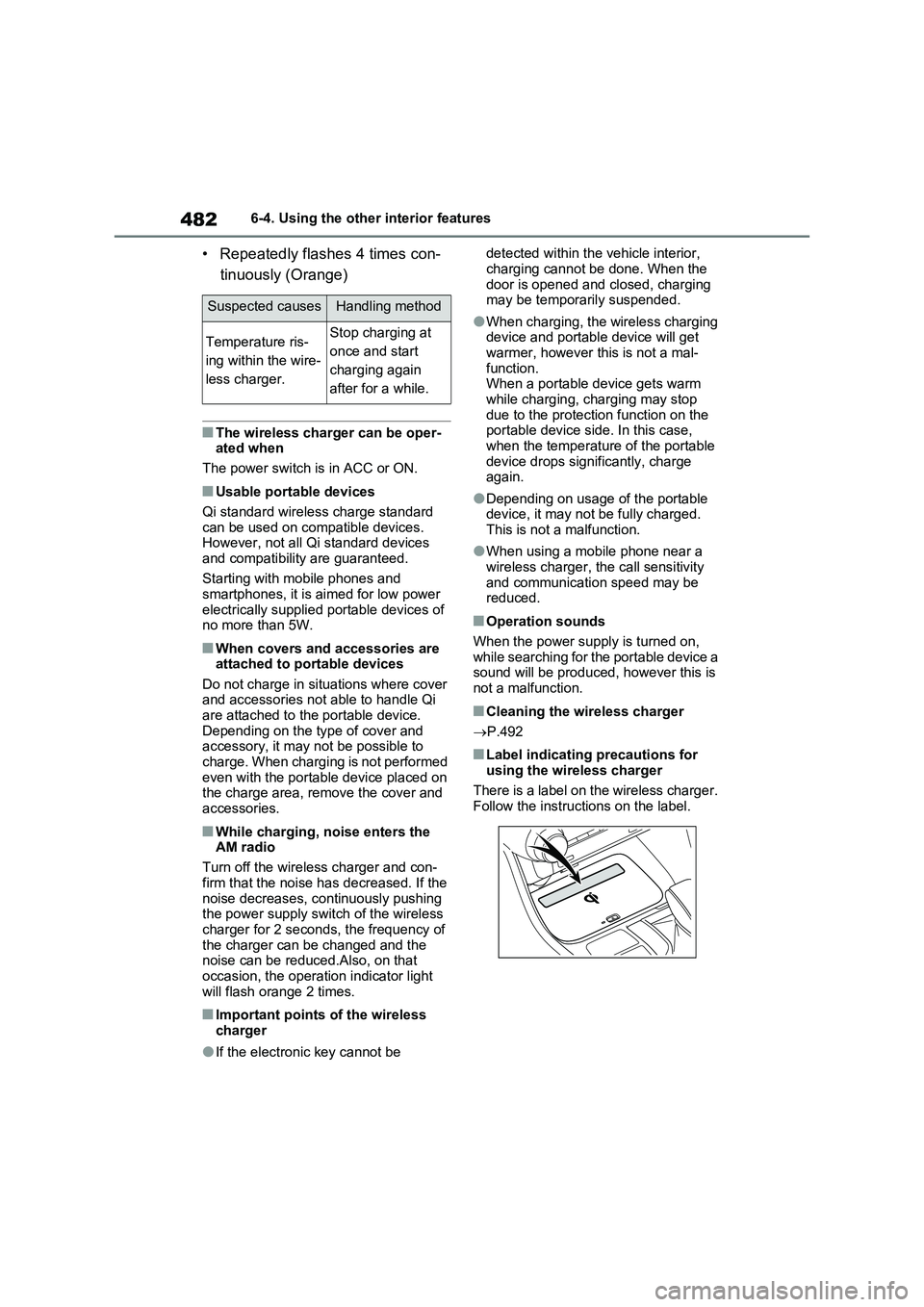
■Label indicating precautions for
using the wireless charger
There is a label on the wireless charger.
Follow the instructions on the label.
Suspected causesHandling method
Temperature ris-
ing within the wire-
less charger.Stop charging at
once and start
charging again
after for a while.
Page 487 of 664
7
487
7
Maintenance and care
Maintenance and care
7-1. Maintenance and care
Cleaning and protecting the
vehicle exterior ............... 488
Cleaning and protecting the
vehicle interior ................ 491
7-2. Maintenance
Maintenance requirements 494
7-3. Do-it-yourself maintenance
Do-it-yourself service precau-
tions ................................ 496
Hood ................................. 498
Positioning a floor jack...... 499
Engine compartment ........ 501
12-volt battery ................... 506
Tires.................................. 509
Tire inflation pressure ....... 529
Wheels.............................. 530
Air conditioning filter ......... 532
Cleaning the DC/DC Con-
verter air intake vent and filter
....................................... 536
Wiper insert replacement .. 539
Electronic key battery ....... 543
Checking and replacing fuses
....................................... 545
Light bulbs ........................ 548
Page 490 of 664
4907-1. Maintenance and care
WARNING
■Precaution regarding the rear bumper with Blind Spot Monitor
(if equipped)
If the paint of the rear bumper is chipped or scratched, the system may
malfunction. If this occurs, consult any authorized Toyota retailer or Toyota authorized repairer, or any
reliable repairer.
NOTICE
■To prevent paint deterioration and corrosion on the body and
components (aluminum wheels, etc.)
●Wash the vehicle immediately in
the following cases:
• After driving near the sea coast
• After driving on salted roads
• If coal tar or tree sap is present on the paint surface
• If dead insects, insect droppings or
bird droppings are present on the paint surface
• After driving in an area contami- nated with soot, oily smoke, mine dust, iron powder or chemical sub-
stances
• If the vehicle becomes heavily soiled with dust or mud
• If liquids such as benzene and gas- oline are spilled on the paint sur-face
●If the paint is chipped or scratched, have it repaired immediately.
●To prevent the wheels from corrod-ing, remove any dirt and store in a
place with low humidity when stor- ing the wheels.
■Cleaning the exterior lights
●Wash carefully. Do not use organic substances or scrub with a hard
brush. This may damage the surfaces of the lights.
●Do not apply wax to the surfaces of the lights.
Wax may cause damage to the lenses.
■When using an automatic car wash
Set the wiper switch to off position.
If the wiper switch is in “AUTO”, the wipers may operate and the wiper blades may be damaged.
■When using a high pressure car wash
●When washing the vehicle, do not let water from the high-pressure washer directly hit the camera (if
equipped) or the area around the camera. Due to the shock from the high pressure water, it is possible
that the device may not operate normally.
●Do not bring the nozzle tip close to boots (rubber or resin manufac-tured cover), or connectors or the
following parts. The parts may be damaged if they come into contact with high-pres-
sure water.
• Traction battery
• Traction related parts
• Steering parts
• Suspension parts
• Brake parts
●Keep the cleaning nozzle at least 30 cm (11.9 in.) away from the vehi-
cle body. Otherwise resin section, such as moldings and bumpers, may be deformed and damaged.
Also, do not continuously hold the nozzle in the same place.
Page 492 of 664
4927-1. Maintenance and care
WARNING
■Water in the vehicle
●Do not splash or spill liquid in the
vehicle, such as on the floor, on the rear seats, in the DC/DC Converter air intake vent, junction box or in
the luggage compartment. ( P.98) Doing so may cause the DC/DC Converter, electrical components,
etc. to malfunction or catch fire.
●Do not get any of the SRS compo-
nents or wiring in the vehicle interior wet. ( P.40) An electrical malfunction may
cause the airbags to deploy or not function properly, resulting in death or serious injury.
●Vehicles with wireless charger:Do not let the wireless charger
( P.479) get wet. Failure to do so may cause the charger to become hot and cause burns or could cause
electric shock resulting in death or serious injury.
■Cleaning the interior (especially instrument panel)
Do not use a polish wax or polish
cleaner. The instrument panel may reflect off the windshield, obstructing the driver’s view and leading to an
accident, resulting in death or serious injury.
NOTICE
■Cleaning detergents
●Do not use the following types of
detergent, as they may discolor the vehicle interior or cause streaks or damage to painted surfaces:
• Non-seat portions: Organic sub- stances such as benzene or gaso-line, alkaline or acidic solutions,
dye, and bleach
• Seats: Alkaline or acidic solutions, such as thinner, benzene, and alco-
hol
●Do not use a polish wax or polish cleaner. The instrument panel’s or other interior part’s painted surface
may be damaged.
■Preventing damage to leather
surfaces
Observe the following precautions to avoid damage to and deterioration of
leather surfaces:
●Remove any dust or dirt from leather surfaces immediately.
●Do not expose the vehicle to direct sunlight for extended periods of
time. Park the vehicle in the shade, especially during summer.
●Do not place items made of vinyl, plastic, or containing wax on the upholstery, as they may stick to the
leather surface if the vehicle interior heats up significantly.
■Water on the floor
Do not wash the vehicle floor with water.
Vehicle systems such as the audio system may be damaged if water comes into contact with electrical
components such as the audio sys- tem above or under the floor of the vehicle. Water may also cause the
body to rust.
■When cleaning the inside of the
windshield (vehicles with Toyota Safety Sense)
Do not allow glass cleaner to contact
the lens. Also, do not touch the lens. ( P.344)
■Cleaning the inside of the rear window
●Do not use a glass cleaner to clean
the rear window, as this may cause damage to the rear window defog-ger heater wires. Use a cloth damp-
ened with lukewarm water to gently wipe the window clean. Wipe the window in strokes running parallel
to the heater wires.
Page 496 of 664
4967-3. Do-it-yourself maintenance
7-3.Do-it-y ours elf main ten ance
Do-it-yourself service
precautions
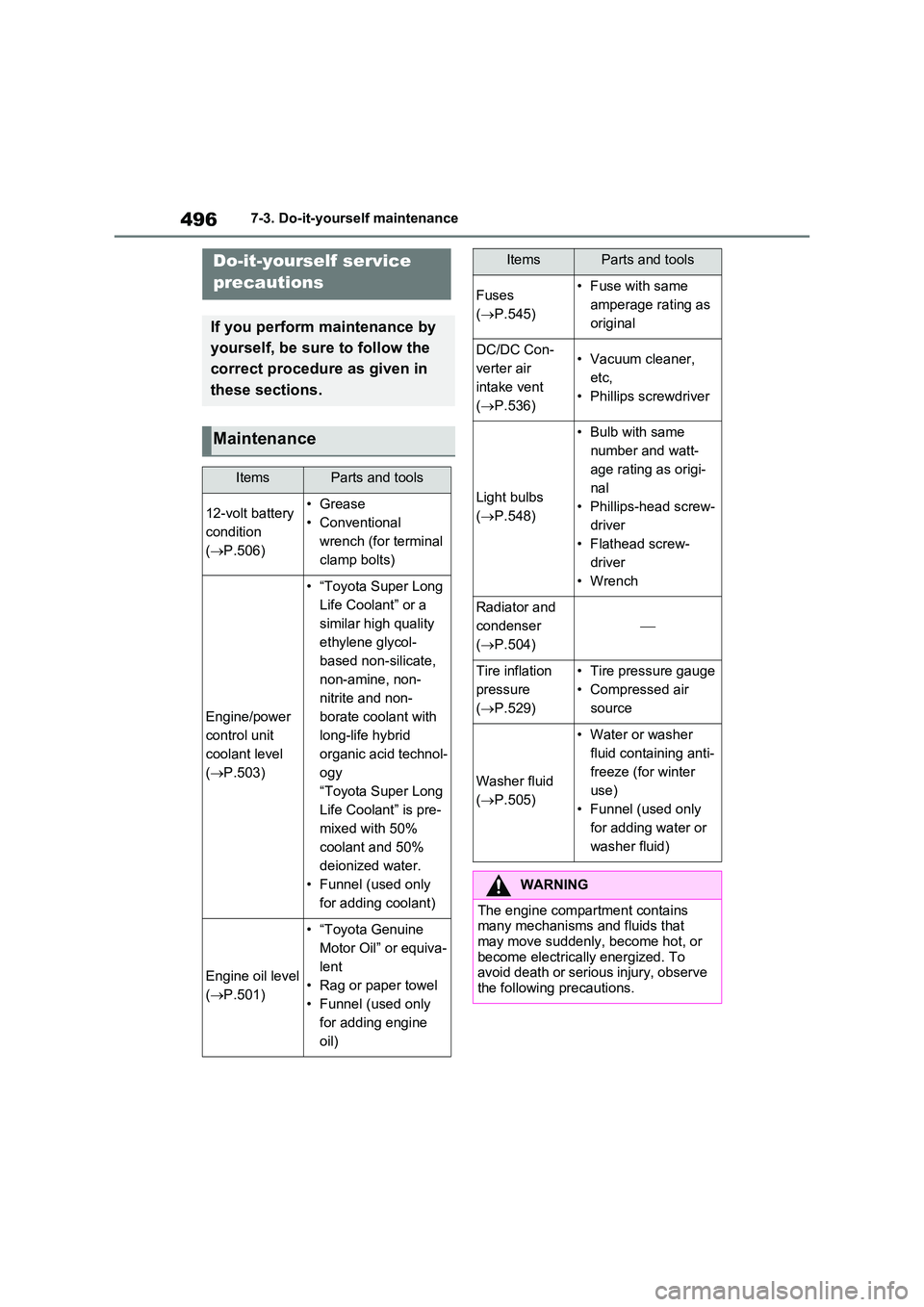
If you perform maintenance by
yourself, be sure to follow the
correct procedure as given in
these sections.
Maintenance
ItemsParts and tools
12-volt battery
condition
( P.506)
•Grease
• Conventional
wrench (for terminal
clamp bolts)
Engine/power
control unit
coolant level
( P.503)
• “Toyota Super Long
Life Coolant” or a
similar high quality
ethylene glycol-
based non-silicate,
non-amine, non-
nitrite and non-
borate coolant with
long-life hybrid
organic acid technol-
ogy
“Toyota Super Long
Life Coolant” is pre-
mixed with 50%
coolant and 50%
deionized water.
• Funnel (used only
for adding coolant)
Engine oil level
( P.501)
• “Toyota Genuine
Motor Oil” or equiva-
lent
• Rag or paper towel
• Funnel (used only
for adding engine
oil)
Fuses
( P.545)
• Fuse with same
amperage rating as
original
DC/DC Con-
verter air
intake vent
( P.536)
• Vacuum cleaner,
etc,
• Phillips screwdriver
Light bulbs
( P.548)
• Bulb with same
number and watt-
age rating as origi-
nal
• Phillips-head screw-
driver
• Flathead screw-
driver
•Wrench
Radiator and
condenser
( P.504)
Tire inflation
pressure
( P.529)
• Tire pressure gauge
• Compressed air
source
Washer fluid
( P.505)
• Water or washer
fluid containing anti-
freeze (for winter
use)
• Funnel (used only
for adding water or
washer fluid)
WARNING
The engine compartment contains many mechanisms and fluids that may move suddenly, become hot, or
become electrically energized. To avoid death or serious injury, observe the following precautions.
ItemsParts and tools
Page 497 of 664
497
7
7-3. Do-it-yourself maintenance
Maintenance and care
WARNING
■When working on the engine compartment
●Make sure that “IGNITION ON” on the multi-information display and the “READY” indicator are both off.
●Keep hands, clothing and tools away from the moving fan.
●Be careful not to touch the engine, power control unit, radiator, exhaust
manifold, etc. right after driving as they may be hot. Oil and other flu-ids may also be hot.
●Do not leave anything that may burn easily, such as paper and
rags, in the engine compartment.
●Do not smoke, cause sparks or
expose an open flame to fuel or the 12-volt battery. Fuel and 12-volt battery fumes are flammable.
●Take care because brake fluid can harm your hands or eyes and dam-
age painted surfaces. If fluid gets on your hands or in your eyes, flush the affected area with clean water
immediately. If you still experience discomfort, consult a doctor.
■When working near the electric cooling fan or radiator grille
Be sure the power switch is off.
With the power switch in ON, the electric cooling fan may automatically start to run if the air conditioning is on
and/or the coolant temperature is high. ( P.504)
■Safety glasses
Wear safety glasses to prevent flying or falling material, fluid spray, etc.,
from getting in your eyes.
NOTICE
■If you remove the air cleaner fil- ter
Driving with the air cleaner filter removed may cause excessive engine wear due to dirt in the air.
■If the fluid level is low or high
It is normal for the brake fluid level to
go down slightly as the brake pads wear or when the fluid level in the accumulator is high.
If the reservoir needs frequent refill- ing, it may indicate a serious problem.