2011 TOYOTA VERSO S light
[x] Cancel search: lightPage 274 of 664
2744-3. Adjusting the seats
will be overwritten.
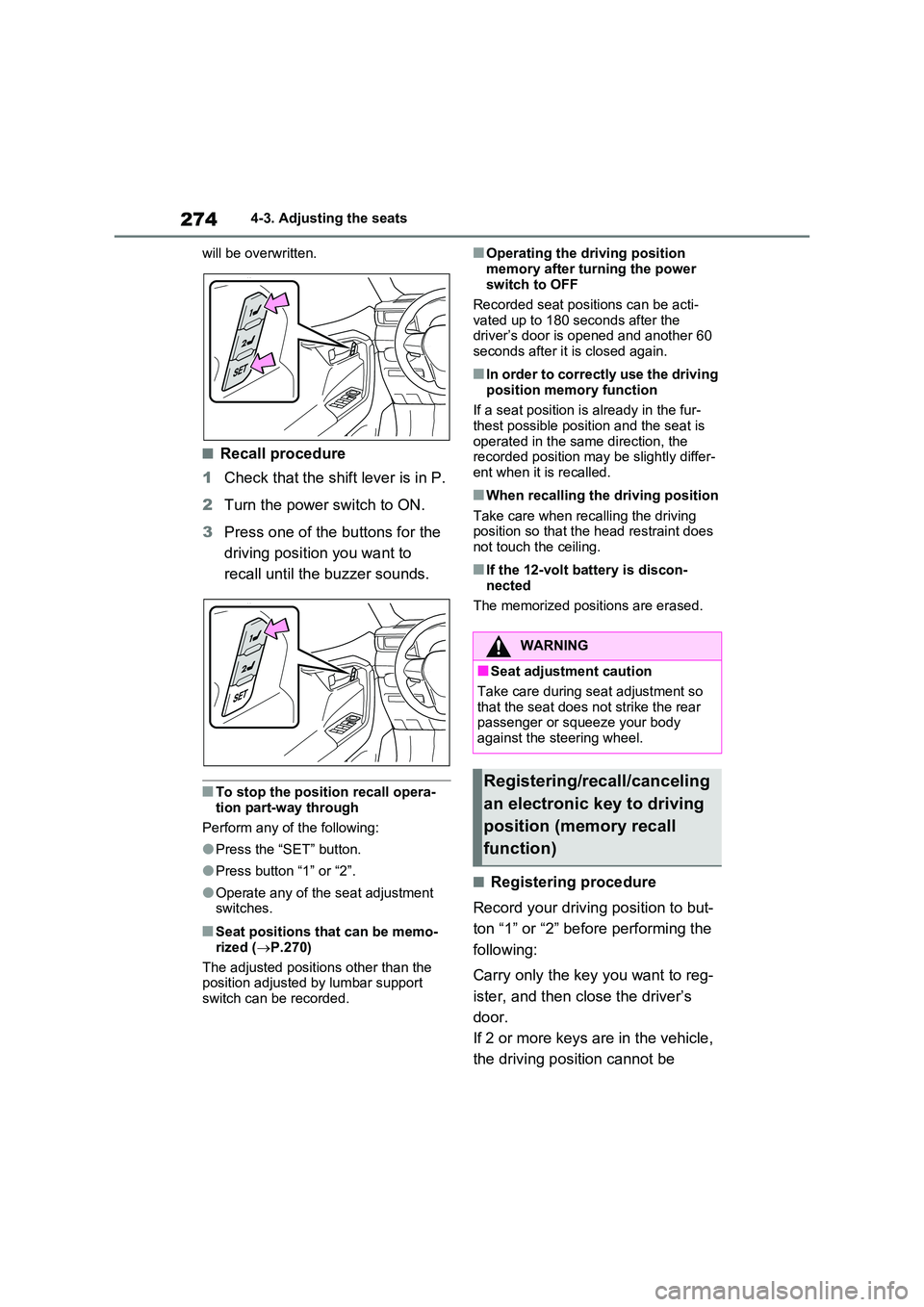
■Recall procedure
1 Check that the shift lever is in P.
2 Turn the power switch to ON.
3 Press one of the buttons for the
driving position you want to
recall until the buzzer sounds.
■To stop the position recall opera-
tion part-way through
Perform any of the following:
●Press the “SET” button.
●Press button “1” or “2”.
●Operate any of the seat adjustment switches.
■Seat positions that can be memo-
rized ( P.270)
The adjusted positions other than the position adjusted by lumbar support
switch can be recorded.
■Operating the driving position
memory after turning the power switch to OFF
Recorded seat positions can be acti-
vated up to 180 seconds after the driver’s door is opened and another 60 seconds after it is closed again.
■In order to correctly use the driving
position memory function
If a seat position is already in the fur- thest possible position and the seat is
operated in the same direction, the recorded position may be slightly differ-ent when it is recalled.
■When recalling the driving position
Take care when recalling the driving position so that the head restraint does not touch the ceiling.
■If the 12-volt battery is discon-
nected
The memorized positions are erased.
■Registering procedure
Record your driving position to but-
ton “1” or “2” before performing the
following:
Carry only the key you want to reg-
ister, and then close the driver’s
door.
If 2 or more keys are in the vehicle,
the driving position cannot be
WARNING
■Seat adjustment caution
Take care during seat adjustment so that the seat does not strike the rear passenger or squeeze your body
against the steering wheel.
Registering/recall/canceling
an electronic key to driving
position (memory recall
function)
Page 279 of 664

279
4
4-4. Adjusting the steering wheel and mirrors
Before driving
*: If equipped
The height of the rear view mirror
can be adjusted to suit your driving
posture.
Adjust the height of the rear view
mirror by moving it up and down.
Responding to the level of bright-
ness of the headlights of vehicles
behind, the reflected light is auto-
matically reduced.
Changing automatic anti-glare
function mode on/off
When the automatic anti-glare function
is in ON mode, the indicator illumi-
nates.
The function will set to ON mode each
time the power switch is turned to ON.
Pressing the button turns the function
to OFF mode. (The indicator also
turns off.)
■To prevent sensor error
To ensure that the sensors operate
properly, do not touch or cover them.
Inside rear view mirror*
The rear view mirror’s position
can be adjusted to enable suf-
ficient confirmation of the rear
view.
Adjusting the height of rear
view mirror
WARNING
■Caution while driving
Do not adjust the position of the mir- ror while driving.Doing so may lead to mishandling of
the vehicle and cause an accident, resulting in death or serious injury.
Anti-glare function
A
A
Page 281 of 664
281
4
4-4. Adjusting the steering wheel and mirrors
Before driving
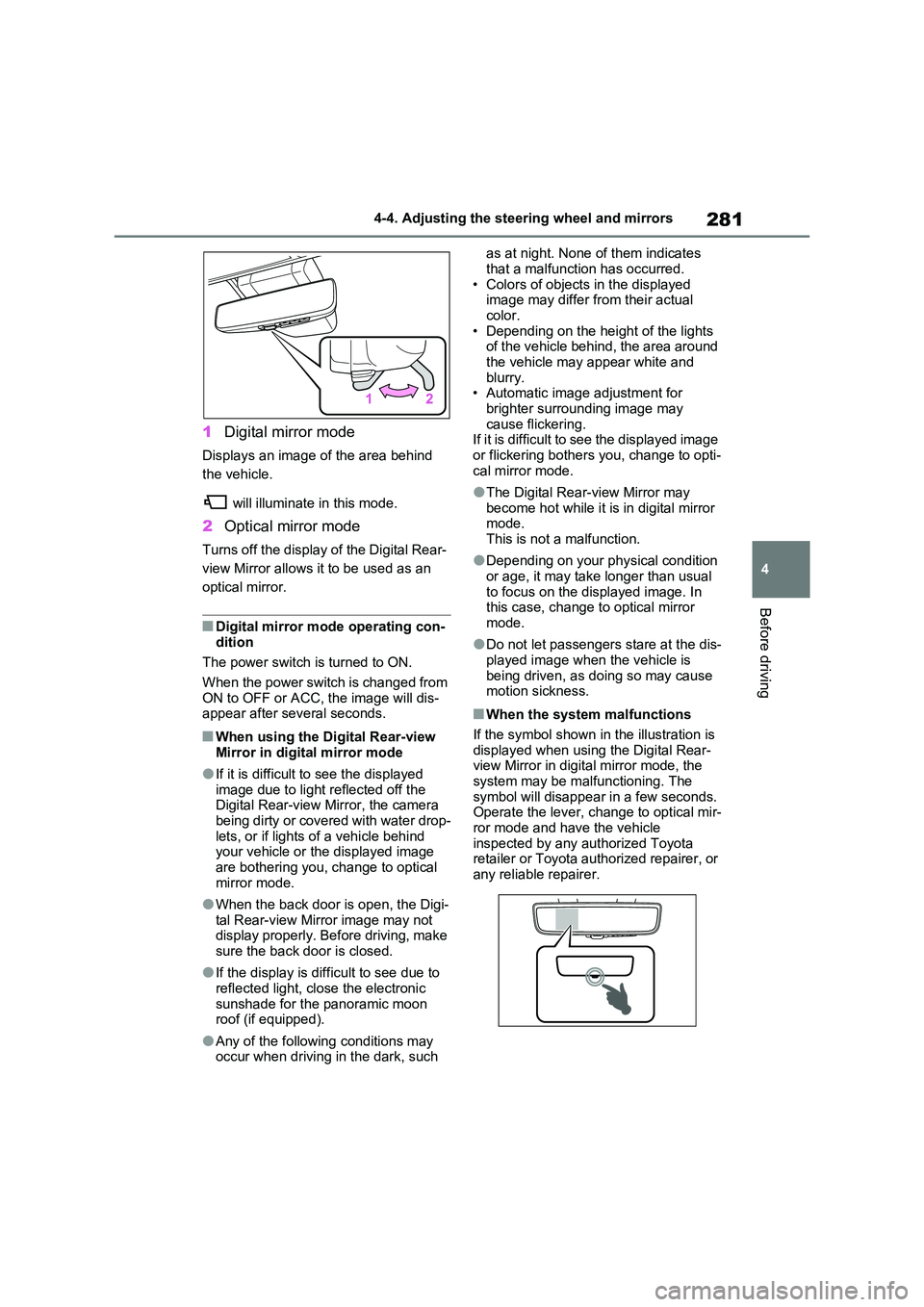
1 Digital mirror mode
Displays an image of the area behind
the vehicle.
will illuminate in this mode.
2 Optical mirror mode
Turns off the display of the Digital Rear-
view Mirror allows it to be used as an
optical mirror.
■Digital mirror mode operating con- dition
The power switch is turned to ON.
When the power switch is changed from ON to OFF or ACC, the image will dis-appear after several seconds.
■When using the Digital Rear-view
Mirror in digital mirror mode
●If it is difficult to see the displayed
image due to light reflected off the Digital Rear-view Mirror, the camera being dirty or covered with water drop-
lets, or if lights of a vehicle behind your vehicle or the displayed image are bothering you, change to optical
mirror mode.
●When the back door is open, the Digi-
tal Rear-view Mirror image may not display properly. Before driving, make sure the back door is closed.
●If the display is difficult to see due to reflected light, close the electronic
sunshade for the panoramic moon roof (if equipped).
●Any of the following conditions may occur when driving in the dark, such
as at night. None of them indicates
that a malfunction has occurred. • Colors of objects in the displayed image may differ from their actual
color. • Depending on the height of the lights of the vehicle behind, the area around
the vehicle may appear white and blurry.• Automatic image adjustment for
brighter surrounding image may cause flickering.If it is difficult to see the displayed image
or flickering bothers you, change to opti- cal mirror mode.
●The Digital Rear-view Mirror may become hot while it is in digital mirror mode.
This is not a malfunction.
●Depending on your physical condition
or age, it may take longer than usual to focus on the displayed image. In this case, change to optical mirror
mode.
●Do not let passengers stare at the dis-
played image when the vehicle is being driven, as doing so may cause motion sickness.
■When the system malfunctions
If the symbol shown in the illustration is displayed when using the Digital Rear-view Mirror in digital mirror mode, the
system may be malfunctioning. The symbol will disappear in a few seconds. Operate the lever, change to optical mir-
ror mode and have the vehicle inspected by any authorized Toyota retailer or Toyota authorized repairer, or
any reliable repairer.
Page 282 of 664
2824-4. Adjusting the steering wheel and mirrors
■Adjusting the mirror height
The height of the rear view mirror
can be adjusted to suit your driving
posture.
Change to optical mirror mode,
adjusting the height of the rear view
mirror by moving it up and down.
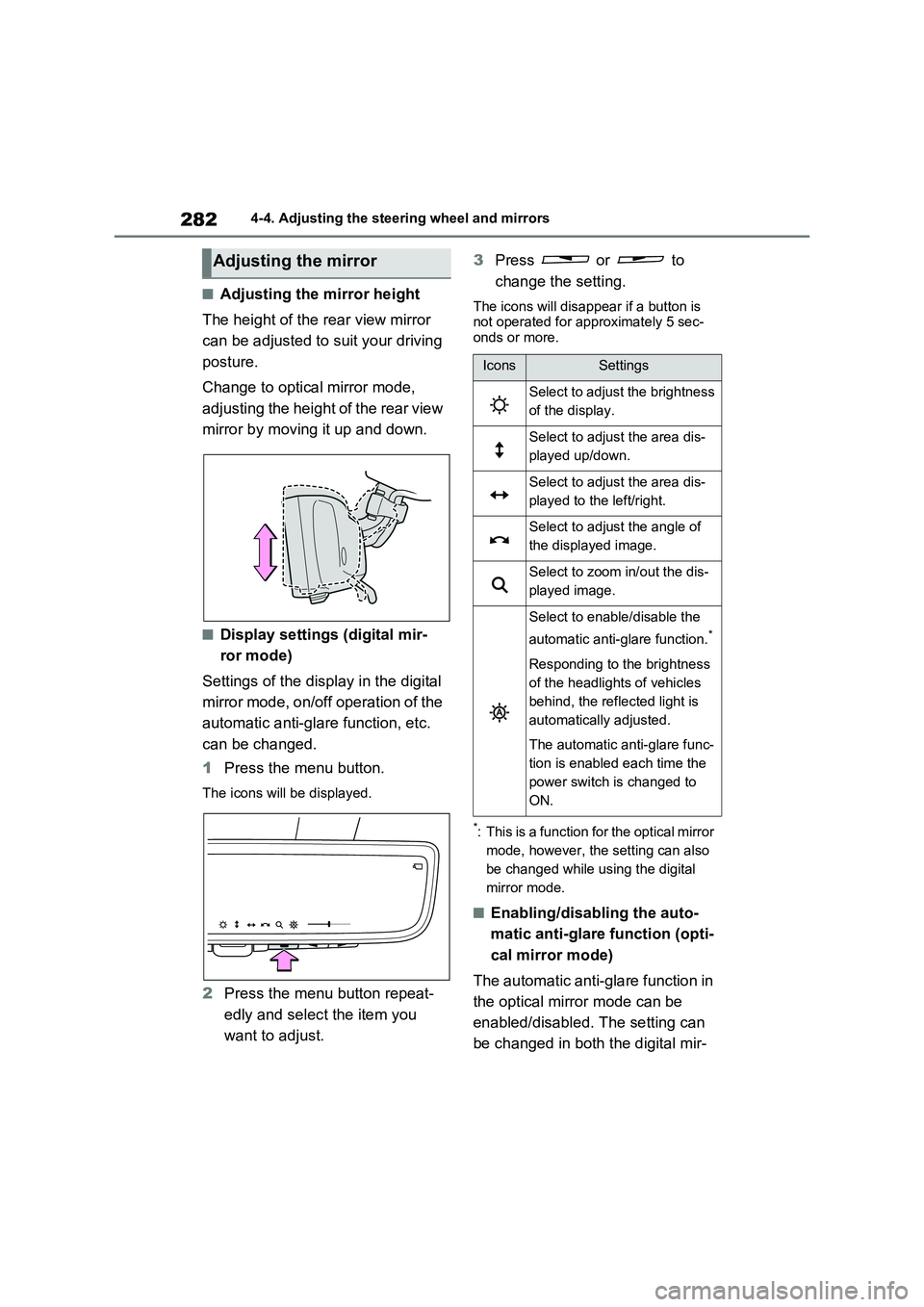
■Display settings (digital mir-
ror mode)
Settings of the display in the digital
mirror mode, on/off operation of the
automatic anti-glare function, etc.
can be changed.
1Press the menu button.
The icons will be displayed.
2Press the menu button repeat-
edly and select the item you
want to adjust.3Press or to
change the setting.
The icons will disappear if a button is
not operated for approximately 5 sec-
onds or more.
*: This is a function for the optical mirror
mode, however, the setting can also
be changed while using the digital
mirror mode.
■Enabling/disabling the auto-
matic anti-glare function (opti-
cal mirror mode)
The automatic anti-glare function in
the optical mirror mode can be
enabled/disabled. The setting can
be changed in both the digital mir-
Adjusting the mirror
IconsSettings
Select to adjust the brightness
of the display.
Select to adjust the area dis-
played up/down.
Select to adjust the area dis-
played to the left/right.
Select to adjust the angle of
the displayed image.
Select to zoom in/out the dis-
played image.
Select to enable/disable the
automatic anti-glare function.
*
Responding to the brightness
of the headlights of vehicles
behind, the reflected light is
automatically adjusted.
The automatic anti-glare func-
tion is enabled each time the
power switch is changed to
ON.
Page 283 of 664

283
4
4-4. Adjusting the steering wheel and mirrors
Before driving
ror mode and the optical mirror
mode.
When using the digital mirror
mode
P.282
When using the optical mirror
mode
1 Press the menu button.
The icons will be displayed.
2Press or to
enable (ON)/disable (OFF) the
automatic anti-glare function.
The icons will disappear if a button is not operated for approximately 5 sec-onds or more.
■Adjusting the display (digital mirror mode)
●If the displayed image is adjusted, it may appear distorted. This is not a
malfunction.
●If the brightness of the Digital Rear-
view Mirror is set too high, it may cause eye strain. Adjust the Digital Rear-view Mirror to an appropriate
brightness. If your eyes become tired, change to optical mirror mode.
●The brightness of the Digital Rear-view Mirror will change automatically according to the brightness of the
area in front of your vehicle.
■To prevent the light sensors from
malfunctioning
To prevent the light sensors from mal- functioning, do not touch or cover them.
WARNING
Observe the following precautions.Failure to do so may result in death or serious injury.
■While driving
●Do not adjust the position of the
Digital Rear-view Mirror or adjust the display settings while driving.Stop the vehicle and operate the
Digital Rear-view Mirror control switches. Failure to do so may cause a steer-
ing wheel operation error, resulting in an unexpected accident.
●Always pay attention to the vehi-cle’s surroundings.
The size of the vehicles and other
objects may look different when in digital mirror mode and optical mirror mode.
When backing up, make sure to directly check the safety of the area around your vehicle, especially
behind the vehicle. Additionally, if a vehicle approaches from the rear in the dark, such as at
night, the surrounding area may appear dim.
Page 284 of 664
2844-4. Adjusting the steering wheel and mirrors
■Cleaning the mirror surface
If the mirror surface is dirty, the
image on the display may be diffi-
cult to see.
Clean the mirror surface gently
using a soft dry cloth.
■Cleaning the camera
If the camera lens is dirty, the dis-
played image may not be clear. In
this case, clean it with a soft cloth
dampened with water or a swab.
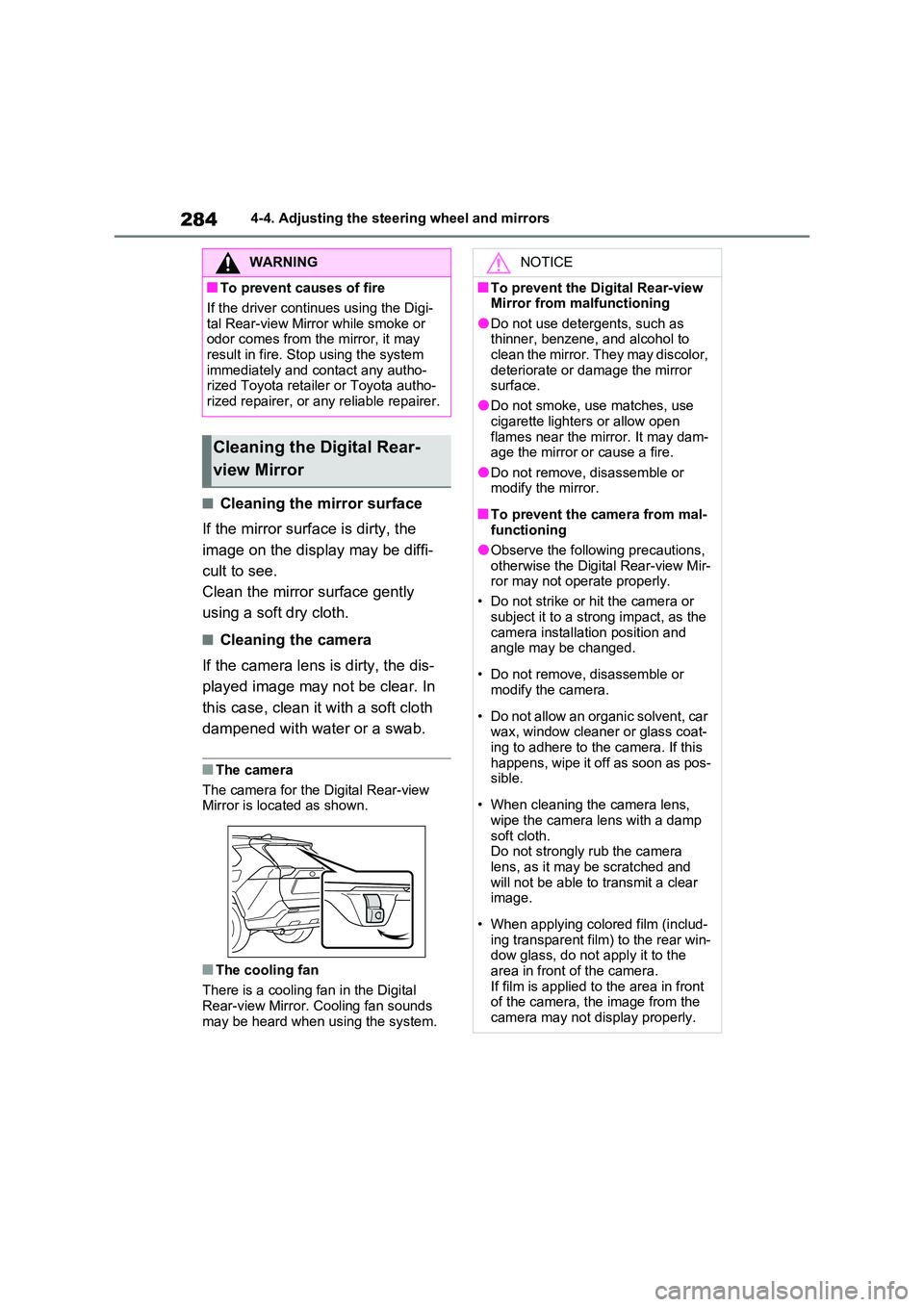
■The camera
The camera for the Digital Rear-view Mirror is located as shown.
■The cooling fan
There is a cooling fan in the Digital
Rear-view Mirror. Cooling fan sounds may be heard when using the system.
WARNING
■To prevent causes of fire
If the driver continues using the Digi-
tal Rear-view Mirror while smoke or odor comes from the mirror, it may result in fire. Stop using the system
immediately and contact any autho- rized Toyota retailer or Toyota autho-rized repairer, or any reliable repairer.
Cleaning the Digital Rear-
view Mirror
NOTICE
■To prevent the Digital Rear-view Mirror from malfunctioning
●Do not use detergents, such as thinner, benzene, and alcohol to clean the mirror. They may discolor,
deteriorate or damage the mirror surface.
●Do not smoke, use matches, use
cigarette lighters or allow open flames near the mirror. It may dam-age the mirror or cause a fire.
●Do not remove, disassemble or modify the mirror.
■To prevent the camera from mal-functioning
●Observe the following precautions,
otherwise the Digital Rear-view Mir- ror may not operate properly.
• Do not strike or hit the camera or
subject it to a strong impact, as the camera installation position and angle may be changed.
• Do not remove, disassemble or modify the camera.
• Do not allow an organic solvent, car wax, window cleaner or glass coat-
ing to adhere to the camera. If this happens, wipe it off as soon as pos-sible.
• When cleaning the camera lens, wipe the camera lens with a damp
soft cloth. Do not strongly rub the camera lens, as it may be scratched and
will not be able to transmit a clear image.
• When applying colored film (includ- ing transparent film) to the rear win-dow glass, do not apply it to the
area in front of the camera. If film is applied to the area in front of the camera, the image from the
camera may not display properly.
Page 286 of 664
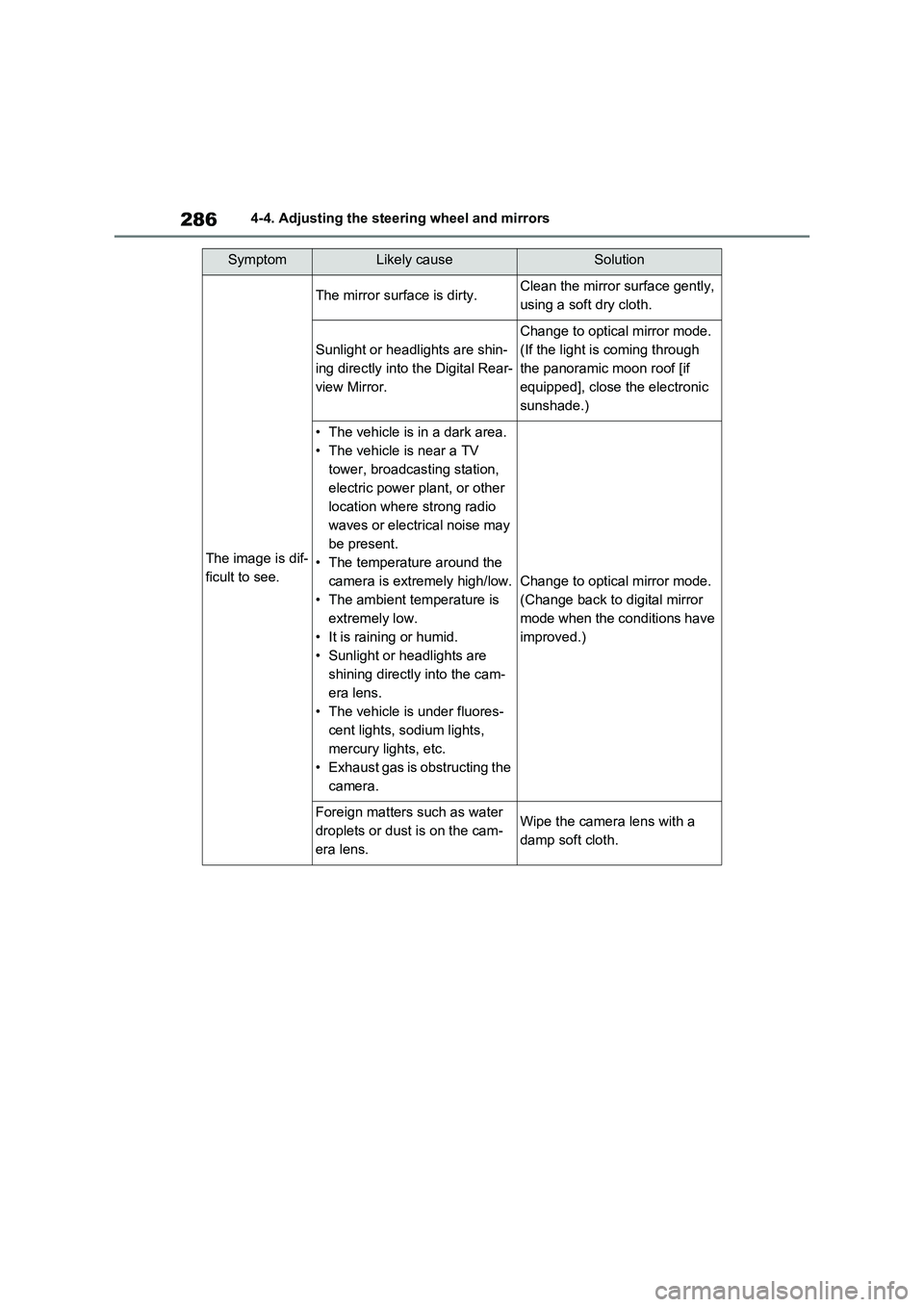
2864-4. Adjusting the steering wheel and mirrors
SymptomLikely causeSolution
The image is dif-
ficult to see.
The mirror surface is dirty.Clean the mirror surface gently,
using a soft dry cloth.
Sunlight or headlights are shin-
ing directly into the Digital Rear-
view Mirror.
Change to optical mirror mode.
(If the light is coming through
the panoramic moon roof [if
equipped], close the electronic
sunshade.)
• The vehicle is in a dark area.
• The vehicle is near a TV
tower, broadcasting station,
electric power plant, or other
location where strong radio
waves or electrical noise may
be present.
• The temperature around the
camera is extremely high/low.
• The ambient temperature is
extremely low.
• It is raining or humid.
• Sunlight or headlights are
shining directly into the cam-
era lens.
• The vehicle is under fluores-
cent lights, sodium lights,
mercury lights, etc.
• Exhaust gas is obstructing the
camera.
Change to optical mirror mode.
(Change back to digital mirror
mode when the conditions have
improved.)
Foreign matters such as water
droplets or dust is on the cam-
era lens.Wipe the camera lens with a
damp soft cloth.
Page 291 of 664
291
4
4-5. Opening, closing the windows and moon roof
Before driving
4-5.Opening, closing the windows an d moo n roof
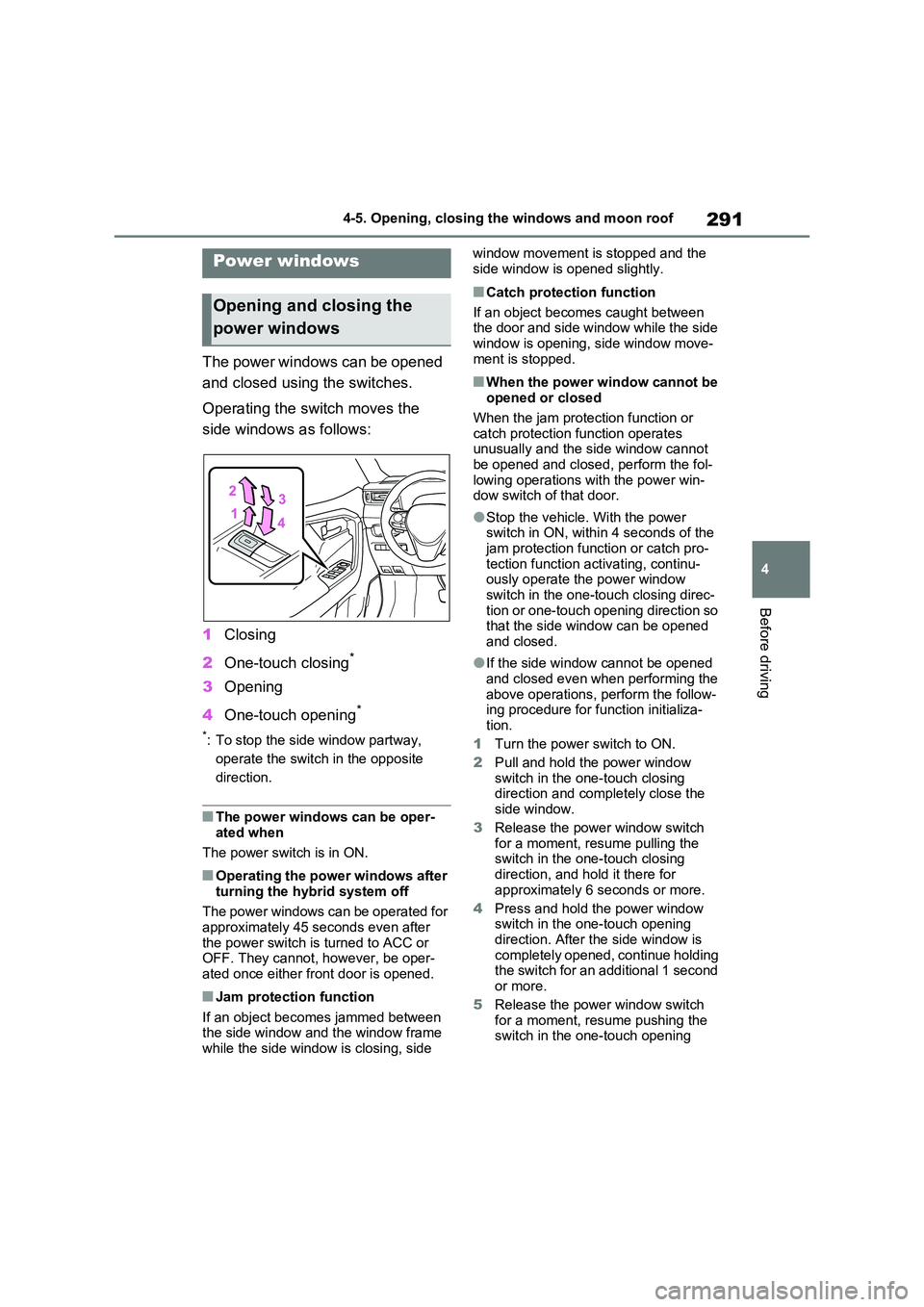
The power windows can be opened
and closed using the switches.
Operating the switch moves the
side windows as follows:
1 Closing
2 One-touch closing*
3Opening
4 One-touch opening*
*: To stop the side window partway,
operate the switch in the opposite
direction.
■The power windows can be oper- ated when
The power switch is in ON.
■Operating the power windows after
turning the hybrid system off
The power windows can be operated for approximately 45 seconds even after
the power switch is turned to ACC or OFF. They cannot, however, be oper-ated once either front door is opened.
■Jam protection function
If an object becomes jammed between the side window and the window frame while the side window is closing, side
window movement is stopped and the
side window is opened slightly.
■Catch protection function
If an object becomes caught between the door and side window while the side
window is opening, side window move- ment is stopped.
■When the power window cannot be opened or closed
When the jam protection function or catch protection function operates unusually and the side window cannot
be opened and closed, perform the fol- lowing operations with the power win-dow switch of that door.
●Stop the vehicle. With the power switch in ON, within 4 seconds of the
jam protection function or catch pro- tection function activating, continu-ously operate the power window
switch in the one-touch closing direc- tion or one-touch opening direction so that the side window can be opened
and closed.
●If the side window cannot be opened
and closed even when performing the above operations, perform the follow-ing procedure for function initializa-
tion.
1 Turn the power switch to ON.
2 Pull and hold the power window switch in the one-touch closing direction and completely close the
side window.
3 Release the power window switch for a moment, resume pulling the switch in the one-touch closing
direction, and hold it there for approximately 6 seconds or more.
4 Press and hold the power window switch in the one-touch opening
direction. After the side window is completely opened, continue holding the switch for an additional 1 second
or more.
5 Release the power window switch for a moment, resume pushing the switch in the one-touch opening
Power windows
Opening and closing the
power windows