2011 MITSUBISHI PAJERO IV Temperature
[x] Cancel search: TemperaturePage 98 of 377

NOTE
l The
average speed
can be reset separately for
the auto reset mode and for the manual reset
mode.
l When you turn the ignition switch to the
“ON” position about 4 hours (or more) after
turning it from the “ON” position to the
“ACC” or “LOCK” position in the auto reset
mode, the average speed indication will auto-
matically be reset.
Outside temperature E00518500071
The outside temperature is graphed every 5 mi-
nutes and
the
data for up to 4 hours are shown in
(A). The current outside temperature is shown in (B). Resetting the outside temperature
Press the “RESET”
function button to reset the
graph of the outside temperature. NOTE
l Depending
on factors
such as the driving con-
ditions, the displayed temperature may vary
from the actual outside temperature.
l It is possible to set the display unit to °C or °F.
Refer to “User customization” on page 3-25.
Frozen road warning
This shows the temperature outside the vehicle. When the outside air temperature drops below
about 3
°C
(37 °F), the alarm sounds and the out-
side air temperature symbol (A) flashes for about
10 seconds. CAUTION
l
There is
a
danger the road might be icy,
even when this symbol is not flashing, so
please take care when driving.
Altimeter E00518600056
The current elevation in units of 50 m (200 ft) is
shown in (A).
The elevation is graphed every
5 minutes and the data for up to 4 hours are shown
in (B). Instruments and controls
3-17 3
OBKE12E1
Page 107 of 377

Selecting the item to set
1. Press the “ADJ” button to select the user cus-tomization display. 2. Press the function button “←” or “→” to se-
lect the item you wish to set. •“UNIT”: Changing the unit
•
“LANGUAGE”: Changing the lan-guage
• “12h ↔ 24h”: Changing the time for- mat
• “DEFAULT”: Resetting to factory set- tings Push the function button “SELECT”. The set-
ting display
for
your selected item will appear. Changing display units
It is possible to change the display units for the fuel
consumption, driving range,
average speed, outside
temperature, elevation, and atmospheric pressure
as shown below.
FUEL ECONOMY km/L → L/100 km → mpg
(UK GALLON)
→
mpg
(US GALLON)
RANGE km → miles
SPEED km/h → mph
OUTSIDE TEM-
PERATURE °C → °F
ELEVATION m → ft
BAROMETER hPa → mb → kPa → inHg
l Changing the
display
unit for fuel consump-
tion 1. Press the “←” or “→” function button to se-
lect “FUEL
ECONOMY”. Then press the
“SELECT” function button. 2. Press the “←” or “→” function button to se-
lect “km/L”.
Then press the “SET” function
button. The display will flash twice, and the
display unit will be updated to the selected
one. NOTE
l You
can return
to the previous display by
pressing the “BACK” function button. Instruments and controls
3-26
3
OBKE12E1
Page 109 of 377

2. After setting the time notation, press the “IN-
FO” button to return to the information dis-
play. Returning display items to their factory settings
You can return the setting of each item to the facto-
ry default settings.
NOTE
l The factory settings are as follows:
•Fuel consumption: L/100 km
• Driving range: km •
Average speed: km/h
• Outside temperature: °C
• Elevation: m
• Atmospheric pressure: hPa
• Display language: English
• Time notation: 12-hour 1. Push the “SELECT” function button.
2. Press the “←” function button to select
“YES”. 3. Press the “SELECT” function button.
4. Once more press the “←” function button to
select “YES”. Instruments and controls
3-28
3
OBKE12E1
Page 120 of 377

CAUTION
l
With the ignition switch in the “ON” posi-
tion and the lever in the “AUTO” posi-
tion, the wipers may automatically oper-
ate in the situations described below.
If your hands get trapped, you could suf-
fer injuries or the wipers could malfunc-
tion. Be sure to turn the ignition switch to
the “OFF” position or move the lever to
the “OFF” position to deactivate the rain
sensor. • When cleaning the outside surface ofthe windscreen, if you touch the rain
sensor.
• When cleaning the outside surface of the windscreen, if you wipe with a
cloth the rain sensor.
• When using an automatic car wash.
• A physical shock is applied to the wind- screen.
• A physical shock is applied to the rain sensor.
NOTE l To
protect the
rubber parts of the wipers, this
operation of the wipers does not take place
when the vehicle is stationary and the ambi-
ent temperature is about 0 °C or lower.
l Do not cover the sensor by affixing a sticker
or label to the windscreen. Also, do not put
any water-repellent coating on the wind-
screen. The rain sensor would not be able to
detect the extent of rain, and the wipers
might stop working normally. l
In the
following
cases, the rain sensor may
be malfunctioning.
Have the vehicle inspected at a
MITSUBISHI MOTORS Authorized Service
Point. • When the wipers operate at a constant in-terval despite changes in the extent of rain.
• When the wipers do not operate even though it is raining.
l The wipers may automatically operate when
things such as insects or foreign objects are
affixed to the windscreen on top of the rain
sensor or when the windscreen is frozen. Ob-
jects affixed to the windscreen will stop the
wipers when the wipers cannot remove them.
To make the wipers operate again, place the
lever in the “LO” or “HI” position.
Also, the wipers may operate automatically
due to strong direct sunlight or electromag-
netic wave. To stop the wipers, place the lev-
er in the “OFF” position.
l Contact a MITSUBISHI MOTORS Author-
ized Service Point when replacing the wind-
screen or reinforcing the glass around the sen-
sor. To adjust the sensitivity of the rain sensor
With the
lever
in the “AUTO” (rain sensor) posi-
tion, it is possible to adjust the sensitivity of the
rain sensor by turning the knob (A). “+”- Higher sensitivity to rain
“-”- Lower sensitivity to rain
NOTE l It
is possible
to activate the following func-
tions. For further information, we recom-
mend you to consult a MITSUBISHI
MOTORS Authorized Service Point. • Automatic operation (rain droplet sensi-tive) can be changed to intermittent oper-
ation (vehicle-speed sensitive).
• Automatic operation (rain droplet sensi- tive) can be changed to intermittent oper-
ation (except vehicle-speed sensitive).
Misting function
Move the lever in the direction of the arrow and re-
lease, to operate the wipers once.
Use this function when you are driving in mist or
drizzle. Instruments and controls
3-39 3
OBKE12E1
Page 139 of 377

Starting
E00601600811
Tips for starting l Do not
operate
the starter motor continuous-
ly longer than 10 seconds; doing so could
run down the battery. If the engine does not
start, turn the ignition key back to “LOCK”
position, wait a few seconds, and then try
again. Trying repeatedly with the starter mo-
tor still turning will damage the starter mech-
anism. WARNING
l Never
run
the
engine in a closed or poor-
ly ventilated area any longer than is nee-
ded to move your vehicle in or out of the
area. Carbon monoxide gases are odour-
less and can be fatal. CAUTION
l
Never attempt to
start the engine by push-
ing or pulling the vehicle.
l Do not run the engine at high rpm or
drive the vehicle at high speed until the en-
gine has had a chance to warm up.
l Release the ignition key as soon as the en-
gine starts to avoid damaging the starter
motor.
l If your vehicle is equipped with a turbo-
charger, do not stop the engine immedi-
ately after high-speed or uphill driving.
First allow the engine to idle to give the
turbocharger a chance to cool down. Starting the engine (petrol-powered ve-
hicles)
E00601701994
The starting procedure is as follows:
1. Insert the ignition
key and fasten the seat belt.
2. Make sure the parking brake is applied.
3. Depress and hold the brake pedal.
4. Fully depress the clutch pedal (M/T).
5. On vehicles with M/T, place the gearshift lev- er in the “N” (Neutral) position.
On vehicles with A/T, make sure the selector
lever is in the “P” (PARK) position.
Vehicles with M/T Vehicles with A/T 6. After turning the ignition key to the “ON” po-
sition, make
certain that all warning lamps
are functioning properly before starting the
engine.
7. Turn the ignition key to the “START” posi- tion without depressing the accelerator pedal,
and release it when the engine starts. NOTE
l A
ticking noise
may be heard after starting
the engine. This is not an abnormal condi-
tion. The noise will disappear after a short
time of engine running.
If the ticking noise continues after the engine
is warmed up, we recommend you to have
your vehicle checked.
Using the MIVEC engine
The MIVEC engine automatically switches its in-
take-valve control between a low-speed mode and
a high-speed mode in accordance with driving con-
ditions for maximum engine performance.
NOTE l To protect the engine, the high-speed mode
may not be selected while the engine coolant
temperature is low. In such a case, the engine
revolutions do not rise to over 5,000 rpm
even if the accelerator pedal is depressed.
Starting the engine (diesel-powered ve-
hicles) E00601800086
1. Insert the ignition key and fasten the seat belt.
2. Make sure the parking brake is applied.
3.
Depress and hold the brake pedal.
4. Fully depress the clutch pedal (M/T).
5. On vehicles with M/T, place the gearshift lev- er in the “N” (Neutral) position. Starting and driving
4-14
4
OBKE12E1
Page 140 of 377

On vehicles with A/T, make sure
the selector
lever is in the “P” (PARK) position.
Vehicles with M/T Vehicles with A/T6. Turn the ignition key to the “ON” position.
The diesel preheat
indication lamp will first
illuminate, and then after a short time go out,
indicating that preheating is completed.
NOTE l If the engine is cold, the diesel preheat indi-
cation lamp is on for a longer time.
l When the engine has not been started within
about 5 seconds after the diesel preheat indi-
cation lamp went out, return the ignition key
to the “LOCK” position. Then, turn the key
to the “ON” position to preheat the engine
again.
l When the engine is warm, the diesel preheat
indication lamp does not come on even if the
ignition key is placed in the “ON” position.
Start the engine by turning the ignition key
right to the “START” position. 7. Turn the ignition key to the “START” posi-
tion without depressing the accelerator pedal,
and release it when the engine starts.
Fuel injection amount learning proc-
ess (diesel-powered vehicles) E00616000044
To keep
exhaust emissions and engine noise low,
the engine very
occasionally performs a learning
process for the fuel injection amount.
The engine sounds slightly different from usual
while the learning process is taking place. The
change in the engine sound does not indicate a fault. Diesel particulate filter (DPF)*
E00619800027
The diesel particulate
filter (DPF) is a device that
captures most of the particulate matter (PM) in the
exhaust emissions of the diesel engine. The DPF au-
tomatically burns away trapped PM during vehicle
operation. Under certain driving conditions, howev-
er, the DPF is not able to burn away all of the trap-
ped PM and, as a result, an excessive amount of
PM accumulates inside it. WARNING
l The DPF reaches very high temperatures.
Do not
park
your vehicle in areas where
combustible materials such as dry grass
or leaves can come in contact with a hot
exhaust system since a fire could occur. CAUTION
l
Do not use
any type of fuel or engine oil
that is not specified for your vehicle. Al-
so, do not use any moisture-removing
agent or other fuel additive. Such substan-
ces could have a detrimental effect on the
DPF.
Refer to “Fuel selection” on page 02 and
“Engine oil” on page 8-04.
NOTE l To
minimize the
likelihood of excessive ac-
cumulation of PM, try to avoid driving for
long periods at low speeds and repeatedly
driving short distances. Starting and driving
4-15 4
OBKE12E1
Page 141 of 377
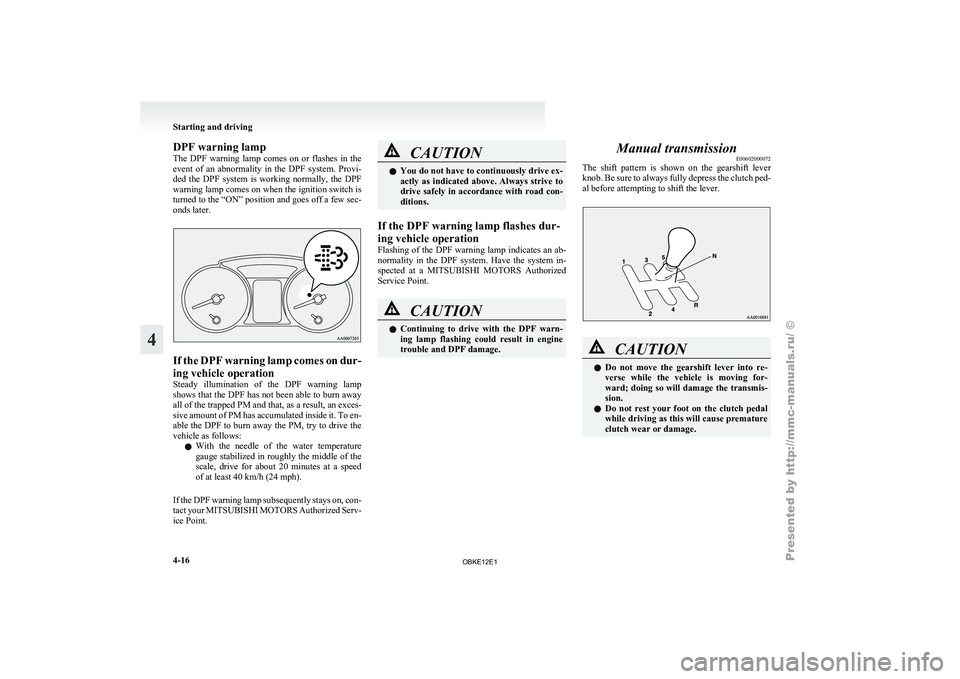
DPF warning lamp
The DPF
warning
lamp comes on or flashes in the
event of an abnormality in the DPF system. Provi-
ded the DPF system is working normally, the DPF
warning lamp comes on when the ignition switch is
turned to the “ON” position and goes off a few sec-
onds later. If the DPF warning lamp comes on dur-
ing vehicle operation
Steady illumination
of
the DPF warning lamp
shows that the DPF has not been able to burn away
all of the trapped PM and that, as a result, an exces-
sive amount of PM has accumulated inside it. To en-
able the DPF to burn away the PM, try to drive the
vehicle as follows:
l With the needle of the water temperature
gauge stabilized in roughly the middle of the
scale, drive for about 20 minutes at a speed
of at least 40 km/h (24 mph).
If the DPF warning lamp subsequently stays on, con-
tact your MITSUBISHI MOTORS Authorized Serv-
ice Point. CAUTION
l
You do not
have to continuously drive ex-
actly as indicated above. Always strive to
drive safely in accordance with road con-
ditions.
If the DPF warning lamp flashes dur-
ing vehicle operation
Flashing of the
DPF warning lamp indicates an ab-
normality in the DPF system. Have the system in-
spected at a MITSUBISHI MOTORS Authorized
Service Point. CAUTION
l
Continuing to
drive
with the DPF warn-
ing lamp flashing could result in engine
trouble and DPF damage. Manual transmission
E00602000072
The shift pattern
is shown on the gearshift lever
knob. Be sure to always fully depress the clutch ped-
al before attempting to shift the lever. CAUTION
l
Do not move
the gearshift lever into re-
verse while the vehicle is moving for-
ward; doing so will damage the transmis-
sion.
l Do not rest your foot on the clutch pedal
while driving as this will cause premature
clutch wear or damage. Starting and driving
4-16
4
OBKE12E1
Page 147 of 377

When a malfunction occurs in the A/T
E00615100035
When the “N” indication lamp blinks E00615200023
When the “N” indication lamp (A) blinks with the
“D” (DRIVE) position
or “Sports mode” being se-
lected, the A/T may be malfunctioning. CAUTION
l
If the “N”
indication lamp blinks while
driving in the “D” (DRIVE) position or
“Sports Mode”, the A/T safety device
may be operating due to a malfunction.
We recommend you to have your vehicle
inspected as soon as possible. When the A/T fluid temperature warning lamp
comes on
E00615300109
When the A/T
fluid temperature warning lamp
comes automatic transmission fluid temperature be-
comes abnormally high. Normally the warning
lamp comes on when the ignition switch is turned
to the “ON” position, and then will go out after a
few seconds. CAUTION
l
If the lamp
comes on, reduce the engine
speed and stop the vehicle in a safe area.
Then set the selector lever to “P” (PARK)
position and idle the engine until the warn-
ing lamp goes off. When the warning
lamp goes off, resume normal driving. If
the warning lamp does not go off, we rec-
ommend you to have your vehicle inspec-
ted. Operation of the A/T
E00604200560 CAUTION
l
Before selecting
a
gear with the engine
running and the vehicle stationary, fully
depress the brake pedal to prevent the ve-
hicle from creeping.
The vehicle will begin to move as soon as
the gear is engaged, especially when the
engine speed is high, at fast idle or with
the air conditioning operating, the brakes
should only be released when you are
ready to drive away.
l Depress the brake pedal with the right
foot at all times.
Using the left foot could cause driver move-
ment delay in case of an emergency.
l Operating the accelerator pedal while the
other foot is resting on the brake pedal
will affect braking efficiency and may
cause premature wear of brake pads.
l To prevent sudden acceleration, never
race the engine when shifting from the
“P” (PARK) or “N” (NEUTRAL) position.
l Use the selector lever in the correct shift
position in accordance with driving condi-
tions.
Never coast downhill backward with the
selector lever in the “D” (DRIVE) or
sports mode position or coast forward
with the selector lever in the “R” (RE-
VERSE) position.
The engine may stop and the unexpected
increase in brake pedal effort and steer-
ing wheel weight could lead to an accident. Starting and driving
4-22
4
OBKE12E1