2011 MERCEDES-BENZ M-CLASS SUV mirror
[x] Cancel search: mirrorPage 254 of 389
Changing th
edeparture time
X Pres sthe = or; button on th esteer-
ing wheel to selec tthe Settings menu.
X Press the :or9 button to selec tthe
Heating submenu.
X Press the abutton to confir m.
You will see the selected setting.
X Press the abutton to confirm.
X Press the :or9 button to select
Change A ,
B or
C .
X Press the abutton to confirm.
You can now change the departur etime.
X Press the =or; button to select the
displa ytobec hanged: hours, minutes.
X Press the :or9 button to set the
selected display.
X Press the abutton to stor ethe ent ry.
The yellow indicator lam ponthe auxiliary
heating button lights up.
Convenience Activating/deactivating th
eEASY-
ENTRY/EXIT featu re
You can use the Easy Entry/Exit: func
tion
to activate or deactivate the EAS YENTRY/
EXIT feature (Y page 99). G
WARNING
Th es teering whee lmoves when the EASY-
ENTRY/EXI Tfeatur eisa ctive. There is arisk
of occupant sbecoming trapped. Before acti-
vating the EASY-ENTRY/EXI Tfeature, make
sure that nobody can becom etrapped.
Do not leave children unsupervised in the
vehicle, eve nifthey ar esecured in achild
restraint system .The children coul dopen the
driver' sdoor and thereby unintentionally acti-
vat ethe EASY-ENTRY/EXI Tfeatur eand
become trapped.
X Pres sthe = or; button on the steer-
ing wheel to selec tthe Settings menu.
X Press the :or9 button to selec tthe
Convenience submenu.X
Press the abutton to confir m.
X Press the :or9 button to select the
Easy Entry/Exit: function.
You will see the selected setting: on or
off .
X Press the abutton to save the setting.
Switching th ebelt adjustment on/off
For further information on belt adjustment,
see (Y page 48).
X Press the =or; button on the steer-
ing wheel to select the Settings menu.
X Press the :or9 button to select the
Convenience submenu.
X Press the abutton to confir m.
X Press the :or9 button to select the
Belt adjustment function.
You will see the selected setting: on or
off .
X Press the abutton to save the setting.
Switching th efold in mirrors when lock-
ing function on/off
If you switch on the Fold mirrors in when
locking func
tion, the exterior mirror sfold in
when you lock the vehicle. When you unlock
the vehicle and then open the driver's or
front-passenger door, the exterior mirrors
fold out again.
If you have switched the func tion on and you
fold the exterior mirror sinusing the button
on the door (Y page 101), they will not fold
out automatically. The exterior mirrors can
then only be folded out usin gthe button on
the door.
X Press the =or; button on the steer-
ing wheel to selec tthe Settings menu.
X Press the :or9 button to selec tthe
Convenience submenu.
X Press the abutton to confir m. Menus and submenus
251On-boardcomputer and display s Z
Page 255 of 389
X
Press the :or9 to select the Fold mirror
sinwhen locking: function.
Yo uw ill see the selected setting: on or
off .
X Press the abutton to save the setting.
Resetting to factor ysettings For safety reasons
,not al lfunction sare reset:
the Limit speed (winter tyres) function
in permane ntSPEEDTRONI Ccan only be set
in the Vehicle submenu. If you want to reset
the Daytim edriving lights: fun
ction in
the Light submenu, you must tur
nthe key in
the ignition lock to position 1.
X Press the =or; button on the steer-
ing wheel to selec tthe Settings menu.
X Press the :or9 button to selec tthe
Factor ysetting submenu.
X Press the abuttontoc onfirm.
The Rese tall settings? message
appe ars.
X Pres sthe : or9 button to select
No or
Yes .
X Press the abutton to confir mthe selec-
tion.
If you select Yes ,t
he multifunction display
shows aconfirmation message. ON&OFFROAD menu
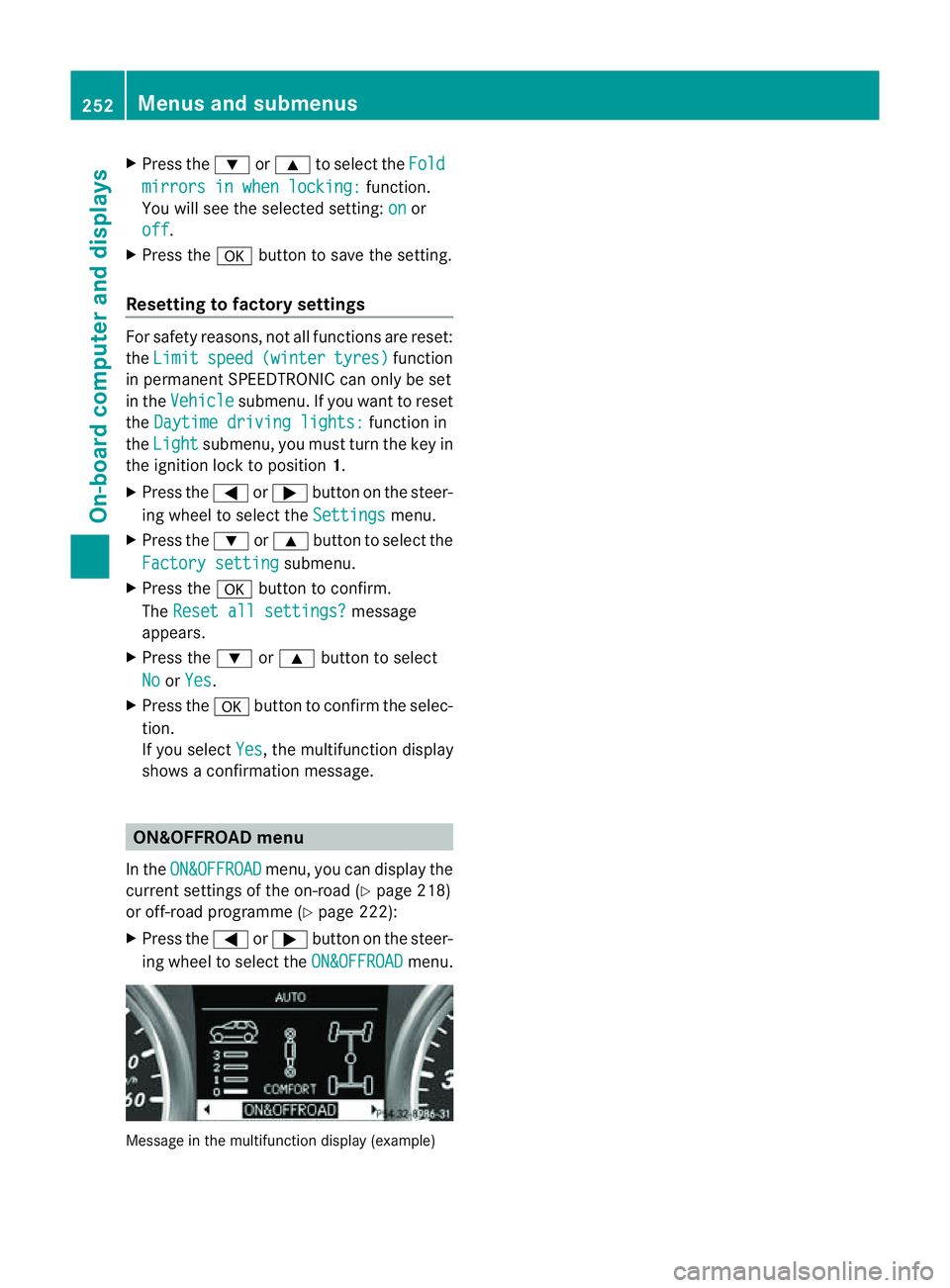
In the ON&OFFROAD menu, you can display the
curren tsettings of the on-road (Y page 218)
or off-road programm e(Ypage 222):
X Press the =or; button on the steer-
ing wheel to select the ON&OFFROAD menu.
Message in the multifunction display (example)252
Menus and submenusOn-board computer and displays
Page 266 of 389

Displa
ymessages Possible causes/consequences and
M Solutions
b
Tr
ailerb rake lamp Th
et railer brak elamp is faulty.
X Chec kwhether you ar epermitted to change the bulb yourself.
or
X Visit aqualified specialist workshop. b
Rear
left indicator
or
Rear righ tindi‐ cator Th
er ear left-hand or rear right-hand tur nsignal is faulty.
X Check whether you are permitted to change the bulb yourself
(Y page 113).
or
X Visit aqualified specialist workshop. b
Fron
tleft indica‐ tor or
Front right indicator Th
ef ront left-hand or fron tright-hand turn signal is faulty.
X Check whether you are permitted to change the bulb yourself
(Y page 113).
or
X Visit aqualified specialist workshop. b
Left
mirror indica‐
tor or
Righ tmir‐ ror indicator Th
et urn signal in the left-hand or right-hand exterior mirror is
faulty.
X Check whether you are permitted to change the bulb yourself
(Y page 113).
or
X Visit aqualified specialist workshop. b
Thir
dbrake lamp Th
et hir db rake lamp is faulty.
X Check whether yo uare permitted to change th ebulb yourself
(Y page 113).
or
X Visit aqualified specialist workshop. b
Left-han
dtail lamp/brake lamp or
Right-hand tail lamp/brake lamp Th
eleft or right-hand brak elamp is faulty.
X Check whethe ryou ar epermitted to change the bulb yourself
(Y page 113).
or
X Visit aqualified specialist workshop. b
Left main beam
or
Righ tmain beam Th
eleft or right-hand high beam is faulty.
X Check whether you are permitted to change the bulb yourself
(Y page 113).
or
X Visit aqualified specialist workshop. Display messages
263On-boardcomputer and displays Z
Page 275 of 389

Displa
ymessages Possible causes/consequences and
M Solutions
Sp
eedL imit Assist currently unavail‐
abl
eS ee Owner's Manual Spee
dLimit Assist is deactivated an dtemporarily inoperative.
Possible causes:
R the windscreen is dirt yinthe camera's field of vision.
R visibility is impaired due to heav yrain, snow or fog.
If the displ aymessage does not disappear:
X Pull ove rand sto pthe vehicle safely as soon as possible, paying
attention to roa dand traffic conditions.
X Appl ythe electric parkin gbrake.
X Cle anthe windscreen.
If th esystem detects that the camera is fully operational, the dis-
play messag edisappears.
Speed Limit Assist is operational again. Speed Limit Assist:
Unavailabl
ein this country Spee
dLimit Assist is only available in certain countries.
X Driv eon.
Spee dLimit Assist is available again when you drive in acount ry
in which its use is approved. Spee
dLimit Assist inoperative Spee
dLimit Assist is faulty.
X Visit aqualified specialist workshop. HOLD
Off The HOLD function is deactivated. The vehicle is skidding.
Aw arning ton ealso sounds.
X Reactivat ethe HOL Dfunction later (Y page 187). Ra
dars ensor deac‐ tivated autom. See
Owner'
sManual Vehicles with
anavigation system :the vehicl eisclose to aradio
telescope facility and is therefor eprohibited from transmittin gany
radar sig nals. The radar sensor system has switched off automat-
icall y(Ypage 380).
DISTRONI CPLUS (Y page 174) is deactivate dautomaticall yifitis
activated. Awarning ton ealso sounds.
Blin dSpotA ssist (Y page 208) or Ac tiveBlind Spo tAssist
(Y page 212) is deactivate dautomaticall yifitisactivated. The
yellow 9indicator lamps als olight up in the exterior mirrors.
BAS PLU S(Brake Assis tPLUS) (Y page 62) and PRE-SAFE ®
Brake
(Y page 66) are then also no tavailable.
X Drive on.
Once yo uhave moved far enough awa yfrom th eradio telescope,
the above function sare avai lable again. 272
Display messagesOn-board computer and displays
Page 311 of 389
X
Fold do wnthe rear seat armrest.
Cu ph older :is in the rea rseat armrest. Sun visors
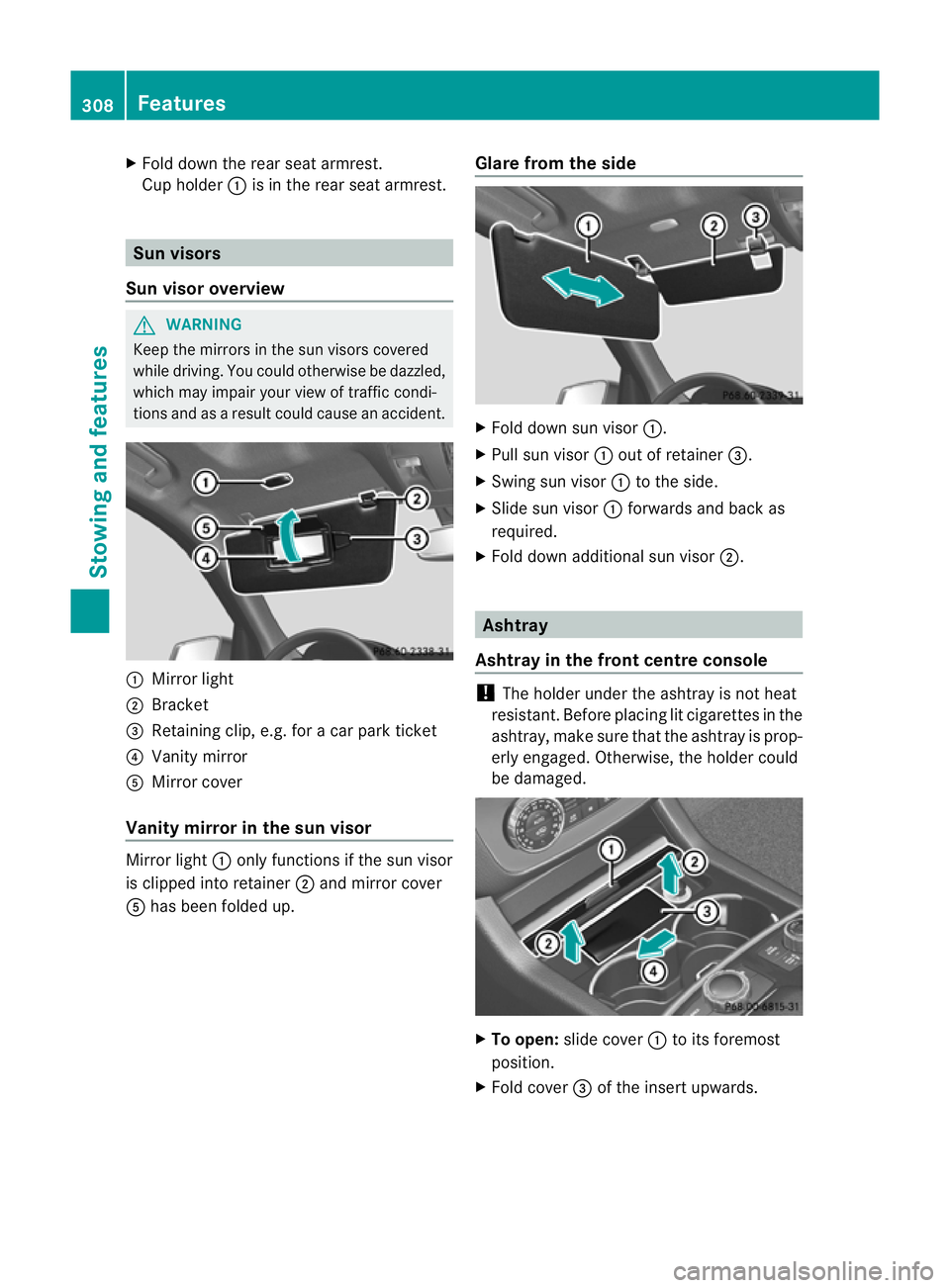
Sun visor overview G
WARNING
Keep the mirror sinthe sun visor scovered
while driving. You coul dotherwis ebedazzled,
which may impair your view of traffic condi-
tions and as aresult could cause an accident. :
Mirror light
; Bracket
= Retaining clip, e.g. for acar park ticket
? Vanity mirror
A Mirror cover
Vanity mirror in the sun visor Mirror light
:only functions if the sun visor
is clipped into retainer ;and mirror cover
A has been folded up. Glare from the side X
Fold down sun visor :.
X Pull sun visor :out of retainer =.
X Swing sun visor :to the side.
X Slide sun visor :forwards and back as
required.
X Fold down additional sun visor ;. Ashtray
Ashtray in the front centre console !
The holde runder the ashtray is not heat
resistant. Before placing lit cigarettes in the
ashtray, make sure that the ashtray is prop-
erly engaged .Otherwise, the holder could
be damaged. X
To open: slidecover :to its foremost
position.
X Fold cover =of the inser tupwards. 308
FeaturesStowing and features
Page 316 of 389

Garag
edoor opener
Important safety notes The HomeLink
®
garage door opener integra-
ted in the rear-view mirror allows you to oper-
ate up to three differ entd oor and gate sys-
tems.
i The garage door opener is only available
for certain countries. Observ ethe legal
requirement sfor each individua lcountry.
The HomeLink ®
garage door opener is
compatible with most European garage and
gate ope nerd rives. Mo reinformatio non
HomeLink ®
and/o rcompatible products is
available from:
R any Mercedes-Benz Servic eCentre
R the HomeLink ®
hotline
(0) 0800 0466 354 65 (fre eofcharge) or
+4 9(0) 6838 907 277 (charge sapply)
R on the In ternet at:
http://www.homelink.com
Programming the integra tedg arage
doo ropene rinthe rear-view mir ror Progr
ammi ng G
WARNING
Only press the transmit terb utton on the inte-
grated garage door opener if there are no per-
sons or objects present within the sweep of
the garage door. Persons could otherwis ebe
injured as the door moves. Integrated garage door opener in the rear-view mir-
ror Garage door remote control
Ais not part of
this integrated garage door opener.
i To achieve the best results, insert new
batteries in garage door remote control
A before programming.
X Before programming for the first time, clear
the memor yofthe integrated garage door
opener (Y page 315).
X Tur nthe key to position 2in the ignition
lock.
X Press and hold one of transmitter but-
tons ;to? on the integrated garage door
opener.
Af teras hort time, indicator lamp :star ts
fl ashing yellow.
i Indicator lamp :flashes yellow immedi-
ately the first time that the transmitter but-
ton is programmed. If this transmitter but-
ton has already been programmed, indica-
tor lamp :only start sflashing yellow after
10 seconds have elapsed.
X Release the transmitter button.
X Point transmitter button Bof garage door
remote control Atowards the transmitter
button sonthe rear-vie wmirror at adis-
tanc eof5 to 20 cm.
i The required distance between garage
door remote control Aand the integrated
door opener depends on the garage door
driv esystem. You might require several
attempts. You should test every position for
at leas t25seconds befor etryin ganother
position.
X Pres sand hol dtransmitter button Bon
garag edoor remote con trol A until indi-
cator lamp :lights up green.
The programmin ghas been successful if
indicator lamp :lights up or flashes
green.
X Release transmitter button ;,=or? on
the integrated garage door opener and the
transmitter button on garage door remote
control B. Features
313Stowingandfeatures Z
Page 317 of 389

If indicato
rlamp :lights up red:
X Repeat the programming procedure for the
transmitter buttons. When doing so, vary
the distance betwee nthe garage door drive
remote con troland the rear-view mirror.
i If the indicator lamp flashes gree nafter
successfu lprogramming, th egarage door
system is using arollin gcode. Af terp ro-
gramming ,you must synchronise the
garage door opener integrated in the rear-
view mirror with the receive rofthe garage
door system.
Synchronising th erolling code
Your vehicle must be within reach of the
garage or gate opener drive. Make sure that
neither your vehicle nor any persons/objects
are present within the sweep of the door or
gate.
Observe the safety notes when performing
the rolling code synchronisation.
X Turn the key to position 2in the ignition
lock.
X Press the programming button of the door
or gate drive (see the door or gate drive
operating instructions, e.g. under "Pro-
gramming of additional remote controls").
i Usually, you now have 30 seconds to ini-
tiate the next step.
X Press the previously programmed button of
the integrated HomeLink ®
garage door
opener repeatedly until the door starts to
move.
The rolling code synchronisation is then
complete.
Problems when programming
If you have problems when programming the
integrated garage door opener, please note
the following:
R check the transmitter frequency of garage
door remote control A(this can usually be
found on the rear of the remote control).
R change the batteries in garage door remote
control A.This increases the likelihood that garage door remote con
trolAwill
send astron gand precis esignal to the
integrated remote control in the rear-view
mirror.
R when programming, hold garage door
remote control Aat different distances
and angles from the transmitter button that
you are programming. Try various angles at
ad istance of between 5and 30 cm or the
same angle but varying distances.
R if there is another remote control for the
same garage doo rdrive ,perform the pro-
grammin gsteps again using this remote
control. Before performing thes esteps,
make sure that new batterie shave been
fitted in the garage door drive remote con-
trol.
R note that some remote controls transmit
only for alimited period (the indicator lamp
on the remote control goes out). Press the
button on the remote control again before
transmission ends.
R align the aerial cable of the garage door
opener unit. This can improv esignal recep-
tion/transmission.
Opening or closing the garage door Once programmed, the integrated garage
door opener will assume the func
tion of the
garage door system's remote con trol. Please
also read the operating instruc tions for the
garage door system.
X Tur nthe key to position 2in the ignition
lock.
X Press overhead con trolpanel transmitter
button ;,=or? that you have pro-
grammed to operate the garage door.
Garage door system with afixed code: indi-
cator lamp :lights up green.
Garage door system with arollin gcode:
indicator lamp :flashes green.
i The transmitter will transmit asignal for
as long as the transmitter button is
pressed. The transmission is halted after a
maximum of 10 seconds, and indicator 314
FeaturesStowin
gand features
Page 350 of 389

X
Switch off al lelec trical consumers (e.g.
radio ,blow er, etc.).
X Connec tthe positive terminal clamp and
secure the cov er.
X Connect the negative terminal clamp.
i If the power supply ha sbeeninterrupted,
e.g. if yo ureconnect the battery, you will
have to:
R set the clock; see the separate operat ing
instructions.
R rese tthe function for automatically fold-
ing the exterior mirror sin/out by foldi ng
the mirrors out onc e(Ypage 10 1). Charging th
ebattery G
WARNING
Onl ycharge the battery in awell-ventilated
area .Ast he battery is being charged, gases
can escap eand generat eminor explosions.
This could injure you and other person sor
caus edamage to the paintwork or acid cor-
rosion on the vehicle.
You can obtain information about battery
chargers which allow the batter ytobe
charged while still installed from aqualified
specialist workshop ,e.g. aM ercedes-Benz
Ser vice Centre. G
WARNING
There is arisk of acid burns during the charg-
ing process due to the gases which escape
from the battery. Do not lean over the battery
during the chargin gprocess. G
WARNING
Battery aci discaustic. Avoid contact with the
skin, eyes or clothing.
! Only charge the installed batter ywith a
batter ycharger whic hhas been tested and
approved by Mercedes -Benz .These battery
chargers allow the battery to be charged
while still installed. !
Only use battery chargers with amaxi-
mum charging voltage of 14.8 V.
! Only charge the battery using the jump-
start connection point.
The jump-starting connection point is in the
engine compartmen t(Ypage 348).
X Open the bonnet (Y page 318).
X Connec tthe battery charger to the positive
terminal and earth point in the sam eorder
as when connecting th edonor battery in
the jump-startin gprocedure
(Y page 348).
X Read th ebattery charger's operating
instructions before charging the battery. Battery
347Breakdown assistanc e Z