Page 398 of 722
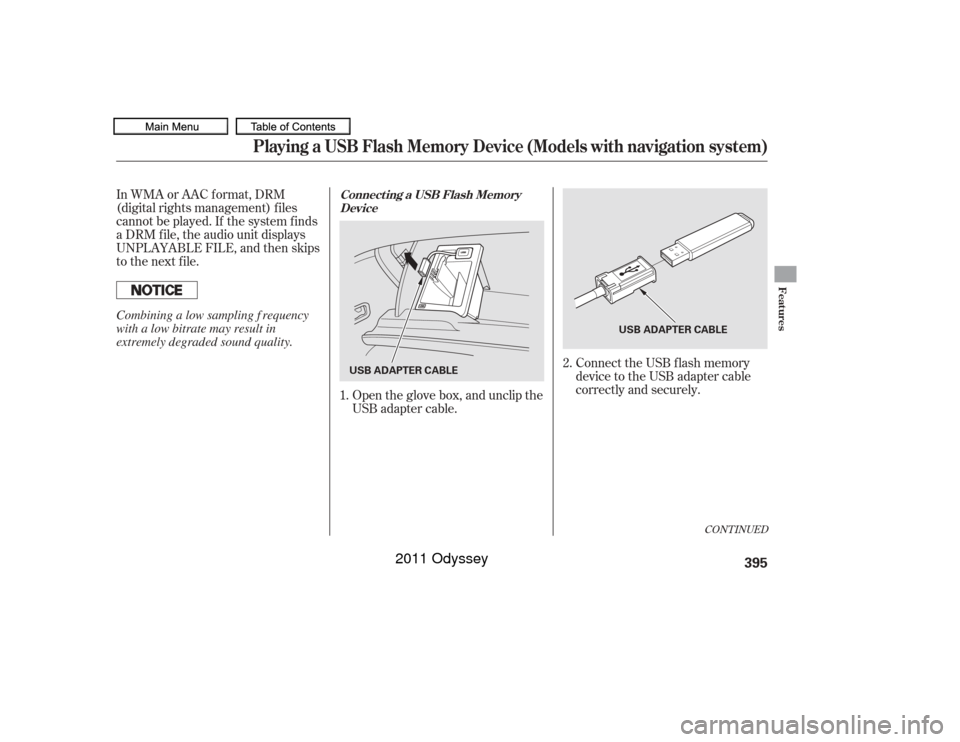
Connect the USB f lash memory
device to the USB adapter cable
correctly and securely.
In WMA or AAC format, DRM
(digital rights management) f iles
cannot be played. If the system f inds
a DRM f ile, the audio unit displays
UNPLAYABLE FILE, and then skips
to the next file.
Open the glove box, and unclip the
USB adapter cable.
1. 2.
CONT INUED
Connect ing a USB Flash Memory
Device
Playing a USB Flash Memory Device (Models with navigation system)
Features
395
USB ADAPTER CABLE
USB ADAPTER CABLE
Combining a low sampling f requency
with a low bitrate may result in
extremely degraded sound quality.
10/07/17 10:26:56 31TK8600_400
2011 Odyssey
Page 399 of 722
�µ�µ
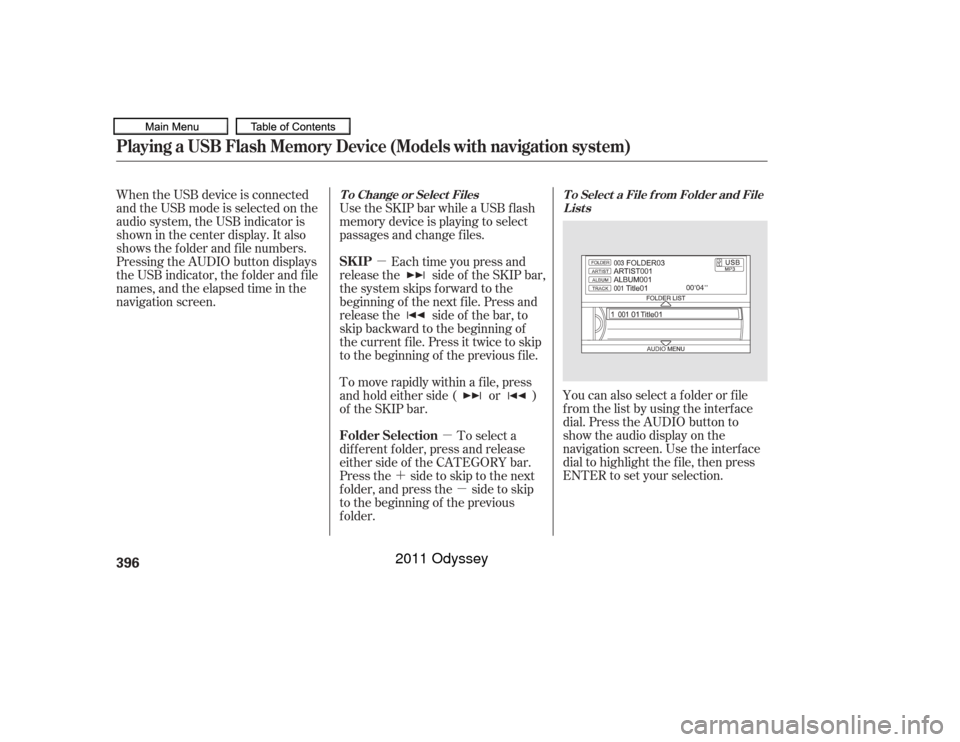
�´ �µ You can also select a f older or f ile
from the list by using the interface
dial. Press the AUDIO button to
show the audio display on the
navigation screen. Use the interf ace
dial to highlight the f ile, then press
ENTER to set your selection.
When the USB device is connected
andtheUSBmodeisselectedonthe
audio system, the USB indicator is
shown in the center display. It also
shows the f older and f ile numbers.
Pressing the AUDIO button displays
the USB indicator, the f older and f ile
names,andtheelapsedtimeinthe
navigation screen.
Use the SKIP bar while a USB f lash
memory device is playing to select
passages and change f iles.
Each time you press and
releasethe sideof theSKIPbar,
the system skips forward to the
beginning of the next f ile. Press and
releasethe sideof thebar,to
skip backward to the beginning of
the current f ile. Press it twice to skip
to the beginning of the previous file.
To move rapidly within a f ile, press
andholdeitherside( or )
of the SKIP bar.
To select a
dif f erent f older, press and release
either side of the CATEGORY bar.
Press the side to skip to the next
f older, and press the side to skip
to the beginning of the previous
f older.
T o Select a File f rom Folder and File
Lists
T o Change or Select Files
SK IP
Folder Selection
Playing a USB Flash Memory Device (Models with navigation system)396
10/07/17 10:27:03 31TK8600_401
2011 Odyssey
Page 400 of 722
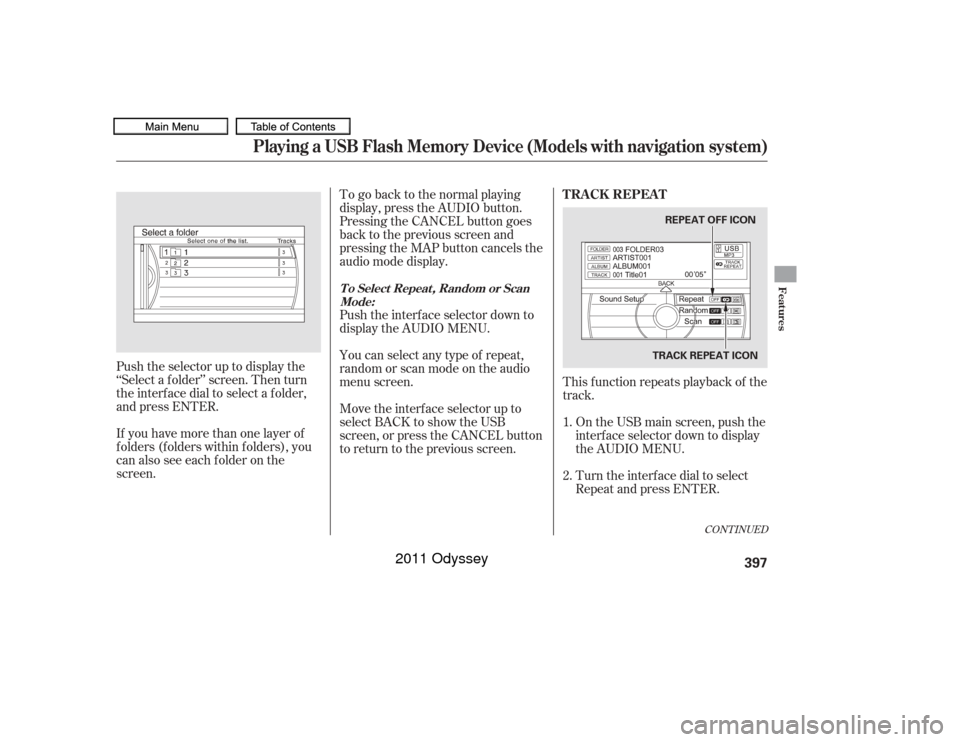
To go back to the normal playing
display, press the AUDIO button.
Pressing the CANCEL button goes
back to the previous screen and
pressing the MAP button cancels the
audio mode display.
Push the interf ace selector down to
display the AUDIO MENU.
You can select any type of repeat,
random or scan mode on the audio
menu screen.This f unction repeats playback of the
track.
Push the selector up to display the
‘‘Select a f older’’ screen. Then turn
the interf ace dial to select a f older,
and press ENTER.
If you have more than one layer of
f olders (f olders within f olders), you
can also see each f older on the
screen. Move the interf ace selector up to
select BACK to show the USB
screen, or press the CANCEL button
to return to the previous screen.
On the USB main screen, push the
interf ace selector down to display
the AUDIO MENU.
Turn the interf ace dial to select
Repeat and press ENTER.
1.
2.
CONT INUED
T o Select Repeat , Random or Scan
Mode:
T RA CK REPEA T
Playing a USB Flash Memory Device (Models with navigation system)
Features
397
REPEAT OFF ICON
TRACK REPEAT ICON
10/07/17 10:27:13 31TK8600_402
2011 Odyssey
Page 401 of 722
To cancel this f unction, turn the
interf ace dial and select the Repeat
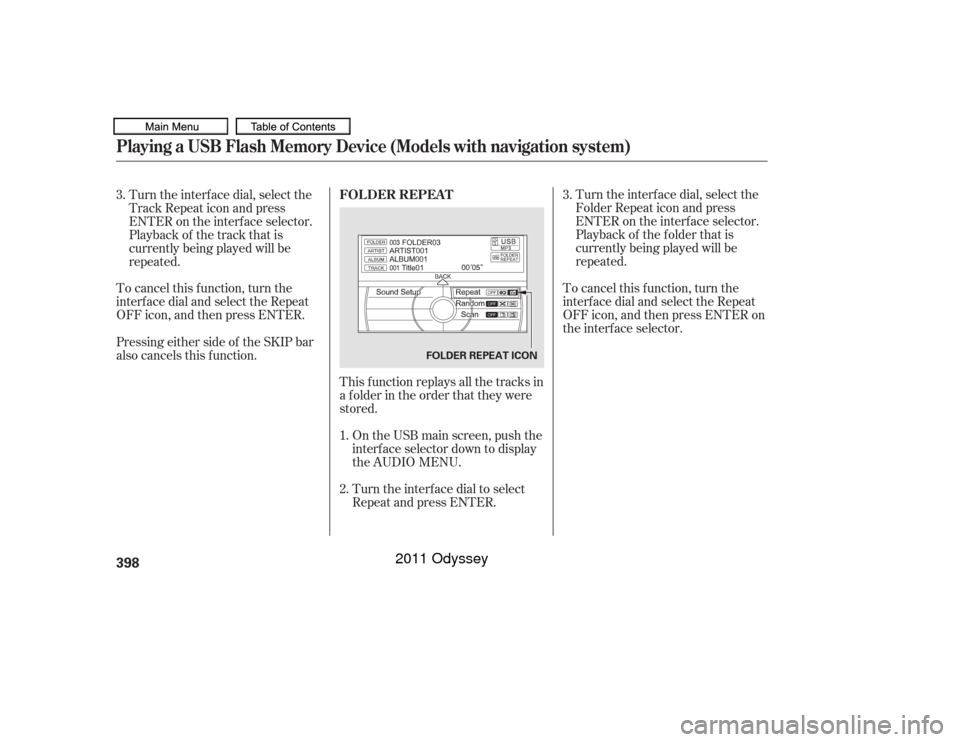
OFFicon,andthenpressENTER.This f unction replays all the tracks in
a f older in the order that they were
stored.On the USB main screen, push the
interf ace selector down to display
the AUDIO MENU.
Turn the interf ace dial to select
Repeat and press ENTER. Turn the interf ace dial, select the
Folder Repeat icon and press
ENTER on the interf ace selector.
Playback of the f older that is
currently being played will be
repeated.
To cancel this f unction, turn the
interf ace dial and select the Repeat
OFFicon,andthenpressENTERon
the interf ace selector.
Turn the interf ace dial, select the
Track Repeat icon and press
ENTER on the interf ace selector.
Playback of the track that is
currently being played will be
repeated.
Pressing either side of the SKIP bar
also cancels this f unction. 3. 3.
1.
2. FOLDER REPEATPlaying a USB Flash Memory Device (Models with navigation system)398
FOLDER REPEAT ICON
10/07/17 10:27:22 31TK8600_403
2011 Odyssey
Page 402 of 722
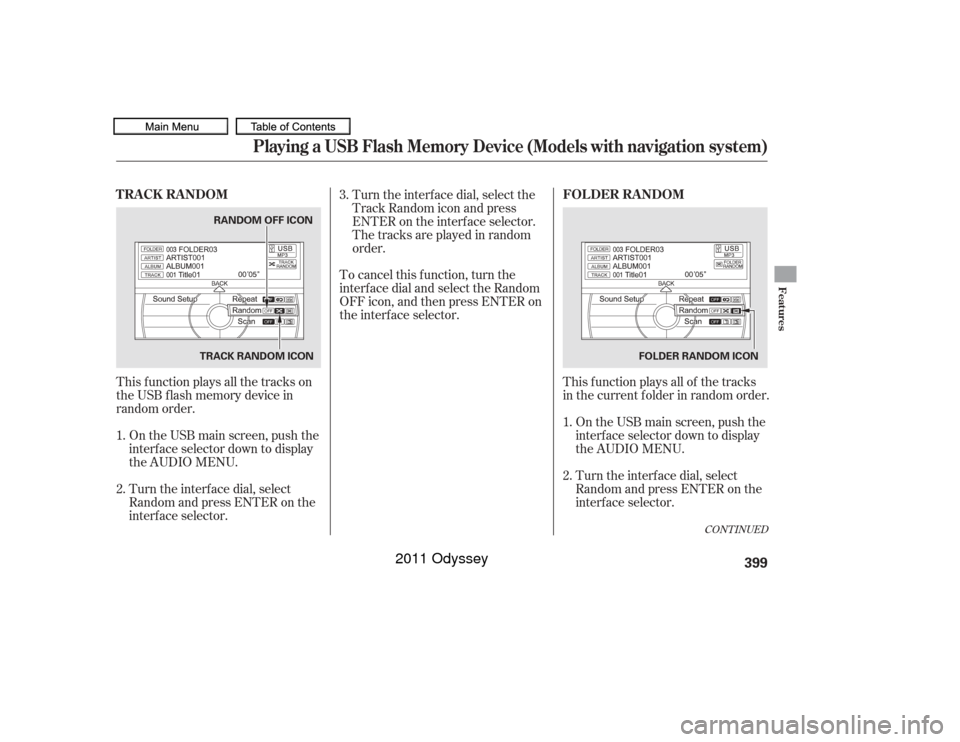
This f unction plays all the tracks on
theUSBflashmemorydevicein
random order.On the USB main screen, push the
interf ace selector down to display
the AUDIO MENU.
Turn the interf ace dial, select
Random and press ENTER on the
interf ace selector. Turn the interf ace dial, select the
Track Random icon and press
ENTER on the interf ace selector.
The tracks are played in random
order.
To cancel this f unction, turn the
interf ace dial and select the Random
OFFicon,andthenpressENTERon
the interf ace selector.
This f unction plays all of the tracks
in the current f older in random order.On the USB main screen, push the
interf ace selector down to display
the AUDIO MENU.
Turn the interf ace dial, select
Random and press ENTER on the
interf ace selector.
1.
2.
2. 1.
3.
CONT INUED
TRACK RANDOM
FOLDER RANDOM
Playing a USB Flash Memory Device (Models with navigation system)
Features
399
TRACK RANDOM ICONRANDOM OFF ICON
FOLDER RANDOM ICON
10/07/17 10:27:33 31TK8600_404
2011 Odyssey
Page 403 of 722
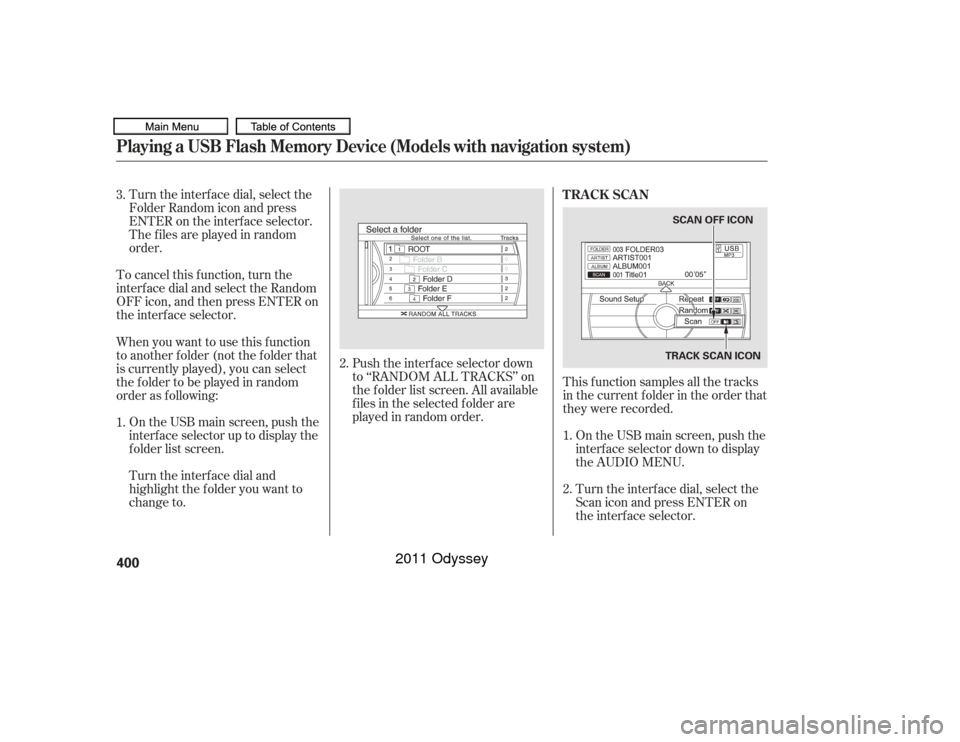
Turn the interf ace dial, select the
Folder Random icon and press
ENTER on the interf ace selector.
The f iles are played in random
order.
To cancel this f unction, turn the
interf ace dial and select the Random
OFFicon,andthenpressENTERon
the interf ace selector.
This f unction samples all the tracks
in the current f older in the order that
they were recorded.On the USB main screen, push the
interf ace selector down to display
the AUDIO MENU.
Turn the interf ace dial, select the
Scan icon and press ENTER on
the interf ace selector.
On the USB main screen, push the
interface selector up to display the
f older list screen.
Push the interf ace selector down
to ‘‘RANDOM ALL TRACKS’’ on
the f older list screen. All available
f iles in the selected f older are
played in random order.
Turn the interf ace dial and
highlight the f older you want to
change to.
When you want to use this f unction
to another f older (not the f older that
is currently played), you can select
the f older to be played in random
order as f ollowing: 3.
1.
2.
1.
2. TRACK SCAN
Playing a USB Flash Memory Device (Models with navigation system)400
TRACK SCAN ICON
SCAN OFF ICON
10/07/17 10:27:43 31TK8600_405
2011 Odyssey
Page 404 of 722
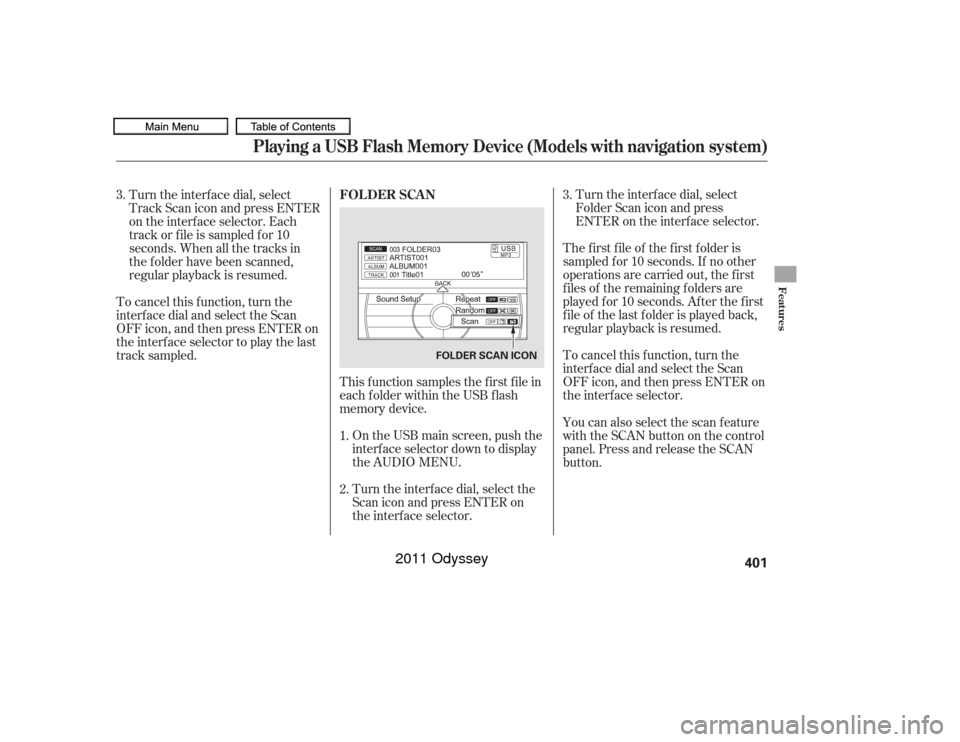
Turn the interf ace dial, select
Folder Scan icon and press
ENTER on the interf ace selector.
The f irst f ile of the f irst f older is
sampled f or 10 seconds. If no other
operations are carried out, the f irst
f iles of the remaining f olders are
played f or 10 seconds. Af ter the f irst
f ile of the last f older is played back,
regular playback is resumed.
To cancel this f unction, turn the
interf ace dial and select the Scan
OFFicon,andthenpressENTERon
the interf ace selector.
This f unction samples the f irst f ile in
each f older within the USB f lash
memory device.
On the USB main screen, push the
interf ace selector down to display
the AUDIO MENU.
Turn the interf ace dial, select the
Scan icon and press ENTER on
the interf ace selector.
Turn the interf ace dial, select
Track Scan icon and press ENTER
on the interf ace selector. Each
track or f ile is sampled f or 10
seconds. When all the tracks in
the f older have been scanned,
regular playback is resumed.
To cancel this f unction, turn the
interf ace dial and select the Scan
OFFicon,andthenpressENTERon
the interface selector to play the last
track sampled.
You can also select the scan feature
with the SCAN button on the control
panel. Press and release the SCAN
button.
1.
2. 3.
3. FOLDER SCAN
Playing a USB Flash Memory Device (Models with navigation system)
Features
401
FOLDER SCAN ICON
10/07/17 10:27:52 31TK8600_406
2011 Odyssey
Page 405 of 722
You can disconnect the USB f lash
memory device at any time even if
the USB mode is selected on the
audio system. Always f ollow the USB
f lash memory device’s instructions
when you remove it.
To take the system out of the USB
mode, press one of the other source
buttons than the USB/AUX button.
When a compatible audio unit is
connected to the auxiliary input jack,
press the USB/AUX button to When you disconnect the USB f lash
memory device while it is playing,
the center display and the audio
screen (if selected) show NO DATA.
If you reconnect the same USB f lash
memory device, the system will
begin playing where it lef t of f . You can also press the MODE
buttononthesteeringwheelto
change modes.Disconnect ing a USB Flash Memory Device
To Stop Playing a USB Flash
Memory DevicePlaying a USB Flash Memory Device (Models with navigation system)402
10/07/17 10:27:58 31TK8600_407
select it.
2011 Odyssey