Page 507 of 722
Up to six phones can be paired.
Your phone’s battery may drain
f aster when it is paired to HFL. You cannot pair your phone while
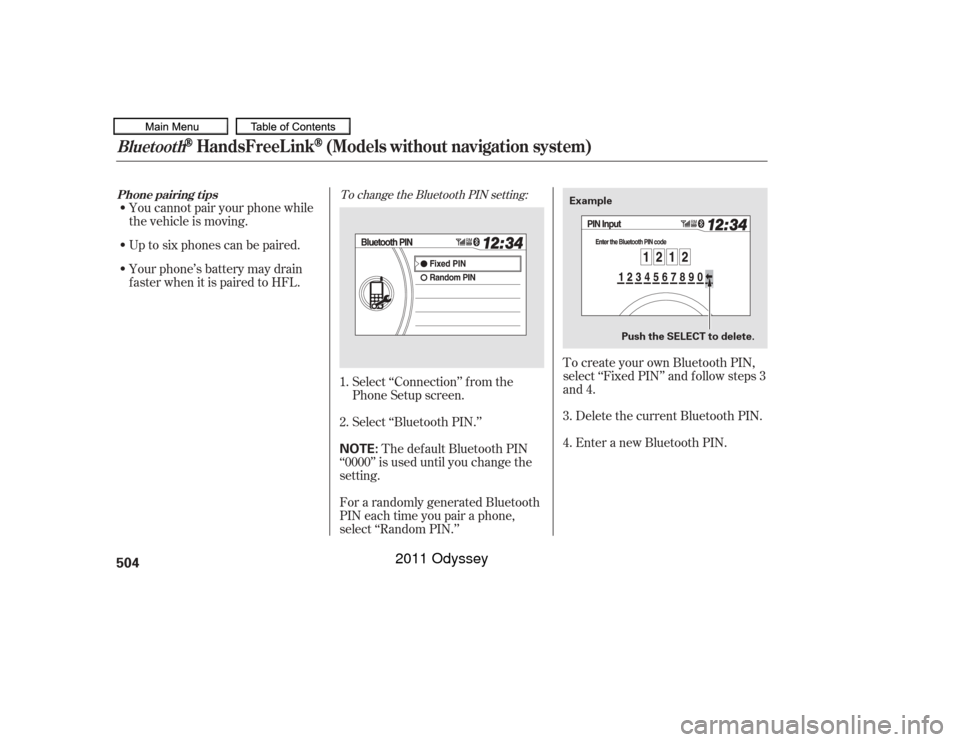
the vehicle is moving.Select ‘‘Connection’’ f rom the
Phone Setup screen.
Select ‘‘Bluetooth PIN.’’The def ault Bluetooth PIN
‘‘0000’’ is used until you change the
setting.
For a randomly generated Bluetooth
PIN each time you pair a phone,
select ‘‘Random PIN.’’ To create your own Bluetooth PIN,
select ‘‘Fixed PIN’’ and f ollow steps 3
and 4.
Enter a new Bluetooth PIN. Delete the current Bluetooth PIN.
3.
1.
2.
4.
To change the Bluetooth PIN setting:
Phone pairing t ips
Bluetooth
HandsFreeL ink
(Models without navigation system)
504
NOTE:
Example
Push the SELECT to delete.
10/07/17 10:41:52 31TK8600_509
2011 Odyssey
Page 509 of 722
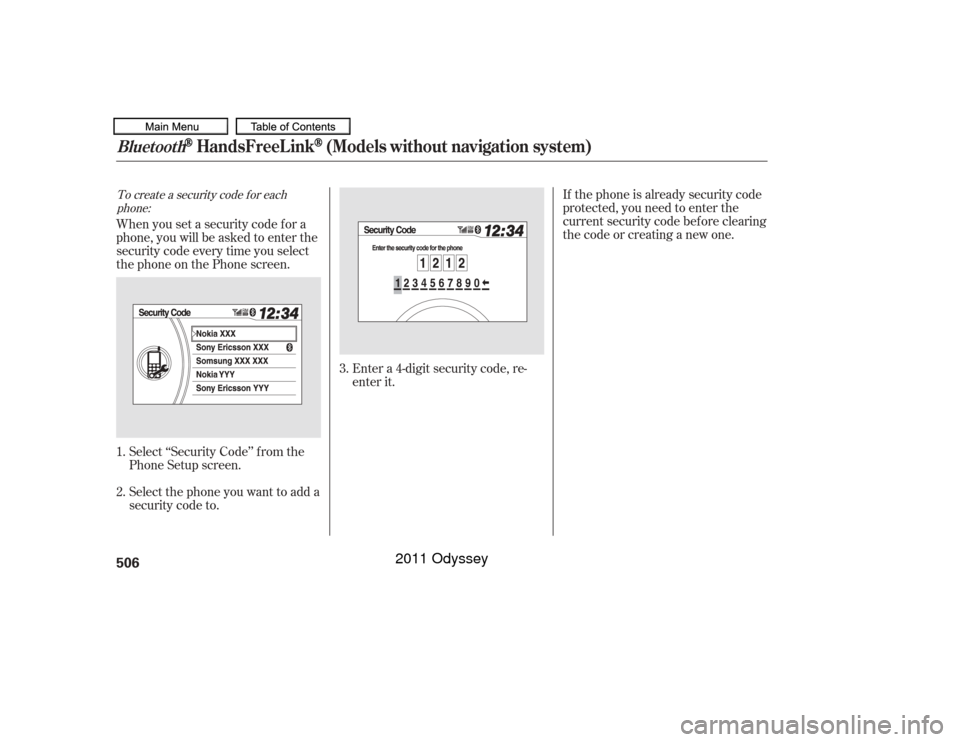
To create a security code f or eachphone:
If thephoneisalreadysecuritycode
protected, you need to enter the
current security code bef ore clearing
thecodeorcreatinganewone.
When you set a security code f or a
phone, you will be asked to enter the
security code every time you select
the phone on the Phone screen.
Select ‘‘Security Code’’ f rom the
Phone Setup screen.
Select the phone you want to add a
security code to. Enter a 4-digit security code, re-
enter it.
3.
1.
2.
Bluetooth
HandsFreeL ink
(Models without navigation system)
506
10/07/17 10:42:09 31TK8600_511
2011 Odyssey
Page 520 of 722
�µ�µ
�µ �µ To change the volume level of
HFL, use the audio system volume
knob or the steering wheel volume
controls. Try to reduce all background
noise. If the microphone picks up
voices other than yours,
commands may be misinterpreted.
For help at any time, including a list
of available options, say ‘‘Help.’’
Refer to the navigation system
manual f or how to change the
system’s language between English,
French, and Spanish.
Press and release the Talk button
each time you want to make a
command. Af ter the beep, speak in
a clear, natural tone.
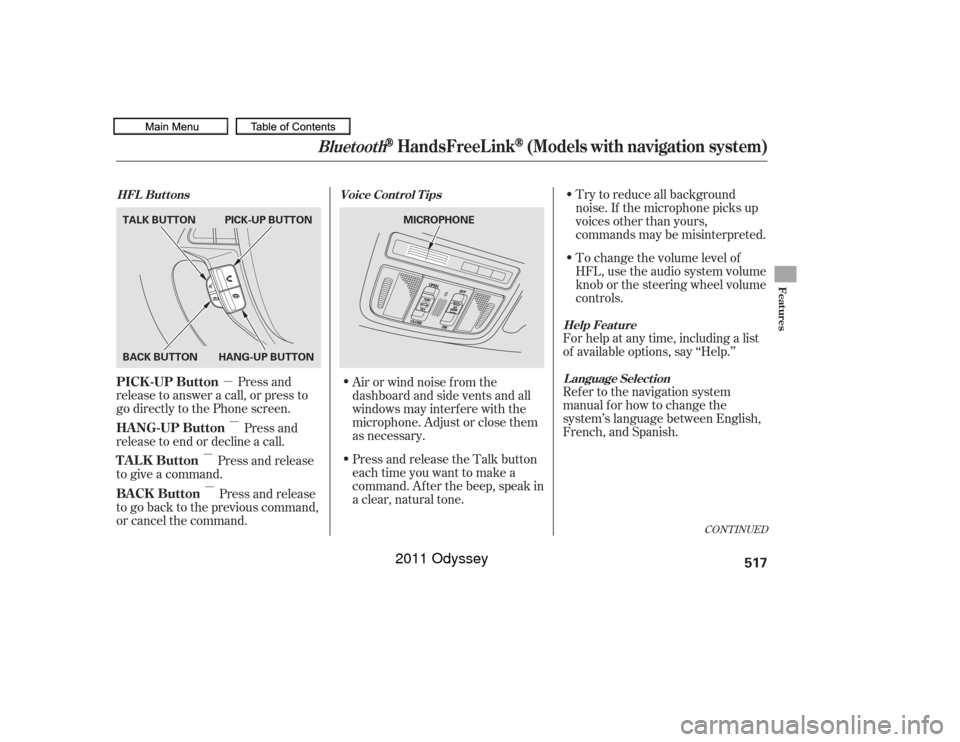
Press and
release to answer a call, or press to
go directly to the Phone screen.
Press and
release to end or decline a call.
Press and release
to give a command.
Press and release
to go back to the previous command,
or cancel the command. Airorwindnoisefromthe
dashboard and side vents and all
windows may interfere with the
microphone. Adjust or close them
as necessary.
CONT INUED
Help Feature
L anguage Select ion
Voice Cont rol T ips
HFL Buttons
PICK -UP Button
HANG-UP Button
TALK Button
BACK Button
Bluetooth
HandsFreeL ink
(Models with navigation system)
Features
517
MICROPHONE
TALK BUTTON
BACK BUTTON
HANG-UP BUTTONPICK-UP BUTTON
10/07/17 10:44:00 31TK8600_522
2011 Odyssey
Page 522 of 722
CONT INUED
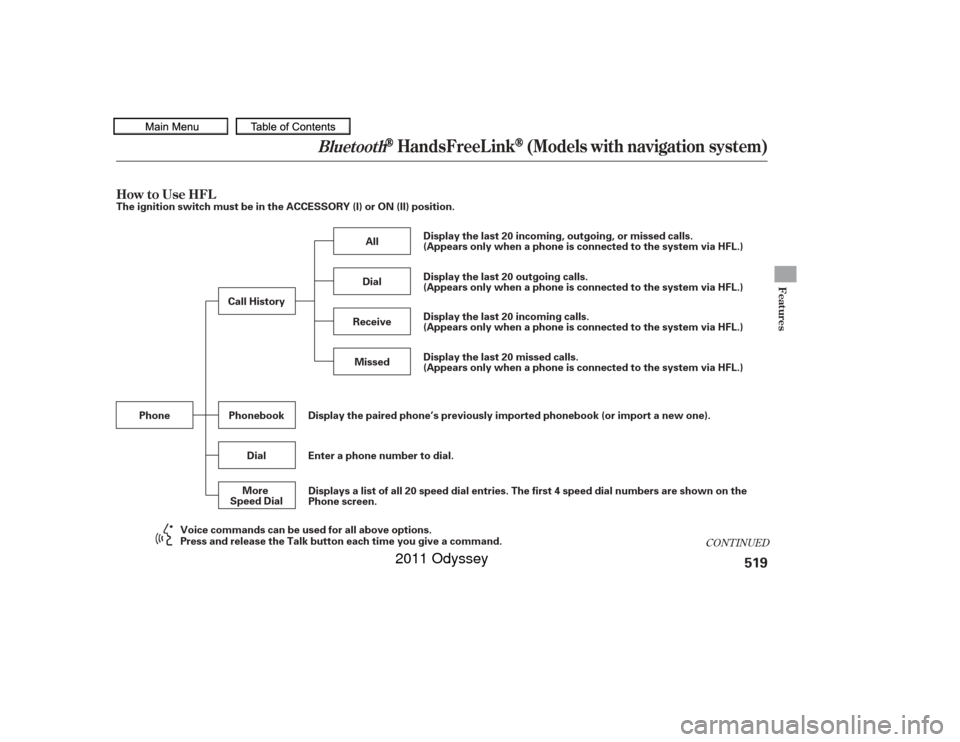
How to Use HFL
Bluetooth
HandsFreeL ink
(Models with navigation system)
Features
519
The ignition switch must be in the ACCESSORY (I) or ON (II) position.Display the paired phone’s previously imported phonebook (or import a new one).
Enter a phone number to dial.
Phone
Phonebook
Dial Display the last 20 incoming, outgoing, or missed calls.
(Appears only when a phone is connected to the system via HFL.)
Display the last 20 incoming calls.
(Appears only when a phone is connected to the system via HFL.) Display the last 20 outgoing calls.
(Appears only when a phone is connected to the system via HFL.)
Display the last 20 missed calls.
(Appears only when a phone is connected to the system via HFL.)
All
Dial
Receive Missed
Call History
More
Speed Dial Displays a list of all 20 speed dial entries. The first 4 speed dial numbers are shown on the
Phone screen.
Voice commands can be used for all above options.
Press and release the Talk button each time you give a command.
10/07/17 10:44:14 31TK8600_524
2011 Odyssey
Page 523 of 722
Bluetooth
HandsFreeL ink
(Models with navigation system)
520
Add New PhoneConnect
Disconnect Delete
Store Voice Tag Delete
Speed Dial Store
Speed Dial
Delete Voice Tag Pair a phone to the system.
Pass-key
Phone
Connection
Phone Setup Connect a phone to the system.
Disconnect a paired phone from the system.
Delete a previously paired phone.
Create a Pass-key number for a paired phone.
Delete a previously stored speed dial number.
Create a voice tag for a speed dial number.
Delete a voice tag for a speed dial number.
Edit
Speed Dial Select a number from the Call History, Phonebook, or manual entry
to store as a speed dial number.
Press and release the Talk button each time you give a command. Voice commands can be used for all above options.
10/07/17 10:44:19 31TK8600_525
2011 Odyssey
Page 524 of 722
CONT INUED
Bluetooth
HandsFreeL ink
(Models with navigation system)
Features
521
Auto Answer
Auto Transfer
Clear PhoneInformation
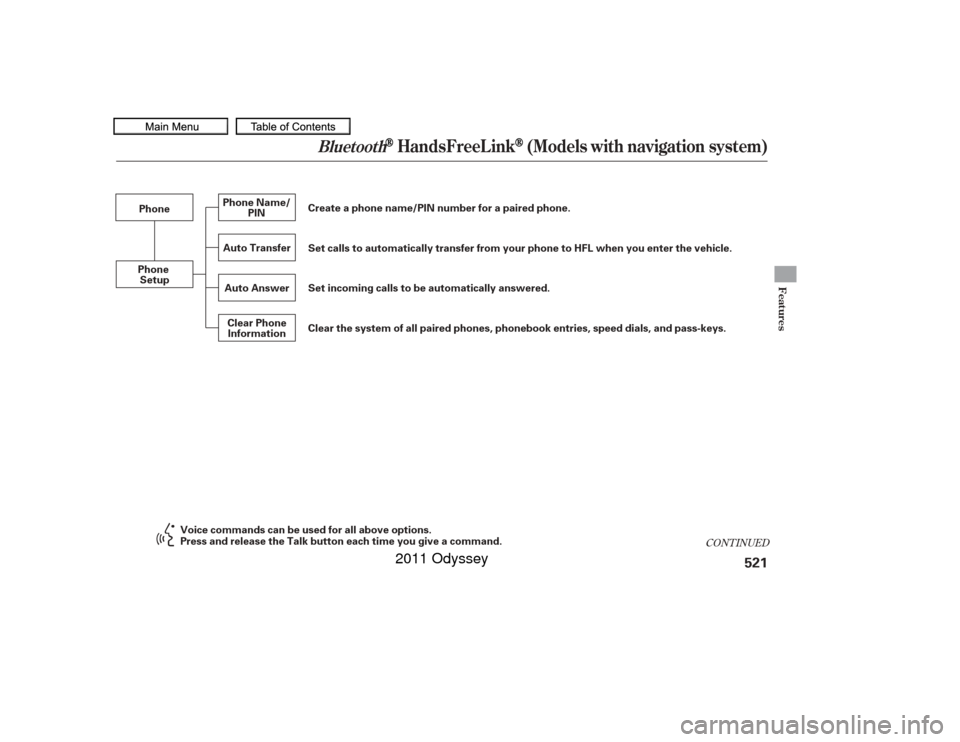
Phone
Phone Setup Create a phone name/PIN number for a paired phone.
Set calls to automatically transfer from your phone to HFL when you enter the vehicle.
Phone Name/
PIN
Set incoming calls to be automatically answered.
Clear the system of all paired phones, phonebook entries, speed dials, and pass-keys.
Press and release the Talk button each time you give a command. Voice commands can be used for all above options.
10/07/17 10:44:23 31TK8600_526
2011 Odyssey
Page 528 of 722
CONT INUED
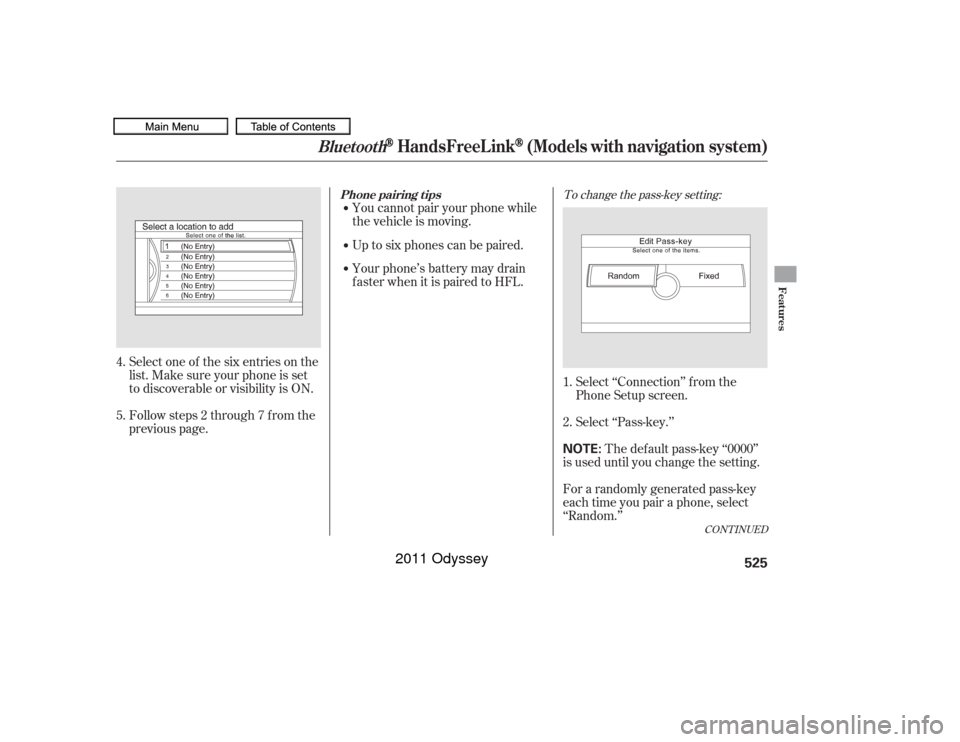
To change the pass-key setting:
Select ‘‘Connection’’ f rom the
Phone Setup screen.
Select ‘‘Pass-key.’’The def ault pass-key ‘‘0000’’
is used until you change the setting.
For a randomly generated pass-key
each time you pair a phone, select
‘‘Random.’’
Up to six phones can be paired.
Your phone’s battery may drain
f aster when it is paired to HFL. You cannot pair your phone while
the vehicle is moving.
Select one of the six entries on the
list. Make sure your phone is set
to discoverable or visibility is ON.
Followsteps2through7fromthe
previous page. 1.
2.
4.
5.
Bluetooth
HandsFreeL ink
(Models with navigation system)
Phone pairing t ips
Features
525
NOTE:
10/07/17 10:44:58 31TK8600_530
2011 Odyssey
Page 531 of 722
Select ‘‘Phone Name/PIN’’ f rom
the Phone Setup screen.
Select ‘‘PIN.’’
Enter a 4-digit PIN, re-enter it, and
select ‘‘OK.’’If you get into the vehicle while you
are on the phone, the call can be
automatically transferred to HFL
with the ignition switch in the
ACCESSORY (I) or ON (II) position.
Select ‘‘Auto Transf er’’ f rom the
Phone Setup screen.
Select ‘‘OFF’’ or ‘‘ON.’’
When you set a PIN f or a phone, you
will be asked to enter the PIN every
time you select the phone on the
Phone screen.
If you select ‘‘DO NOT USE PIN,’’
bef ore entering any number, the
phone will not have a PIN.
If the phone is already PIN-protected,
you need to enter the current PIN
bef ore creating a new one.
1.
2.
2. 1.
3.
To create a PIN f or each phone:
A ut omat ic T ransf erringBluetooth
HandsFreeL ink
(Models with navigation system)
528
10/07/17 10:45:26 31TK8600_533
2011 Odyssey