Page 264 of 722
�µ
To listen to XM Radio, turn the
ignition switch to the ACCESSORY
(I) or ON (II) position, and press the
button. The last channel you
listened to will show in the display.
Adjust the volume by turning the
power/volume knob.
XM Radio receives signals f rom two
satellites to produce clear, high-
quality digital reception. It of f ers
many channels in several categories.
Along with a large selection of
dif f erent types of music, XM Radio
allows you to view channel and
category selections in the display. Your vehicle is capable of receiving
XM
Radio anywhere in the United
States and Canada, except Hawaii,
Alaska,andPuertoRico.XMisa
registered trademark of Sirius XM
Radio,Inc.andXMCANADA
is a
registered business name of
Canadian Satellite Radio Inc. You can also change the mode from
the setup menu. Press the SETUP
button to display the setup menu.
Turn the selector knob to select XM
Mode and press the selector knob.
You can select Channel mode or
Category mode by turning and
pressing the selector knob.
Each time you press and release the
TITLE button, the display changes
f rom artist name to song name.
You may experience periods when
XM Radio does not transmit the
artist’s name and song title
inf ormation. If this happens, there is
nothing wrong with your system.
To switch between
channel mode and category mode,
either press and hold the TITLE
button until the mode changes.
In the channel mode, you can select
all of the available channels. In the
category mode, such as Jazz, Rock,
Classical, etc., you can select all of
the channels within that category.
CONT INUED
Operating the XM Radio
MODE
Playing the XM
Radio (EX-L model without navigation system)
Features
261
10/07/17 10:09:23 31TK8600_266
2011 Odyssey
Page 266 of 722
�µ�µ
�µ
�µ
�µ �µ
�µ
�µ
Youcanstoreupto12
preset channels using the six preset
buttons. Each button stores one
channel f rom the XM1 band and one
channel f rom the XM2 band.
To store a channel: Press the button. Either
XM1 or XM2 will show in the
display. Repeat steps 2 and 3 to store the
f irst six channels.
Once a channel is stored, simply
press and release the proper preset
button to tune to it. Press the button again.
The other XM band will show.
Store the next six channels using
steps 2 and 3.
The signal is
currently too weak. Move the vehicle
to an area away from tall buildings,
and with an unobstructed view of the
southern horizon.
The selected
channel has no artist or title
inf ormation at this time.
XM is loading the
audio or program inf ormation.
The channel
currently selected is no longer
broadcasting. The
encryption code is being updated.
Wait until the encryption code is
f ully updated. Channels 0 and 1
should still work normally.
There is
a problem with the XM antenna.
Please consult your dealer.
Use the selector knob, SKIP bar,
CATEGORYbarorSCANbutton
to tune to a desired channel.
The selected
channel number does not exist, is
not part of your subscription, or this
channel has no artist or title
inf ormation at this time.
In category mode, only channels
within that category can be selected.
In channel mode, all channels can be
selected.
Pick the preset button you want
f or that channel. Press and hold
the button until you hear a beep.
3. 4.
5.
2. 1.
CONT INUED
Preset
XM Radio Display Messages ‘‘NO SIGNA L ’’
‘‘NO INFO’’
‘‘L OA DING’’
‘‘OFF A IR’’ ‘‘UNA UT HORIZED’’
‘‘CHECK A NT ENNA ’’ ‘‘UNA VA IL A BL E’’
Playing the XM
Radio (EX-L model without navigation system)
Features
263
10/07/17 10:09:41 31TK8600_268
2011 Odyssey
Page 271 of 722
If a f ile on a WMA disc is protected
by digital rights management
(DRM), the audio unit displays
UNSUPPORTED, and then skips to
the next f ile.
Depending on the sof tware the f iles
were made with, it may not be
possible to play some f iles, or display
some text data.Each time you press the TITLE
button, the display shows you the
text, if the disc was recorded with
text data.
If you select name of f , the text
display is turned of f . With the f older name, you will see
the FOLDER indicator in the display.
The TRACK indicator is shown with
the file or track name.
When you press and release the
TITLE button while a disc without
text data is playing, you will see ‘‘NO
INFO’’ on the display.
The display shows up to 16
characters of selected text data (the
f older name, f ile name, etc.).
You can see the album, artist, and
track name in the display. If a disc is
recorded in MP3, WMA or AAC you
can see the f older and f ile name, and
the artist, album, and track tag.
On U.S. EX models
T ext Data Display Function
Playing a Disc (EX, EX-L models without navigation system)268NOTE:
10/07/17 10:10:20 31TK8600_273
2011 Odyssey
Page 272 of 722
If the text data has more than 16
characters, you will see the first 16
characters and the indicator in
the display. Press and hold the
TITLE button until the next 16
characters are shown. You can see
up to 32 characters of the text data.
If youpressandholdtheTITLE
button again, the display shows the
f irst 16 characters again.
If any letter is not available, it is
replaced with ‘‘ . ’’ (dot) in the display.
When the disc has no text data, you
will see ‘‘NO INFO’’ on the display.You will also see some text data
under these conditions:
When a new f older, f ile, or track is
selected.
When you insert a disc, and the
system begins to play. In MP3 or WMA mode, each time
you press and release the TITLE
button, the display changes between
track name and file name.
When you change the audio mode
to play a disc with text data or in
MP3, WMA or AAC. When playing a CD-DA with text
data, the album and track name are
showninthedisplay.Withadiscin
MP3, WMA or AAC the display
shows the f older and f ile name.
CONT INUED
On EX-L and Canadian EX models
Playing a Disc (EX, EX-L models without navigation system)
Features
269
10/07/17 10:10:28 31TK8600_274
2011 Odyssey
Page 273 of 722
�µ
Insert a disc about half way into the
disc slot. The drive will pull the disc
intherestof thewaytoplayit.You
operate the disc player with the
same controls used f or the radio.
The number of the current track is
showninthedisplay.Whenplayinga
disc in MP3, WMA or AAC, the
numbers of the current f older and
f ile are shown. The system will
continuously play a disc until you
change modes.
For inf ormation on how to handle
and protect compact discs, see page . To move rapidly within a track or f ile,
press and hold either side ( or
) of the SKIP bar. When you insert a CD f or the f irst
time, the recording CD prompt will
appear on the display. If you select
‘‘Yes,’’ the system will start
recording to the f lash memory. For
inf ormation on recording f rom music
CDs, see page .
Each time you press and
releasethe sideof theSKIPbar,
the player skips forward to the
beginning of the next track (f ile in
MP3, WMA or AAC mode). Press
and release the side of the bar
to skip backward to the beginning of
the current track. Press it again to
skip to the beginning of the previous
track.
Turning the selector knob to the
right or lef t also changes a f ile. When you insert a CD f or the f irst
time, a Gracenote notif ication
appears. For more inf ormation, see
page .
352 278
380
L oading DiscsPlaying a Disc (EX, EX-L models without navigation system)
SK IP
270
10/07/17 10:10:35 31TK8600_275
2011 Odyssey
Page 277 of 722
To turn this feature off, press and
hold the SCAN button for more than
2 seconds, or press and release the
selector knob while scan mode.
Each time you press and release the
SCAN button, the mode changes
from file scan to folder scan, then to
normal play.To take the system out of the disc
mode, press one of other source
buttons than the CD button.
If you turn the system of f while a
disc is playing, either with the
power/volume knob or the ignition
switch, play will continue at the same
point when you turn it back on. For inf ormation on how to handle
and protect compact discs, see
page .
352Playing a Disc (EX, EX-L models without navigation system)
T o Stop Playing a Disc Protecting Discs
274
10/07/17 10:11:02 31TK8600_279
2011 Odyssey
Page 281 of 722
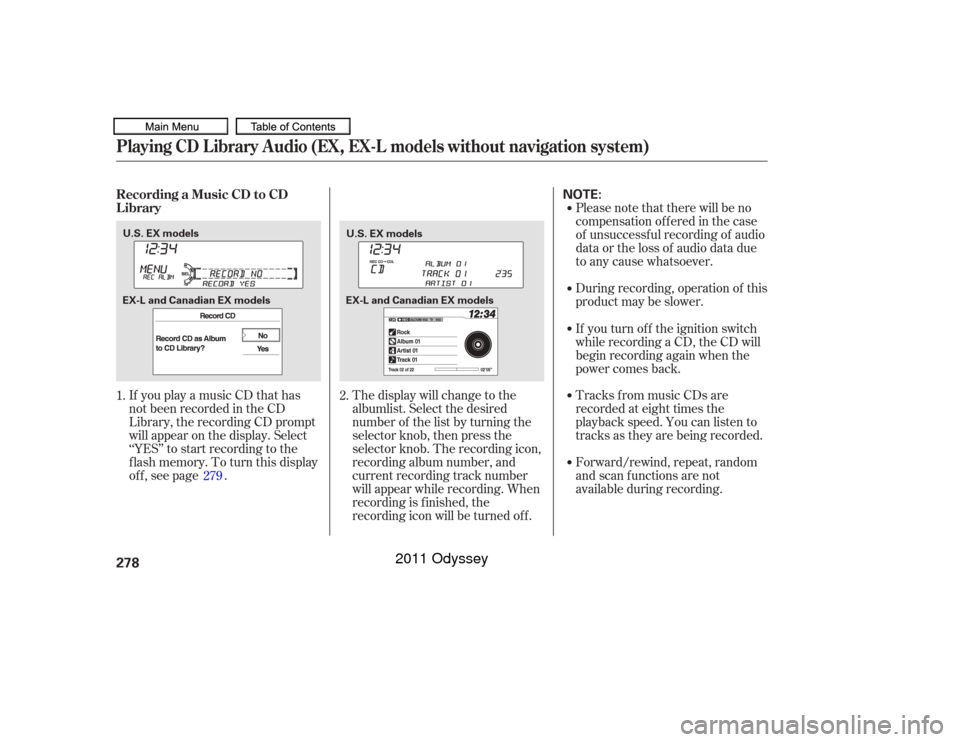
If you play a music CD that has
not been recorded in the CD
Library, the recording CD prompt
will appear on the display. Select
‘‘YES’’ to start recording to the
f lash memory. To turn this display
off, see page .Please note that there will be no
compensation of f ered in the case
of unsuccessf ul recording of audio
data or the loss of audio data due
to any cause whatsoever.
During recording, operation of this
product may be slower.
Tracks from music CDs are
recorded at eight times the
playback speed. You can listen to
tracks as they are being recorded.
Forward/rewind, repeat, random
and scan f unctions are not
available during recording.
The display will change to the
albumlist. Select the desired
number of the list by turning the
selector knob, then press the
selector knob. The recording icon,
recording album number, and
current recording track number
will appear while recording. When
recording is f inished, the
recording icon will be turned of f . If you turn of f the ignition switch
while recording a CD, the CD will
begin recording again when the
power comes back.
1. 2.
279
Playing CD L ibrary A udio (EX, EX-L models without navigation system)Recording a Music CD to CD
L ibrary278
NOTE:
U.S. EX models U.S. EX models
EX-L and Canadian EX models EX-L and Canadian EX models
10/07/17 10:11:38 31TK8600_283
2011 Odyssey
Page 282 of 722
Youcanlistentotracksfromother
albumlists that have already been
recorded while recording. Press
the CD-L button and switch over
to CD Library Audio.
Recording settings cannot be
changed during recording.Each time you press and release the
selector knob, this f eature turns on
and off.
If you don’t wish to display the
recording CD prompt when you
insert a CD f or the f irst time, press
and release the SETUP button and
turn the selector knob to ‘‘CDL
SETUP’’ or ‘‘CD Library Setup,’’ then
press the selector knob and select
‘‘REC PROMPT ON’’ or ‘‘Prompt to
Record CD.’’
CONT INUED
Playing CD L ibrary A udio (EX, EX-L models without navigation system)
Changing the Recording SettingsT o St op Displaying t he Recording CD Prompt
Features
279
U.S. EX models
EX-L and Canadian EX models
10/07/17 10:11:46 31TK8600_284
2011 Odyssey