2011 CHEVROLET CORVETTE brakes
[x] Cancel search: brakesPage 265 of 428
Black plate (35,1)Chevrolet Corvette Owner Manual - 2011
Driving and Operating 9-35
If driving safely on a wet road
and it becomes necessary to slam
on the brakes and continue braking
to avoid a sudden obstacle, a
computer senses that the wheels
are slowing down. If one of the
wheels is about to stop rolling,
the computer will separately work
the brakes at each wheel.
ABS can change the brake pressure
to each wheel, as required, faster
than any driver could. This can help
the driver steer around the obstacle
while braking hard.
As the brakes are applied, the
computer keeps receiving updates
on wheel speed and controls
braking pressure accordingly.
Remember: ABS does not change
the time needed to get a foot up to
the brake pedal or always decreasestopping distance. If you get too
close to the vehicle in front of you,
there will not be enough time to
apply the brakes if that vehicle
suddenly slows or stops. Always
leave enough room up ahead to
stop, even with ABS.
Using ABS
Do not pump the brakes. Just hold
the brake pedal down firmly and let
ABS work. You might hear the ABS
pump or motor operating and feel
the brake pedal pulsate, but this is
normal.
Braking in Emergencies
ABS allows the driver to steer and
brake at the same time. In many
emergencies, steering can help
more than even the very best
braking.
Parking Brake
The parking brake lever is located to
the right of the center console.
To set the parking brake, hold the
brake pedal down. Pull the parking
brake lever up. If the ignition is on,
the brake system warning light will
come on.
To release the parking brake, hold
the brake pedal down. Then push
the release button in as you move
the parking brake lever all the
way down.
Notice:
Driving with the parking
brake on can overheat the brake
system and cause premature
wear or damage to brake system
parts. Make sure that the parking
brake is fully released and the
brake warning light is off before
driving.
Page 266 of 428
Black plate (36,1)Chevrolet Corvette Owner Manual - 2011
9-36 Driving and Operating
Brake Assist
This vehicle has a brake assist
feature designed to assist the
driver in stopping or decreasing
vehicle speed in emergency driving
conditions. This feature uses the
stability system hydraulic brake
control module to supplement
the power brake system under
conditions where the driver has
quickly and forcefully applied the
brake pedal in an attempt to quickly
stop or slow down the vehicle.
The stability system hydraulic brake
control module increases brake
pressure at each corner of the
vehicle until the ABS activates.
Minor brake pedal pulsation or
pedal movement during this time
is normal and the driver should
continue to apply the brake pedal
as the driving situation dictates.
The brake assist feature will
automatically disengage when
the brake pedal is released or
brake pedal pressure is quickly
decreased.
Ride Control Systems
Traction Control
System (TCS)
The vehicle has a Traction Control
System (TCS) that limits wheel spin.
This is especially useful in slippery
road conditions. The system
operates only if it senses that the
rear wheels are spinning too much
or are beginning to lose traction.
When this happens, the system
works the rear brakes and reduces
engine power (by closing the throttle
and managing engine spark) to limit
wheel spin.
The TRACTION SYSTEM ACTIVE
message displays on the Driver
Information Center (DIC) when TCS
is limiting wheel spin. SeeRide
Control System Messages on
page 5‑44. The system may be
heard or felt while it is working,
but this is normal. If cruise control is being used when
TCS begins to limit wheel spin, the
cruise control will automatically
disengage. Cruise control may be
reengaged when road conditions
allow. See
Cruise Control on
page 9‑44.
The SERVICE TRACTION SYSTEM
message and the TCS warning light
will come on if there is a problem
with TCS. See Ride Control System
Messages on page 5‑44.
When this light and the SERVICE
TRACTION SYSTEM message
are on, the system will not limit
wheel spin. Adjust your driving
accordingly.
Page 267 of 428
Black plate (37,1)Chevrolet Corvette Owner Manual - 2011
Driving and Operating 9-37
TCS automatically comes on
whenever the vehicle is started.
To limit wheel spin, especially in
slippery road conditions, the system
should always be left on. TCS can
be turned off if needed.
To turn the system off, press the
button located on the console.
The system can be turned on or off
at any time by pressing the ACTIVE
HANDLING button. The DIC will
display the appropriate message
when the button is pushed.
Notice:When traction control is
turned off, or Competitive Driving
Mode is active, it is possible to
lose traction. If you attempt to shift with the drive wheels
spinning with a loss of traction, it
is possible to cause damage to
the transmission. Do not attempt
to shift when the drive wheels do
not have traction. Damage caused
by misuse of the vehicle is not
covered. See the warranty book
for additional information.
Adding non‐dealer/non-retailer
accessories can affect the vehicle's
performance. See
Accessories and
Modifications on page 10‑4 for more
information.
Active Handling System
The Active Handling System is
a computer controlled system
that helps the driver maintain
directional control of the vehicle
in difficult driving conditions.
This is accomplished by selectively
applying any one of the vehicle's
brakes. The ACTIVE HANDLING message
will come on when the system is
operating. See
Ride Control System
Messages on page 5‑44 for more
information. The system may be
heard or felt while it is working.
This is normal.
The SERVICE ACTIVE HANDLING
SYSTEM message is displayed, the
instrument cluster light comes on,
and a sound is heard if there is a
problem with the system.
See Ride Control System Messages
on page 5‑44 for more information.
When this light and the SERVICE
ACTIVE HANDLING SYSTEM
message are on, the system is not
operational. Adjust your driving
accordingly.
Page 268 of 428
Black plate (38,1)Chevrolet Corvette Owner Manual - 2011
9-38 Driving and Operating
The Active Handling System comes
on automatically whenever the
vehicle is started. To help maintain
directional control of the vehicle,
the system should always be left
on. The system can be turned off
if needed. If the Active Handling
System is turned off, the Traction
Control System will also be turned
off. Adjust your driving accordingly.
To turn the system off, press the
Active Handling button on the
console until TRACTION SYSTEM
AND ACTIVE HANDLING
SYSTEM—OFF is displayed.
The system can be turned back on
at any time by pressing the button.
The DIC will display the appropriate
message when the button is
pushed. If the Tire Pressure Monitor (TPM)
system detects a flat tire and the
Driver Information Center (DIC)
displays TIRE FLAT, or if the
TPM system is malfunctioning and
the DIC displays SERVICE TIRE
MONITOR, the Active Handling
System will be affected as follows:
.The Active Handling System
cannot be turned off by the
driver.
.If the Active Handling System
is off, it will be turned on
automatically.
.Competitive Driving Mode
or Performance Traction
Management is unavailable.
.The Active Handling System
will feel different in aiding and
maintaining directional control.
Competitive Driving Mode
Competitive Driving Mode,
Performance Traction Management,
and Launch Control are systems
designed to allow increased
performance while accelerating
and/or cornering. This is
accomplished by regulating and
optimizing the engine, brakes,
and suspension performance.
These modes are for use at a
closed course race track and are
not intended for use on public
roads. They will not compensate
for a driver
’s inexperience or lack
of familiarity with the race track.
Drivers who prefer to allow the
system to have more control of
the engine, brake, and suspension
are advised to turn the normal
traction control and active handling
systems on. See Racing or Other
Competitive Driving on page 9‑7
for more information.
Page 275 of 428
Black plate (45,1)Chevrolet Corvette Owner Manual - 2011
Driving and Operating 9-45
If the vehicle is in cruise control,
and has the Traction Control
System (TCS), and it begins to
limit wheel spin, the cruise control
automatically disengages. See
Traction Control System (TCS) on
page 9‑36. When road conditions
allow the cruise control to be safely
used again, it can be turned
back on.
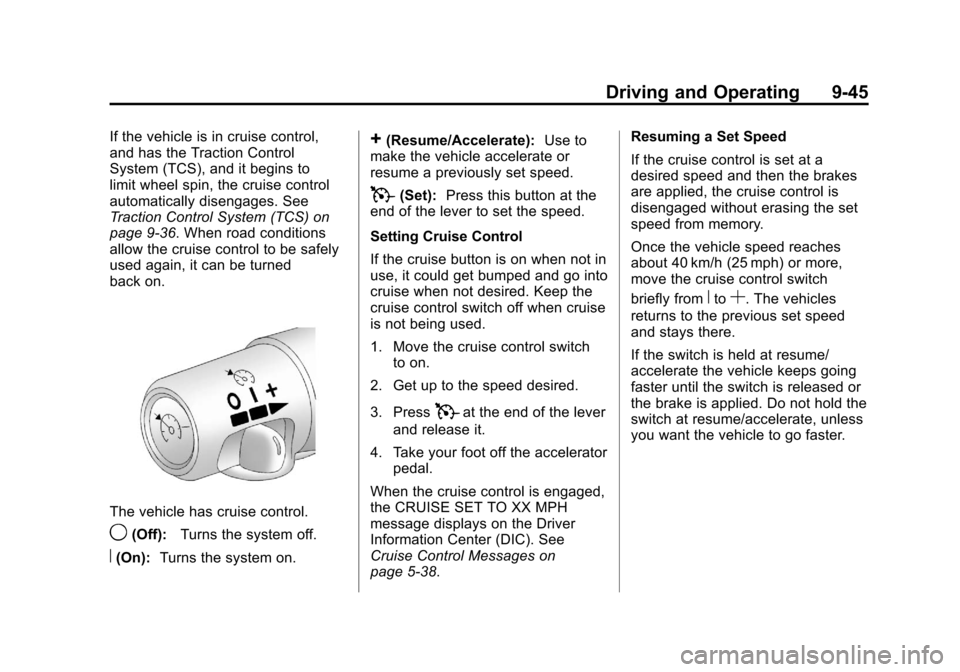
The vehicle has cruise control.
9(Off):Turns the system off.
R(On):Turns the system on.
+(Resume/Accelerate): Use to
make the vehicle accelerate or
resume a previously set speed.
T(Set): Press this button at the
end of the lever to set the speed.
Setting Cruise Control
If the cruise button is on when not in
use, it could get bumped and go into
cruise when not desired. Keep the
cruise control switch off when cruise
is not being used.
1. Move the cruise control switch to on.
2. Get up to the speed desired.
3. Press
Tat the end of the lever
and release it.
4. Take your foot off the accelerator pedal.
When the cruise control is engaged,
the CRUISE SET TO XX MPH
message displays on the Driver
Information Center (DIC). See
Cruise Control Messages on
page 5‑38. Resuming a Set Speed
If the cruise control is set at a
desired speed and then the brakes
are applied, the cruise control is
disengaged without erasing the set
speed from memory.
Once the vehicle speed reaches
about 40 km/h (25 mph) or more,
move the cruise control switch
briefly from
RtoS. The vehicles
returns to the previous set speed
and stays there.
If the switch is held at resume/
accelerate the vehicle keeps going
faster until the switch is released or
the brake is applied. Do not hold the
switch at resume/accelerate, unless
you want the vehicle to go faster.
Page 276 of 428
Black plate (46,1)Chevrolet Corvette Owner Manual - 2011
9-46 Driving and Operating
Increasing Speed While Using
Cruise Control
If the cruise control system is
already activated,
.Use the accelerator pedal to get
to the higher speed. Press
Jat
the end of the lever, then release
the button and the accelerator
pedal. If the accelerator pedal is
held longer than 60 seconds,
cruise control will turn off.
.Move the cruise switch fromRto
S. Hold it there until desired
speed is reached, and then
release the switch.
.To increase the vehicle speed in
small amounts, move the switch
briefly to
S. Each time this is
done, the vehicle goes about
1.6 km/h (1 mph) faster. Reducing Speed While Using
Cruise Control
If the cruise control system is
already activated,
.Press and hold the set button
until the lower speed desired is
reached, then release it.
.To slow down in small amounts,
briefly press
J. Each time this
is done, the vehicle goes about
1.6 km/h (1 mph) slower.
Passing Another Vehicle While
Using Cruise Control
Use the accelerator pedal to
increase the vehicle speed. When
you take your foot off the pedal,
the vehicle will slow down to the
previous set cruise speed. Using Cruise Control on Hills
How well the cruise control works
on hills depends upon the vehicle
speed, load, and the steepness
of the hills. When going up steep
hills, you might want to step on
the accelerator pedal to maintain
the vehicle speed. When going
downhill, you might have to brake
or shift to a lower gear to keep the
vehicle's speed down. When the
brakes are applied the cruise control
is disengaged.
Page 285 of 428

Black plate (1,1)Chevrolet Corvette Owner Manual - 2011
Vehicle Care 10-1
Vehicle Care
General Information
General Information . . . . . . . . . . 10-3
California Proposition65 Warning . . . . . . . . . . . . . . . . . 10-3
California Perchlorate Materials Requirements . . . . 10-3
Accessories and Modifications . . . . . . . . . . . . . . . 10-4
Lifting the Vehicle . . . . . . . . . . . . 10-5
Vehicle Checks
Doing Your Own Service Work . . . . . . . . . . . . . . . 10-8
Hood . . . . . . . . . . . . . . . . . . . . . . . . 10-9
Engine Compartment Overview . . . . . . . . . . . . . . . . . . 10-10
Engine Oil . . . . . . . . . . . . . . . . . . 10-15
Engine Oil Life System . . . . . 10-22
Automatic Transmission Fluid . . . . . . . . . . . . . . . . . . . . . . 10-23 Manual Transmission
Fluid . . . . . . . . . . . . . . . . . . . . . . 10-23
Hydraulic Clutch . . . . . . . . . . . . 10-24
Engine Air Cleaner/Filter . . . . 10-24
Cooling System (Engine) . . . 10-28
Cooling System (Intercooler) . . . . . . . . . . . . . . . 10-29
Engine Coolant . . . . . . . . . . . . . 10-29
Engine Overheating . . . . . . . . 10-34
Overheated Engine Protection
Operating Mode . . . . . . . . . . . 10-35
Power Steering Fluid . . . . . . . 10-36
Washer Fluid . . . . . . . . . . . . . . . 10-37
Brakes . . . . . . . . . . . . . . . . . . . . . 10-38
Brake Fluid . . . . . . . . . . . . . . . . . 10-41
Battery . . . . . . . . . . . . . . . . . . . . . 10-43
Rear Axle . . . . . . . . . . . . . . . . . . 10-44
Starter Switch Check . . . . . . . 10-44
Automatic Transmission Shift Lock Control Function
Check . . . . . . . . . . . . . . . . . . . . . 10-45 Park Brake and P (Park)
Mechanism Check . . . . . . . . 10-45
Wiper Blade Replacement . . . . . . . . . . . . . . 10-46
Windshield Replacement . . . 10-47
Headlamp Aiming
Headlamp Aiming . . . . . . . . . . 10-48
Bulb Replacement
Bulb Replacement . . . . . . . . . . 10-48
Halogen Bulbs . . . . . . . . . . . . . . 10-48
High Intensity Discharge
(HID) Lighting . . . . . . . . . . . . . 10-48
Headlamps, Front Turn Signal and Parking
Lamps . . . . . . . . . . . . . . . . . . . . 10-49
Taillamps, Turn Signal, and Stoplamps . . . . . . . . . . . . . . . . 10-50
Replacement Bulbs . . . . . . . . . 10-50
Page 288 of 428
Black plate (4,1)Chevrolet Corvette Owner Manual - 2011
10-4 Vehicle Care
Accessories and
Modifications
Adding non‐dealer accessories
to the vehicle can affect vehicle
performance and safety, including
such things as airbags, braking,
stability, ride and handling,
emissions systems, aerodynamics,
durability, and electronic systems
like antilock brakes, traction control,
and stability control. Some of
these accessories could even
cause malfunction or damage not
covered by the vehicle warranty.Damage to vehicle components
resulting from the installation or use
of non‐GM certified parts, including
control module modifications, is not
covered under the terms of the
vehicle warranty and may affect
remaining warranty coverage for
affected parts.
GM Accessories are designed to
complement and function with other
systems on the vehicle. Your GM
dealer can accessorize the vehicle
using genuine GM Accessories.
When you go to your GM dealer
and ask for GM Accessories,
you will know that GM-trained and
supported service technicians will
perform the work using genuine
GM Accessories.
Also, see
Adding Equipment to the
Airbag-Equipped Vehicle on
page 3‑35.