2011 CHEVROLET AVEO steering
[x] Cancel search: steeringPage 115 of 328
Black plate (3,1)Chevrolet Aveo Owner Manual - 2011
Instruments and Controls 5-3
+ VOLUME−:Press the toggle
bar located below the + VOLUME −
button to adjust the volume. Press
the left side of the toggle bar, below
the + (plus) sign to increase the
volume. Press the right side of the
toggle bar, below the −(minus) sign
to decrease the volume.
MODE: Press and release this
button multiple times to cycle
through the audio playback options
that are available on the vehicle.
Options may include FM, AM, XM,
CD, and AUX.
SEEK: Press and release to go to
the next preset station.
Press and hold for a long time to go
to the next AM, FM, or XM station.
The radio seeks stations only with
a strong signal that are in the
selected band.
When playing a CD, press and
release to go to the next track.
Press and hold to fast forward
through the tracks.Horn
Press near or on the horn symbols
on the steering wheel pad to sound
the horn.
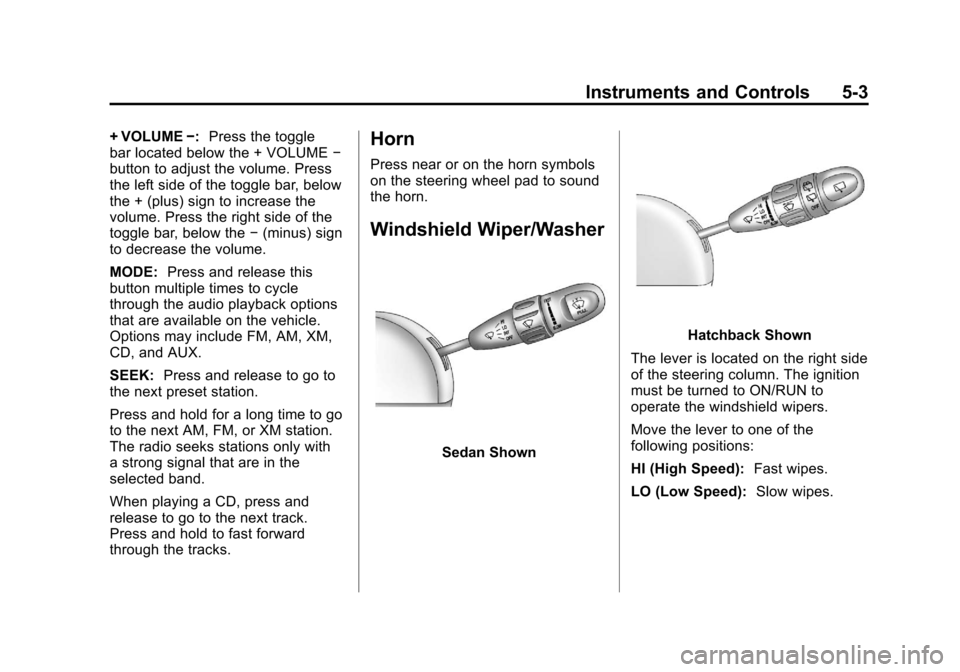
Windshield Wiper/Washer
Sedan Shown
Hatchback Shown
The lever is located on the right side
of the steering column. The ignition
must be turned to ON/RUN to
operate the windshield wipers.
Move the lever to one of the
following positions:
HI (High Speed): Fast wipes.
LO (Low Speed): Slow wipes.
Page 128 of 328
Black plate (16,1)Chevrolet Aveo Owner Manual - 2011
5-16 Instruments and Controls
Emissions Inspection and
Maintenance Programs
Some state/provincial and local
governments may have programs to
inspect the on-vehicle emission
control equipment. For the
inspection, the emission system test
equipment is connected to the
vehicle’s Data Link
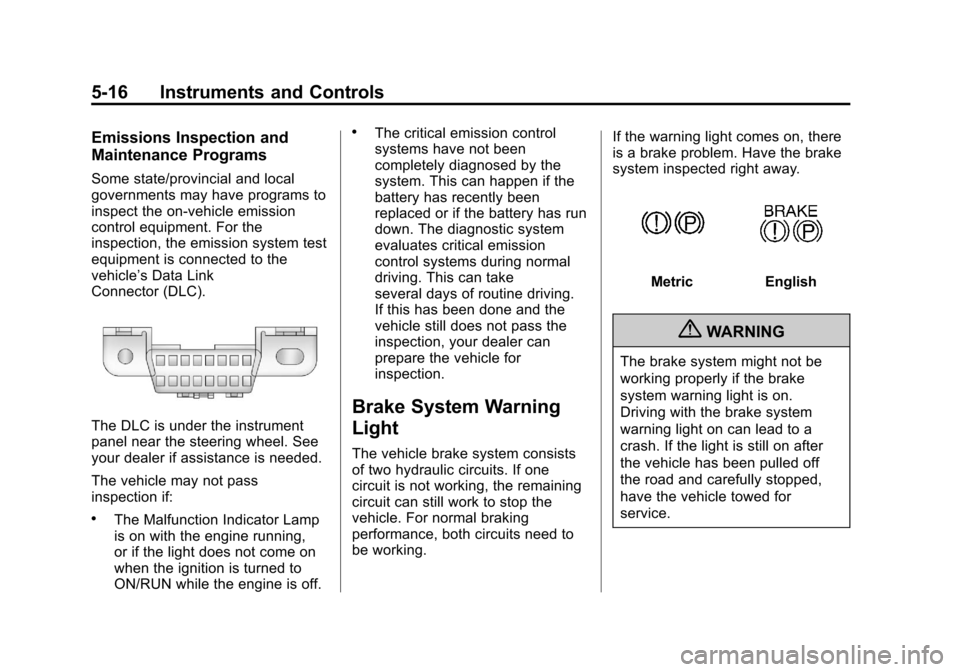
Connector (DLC).
The DLC is under the instrument
panel near the steering wheel. See
your dealer if assistance is needed.
The vehicle may not pass
inspection if:
.The Malfunction Indicator Lamp
is on with the engine running,
or if the light does not come on
when the ignition is turned to
ON/RUN while the engine is off.
.The critical emission control
systems have not been
completely diagnosed by the
system. This can happen if the
battery has recently been
replaced or if the battery has run
down. The diagnostic system
evaluates critical emission
control systems during normal
driving. This can take
several days of routine driving.
If this has been done and the
vehicle still does not pass the
inspection, your dealer can
prepare the vehicle for
inspection.
Brake System Warning
Light
The vehicle brake system consists
of two hydraulic circuits. If one
circuit is not working, the remaining
circuit can still work to stop the
vehicle. For normal braking
performance, both circuits need to
be working.If the warning light comes on, there
is a brake problem. Have the brake
system inspected right away.
MetricEnglish
{WARNING
The brake system might not be
working properly if the brake
system warning light is on.
Driving with the brake system
warning light on can lead to a
crash. If the light is still on after
the vehicle has been pulled off
the road and carefully stopped,
have the vehicle towed for
service.
Page 135 of 328
Black plate (1,1)Chevrolet Aveo Owner Manual - 2011
Lighting 6-1
Lighting
Exterior Lighting
Exterior Lamp Controls . . . . . . . . 6-1
Headlamp High/Low-BeamChanger . . . . . . . . . . . . . . . . . . . . . 6-2
Flash-to-Pass . . . . . . . . . . . . . . . . . 6-2
Daytime Running Lamps (DRL) . . . . . . . . . . . . . . . . 6-2
Hazard Warning Flashers . . . . . 6-3
Turn and Lane-Change Signals . . . . . . . . . . . . . . . . . . . . . . 6-3
Fog Lamps . . . . . . . . . . . . . . . . . . . . 6-4
Interior Lighting
Instrument Panel Illumination Control . . . . . . . . . . . . . . . . . . . . . . 6-4
Dome Lamps . . . . . . . . . . . . . . . . . 6-5
Lighting Features
Inadvertent Power Battery Saver . . . . . . . . . . . . . . . . . . . . . . . . 6-5
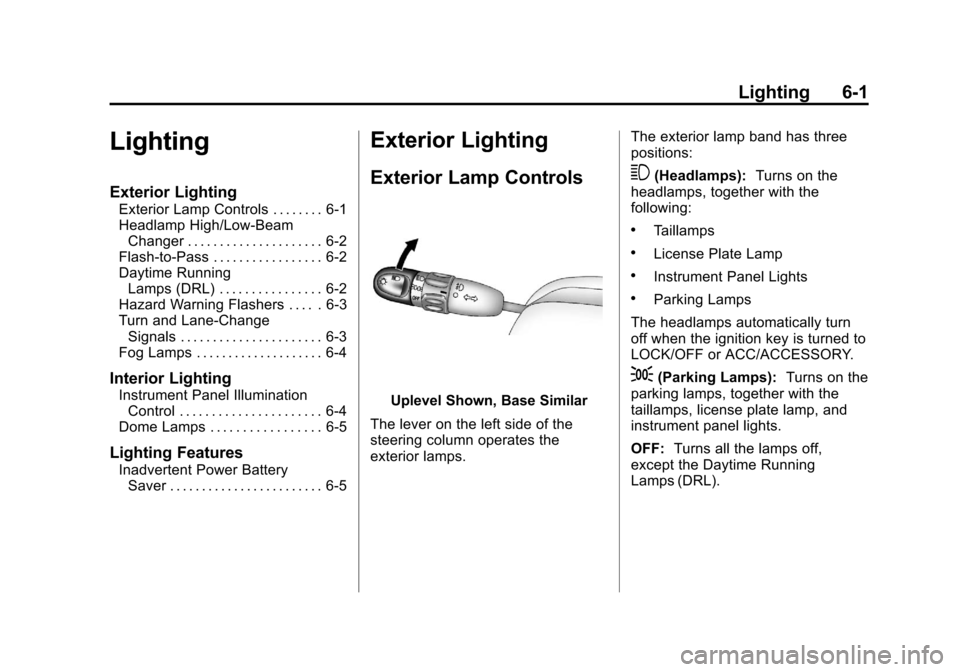
Exterior Lighting
Exterior Lamp Controls
Uplevel Shown, Base Similar
The lever on the left side of the
steering column operates the
exterior lamps. The exterior lamp band has three
positions:
3(Headlamps):
Turns on the
headlamps, together with the
following:
.Taillamps
.License Plate Lamp
.Instrument Panel Lights
.Parking Lamps
The headlamps automatically turn
off when the ignition key is turned to
LOCK/OFF or ACC/ACCESSORY.
;(Parking Lamps): Turns on the
parking lamps, together with the
taillamps, license plate lamp, and
instrument panel lights.
OFF: Turns all the lamps off,
except the Daytime Running
Lamps (DRL).
Page 138 of 328
Black plate (4,1)Chevrolet Aveo Owner Manual - 2011
6-4 Lighting
Fog Lamps
For vehicles with fog lamps, they
are controlled by the
#band
located on the middle of the turn
signal/multifunction lever.
To use the fog lamps, the ignition
must be turned to ON/RUN and the
low-beam headlamps or parking
lamps must be on.
Turn the band to
#to turn the fog
lamps on. The band automatically
returns to its starting position when
released. The fog lamp indicator
light comes on in the instrument
panel cluster. See Front Fog Lamp
Light on page 5‑20. To turn the fog lamps off, turn the
band to
#again. The fog lamp
indicator light will go off.
The fog lamps will also turn off
when the high-beam headlamps are
turned on. When the high-beam
headlamps are turned off, the fog
lamps will turn on again.
Some localities have laws that
require the headlamps to be on
along with the fog lamps.Interior Lighting
Instrument Panel
Illumination Control
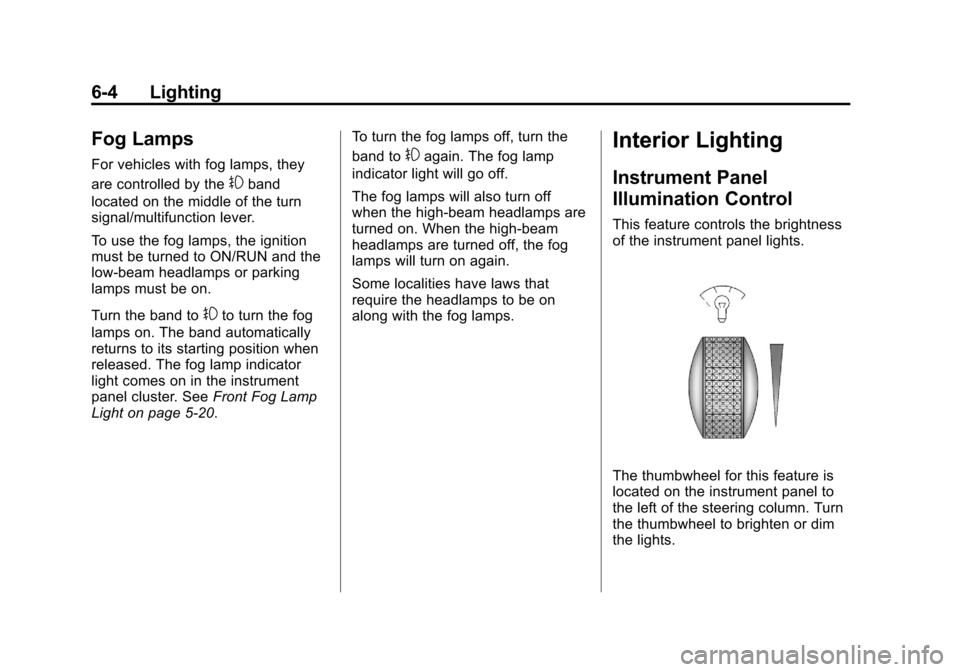
This feature controls the brightness
of the instrument panel lights.
The thumbwheel for this feature is
located on the instrument panel to
the left of the steering column. Turn
the thumbwheel to brighten or dim
the lights.
Page 145 of 328
Black plate (5,1)Chevrolet Aveo Owner Manual - 2011
Infotainment System 7-5
Press and hold SCAN/AST to use
Automatic Store. The radio only
scans stations with a strong signal
in the selected band.
AST (Automatic Store):Twelve
preset stations with the strongest
reception in the area can be
automatically stored. The radio will
only scan stations with a strong
signal that are in the selected AM or
FM band. If the Automatic Store
function is started in the FM band,
only FM stations are stored in
preset pages A1 and A2. If the
Automatic Store function is started
in the AM band, only AM stations
are stored in A1 and A2.
A combination of AM, FM, and XM
(if equipped) stations can be stored
manually into the other four favorite
pages. To use Automatic Store:
1. Press and hold SCAN/AST to
use Automatic Store mode.
2. Press the pushbutton below the ON tab on the radio display.
3. Automatic Store searches for radio stations with a strong
signal and automatically sets
presets A1 and A2 with new
stations.
4. After all stations are set, press the pushbutton below the arrow
tab on the radio display to return
to the main radio screen.
To reset the automatically stored
radio stations, press and hold
SCAN/AST. Then press the
pushbutton below the RESE tab on
the radio display. If no stations are
stored on preset pages A1 and A2,
the RESE option does not appear
in the radio display. When the
Automatic Store function is used,
any stations that were previously set
will be deleted and replaced with
new stations.Storing a Radio Station
Drivers are encouraged to set up
radio station favorites while the
vehicle is in P (Park). Tune to
favorite stations using the
pushbuttons, favorites button, and
steering wheel controls. See
Defensive Driving on page 9‑2.
A maximum of 36 stations can be
programmed as favorites using the
6 pushbuttons positioned below the
radio station frequency labels and
by using the radio favorites page
button (FAV button). Press the FAV
button to go through up to six pages
of favorites, each having six favorite
stations available per page.
If Automatic Store is used, then four
pages of favorites are available.
Each page of favorites can contain
any combination of AM, FM, or XM
(if equipped) stations. To store a
station as a favorite:
1. Tune in the desired station.
2. Press and release the FAV button to display the page where
the station is to be stored.
Page 147 of 328
Black plate (7,1)Chevrolet Aveo Owner Manual - 2011
Infotainment System 7-7
Storing an XM Channel
Drivers are encouraged to set up
XM Channel favorites while the
vehicle is in P (Park). Tune to
favorite stations using the
pushbuttons, favorites button, and
steering wheel controls. See
Defensive Driving on page 9‑2.
A maximum of 36 stations can be
programmed as favorites using the
6 pushbuttons positioned below the
radio station frequency labels and
by using the radio favorites page
button (FAV button). Press the FAV
button to go through up to six pages
of favorites, each having six favorite
stations available per page.
If Automatic Store is used, then four
pages of favorites are available.
Each page of favorites can contain
any combination of AM, FM, or XM
channels. To store an XM channel
as a favorite:
1. Tune in the desired channel.
2. Press and release the FAVbutton to display the page where
the channel is to be stored. 3. Press and hold one of the six
numbered pushbuttons until
a beep sounds. When the
pushbutton is pressed and
released, the channel that was
set will return.
4. Repeat Steps 1 through 3 for each XM channel to be stored
as a favorite.
To set up the number of favorites
pages:
1. Press and hold FAV until the radio setup menu displays.
2. Select the desired number of favorites pages by pressing the
pushbutton located below the
displayed page numbers.
3. Press FAV to return to the original main radio screen
showing the radio frequency
tabs and to begin the process of
programming favorites for the
chosen number of numbered
pages.
XM Radio Messages
UPDATING: The encryption code
in the receiver is being updated, and
no action is required. This process
should take no longer than
30 seconds.
NO SIGNAL: The system is
functioning correctly, but the vehicle
is in a location that is blocking the
XM signal. When the vehicle is
moved into an open area, the signal
should return.
LOADING: The audio system is
acquiring and processing audio and
text data. No action is needed. This
message should disappear shortly.
OFF AIR: This channel is not
currently in service. Tune in to
another channel.
CH UNAVAILABLE: This
previously assigned channel is no
longer assigned. Tune to another
station. If this station was one of the
presets, choose another station for
that preset button.
Page 163 of 328
Black plate (1,1)Chevrolet Aveo Owner Manual - 2011
Driving and Operating 9-1
Driving and
Operating
Driving Information
Defensive Driving . . . . . . . . . . . . . 9-2
Drunk Driving . . . . . . . . . . . . . . . . . 9-2
Control of a Vehicle . . . . . . . . . . . 9-3
Braking . . . . . . . . . . . . . . . . . . . . . . . 9-3
Steering . . . . . . . . . . . . . . . . . . . . . . . 9-4
Off-Road Recovery . . . . . . . . . . . . 9-5
Loss of Control . . . . . . . . . . . . . . . . 9-5
Driving on Wet Roads . . . . . . . . . 9-7
Highway Hypnosis . . . . . . . . . . . . 9-8
Hill and Mountain Roads . . . . . . 9-8
Winter Driving . . . . . . . . . . . . . . . . . 9-9
If the Vehicle is Stuck . . . . . . . . 9-11
Vehicle Load Limits . . . . . . . . . . 9-12
Starting and Operating
New Vehicle Break-In . . . . . . . . 9-17
Ignition Positions . . . . . . . . . . . . 9-17
Starting the Engine . . . . . . . . . . 9-19
Engine Heater . . . . . . . . . . . . . . . 9-20Shifting Into Park (Automatic
Transmission) . . . . . . . . . . . . . . 9-21
Shifting Out of Park . . . . . . . . . . 9-23
Parking (Manual Transmission) . . . . . . . . . . . . . . 9-23
Parking Over Things That Burn . . . . . . . . . . . . . . . . . . 9-24
Engine Exhaust
Engine Exhaust . . . . . . . . . . . . . . 9-24
Running the Vehicle WhileParked . . . . . . . . . . . . . . . . . . . . . 9-25
Automatic Transmission
Automatic Transmission . . . . . 9-25
Manual Transmission
Manual Transmission . . . . . . . . 9-29
Brakes
Antilock BrakeSystem (ABS) . . . . . . . . . . . . . . 9-30
Parking Brake . . . . . . . . . . . . . . . 9-31
Cruise Control
Cruise Control . . . . . . . . . . . . . . . 9-32
Fuel
Fuel . . . . . . . . . . . . . . . . . . . . . . . . . 9-34
Recommended Fuel . . . . . . . . . 9-35
Gasoline Specifications (U.S. and Canada Only) . . . . . . . . . . 9-35
California Fuel
Requirements . . . . . . . . . . . . . . 9-35
Fuels in Foreign Countries . . . 9-36
Fuel Additives . . . . . . . . . . . . . . . 9-36
Filling the Tank . . . . . . . . . . . . . . 9-37
Filling a Portable Fuel Container . . . . . . . . . . . . . . . . . . . 9-39
Towing
General TowingInformation . . . . . . . . . . . . . . . . . 9-39
Conversions and Add-Ons
Add-On ElectricalEquipment . . . . . . . . . . . . . . . . . 9-40
Page 165 of 328
Black plate (3,1)Chevrolet Aveo Owner Manual - 2011
Driving and Operating 9-3
Medical research shows that
alcohol in a person's system can
make crash injuries worse,
especially injuries to the brain,
spinal cord, or heart. This means
that when anyone who has been
drinking—driver or passenger —is
in a crash, that person's chance of
being killed or permanently disabled
is higher than if the person had not
been drinking.
Control of a Vehicle
The following three systems
help to control the vehicle while
driving —brakes, steering, and
accelerator. At times, as when
driving on snow or ice, it is easy to
ask more of those control systems
than the tires and road can provide.
Meaning, you can lose control of the
vehicle.
Adding non‐dealer accessories can
affect vehicle performance. See
Accessories and Modifications on
page 10‑4.
Braking
See Brake System Warning Light on
page 5‑16.
Braking action involves perception
time and reaction time. Deciding to
push the brake pedal is perception
time. Actually doing it is
reaction time.
Average reaction time is about
three‐fourths of a second. But that
is only an average. It might be less
with one driver and as long as two
or three seconds or more with
another. Age, physical condition,
alertness, coordination, and
eyesight all play a part. So do
alcohol, drugs, and frustration. But
even in three‐fourths of a second, a
vehicle moving at 100 km/h
(60 mph) travels 20 m (66 ft). That
could be a lot of distance in an
emergency, so keeping enough
space between the vehicle and
others is important. And, of course, actual stopping
distances vary greatly with the
surface of the road, whether it is
pavement or gravel; the condition of
the road, whether it is wet, dry,
or icy; tire tread; the condition of the
brakes; the weight of the vehicle;
and the amount of brake force
applied.
Avoid needless heavy
braking. Some people drive in
spurts
—heavy acceleration
followed by heavy braking —rather
than keeping pace with traffic. This
is a mistake. The brakes might not
have time to cool between hard
stops. The brakes will wear out
much faster with a lot of heavy
braking. Keeping pace with the
traffic and allowing realistic
following distances eliminates a lot
of unnecessary braking. That means
better braking and longer brake life.