2011 CADILLAC ESCALADE ESV audio
[x] Cancel search: audioPage 257 of 548

Black plate (55,1)Cadillac Escalade/Escalade ESV Owner Manual - 2011
Infotainment System 7-55DISPLAY: Press to choose from
the following display options:
1. Press DISPLAY once and Single
Elapsed appears along with the
current track playing and the
length of time for that track.
2. Press DISPLAY twice and Single
Remain appears along with the
current track playing and the
amount of time left on the track.
3. Press DISPLAY three times and
Total Elapsed appears along
with the current track playing
and the total time that has
played on the CD.
4. Press DISPLAY four times and
Total Remain appears along with
the current track playing and the
amount of time left on the CD. REPEAT: Press to toggle between
Track and All. The default for repeat
is OFF. .
Track repeats the track that is
playing. .
All repeats the disc that is
playing.
Playing MP3 CD MP3 is the format for storing digital
audio. An audio CD quality song
can be compressed into the MP3
format with very little loss of quality,
while taking up much less space.
CD-R/RW discs that have been
encoded in MP3 format can be
played on the DVD player. See MP3
on page 7 ‑ 28 for more information. Selecting Folders and Songs
When an MP3 disc is inserted in
the player, the navigation screen
appears. The folders and songs can
be changed by navigating through
the file system. The DVD player
plays the songs in the order they
were burned to the disc.
1. Press STOP if a disc is playing.
Press the up or down navigation
arrows on the remote control to
go through the folder list on the
left side of the screen.
Page 259 of 548

Black plate (57,1)Cadillac Escalade/Escalade ESV Owner Manual - 2011
Infotainment System 7-57Tips and Troubleshooting Chart Problem Recommended Action
IR Sensor Inoperative .
Check that the batteries are good in the
remote control. .
Check that the remote Control IR Sensor is
not blocked. .
Aim the remote control toward the IR Sensor
being controlled. .
Select the correct screen, 3 or 4.
No picture .
Check that the correct video input mode is
selected. .
Check that the video cable is plugged into
the jack securely.
No Sound .
Check that the correct audio input mode is
selected. .
Check that the audio cable is securely
plugged into the jack. Cleaning the Video Screens The video display screens are
made of a specially coated glass
and can be scratched or damaged
by abrasive products, solvents,
or ammonia-based window
cleaners. Clean with a soft, lint-free,
cotton cloth that has been slightly
dampened with warm water. Dry the
screens by wiping with a clean dry
cotton cloth.
Cleaning the Components Use care when touching or cleaning
the components such as the DVD
player or the discs.
Do not use DVD lens cleaners for
DVD players because the lens of
the DVD optics can become
contaminated by lubricants.
Page 260 of 548

Black plate (58,1)Cadillac Escalade/Escalade ESV Owner Manual - 2011
7-58 Infotainment System Handle CDs and DVDs carefully.
Store them in their original cases or
other protective cases and away
from direct sunlight and dust. The
DVD player scans the bottom
surface of the disc. If the surface of
a CD or DVD is damaged, such as
cracked, broken, or scratched, the
CD or DVD may not play properly or
not at all. If the surface of a CD or
DVD is soiled, take a soft, lint free
cloth or dampen a clean, soft cloth
in a mild, neutral detergent solution
mixed with water, and clean it. Make
sure the wiping process starts from
the center to the edge.
Do not touch the bottom side of a
CD or DVD while handling it; this
could damage the surface. Pick up
CDs or DVDs by grasping the outer
edges or the edge of the hole and
the outer edge. Rear Seat Audio (RSA)
System Vehicles with this feature allow
the rear seat passengers to listen
to and control any of the music
sources: radio, CD, DVD, or other
auxiliary sources. The rear seat
passengers can control the same
music sources the front seat
passengers are listening to (dual
control) or a different source. For
example, rear seat passengers can
listen to and control a CD through
the headphones, while the driver
listens to the radio through the
speakers. The rear seat passengers
have control of the volume for each
set of headphones.
The radio functionality is controlled
by both the RSA and the front radio,
only one band can be tuned to at
one time. Changing the band on the
RSA or the front radio will change
band on the other system. RSA functions can be operated
even when the main radio is off.
Audio can be heard through wired
headphones (not included) plugged
into the jacks on the RSA. If the
vehicle has this feature, audio can
also be heard on Channel 2 of the
wireless headphones.
The audio system allows the rear
speakers to continue playing even
when the RSA audio is active
through the headphones.
To listen to an iPod or portable
audio device through the RSA,
attach the iPod or portable audio
device to the auxiliary input (if
available), located below the RSA.
Turn the iPod on, then choose the
auxiliary input with the RSA SRCE
button. An iPod ®
or portable audio
device can be connected to the front
auxiliary jack or the USB port.
Page 261 of 548
Black plate (59,1)Cadillac Escalade/Escalade ESV Owner Manual - 2011
Infotainment System 7-59
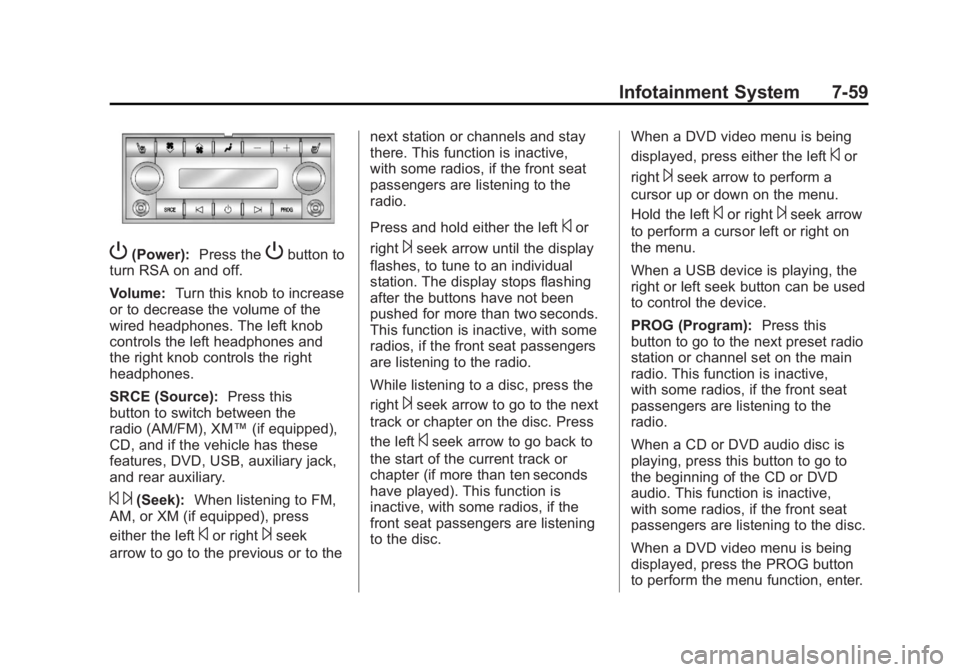
P (Power): Press the
P button to
turn RSA on and off.
Volume: Turn this knob to increase
or to decrease the volume of the
wired headphones. The left knob
controls the left headphones and
the right knob controls the right
headphones.
SRCE (Source): Press this
button to switch between the
radio (AM/FM), XM ™ (if equipped),
CD, and if the vehicle has these
features, DVD, USB, auxiliary jack,
and rear auxiliary.
© ¨ (Seek): When listening to FM,
AM, or XM (if equipped), press
either the left
© or right
¨ seek
arrow to go to the previous or to the next station or channels and stay
there. This function is inactive,
with some radios, if the front seat
passengers are listening to the
radio.
Press and hold either the left
© or
right
¨ seek arrow until the display
flashes, to tune to an individual
station. The display stops flashing
after the buttons have not been
pushed for more than two seconds.
This function is inactive, with some
radios, if the front seat passengers
are listening to the radio.
While listening to a disc, press the
right
¨ seek arrow to go to the next
track or chapter on the disc. Press
the left
© seek arrow to go back to
the start of the current track or
chapter (if more than ten seconds
have played). This function is
inactive, with some radios, if the
front seat passengers are listening
to the disc. When a DVD video menu is being
displayed, press either the left
© or
right
¨ seek arrow to perform a
cursor up or down on the menu.
Hold the left
© or right
¨ seek arrow
to perform a cursor left or right on
the menu.
When a USB device is playing, the
right or left seek button can be used
to control the device.
PROG (Program): Press this
button to go to the next preset radio
station or channel set on the main
radio. This function is inactive,
with some radios, if the front seat
passengers are listening to the
radio.
When a CD or DVD audio disc is
playing, press this button to go to
the beginning of the CD or DVD
audio. This function is inactive,
with some radios, if the front seat
passengers are listening to the disc.
When a DVD video menu is being
displayed, press the PROG button
to perform the menu function, enter.
Page 262 of 548

Black plate (60,1)Cadillac Escalade/Escalade ESV Owner Manual - 2011
7-60 Infotainment System
Navigation Using the Navigation
System This section presents basic
information needed to operate the
navigation system.
Use the buttons located on the
navigation system along with the
available touch-sensitive screen
buttons on the navigation screen to
operate the system. See Overview
on page 7 ‑ 3 for more information.
Once the vehicle is moving, various
functions are disabled to reduce
driver distractions. Navigation Buttons The following buttons are located on
the navigation system:
O /
n (Power/Volume):
1. Press to turn the system on
and off.
2. Turn to increase or decrease the
volume to the audio system.
3. Press and hold for more than
two seconds to turn off the
navigation system, the Rear
Seat Entertainment (RSE), and
Rear Seat Audio (RSA). If the
vehicle has not been tuned off,
the RSE and the RSA can be
turned back on by pressing this
knob and continues play of the
last active source.
X (Eject): Press to eject the
CD/DVD Disc. See CD/DVD Player
on page 7 ‑ 19 . w (Tune): Turn to go to the next
or previous frequency or disc track
or chapter. See CD/DVD Player on
page 7 ‑ 19 or MP3 on page 7 ‑ 28 for
more information.
AUDIO: Press to display the audio
screen. Press to switch between
AM, FM, or XM, if equipped, DISC,
or AUX (Auxiliary), or press on the
screen button. See CD/DVD Player
on page 7 ‑ 19 , MP3 on page 7 ‑ 28 ,
and Auxiliary Devices on page 7 ‑ 31
for more information.
FAV (Favorite): Press to access
the preset stations. See “ Storing
Radio Station Presets ” under,
Overview on page 7 ‑ 3 .
5 (Phone): See the OnStar ®
(if equipped) owner guide and
Bluetooth (if equipped) for more
information.
e (Sound): Press to access the
Sound menu to adjust the treble,
midrange, bass, fade, balance, and
Digital Signal Processing (DSP).
Page 263 of 548

Black plate (61,1)Cadillac Escalade/Escalade ESV Owner Manual - 2011
Infotainment System 7-61
y z (Scan Up/Down): Press to
scan the tracks/chapters up or down
on a disc.
y © ¨ z (Seek) (Previous/
Next): Press the up or down arrows
to go to the next or previous station.
Press and hold either arrow for
more than two seconds. The radio
goes to a station, plays for a few
seconds, then goes to the next
station.
NAV (Navigation): Press to view
the vehicle's current position on the
map screen. Each press of this
button cycles through Full Map and
the tab that displays the current
audio source (AM, FM, XM (if
equipped), CD, etc.). Full Map
displays the screen in full map view. Selecting the audio tab splits the
screen between the map screen
and the current audio source
screen menu.
RPT (Repeat): Press to repeat the
last voice guidance prompt.
DEST (Destination): Press to
access the Destination Entry
screen. From this screen, you can
select from several options to plan a
route by entering destination points.
CONFIG (Configure): Press to
adjust several of the system's
features and preferences.
Touch-Sensitive Screen
Buttons Touch-sensitive screen buttons are
located on the screen. When a
screen button has been selected, a
beep sounds. Screen buttons are
highlighted when a feature is
available. Alpha-Numeric Keyboard Letters of the alphabet, symbols,
punctuation, and numbers, when
available, displays on the navigation
screen as an alpha or numeric
keyboard. The alpha keyboard
displays when the system requires
entry of a city or street name.
All characters are touch-sensitive
screen buttons. Press a character to
select it.
A-Y (Accent Alphabet): Select to
enter letters with accent symbols.
This button may toggle to A-Z.
A-Z (Alphabet): Select to enter
letters from the alphabet. This
button may toggle to A-Y.
0-9 (Numbers): Select to enter
numbers.
Page 286 of 548

Black plate (84,1)Cadillac Escalade/Escalade ESV Owner Manual - 2011
7-84 Infotainment System Sound Press CONFIG to enter the
configure menu options, then press
CONFIG again, repeatedly until
Sound is selected or press the
Sound screen button to make
speaker and DSP (Digital Signal
Processing) adjustments. See
“ Sound Menu ” under, AM-FM Radio
on page 7 ‑ 10 for more information.
Radio Press CONFIG to enter the
configure menu options, then press
CONFIG again, repeatedly until
Radio is selected or press the Radio
screen button to make changes for
radio information displayed, preset
pages, XM (if equipped) categories,
and Bose AudioPilot. See “ Radio
Menu ” under, AM-FM Radio on
page 7 ‑ 10 for more information. Nav (Navigation)
Press CONFIG to enter the
configure menu options, then press
CONFIG again, repeatedly until Nav
is selected or press the Nav screen
button.
Voice Prompt
Voice Prompt: Press the Voice
Prompt screen button to change the
volume of the voice prompts or to
turn voice guidance on and off. Volume: Press + or − to increase
or to decrease the volume of the
voice prompts. The system will
respond with the adjusted voice
level.
Voice Guidance: Press On or Off
to turn voice instructions on and off
while traveling on a planned route.
Route Preference
Press the Route Preference screen
button to change route options
when the system calculates a route.
Allow Major Roads: This feature
allows the system to use major
roads when calculating a planned
route.
Allow toll road: This feature allows
the system to use toll roads when
calculating a planned route.
Allow ferry: This feature allows
the system to use ferries when
calculating a planned route.
Page 302 of 548

Black plate (100,1)Cadillac Escalade/Escalade ESV Owner Manual - 2011
7-100 Infotainment System
Voice Recognition The navigation system's voice
recognition allows for hands-free
operation of the navigation system,
audio system, and OnStar (if
equipped) features.
Voice recognition can be used when
the ignition is on or when Retained
Accessory Power (RAP) is active.
See Retained Accessory Power
(RAP) on page 9 ‑ 35 for more
information. To use voice recognition:
1. Press and hold SRCE located
on the steering wheel until you
hear a beep. The audio system
mutes.
2. Clearly state one of the
commands listed on the
following pages. Helpful Hints for Stating
Commands .
When a multiple command is
available, choose the command
that works best. .
Words that are in brackets are
optional. For example, for the
command Radio [band] [select]
FM, stating Radio FM or Radio
select FM are both valid
commands. .
When the system recognizes the
command the system does one
of the following:
‐ Perform the function.
‐ Ask you to confirm your
choice.
‐ Issue an error message
“ Did not recognize. Voice
Recognition Canceled. ” .
If you experience difficulty with
the system recognizing a
command, try saying it more
softly, and wait for a few
seconds after the beep,
or repeat the command.