2011 AUDI R8 SPYDER warning
[x] Cancel search: warningPage 37 of 244

~ Defective light bulb warning
The defective light bulb warning tells you
when a vehicle light bulb has become defec· tive .
If a defective bulb has been detected by the
system or a light bulb burns out, the
II sym
bol with a message appears in the display to
tell you wh ich bu lb is bur nt out and where it is
located. For example:
R ea r left turn signal
After 5 seconds, the message disappears . If
you want to recall the message into the dis play, press the CHECK button
c::> page 10,
fig . 3 @ .
There are three reasons why the defective
bulb message would appea r in the display:
- The light bulb has burnt out
c=> poge 224 .
- The fuse is "blown"¢ page 223, Replacing
fuses.
- T he w ire connection to the light bulb is de-
fective .
H ave the bulb rep laced or the connection re·
pa ired by you r authorized Aud i Servi ce depart
ment.
A WARNING
- Light bu lbs are pressurized and co uld ex
plode while they are being changed caus
ing serious persona l injury.
- Work with due care when handling the
high-voltage section of gas discharge
(xenon) lamps . Failing to do so co uld re
sult in death or serious injury!
BRAKE LIGHT t<®> Brake light defective
In case of a malfunction or component fa il·
ure, the symbol (USA models)/
K@ )] (Canada models) can appear . The follow
i ng e lectr ica l components should be checked,
repaired or replaced, as necessary:
- Brake light bulbs
- All w iring connections
- Brake light switch
Dr iver in formati on sys tem 35
Contact your a uthorized Audi dea ler for assis
tance if necessary.
(0 Tips
The brake light sw itch is on ly inspected as
part of the functional chec k afte r the en
gine is started .
fi.D Light/rain sensor defective
The indicator light indicates a defect in the
automatic headlights/automatic wiper sys
tem.
If the symbol ftl illum inates, the light sensor
has failed. Fo r safety reasons, the low beams
are turned on permanently with the switch in
AUTO. However, yo u can cont inue to turn the
li ghts on and off using the light switch. In the
case of a defect in the rain sensor, the wind
shield wiper lever functions are still availab le .
Have the light/ rain senso r checked as soon as
poss ib le at an autho rized Aud i dea ler.
1" IF{ Selector lever defective
Applies to vehic les : wi th R tronic
D 1;j Sele ctor l ever defectiv e! No rev ers e
ge ar!
If the symbols are il lum ina ted, the re is a mal·
funct io n in the R tronic selector lever. These·
l ector lever d isp lays go out o r flash.
It is not
poss ible to engage reverse gear . If you have
been shifting the transm iss ion manually, it
switches to a utomatic operation .
You can continue to shift the transm iss ion
manua lly. From the neu tral pos ition N, en
gage first gea r by tapping the shift button
0
on the steering wheel. Then the transmission
rema ins in manual ope ration and you can se
lect the gears using the sh ift b uttons.
Have the se lector lever checked as soon as
possible at an authorized Audi dea ler or other
qualified workshop.
Page 39 of 244

Opening and closing Keys
Key set
F ig. 29 Key set
Fig. 30 Remote master key: Indicator light
Your Audi comes with four keys¢ fig. 29:
@ two master keys with remo te
control
@ one valet key
© one emergency key
Master key with remote control
You ca n centrally lock and unlock you r vehicle
and star t the eng ine wi th the master key with
r emo te con trol. To fo ld the key o ut and back
i n place, press t he re lease button ¢
fig. 29
(arrow).
Valet key
The valet key on ly fi ts the lock in the d river's
door and the ignition l ock. If you have to leave
t he key with somebo dy e lse, yo u are well-ad
vised to turn
ove r the vale t key only .
Be aware that the fro nt lid and glove compa rt
men t ca n be opened from ins ide the ve hicle
using the release bu ttons .
Opening and clo sing 3 7
Emergency key
The emergency key is o nly for temporary use if
the ve hicl e key should be lost or misplaced.
Key replacement
If you lose a key, contact your authoriz ed Audi
dealer immed iate ly to have the
lost key disa
bled . B e sure t o br ing all your keys w it h you .
If a key is los t, you should report it to your in
su rance company .
Registered keys
You can inquire about the number of remote
master keys registered to your vehicle
¢
page 24 . In this way, you can be certain of
obta ining all the remote master keys if you
purchase a used vehicle .
State of master key battery
When a button is pressed, the check light
flashes ¢
fig. 30. If the check light does not
come on or flash, the battery is dead and has
to be replaced .
Battery replacement¢
page 38.
A WARNING
-
-Do not leave you r vehicle unattended
with the key in the ignition lock . Entry by
un authorized persons co uld e ndange r
you o r result in t heft or damage the v ehi
cle. A lways lo ck all do ors a nd take the
key.
- D o not leave children unattended in t he
ve hicl e, especi ally wi th access t o veh icle
keys. Ungu ard ed access to the keys pro
vi des children the opportun ity to s tart
the engine and/or activate vehicle sys tems such as the power windows etc . Un
supe rvised operation o f any vehicle sys
tem by children can result in ser ious in
jury.
@ Tips
If you ope n the dr iver's door with the key
l eft in the ignition lock, a chime will
sound. This is your reminder to
remove the
key and lock the door.
Page 41 of 244

electronic immobilizer is automatically acti
vated once aga in.
If an unauthorized key was used, SAFE is dis
played continuously in the odometer display
field.
~ WARNING
-
Always take the key with you when you
leave the vehicle. The key can disarm the
electronic engine immobilizer and permit
an unauthorized person to start the engine
and enable operation of the vehicle sys
tems such as power window leading to se
rious personal injury.
@ Tips
- The vehicle cannot be started if an unau
thorized key is used . The vehicle may not
start if another radio device such as a key
for another vehicle or a transponder is
located on the key ring .
- For Declaration of Compliance to United
States FCC and Industry Canada regula
tions
r::;, page 212.
Power locking system
General description
The power locking system locks or unlocks oil
doors simultaneously.
When opening and closing the doors , the
power locking system locks or unlocks
both
doors together.
The remote master key locks and unlocks the
doors using a radio signal
r::;, page 40.
Locking and unlocking with the key
You can also lock and unlock your vehicle us
ing the key in the lock on the driver's door.
The unlocking and locking mode can be
changed in the Driver Information System
r::;,page24.
Both doors are locked automatically when the
vehicle is locked and the anti-theft alarm sys
tem is activated.
Opening and closing 39
Auto Lock
The Auto Lock function locks all doors and the
front lid once speed has exceeded approxi
mately 9 mph (15 km/h).
The car is unlocked automatically once the ig
nition key is removed . In addition, the vehicle
can be unlocked if the power locking system
opening function~ is activated or one of the
door levers is used.
Turn signals
All the turn signals flash to indicate when the
vehicle is locked and unlocked. The turn sig
nals flash twice when the vehicle is unlocked.
The turn signals flash once when all the doors
and the front lid are locked. The interior lights
are also switched on or off automatically ac
cording to the position of the door contact
switch.
A WARNING
- When you lock your vehicle from outside,
nobody -especially children -should re
main inside the vehicle. Remember,
when you lock the vehicle from the out
side the windows cannot be opened from
the inside.
- When you leave the vehicle, always re
move the ignition key and take it with
you. This will prevent passengers (chil
dren, for example) from accidentally be ing locked in the vehicle should they acci
dentally press the power locking switch
in one of the doors.
- Do not leave children inside the vehicle
unsupervised. In an emergency it would
be impossible to open the doors from
the outside without the key.
(D Tips
-The driver's door can be locked and un
locked with the key if the power locking
system fails. The passenger's door can
be locked manually
r::;, page 42.
Page 42 of 244

40 Opening and clo sing
- In the event of a crash with airbag de
ployment all locked doors will be auto
matically unlocked to g ive access to the
vehicle occupants from the outside .
- You are well advised not to keep valua
bles inside an unattended vehicle, visib le
or not . Even a properly locked vehicle
cannot provide the security of a safe!
Unlocking and locking the vehicle with
the remote control
Fig. 32 Remote co ntro l: fun ctio n button s
To unlock the veh icle @J
.. Press button @once ¢ fig. 32 .
To lock the vehi cle [fil
.. Press b utton ® once ¢ ,&..
To unlock f ront lid only
.. Press button © for approximately one sec
ond .
PANIC Button
.. Push the red button @ to activate the pan ic
function. The horn sounds and the turn s ig
nals flash .
.. Push the button @ again to deactivate the
panic funct ion .
The turn s ignals flash twice when the vehicle
is unlocked . If the vehicle is u nlocked and a
door or the front lid are not opened within the
next 30 seconds, the vehi cle locks again auto
ma tica lly. This feature prevents the vehicle
from being left unlocked acc identally for a
long period of time . T
he t urn signa ls briefly flash once and the
horn so unds once when the doo rs and front
lid are locked properly .
A WARNING
-Read and follow all WARNINGS ¢.&. in
General description on page 39.
(D Tips
- Use the remote cont ro l only when the
doors and front lid are closed.
- In order to make s ure the locking f unc
tion is working, you should a lways keep
your eye on the vehicle to make s ure it is
properly locked.
-
- Do not use the remote cont ro l if yo u are
inside the car, otherw ise you may unin
tentionally lock the vehicle, and then you
would set off the anti-theft alarm when
you try to open a door . In case this hap
pens any how, push the unloc k button~-
- Use the pan ic function o nly if you are in
an eme rgency s ituation .
Operating locks with the key
To lock and unlock the vehicle from the out
side, turn the key in the lock of the driver's
door .
F ig . 33 Key turns fo r ope nin g an d clos ing
To unlock the vehicle
.. Turn the key one time to posit io n @ to un
lo ck the driver 's door ¢
fig. 33.
To lock the vehicle
.. Tu rn the key in the lock of the d river's door
to the lock pos it io n
@ ¢ ,&. . .,..
Page 43 of 244

The turn signals briefly flash once and the
horn sounds once when the doors and the
front lid are locked properly.
_& WARNING
- Be careful when closing the windows.
-
Check to see that no one is in the way, or
serious injury could result!
- Always read and heed WARNING
c::> .&. in
General description on page 39 .
@ Tips
-However, note that which door is un
l ocked
mechanically when the vehicle is
opened depends on the settings in the menu display
c::> page 24.
- Both doors are locked automatically
when the vehicle is locked.
Locking and unlocking the vehicle from
inside
The vehicle can be locked or unlocked from
the inside using the power locking switch.
Fig. 34 Section from driver's door: Power lock ing
sw itch
To lock the vehicle
• Press the upper part of the power locking
switch
@Jc::, fig. 34 c::> ,& .
To unlock the vehicle
• Press the lower part of the switch~-
If you lock the vehicle using the power locking
switch, please note the following:
- You cannot open the doors from the
outside
(increased security, for example when you
are stopped at a red light).
Opening and closing 41
- The LED in the power locking switch lights
up when all the doors and the front lid are
closed and locked.
- You can unlock and open the doors from the
inside by pulling on the door handle.
- You cannot lock the vehicle with the central
locking switch when the driver's door is
open.
- If you have a crash and the airbag is activat
ed, the doors automatically unlock.
_& WARNING
-If you use the power locking switch with
the doors closed, remember that all the
vehicle doors will lock.
- Locking doors from the inside can help
prevent inadvertent door opening during
an accident and can also prevent unwant
ed entry from the outside. Locked doors
can, howeve r, delay assistance to vehicle
occupants and hold up rescue efforts
from the outside in an accident or other
emergency.
Page 44 of 244

42 Opening and clo sing
Emergency locking
If the power locking system fails (power fail
ure), you will need to lock the passenger door
separately.
Fi g. 35 Emergency lock location on the front passeng
er 's door
~ 0
"' .., a,
Fig. 36 Emergency lock ing
For this purpose, a mechanical locking device
is provided on the end panel of the passenger
door (only visible when the door is open) .
.. Open the door.
"' Remove the cap
9 fig. 35.
1> lnsert the key into the inner slot c::> fig. 36
and turn it about 90 degrees to the right as
far as it can go.
.. Replace the cap.
After you close the door you w ill no longer be
able to open it from the outside. You can open
it from the insid e, howeve r, by pulling on the
door la tch tw ice.
Front lid
Opening and closing the front lid
1
Fig . 37 Drivers door: remote front lid release
F ig . 38 Release lever under the front lid
When opening the front lid, the windshield
wipers must be switched off and the wiper
arms must be folded against the windshield.
Otherwise the paint could be damaged .
Opening th e front lid
.. Press the center button on the master key or
.. Pull the release button in the driver's door
c::>fig. 37.
.. Pull up on the release under the front lid
c::> fig . 38 (arrow). This releases the catch .
"' Open the front lid a ll the way .
Closing the front lid
.. Pull the front lid down until the pressure
from the struts is reduced.
"' Close the front lid .
.. Press the front lid closed carefully using
both hands unt il it latches audib ly
c::> .&_ .
_8. WARNING
A front lid that is not completely lat ched
could fly up and b lock your view while driv
i ng.
Page 45 of 244

-When you close the front lid , check it to
make sure the safety catch has properly
engaged . The lid should be flush with the
surround ing vehicle body parts .
- If you notice while driving that the lid is
not secured properly, stop at once and
close it .
- Never leave your vehicle unattended es
pecially with the front lid left open. A
child could crawl into the luggage com
partment and pull the lid shut, becoming
trapped and unable to get out. To reduce
the risk of personal injury, never let chil
dren play in or around your vehicle. Al
ways keep the front lid as we ll as the ve
hicle doors closed when not in use.
(D Note
Make sure there are no objects are pro
t rud ing above the edge of the luggage
compartment . Otherwise, the front lid
could be damaged .
@ Tips
If the front lid is open or not properly
locked when the ignition is turned on, the
door and front lid warning appears in the
instrument cluster disp lay.
Emergency release for front lid
If the front lid cannot be opened, on emer
gency release is provided .
Fig. 39 Sectio n: Eme rgency release
" Reach under the closed glove compartment .
There is a red plast ic cord under the glove
compartment.
"Pu ll the red plastic cord towards you.
Opening and closing 43
Anti-theft alarm
system
Description
The anti-theft alarm triggers an alarm if any
one attempts to break into the vehicle .
Fig. 40 Diode posit io n in th e in str um ent panel
The anti-theft alarm system triggers an audi·
ble alarm and turns on the emergency flasher
if an unauthorized interference with the vehi
cle is sensed by the system .
How is the anti-theft alarm system
switched on?
The anti-theft alarm system is switched on
when you lock the driver's door manually us
ing the fold -out key, or when you use the re
mote control. The system is activated approxi
mately 30 seconds after the vehicle is locked.
T he ind icator light
9 fig. 40 starts flashing
rapidly for 2 seconds and then blinks slow ly.
How is the anti -theft alarm system
switched off?
T he anti-theft alarm system is switched off
o nly when yo u un lock your veh icle.
If you do
not open a door within 30 seconds after you
have unlocked with the remote control, the
vehicle will lock itself again automatically .
When will the anti theft alarm system be
triggered?
When the vehicle is locked, the a larm system
monitors and protects the fo llowing parts of
the vehicle:
- engine compartment
- luggage compartment
- doors
Page 46 of 244
44 Opening and clo sing
- ignition
When the sys tem is activated, the alarm w ill
be tr iggered if one of the doors , the eng ine
compartmen t lid or the front lid are opened.
The anti-theft a larm system will also go
off
when the ba tte ry is d isconne cted.
You can a lso trigger the alarm by pressing the
PANIC button on your remote-control key .
This will a lert other people in case of emer
gency. Press the PANIC button again to turn
off th e al ar m .
How is the anti-theft alarm switched off
when triggered?
To switch t he a larm off, press the button @l on
the master key o r swi tch t he ign ition on. The
ala rm w ill also sw itch i tse lf
off when i t comes
to the end of its cycle .
Emergency flasher
The emergency flasher w ill blink briefly when
the doo rs, e ngine compartment lid and front
lid are prope rly closed .
If the emergency flashe rs do not b link, check
the doors, engine compartment lid and front
lid to ma ke sure t hey a re p roperly closed. If
you close a doo r, the engine comp artment lid
or the front lid wit h the anti-theft alarm
switched on, t he emergency f lashers will blink
only after you have closed the door or lid .
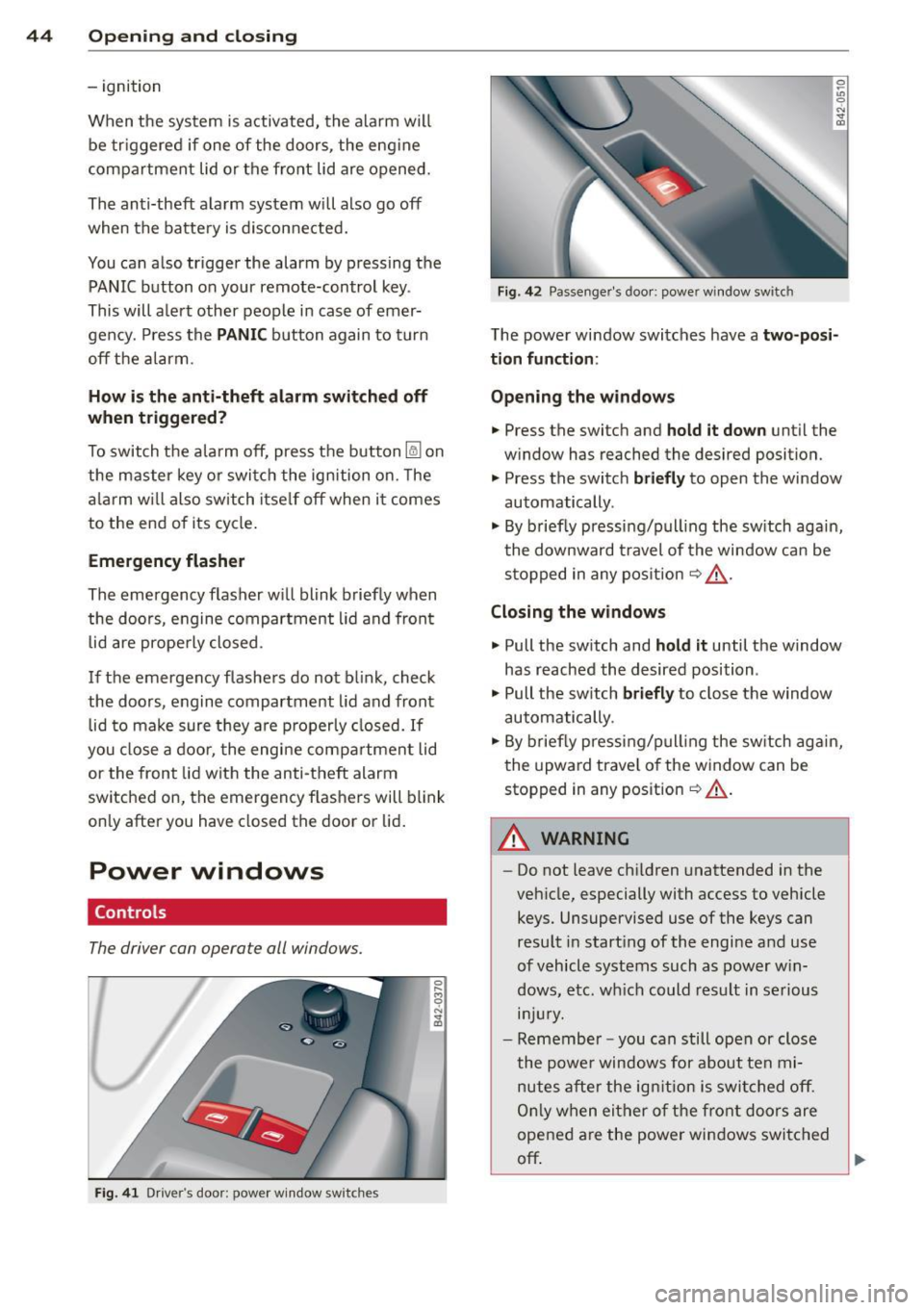
Power windows
Controls
The driver can operate all windows.
Fig. 41 D rive r's doo r: p owe r w in dow sw it c h es
Fig. 42 Passen ger 's doo r: powe r wi ndow swit ch
0 ~
"' 0
"' "' OJ
The powe r wi ndow swi tches have a two-posi
tion function :
Opening the windows
• Press the switch and hold it down unt il the
w ind ow has reached the desired position.
"' Press the switc h
briefly to open the window
automatically .
"' By briefly pressi ng/p ull ing the sw itch again,
t he downward travel of the window ca n be
s toppe d in any pos it ion
~ .&, .
Closing the windows
"' Pull the sw itch and hold it until the window
has reached the desired position .
"' Pull the sw itch
briefly to close the window
automatically .
"' By briefly pressing/p ull ing the sw itch agai n,
t he upward trave l of the window can be
stopped in any position
~ .&, .
.&_ WARNING
-
-Do not leave ch ildren unattended in the
veh icle, especially with access to vehicle
keys. Unsupervised use of the keys can
resu lt in start ing of the engi ne and use
o f vehicle syst ems such as power w in
d ows, e tc. w hich could res ult in s erious
lnJUr y.
-Remember -you can still ope n or close
the powe r windows for about ten mi
nutes after the ig nition i s swi tched off.
On ly w hen ei ther o f th e fr ont d oors are
opened a re the power windows switched
off ~