2011 AUDI A5 CABRIOLET instrument cluster
[x] Cancel search: instrument clusterPage 50 of 364

Opening and closing
& WARNING (continued)
compartment and pull the lid shut, becoming trapped and unable
to get out. To reduce the risk of personal injury, never let children
play in or around your vehicle. Always keep the rear lid as well as
the vehicle doors closed when not in use.
• Always ensure that no one is within range of the rear lid when
it is moving, in particular close to the hinges -fingers or hands can
be pinched .
[ i J Tips
• When the vehicle is locked, the rear lid can be opened separately
by pressing the button
-c::5 on the master key. When you close the rear
lid again, it locks automatically .
• If the rear lid is open or not properly closed when the ignition is
turned on, the door and rear lid warning~
page 20 appears in the
instrument cluster display. •
Emergency unlocking of the
luggage compartment lid
There is on emergency release for the rear lid .
Fig. 40 Rear lid: Lock
cylinder
- Remove the mechanical key from the master key
=>
page 40.
- Insert the key in the lock cylinder and turn it in the direc
tion of the arrow .•
Power windows
Controls
The driver can control all power windows.
Fig. 41 Section of the
driver 's door: Controls
Fig. 42 Center
console: central power
window switch
All power window switches=> fig. 41 are provided with a two-
position function: •
Page 54 of 364

Power top
• A message in the instrument cluster display will alert you if a
protection function was activated or if there is a malfunction
=>page 52.
• The power top can also be operated manually if there is a malfunc
tion=>
page 57, "Power top emergency operation" . Have you autho
rized Audi dealer correct the cause of the malfunction as soon as
possible .
• If parking the vehicle with the power top open, remember that the
vehicle interior will not be protected from the weather or from unau
thorized entry. Closing the power top before leaving the vehicle is
recommended. If you leave items in the vehicle, lock them in the
trunk .•
Power top operation
The indicator light monitors the power top.
The . indicator light illuminates for approximately 2 seconds when
the ignition switches on to check the function and then goes out
again. The indicator light also:
• illuminates when the power top opens or closes.
• blinks if the power top switch is operated but the conditions for
opening or closing the power top are not met . A warning message
also appears in the instrument cluster display=>
page 52, "E rror
message in the instrument cluster display" .
• if the power top did not open or close completely.
[ i J Tips
The indicator light stays on if the power top was opened manually. •
Error message in the instrument cluster
display
An error message appears if the power top cannot open
or close.
Several conditions must be met for the power top to open or close
automatically.
An error message in the instrument cluster display indicates if one of
the conditions is not met or there is a malfunction.
Power top: please close rear lid
The luggage compartment lid must be closed when the power top is
opening or closing. This error message appears in the instrument
cluster display if the luggage compartment lid is not closed.
Storage bay not lowered. Please remove
obstruction
The power top storage bay must lower when the power top is
opening. This error message appears in the instrument cluster
display if the storage bay is not lowered . If the storage bay does not
lower automatically because of objects in the luggage compartment,
remove the objects that are in the way from the storage bay area.
Otherwise, you can operate the power top storage bay manually
=>page 55.
Power top: cannot be used
This error message appears if the convertible cannot open or close
automatically because of safety reasons or if there is a malfunction.
The following causes are possible:
• Vehicle speed too high: Power top operation is deactivated and an
error message appears if the vehicle speed is too high. Reduce the
vehicle speed and operate the switch again to open or close the power
top.
• Battery voltage too low: The power top cannot be operated if the
battery voltage is too low. This ensures there will be enough battery
~
Page 65 of 364

Clear vision
Lights
Switching the lights on and off ·t!·
0 9
" l8
Fig. 66 Instru ment
pan el: He ad lig ht
con trol swi tc h
Switching on AUTO -Automatic headlight
controls*
- Turn the light switch to AUTO => fig. 66.
Turning on the side marker lights
- Turn the head light control switc h to ~oo~.
Switching on low beams
- Turn the headlight control switch to ;D .
Switching off the lights
- Turn the headlight control switch to 0.
The low beams only illuminate with the ign ition turned o n.
With the side marker lights or headlights switched on, the symbol
next to the light switch illum inates
:oo:c .
Con tro ls a nd e quip
m en t Vehicle
OP-eration
Clear vision
AUTO -Automatic headlight contro l*
With the switch in the AUTO position, the low beams are switched on
au tomatically depending on the ambient light, for examp le in a
tunnel, at dusk and when it is raining or snowing . When the low
beams are sw itched on, the
: oo ~ symbo l comes on. The low beams
remain switched on rega rdless of the ambient light when you turn on
the fog lights.
When you tu rn off the ignition, the low beams are automatically
switched off .
On veh icles with a ra in sensor the head lights sw itch on autom atically
after a few windshield wiper passes . H owever, the instrument
lighting will not be switched on .
With automatic head lig ht control, you also have the high-beam func
tion available . However, if you have not switched high beams back to
low beams wh ile dr iving with au toma tic headlight contro l, o nly the
low beams come on the next t ime you turn on automatic headlight
cont rol. In o rder to return to high beams again, you first have to pull
the high beam lever back to the normal pos ition and then push the
lever forward.
Light sensor m alfunction
In the event of a light senso r malfunction, the dr iver is notified in the
instrument cluster display:
Autom ati c dri ving light s/automatic wiper s defecti ve
For safety reaso ns, the low beams a re turned on permanen tly with
the switch in
AUTO . However, you can continue to turn the lights on
and off us ing the l igh t sw itch . H ave the ligh t se nsor checked as soon
as possible at an authorized Audi dealer or other qualif ied workshop . .,,_
Vehicle care Do-it-yourselt service Technical data
Page 68 of 364

Clear vision
Instrument lighting
The basic brightness of the illumination for the instru
ments, the center console and the display can be
adjusted .
-Press the knob to release it.
N ~ 0 0 ,;
"'
lighting
Rotating the knob to the right"+" will increase the basic
brightness when it is dark.
- Rotating the knob to the left"-" will decrease the basic
brightness when it is dark.
- Pressing the knob will prevent unintentional changes.
(I] Tips
The illumination for the instrument cluster lights up whenever you
switch on the ignition with the vehicle headlights off . As the daylight
fades, the instrument cluster illumination likewise dims automati
cally and will go out completely when the outside light is very low.
This feature is meant to remind you to switch on the headlights when
outside light conditions become poor. •
Appli es to veh icles : wi th xenon headlights
Xenon headlights
After starting the engine , the xenon headlights are automatically
adjusted to the load and angle of the vehicle (for example, during
acceleration and braking). This prevents oncoming traffic from expe
riencing unnecessary headlight glare from your xenon headlights .
If the system is not operating properly, a warning symbol in the Auto
Check Control is displayed~
page 37. •
Ap plies to vehi cles: with adap tive light
Adaptive light
When driving around bends, the relevant area of the road
is better illuminated.
Fig. 69 Adaptive light
when driving
The benefit of adaptive light is that the curve and the edge of the road
are better illuminated ~ fig. 69. Dynamic adaptive light is controlled
automat ically, depending on vehicle speed and steering wheel angle.
When driving around bends, the headlights are controlled according
to steering wheel angle . So that there is no black hole ahead of the
vehicle , the two main beams pivot at different angles. .,.
Page 69 of 364
![AUDI A5 CABRIOLET 2011 Owners Manual (]] Tips
The system works above a speed of about 6 mph (10 km/h) .•
Emergency flashers ~
The emergency flashers makes other motorists aware
that you or your vehicle are in an](/manual-img/6/57571/w960_57571-68.png "AUDI A5 CABRIOLET 2011 Owners Manual (]] Tips
The system works above a speed of about 6 mph (10 km/h) .•
Emergency flashers ~
The emergency flashers makes other motorists aware
that you or your vehicle are in an")
(]] Tips
The system works above a speed of about 6 mph (10 km/h) .•
Emergency flashers ~
The emergency flashers makes other motorists aware
that you or your vehicle are in an emergency situation.
Fig. 70 Emergency
flasher switch
- Press the switch ~=> fig. 70 to turn the emergency
flashers on or off.
When the emergency flashers are on, all four turn signals blink at the
same time . The turn signal indicator lights¢¢ in the instrument
cluster, as well as the light in the emergency flasher switch~ blink
likewise . The emergency flashers also work when the ignition is
turned off.
The emergency flashers will turn on automatically if you are in an
accident where the airbag has deployed.
(]] Tips
You should turn on the emergency flashers when :
• you are the last vehicle standing in a traffic jam so that any other
vehicles coming can see you, or when
Con tro ls a nd e quip
m en t Vehicle
OP-eration
Clear vision
• your vehicle has broken down or you are in an emergency situa
tion, or when
• your vehicle is being towed by a tow truck or if you are towing
another vehicle behind you .•
Turn signals -¢ Q and high beam gD lever
The lever on the le~ side of the steering column is used to
operate the turn signals and the high beam as well as the
headlight flasher.
Fig. 71 Turn signal
and high beam lever
The turn signal and high beam lever has the following func
tions:
Turn signals¢¢ (D@
- Push the lever up as far as it can go to turn on the right
turn signal or down to turn on the left turn signal
=> fig. 71 .
- Move the lever briefly until you meet resistance and
release it to flash three times.
- Move the lever (up or down) until you meet resistance and
hold it there to determine the flashing time for the turn
signals. _.,
Vehicle care Do-it-yourselt service iTechnical data
Page 70 of 364

Clear vision High be am
~D @
- Push the lever forward to switch on the high beam.
- Pull the lever back towards you to switch off the high
beam.
H eadlight flasher ~D ©
- Pull the lever toward the steering whee l to use the head
light flasher.
Not es on th es e fe ature s
• The turn signals only work with the ignit ion turned on. The indi
cato r lights ¢ or¢ in the instrument cluster also blink.
• After you have turned a corner, the turn signal switches off auto
matically.
• The
high beam works only when the headlights are on. The indi
cator light ~D in the instrument cluster illuminates when the high
beams are on.
• T he
headlight flasher works only as long as you hold the lever -
even if there are no lights switched on. The indicator light ~Din the
instrument cluster illuminates when you use the headlight flasher.
0 Note
Do not use the high beam or headlight flasher in if you know that
these could be blinding oncoming traffic.•
Interior lights
Interior lights
The interior lights include the reading lights for the driver
and the front passenger .
Activating door contact circuit
Fig. 72 Sect ion from
h ead liner: Interio r
l ig ht s
- Press the button@. The LED in the button illuminates .
Deactivating door contact circuit
-Press the button@. The LED in the button goes out .
Front reading Lights ~
- Press one of the switches @ to turn the right or le ft
reading light on or off .
With the door contact circu it, the inte rior lights turn on as soon as
you un lock the vehicle or open the doors. The interior lights are also
tu rned on when the ignit ion key is removed. The lights turn off about
30 seconds after the doors are closed. When the vehicle is locked or
when the ignition is tu rned on, the interior lights are turned off.
When a door is open, the interior lights are turned off after about 10
min utes to prevent battery draining. _,.
Page 108 of 364
ffl..__O_ n_ t_h _e_ r_o _ a_ d _________________________________________________ _
Ignition Lock and ignition switch
Starting engine with the key
The ignition is switched on and the engine started with
the ignition key.
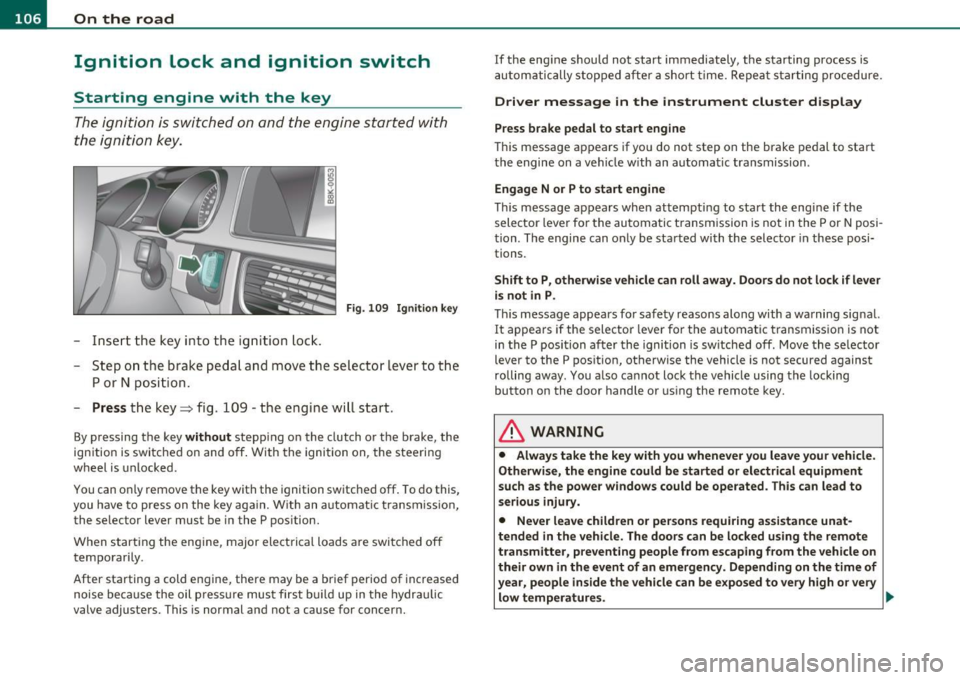
F ig. 10 9 Igniti on k ey
-Inse rt the key in to the ig n ition lock.
- Step on th e brake pedal and mov e th e selec tor lev er to th e
P or N posi tion.
- Press the key => fig. 109 -the engine wi ll start .
By pressing the key without stepp ing on the clutch or the b rake, the
i gn itio n is switc hed on and o ff . With the ignition on, the steeri ng
w heel is unlocked.
You can o nly remove the key with the i gnition switc hed off . To do this,
you have to press on the key ag ain. Wi th an a utomat ic transm iss io n,
the se lector lever must be in the P pos ition.
W hen s tarting the eng ine, major electrica l loads a re swi tched off
temporarily .
After startin g a cold eng ine, there may be a brief period of increased
noise be cause the oil p ress ure mu st firs t b uild up in t he hydr auli c
valve adjuste rs. This is normal and not a cause for concern. If the eng
ine s hould not start immediately, the starting process is
a u tom atically st op ped aft er a sh ort t ime. Re peat sta rtin g p ro cedu re.
Driver message in the instrument cluster display
Press brake pedal to start engine
T h is message ap pears i f yo u do not step on the brake pedal to start
t he engine on a vehicle w ith an au toma tic transmission .
Engage N or P to start engine
This message appea rs when at tempti ng to start the eng ine if the
sele ctor lever fo r the au tomatic t ransm ission is no t in the P or N po si·
t ion . The engine can on ly be sta rted wi th the selecto r in these posi
tions.
Shift to P , otherwise vehicle can roll away. Doors do not lock if lever
is not in P .
This message app ears fo r sa fe ty reasons along with a wa rning sig nal.
It appea rs if the selector lever for t he automat ic transm iss io n is not
in the P posi tion af ter the ignition is sw itched off . M ov e t he se lector
lever to the P pos itio n, ot herw ise the vehicle is not secured against
rolling away . You a lso ca nnot lo ck th e ve hi cle u sing the locking
button on the door hand le or us ing the remote key.
& WARNING
• Always take the key with you whenever you leave your vehicle.
Otherwise, the engine could be started or electrical equipment
such a s the power windows could be operated . This can lead to
serious in jury.
• Never leave children or per sons requiring assistan ce unat
tended in the vehicle. The doors can be locked u sing the remote
transmitter, p reventing people from escaping from the vehicle on
their own in the event of an emergency. Depending on the time of
year, people inside the vehicle can be exposed to very high or very low temperatures. ..,
Page 110 of 364

ffl..__O_ n_ t_h _ e_ r_ o_ a_ d _________________________________________________ _
Starting and stopping the engine
with convenience key
A pplies to veh ic le s: with conven ience ke y
Starting the engine with the
[START ENGINE S TOP] button
This button switches on the ignition and starts the
engine.
Fig. 110 Convenience
key: START ENGINE
STOP
button
- Step on the brake pedal and move the selector lever to P
orN =>& .
- Pressonthe[START ENGINE STOP)button::::>fig. 110-
the engine will start.
By pressing the [STAR T ENGINE STOP] button without depressing
the clutch or the brake peal, the ignition is switched on and switched
off by pressing it again.
If the engine does not start immediately, stop trying after 10 seconds
and then try to restart the engine about 30 seconds later.
After a cold engine is started, there may be a brief period of increased
noise because oil pressure must first build up in the hydraulic valve
adjusters. This is normal and not a cause for concern.
Driver message in the instrument cluster display
No key identified
This message appears when the !START ENGINE STOP] button is
pressed if there is no master key inside the vehicle or if the system
does not recognize it. For example, the master key cannot be recog
nized if it is covered by an object (e.g. aluminum brief case) which
screens the radio signal. Electronic devices such as cell phones can
also interfere with the radio signal.
Press brake pedal to start engine
This message appears if you press the !START ENGINE STOP)
button to start the engine and do not depress the brake pedal. The
engine can only be started if the brake pedal is depressed.
Engage N or P to start engine
This message appears when attempting to start the engine if the
selector lever for the automatic transmission is not in the P or N posi
tion. The engine can only be started with the selector in these posi
tions.
Key not in vehicle
This message appears along with the.:! symbol if the master key is
removed from the vehicle with the engine running. It is intended to
remind you (e.g. when changing drivers) not to continue the journey
without the master key.
If the master key is no longer in the vehicle, you cannot switch on the
ignition after stopping the engine and you also cannot start the
engine again. Moreover, you cannot lock the vehicle from the outside
with the key.
Shift to P, otherwise vehicle can roll away. Doors do not lock if lever
is not in P.
This message appears for safety reasons along with a warning signal.
It appears if the selector lever for the automatic transmission is not
in the P position when switching off the ignition with the
!START ENGINE STOP] button. Move the selector lever to the P _..