2011 AUDI A5 CABRIOLET instrument cluster
[x] Cancel search: instrument clusterPage 25 of 364

Efficiency program*
The efficiency program can help you to use less fuel => page 24. •
Operation
The trip computer is controlled by two switches on the
windshield wiper lever.
B
Fig. 16 Windshield
wiper lever: controls
for the trip computer
-To display the trip computer memory levels, press the
[ RESET) button@=> fig. 16 repeatedly until the desired
memory level is shown in the display .
- To display trip information within a memory level, press
the top or bottom part of the function selection switch ®·
The trip computer will not operate unless the ignition is on. When you
turn on the ign ition, the function that was in use when you last turned
the ignition off will be displayed.
In addition to information on the trip computer (trip computer 1 and
2 and the effic iency program), the digital speedometer and informa
tion regarding the navigation system* can also be disp layed. To
switch the display between the different information, tap the
I RESET ] button@ briefly.
Controls and equip
ment Safety first
Driver information display
Setting
values to zero
To delete one current value from the trip computer, select the
desired funct io n and press the
I RESET] button @for at least one
second. The fo llowing va lues can be set to zero
individually :
• Average fuel mileage
• Average speed
• Elapsed time
• Distance
All currently displayed values are deleted in the efficiency program* .
In addition,
all the values in the single-trip or the total-trip memory
can be deleted simultaneously =>
page 23.
(I] Tips
All stored values will be lost if the vehicle battery is disconnected. •
Basic Settings for the trip computer
The radio or MM!* operating unit is used for setting the
trip computer's basic settings.
-Select: Function button [CAR)> Instrument cluster > On-
board computer 1
or On-board computer 2.
Th e val ues in the single-trip or the total-trip memory can all be reset
to zero at the same time under
Reset in the menu .
In addition, you can determine what information from the trip
computer should be shown in the instrument cluster display.
If one
of the p ieces of driver information is turned
Off , that driver informa
tion will not be shown in the disp lay. The information w ill continue to
be calculated by the trip computer and can be turned back
On at any
time. ..,_
Vehicle care Technical data
Page 27 of 364
Applies to veh icles: w ith trip comp ute r wi th effic iency program
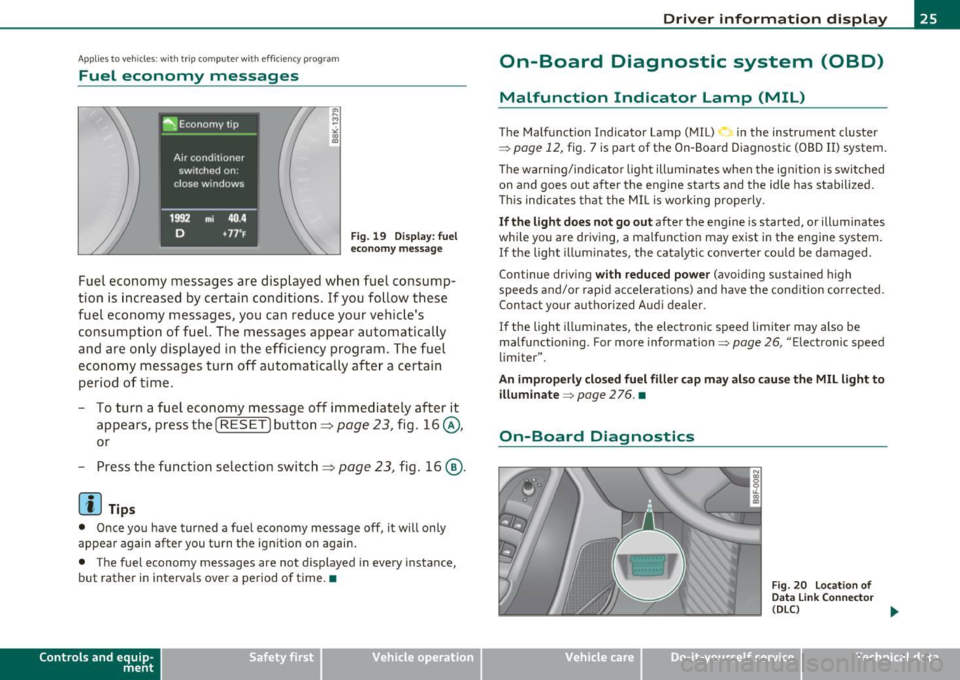
Fuel economy messages
Fig. 19 Display: fuel
economy message
Fuel economy messages are displayed when fuel consump
tion is increased by certain conditions. If you follow these
fuel economy messages, you can reduce your vehicle's
consumption of fuel. The messages appear automatically
and are only displayed in the efficiency program. The fuel
economy messages turn off automatically after a certain
period of time.
- To turn a fuel economy message
off immediately after it
appears, press the [
RESET] button ~ page 23, fig. 16@,
or
- Press the function selection switch~ page 23, fig. 16@.
[I] Tips
• Once you have turned a fuel economy message off, it will only
appear again after you turn the ignition on again.
• The fuel economy messages are not displayed in every instance,
but rather in intervals over a period of time. •
Contro ls a nd e quip
m en t Vehicle
OP-eration
Driver information display
On-Board Diagnostic system (OBD)
Malfunction Indicator Lamp (MIL)
The Malfunction Indicator Lamp (MIL) in the instrument cluster
=;,
page 12, fig. 7 is part of the On-Board Diagnostic (OBD II) system.
The warning/indicator light illuminates when the ignition is switched
on and goes out after the engine starts and the idle has stabilized.
This indicates that the MIL is working properly.
If the light does not go out after the engine is started, or illuminates
while you are driving, a malfunction may exist in the engine system.
If the light illuminates, the catalytic converter could be damaged.
Continue driving
with reduced power (avoiding sustained high
speeds and/or rapid accelerations) and have the condition corrected.
Contact your authorized Audi dealer .
If the light illuminates , the electronic speed limiter may also be
malfunctioning. For more information=;,
page 26, "Electronic speed
limiter".
An improperly closed fuel filler cap may also cause the MIL light to illuminate
=;, page 2 76. •
On-Board Diagnostics
Fig. 20 Location of
Data Link Connector
(DLC)
tJ,,,
Vehicle care Do-it-yourselt service iTechnical data
Page 29 of 364

Speed warning 2
Storing warning 2 is recommended if you always want to be reminded
of a certain speed, for example when you are travel ing in a country
that has a genera l maximum speed limit, or if you do not want to
exceed a spec ified speed for winter tires.
The speed warning 2 symbol,
8. (USA mode ls)/ 8, (Canada models)
appears in the display when you exceed the stored speed limit. Unlike
warning 1, it will not go out until the vehicle speed drops below the
sto red speed limit.
Setting speed warning 2
=> page 27 .
00 Tips
Even though your veh icle is equ ipped with a speed warn ing system,
you should sti ll watch the speedometer to make sure you are not
driving faster than the speed limit.•
Speed warning 1: setting a speed Limit
Warning threshold 1 is set by the (SET] button.
Storing the maximum speed
-Drive at the desired maximum speed.
Controls and equip
ment Safety first
F
ig . 21 SET button in
t he instru ment cluster
Driver information display
- Press the !SETI button in the instrument panel display
=:> fig. 21 for 1 second.
Resetting the maximum speed
- Drive the vehicle at a speed of at least 3 mph (5 km/h)
- Press the
[SET ] button for more than 2 seconds.
The speed warning symbo l 8 (USA models)/ 0 (Canada models) will
appear briefly in the dis play when you release the
I SET I button to
indicate that the maximum speed has been stored successfu lly.
Th e maximum speed remains stored until it is changed by pressing
the
I SET] button again briefly or until it is deleted by a lengthy push
on the button. •
Speed warning 2: setting a speed Limit
The radio or MM!* control unit is used to set, change or
delete warning threshold 2.
-Select: Function button [CARI> Instrument cluster >
Speed warning.
Warning threshold 2 can be set in the speed range starting from 20
mph to 150 mph (30 km/h to 240 km/h). Sett ings can each be
adjusted in intervals of 6 mph
(10 km/h). •
Auto Check Control
Introduction
The Auto-Check control monitors the function of certain vehicle
features and components . It simp ly makes sure these features and
components are work ing properly. The Auto-Check control works as
long as the ignition is on, as well as whenever the vehicle is driven. ..,
Vehicle care Technical data
Page 30 of 364

Driver information display
If a component is malfunctioning or if the need for an urgent repair
h as been de te cte d, th is will appea r in th e instrument clus ter display.
You will also hear an a udible warning to ne. The displays are color
coded in either red or yellow depend ing on their level of priority.
A red symbo l mea ns
Danger , a yellow symbo l ind icates Warning . In
certain situations, information message for the driver appear in addi
t ion to the red and yellow symbo ls.
T he Auto-Check Contro l w ill automatica lly perform a test each t ime
you switch on the ignition . With the selector lever in
P or N , the
following message appears in the d isplay:
When stationary apply footbrake while sele cting gear.
W hen you a se lec t a d iffe ren t gear ( for ex ample: R , D , etc .), t he
message w ill disappear a nd the Auto-Check function is d isplayed.
If t he re is a ma lfunction, then the malfunct ion message will appear
about
15 seco nds afte r you sta rt the veh icle . At the same t ime you
wi ll hear a warning tone. •
Driver information messages
Driver information messages are sho wn in th e instru
ment cluster display in addition to symbols .
Fig. 22 I nstrumen t
clu ster: SET bu tton
For examp le , if the transmiss ion se lector lever is not in the P position
w hen the eng ine is tu rne d off, the following mess age appears :
Shift to P , otherwi se vehicle can roll away. Door s do not lock if
le ver is not in P.
Th e ig nit io n key can on ly be removed w ith t he sele cto r in this pos i
tion . T hi s and other messages are brought up if a funct io n cannot be
c ar ried out.
Driver messages and red symbols
If a red symbo l appear s in the disp lay, a driver mess age is also
displayed automatically.
F or example, the symbo l for a prob lem w ith en gine oi l press ure
Switch off engine! Oil pressure too low
The d river mess age in the display goes out afte r abo ut 5 seconds. The
dr iver message can be displayed aga in by briefly pressing the
! SET ]
button ~ fig. 22 .
Driver messages and yellow symbols
If a yellow symbol appears in the di spla y, a drive r message is also
displayed automatically.
F or example, the symbo l.,,. appears in the dis play, i ndicating low
w indshield washer fl uid leve l. The following message also a ppears:
Please refill washer fluid
Th e dr iver mess age d isappears a fter a f ew seconds. The dr iver
message can be displayed again by briefly pressi ng the
(SET]
button .•
Page 32 of 364

Driver information display
you have to stop immediately and turn off the engine. The coolant
pump is not working anymore--danger of damage to the engine! •
Brake system malfunction
A malfunction in the brake system must be repaired as
soon as possible.
If the warning/indicator light BRAKE (USA models)/ ((D)
(Canada models) in the instrument cluster flashes, there is a
brake system malfunction . A driver message appears as well
to explain the malfunction in more detail. The driver warning
goes out after about S seconds, but it can be brought up at
any time by pressing the
!SET] button again.
Stop the Vehicle and Check the Brake Fluid
- Stop the vehicle.
-Check the brake fluid level=>
page 289.
- Seek professional assistance if necessary .
Warning ! Fault in brake system. Contact
workshop
- Drive carefully to the nearest authorized Audi dealer or other qualified workshop and have the malfunction
corrected =>
&.
Parking brake Please get to a repair shop
- If this symbol appears when the vehicle is stationary or
after the ignition is turned on, check to see if the parking brake can be released. Drive to an authorized Audi dealer
or other qualified workshop as soon as possible and have
the malfunction corrected. If the parking brake cannot be
opened, then take it to an expert at an authorized Audi
dealer.
- If the symbol appears while you are driving, it is possible that the traction control or the emergency brake has malfunctioned. It is possible that the parking brake
cannot be applied. It is also possible that the parking
brake cannot be released after it has been applied. Drive
to an authorized Audi dealer or other qualified workshop
to have the malfunction corrected.
If the ABS system malfunctions, the ABS warning/indicator light illu
minates together with the brake system malfunction warning/indi
cator light~& .
& WARNING
• Always observe the warnings in~ page 2 72, "Engine compart
ment", before opening the hood and checking the brake fluid.
• Driving with low brake fluid is a safety hazard. Stop the car and
get professional assistance.
• USA models: If the BRAKE warning light and the i, warning
light come on together, the rear wheels could lock up first under
hard braking. Rear wheel lock-up can cause loss of vehicle control
and an accident . Have your vehicle repaired immediately by your
authorized Audi dealer or a qualified workshop. Drive slowly and
avoid sudden, hard brake applications.
• Canada models: If the brake warning light (CD) and the ABS
warning light come on together, the rear wheels could lock up .,_
Page 37 of 364

Light/rain sensor defective ~c.,
Automatic headlights/automatic wipers defective
If the symbo l illumina tes, the ligh t senso r has fa iled. For s afe ty
reasons the low beams are turned on permanently with the sw itch in
AUTO . However, you can continue to t urn the lights on and off usi ng
the light sw itch . In the case of a defect in the ra in sensor, the wi nd
shield wiper lever functions are still avai lab le . Have the light/rain
senso r chec ked as soo n as poss ible by an a utho riz ed Aud i dea le r.•
Worn brake pads u
Brake pads!
If the warn ing light illum inates, immediately contact your autho rized
Audi dea ler or qu alified wor kshop to h ave all b rake pad s in sp ecte d.
On USA mode ls the warn ing light comes on together w it h the
w ar ning light
BRAKE . Both se ts of b rake pads on an axle mus t always
be rep laced at the same time.
& WARNING
Driving with bad brakes can cause a collision and serious personal
injury .
• If the warning light J and the warning light BRAKE1> with the
message Brake pads! comes on in the instrument cluster di splay,
immediately contact your authorized Audi dealer or qualified
workshop to have all brake pads checked or replaced if
necessary. •
ll BRAKE: USA mode ls on ly
Controls and equip
ment Safety first
Driver information display
A
pp lies to veh icles : wit h defective ligh t bulb wa rning
Defective Light bulb warning t
Th e def ective light bul b warning monitors the function of
the li ght bulbs in the vehicle.
Th e defe ct ive light bulb war ning moni tor s the functio n of the lig ht
bulbs. If a de fective light bu lb is detected, or if a light bu lb has
bur ned out, a ye llow symbol appears as well as a n otifi cat io n that
shows w hich light bu lb is defective.
Defective bulb
~ If this symbol lights up, a t urn signa l (front or rear), a headlamp, a
br ak e light, t he b ack- up ligh t, a fog lamp o r a rear f og l am p has
fai led.
& WARNING
• Light bulbs are under pressure and can explode when bulbs are
replaced -risk of injury .
• With gas-discharge lamps* (xenon headlights ), the high
voltage component must be handled appropriately . Doing other
wise poses a risk of death!
[ i ] Tips
Have an a uth orized Audi dea ler o r other qualified workshop pe rform
t he rep lacemen t or t he repai r.•
Windshield washer fluid level too low >
< . .., Please refill washer fluid
If the symbo l illum inates, add windsh ield washer f luid to the washer
sy ste m a nd also to the he adlig ht w ashe r system* =>
page 295. •
Vehicle care Technical data
Page 38 of 364

Driver information display
Fuel supply too low I
When the symbol illuminates, this means there are about 2.1
gallons (8 liters) of fuel left in the fuel tank. Time to refuel!
=;, page 275.
If the symbol lights up, even when there is ample fue l in the tank, and
the text
TANK SYSTEM MALFUNCTION! CONTACT WORKSHOP
appears in the display, there is a fault in the system. Contact a quali
fied workshop to have the fault rectified. •
Applies to veh icles: w ith batte ry vol tage warning
Battery voltage L:
If battery power drops into the range where it can limit the ability of
the engine to start, this the symbol appears in the instrument
cluster display with the following driver message battery charge low:
Indicates charging by being driven.
While this driver notification is displayed, you have to be prepared for
limited starting capability.
Driver message appears and goes out again
If this driver message appears after the ignition is turned on or while
driving and it goes out again after a while, the battery has been
adequately recharged.
Driver message appears and does not go out again
If this driver notification appears after the ignition is turned on or
wh ile driving and does not go out again, the battery's state of charge
is not in the optimal range. Starting capability is restricted. Have the
battery checked at an authorized Audi dealer or other qualified work
shop as soon as possible. •
Check engine oil ~
, Add oil, max x qt (l). You may continue driving
If the . symbol lights up displaying this driver message, then add a
maximum of 1 liter at your earliest opportunity~
page 284. •
Engine oil level ~i.
c,,-Please check oil level
When the symbol illuminates, check the engine oi l level as soon as
possible~
page 284. Top off the oil at your earliest opportunity
~page284. •
Engine oil sensor defective
Oil level! Sensor defective
,., _,..
If the symbol illuminates, contact your authorized Audi dealer and
have the oi l sensor inspected. Until you have this done, check the oil
level each time you refuel just to be on the safe side~
page 284. •
Applies to vehicles: with engine speed limitation
Engine speed limitation -~
Do not exceed max. engine speed of XXXX rpm
Th e ·, symbol illuminates when there is an engine control malfunc
tion . The ind icator light 'in the instrument cluster also illuminates.
Th e engine speed is limited to the speed displayed in the driver infor
mation system. Keep in mind that the engine speed will not exceed
the va lue displayed in the driver information system, for example
when downshifti ng.
Please go to an author ized Audi dealer or other qualified workshop to
have the malfunction repaired. •
Page 41 of 364
![AUDI A5 CABRIOLET 2011 Owners Manual (]] Tips
• The operation of the remote control key can be temporarily
d isrupted by interfe rence from transmitters in the v icinity of the
vehicle wo rking in the same freq](/manual-img/6/57571/w960_57571-40.png "AUDI A5 CABRIOLET 2011 Owners Manual (]] Tips
• The operation of the remote control key can be temporarily
d isrupted by interfe rence from transmitters in the v icinity of the
vehicle wo rking in the same freq")
(]] Tips
• The operation of the remote control key can be temporarily
d isrupted by interfe rence from transmitters in the v icinity of the
vehicle wo rking in the same frequency range (e.g. a cell phone, rad io
equipmen t) .
• If you open the dr ive r's doo r with the key left in the ignit ion lo ck,
a ch ime will sound . This is your reminder to remove the key and lock
the doo r.
• For security reasons, replacement keys are only available from
Audi dealers.
• For Declaration of Complia nce to United States FCC and Industry
Canada regulations=>
page 346 . •
Check Light in the master key
The check li ght in the master key provides inform ation
about different conditions.
!
lJl
Fig. 2 6 Che ck lig ht in
t h e maste r key
The check light comes on brief ly once when a button is p ressed, and
du ring an " inquiry" by the convenience key system.
Con tro ls a nd e quip
m en t Vehicle
OP-eration
Opening and closing
If the check light does not come o n, the batte ry is dead and has to be
rep laced. In addi tion , when the batte ry is dead the • sym bol appears
in the instrument cluster d isp lay as well as the message :
Please change ke y batte ry
Battery replacement => page 39. •
Master key battery replacement
..
Fig . 2 7 R em ote
m aste r ke y: Rem ovin g
th e m ech anic al ke y
Fig. 28 Remot e
m as ter k ey: Rem oving
t he batte ry hol der
We recommend having the battery changed by an authorized
Audi dealer . However , if you wish to rep lace the dead battery
yourse lf, proceed as follows :
- P ress the release button©=> fig. 27.
~
Vehicle care Do-it-yourselt service iTechnical data