2011 AUDI A5 CABRIOLET door lock
[x] Cancel search: door lockPage 82 of 364

Seats and storage Folding down the front seatbacks
- Lift the latch=> page 79, fig. 83.
- Tilt the seatbac k forward.
Moving the front seats forward
-Press and hold the switch@ until the seat has reached the
desired position.
Moving front seats back
- Press and hold the switch @ until the seat has reached the
des ired position. The seat stops automatically when it has
reached its starting position again .
To make it easier to enter and leave the rear seat, the seatbacks of the
front seats can be folded forward and the head restraints are auto
matically lowered. At the same time, the front seats can be moved
forward and back.
When the front seats a re moved forward, their orig inal position is
stored . When it is moved back, the seat automatically stops in this
posit ion. To move the seat even further back, you have to release the
switch @ and reactivate it.
T he head rest raints from the front seats, depending on the seat
height that has been set, are automatically retracted when the seat
backs are folded down. They return to their original position again
when the seatbacks for the front seats are ra ised .
(I) Tips
With the driver's or passenger's door closed, the corresponding
switch to move the seat is inoperative.•
Seat memory
Applies to veh icles : wit h seat memo ry
Memory for driver's seat
The seat adjustment settings for two drivers can be
stored using the memory buttons in the driver's door .
Fig. 84 Driver 's door:
Seat memory
In addition to the setting for the driver's seat, the exterior rear view
mirror setting ca n be stored and reca lled through seat memory if the
vehicle is properly equipped.
Storing and recalling settings
With the help of the memory buttons 1 and 2 ~ fig. 84 the settings
for two different drivers can be stored and recalled~
page 81.
The current settings are also automatically stored on the remote
control key being used when the vehicle is locked. When the vehicle is
unlocked, the settings stored on the remote contro l key being used
are automatically recalled.
Turning seat memory on and off
If the [ ON/OFF] switch is depressed , the seat memory is inoperative.
The word
OFF in the [ ON/OFF] sw itch illuminates .
All the stored settings are retained. We recommend using the
I ON/OFF] switch and deact ivating the seat memory if the vehicle is .,
Page 83 of 364

only going to be used temporarily by a driver whose settings are not
going to be stored. •
Applies to vehicles : w ith seat memory
Storing and recalling settings
Before you can store or recall your settings, the [ ON/OFF]
switch on the seat memory must be engaged (not raised).
Storing settings
- Adjust the driver's seat.
- Adjust the two exterior mirrors .
- Press the
I SETI button and hold it down. In addition, press
one of the memory buttons for at least one second .
- Release the buttons. The settings are now stored under
the corr esponding memory button .
Recalling settings
- If the driver's door is open, tap the corresponding memory
button briefly .
- If the driver's door is closed , press the appropriate
memory button unt il the stored position is reached .
Successful storage is confirmed audibly and by the light in the [SET)
button illuminat ing=> page 80, fig . 84.
When the vehicle is
loc ked , the current settings are stored and
ass igned to the remote contro l key. B ut the setti ngs sto red on
memory buttons 1 to 2 are not deleted. They can be reca lled at any
time. When the vehicle is
unlo ck ed , the settings stored on the
remote control key are restored.
If your vehicle is driven by other persons using your remote control
key , you should save your individua l seat position on one of the
Controls and equip
ment Safety first
S
eats and storage
memory buttons. You can recall your settings again simply and
conveniently by press ing the cor responding memory button. When
the vehicle is locked, these settings are automatically re-assigned to
the remote control key and stored.
& WARNING
• Fo r sa fe ty reaso ns, th e se at se tting can only b e recalled when
t h e ve hicl e is s tat ion ary -oth erwise yo u risk ha ving an acc ident .
• In an emer gency th e re ca ll pro ce du re can be cancelled b y
p ressing the [
ON/OFF) sw itch or by t appin g of the the memo ry
b utto ns. •
App lies to ve hicles: with seat memory
Activating remote control key memory
To be able to recall the stored settings with the remote
control key, the function has to be activated in the radio
or in the MM!*.
-Select : Function button I CAR]> Seat adjustment >
D river's se at > Key mem . profile > On .
(I) Tips
If you do not want another driver to store their settings on the
remote key, switch
off the Memory function using the radio or the
MMI* or the [OFF] button => page 80 . •
Vehicle care Technical data
Page 86 of 364

Seats and storage
& WARN ING (con tin ue d)
• When you tran sport he avy objec ts, alw ays re membe r th at a
c hang e in the c enter of g ravity m ay result in a ch ange in th e
ve hicl e's handli ng char acte ris ti cs .
• Follo w all warnings =>
page 17 6, "Dr iving Safel y"
00 Tips
The tire pressure must be adjusted to the load -see the t ire pressure
sticker on the edge of the driver's door. •
Tie-down rings
The luggage compartment is equipped with four tie-down
rings to secure luggage and other items.
F ig. 88 Locat ion of
th e t ie-d ow n ring s in
t he lugg age com part
m ent
- Secure the cargo to the tie-down rings=> fig. 88 -Arrows -.
- Observe the safety notes=> page 185. •
Increasing the size of the luggage
compartment
The rear seat backrests can be folded forward either
separately or together.
Folding the backrest forward
F ig. 89 Luggage
co mp artme nt: release
l e v e r
Pull the release lever in the direction of the arrow to fold
the backrest forward.
Folding the backrest down
- Fold the backrest down until it latches securely => & .
& WARNING
The ba ckr es t mu st be securel y la tched so object s cannot slide
f o rw ard o ut of the luggage compa rtment during sudd en bra king .
0 Note
When fold ing the backrest forward, make sure the rear safety belts
are in the belt guides so they do not become pinched in the backrest
lock and damaged . Other objects should be removed from the rear
bench seat to protect the back rest from damage. •
Page 96 of 364
![AUDI A5 CABRIOLET 2011 Owners Manual Warm and cold
(I] Tips
If the climate control is running in cooling mode, air flows mainly
from ve nts @ and @. To achieve adequate cooling, you should never
close these vents c](/manual-img/6/57571/w960_57571-95.png "AUDI A5 CABRIOLET 2011 Owners Manual Warm and cold
(I] Tips
If the climate control is running in cooling mode, air flows mainly
from ve nts @ and @. To achieve adequate cooling, you should never
close these vents c")
Warm and cold
(I] Tips
If the climate control is running in cooling mode, air flows mainly
from ve nts @ and @. To achieve adequate cooling, you should never
close these vents completely. •
Applies to vehicles: wit h deluxe auto mati c climate c ontro l
Economical use of the climate control
system
Economical use of the climate control system helps save
fuel.
When the climate control system is working in cooling mode,
engine performance is reduced and fuel consumption is
affected. To keep the time the climate control system is on as
short as possible, you should do the following :
- To save fuel, turn off cooling mode by pressing the [AC]
button (indicator light goes out).
- In addition, if you open the window while driving, turn off cooling mode by pressing the
[AC] button (indicator light
goes out).
- If the vehicle is extremely hot due to the heat of the sun,
briefly open doors and windows.
For the sake of the environment
When you save fuel, you reduce emissions from the vehicle. •
App lies to veh ic les: with del uxe automatic climate control
Automatic recirculation
An air quality sensor detects increased concentrations of
pollutants in the outside air and automatically switches
to recirculation mode.
The basic climate control settings can be adjusted in the
radio or
MMI*.
- Select: Function button [CAR]> Climate control switch.
We recommend that you always keep automatic recirculation ON to
prevent polluted outside ai r from entering the vehicle interior.
If the
air quality sensor located in the climate control system detects
polluted outside air, the sensor decides whether the air pollution can
be reduced by the factory-installed pollutant filter or whether it is
necessary to switch to recirculation . With heavy concentrations of
pollutants, the climate control system is switched automatically to
recirculation mode and the supply of outside air is blocked . As soon
as the concentration of pollutants in the outside air drops, fresh air is
supplied to the vehicle interior again.
In the event tha t the windows fog up during au tomatic recircula tion,
press the[@] button immediately.
Under certain operating conditions, automatic recirculation is
switched off automatically. When outside temperatures are below
about SO
°F ( + 10 °(), automatic recirculation is limited to
30 seconds. When outside temperatures are below about 30
°F (-
1 °(), automatic recirculation is limited to 15 seconds .•
Page 104 of 364

1111....__w __ a _r_ m __ a_n_ d_ c_ o _ l_d _______________________________________________ _
Applies to veh icles : wi th d eluxe automat ic clim ate cont rol pl us
Economical use of the climate control
system
Economical use of the climate control system helps save
fuel.
When the climate control system is working in cooling mode,
engine performance is reduced and fuel consumption is
affected. To keep the time the climate control system is on as
short as possible, you should do the following:
- To save fuel, turn off cooling mode by pressing the AC
button (indicator light goes out).
- In addition, if you open the window while driving, turn off
cooling mode by pressing the AC button (indicator light
goes out).
- If the vehicle is extremely hot due to the heat of the sun,
briefly open doors and windows.
~ For the sake of the environment
When you save fuel, you reduce emissions from the vehicle. •
Applies to vehicles: with deluxe automatic climate cont rol plus
Deluxe automatic climate control plus -
basic settings
The basic climate control settings can be adjusted in the
radio or MM!*.
-Select: Function button (CAR]> Climate control switch.
Automatic recirculation
An air quality sensor detects increased concentrations of pollutants
in the outside air and automatically switches to recirculation mode. We recommend that you always keep automatic
recirculation ON to
prevent polluted outside air from entering the vehicle interior.
If the
air quality sensor located in the climate control system detects
polluted outside air, the sensor decides whether the air pollution can
be reduced by the factory-installed pollutant filter or whether it is
necessary to switch to recirculation. With heavy concentrations of
pollutants, the climate control system is switched automatically to
recirculation mode and the supply of outside air is blocked. As soon
as the concentration of pollutants in the outside air drops, fresh air is
supplied to the vehicle interior again.
In the event that the windows fog up during automatic recirculation,
press the
l@I button immediately.
Under certain operating conditions, automatic recirculation is
switched off automatically. When outside temperatures are below
about 50
°F ( + 10 °(), automatic recirculation is limited to
30 seconds. When outside temperatures are below about 30
°F (-
1 °C), automatic recirculation is limited to 15 seconds .
Synchronization
After Synchronization is set to on, all of the subsequent climate
control settings (except for seat heating*) for the driver are trans
ferred to the front passenger .
Synchronization is canceled when settings are adjusted on the front
passenger's side .•
Page 108 of 364
ffl..__O_ n_ t_h _e_ r_o _ a_ d _________________________________________________ _
Ignition Lock and ignition switch
Starting engine with the key
The ignition is switched on and the engine started with
the ignition key.
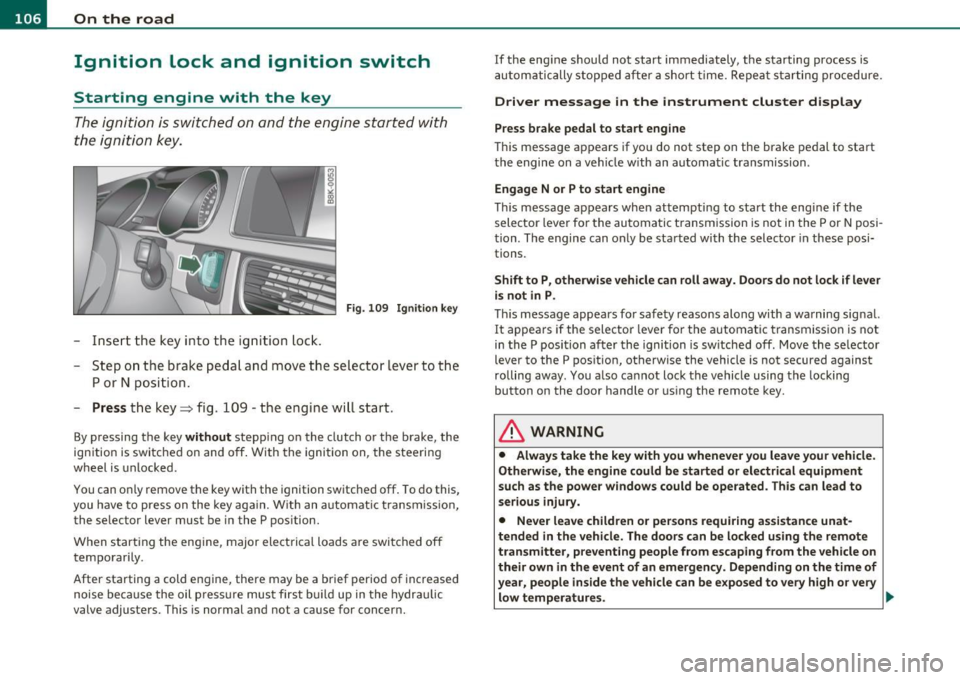
F ig. 10 9 Igniti on k ey
-Inse rt the key in to the ig n ition lock.
- Step on th e brake pedal and mov e th e selec tor lev er to th e
P or N posi tion.
- Press the key => fig. 109 -the engine wi ll start .
By pressing the key without stepp ing on the clutch or the b rake, the
i gn itio n is switc hed on and o ff . With the ignition on, the steeri ng
w heel is unlocked.
You can o nly remove the key with the i gnition switc hed off . To do this,
you have to press on the key ag ain. Wi th an a utomat ic transm iss io n,
the se lector lever must be in the P pos ition.
W hen s tarting the eng ine, major electrica l loads a re swi tched off
temporarily .
After startin g a cold eng ine, there may be a brief period of increased
noise be cause the oil p ress ure mu st firs t b uild up in t he hydr auli c
valve adjuste rs. This is normal and not a cause for concern. If the eng
ine s hould not start immediately, the starting process is
a u tom atically st op ped aft er a sh ort t ime. Re peat sta rtin g p ro cedu re.
Driver message in the instrument cluster display
Press brake pedal to start engine
T h is message ap pears i f yo u do not step on the brake pedal to start
t he engine on a vehicle w ith an au toma tic transmission .
Engage N or P to start engine
This message appea rs when at tempti ng to start the eng ine if the
sele ctor lever fo r the au tomatic t ransm ission is no t in the P or N po si·
t ion . The engine can on ly be sta rted wi th the selecto r in these posi
tions.
Shift to P , otherwise vehicle can roll away. Doors do not lock if lever
is not in P .
This message app ears fo r sa fe ty reasons along with a wa rning sig nal.
It appea rs if the selector lever for t he automat ic transm iss io n is not
in the P posi tion af ter the ignition is sw itched off . M ov e t he se lector
lever to the P pos itio n, ot herw ise the vehicle is not secured against
rolling away . You a lso ca nnot lo ck th e ve hi cle u sing the locking
button on the door hand le or us ing the remote key.
& WARNING
• Always take the key with you whenever you leave your vehicle.
Otherwise, the engine could be started or electrical equipment
such a s the power windows could be operated . This can lead to
serious in jury.
• Never leave children or per sons requiring assistan ce unat
tended in the vehicle. The doors can be locked u sing the remote
transmitter, p reventing people from escaping from the vehicle on
their own in the event of an emergency. Depending on the time of
year, people inside the vehicle can be exposed to very high or very low temperatures. ..,
Page 109 of 364

_________________________________________________ O_ n_t_ h _ e_ ro_ a_d __ ffl'II
& WARNING (co ntinued )
• Never remo ve the ignition key from the ignition look while the
vehicle is moving. Otherwi se, the steering lock could suddenly
engage and you would not be able to steer the vehicle.
0 Note
• In the event of a malfunction in the electronic ignit ion lock a
symbo l in th e instr umen t cluster flashes with the message
Ignition
lock defective .
• Avoid h igh eng ine speeds, fast acce lerat ion or heavy eng ine loads
whi le the engine is still co ld. This cou ld damage the engine .
<£> For the sake of the environment
To avoid unnecessary engine wear and to reduce exhaust emiss ions,
do not let your vehicle s tand and w arm up. Be re ady to dr ive off i mme
diately after starting your ve hicle. Mai ntain mode rate speed until the
eng ine is complete ly w arm . R emembe r, the eng ine per forms best at
operat ing temperature.
[I) Tips
• If the key ca nnot be removed from the ignition lock , yo u have to
pull the mec hanica l key o ut o f the maste r key in o rde r to be able to
lock the ve hicle Th e veh icle can be locked with the mec han ical key
=> page 40.
• If you open the driver's door with the ig nit io n switched on, a
buzze r soun ds and the message
Ignition is on appea rs in the instru
ment cl uster d is p lay . Switch t he ig nitio n off .•
Stopping the engine
- Bring the vehic le to a fu ll s top.
Controls and equip
ment Safety first
M
ove the select or lever to the P or N po sit ion .
- Press on t he igni tion key. The engi ne is tu rned of f.
Emergency off
If it is necessary in unusual circ umstances, the engine can be
switched off while the vehicle is mov ing . The eng ine will be switched
off if you press on the key for an extended period.
& WARNING
• Never turn off the engine until the vehicle has come to a
complete stop .
• The brake booster and servotronic only work when the engine
is running . With the ignition turned off, you ha ve to apply more
force when steering or braking. Since you cannot steer and stop
normally, this can lead to accident s and serious injuries.
• The radiator fan can continue to run for up to 10 minute s even
after you have turned of f the engine and removed the ignition key.
The radiator fan can also turn on a gain if the engine coolant heats
up becau se of intense sunlight or heat build-up in the engine
compartment.
0 Note
Do not stop the engine immediately after har d or extended dr iving.
Keep the eng ine runni ng fo r approx imately two m in utes to p revent
excessive heat b uild -up. •
Vehicle care Technical data
Page 110 of 364

ffl..__O_ n_ t_h _ e_ r_ o_ a_ d _________________________________________________ _
Starting and stopping the engine
with convenience key
A pplies to veh ic le s: with conven ience ke y
Starting the engine with the
[START ENGINE S TOP] button
This button switches on the ignition and starts the
engine.
Fig. 110 Convenience
key: START ENGINE
STOP
button
- Step on the brake pedal and move the selector lever to P
orN =>& .
- Pressonthe[START ENGINE STOP)button::::>fig. 110-
the engine will start.
By pressing the [STAR T ENGINE STOP] button without depressing
the clutch or the brake peal, the ignition is switched on and switched
off by pressing it again.
If the engine does not start immediately, stop trying after 10 seconds
and then try to restart the engine about 30 seconds later.
After a cold engine is started, there may be a brief period of increased
noise because oil pressure must first build up in the hydraulic valve
adjusters. This is normal and not a cause for concern.
Driver message in the instrument cluster display
No key identified
This message appears when the !START ENGINE STOP] button is
pressed if there is no master key inside the vehicle or if the system
does not recognize it. For example, the master key cannot be recog
nized if it is covered by an object (e.g. aluminum brief case) which
screens the radio signal. Electronic devices such as cell phones can
also interfere with the radio signal.
Press brake pedal to start engine
This message appears if you press the !START ENGINE STOP)
button to start the engine and do not depress the brake pedal. The
engine can only be started if the brake pedal is depressed.
Engage N or P to start engine
This message appears when attempting to start the engine if the
selector lever for the automatic transmission is not in the P or N posi
tion. The engine can only be started with the selector in these posi
tions.
Key not in vehicle
This message appears along with the.:! symbol if the master key is
removed from the vehicle with the engine running. It is intended to
remind you (e.g. when changing drivers) not to continue the journey
without the master key.
If the master key is no longer in the vehicle, you cannot switch on the
ignition after stopping the engine and you also cannot start the
engine again. Moreover, you cannot lock the vehicle from the outside
with the key.
Shift to P, otherwise vehicle can roll away. Doors do not lock if lever
is not in P.
This message appears for safety reasons along with a warning signal.
It appears if the selector lever for the automatic transmission is not
in the P position when switching off the ignition with the
!START ENGINE STOP] button. Move the selector lever to the P _..