2011 AUDI A5 CABRIOLET door lock
[x] Cancel search: door lockPage 47 of 364

Locking vehicle
-Move the selector lever to the P position (automatic trans
mission), otherwise the vehicle cannot be locked.
- Touch the sensor at the door handle
once~ page 44,
fig. 35 to lock the vehicle ~ & in "General description"
on
page 41 .
The vehicle can be locked and unlocked at any door. It depends on the
settings in the radio or in the MMI* whether the entire vehicle is
unlocked or one of the doors=>
page 43. The master key must be
within a range of about 1.5 m from the appropriate door or the rear
lid . It makes no difference whether the master key is in your jacket
pocket or in your brief case.
If you grip the door handle while locking, th is can adversely affect the
locking function.
It is not possible to re-open the door for a brief period directly after
closing it. This allows you to ensure that the doors are properly
locked.
& WARNING
Read and follow all WARNINGS => & in "General description " on
page 41.
[ i ] Tips
If your vehicle has been standing for an extended period, please note
the following :
• The proximity sensors are deactivated after a few days to save
powe r. You then have to pull on the door hand le once to unlock the
vehicle and a second time to open the vehicle .
• To prevent the battery from being discharged and to preserve your
vehicle's ability to start for as long as possible, the energy manage
ment system gradually switches off unnecessary convenience func-
Controls and equip
ment Safety first
Opening and closing
tions. It is possible that you w
ill not be able to unlock your vehicle
us ing these conven ience f unctions .
• For Declaration of Compliance to United States FCC and Industry
Canada regulations =>
page 346. •
Operating locks with the mechanical key
In the event of a failure of the power locking system, the
driver's door con locked and unlocked with the mechan
ical key at the lock cylinder.
To unlock the vehicle
Fig. 36 Key turns for
opening and closing
- Insert the mechanical key in to the lock of the driver's
door.
- Turn the mechanical key to position @~ fig . 36.
To lock the vehicle
- Move the selector lever to the P position (automatic trans
mission) .
- Close all windows and doors properly.
~
Vehicle care Technical data
Page 48 of 364
Opening and closing
-Tur n the me chanical key i n th e lo ck of the d river's door to
the lock position @=> & in "General descr iption" on
pag e 41.
If the power locki ng system f ail s, there is eme rge ncy locki ng for the
passenger 's door=>
page 47.
& WARNING
Read and follow all WARNINGS=> & in "General descript ion" on
page 41.
[IJ Tips
• After the ignit ion is swi tched on, the power locking sys tem swi tch
and the unlocking button for the rear lid
c;:; i n the door are enabled .•
Locking and unlocking the vehicle from
inside
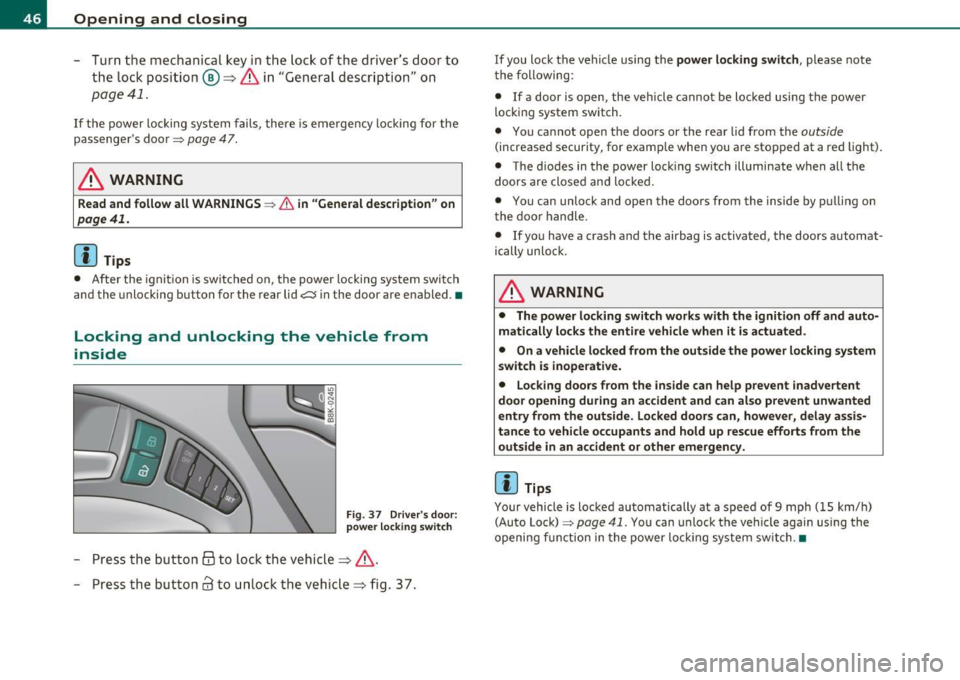
Fig . 37 D river 's door :
power lo cking switch
- Press the b utto n @ to lo ck the vehicl e=> & .
- Press the but ton
63 to u nloc k the veh icle => fig. 37.
If you lock the vehicle using the power locking switch , please note
t he following:
• If a door is open, the veh icle cannot be locked using the power
loc kin g system switch.
• You ca nnot open the doors or the rear lid from the
outside
(increased security, for examp le when you are sto pped at a red light).
• The diodes in the power loc king switch ill uminate when a ll the
doors are close d an d lock ed .
• You can unlock and open the doors from the inside by p ulling on
t he doo r handle .
• If yo u have a crash and the airbag is activated, the doors automat
ically unlo ck.
& WARNING
• The power locking switch works with the ignition off and auto
matically locks the entire vehicle when it is actuated .
• On a vehicle locked from the outside the power locking system
switch is inoperati ve.
• Locking doors from the inside can help prevent inadvertent
door opening during an accident and can al so prevent unwanted
entry from the outside. Locked doors can, however, delay assis
tance to vehicle occupants and hold up rescue efforts from the outside in an accident or other emergency .
[IJ Tips
Your vehicle is loc ked automatically at a speed of 9 mph ( 15 km/h)
(Auto Lock)=>
page 41. You can unlock t he vehicle again using the
openi ng f unction in the power loc king system sw itch. •
Page 49 of 364

Emergency locking of the passenger's door
If the power locking system fails (power failure), you will need to lock the passenger door separately.
! a,
Fig. 38 Emergency
locking of the
passenger's door
An emergency locking mechanism is integrated in the edge of
the passenger's door (only visible when the door is open).
- Take the mechanical key out of the master key~
page 40.
-Open the door.
- Pull the protective cover out of the hole =} fig. 38 .
- Insert the mechanical key into the inner slot and turn it to
the right as far as it can go .
After you close the door, you will no longer be able to open it from the
outside . The door can be opened from the inside by pulling once on
the door handle .•
Con tro ls a nd e quip
m en t Vehicle
OP-eration
Opening and closing
Opening and closing rear lid/trunk
lid
Opening the rear lid
Fig. 39 Position of
handle in the rear lid
- Press the middle button ?:5 on the remote control master
key for at least one second, or
- Press the handle on the rear lid=} fig . 39.
Closing the rear lid
- Pull the rear lid down at the grip on the inside and allow it
to drop gently to close it~ & .
& WARNING
• After closing the rear lid, always pull up on it to make sure that
it is properly closed . Otherwise it could open suddenly when the
vehicle is moving.
• To help prevent poisonous exhaust gas from being drawn into
the vehicle, always keep the rear lid closed while driving. Never
transport objects larger than those which fit completely into the
luggage area, because then the rear lid cannot be fully closed.
• Never leave your vehicle unattended especially with the rear lid
left open. A child could crawl into the car through the luggage
~
Vehicle care Do-it-yourselt service iTechnical data
Page 50 of 364

Opening and closing
& WARNING (continued)
compartment and pull the lid shut, becoming trapped and unable
to get out. To reduce the risk of personal injury, never let children
play in or around your vehicle. Always keep the rear lid as well as
the vehicle doors closed when not in use.
• Always ensure that no one is within range of the rear lid when
it is moving, in particular close to the hinges -fingers or hands can
be pinched .
[ i J Tips
• When the vehicle is locked, the rear lid can be opened separately
by pressing the button
-c::5 on the master key. When you close the rear
lid again, it locks automatically .
• If the rear lid is open or not properly closed when the ignition is
turned on, the door and rear lid warning~
page 20 appears in the
instrument cluster display. •
Emergency unlocking of the
luggage compartment lid
There is on emergency release for the rear lid .
Fig. 40 Rear lid: Lock
cylinder
- Remove the mechanical key from the master key
=>
page 40.
- Insert the key in the lock cylinder and turn it in the direc
tion of the arrow .•
Power windows
Controls
The driver can control all power windows.
Fig. 41 Section of the
driver 's door: Controls
Fig. 42 Center
console: central power
window switch
All power window switches=> fig. 41 are provided with a two-
position function: •
Page 51 of 364

Opening the windows
-Press th e switc h to the first stop and hold it u ntil the
win dow re aches t he desire d pos ition.
- Press the sw itc h br iefly to the
second stop t o a uto mat i
ca lly open t he w indow .
Closing the windows
-Pu ll t he swi tch to the first stop an d hold it unti l the
w indow reaches the desi red pos ition .
- Pull t he swi tch briefly to th e
second stop to auto mat ica lly
cl ose the wi ndow.
Power window switches
© Dr iver's door
® Passenger's door
© Left re ar door
@ Righ t rea r doo r
You can open or close all the windows with the switch=> page
48,
fig. 42.
& WARNING
• Do not leav e children unattended in the vehicle, especially with
access to vehicle keys. Unsupervised use of the keys can result in
s tarting of the engine and use of vehicle systems such as power
windows, etc. which could result in serious injury .
• Remember -you can still open or close the power window s for
about ten minutes after the ignition is switched off . Only when
either of the doors are opened are the power window s switched
off.
• Be careful when closing the window s. Check to see that no one
is in the
way, or serious injury could result!
Controls and equip
ment Safety first
Opening and closing
& WARNING
(co ntinued )
• Alway s remove the ignit ion key whenever you leave your
vehicle .
• If you lock your vehicle from the out side, no one, es pecially
children, should remain in the vehicle.
• Do not stick anything on the windows or the windshield th at
may interfere w ith the drive r's field of vision.
[I] Tips
• Whe n you open the doors , the windows automat ica lly lowe r about
1 0mm .
• After the ignition has been switched off, the w indows can still be
opene d or close d for about 10 min utes. The w indow reg ulators a re
no t sw itched until the driver 's or passenger's door is opened .•
Convenience opening /closing
The wind ows can be opene d and closed wit h the mecha n
ical key or the e mergen cy k ey.
Fig. 4 3 Key turn s for
o pen ing a nd closing ...
Vehicle care Technical data
Page 52 of 364

Opening and closing
Convenience opening feature
- Use the emergency key or pull the mechanical key out of
the master key=>
page 40.
-Insert the key into the lock of the driver's door.
- Turn the key to position=>
page 49, fig. 43 @until all the
windows have reached the desired position.
Convenience closing feature
- Use the emergency key or pull the mechanical key out of
the master key=>
page 40.
-Turn the key in the lock of the driver's door to the lock
position @ until the windows are closed=>
&-
& WARNING
• Never close the windows inattentively and without checking ·
there is risk of injury.
• You must always watch when the windows are being raised so
that no one can be trapped. If you release the key, the closing
action is immediately canceled.
• Always read and heed WARNING=>
& in "General description"
on
page 41. •
Correcting window regulator malfunction
After disconnecting the vehicle battery, the one-touch up
and down feature must be activated again.
- Pull and hold the power window switch until the window is
completely closed.
- Release the switch. -
Pull the switch again for one second. The automatic
closing/opening is now reactivated. •
Page 56 of 364

Power top
Power top convenience opening and
closing
F ig. 45 R emote
m ast er key : button s
Fig. 46 T urning the
key to open and close
Convenience opening with the driver door
lock
- Press the@ butto n on the remote master key to un lock t he
vehicle .
- Turn the key once in the dr iver door loc k to the openi ng
posi tion ©~ fig . 46.
- Tur n the key to the openi ng posit ion aga in
within two
seconds
and hold it there until the power top opens
completely .
Convenience closing with the driver door lock
- Turn the key once in the driver door lock to t he closing
pos ition ®~ fig. 46 .
- Turn the key to th e clos ing posit ion again
with in two
seconds
and hold it there until the power top closes
comple tely .
Convenience opening with the convenience
key*
- Press the@ button on t he conven ience key* to un lock the
vehicle .
Convenience closing with the convenience
key*
P ress t he l'.Il button on the convenience key* to lock the
v e hi cle .
Releasing the key stops the opening o r closing process immediately .
& WARNING
• When opening and closing the power top, mak e sure no one
will be injured by the supports and other moving parts.
• Operating the power top reduces the headroom in the rear of
the vehicle. Make sure there is enough clearance between the rear pa ssenger and the power top when opening and closing it .•
Page 70 of 364

Clear vision High be am
~D @
- Push the lever forward to switch on the high beam.
- Pull the lever back towards you to switch off the high
beam.
H eadlight flasher ~D ©
- Pull the lever toward the steering whee l to use the head
light flasher.
Not es on th es e fe ature s
• The turn signals only work with the ignit ion turned on. The indi
cato r lights ¢ or¢ in the instrument cluster also blink.
• After you have turned a corner, the turn signal switches off auto
matically.
• The
high beam works only when the headlights are on. The indi
cator light ~D in the instrument cluster illuminates when the high
beams are on.
• T he
headlight flasher works only as long as you hold the lever -
even if there are no lights switched on. The indicator light ~Din the
instrument cluster illuminates when you use the headlight flasher.
0 Note
Do not use the high beam or headlight flasher in if you know that
these could be blinding oncoming traffic.•
Interior lights
Interior lights
The interior lights include the reading lights for the driver
and the front passenger .
Activating door contact circuit
Fig. 72 Sect ion from
h ead liner: Interio r
l ig ht s
- Press the button@. The LED in the button illuminates .
Deactivating door contact circuit
-Press the button@. The LED in the button goes out .
Front reading Lights ~
- Press one of the switches @ to turn the right or le ft
reading light on or off .
With the door contact circu it, the inte rior lights turn on as soon as
you un lock the vehicle or open the doors. The interior lights are also
tu rned on when the ignit ion key is removed. The lights turn off about
30 seconds after the doors are closed. When the vehicle is locked or
when the ignition is tu rned on, the interior lights are turned off.
When a door is open, the interior lights are turned off after about 10
min utes to prevent battery draining. _,.