Page 269 of 616

Interior features3
269
PRIUS_U (OM47668U) U.S.A.
3-3. Using the hands-free system (for cellular phone)
Hands-free system
(for cellular phone) ......... 326
Using the hands-free
system ........................... 329
Making a phone call ......... 338
Setting a cellular phone ... 344
Security and system
setup .............................. 350
Using the phone book ...... 354
3-4. Using the interior lights Interior lights list ............... 363
• Personal/interior light main
switch ............................. 364
• Personal/interior lights ... 365
• Interior light .................... 365 3-5. Using the storage features
List of storage features .... 367
• Glove boxes ................... 368
• Console box ................... 369
• Overhead console .......... 370
• Card holder .................... 371
• Cup holders ................... 372
• Bottle holders ................. 374
• Auxiliary box .................. 375
3-6. Other interior features Sun visors ........................ 376
Vanity mirror..................... 377
Outside temperature
display............................ 378
Power outlets ................... 379
Seat heaters..................... 381
Armrest ............................ 383
Floor mats ........................ 384
Luggage compartment
features .......................... 385
Garage door opener......... 389
Safety Connect ................ 395
Page 270 of 616
270
PRIUS_U (OM47668U) U.S.A.
3-1. Using the air conditioning system and defogger
Air conditioning system
Airflow and outlets are automatically adjusted according to the tem-
perature setting.
ITO31P101
Temperature
control
Temperature
setting display Air outlet
display
Fan speed
display Windshield
defogger
Off Automatic
mode Outside air or
recirculated
air mode Changes the
air outlets used Micro dust and
pollen filter Air conditioning
ON/OFF switch
Fan speed
control
Page 271 of 616
271
3-1. Using the air conditioning system
and defogger
3
Interior features
PRIUS_U (OM47668U) U.S.A.
Using the automatic mode
Press .
The air conditioning system will begin to operate. Air outlets and fan
speed are automatically adjusted according to the temperature set-
ting.
Press to increases the temperature and to decreases the
temperature on the .
Adjusting the settings
■ Adjusting the temperature setting
Press to increases the temperature and to decreases the tem-
perature on the .
■ Adjusting the fan speed
Press (increase) or (decrease) on .
The fan speed is shown on the display. (7 levels)
Press to turn the fan off.
STEP1
STEP2
Page 281 of 616
281
3-1. Using the air conditioning system
and defogger
3
Interior features
PRIUS_U (OM47668U) U.S.A.
Changing the recirculated air mode
Press .
The mode switches between outside air mode and recirculated air
mode each time the switch is pressed.
■ When operating the steering switches
On vehicles with touch tracer display, the steering switches operation status
is displayed on the instrument cluster for confirmation purposes. ( P. 182)
CAUTION
■To reduce the risk of an accident
Exercise care when operating the air conditioning switches on the steering
wheel.
Page 295 of 616
295
3-2. Using the audio system
3
Interior features
PRIUS_U (OM47668U) U.S.A.
Setting station presets (excluding XM® Satellite Radio)
Search for desired stations by turning or pressing “ ” or
“ ” on .
Press and hold the button (fro m to ) the station is
to be set to, and you hear a beep.
Scanning radio stations (excluding XM® Satellite Radio)
■ Scanning the preset radio stations
Press and hold until you hear a beep.
Preset stations will be played for a few seconds each.
When the desired station is reached, press once
again.
■ Scanning all radio stations within range
Press .
“SCAN” appears on the display and all stations with reception
will be played for a few seconds each.
When the desired station is reached, press once
again.
STEP1
STEP2
STEP1
STEP2
STEP1
STEP2
Page 296 of 616
296 3-2. Using the audio system
PRIUS_U (OM47668U) U.S.A.
XM® Satellite Radio (if equipped)
■ Receiving XM
® Satellite Radio
Press until “SAT” shows in the display.
The display changes as follows each time the button is pressed.
“AM” “SAT1” “SAT2” “SAT3”
Turn to select a desired channel from all the categories
or press “ ” or “ ” on to select a desired channel in
the current category.
■ Presetting XM
® Satellite Radio channels
Select the desired channel. Press and hold the button (from
to ) until you hear a beep.
■ Changing the channel category
Press “ ” or “ ” on .
STEP1
STEP2
Page 297 of 616
297
3-2. Using the audio system
3
Interior features
PRIUS_U (OM47668U) U.S.A.
■
Scanning XM
® Satellite Radio channels
● Scanning channels in the current category
Press .
When the desired channel is reached, press the button again.
● Scanning preset channels
Press and hold until you hear a beep.
When the desired channel is reached, press the button again.
■ Displaying text information
Press .
The display will show up to 10 characters.
The display changes as follows each time the button is pressed.
● CH NAME
● TITLE (SONG/PROGRAM TITLE)
● NAME (ARTIST NAME/FEATURE)
● CH NUMBER
STEP1
STEP2
STEP1
STEP2
Page 303 of 616
303
3-2. Using the audio system
3
Interior features
PRIUS_U (OM47668U) U.S.A.
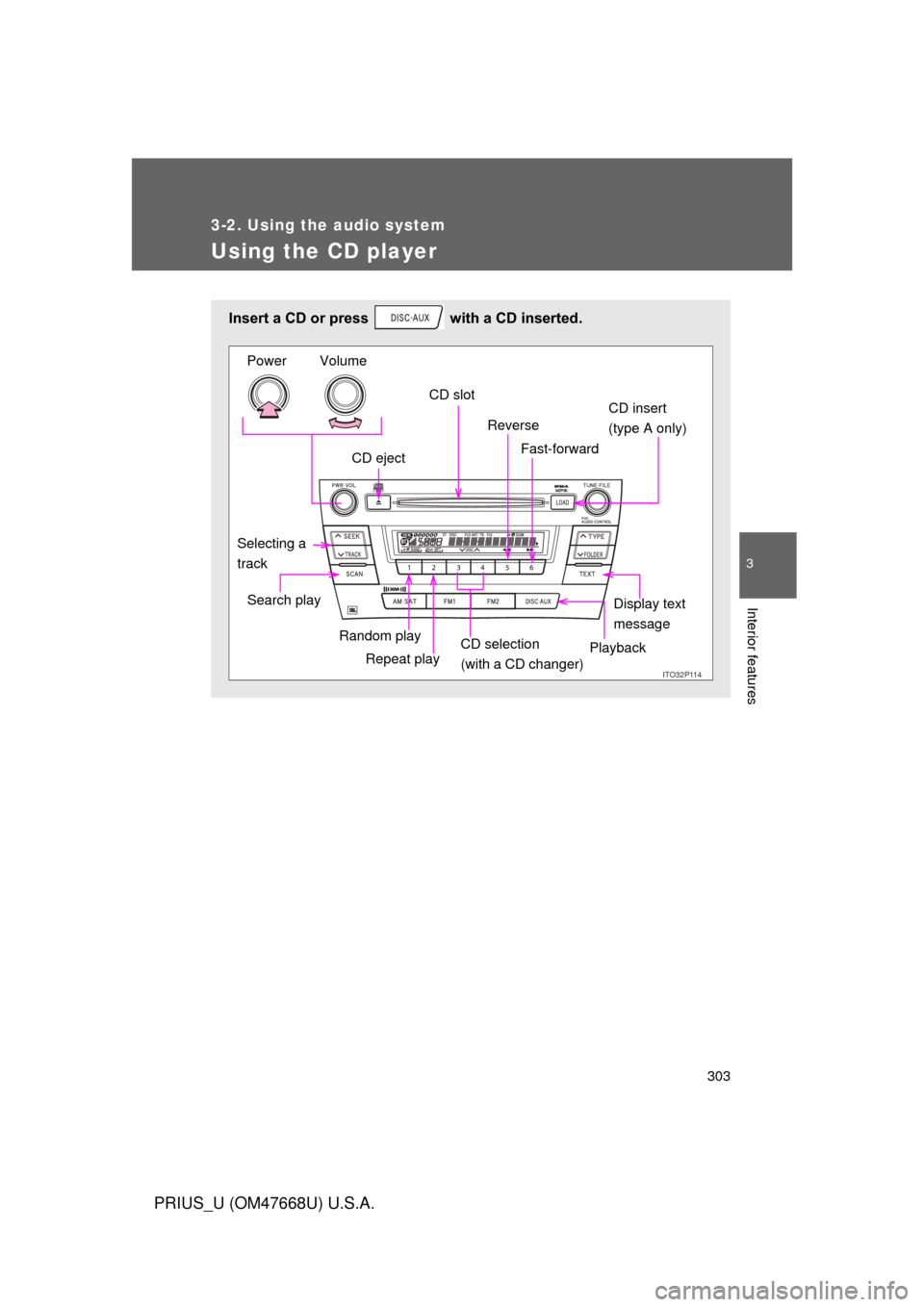
Using the CD player
Insert a CD or press with a CD inserted.
ITO32P114
CD ejectCD slot
CD insert
(type A only)
Display text
message
Search play
Repeat play
Selecting a
track Volume
Power
Reverse
Fast-forward
Playback
CD selection
(with a CD changer)
Random play