Page 188 of 616
188
2-2. Instrument cluster
PRIUS_U (OM47668U) U.S.A.
Multi-information display
The multi-information display presents the driver with a variety of
driving-related data, including the clock.
● Clock ( P. 201)
Indicates and sets the time.
● Energy monitor ( P. 190)
Displays the status of the hybrid system.
● Hybrid System Indicator ( P. 192)
Provides assistance for environmentally friendly (fuel efficient) driving.
● Trip information
Displays driving range, fuel consumption and other cruising-related
information.
●Odometer/trip meter/ distance to empty ( P. 198)
Page 201 of 616
201
2-2. Instrument cluster
2
When driving
PRIUS_U (OM47668U) U.S.A.
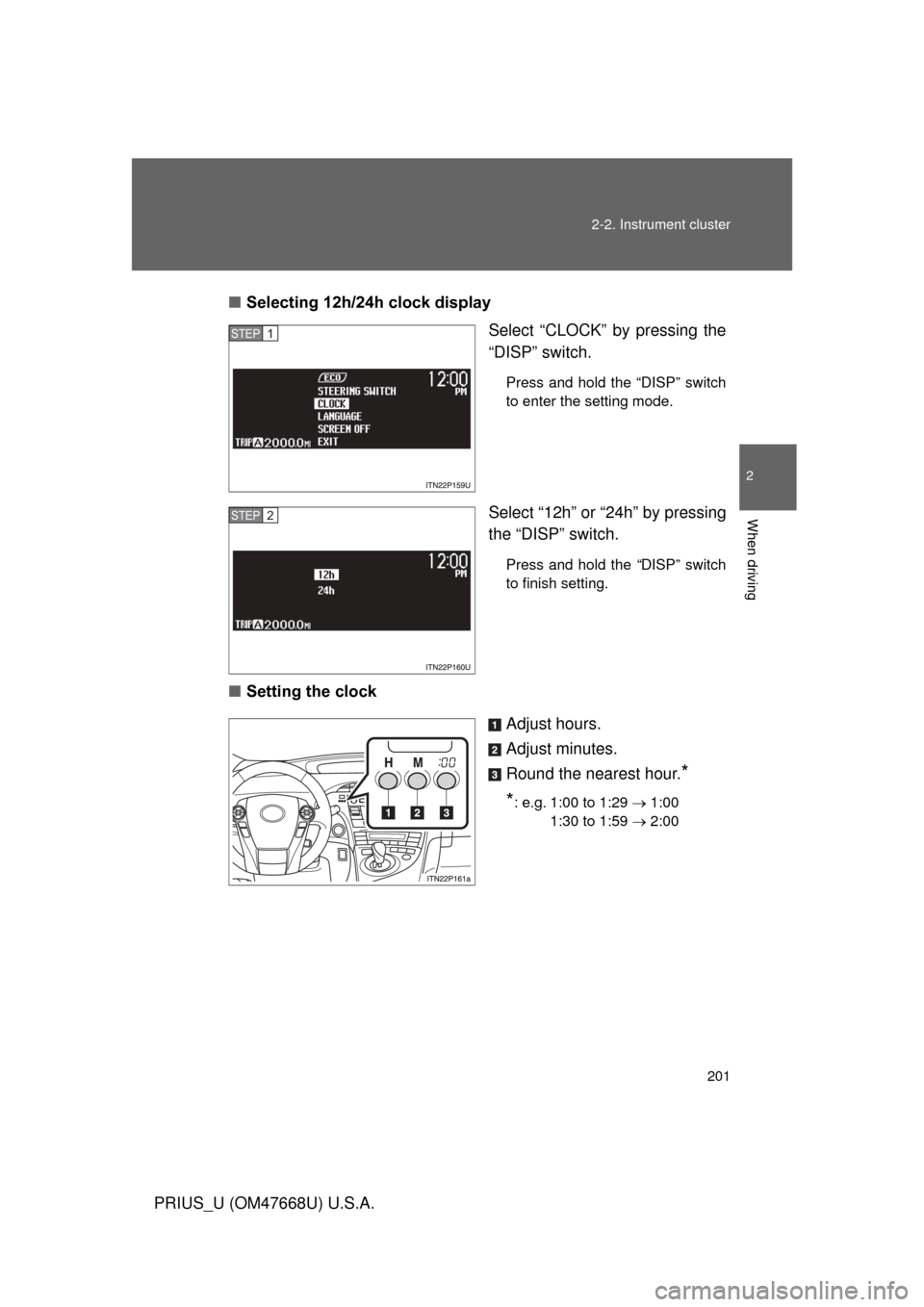
■
Selecting 12h/24h clock display
Select “CLOCK” by pressing the
“DISP” switch.
Press and hold the “DISP” switch
to enter the setting mode.
Select “12h” or “24h” by pressing
the “DISP” switch.
Press and hold the “DISP” switch
to finish setting.
■Setting the clock
Adjust hours.
Adjust minutes.
Round the nearest hour.
*
*
: e.g. 1:00 to 1:29 1:00
1:30 to 1:59 2:00
STEP1
STEP2
Page 205 of 616
205
2-2. Instrument cluster
2
When driving
PRIUS_U (OM47668U) U.S.A.
■
Fuel consumption history display
● Each time a trip meter is reset, the old data will move to the left by 1 col-
umn.
● A maximum of 5 history items can be displayed (including the current his-
tory). If the history exceeds 5 items, the oldest item will be deleted.
■ Driving in Eco Driving Mode
The multi-information display will automatically switch the display to the
Hybrid System Indicator, regardless of which display is currently being
shown. ( P. 172)
■ Display settings can be changed when
The vehicle speed is less than approximately 5 mph (8 km/h).
■ When the 12 volt battery is disconnected
The following data will be reset.
● Average fuel consumption
● Distance to empty
● Average vehicle speed
● Clock
● Display settings
Page 352 of 616
352 3-3. Using the hands-free system (for cellular phone)
PRIUS_U (OM47668U) U.S.A.
Locking or unlocking the phone bookSelect “Phonebook Lock (Phbk Lo ck)” or “Phonebook Unlock
(Phbk Unlock)” by using a voice command or .
Input the PIN by either of th e following methods and select
“Confirm” by using a voice command or :
a. Press and say the registered PIN.
b. Input a new PIN by using .
Setting voice guidance volume
Select “Guidance Vol” by using .
Change the voice guidance volume.
To decrease the volume: Turn counterclockwise.
To increase the volume: Turn clockwise.
STEP1
STEP2
STEP1
STEP2