Page 199 of 616
199
2-2. Instrument cluster
2
When driving
PRIUS_U (OM47668U) U.S.A.
●
Odometer
● Trip meter
● Distance to empty Displays the total distance the vehicle has been
driven.
Displays the distance the vehicle has been driven
since the meter was last reset. Trip meters A and
B can be used to record and display different dis-
tances independently.
Displays the estimated
maximum distance that
can be driven with the quantity of fuel remaining.
• This distance is computed based on your average fuel consumption. As a result, the actual distance
that can be driven may differ from that displayed.
• When only a small amount of fuel is added to the tank, the display may not be updated.
Page 200 of 616
200 2-2. Instrument cluster
PRIUS_U (OM47668U) U.S.A.
Setting up the displaysPress the “DISP” switch unt il the “SETTINGS” screen
appears.
While the vehicle is stopped,
press and hold the “DISP” switch
until the screen changes.
■ Switching the Eco Driving Indi cator Light/steering switch
operation display on/off
Select “ECO” or “STEERING
SWITCH” on the screen by
pressing the “DISP” switch.
Press and hold the “DISP” switch
to enter the setting mode.
Select “ON” or “OFF” by press-
ing the “DISP” switch.
Press and hold the “DISP” switch
to finish setting.
STEP1
STEP2
STEP1
STEP2
Page 201 of 616
201
2-2. Instrument cluster
2
When driving
PRIUS_U (OM47668U) U.S.A.
■
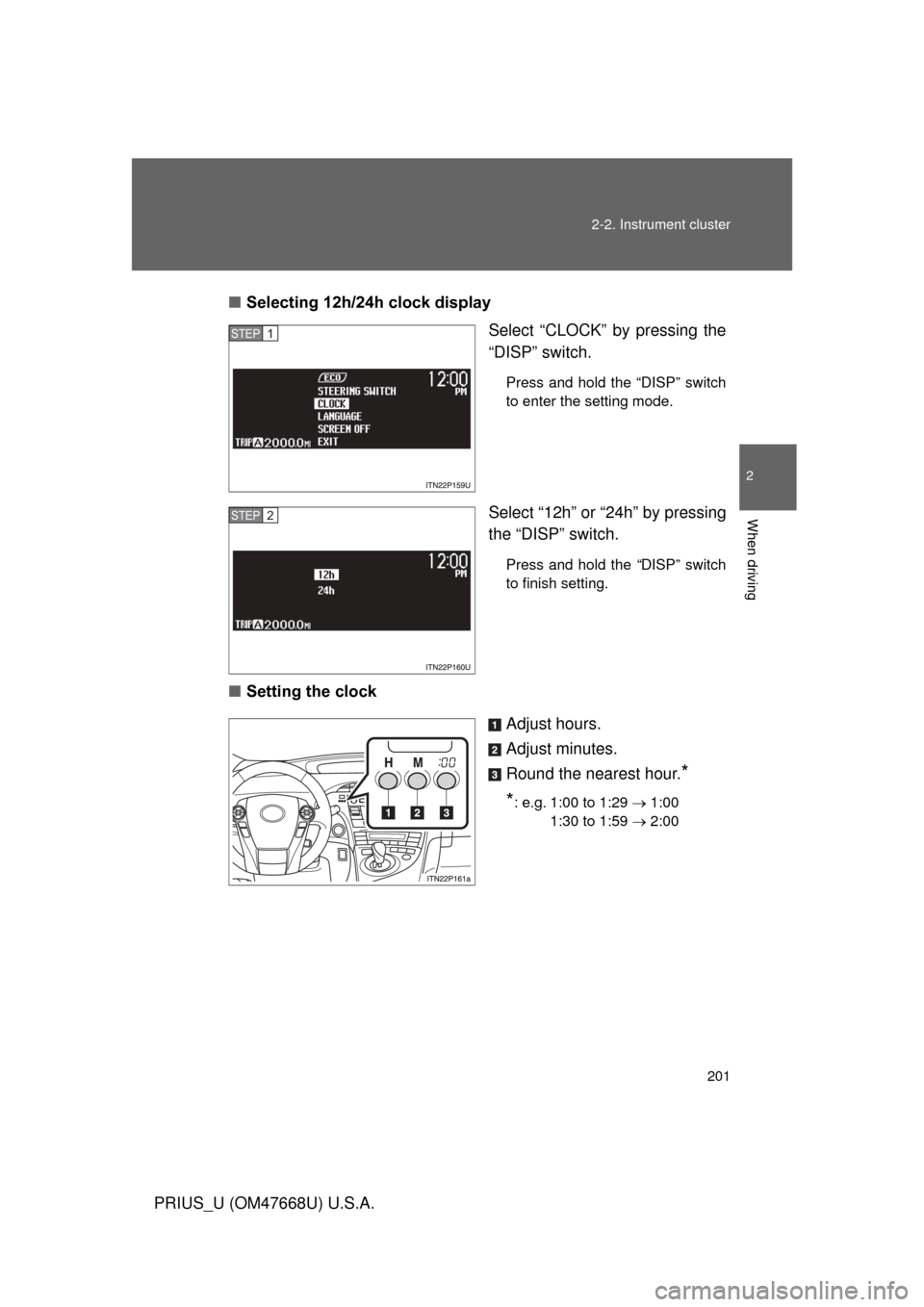
Selecting 12h/24h clock display
Select “CLOCK” by pressing the
“DISP” switch.
Press and hold the “DISP” switch
to enter the setting mode.
Select “12h” or “24h” by pressing
the “DISP” switch.
Press and hold the “DISP” switch
to finish setting.
■Setting the clock
Adjust hours.
Adjust minutes.
Round the nearest hour.
*
*
: e.g. 1:00 to 1:29 1:00
1:30 to 1:59 2:00
STEP1
STEP2
Page 203 of 616
203
2-2. Instrument cluster
2
When driving
PRIUS_U (OM47668U) U.S.A.
■
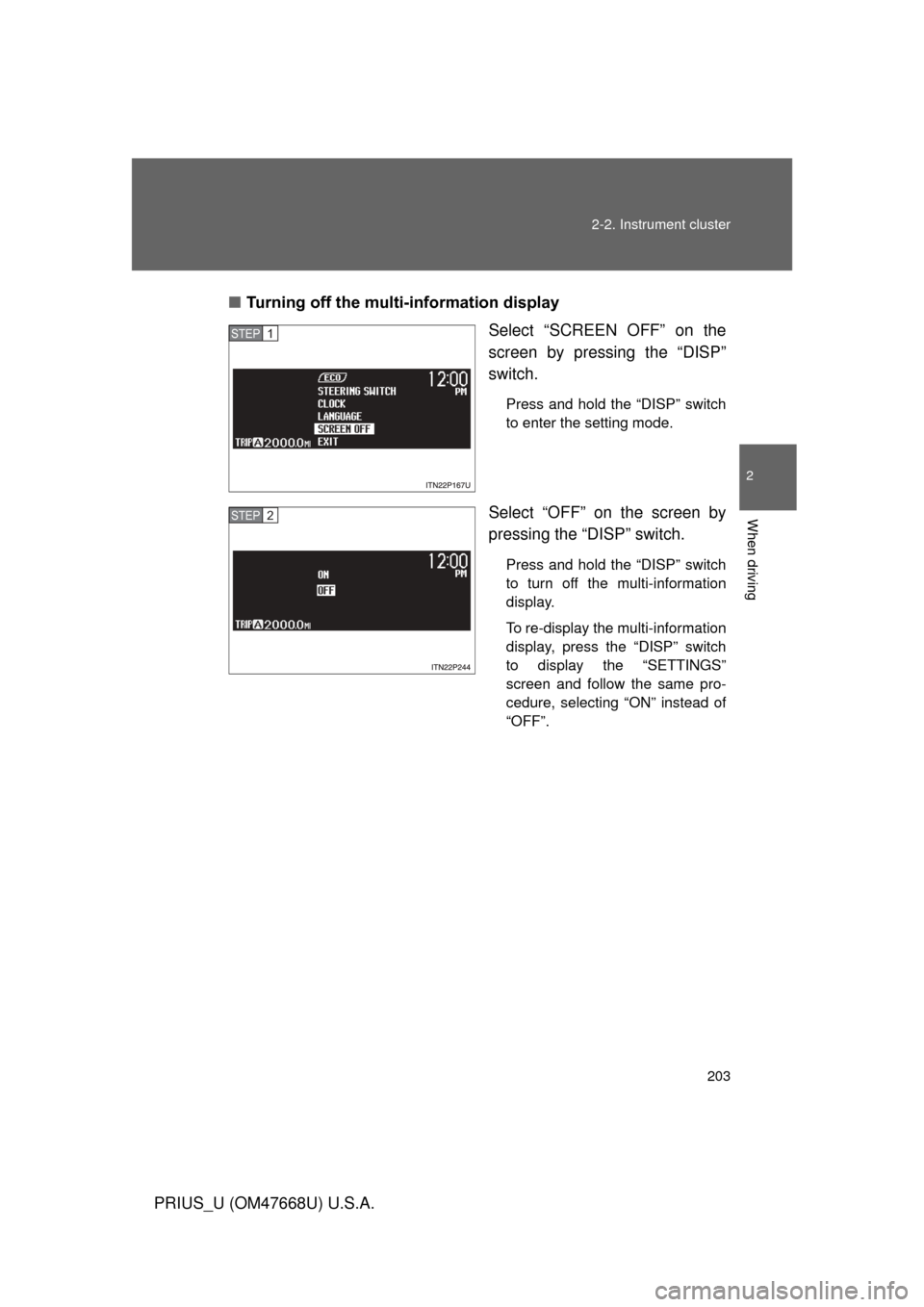
Turning off the multi-information display
Select “SCREEN OFF” on the
screen by pressing the “DISP”
switch.
Press and hold the “DISP” switch
to enter the setting mode.
Select “OFF” on the screen by
pressing the “DISP” switch.
Press and hold the “DISP” switch
to turn off the multi-information
display.
To re-display the multi-information
display, press the “DISP” switch
to display the “SETTINGS”
screen and follow the same pro-
cedure, selecting “ON” instead of
“OFF”.
STEP1
STEP2
Page 204 of 616

204 2-2. Instrument cluster
PRIUS_U (OM47668U) U.S.A.■
Returning to the previous screen
Select “EXIT” on the screen by
pressing the “DISP” switch, and
press and hold the “DISP”
switch.
The screen will revert to the
“SETTINGS” screen.
■System check display
After switching the “POWER” switch to ON mode, “PRIUS” is displayed
while system operation is checked. When the system check is complete, the
normal screen will return.
■ Vacuum fluorescent display
Small spots or light spots may appear on the display. This phenomenon is
characteristic of vacuum fluorescent displays, and there is no problem to
continue using the display.
■ Eco Driving Indicator Light
This indicator will not turn on if the following conditions are met while driving:
● The shift position is anything other than “D”.
● The driving mode is set to power mode or EV-Drive Mode.
■ 5-minute interval/1-minute inte rval fuel consumption display
If the “POWER” switch is turned OF F, average fuel consumption and regen-
erated energy data will be reset.
■ Odometer/trip meter/distance to empty
The odometer/trip meter/distance to empty will not be displayed while the
fuel consumption history is being displayed.
Page 205 of 616
205
2-2. Instrument cluster
2
When driving
PRIUS_U (OM47668U) U.S.A.
■
Fuel consumption history display
● Each time a trip meter is reset, the old data will move to the left by 1 col-
umn.
● A maximum of 5 history items can be displayed (including the current his-
tory). If the history exceeds 5 items, the oldest item will be deleted.
■ Driving in Eco Driving Mode
The multi-information display will automatically switch the display to the
Hybrid System Indicator, regardless of which display is currently being
shown. ( P. 172)
■ Display settings can be changed when
The vehicle speed is less than approximately 5 mph (8 km/h).
■ When the 12 volt battery is disconnected
The following data will be reset.
● Average fuel consumption
● Distance to empty
● Average vehicle speed
● Clock
● Display settings
Page 218 of 616
218
2-4. Using other driving systems
PRIUS_U (OM47668U) U.S.A.
Dynamic radar cruise control
: If equipped
Dynamic radar cruise control supplements conventional cruise con-
trol with a vehicle-to-vehicle dist ance control. In vehicle-to-vehicle
distance control mode, the vehicle automatically accelerates or
decelerates in order to maintain a set following distance from vehi-
cles ahead.
Vehicle-to-vehicle distance
button
Display
Set speed
Indicators
Cruise control switch
Page 220 of 616

220 2-4. Using other driving systems
PRIUS_U (OM47668U) U.S.A.
■Adjusting the set speed
To change the set speed, operate the lever until the desired set
speed is displayed.
Increases the speed
Decreases the speed
Fine adjustment: Momentarily
move the lever in the desired
direction.
Large adjustment: Hold the
lever in the desired direction.
In the vehicle-to-vehicle distance control mode, the set speed will be
increased or decreased as follows:
When the set speed is shown in “MPH”
Fine adjustment: By approximately 1 mph (1.6 km/h) each time the
lever is operated
Large adjustment: By approximately 5 mph (8 km/h) for each 0.75
seconds the lever is held
When the set speed is shown in “km/h”
Fine adjustment: By approximately 0.6 mph (1 km/h) each time the
lever is operated
Large adjustment: By approximately 3.1 mph (5 km/h) for each 0.75
seconds the lever is held
In the constant speed control mode ( P. 224), the set speed will be
increased or decreased as follows:
Fine adjustment: By approximately 1 mph (1.6 km/h) each time the
lever is operated
Large adjustment: The set speed can be increased or decreased con-
tinually until the lever is released.
ITO24P126