Page 221 of 616
221
2-4. Using other
driving systems
2
When driving
PRIUS_U (OM47668U) U.S.A.
■Changing the vehicle -to-vehicle distance
Pressing the button changes
the vehicle-to-vehicle dis-
tance as follows:
Long
Medium
Short
The vehicle-to-vehicle distance
is set automatically to long
mode when the “POWER”
switch is turned to ON mode.
If a vehicle is running ahead of
you, the preceding vehicle
mark will also be displayed.
■Canceling and resuming the speed control
Pulling the lever toward you
cancels the cruise control.
The speed setting is also can-
celed when the brakes are
applied.
Pushing the lever up
resumes the cruise control
and returns vehicle speed
to the set speed.
Resuming is available when
the vehicle speed is more than
approximately 25 mph (40 km/
h).
ITO24P128
Preceding vehicle mark
ITO24P127
Page 231 of 616
231
2-4. Using other driving systems
2
When driving
PRIUS_U (OM47668U) U.S.A.
Rear view monitor system
: If equipped
The rear view monitor system assists the driver by displaying an
image of the view behind the vehicle while reversing. The image is
displayed in reverse on the screen. This allows the image to appear
in the same manner as that of the rear view mirror.
With navigation system
Rear view image is displayed
when the shift lever is in “R”.
If you move the lever out of
“R”, the screen returns to the
previous one.
Without navigation system
Rear view image is displayed
on the inside rear view mirror
when the shift lever is in “R”.
This reversed image is a simi-
lar image to the one on the
inside rear view mirror.
If you move the lever out of
“R”, the screen is turned off.
ITO24P107a
Page 232 of 616
232 2-4. Using other driving systems
PRIUS_U (OM47668U) U.S.A.
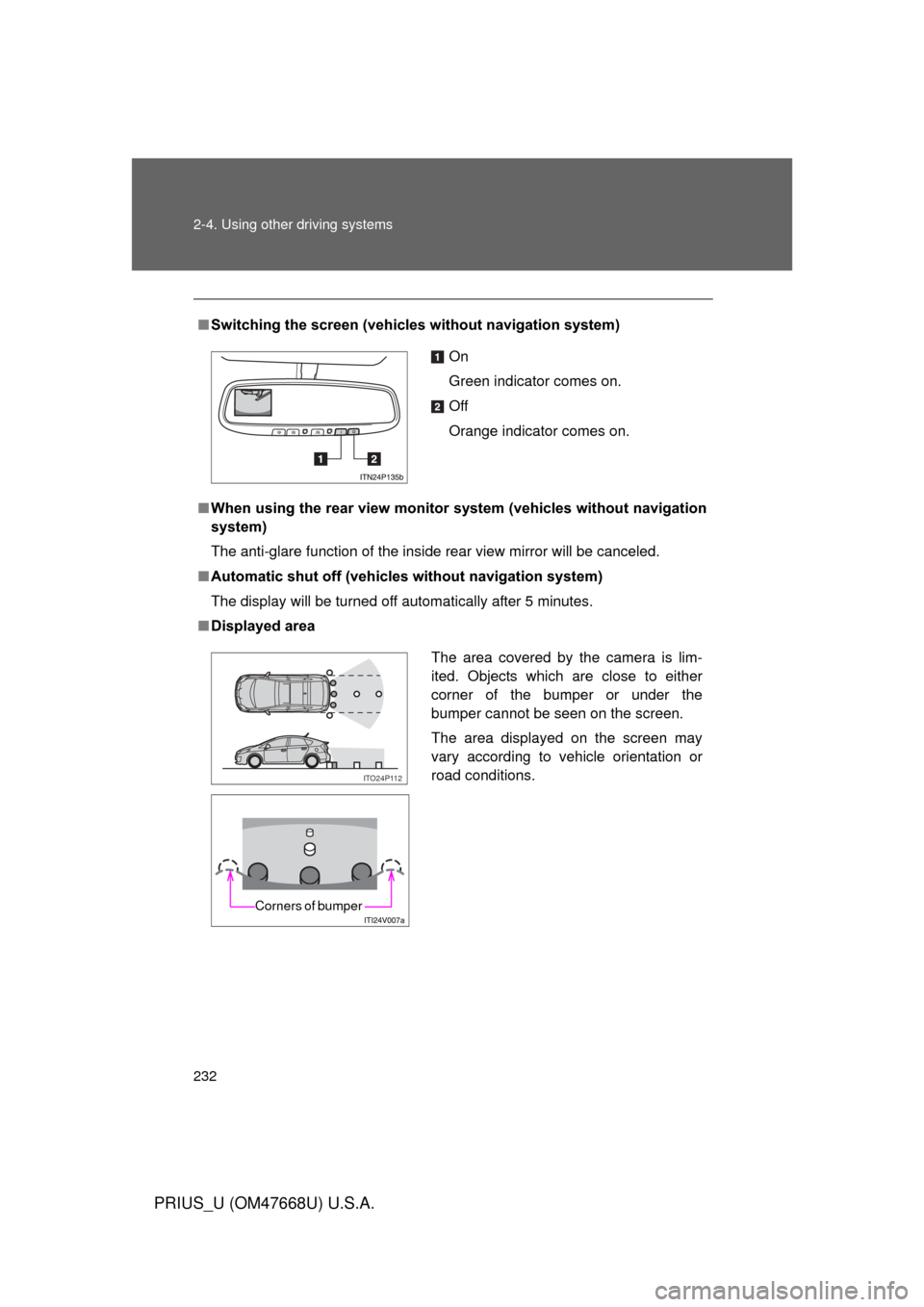
■Switching the screen (vehicl es without navigation system)
■ When using the rear view monitor system (vehicles without navigation
system)
The anti-glare function of the inside rear view mirror will be canceled.
■ Automatic shut off (vehicles without navigation system)
The display will be turned off automatically after 5 minutes.
■ Displayed area
On
Green indicator comes on.
Off
Orange indicator comes on.
The area covered by the camera is lim-
ited. Objects which are close to either
corner of the bumper or under the
bumper cannot be seen on the screen.
The area displayed on the screen may
vary according to vehicle orientation or
road conditions.
ITO24P112
Corners of bumper
Page 234 of 616
234 2-4. Using other driving systems
PRIUS_U (OM47668U) U.S.A.
CAUTION
■When using the rear view monitor system
Observe the following precautions to avoid an accident that could result in
death or serious injuries.
● Never depend solely on the monitor system when reversing.
● Always check visually and with the mirrors to confirm your intended path is
clear.
● Depicted distances between objects and flat surfaces differ from actual
distances.
● Do not use the system if the back door is not completely closed.
■ Conditions which may affect the rear view monitor system
● If the back of the vehicle is hit, the camera’s position and mounting angle
may change. Contact your Toyota dealer.
● Rapid temperature changes, such as when hot water is poured on the
vehicle in cold weather, may cause the system to function abnormally.
● If the camera lens is dirty, it cannot transmit a clear image. Rinse with
water and wipe with a soft cloth. If extremely dirty, wash with a mild
cleanser and rinse.
● The displayed image may be darker and moving images may be slightly
distorted when the system is cold.
Page 235 of 616
235
2-4. Using other driving systems
2
When driving
PRIUS_U (OM47668U) U.S.A.
LKA (Lane-Keeping Assist)
: If equipped
While driving on a freeway or motor highway that has lane markings,
this system recognizes the lanes using a camera as a sensor to
assist the driver with staying in the lane. The LKA system has two
functions.
■ Lane departure warning function
If the system judges that the vehicle may deviate from its lane, it
alerts the driver using rapid be eping, indications on the multi-
information display, and a sensory warning
* given via the steer-
ing wheel.
*: A slight steering torque is applied for a short period of time in
the direction of the center of the lane.
■ Lane keeping assist function
This function will be active when the vehicle-to-vehicle distance
control mode of the cruise control ( P. 218) is set with vehicle
speed above approx. 50 mph (approx. 75 km/h) and while the
lane departure warning function is active. When the lane keep-
ing assist function is active, a slight steering torque will be
applied, to help the driver mainta in the vehicle inside the lane.
Page 238 of 616
238 2-4. Using other driving systems
PRIUS_U (OM47668U) U.S.A.
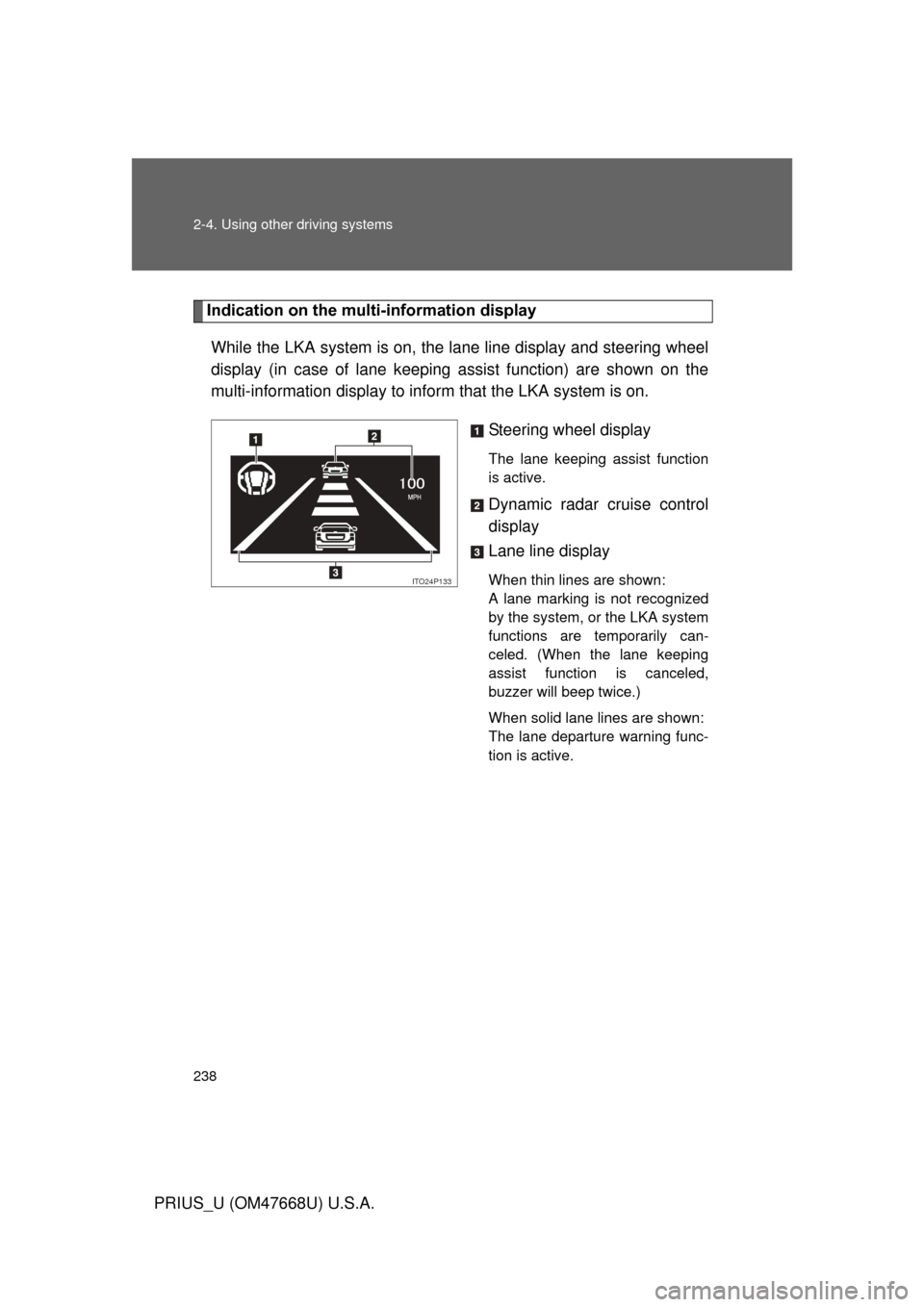
Indication on the multi-information display
While the LKA system is on, the lane line display and steering wheel
display (in case of lane keeping assist function) are shown on the
multi-information display to info rm that the LKA system is on.
Steering wheel display
The lane keeping assist function
is active.
Dynamic radar cruise control
display
Lane line display
When thin lines are shown:
A lane marking is not recognized
by the system, or the LKA system
functions are temporarily can-
celed. (When the lane keeping
assist function is canceled,
buzzer will beep twice.)
When solid lane lines are shown:
The lane departure warning func-
tion is active.ITO24P133
Page 240 of 616

240 2-4. Using other driving systems
PRIUS_U (OM47668U) U.S.A.
■No-handed driving warning
If the steering wheel is not operated for about 15 seconds on a straight road
or about 5 seconds on a curve, the buzzer will beep twice, indicators on the
multi-information display will flash, and the lane keeping assist function will
be temporarily canceled. If you drive the vehicle with your hands lightly
touching the steering wheel, this may also be detected as no-handed driv-
ing.
■ When the vehicle has been parked in the sun
The LKA system functions may not be available for a while after driving has
started. In such cases, turn the LKA system off and turn it on again after nor-
mal temperature returns. When the temperature in the cabin decreases and
the temperature around the camera sensor becomes suitable for its opera-
tion, the functions will begin to operate.
CAUTION
■Before using the LKA system
Do not rely on the LKA system to remain within a selected lane. The LKA
system is not designed to enable inattentive driving. The steering wheel
should be operated by the driver to mainta in the vehicle in a suitable position
within its lane. Always drive carefully.
Page 249 of 616

249
2-4. Using other driving systems
2
When driving
PRIUS_U (OM47668U) U.S.A.
Pre-Collision System
: If equipped
Safety systems such as the brakes and seat belts are automati-
cally engaged to lessen impact and in juries to occupants as well as
vehicle damage when the radar sensor detects an unavoidable
frontal collision.
■ Pre-collision seat belts
If the pre-collision s ensor detects that a co llision is unavoidable,
the pre-collision system will retract the seat belt before the colli-
sion occurs.
The same will happen if the driver makes an emergency braking
or loses control of the vehicle. ( P. 8 6 )
■ Pre-collision brake assist
When there is a high possibility of a frontal collision, the system
applies greater braking force in relation to how strongly the
brake pedal is depressed.
■ Pre-collision braking
When there is a high possibility of a frontal collision, the system
warns the driver using a warning light, warning display and
buzzer. If the system determines that a collision is unavoidable,
the brakes are auto matically applied to reduce the collision
speed. Pre-collision braking can be disabled using the pre-colli-
sion braking off button.