Page 269 of 315
SETUP
272
You can also delete it in the following
way.
1. Push the “INFO·PHONE” button.
2. Touch “Phone”.
3. Touch “Contacts”.
4. Select the desired data from the list.
5. Touch “Options”.
6. Touch “Delete Contact”.
7. Touch “Yes”.
INFORMATION
When you delete a Bluetooth �
phone, the phonebook data will be
deleted at the same time.
Page 270 of 315
SETUP
273
“Speed dials setting” is accessed from
the “Speed Dials” screen.
1. Push the “SETUP” button.
2. Touch “Phone”.
3. Touch “Phonebook”.
4. Touch “Manage Speed Dials”.
Please refer to the following pages for
each setting.You can also display the “Speed Dials”
screen in the following way.
1. Push the “INFO·PHONE” button.
2. Touch “Phone”.
3. Touch “Speed Dials”.
4. Touch “Options”.
— Speed dials setting
Page 271 of 315
SETUP
274
�
Registering the speed dial
You can register the desired phone
number from phonebook. Up to 18
numbers per phone can be registered.
1. Touch “New Speed Dial”.
2. Select the data you want to register.
3. Touch the desired phone number.
4. Touch the touchscreen button you
want to register in.
Page 272 of 315
SETUP
275
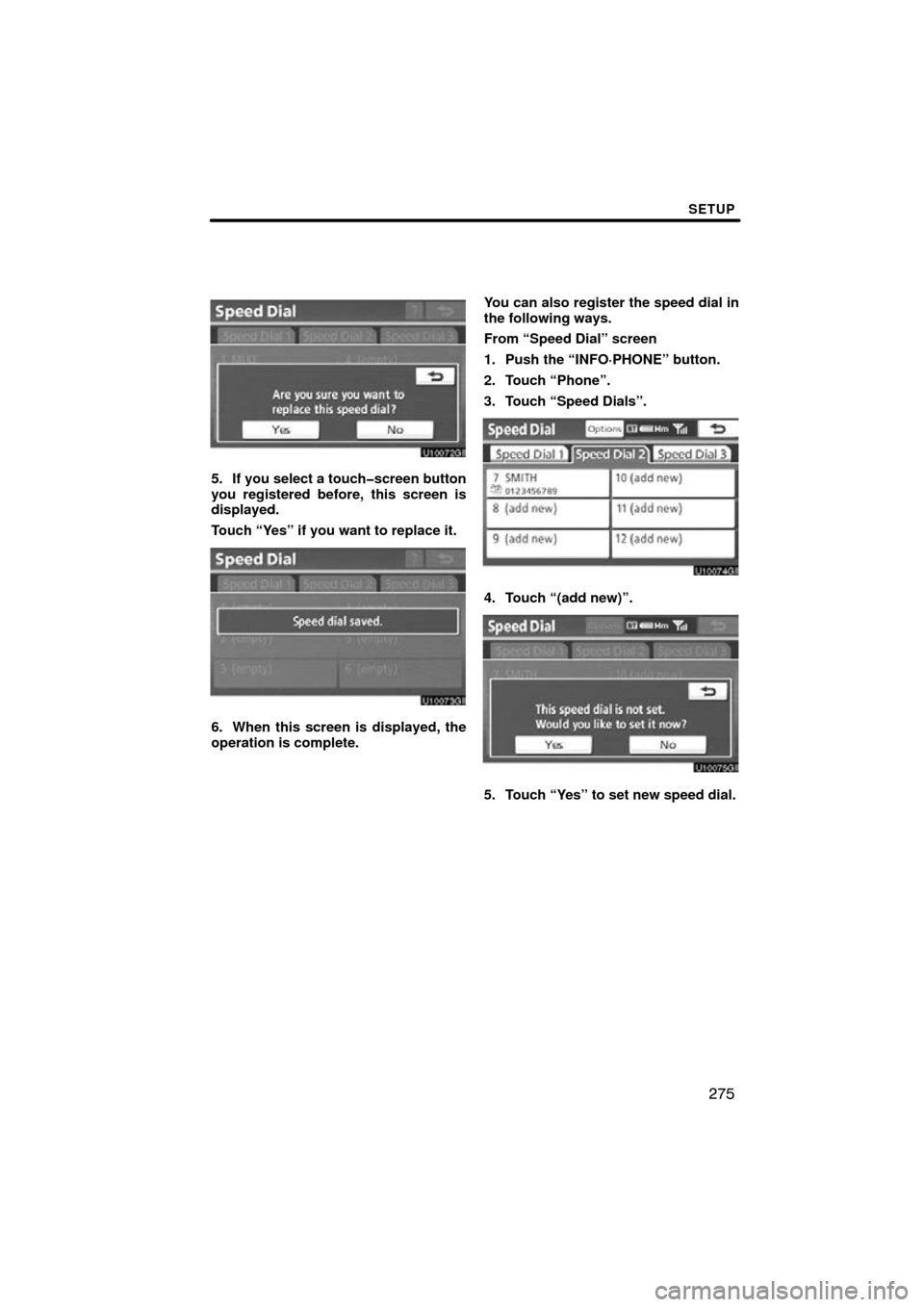
5. If you select a touchscreen button
you registered before, this screen is
displayed.
Touch “Yes” if you want to replace it.
6. When this screen is displayed, the
operation is complete.You can also register the speed dial in
the following ways.
From “Speed Dial” screen
1. Push the “INFO·PHONE” button.
2. Touch “Phone”.
3. Touch “Speed Dials”.
4. Touch “(add new)”.
5. Touch “Yes” to set new speed dial.
Page 273 of 315
SETUP
276
6. Select the data you want to register.
7. Touch the desired phone number. From “Contact Data” screen
1. Push the “INFO·PHONE” button.
2. Touch “Phone”.
3. Touch “Contacts”.
4. Select
the desired data from the list.
5. Touch “Options”.
6. Touch “Set Speed Dial”.
Page 277 of 315
SETUP
280
3. Select the desired data or touch
“Select All”, then touch “Delete”.
You can select multiple data and delete
them at the same time.
4. Touch “Yes”.You can also delete the call history in
the following way.
1. Push the “INFO·PHONE” button.
2. Touch “Phone”.
3. Touch “Call History”.
4. Touch “Delete”.
5. This screen is displayed.
The following operations are the same
as the operation when you operate it
from the “SETUP” button.
You can similarly operate other call his-
tory.
Page 278 of 315
SETUP
281
“Setting the voice tag” is done by dis-
playing “Voice Tags” screen.
1. Push the “SETUP” button.
2. Touch “Phone”.
3. Touch “Phonebook”.
4. Touch “Manage Voice Tags”.
Please refer to the following pages for
each setting.You can also display “Voice Tags”
screen in the following way.
1. Push the “INFO·PHONE” button.
2. Touch “Phone”.
3. Touch “Contacts”.
4. Touch “Options”.
5. Touch “Manage Voice Tags”.
— Setting the voice tag
Page 280 of 315
SETUP
283
You can also register the voice tag in
the following way.
1. Push the “INFO·PHONE” button.
2. Touch “Phone”.
3. Touch “Contacts”.
4. Select the desired data from the list.
5. Touch “Options”.
6. Touch “Set Voice Tag”.
7. This screen is displayed.
The following operations are the same
as the operation when you operate it
from the “SETUP” button.