Page 137 of 315
TELEPHONE AND INFORMATION
140
Page 171 of 315

AUDIO SYSTEM
174
INFORMATION
Portable players must correspond to
the following specifications in order
to be connected to the Bluetooth� au-
dio system. However, please note
that some functions may be limited
depending on the type of portable
player.
� Bluetooth � Specification
Ver.1.1 or higher
(Recommended: Ver.2.0+EDR or
higher)
� Profile
� A2DP (Advanced Audio Dis-
tribution Profile) Ver.1.0
� AVRCP (Audio/Video Remote
Control Profile) Ver.1.0 or highe
(Recommended: Ver.1.3 or higher)
Please go to “http://www.toyota.lets-
talk.com/” to find approved
Bluetooth � phones for this system.
Bluetooth is a trademark owned by
Bluetooth SIG. Inc.
CAUTION
Do not operate the player’s controls
or connect to the Bluetooth � audio
system while driving.
NOTICE
Do not leave your portable player in
the car. In particular, high tempera-
tures inside the vehicle may damage
the portable player.
INFORMATION
�In the following conditions, the
system may not function.
� The portable player is turned off.
� The portable player is not con-
nected.
� The portable player has a low bat-
tery.
�It may take time, the phone connec-
tion is carried out during
Bluetooth � audio play.
Page 180 of 315

AUDIO SYSTEM
183
NOTICE
To ensure correct audio system op-
erations:
�Be careful not to spill beverages
over the audio system.
�Do not put anything other than an
appropriate disc into the CD
changer.
�The use of a cellular phone inside
or near the vehicle may cause a
noise from the speakers of the au-
dio system which you are listening
to. However, this does not indicate
a malfunction.
RADIO RECEPTION
Usually, a problem with radio reception
does not mean there is a problem with your
radio — it is just the normal result of condi-
tions outside the vehicle.
For example, nearby buildings and terrain
can interfere with FM reception. Power
lines or telephone wires can interfere with
AM signals. And of course, radio signals
have a limited range. The farther you are
from a station, the weaker its signal will be.
In addition, reception conditions change
constantly as your vehicle moves.
Here are some common reception prob-
lems that probably do not indicate a prob-
lem with your radio: FM
Fading and drifting stations — Generally,
the effective range of FM is about 25 miles
(40 km). Once
outside this range, you may
notice fading and drifting, which increase
with the distance from the radio transmit-
ter. They are often accompanied by distor-
tion.
Multi−path — FM signals are reflective,
making it possible for two signals to reach
your antenna at the same time. If this hap-
pens, the signals will cancel each other
out, causing a momentary flutter or loss of
reception.
Static and fluttering — These occur when
signals are blocked by buildings, trees, or
other large objects. Increasing the bass
level may reduce static and fluttering.
Station swapping — If the FM signal you
are listening to is interrupted or weakened,
and there is another strong station nearby
on the FM band, your radio may tune in the
second station until the original signal can
be picked up again.
AM
Fading — AM broadcasts are reflected by
the upper atmosphere — especially at
night. These reflected signals can inter-
fere with those received directly from the
radio station, causing the radio station to
sound alternately strong and weak.
Station interference — When a reflected
signal and a signal received directly from
a radio station are very nearly the same
frequency, they can interfere with each
other, making it difficult to hear the broad-
cast.
Static — AM is easily affected by external
sources of electrical noise, such as high
tension power lines, lightening, or electri-
cal motors. This results in static.
Audio system operating
hints
Page 194 of 315
ADVANCED PARKING GUIDANCE SYSTEM
197
Instructions given are only examples.
When and how much to turn the steer-
ing wheel will vary according to traffic
conditions, road surface conditions,
vehicle condition, etc. when parking.
It is necessary to be fully aware of this
before using the
advanced parking
guidance system.
Also, when parking, be sure to check
that the parking space will accommo-
date your vehicle before maneuvering
into it.
CAUTION
Depending on the circumstances of
the vehicle (number of passengers,
amount of luggage, etc.), the set tar-
get parking position displayed on the
screen may change. Be sure to check
visually behind and all around the ve-
hicle before proceeding.
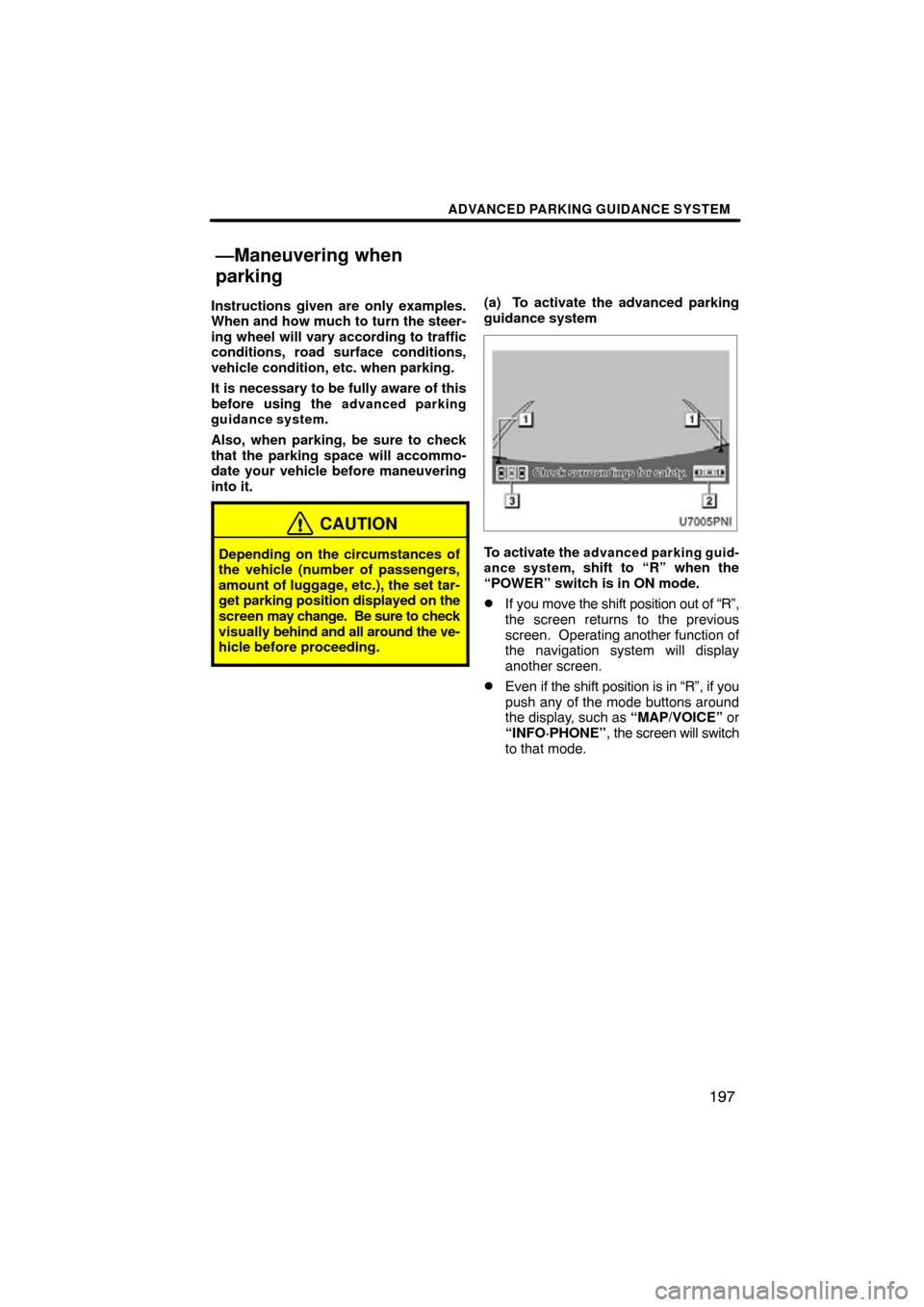
(a) To activate the advanced parking
guidance system
To activate the advanced parking guid-
ance system, shift to “R” when the
“POWER” switch is in ON mode.
�If you move the shift position out of “R”,
the screen returns to the previous
screen. Operating another function of
the navigation system will display
another screen.
�Even if the shift position is in “R”, if you
push any of the mode buttons around
the display, such as “MAP/VOICE” or
“INFO·PHONE” , the screen will switch
to that mode.
—Maneuvering when
parking
Page 196 of 315

ADVANCED PARKING GUIDANCE SYSTEM
199
(b) Disabling the advanced parking
guidance system
When in the parking assist mode or par-
allel parking assist mode, in the follow-
ing case the voice guidance will say
“The guidance has been canceled”, a
message will be displayed, and the sys-
tem will be disabled. For displayed
message, see page 226.
After the following operations
�Moving the steering wheel
�Using the accelerator
�Moving the shift position out of “R”
�Applying the parking brake
�Switching the screen display In the following situation
�If the vehicle slips forward or stops af-
ter taking your foot off the brake pedal
�If the backing speed is too fast
�If normal assistance cannot be ren-
dered
due to worn tires or low tire infla-
tion pressure
�If the target parking position has not
been confirmed on the target parking
position setting screen before backing
up
�Any warnings displayed on the screen
are not acknowledged before backing
up
�If there is a system malfunction
�If the system temperature protection
function operates
If the system is disabled while backing up,
grip the steering wheel firmly and depress
the brake pedal to bring the vehicle to a
halt. The system has been completely dis-
abled, so you may either start again from
the beginning, or if you wish to finish park-
ing manually, be sure to operate the steer-
ing wheel as you would normally.
If a hands− free phone call is received, the
hands −free screen will be displayed, and
the system will be disabled.
Page 232 of 315
SECTION 8
SETUP
235
SETUP
�General settings 236
(Used for language selection and the on/off settings of
operation sounds and automatic screen change.)
� Clock settings 241
(Used for changing time zones and the on/off settings of
daylight saving time.)
� Voice settings 242
(Voice guidance can be set.)
� Navigation settings 244
(“Home” and “Preset Destinations” can be set and edited.)
� Detailed navigation settings 245
(Average cruising speed, displayed screen contents,
and POI icon categories can be set.)
� Telephone settings 254
(Bluetooth � phones can be registered.)
� Audio settings 292
(Settings are available for portable audio devices and
Bluetooth � audio devices players.)
� Vehicle settings 300
(Vehicle information can be set.) . . . . . . . . . . . . . . . . . . . . . . . . . . . . . . . . . . . .\
. . . . . . . . . . . . . . . . . . . . . . . . . . . . .
. . . . . . . . . . . . . . . . . . . . . . . . . . . . . . . . . . . .\
. . . . .
. . . . . . . . . . . . . . . . . . . . . . . . . . . . . . . . . . . .\
. . . . . . . . . . . . . . . . . . . . . . . . . . . . . . . . . . . . . . . . .\
. . .
. . . . . . . . . . . . . . . . . . . . . . . . . . . . . . . . . . . .\
.
. . . . . . . . . . . . . . . . . . . . . . . . . . . . . . . . . . . .\
. . . . .
. . . . . . . . . . . . . . . . . . . . . . . . . . . . . . . . . . . .\
. . .
Page 237 of 315
SETUP
240
�
Delete personal data
The following personal data can be de-
leted or returned to their default settings:
�Maintenance conditions
�Maintenance information “off” setting
�Address book
�Areas to avoid
�Previous points
�Route trace
�Phonebook data
�Call history data
�Speed dial data
�Voice tag data
�Bluetooth � phone data
�Phone volume setting
�Details phone setting
This function is available only when the ve-
hicle is not moving. 1. Push the “SETUP” button.
2. Touch “General” on the “Setup”
screen.
Then touch
to display page 2 of the
“General Settings” screen.
3. Touch “Delete Personal Data”.
4. Touch “Delete”.
5. Touch “Yes”.
Page 251 of 315
SETUP
254
“Telephone settings” can be changed
on the “Phone settings” screen.
1. Push the “SETUP” button.
2. Touch “Phone”.
Please refer to the following pages for
each setting.You can adjust the voice and ring vol-
ume.
1. Touch “Volume”.
2. Change each setting according to
the following procedures.
3. When you complete all settings,
touch “Save”.
Automatic volume settings for high
speed
The system will automatically increase the
volume by one step up when the speed ex-
ceeds 50 mph (80 km/h).
Telephone settings —— Volume setting


