Page 301 of 315
SETUP
304
�
To edit “Location”
1. Touch “Edit” of “Location”.
2. Touch the 8 directional touch
screen
button to move the cursor to
the desired point on the map.
3. Touch “OK”.
The previous screen will be displayed.
�To edit “Phone #” (telephone num-
ber)
1. Touch “Edit” of “Phone #”.
2. Enter the number using number
keys.
3. Touch “OK”.
The previous screen will be displayed.
Page 308 of 315

APPENDIX
311
U.S. GOVERNMENT RIGHTS
If you are an agency, department, or
other entity of the United States
Government, or funded in whole or in
part by the United States Government,
then use, duplication, reproduction,
release, modification, disclosure or
transfer of this commercial product and
accompanying documentation, is
restricted in accordance with the
LIMITED or RESTRICTED rights as
described in DFARS
252.227 −7014(a)(1) (JUN 1995)
(DOD commercial computer software
definition), DFARS 227.7202 −1 (DOD
policy on commercial computer
software), FAR 52.227−19 (JUN 1987)
(commercial computer software
clause for civilian agencies), DFARS
252.227 −7015 (NOV 1995) (DOD
technical data − commercial items
clause); FAR 52.227−14 Alternates I,
II, and III (JUN 1987) (civilian agency
technical data and noncommercial
computer software clause); and/or
FAR 12.211 and FAR 12.212
(commercial item acquisitions), as
applicable. In case of conflict between
any of the FAR and DF ARS provisions
listed herein and this Agreement, the
construction that provides greater
limitations on the Government’s rights
shall control.
Contractor/manufacturer is Tele Atlas
North America, Inc., 11 Lafayette
Street, Lebanon, NH 03766 −1445.
Phone: 603.643.0330. The DATA-
BASE is © 1984−2007 by Tele Atlas
North America, Inc. ALL RIGHTS RE-
SERVED. For purpose of any public
disclosure provision under any federal,
state or local law, it is agreed that the
DATABASE is a trade secret and a pro-
prietary commercial product and not
subject to disclosure.If you are an agency, department, or
other entity of any State government,
the United States Government or any
other public entity or funded in whole or
in part by the United States Govern-
ment, then you hereby agree to protect
the DATABASE from public disclosure
and to consider the DATABASE ex-
empt from any statute, law, regulation,
or code, including any Sunshine Act,
Public Records Act, Freedom of Infor-
mation Act, or equivalent, which per-
mits public access and/or reproduction
or use of the Licensed Products. In the
event that such exemption is chal-
lenged under any such laws, this
Agreement shall be considered
breached and any and all right to retain
any copies or to use of the DAT ABASE
shall be terminated and considered im-
mediately null and void. Any copies of
the DATABASE held by you shall im-
mediately be destroyed. If any court of
competent jurisdiction considers this
clause void and unenforceable, in
whole or in part, for any reason, this
Agreement shall be considered termi-
nated and null and void, in its entirety,
and any and all copies of the DATA-
BASE shall immediately be destroyed.
Page 310 of 315

APPENDIX
313
Restrictions. Except where you have
been specifically licensed to do so by
DENSO, and without limiting the pre-
ceding paragraph, you may not (a) use
this Data with any products, systems,
or applications installed or otherwise
connected to or in communication with
vehicles, capable of vehicle naviga-
tion, positioning, dispatch, real time
route guidance, fleet management or
similar applications; or (b) with or in
communication with any positioning
devices or any mobile or wireless −con-
nected electronic or computer devices,
including without limitation cellular
phones, palmtop and handheld com-
puters, pagers, and personal digital as-
sistants or PDAs.
Warning.
The Data may contain inac-
curate or incomplete information due
to the passage of time, changing cir-
cumstances, sources used and the na-
ture of collecting comprehensive geo-
graphic data, any of which may lead to
incorrect results.
No Warranty.
This Data is provided to
you “as is,” and you agree to use it at
your own risk. DENSO and its licen-
sors (and their licensors and suppliers)
make no guarantees, representations
or warranties of any kind, express or
implied, arising by law or otherwise, in-
cluding but not limited to, content, qual-
ity, accuracy, completeness, effective-
ness, reliability, fitness for a particular
purpose, usefulness, use or results to
be obtained from this Data, or that the
Data or server will be uninterrupted or
error−free.
Disclaimer of Warranty: DENSO AND
ITS LICENSORS (INCLUDING THEIR
LICENSORS AND SUPPLIERS)
DISCLAIM ANY WARRANTIES,
EXPRESS OR IMPLIED, OF
QUALITY, PERFORMANCE,
MERCHANTABILITY, FITNESS FOR
A PARTICULAR PURPOSE OR
NON−INFRINGEMENT. Some
States, Territories and Countries do
not allow certain warranty exclusions,
so to that extent the above exclusion
may not apply to you.
Disclaimer of Liability:
DENSO AND
ITS LICENSORS (INCLUDING THEIR
LICENSORS AND SUPPLIERS)
SHALL NOT BE LIABLE TO YOU: IN
RESPECT OF ANY CLAIM, DEMAND
OR ACTION, IRRESPECTIVE OF
THE NATURE OF THE CAUSE OF
THE CLAIM, DEMAND OR ACTION
ALLEGING ANY LOSS, INJURY OR
DAMAGES, DIRECT OR INDIRECT,
WHICH MAY RESULT FROM THE
USE OR POSSESSION OF THE
INFORMATION; OR FOR ANY LOSS
OF PROFIT, REVENUE,
CONTRACTS OR SAVINGS, OR
ANY OTHER DIRECT, INDIRECT,
INCIDENTAL, SPECIAL OR
CONSEQUENTIAL DAMAGES
ARISING OUT OF YOUR USE OF OR
INABILITY TO USE THIS
INFORMATION, ANY DEFECT IN
THE INFORMATION, OR THE
BREACH OF THESE TERMS OR
CONDITIONS, WHETHER IN AN
ACTION IN CONTRACT OR TORT
OR BASED ON A W ARRANTY, EVEN
IF DENSO OR ITS LICENSORS
HAVE BEEN ADVISED OF THE
POSSIBILITY OF SUCH DAMAGES.
Some States, T erritories and Countries
do not allow certain liability exclusions
or damages limitations, so to that
extent the above may not apply to you.
Page 314 of 315
APPENDIX
317
1. Push the “INFO·PHONE” button.
2. Touch “Map Data”.
3. Touch “ DVD”.
4. Insert a new map DVDROM with the
label side up.
5. Push the “·CLOSE” button to
close the display.
— Changing the map
DVDROM
Page 315 of 315
APPENDIX
318
CAUTION
�Do not place anything on the
opened display, as such items may
be thrown about and possibly in-
jure people in the vehicle during
sudden braking or in an accident.
�To reduce the chance of injury in
the case of an accident or sudden
stopping while driving, keep the
display closed.
�Take care not to jam your hand
while the display is moving. Other-
wise, you could be injured.
NOTICE
�Do not obstruct the display while it
is moving. It could damage your
navigation system.
�If a disc cannot be ejected, do not
forcibly take out the disc. Keep
pushing the “ ·CLOSE” button
for approximately 5 seconds and
release it. At this time, the audio
disc and the map DVDROM will be
ejected.
INFORMATION
Under extremely cold conditions, the
display may react slowly or operation
sound may become louder.
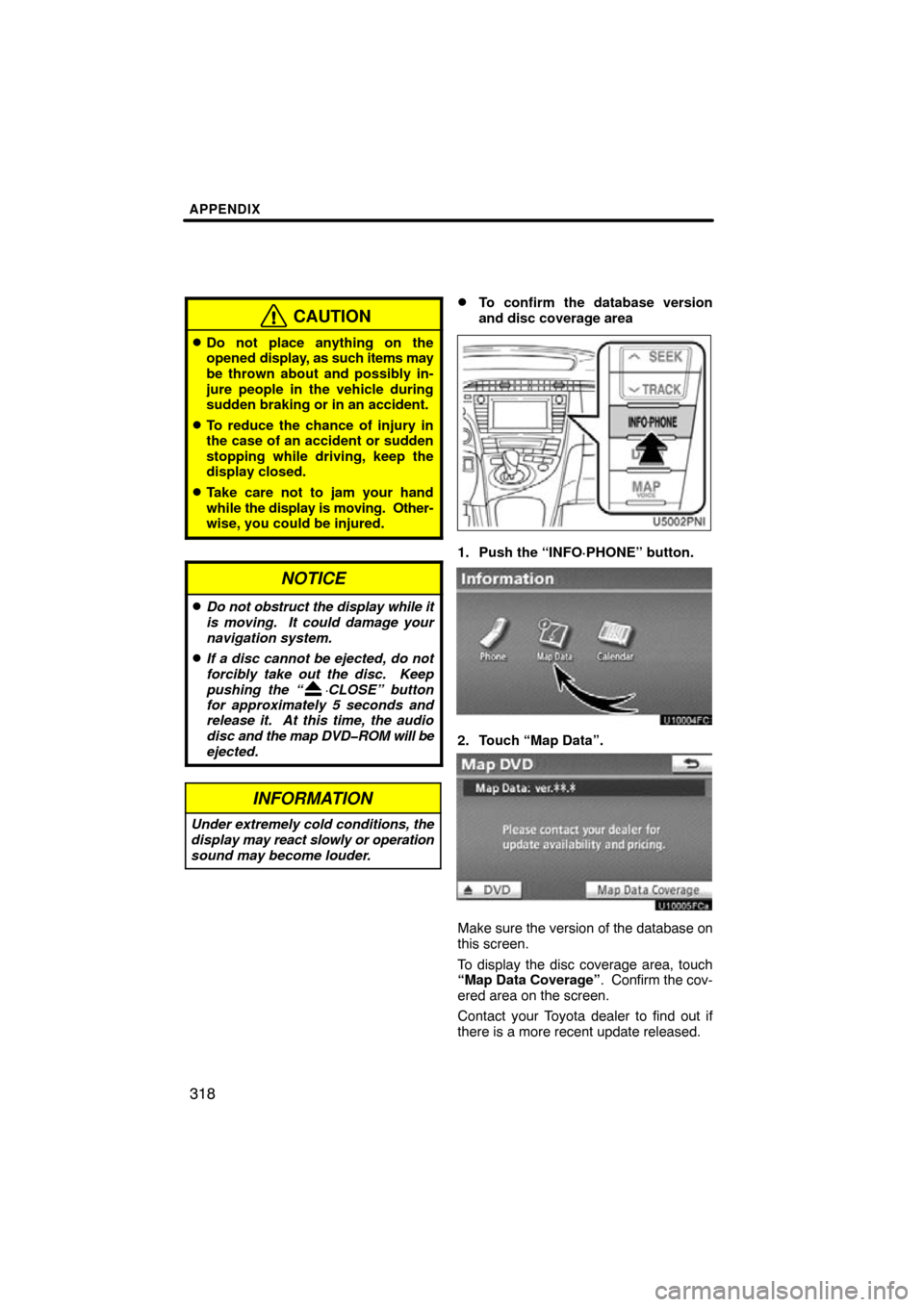
�To confirm the database version
and disc coverage area
1. Push the “INFO·PHONE” button.
2. Touch “Map Data”.
Make sure the version of the database on
this screen.
To display the disc coverage area, touch
“Map Data Coverage” . Confirm the cov-
ered area on the screen.
Contact your Toyota dealer to find out if
there is a more recent update released.

