2010 MITSUBISHI L200 change
[x] Cancel search: changePage 166 of 369
Crossing a stream
4-wheel
drive vehicles are not necessarily water-
proof. If the electrical circuits become wet, further
operation of the vehicle will be impossible; there-
fore, avoid crossing streams unless absolutely nec-
essary. If crossing a stream is unavoidable, use the
following procedure: 1. Check depths of a stream and geographicalfeatures before attempting to cross a stream
and ford the stream where the water is as shal-
low as practicable.
2. Set the transfer shift lever to “4L” position (easy select 4WD), “4LLc” position (super se-
lect 4WD).
3. Drive slowly at a speed of approximately 5 km/h (3 mph) to avoid splashing too much
water. CAUTION
l
Never
cross a stream where the water is
deep.
Do not change gears while crossing the
stream.
Frequent crossing of streams can adverse-
ly affect the life span of the vehicle; we rec-
ommend you to take the necessary meas-
ures to prepare, inspect, and repair the ve-
hicle.
After crossing a stream, apply the brakes to be sure
they
are functioning properly. If the brakes are wet
and not functioning properly, dry them out by driv-
ing slowly while lightly depressing the brake pedal.
Inspect each part of the vehicle carefully. Inspection and maintenance
following rough road operation E00606700048
After
operating the vehicle in rough road condi-
tions, be sure to perform the following inspection
and maintenance procedures:
l Check that the vehicle has not been damaged
by rocks, gravel, etc.
l Carefully wash the vehicle with water.
After washing, drive the vehicle slowly
while lightly depressing the brake pedal in or-
der to dry out the brakes. If the brakes still
do not function properly, we recommend you
to have the brakes checked as soon as possible.
l Remove the insects, dried grass, etc. clog-
ging the radiator core.
l After crossing a stream, be sure to have the
following items inspected at a MITSUBISHI
MOTORS Authorized Service Point and take
the necessary measures.
• Check the brake system and, if necessary,have it serviced.
• Check the engine, transmission, transfer, and differential oil or grease level and tur-
bidity. If the oil or grease is milky, it indi-
cates water contamination. Replace it
with new oil or grease.
• Grease the propeller shaft.
• Check the inside of the vehicle. If ingress of water is found, dry the carpet etc.
• Inspect the headlamps. If the headlamp bulb is flooded with water, we recom-
mend you to have it drained. Cautions on handling of 4-wheel
drive vehicles E00606800368
Tyres and wheels
Since
the driving torque can be applied to the 4
wheels, the performance of the vehicle when oper-
ating in 4-wheel drive is greatly affected by the con-
dition of the tyres.
Pay close attention to the tyres.
l Install specified tyres on all wheels. Refer to
“Tyres and wheels” on page 9-18.
l Be sure to fit all 4 tyres and wheels of the
same size and type.
When replacement of any of the tyres or
wheels is necessary, replace all of them.
l All tyres should be rotated whenever the
wear difference between the front and rear
tyres is recognizable.
Good vehicle performance cannot be expected if
there is a difference in wear between tyres. Refer to
“Tyre rotation” on page 8-13. l Check the tyre inflation pressure regularly. Starting and driving
4-41 4
OCRE12E1
Page 181 of 369
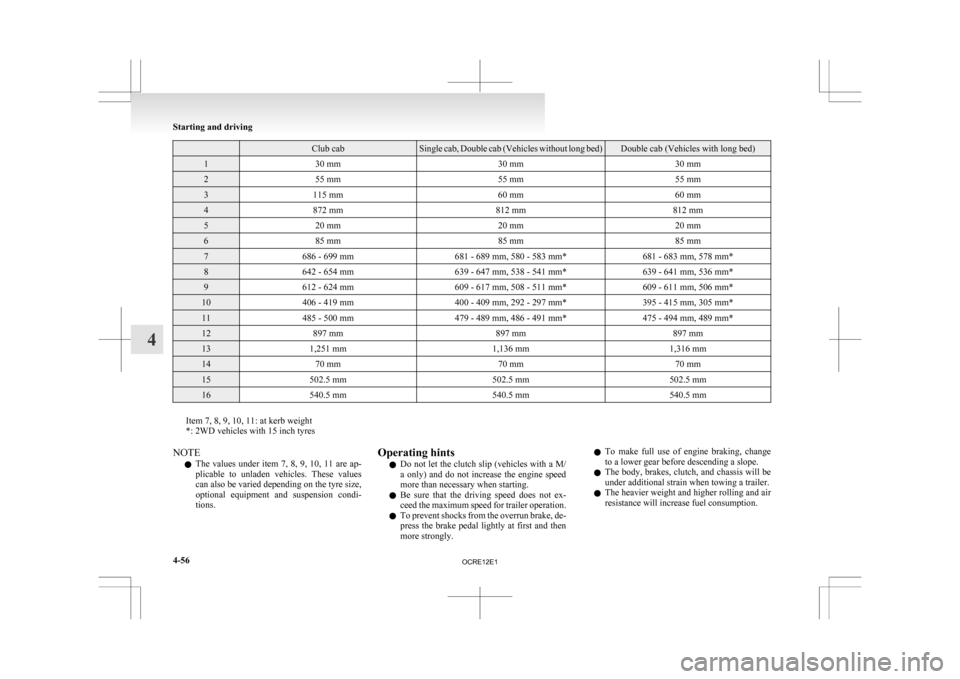
Club cab Single cab, Double cab (Vehicles without long bed) Double cab (Vehicles with long bed)
1
30 mm 30 mm30 mm2
55 mm 55 mm55 mm3
115 mm 60 mm60 mm4
872 mm 812 mm812 mm5
20 mm 20 mm20 mm6
85 mm 85 mm85 mm7
686 - 699 mm 681 - 689 mm, 580 - 583 mm* 681 - 683 mm, 578 mm*8
642 - 654 mm 639 - 647 mm, 538 - 541 mm* 639 - 641 mm, 536 mm*9
612 - 624 mm 609 - 617 mm, 508 - 511 mm* 609 - 611 mm, 506 mm*10
406 - 419 mm 400 - 409 mm, 292 - 297 mm* 395 - 415 mm, 305 mm*11
485 - 500 mm 479 - 489 mm, 486 - 491 mm* 475 - 494 mm, 489 mm*12
897 mm 897 mm897 mm13
1,251 mm 1,136 mm1,316 mm14
70 mm 70 mm70 mm15
502.5 mm 502.5 mm502.5 mm16
540.5 mm 540.5 mm540.5 mmItem 7, 8, 9, 10, 11: at kerb weight
*: 2WD vehicles with 15 inch tyres
NOTE
l The
values under item 7, 8, 9, 10, 11 are ap-
plicable to unladen vehicles. These values
can also be varied depending on the tyre size,
optional equipment and suspension condi-
tions. Operating hints
l Do
not let the clutch slip (vehicles with a M/
a only) and do not increase the engine speed
more than necessary when starting.
l Be sure that the driving speed does not ex-
ceed the maximum speed for trailer operation.
l To prevent shocks from the overrun brake, de-
press the brake pedal lightly at first and then
more strongly. l
To make full use of engine braking, change
to a lower gear before descending a slope.
l The body, brakes, clutch, and chassis will be
under additional strain when towing a trailer.
l The heavier weight and higher rolling and air
resistance will increase fuel consumption. Starting and driving
4-56
4
OCRE12E1
Page 185 of 369

Ventilators
E007001003441- Centre ventilators
2-
Side ventilators
Air flow and direction adjustments E00700200749
Centre ventilators
Adjust
the direction of the air flow by moving the
knob (A). Side ventilators
The
ventilator can be opened and closed with the di-
al (B).
( )
- Open
( )
- Close
Adjust the direction of the air flow by moving the
knob (C). NOTE
l On
air conditioned vehicles, the cool air
from the ventilators may appear as a mist.
This is due to moist air being suddenly
cooled by the air conditioning. This will
clear after a few moments.
Changing the mode selection E00700301008
To change the position and amount of air flowing
from
the ventilators, turn the mode selection dial.
(Refer to “Mode selection dial” on pages 5-04,
5-09.) These symbols are used in the next several illustra-
tions
to demonstrate the quantity of air coming
from the ventilators. : Small amount of air from the ventilators
: Medium amount of air from the ventilators
: Large amount of air from the ventilators
Face position
Air
flows only to the upper part of the passenger
compartment. Foot/Face position
Air
flows to the upper part of the passenger com-
partment, and flows to the leg area.
: Optional equipment For pleasant driving
5-02
5 LHD RHD
OCRE12E1
Page 187 of 369
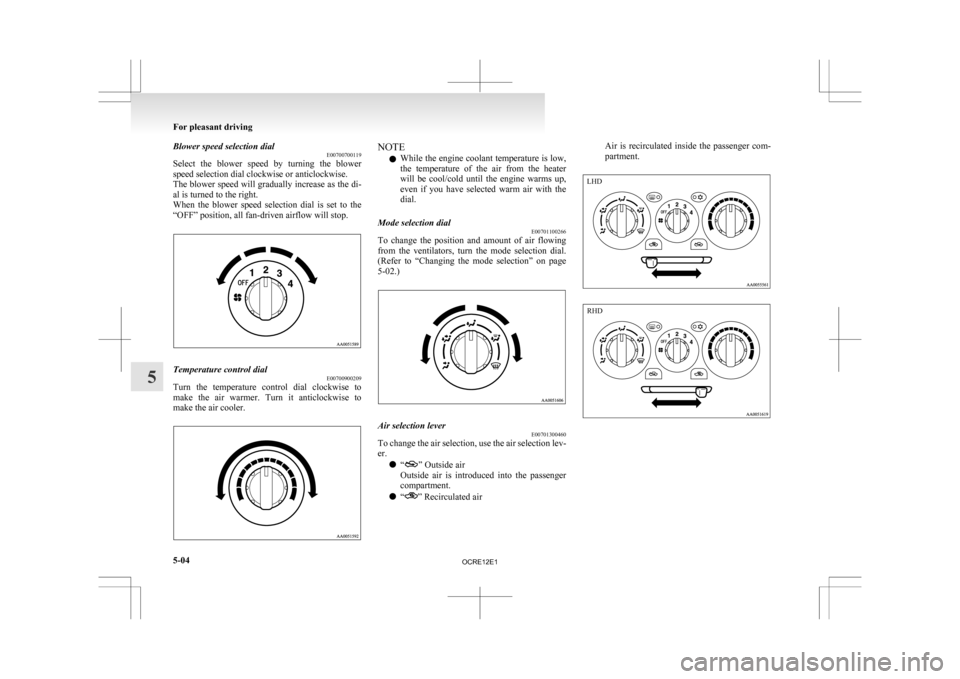
Blower speed selection dial
E00700700119
Select
the blower speed by turning the blower
speed selection dial clockwise or anticlockwise.
The blower speed will gradually increase as the di-
al is turned to the right.
When the blower speed selection dial is set to the
“OFF” position, all fan-driven airflow will stop. Temperature control dial
E00700900209
Turn the temperature control dial clockwise to
make
the air warmer. Turn it anticlockwise to
make the air cooler. NOTE
l While
the engine coolant temperature is low,
the temperature of the air from the heater
will be cool/cold until the engine warms up,
even if you have selected warm air with the
dial.
Mode selection dial E00701100266
To change the position and amount of air flowing
from
the ventilators, turn the mode selection dial.
(Refer to “Changing the mode selection” on page
5-02.) Air selection lever
E00701300460
To change the air selection, use the air selection lev-
er.
l “ ” Outside air
Outside
air is introduced into the passenger
compartment.
l “ ” Recirculated airAir is recirculated inside the passenger com-
partment.For pleasant driving
5-04
5 LHD RHD
OCRE12E1
Page 189 of 369
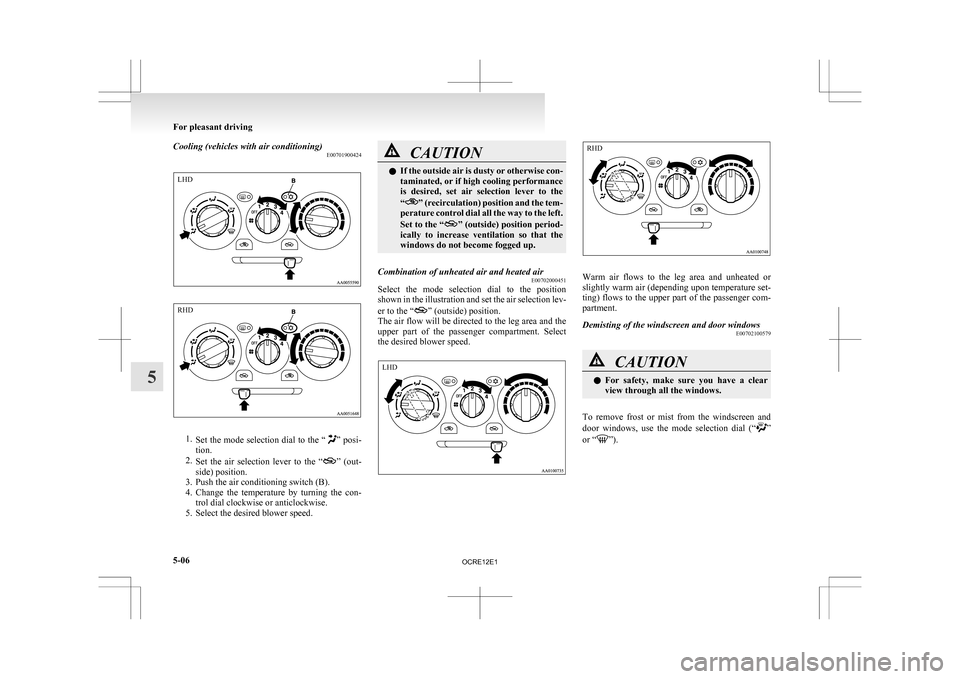
Cooling (vehicles with air conditioning)
E007019004241.
Set the mode selection dial to the “ ” posi-
tion.
2. Set the air selection lever to the “ ”
(out-
side) position.
3. Push the air conditioning switch (B).
4. Change the temperature by turning the con- trol dial clockwise or anticlockwise.
5. Select the desired blower speed. CAUTION
l
If
the outside air is dusty or otherwise con-
taminated, or if high cooling performance
is desired, set air selection lever to the
“ ”
(recirculation) position and the tem-
perature control dial all the way to the left.
Set to the “ ”
(outside) position period-
ically to increase ventilation so that the
windows do not become fogged up.
Combination of unheated air and heated air E00702000451
Select the mode selection dial to the position
shown
in the illustration and set the air selection lev-
er to the “ ” (outside) position.
The
air flow will be directed to the leg area and the
upper part of the passenger compartment. Select
the desired blower speed. Warm air flows to the leg area and unheated or
slightly
warm air (depending upon temperature set-
ting) flows to the upper part of the passenger com-
partment.
Demisting of the windscreen and door windows E00702100579 CAUTION
l
For
safety, make sure you have a clear
view through all the windows.
To remove frost or mist from the windscreen and
door
windows, use the mode selection dial (“ ”
or “ ”).For pleasant driving
5-06
5LHD RHD LHD RHD
OCRE12E1
Page 192 of 369
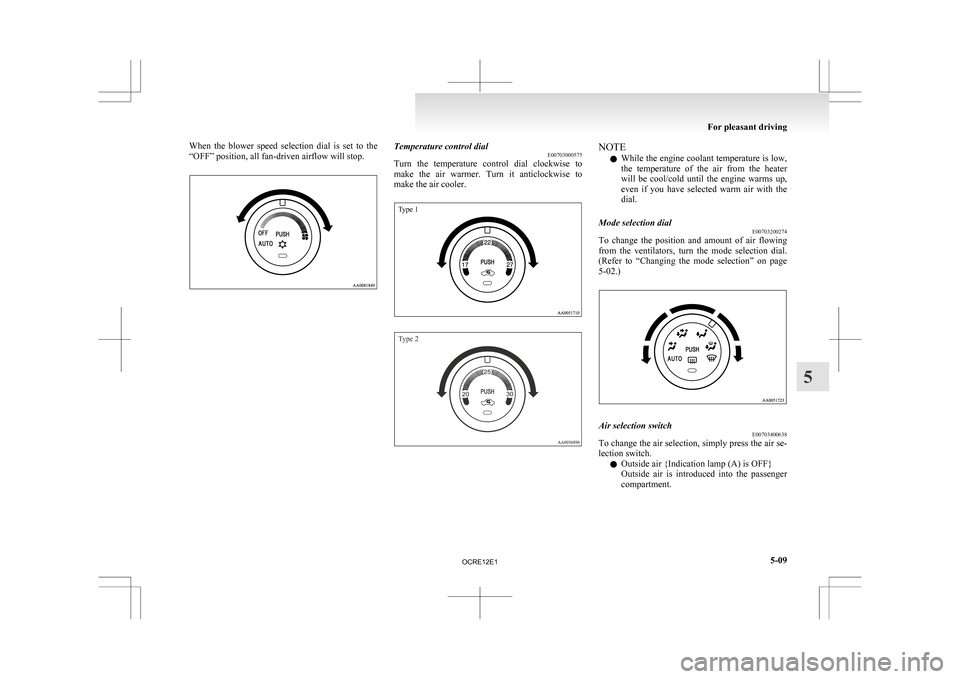
When the blower speed selection dial is set to the
“OFF” position, all fan-driven airflow will stop.
Temperature control dial
E00703000575
Turn
the temperature control dial clockwise to
make the air warmer. Turn it anticlockwise to
make the air cooler.
Type 1
Type 2 NOTE
l While
the engine coolant temperature is low,
the temperature of the air from the heater
will be cool/cold until the engine warms up,
even if you have selected warm air with the
dial.
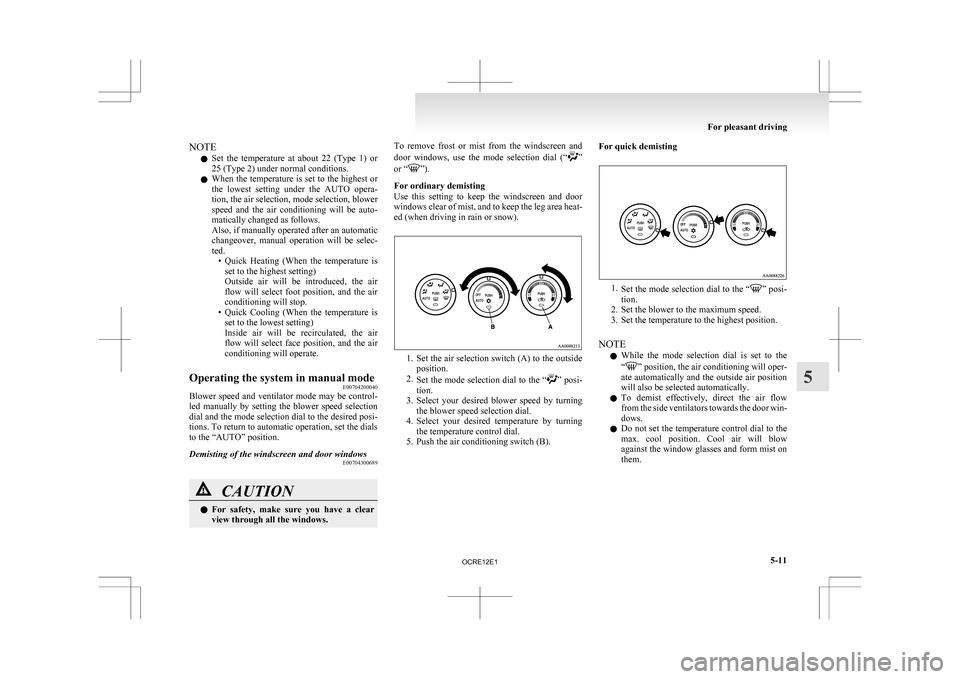
Mode selection dial E00703200274
To change the position and amount of air flowing
from
the ventilators, turn the mode selection dial.
(Refer to “Changing the mode selection” on page
5-02.) Air selection switch
E00703400638
To change the air selection, simply press the air se-
lection switch.
l Outside air {Indication lamp (A) is OFF}
Outside
air is introduced into the passenger
compartment. For pleasant driving
5-09 5
OCRE12E1
Page 194 of 369
NOTE
l Set
the temperature at about 22 (Type 1) or
25 (Type 2) under normal conditions.
l When the temperature is set to the highest or
the lowest setting under the AUTO opera-
tion, the air selection, mode selection, blower
speed and the air conditioning will be auto-
matically changed as follows.
Also, if manually operated after an automatic
changeover, manual operation will be selec-
ted.
• Quick Heating (When the temperature isset to the highest setting)
Outside air will be introduced, the air
flow will select foot position, and the air
conditioning will stop.
• Quick Cooling (When the temperature is set to the lowest setting)
Inside air will be recirculated, the air
flow will select face position, and the air
conditioning will operate.
Operating the system in manual mode E00704200040
Blower speed and ventilator mode may be control-
led
manually by setting the blower speed selection
dial and the mode selection dial to the desired posi-
tions. To return to automatic operation, set the dials
to the “AUTO” position.
Demisting of the windscreen and door windows E00704300689CAUTION
l
For
safety, make sure you have a clear
view through all the windows. To remove frost or mist from the windscreen and
door
windows, use the mode selection dial (“ ”
or “ ”).
For ordinary demisting
Use
this setting to keep the windscreen and door
windows clear of mist, and to keep the leg area heat-
ed (when driving in rain or snow). 1. Set
the air selection switch (A) to the outside
position.
2. Set the mode selection dial to the “ ”
posi-
tion.
3. Select your desired blower speed by turning the blower speed selection dial.
4. Select your desired temperature by turning the temperature control dial.
5. Push the air conditioning switch (B). For quick demisting
1.
Set
the mode selection dial to the “ ” posi-
tion.
2.
Set the blower to the maximum speed.
3. Set the temperature to the highest position.
NOTE l While the mode selection dial is set to the
“ ”
position, the air conditioning will oper-
ate automatically and the outside air position
will also be selected automatically.
l To demist effectively, direct the air flow
from the side ventilators towards the door win-
dows.
l Do not set the temperature control dial to the
max. cool position. Cool air will blow
against the window glasses and form mist on
them. For pleasant driving
5-11 5
OCRE12E1
Page 197 of 369
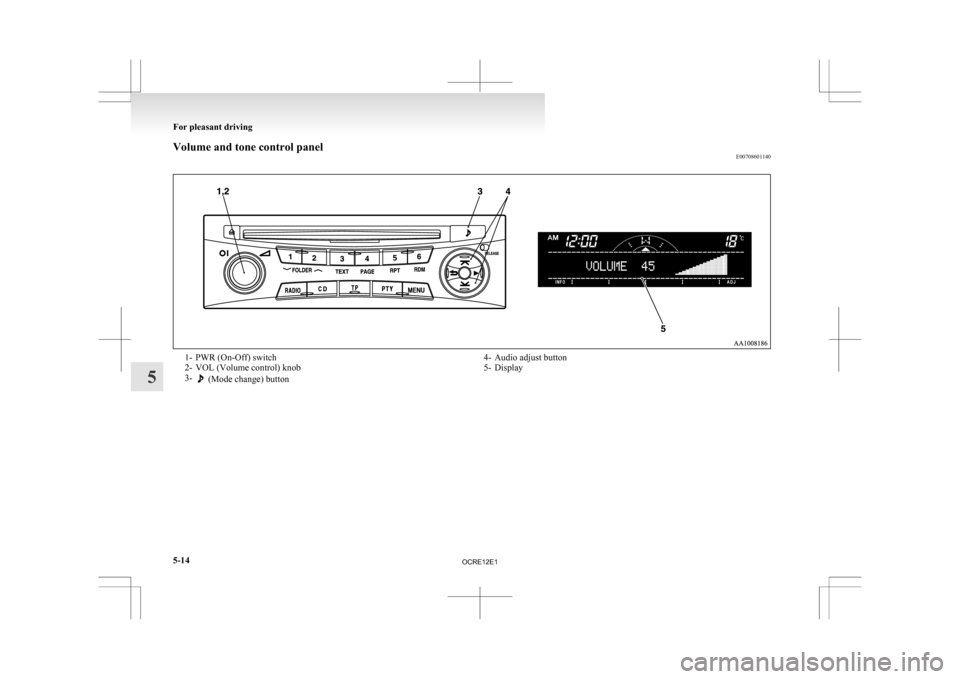
Volume and tone control panel
E007086011401- PWR (On-Off) switch
2-
VOL (Volume control) knob
3- (Mode change) button
4- Audio adjust button
5-
Display For pleasant driving
5-14
5
OCRE12E1