2010 MITSUBISHI L200 change
[x] Cancel search: changePage 212 of 369
To play from an iPod
E00756300372
1. Press
the PWR button (1) to turn on the au-
dio system. The system turns on in the last
mode used.
2. Connect your iPod to the USB input terminal. Refer to “How to connect an iPod” on page
5-67.
3. Press the CD button (11) several times to switch to the iPod mode. The mode changes
every time the CD button is pressed.
CD mode → iPod mode → Bluetooth ®
mode*
NOTE l If your vehicle is equipped with Auxiliary Au-
dio connector (RCA), pressing and holding
the CD button for 2 seconds or more
switches the system to the AUX mode.
4. Once the device is selected, playback starts and “iPod” appears on the display.
NOTE l Depending on the condition of your iPod, it
may take a longer time before the playback
starts.
5. To stop the playback, change over to a differ- ent mode.
NOTE l Buttons on the iPod are disabled while the
iPod is connected to the audio system.
l To adjust the volume and tone, refer to “To
adjust the volume” and “To adjust the tone”. To fast-forward/reverse the track
E00756400113
Fast-forward
To
fast-forward the current track, press the but-
ton
(8). While the button is pressed, the track will
be fast-forwarded.
Fast-reverse
To fast-reverse the current track, press the but-
ton
(9). While the button is pressed, the track will
be fast-reversed.
To select a desired track E00756500097
Track up
Press
the button (8) repeatedly until the desired
track number appears on the display.
Track down
Press
the button (9) repeatedly until the desired
track number appears on the display.
NOTE
l Pressing
the button (9) once during the
song
will cause the audio system to restart
playback from the beginning of the song.
To find a track from the iPod menu E00756600186
You can select desired tracks from the “Playlists”,
“Artists”,“Albums”,
“Songs” or “Genre” (vehicles
with Bluetooth ®
2.0 interface) menus on your iPod.
Press the following buttons to select desired tracks.
The selected menu or category or track is shown in
the display. button (12)
: To start this mode or cancel the
selection. button (8)
or button (9)
: To show the menu or category
or track. button (13)
: To select the menu or category
or track.
NOTE l If
no operation is performed for 10 seconds
or more or another button is operated after
the button or button has been pressed,
searching of the desired tracks is cancelled.
l If
no operation is performed for 5 seconds or
more after the track is displayed, playback
starts.
To play the same track repeatedly E00756700099
Press the RPT button (6) during playback to show
“RPT” in the display.
To exit this mode, press the button again.
To play tracks in random order E00756900091
Press the RDM button (7) to show “SHUFFLE” in
the
display.The iPod randomly selects tracks from
the current category and plays the selected tracks.
To exit this mode, press the button again.
To play tracks in each album in random order E00757000099
Press and hold the RDM button (7) until you hear a
beep to show “A-SHUFFLE” in the display.
The
iPod randomly selects tracks in the album
from the current category and play the selected
tracks.
To exit this mode, press the button again. For pleasant driving
5-29 5
OCRE12E1
Page 213 of 369
To switch the display
E00757100090
The
display changes as follows every time the
TEXT button (4) is pressed during playback.
Album title → Track name → Artist name →
Genre (vehicles with Bluetooth ®
2.0 interface) →
Normal display
Example
Album title NOTE
l Up
to 16 characters are shown in the display
at once. If the title is cut off in the middle,
press the PAGE button (5). The next charac-
ters are displayed every time this button is
pressed.
l If no title is stored, “NO TITLE” is shown in
the display.
l Characters that cannot be displayed are sub-
stituted by “ ”. To play iPod tracks via voice opera-
tion
(vehicles with Bluetooth ®
2.0 inter-
face) E00757200046
Desired tracks can be selected and played from
your iPod by “Artist”, “Album”, “Playlist” and
“Genre” using voice commands.
For information concerning the voice recognition
function or speaker enrollment function, refer to
“Bluetooth ®
2.0 interface” on page 5-51.
The following explains how to prepare for voice op-
eration and play the tracks.
Preparation for voice operation E00757300135
To use the voice operation, press the SPEECH but-
ton (1) first. To search by artist name
E00757400019
1. Say “Play” on the main menu. NOTE
l The
Bluetooth®
2.0 interface starts recogniz-
ing the connected device.
If the connected device cannot be recognized
or a connection error occurs, the Bluetooth ®
2.0 interface starts an appropriate voice
guide. Follow the voice guide.
2. After the voice guide says “Would you like to play by Artist, Album, Playlist or
Genre?,” say “Artist”.
NOTE l If you say “Artist
step 3.
3. After the voice guide says “What Artist would you like to play?,” say the artist name.
4. If there is only one match, the system pro- ceeds to step 6.
5. If there are two or more matches, the voice guide will say “More than one match was
found, would you like to play
ceeds to step 6.
If you say “No,” the next matching artist is
uttered by the system.
NOTE l If you say “No” to three or all artist names ut-
tered by the system, the voice guide will say
“Artist not found, please try again” and the
system returns to step 2.
l Search time is dependant on the number of
songs on your connected device. Devices con-
taining a large number of songs may take lon-
ger to return search results. For pleasant driving
5-30
5
OCRE12E1
Page 216 of 369
USB control panel and display
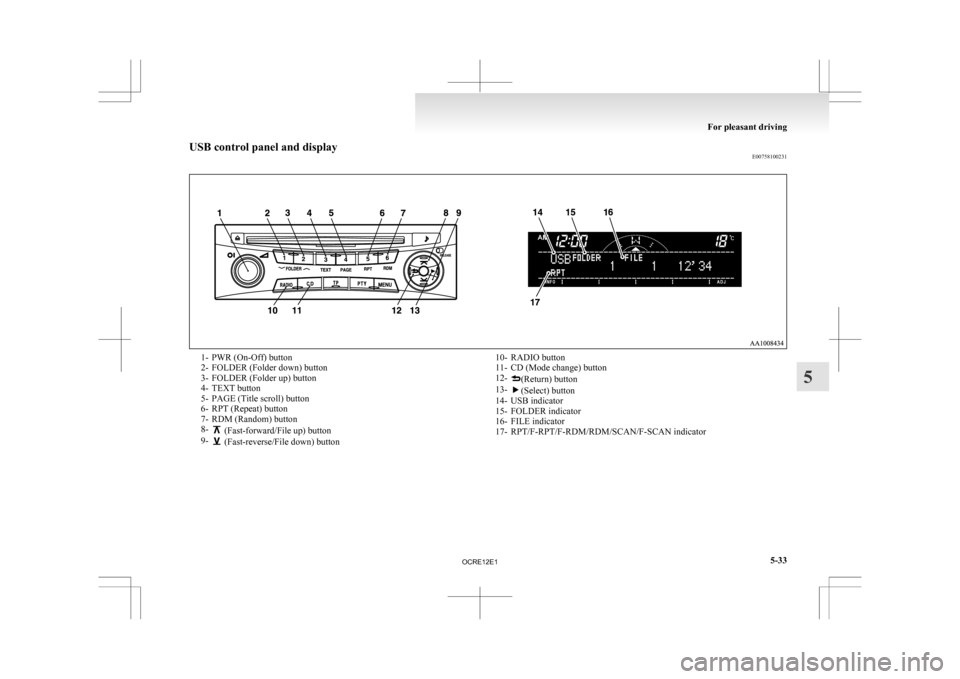
E007581002311- PWR (On-Off) button
2-
FOLDER (Folder down) button
3- FOLDER (Folder up) button
4- TEXT button
5- PAGE (Title scroll) button
6- RPT (Repeat) button
7- RDM (Random) button
8- (Fast-forward/File up) button
9- (Fast-reverse/File down) button
10- RADIO button
11-
CD (Mode change) button
12- (Return) button
13- (Select) button
14-
USB indicator
15- FOLDER indicator
16- FILE indicator
17- RPT/F-RPT/F-RDM/RDM/SCAN/F-SCAN indicator For pleasant driving
5-33 5
OCRE12E1
Page 217 of 369
To play from a USB memory device
E00762500366
1. Press
the PWR button (1) to turn on the au-
dio system. The system turns on in the last
mode used.
2. Connect your USB memory device to the USB input terminal.
Refer to “How to connect a USB memory de-
vice” on page 5-67.
3. Press the CD button (11) several times to switch to the USB mode. The mode changes
as follows every time the CD button is pressed.
CD mode → USB mode → Bluetooth ®
mode*
NOTE l If your vehicle is equipped with Auxiliary Au-
dio connector (RCA), pressing and holding
the CD button for 2 seconds or more
switches the system to the AUX mode.
4. Once the device is selected, playback starts and “USB” appears on the display.
NOTE l Depending on the condition of your USB de-
vice, it may take a longer time before the play-
back starts.
5. To stop the playback, change over to a differ- ent mode.
NOTE l To adjust the volume and tone, refer to “To
adjust the volume” and “To adjust the tone”. Supported compressed music files
E00758300305
This
audio can play MP3, WMA, AAC and WAV
files recorded in a USB memory device. This audio
supports up to 65,535 files in 700 folders on 8 levels.
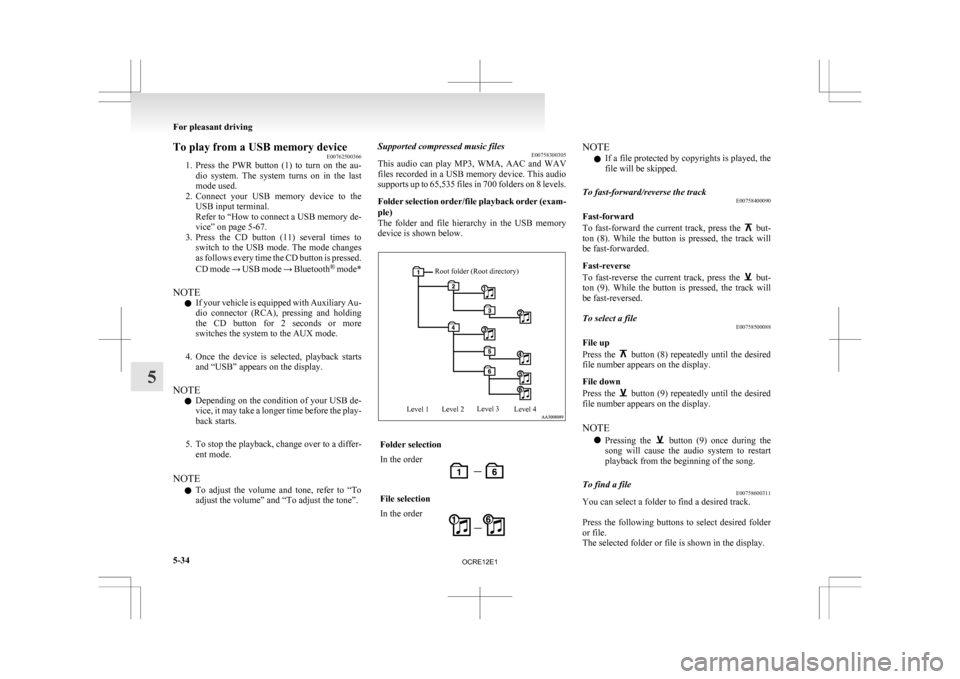
Folder selection order/file playback order (exam-
ple)
The folder and file hierarchy in the USB memory
device is shown below.
Root folder (Root directory)
Level 1 Level 2 Level 3
Level 4 Folder selection
In the order
File selection
In the order NOTE
l If a file protected by copyrights is played, the
file will be skipped.
To fast-forward/reverse the track E00758400090
Fast-forward
To
fast-forward the current track, press the but-
ton
(8). While the button is pressed, the track will
be fast-forwarded.
Fast-reverse
To fast-reverse the current track, press the but-
ton
(9). While the button is pressed, the track will
be fast-reversed.
To select a file E00758500088
File up
Press
the button (8) repeatedly until the desired
file number appears on the display.
File down
Press
the button (9) repeatedly until the desired
file number appears on the display.
NOTE
l Pressing
the button (9) once during the
song
will cause the audio system to restart
playback from the beginning of the song.
To find a file E00758600311
You can select a folder to find a desired track.
Press
the following buttons to select desired folder
or file.
The selected folder or file is shown in the display. For pleasant driving
5-34
5
OCRE12E1
Page 218 of 369
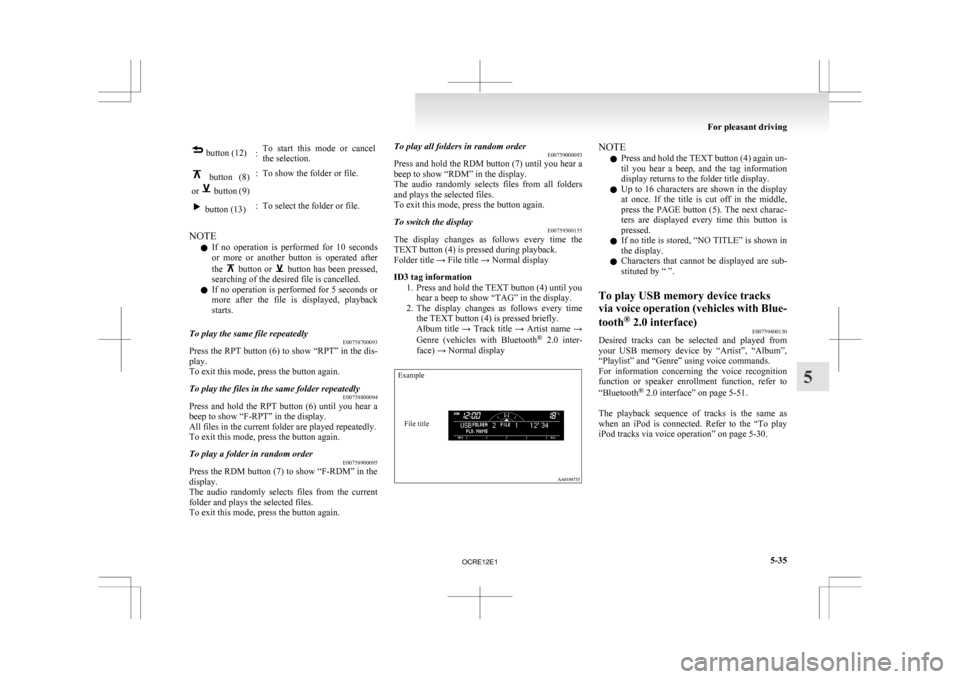
button (12)
:To start this mode or cancel
the selection. button (8)
or button (9)
: To show the folder or file. button (13)
: To select the folder or file.
NOTE l If
no operation is performed for 10 seconds
or more or another button is operated after
the button or button has been pressed,
searching of the desired file is cancelled.
l If
no operation is performed for 5 seconds or
more after the file is displayed, playback
starts.
To play the same file repeatedly E00758700093
Press the RPT button (6) to show “RPT” in the dis-
play.
To exit this mode, press the button again.
To play the files in the same folder repeatedly E00758800094
Press and hold the RPT button (6) until you hear a
beep to show “F-RPT” in the display.
All files in the current folder are played repeatedly.
To exit this mode, press the button again.
To play a folder in random order E00758900095
Press the RDM button (7) to show “F-RDM” in the
display.
The
audio randomly selects files from the current
folder and plays the selected files.
To exit this mode, press the button again. To play all folders in random order
E00759000093
Press
and hold the RDM button (7) until you hear a
beep to show “RDM” in the display.
The audio randomly selects files from all folders
and plays the selected files.
To exit this mode, press the button again.
To switch the display E00759300155
The display changes as follows every time the
TEXT button (4) is pressed during playback.
Folder title → File title → Normal display
ID3 tag information
1.
Press and hold the TEXT button (4) until youhear a beep to show “TAG” in the display.
2. The display changes as follows every time the TEXT button (4) is pressed briefly.
Album title → Track title → Artist name →
Genre (vehicles with Bluetooth ®
2.0 inter-
face) → Normal display
Example
File title NOTE
l Press
and hold the TEXT button (4) again un-
til you hear a beep, and the tag information
display returns to the folder title display.
l Up to 16 characters are shown in the display
at once. If the title is cut off in the middle,
press the PAGE button (5). The next charac-
ters are displayed every time this button is
pressed.
l If no title is stored, “NO TITLE” is shown in
the display.
l Characters that cannot be displayed are sub-
stituted by “ ”.
To play USB memory device tracks
via
voice operation (vehicles with Blue-
tooth ®
2.0 interface)
E00759400130
Desired tracks can be selected and played from
your
USB memory device by “Artist”, “Album”,
“Playlist” and “Genre” using voice commands.
For information concerning the voice recognition
function or speaker enrollment function, refer to
“Bluetooth ®
2.0 interface” on page 5-51.
The playback sequence of tracks is the same as
when an iPod is connected. Refer to the “To play
iPod tracks via voice operation” on page 5-30. For pleasant driving
5-35 5
OCRE12E1
Page 220 of 369
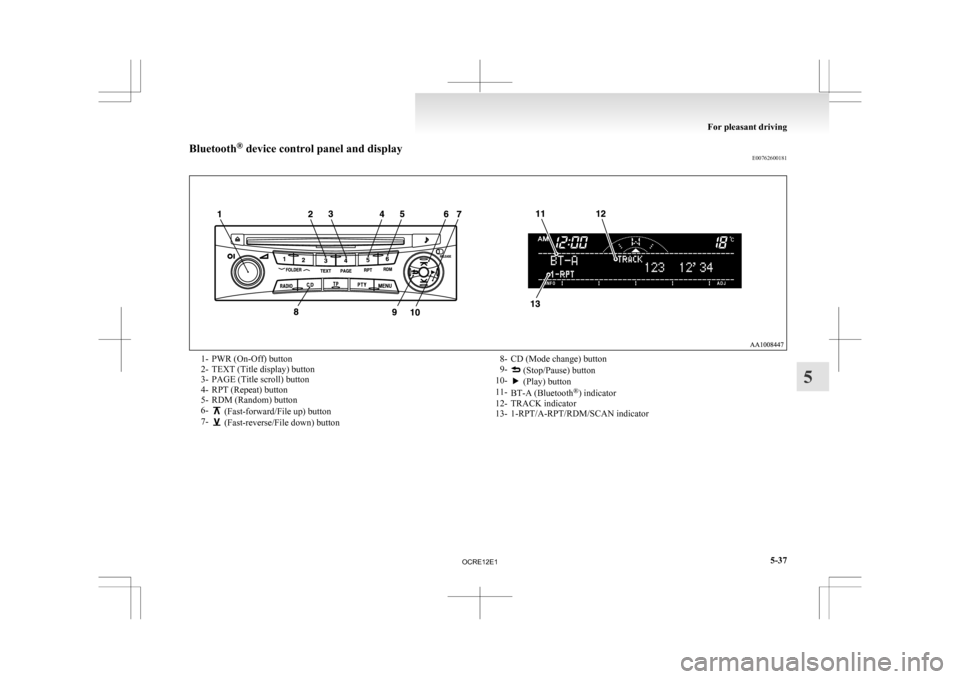
Bluetooth
®
device control panel and display
E007626001811- PWR (On-Off) button
2-
TEXT (Title display) button
3- PAGE (Title scroll) button
4- RPT (Repeat) button
5- RDM (Random) button
6- (Fast-forward/File up) button
7- (Fast-reverse/File down) button
8- CD (Mode change) button
9- (Stop/Pause) button
10- (Play) button
11- BT-A (Bluetooth ®
) indicator
12-
TRACK indicator
13- 1-RPT/A-RPT/RDM/SCAN indicator For pleasant driving
5-37 5
OCRE12E1
Page 221 of 369
To listen to tracks from a device con-
nected via Bluetooth
®
E00762700225
1. Press
the PWR button (1) to turn on the au-
dio system. The system turns on in the last
mode used.
2. Press the CD button (8) several times to
switch to the BT-A (Bluetooth ®
) mode. The
mode changes as follows every time the CD
button is pressed.
CD mode → USB (iPod) mode → Blue-
tooth ®
mode
NOTE l For vehicles equipped with Auxiliary Audio
connector (RCA), pressing and holding the
CD button for 2 seconds or more switches
the system to the AUX mode.
3. Connect your Bluetooth ®
device.
Refer to “Connecting the Bluetooth® 2.0 in-
terface and Bluetooth® device” on page
5-55.
4. Playback starts automatically.
NOTE l Depending on the connected device, the play-
back may not start automatically.
In this case, operate the connected device to
start the playback.
To stop the playback (if supported by the device) E00762800079
To stop the playback, press and hold the button
(9) until you hear a beep.
To restart the playback, press the button (10).To pause the playback (if supported by the device)
E00762900083
To pause the playback, press the button (9).
To restart the playback, press the button (10).
To fast-forward/reverse the track (if supported by
the device) E00765600010
Fast-forward
To
fast-forward the current track, press the but-
ton
(6). While the button is pressed, the track will
be fast-forwarded.
Fast-reverse
To fast-reverse the current track, press the but-
ton
(7). While the button is pressed, the track will
be fast-reversed.
To select a track (if supported by the device) E00763000094
Track up
Press
the button (6) repeatedly until the desired
track number appears on the display.
Track down
Press
the button (7) repeatedly until the desired
track number appears on the display.
NOTE
l Pressing
the button (7) once during the
song
will cause the audio system to restart
playback from the beginning of the song.
To play the same track or all tracks repeatedly (if
supported by the device) E00763100079
Press the RPT button (4) several times to show
“1-RPT”
(same track repeat mode) or “A-RPT” (all
tracks repeat mode) in the display. The mode changes as follows every time the RPT
button is pressed.
1-RPT mode → A-RPT mode → mode off
To
exit these mode, press the RPT button several
times until the 1-RPT indicator or the A-RPT indi-
cator goes off.
To play tracks in random order (if supported by
the device) E00763200070
Press the RDM button (5) to show “RDM” in the
display.
The
system randomly selects and plays tracks from
all tracks in the Bluetooth ®
device.
To exit this mode, press the button again.
To switch the display (if supported by the device) E00763400072
The display changes as follows every time the
TEXT button (2) is pressed briefly.
Album
title → Title name → Artist name → Genre
→ Normal display
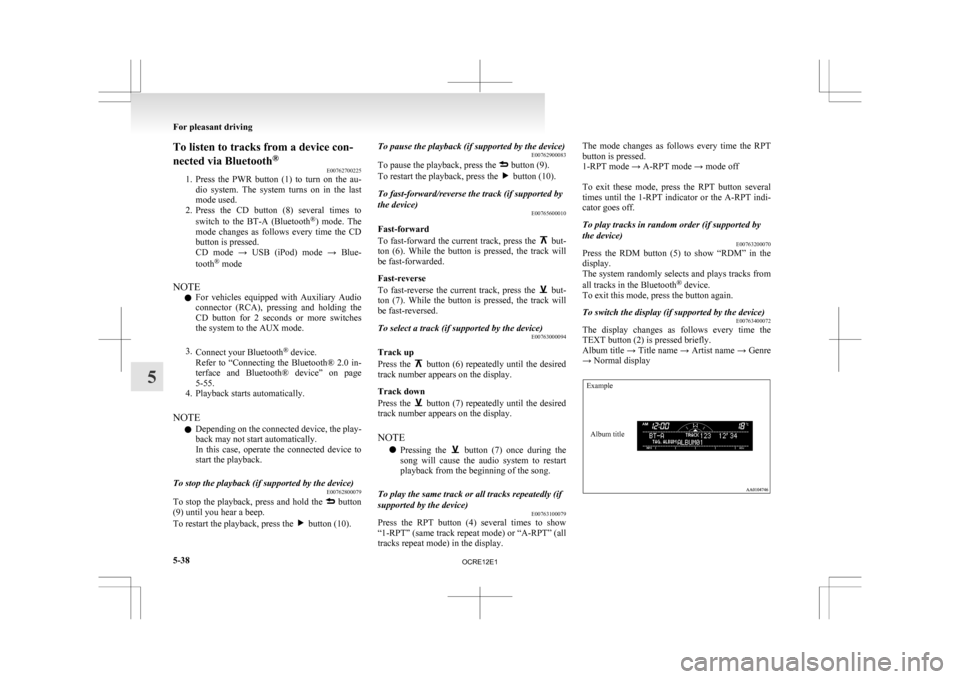
Example
Album title For pleasant driving
5-38
5
OCRE12E1
Page 223 of 369
CAUTION
l
Do not operate the connected audio equip-
ment while driving.
This could distract you and an accident
might occur.
NOTE l The
connected audio equipment cannot be op-
erated with the vehicle’s audio system.
l Depending on the connected audio equip-
ment, it may produce noise from the speakers.
l Use the connected audio equipment’s own
power source, such as its battery.
Noise may be produced from the speakers if
the connected audio equipment is used while
charging it using the accessory socket of the
vehicle.
l Do not activate the external audio input
mode when no audio equipment is connected.
Otherwise, noise may be produced from the
speakers.
l Connect audio equipment when the external
audio input mode is deactivated or lower the
vehicle’s speaker volume before connecting it.
Noise may be produced from the speakers if
audio equipment is connected after the exter-
nal audio input mode is activated.
l For information on how to connect and oper-
ate the audio equipment, refer to the owner’s
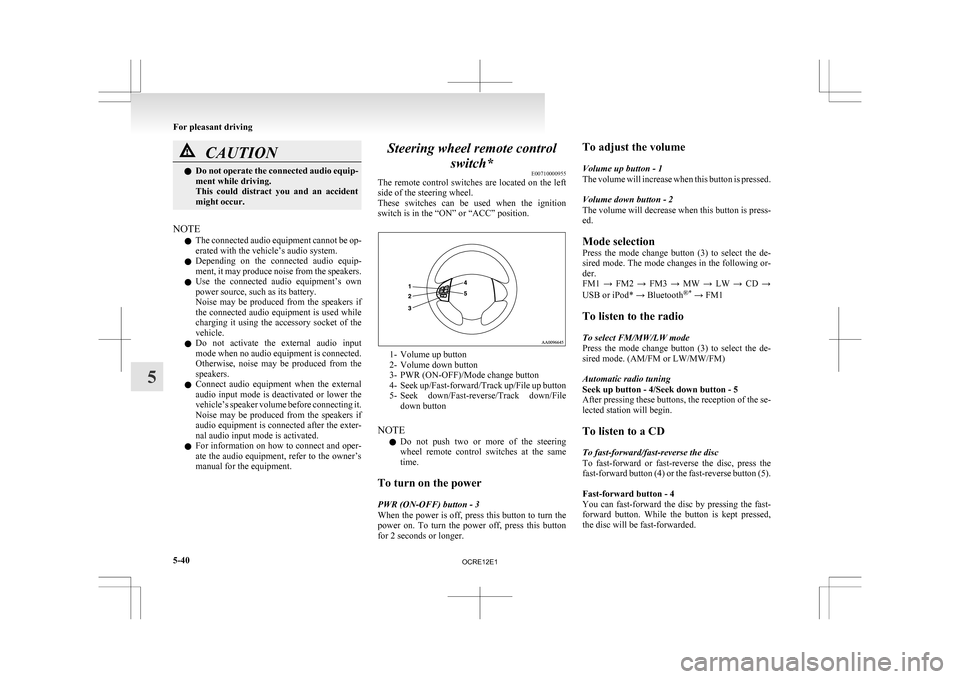
manual for the equipment. Steering wheel remote control
switch* E00710000955
The
remote control switches are located on the left
side of the steering wheel.
These switches can be used when the ignition
switch is in the “ON” or “ACC” position. 1- Volume up button
2-
Volume down button
3- PWR (ON-OFF)/Mode change button
4- Seek up/Fast-forward/Track up/File up button
5- Seek down/Fast-reverse/Track down/File down button
NOTE l Do not push two or more of the steering
wheel remote control switches at the same
time.
To turn on the power
PWR (ON-OFF) button - 3
When the power is off, press this button to turn the
power on. To turn the power off, press this button
for 2 seconds or longer. To adjust the volume
Volume up button - 1
The
volume will increase when this button is pressed.
Volume down button - 2
The volume will decrease when this button is press-
ed.
Mode selection
Press the mode change button (3) to select the de-
sired mode. The mode changes in the following or-
der.
FM1 → FM2 → FM3 → MW → LW → CD →
USB or iPod* → Bluetooth ®*
→ FM1
To listen to the radio
To select FM/MW/LW mode
Press the mode change button (3) to select the de-
sired mode. (AM/FM or LW/MW/FM)
Automatic radio tuning
Seek up button - 4/Seek down button - 5
After pressing these buttons, the reception of the se-
lected station will begin.
To listen to a CD
To fast-forward/fast-reverse the disc
To fast-forward or fast-reverse the disc, press the
fast-forward button (4) or the fast-reverse button (5).
Fast-forward button - 4
You can fast-forward the disc by pressing the fast-
forward button. While the button is kept pressed,
the disc will be fast-forwarded.
For pleasant driving
5-40
5
OCRE12E1