2010 MERCEDES-BENZ SLS COUPE oil temperature
[x] Cancel search: oil temperaturePage 11 of 361
DVD
Copy protection ............................. 167
Disc ............................................... 167
Selecting atrack ............................ 176
DVD audio
Operation (on-board computer) .....235
DVD playbac kconditions ................. 191
DVD video Operating (on-board computer) .....236
Dynamic route guidance ................... 119
Switching on/off ........................... 119
TMC/TMCPro ................................ 119E
EASY-ENTRY feature .........................207
Activating/deactivating (on-
board computer) ............................ 240
EASY-EXIT feature ............................. 207
Crash-responsive ........................... 207
EBD
Display message ............................ 299
EBV (electronic brake force distri-
bution) .................................................. 49
Electronic brake force distribution See EBV ........................................... 49
Electronic Stability Program
see ESP ®
Electronic Traction Support see ETS
Emergency call 999 or 112 ..............129
Emergency key element ...................321
Lost ............................................... 320
Emergency spare wheel
Inflating ......................................... 333
Stowing .......................................... 334
Technical data ............................... 355
Emergency unlocking
Boot ............................................... 322
Vehicle .......................................... .322
Engine
Running irregularl y......................... 315
Starting .................................. 202, 220
Starting problems ..........................315
Starting the engine with the key ....220
Starting with KEYLESS GO .............220
Starting with the key ..................... .220
Stopping ........................................ 222Engine diagnostics warning lamp
....310
Engine electronics .............................346
Malfunction ................................... .315
Engine number .................................. 349
Engine oil ........................................... 350
Capacities ...................................... 269
Checking the oil level (dipstick) .....269
Consumption ................................. 269
Display mes-
sag e....................................... 302, 303
Filler neck ...................................... 269
Temperature display (on-board
computer) ...................................... 241
Temperature gauge ........................ 229
Topping up ..................................... 269
Ensemble ........................................... 161
ESP ®
(Electronic Stability Pro-
gram) .................................................... 47
Activating/deactivating .............47, 48
AMG menu (on-board computer) ...241
Warning lamp ..................47, 308, 309
ETS (Electronic Traction Support) ...... 48
Example of operation ..........................66
Exterior lighting Delayed switch-off (on-board
computer) ...................................... 239
Exterior mirrors
Adjusting ....................................... 208
Anti-dazzle mode (automatic) ........209
Folding in/ou t(automatically) .......209
Folding in/ou t(electrically) ...........208
Folding in whe nlocking (on-board
computer) ...................................... 240
Malfunction ................................... .318
Parking position ............................. 209
Resetting ....................................... 209
Storing settings ............................. 210
Exterior view
Overview .......................................... 22
External authorisation ........................77
External data Deleting (convenience telephone) .137
Importing (convenience tele-
phone )................................... 136, 155
External devices (Media Interface)
Connecting .................................... 1848
Index BA 197 ECE RE 2010/6a; 1; 2, en-GB
sabbae uV ersion: 3.0.3.6
2010-05-07T14:19:43+02:00 - Seite 8
Page 15 of 361
Operating (on-board computer)
.....235
Selecting amedium ....................... 175
Multifunction display ..........................62
Multifunction steering wheel .....62, 230
Overview .......................................... 28
Multisession CDs ............................... 166
Music Register .................................. .178
Copying musi cdata ....................... 181
MUSIC REGISTER
Deleting allm usic files................... 182
My address ........................................ 123N
Navigation Basi csettings .................................. 84
On-board computer .......................234
Navigation announcements .............116
Switching off .................................. 116
Switching on .................................. 116
North up orientation ...........................84
Notes on running in anew vehicle ..266 O
Odometer see Total distance recorde r........... 233
see Trip meter ....................... 233, 234
Off-map .............................................. 115
Off-road .............................................. 115
Oil Consumption ................................. 269
Topping up ..................................... 269
Oil level
Checking (dipstick) ........................269
On-board computer ...........................230
AMG menu ..................................... 241
Audi omenu ................................... 235
Convenience submenu ..................240
Display messages ..........................289
Factory settings ............................. 240
Instrument cluster submenu ..........238
Ligh tsubmenu ............................... 238
Navigation menu ............................ 234
Overview ........................................ 232
Service menu ................................. 237
Settings menu ............................... 238
Standard display submenu ............233 Telephone menu
............................ 236
Trip menu ...................................... 232
Vehicle submenu ........................... 240
Opening and closing .........................200
Acoustic confirmation ....................240
Operating system
see On-board computer
Orientation in direction of travel .......84
Outside temperature indicator ........230 P
Pain tcode .......................................... 348
Paintwork Cleaning ......................................... 283
Parking ............................................... 221
Parking aid Exterior mirror on the front-
passenger side ............................... 209
PARKTRONI C................................. 248
Parking brake
Display message ............................ 296
Electric parking brake ....................221
Parking position
Exterior mirror on the front-
passenger side ............................... 209
PARKTRONIC ...................................... 248
Activating/deactivating .................250
Malfunction ................................... .316
Range of the sensors .....................248
Warning displa y............................. 249
PASSENGE RAIRBAG OFF warning
lamp ............................................. 42, 307
PCMCIA memory card Ejecting .......................................... 171
Loading .......................................... 169
Permanent Speedtronic ....................247
Petrol Minimum grade .............................. 267
see Fuel
Phone book
Adding a numbe rto an address
book entry. .................................... 141
Calling up ....................................... 137
Creating anew entry ..................... 14012
Index BA 197 ECE RE 2010/6a; 1; 2, en-GB
sabbae uV ersion: 3.0.3.6
2010-05-07T14:19:43+02:00 - Seite 12
Page 18 of 361
Stowage compartments
...................257
Armrest (under) ............................. 258
Cuph older..................................... 258
Glove compartment .......................257
Telephone compartment ................258
Submenu (on-board computer)
Convenience .................................. 240
Factory setting ............................... 240
Instrument cluster .........................238
Lights ............................................ .238
Standard displa y............................ 233
Vehicle .......................................... .240
Sub-programmes (DAB) ....................165
Summer and standard time Switching ......................................... 73
Summer opening
see Convenience opening
Sun visor ............................................ 259
Supplemental Restraint System see SRS ........................................... 35
See SRS ........................................... 35
Surround lighting
Switching on/off (on-board com-
puter) ............................................. 239
Switching off the alarm
ATA .................................................. 49
Syste mlanguage
Setting ............................................. 78
Syste mmenu....................................... 71
Syste msettings
Menu overview ................................ .71T
Tail lamps Display message ............................ 301
Tail pipes
Cleaning ......................................... 284
Tank
see Fuel tank
Tank capacity .................................... 349
Technical data ................................... 352
Emergency spare wheel .................355
Telephone
Accepting/ending call ...................144
Accepting or rejecting a waiting
call ................................................. 146
Ending an active call ......................146Entering phone numbers ................ 145
Incoming call
................................. 144
Outgoing call ................................. 144
Reception and transmission vol-
ume ............................................... 135
see Mobile phone .......................... 236
Sending DTMF tones ..................... .146
Single call ...................................... 145
Switching hands-free microphone
on/off ............................................ 146
Telephone basic menu
Bluetooth interface ........................132
Convenience telephony .................134
Telephone compartment ..................258
Telephone mode Redialling ....................................... 145
Telephone number
Entering ......................................... 144
Temperature
Engine oil ....................................... 229
Engine oil (on-board computer) ...... 241
Outside temperature ..................... .230
Transmissio noil (on-board com-
puter )............................................. 241
Text message (SMS) (convenience
telephone)
Calling the sende r.......................... 148
Deleting ......................................... 149
Incoming ........................................ 147
Read-aloud function .......................148
Reading .......................................... 148
Storing the sende rinthe address
book ...................................... 148, 149
THERMOTRONIC
Malfunction indicator lamp ............307
Tightening torque .............................. 332
Time Lap time (on-board computer) .......241
Setting ............................................. 72
Time format
Setting ............................................. 72
Timer (on-board computer) ..............241
Time zone Setting ............................................. 73
TIREFIT kit
Using ............................................. 326
TMCPro ............................................... 119 Index
15 BA 197 ECE RE 2010/6a; 1; 2, en-GB
sabbae uV ersion: 3.0.3.6
2010-05-07T14:19:43+02:00 - Seite 15
Page 19 of 361
Tone settings
Trebl eand bass ............................... 68
Total distance recorder ....................233
Tow-away protection ..........................49
Towing ........................................ 339, 341
Towing eye Fitting ............................................ 341
Removing ....................................... 341
Town
Entering ........................................... 94
Traffic announcements on ...............164
Traffic jam function ........................... 117
Traffic Programme Switching traffic announcements
on/off ............................................ 164
Transferring acall (convenience
telephone) .......................................... 146
Transmission oil Temperature gauge (on-board
computer) ...................................... 241
Transmission output (maximum)
Telephone/two-way radio ..............347
Transport (vehicle) ............................341
Trim strips Cleaning ......................................... 285
Trip computer
On-board computer .......................232
Trip meter .......................................... 233
Resetting (on-board computer) ......234
True Image™ ........................................ 68
Turn signal Display message ............................ 300
Two-way radio
Installatio n..................................... 347
Type identification plate
see Vehicle identification plate ......348
Tyre grip ............................................. 278
Tyre pressure ..................................... 272
Calling up (on-board computer) .....273
Display message ............................ 304
Tyre pressure monitor
Warning lamp ................................. 311
Tyres
Direction of rotatio n...................... 272
General notes ................................ 270
Technical data ............................... 354
Tyre tread .......................................... .272 U
Unladen weight ................................. 352
Unlocking Emergency unlocking ..................... 322
Updating
Map software ................................... 89
Upshift indicator ............................... 229
USB devices Connecting to the Media Inter-
face ............................................... 184
Folders and playlists ......................187
Using the telephone ..........................144
Multi-function steering wheel ..........62 V
Variable Speedtronic ........................246
vCards Receiving ....................................... 137
Vehicle
Emergency unlocking ..................... 322
Individual settings (on-board com-
puter) ............................................. 238
Leaving parked up .........................321
Towing ........................................... 341
Transporting .................................. 341
Unlocking (key ).............................. 200
Vehicle battery .................................. 334
Vehicle dimensions ...........................352
Vehicle electronics ...........................346
Vehicle identification number
(VIN) ................................................... 348
Vehicle identification plate ..............348
Vehicle position Saving ...................................... 83, 127
Vehicle tool kit .................................. 288
Vehicle weights ................................. 352
Video DVD Fast forward/rewind ..................... .194
Operation ....................................... 190
Pause function ............................... 195
Picture settings .............................. 195
Selecting a film/title ..................... .195
Selecting a scene/chapter ............195
Stop function ................................. 194
Video mode
Automatic picture shutoff ..............190 16
Index BA 197 ECE RE 2010/6a; 1; 2, en-GB
sabbae uV ersion: 3.0.3.6
2010-05-07T14:19:43+02:00 - Seite 16
Page 28 of 361
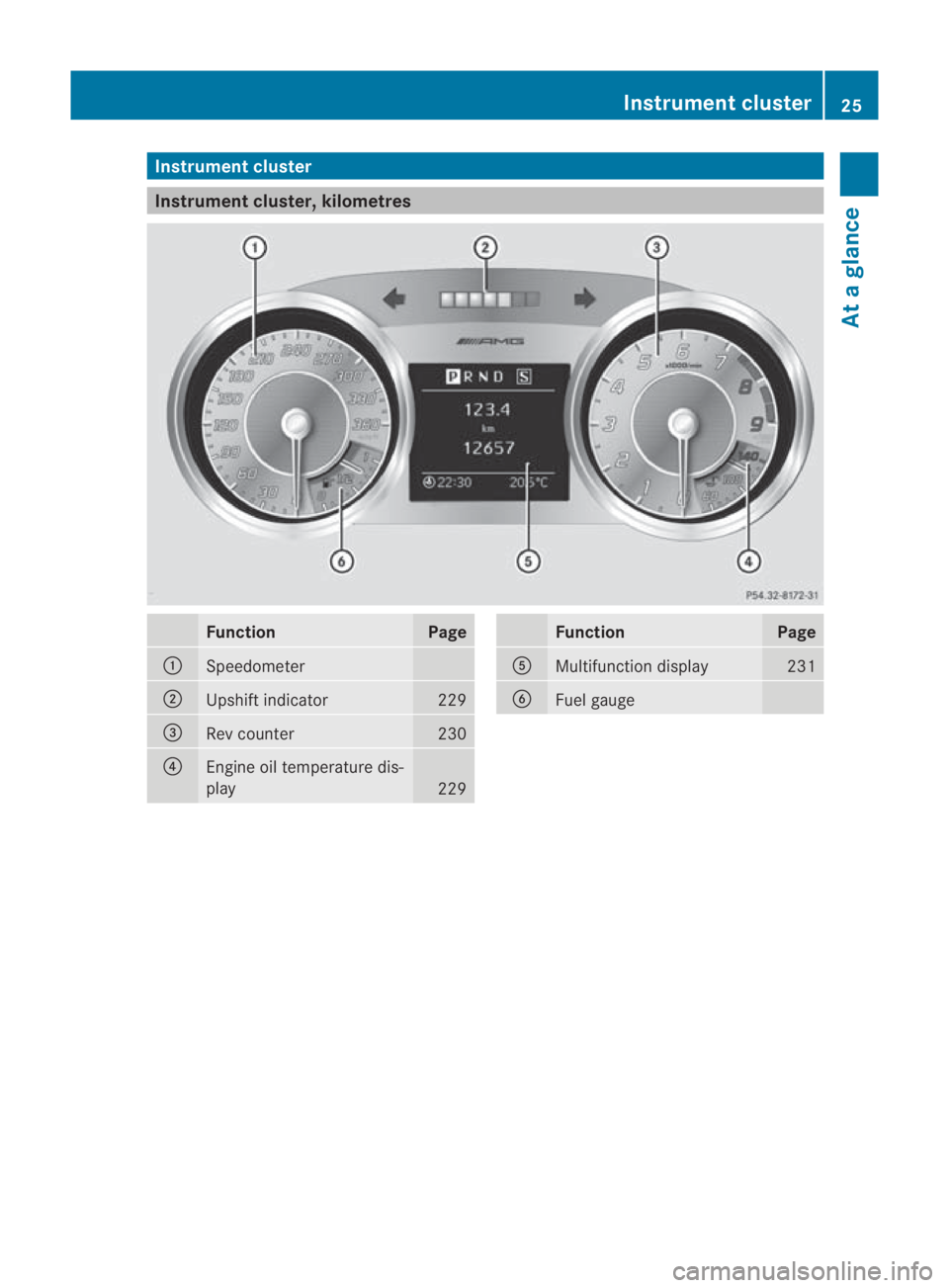
Instrumen
tcluster Instrument cluster, kilometres
Function Page
0001
Speedometer
0002
Upshif
tindicator 229
0015
Re
vc ounter 230
0014
Engine oil temperature dis-
play
229 Function Page
0012
Multifunction display 231
0013
Fuel gauge Instrument cluster
25At a glance
BA 197 ECE RE 2010/6a; 1; 2, en-GB
sabbaeu Version: 3.0.3.6 2010-05-07T14:19:43+02:00 - Seite 25
Page 29 of 361
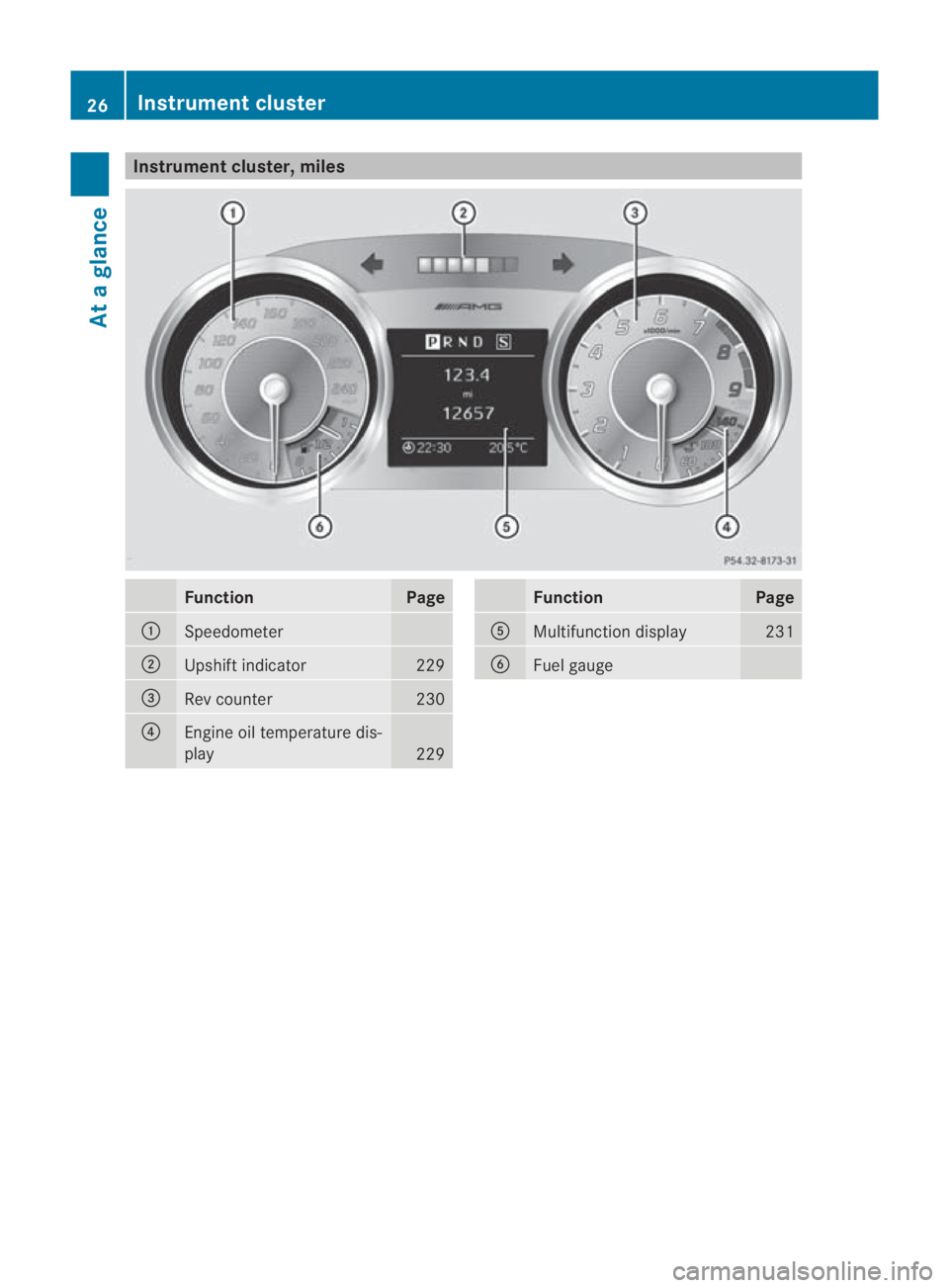
Instrumen
tcluster, miles Function Page
0001
Speedometer
0002
Upshif
tindicator 229
0015
Re
vc ounter 230
0014
Engine oil temperature dis-
play
229 Function Page
0012
Multifunction display 231
0013
Fuel gauge26
Instrument clusterAt a glance
BA 197 ECE RE 2010/6a; 1; 2, en-GB
sabbaeu
Version: 3.0.3.6 2010-05-07T14:19:43+02:00 - Seite 26
Page 30 of 361
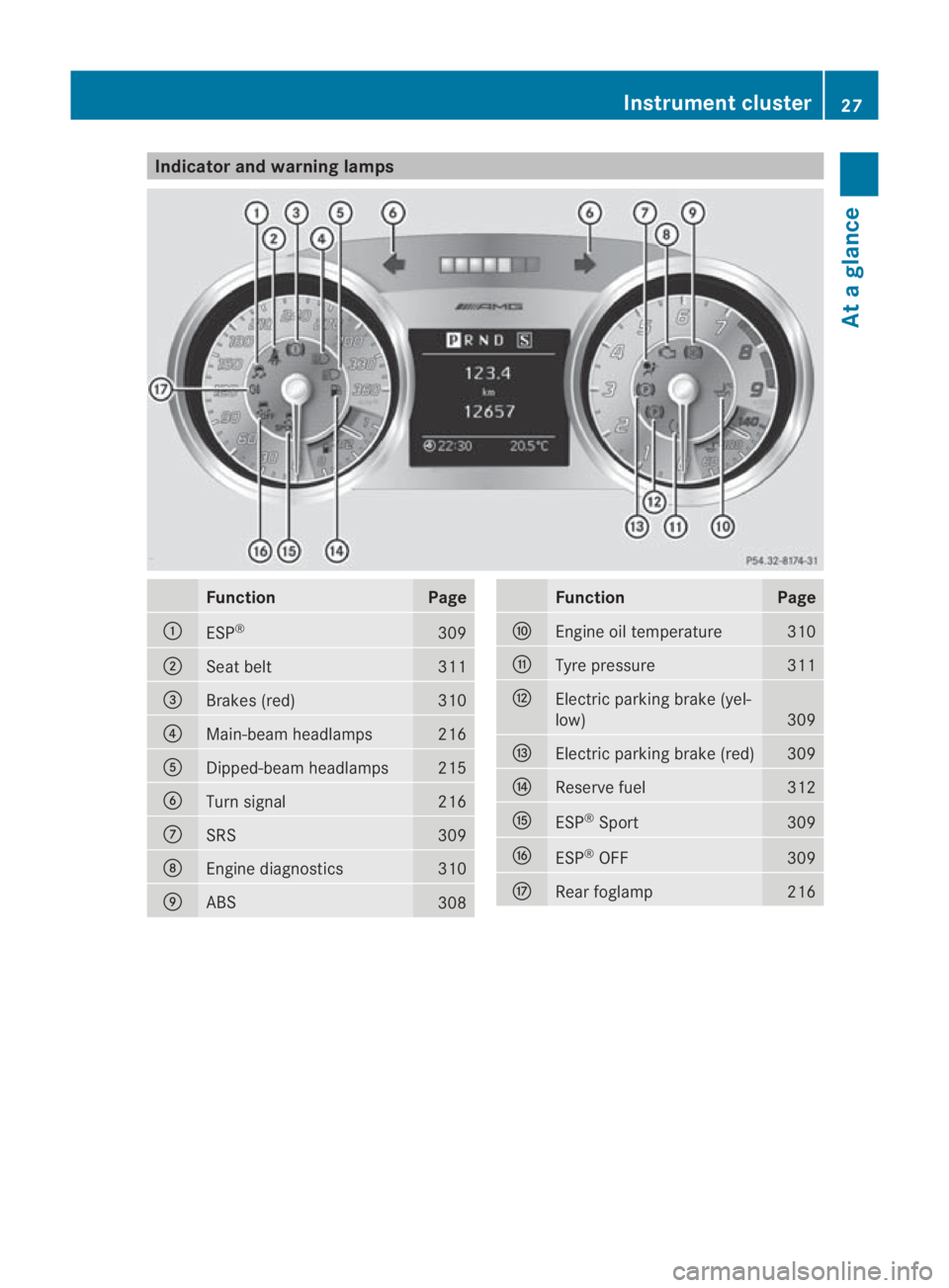
Indicator and warning lamps
Function Page
0001
ESP
® 309
0002
Seat belt 311
0015
Brakes (red) 310
0014
Main-beam headlamps 216
0012
Dipped-beam headlamps 215
0013
Turn signal 216
000A
SRS 309
000B
Engine diagnostics 310
000C
ABS
308 Function Page
000D
Engine oil temperature 310
000E
Tyre pressure 311
000F
Electric parking brake (yel-
low)
309
0010
Electric parking brak
e(red) 309
0011
Reserve fuel 312
0016
ESP
®
Sport 309
0017
ESP
®
OFF 309
0018
Rearf
oglamp 216Instrument cluster
27At a glance
BA 197 ECE RE 2010/6a; 1; 2, en-GB
sabbaeu Version: 3.0.3.6 2010-05-07T14:19:43+02:00 - Seite 27
Page 223 of 361
Driving an
dparking Starting the engine
G
Risk of accident
Do not place any objects in the driver's foot-
well. If you use a floormat or carpet in the
driver's footwell, make sure that it is correctly
secured and that there is sufficient clearance
for the pedals.
Do not place several floormats on top of one
another.
Loose objects or the floormats could other-
wise get caught between the pedals if you
accelerate or brake suddenly. You will then
not be able to brake, declutch or accelerate
as intended .This could lead to accidents and
injury. G
Risk of poisoning
Never leave the engine running in enclosed
spaces. The exhaust gases contain carbon
monoxide. Inhaling exhaust fumes consti-
tutes a health hazard and could lead to loss
of consciousness or even death.
i Do not depress the accelerator pedal
when starting the engine.
KEYLESS-GO starting function G
Risk of injury
Your vehicle can be started using a valid KEY-
LESS GO key. For this reason, children should
never be left unsupervised in the vehicle.
Always take the KEYLESS GO key with you
when leaving the vehicle, even if you are only
leaving it for a short time.
i The Start/Stop button can be used to
start the vehicle without inserting the key
in the ignition lock. You merely need to
carry the key on your person.
When starting the engine and while the vehi-
cle is in motion, KEYLESS-GO regularly
checks whether a valid key is located in the
vehicle interior by means of brief radio con- nections. The boot is not covered by the
checks.
X
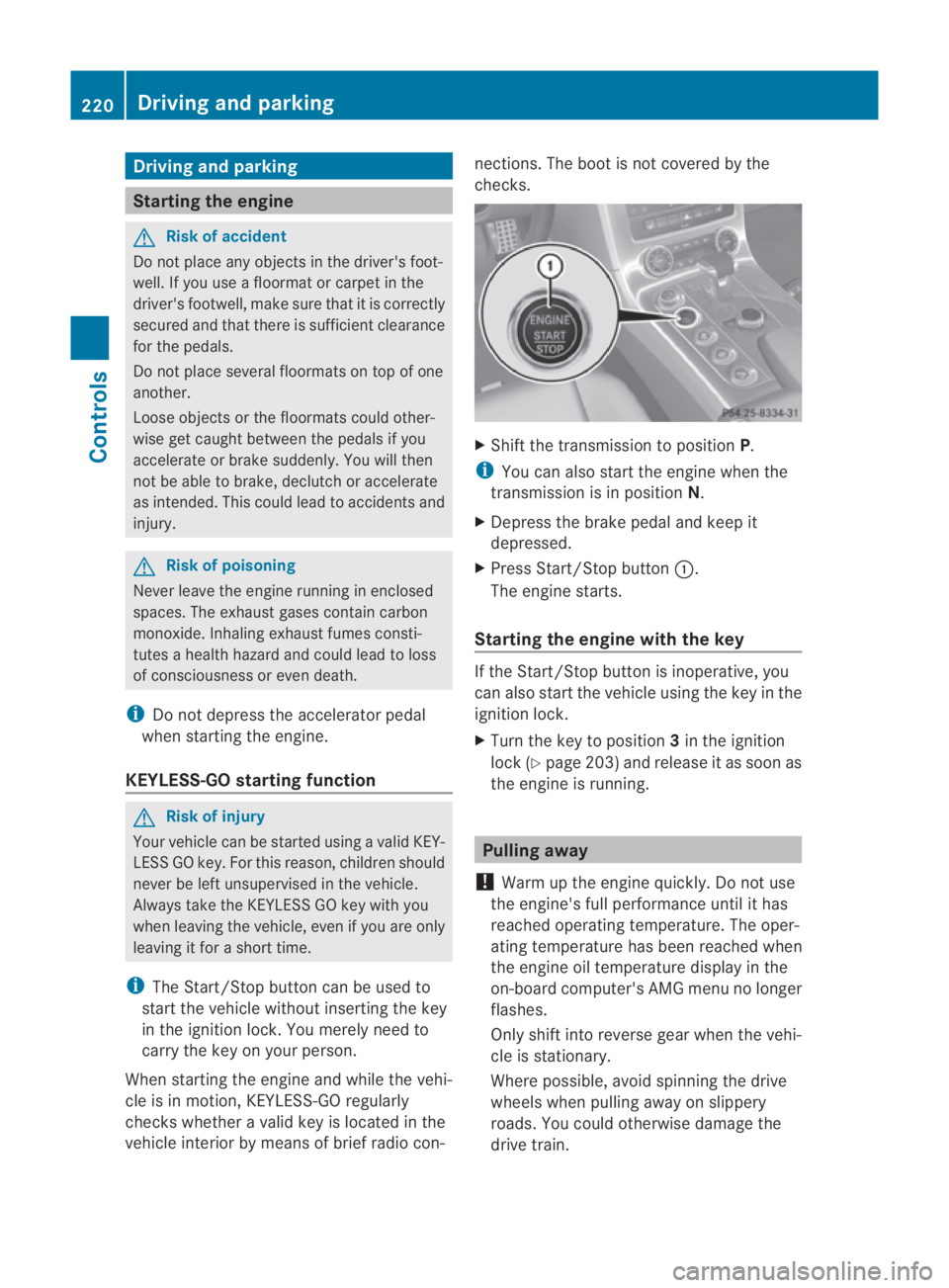
Shift the transmission to position P.
i You can also start the engine when the
transmission is in position N.
X Depress the brake pedal and keep it
depressed.
X Press Start/Stop button 0001.
The engine starts.
Starting the engine with the key If the Start/Stop button is inoperative, you
can also start the vehicle using the key in the
ignition lock.
X
Turn the key to position 3in the ignition
lock (Y page 203) and release it as soon as
the engine is running. Pulling away
! Warm up the engine quickly. Do not use
the engine's full performance until it has
reached operating temperature. The oper-
ating temperature has been reached when
the engine oil temperature display in the
on-board computer's AMG menu no longer
flashes.
Only shift into reverse gear when the vehi-
cle is stationary.
Where possible, avoid spinning the drive
wheels when pulling away on slippery
roads. You could otherwise damage the
drive train. 220
Driving and parkingControls
BA 197 ECE RE 2010/6a; 1; 2, en-GB
sabbaeu
Version: 3.0.3.6 2010-05-07T14:19:43+02:00 - Seite 220