2010 MERCEDES-BENZ SLS COUPE dashboard
[x] Cancel search: dashboardPage 8 of 361
Audio DVD
Stop function ................................. 174
Audio format
Setting (audio DVD mode )............. 178
Audio menu ........................................ 157
AUTO lights Display message ............................ 300
Automatic car wash ..........................281
Autostore ........................................... 163B
Back button ......................................... 60
Bang &Olufsen sound system ...........68
BAS (Brake Assist) ............................... 46
Battery Charging ........................................ 336
Checking (key )............................... 323
Check lamp (key )........................... 323
Disconnecting ................................ 336
Display message .................... 295, 303
Jump-starting ................................. 338
Maintenance (vehicle) .................... 334
Reconnecting ................................. 337
Removing/fitting ........................... 336
Vehicle battery .............................. 334
Belt force limiters
Activation ......................................... 35
Belt tensioners
Activation ......................................... 35
Belt warning ....................................... 212
Bird's-eye view .................................... 84
Bluetooth ®
Activating/deactivating ...................75
Authorising devices .........................76
Revoking authorisatio n.................... 77
Settings ........................................... 75
Bluetooth ®
telephones list .................76
Bonnet Bonnet catch ................................. 268
Display message ............................ 294
Opening/closing ............................ 267
Releas elever ................................. 268
Boot
Emergency release ........................322
Locking separatel y......................... 202
Opening ......................................... 202Boot lid
Display message ............................ 294
Opening/closing ............................ 201
Boot load (maximum) ........................ 352
Brake Assist see BAS ........................................... 46
Brake fluid .......................................... 351
Display message ............................ 299
Brake lamps
Adaptive .......................................... .46
Display message ............................ 301
Brake system
Display message ............................ 295
Bulbs
Licence plate lamp ......................... 324
see Lamp C
Call Accepting or rejecting ...................146
Ending ............................................ 146
Call (telephone)
Placing ........................................... 144
Calling up a fault
see Display message .....................289
Call lists ............................................. 142
Displaying details ........................... 143
Storing an entry which has not yet
bee nstore d................................... 143
Care
Automatic car wash .......................281
Care products ................................ 280
Cleaning agents ............................. 280
Dashboard ..................................... 284
Display ........................................... 284
Exterior .......................................... 281
Headlamps ..................................... 283
High-pressure cleaners ..................282
Interior ........................................... 284
Matt paintwork .............................. 282
Paintwork ...................................... 283
Plastic trim .................................... 285
Reversing camera ..........................284
Seat covers .................................... 285
Sensors ......................................... 284
Steering wheel boss ......................284
Tai lpipes ....................................... 284 Index
5 BA 197 ECE RE 2010/6a; 1; 2, en-GB
sabbae uV ersion: 3.0.3.6
2010-05-07T14:19:43+02:00 - Seite 5
Page 10 of 361
Dashboard
Cleaning ........................................ .284
see Cockpit
see Instrument cluster
Dashboard lighting
see Instrument lighting ..................239
Date format
Setting ............................................. 72
Daytime driving lights ......................215
Display message ............................ 302
Switching on/off (on-board com-
puter) ............................................. 238
Delaye dswitch-off
Exterio rlighting (on-board com-
puter )............................................. 239
Interior lighting (on-board com-
puter) ............................................. 239
Delete button ....................................... 61
Deleting Call lists ......................................... 142
Destination
Deleting ................................. 126, 127
Entering from the destination
memory ......................................... 101
Entering from the list of last des-
tinations ......................................... 103
Entering using the map ..................103
Saving ............................................ 125
Destination entry
Specia ldestination ........................ 106
Destination information ...................118
Destination input ................................. 92
destination memory ..........................123
Destination memory Deleting an entry ........................... 126
My address .................................... 123
Storing adestination ..................... 125
Digital speedometer .........................233
Dipped-beam headlamps Display message ............................ 300
Symmetrical ................................... 279
Disc
CD/DVD ........................................ 167
MP3 ............................................... 166
Display
Adjusting the brightness ..................72
see Multifunctio ndisplay ............... 231Display design
Setting ............................................. 72
Display messages ............................. 289
ASSYST PLUS service interval dis-
pla y................................................ 279
Symbo lmessages .......................... 293
Text messages ............................... 291
Distance recorder
Total distance recorde r.................. 233
Trip meter ...................................... 233
Door
Display message .................... 294, 303
Emergency unlocking ..................... 322
Not unlocking the front-
passenger door .............................. 200
Opening (from the inside) ..............201
Unlocking all (factory setting) ........200
Door control panel
Overview .......................................... 32
Drinks holder
see Cuph older
Drive program .................................... 224
Manual .......................................... .229
Driver's airbag ..................................... 38
Driver's knee airbag ............................39
Driver's seat position ........................ 213
Driving abroad ................................... 279
Driving safety systems .......................45
ABS .................................................. 46
ADAPTIVE BRAKE ............................. 49
Adaptive brake lamps ......................46
BAS .................................................. 46
EBV .................................................. 49
ESP ®
................................................ 47
Driving systems ................................ 243
Cruise control ................................ 243
Parktroni c...................................... 248
Reversing camera ..........................250
Speedtronic ................................... 245
Driving tips
Braking .......................................... 277
Driving abroad ............................... 279
Driving on wet road s...................... 278
Fording .......................................... 278
Winter ............................................ 276
DTMF tones
Sending ......................................... 146 Index
7 BA 197 ECE RE 2010/6a; 1; 2, en-GB
sabbae uV ersion: 3.0.3.6
2010-05-07T14:19:43+02:00 - Seite 7
Page 40 of 361
gered replaced at a qualified specialist work-
shop.
Comply with safety regulations when dispos-
ing of belt tensioners. Any Mercedes-Benz
Service Centre can provide details of these
regulations.
Airbags Airbag deployment slows down and restricts
the movement of the vehicle occupant.
If the airbags are deployed
,you will hear a
bang and a small amount of powder may also
be released. Only in rare cases will the bang
affect your hearing. The powder that is
released generally does not constitute a
health hazard. The 0018SRS warning lamp
lights up.
The SRS/AIRBAG symbol indicates the loca-
tion of the airbags. G
Risk of injury
Airbags provide additional protection; they
are not, however, a substitute for seat belts.
Observe the following notes to reduce the risk
of serious or even fatal injury caused by airbag
deployment:
R All vehicle occupants –inparticular, preg-
nant women – must wear their seat belt
correctly at all times and lean back against
the backrest, which should be positioned
as close to the vertical as possible.
R Always secure childre nless than 1.50mt all
and unde r12years of age in suitable child
restraint systems.
R All vehicle occupants must select a seat
position that is as far away from the airbag
as possible. The driver's seat position must
allow the vehicle to be driven safely. The
driver's chest should be as far away from
the centre of the driver's fron tairbag cover
as possible.
R Move the front-passenge rseat as far back
as possible. This is especially important if a
child is secured in a child restraint system
on this seat. R
Vehicle occupants –inparticular childre n–
must not lean their head in the area of the
window where the windowbag is deployed
R Rearward-facing child restraint systems
must not be fitted to the front-passenger
seat unless the front-passenger front air-
bag has been disabled .The front-passenger
front airbag is disabled if a child restraint
system with automatic child seat recogni-
tion is fitted to the front-passenger seat.
The 000A PASSENGER AIRBAG OFF indica-
tor lamp must be continuously lit. In order
for the automatic child seat recognition to
function, a Mercedes-Ben zapproved child
seat with transponder is required.
If you secure a forward-facing child
restraint system to the front-passenger
seat, you must move the front-passenger
seat as far back as possible.
R Make sure there are no heavy or sharp-
edged objects in pockets of clothing.
R Do not lean forwards, e.g. over the cover of
the driver's/front-passenger front airbag,
particularly when the vehicle is in motion.
R Do not put your feet on the dashboard.
R Only hold the steering wheel by the rim.
This allows the airbag to deploy fully. You
could be injured if the airbag is deployed
and you are holding the inside of the steer-
ing wheel.
R Do not lean on the doors from inside the
vehicle.
R Make sure that there are no people, ani-
mals or objects between the vehicle occu-
pants and the area of deployment of the
airbag.
R Do not place any objects between the seat
backrest and the door.
R Do not hang any hard objects, for example,
coat hangers, on the coat hooks.
R Do not attach accessories, e.g. cup holders,
to the doors.
It is not possible to rule out a risk of injuries
caused by an airbag due to the high speed at
which the airbag must deploy. Occupant safety
37Safety
BA 197 ECE RE 2010/6a; 1; 2, en-GB
sabbaeu Version: 3.0.3.6 2010-05-07T14:19:43+02:00 - Seite 37 Z
Page 45 of 361
G
Risk of injury
If the front-passenger front airbag is not dis-
abled:
R a child secured in a child restraint system
on the front-passenger sea tcould be seri-
ously and even fatally injured by the front-
passenger front airbag deploying. This is
especially a risk if the child is in the imme-
diate vicinity of the front-passenger front
airbag when it deploys.
R Never secure a child on the front-passenger
seat in a rearward-facing child restraint sys-
tem.
R Always move the front-passenger seat to
the rearmost position if you secure a child
in a forward-facing child restraint system
on the front-passenger seat.
The front-passenger front airbag is not disa-
bled:
R if there is not a child restraint system with
automatic child seat recognition fitted. In
order to make use of the automatic child
seat recognition, a Mercedes-Benz
approved child seat with a transponder is
necessary.
R if the 000A PASSENGER AIRBAGO FF warn-
ing lamp on the centre console is not lit
To make you aware of this danger, a corre-
sponding warning sticker has bee naffixed on
the dashboard and on both sides of the sun
visor on the front-passenger side.
Information about recommended child
restraint systems is available at any
Mercedes-Benz Service Centre. Automatic chil
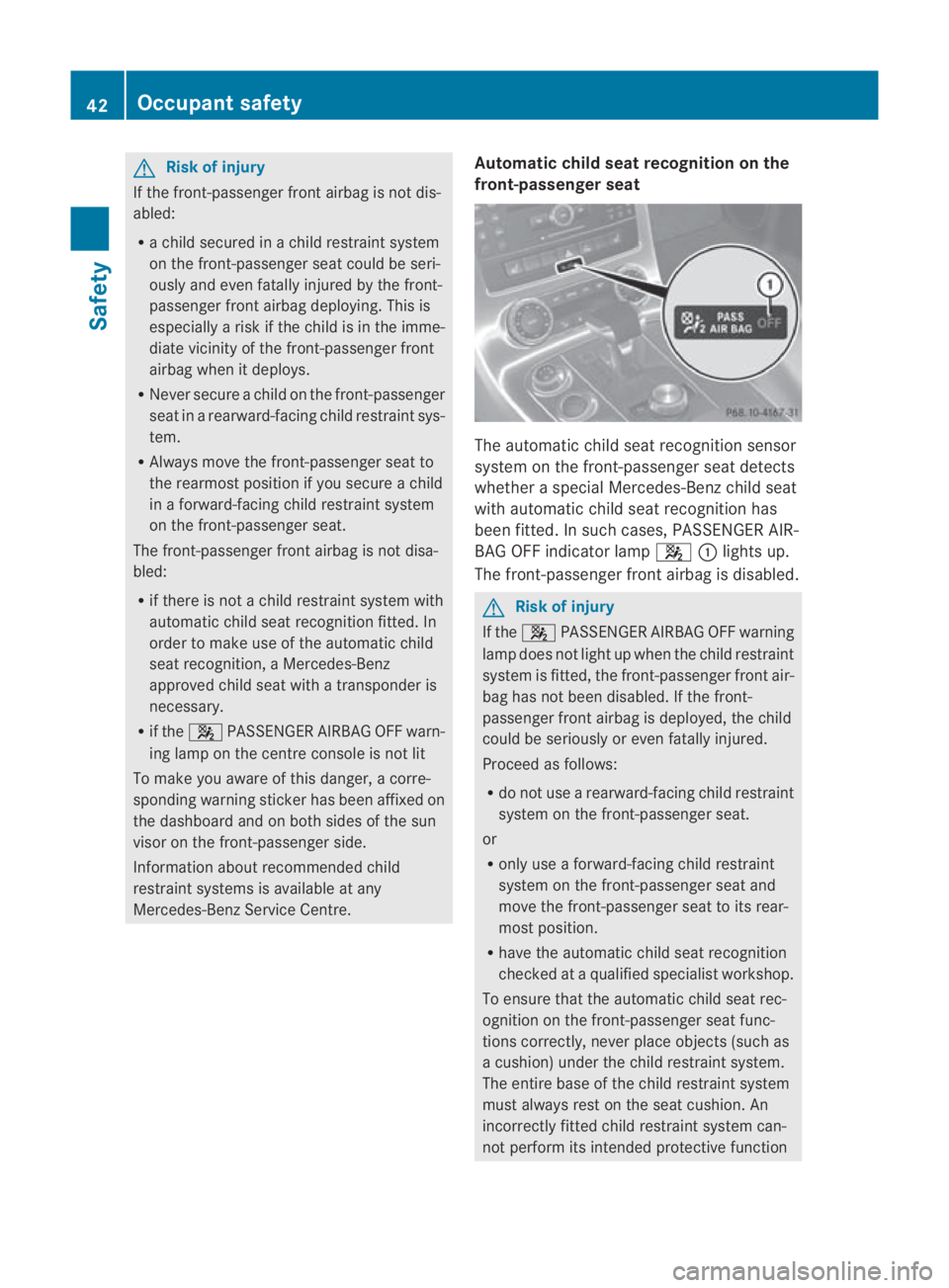
dseat recognition on the
front-passenger seat The automatic child seat recognitio
nsensor
system on the front-passenger seat detects
whether a special Mercedes-Benzc hild seat
with automatic child seat recognition has
been fitted. In such cases, PASSENGER AIR-
BAG OFF indicator lamp 000A0001lights up.
The front-passenger front airbag is disabled. G
Risk of injury
If the 000A PASSENGER AIRBAG OFF warning
lamp does not light up when the child restraint
system is fitted, the front-passenger front air-
bag has not been disabled. If the front-
passenger front airbag is deployed, the child
could be seriously or even fatally injured.
Proceed as follows:
R do not use a rearward-facing child restraint
system on the front-passenger seat.
or
R only use a forward-facing child restraint
system on the front-passenger seat and
move the front-passenger seat to its rear-
most position.
R have the automatic child seat recognition
checked at a qualified specialist workshop.
To ensure that the automatic child seat rec-
ognition on the front-passenger seat func-
tions correctly, never place objects (such as
a cushion) under the child restraint system.
The entire base of the child restraint system
must always rest on the seat cushion. An
incorrectly fitted child restraint system can-
not perform its intended protective function 42
Occupant safetySafety
BA 197 ECE RE 2010/6a; 1; 2, en-GB
sabbaeu
Version: 3.0.3.6 2010-05-07T14:19:43+02:00 - Seite 42
Page 252 of 361
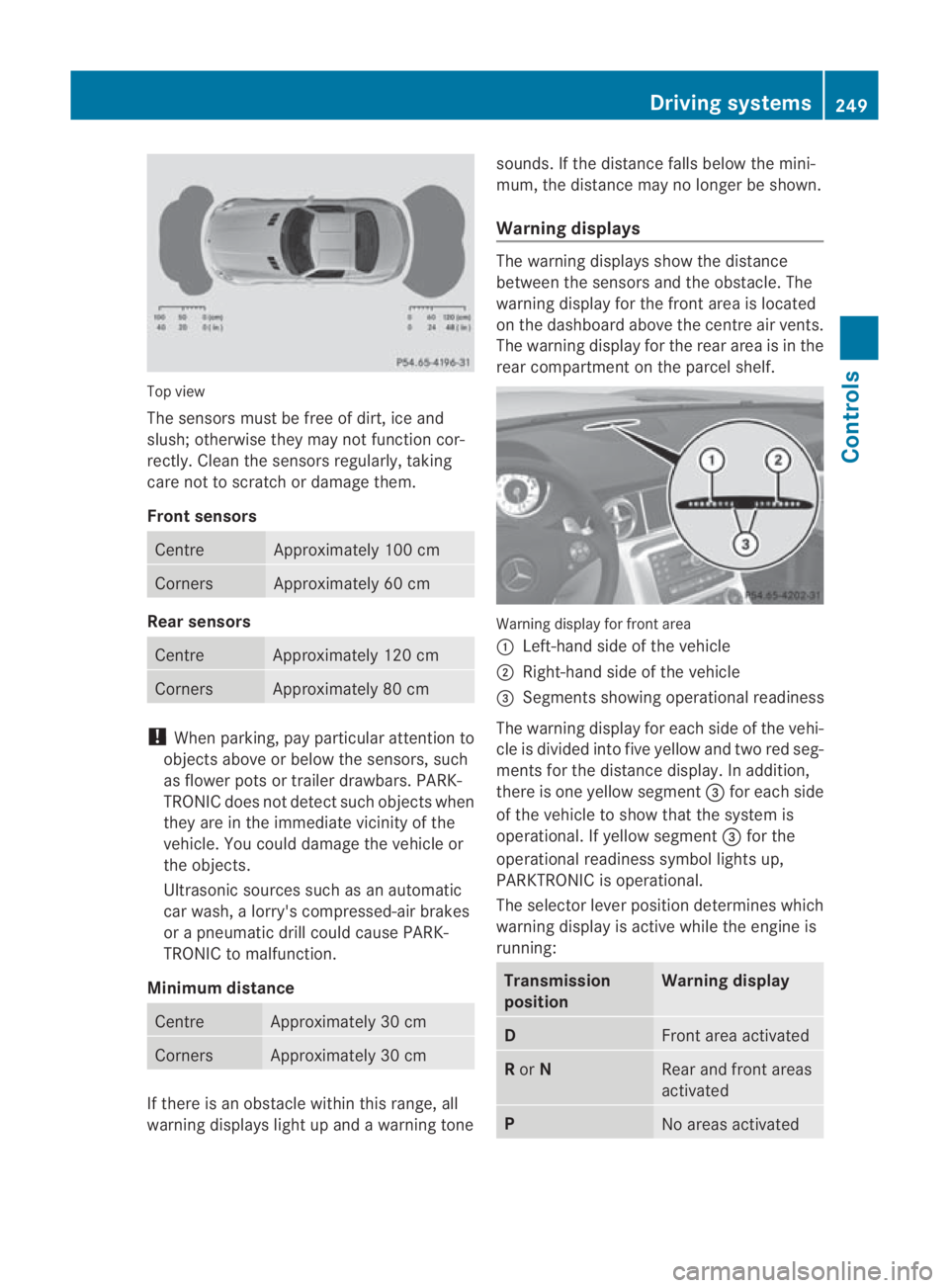
Top view
The sensors must be free of dirt, ice and
slush; otherwise they may not function cor-
rectly. Clean the sensors regularly, taking
care not to scratch or damage them.
Front sensors Centre Approximately 100 cm
Corners Approximately 60 cm
Rear sensors
Centre Approximately 120 cm
Corners Approximately 80 cm
!
When parking, pay particular attention to
objects above or below the sensors, such
as flower pots or trailer drawbars. PARK-
TRONIC does not detect such objects when
they are in the immediate vicinity of the
vehicle. You could damage the vehicle or
the objects.
Ultrasonic sources such as an automatic
car wash, a lorry's compressed-air brakes
or a pneumatic drill could cause PARK-
TRONIC to malfunction.
Minimum distance Centre Approximately 30 cm
Corners Approximately 30 cm
If there is an obstacle within this range, all
warning displays light up and a warning tone sounds. If the distance falls below the mini-
mum, the distance may no longer be shown.
Warning displays The warning displays show the distance
between the sensors and the obstacle. The
warning display for the front area is located
on the dashboard above the centre air vents.
The warning display for the rear area is in the
rear compartment on the parcel shelf.
Warning display for front area
0001
Left-hand side of the vehicle
0002 Right-hand side of the vehicle
0015 Segments showing operational readiness
The warning display for each side of the vehi-
cle is divided into five yellow and two red seg-
ments for the distance display .Inaddition,
there is one yellow segment 0015for each side
of the vehicle to show that the system is
operational. If yellow segment 0015for the
operational readiness symbol lights up,
PARKTRONIC is operational.
The selector lever position determines which
warning display is active while the engine is
running: Transmission
position Warning display
D
Front area activated
R
or N Rear and front areas
activated
P
No areas activatedDriving systems
249Controls
BA 197 ECE RE 2010/6a; 1; 2, en-GB
sabbaeu Version: 3.0.3.6 2010-05-07T14:19:43+02:00 - Seite 249 Z
Page 287 of 361
scratch or damage the plastic lamp lenses
of the headlamps and rear lighting.
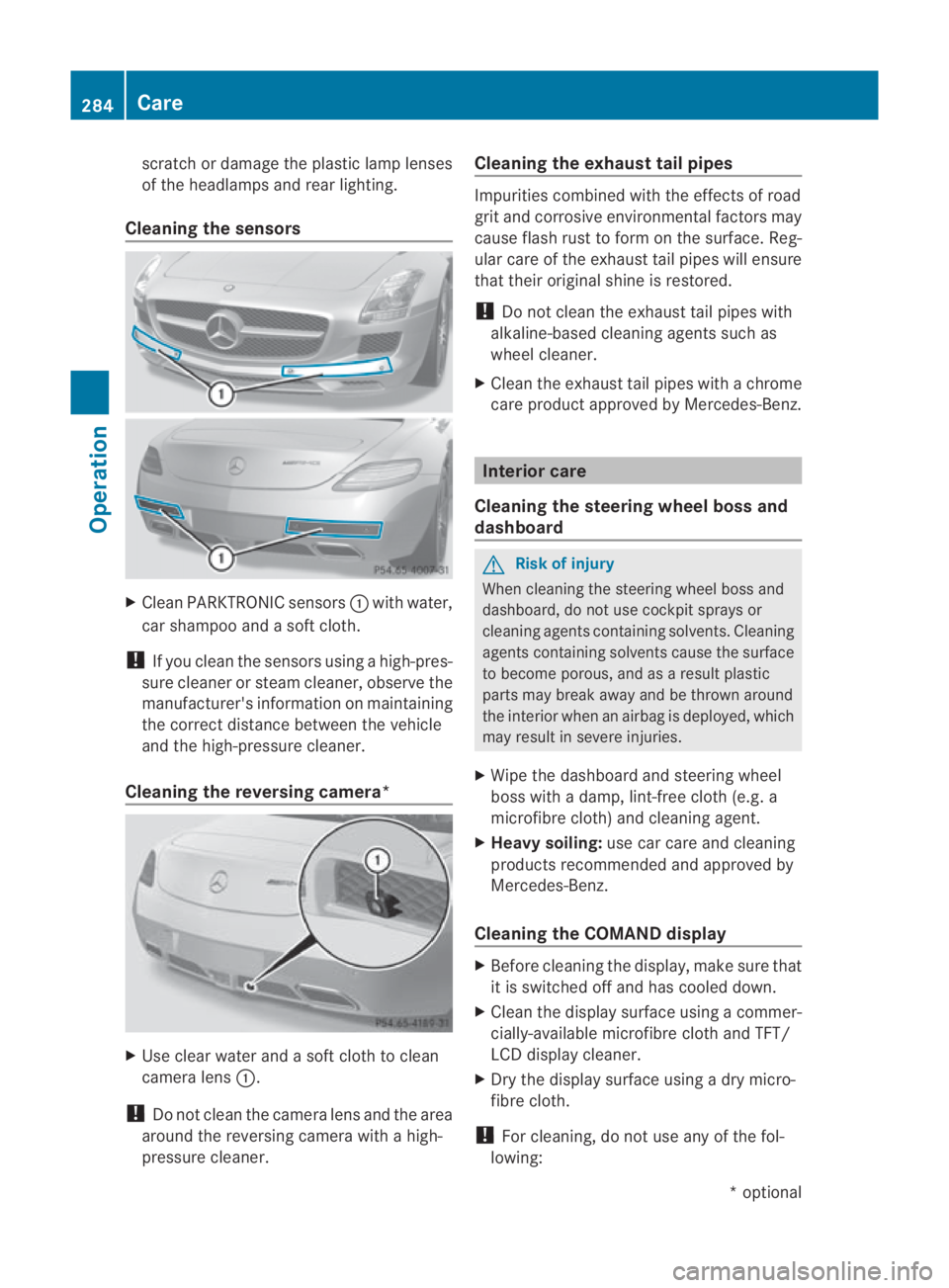
Cleaning the sensors X
CleanP ARKTRONIC sensors 0001with water,
car shampoo and a sof tcloth.
! If you clean the sensors using a high-pres-
sure cleaner or steam cleaner, observe the
manufacturer' sinformation on maintaining
the correct distance between the vehicle
and the high-pressure cleaner.
Cleaning the reversing camera* X
Use clear water and a sof tcloth to clean
camera lens 0001.
! Do not clean the camera lens and the area
around the reversing camera with a high-
pressure cleaner. Cleaning the exhaust tail pipes Impurities combined with the effects of road
grit and corrosive environmental factors may
cause flash rust to for monthe surface. Reg-
ular care of the exhaust tail pipes will ensure
that their original shine is restored.
! Do not clean the exhaust tail pipes with
alkaline-based cleaning agents such as
wheel cleaner.
X Cleant he exhaust tail pipes with a chrome
care product approved by Mercedes-Benz. Interior care
Cleaning the steering wheel boss and
dashboard G
Risk of injury
When cleaning the steering wheel boss and
dashboard, do not use cockpit sprays or
cleaning agents containing solvents. Cleaning
agents containing solvents cause the surface
to become porous, and as aresult plastic
parts may break away and be thrown around
the interior when an airbag is deployed, which
may result in severe injuries.
X Wipe the dashboard and steerin gwheel
boss with a damp, lint-free cloth (e.g. a
microfibre cloth) and cleaning agent.
X Heavy soiling: use car care and cleaning
products recommended and approved by
Mercedes-Benz.
Cleaning the COMAND display X
Before cleaning the display, make sure that
it is switched off and has cooled down.
X Cleant he display surface using a commer-
cially-available microfibre cloth and TFT/
LCD display cleaner.
X Dry the display surface using a dry micro-
fibre cloth.
! For cleaning, do not use any of the fol-
lowing: 284
CareOperation
*o
ptional
BA 197 ECE RE 2010/6a; 1; 2, en-GB
sabbaeu
Version: 3.0.3.6 2010-05-07T14:19:43+02:00 - Seite 284