2010 JAGUAR XFR U3000
[x] Cancel search: U3000Page 274 of 3039

DTC Description Possible Causes Action U3000-04
Control Module -
System internal
failures
Diversity antenna amplifier internal
failure
Renew the amplifier module U3000-4A
Control Module -
Incorrect
component
installed
Diversity antenna amplifier internal
incorrect component installed
- The module has been installed to
a vehicle not configured to accept
it
Using the manufacturer approved
diagnostic system select the vehicle
configuration main menu, select configure
existing modules menu and program the
module U3000-55
Control Module -
Not configured
Diversity antenna amplifier not
configured correctly
Using the manufacturer approved
diagnostic system select the vehicle
configuration main menu, select configure
existing modules menu and program the
module U3000-87
Control Module -
Missing message
Missing message
Using the manufacturer approved
diagnostic system select the vehicle
configuration main menu, select configure
existing modules menu and program the
module U3000-98
Control Module -
Component or
system over
temperature
Diversity antenna amplifier component or
system over temperature
Consider moving the amplifier mounting
position to prevent unit overheating. Cool
the vehicle interior down by ensuring it is
in the shade and have the A/C on cool.
When cool, clear the DTC and retest. If
the problem persists, renew the amplifier
module U3003-62
Battery Voltage -
Signal compare
failure
Mismatch in battery voltage of 2 volts or
more for longer than 1 minute, between
the measured battery voltage at the
Digital Audio Control Module C and the
battery voltage signal sent from the Rear
Junction Box.
Refer to the electrical guides and check
that power supply voltage at Digital Audio
Control Module C and Rear Junction Box is
not different by more than 2 volts. Rectify
as required
Page 280 of 3039

DTC Description Possible Causes Action module as required, refer to the new
module/component installation note at the top of the
DTC Index U3000-44
Control Module - Data
memory failure
Data memory failure
Re-configure the telephone module. If the DTC
remains, suspect the telephone module. Check and
install a new telephone module as required, refer to
the new module/component installation note at the
top of the DTC Index U3000-45
Control Module -
Program memory
failure
Program memory failure
Re-configure the telephone module. If the DTC
remains, suspect the telephone module. Check and
install a new telephone module as required, refer to
the new module/component installation note at the
top of the DTC Index U3000-55
Control Module - Not
configured
Incorrect car
configuration data
received
Re-configure the RJB using the manufacturer approved
diagnostic system. Clear DTC and re-test. If the DTC
remains suspect the telephone module. Check and
install a new module as required, refer to the new
module/component installation note at the top of the
DTC Index U3000-98
Control Module -
Component or system
over temperature
Component or system
over temperature
Check for additional DTCs and refer to DTC Index.
Clear DTC and re-test/monitor condition for
re-occurrence U3003-62
Battery Voltage -
Signal compare failure
Mis-match in battery
voltage, of 2 volts or
more, between
telephone module and
RJB
Carry out any pinpoint tests associated with this DTC
using the manufacturer approved diagnostic system
Page 451 of 3039

DTC Description Possible Cause Action U0142-00
Lost Communication With
Body Control Module "B"
-no sub type information
CAN bus fault
Auxiliary Junction Box fault Refer to the electrical wiring diagrams and check
Auxiliary Junction Box power and ground supplies for
short, open circuit. Carry out CAN network integrity
tests. U0155-00
Lost Communications With
Instrument Panel Cluster
(IPC) Control Module-no
sub type information
CAN bus fault
Instrument cluster fault Refer to the electrical wiring diagrams and check
instrument cluster power and ground supplies for
short, open circuit. Carry out CAN network integrity
tests. U0164-00
Lost Communication With
HVAC Control Module-no
sub type information
CAN bus fault
Climate control module
fault Refer to the electrical wiring diagrams and check
climate control module power and ground supplies for
short, open circuit. Carry out CAN network integrity
tests. U0300-00
Internal Control Module
Software Incompatibility-no
sub type information
Incompatible tire pressure
monitoring system module
for vehicle CAN network Check correct tire pressure monitoring system module
is installed to vehicle specification, otherwise
suspect the Auxiliary Junction Box. U0415-00
Invalid Data Received From
Anti-Lock Brake System
(ABS) Control Module-no
subtype information
Invalid data received from
the Anti-Lock Braking
System Control Module
CAN bus fault
Anti-Lock Braking System
fault Check Anti-Lock Braking System control module and
Instrument Cluster for related DTCs and refer to the
relevant DTC Index. Carry out CAN network integrity
tests. U0424-00
Invalid Data Received From
HVAC Control Module-no
sub type information
HVAC control module fault Check climate control module for related DTCs and
refer to relevant DTC Index. U1A14-49
CAN Initialisation Failure-
internal electronic failure
Tire pressure monitoring
system module fault Install a new tire pressure monitoring module. Refer
to the new module/component installation note at
the top of the DTC Index. U3000-55
Control Module-not
configured
Tire pressure monitoring
system configuration data
is invalid Check and amend the car configuration file. U3000-87
Control Module-missing
message
Tire pressure monitoring
system configuration data
not received Check the Auxiliary Junction Box for related DTCs and
refer to the relevant DTC Index. Carry out CAN
network integrity test. U3002-81
Vehicle Identification
Number - invalid serial data
received
Tire pressure monitoring
system module and vehicle
VIN mis-match
NOTE: This DTC indicates that the tire pressure
monitoring system module is not the original part
installed to the vehicle at the factory/dealer and
could have been substituted. Refer to the note above
the DTC index about replacing components which may
remain under manufacturer warranty.
Re-install the original or a new tire pressure monitoring system control module.
Component Tests
Wheels and Tires
For wheel and tire specification information (pressures, torques, etc).
When replacing wheels or tires, local legislation regarding health and safety must be complied with.
If the vehicle has a Tire Pressure Monitoring System installed, only Jaguar approved wheels and tires should be used. If the
wheel and tire size is changed (for example from R18 to R20) the Tire Pressure Monitoring System module should be updated
with the correct pressure information appropriate to the new wheel and tire set. Update the Tire Pressure Monitoring System
module using the Jaguar approved diagnostic system.
As a general guideline, only replace tires in pairs or as a set, and only with tires of equivalent size and specification.
Confirm the symptoms of the customer complaint.
As much information as possible should be gathered from the driver to assist in diagnosing the cause(s).
1. Before a road test, carry out a basic inspection to make sure the vehicle is safe and legal to drive.
Basic inspection
Correct tire inflation
Legal tire tread depth
Page 1448 of 3039

DTC Description Possible Cause Action U0416-68
Invalid Data Received From
Vehicle Dynamics Control
Module - event information
Event information brake
information Check Engine control module for stored DTCs. Check
CAN Bus Circuit for fault U0422-68
Invalid Data Received From
Body Control Module - event
information
Event information invalid
Power mode information Check Central junction box for stored DTCs. Check CAN
Bus Circuit for fault U101B-87
Lost Communication With
GSM - Multiple Bus-missing
message
Missing message lost
communication with
Transmission Shift
Module (multiple Bus) Check Transmission Shift Module for stored DTCs.
Refer to Circuit diagrams and check CAN and LIN Bus
for Circuit fault U3000-49
Control Module - internal
electronic failure
Internal electronic failure Suspect the Transmission control module. Install a
new Transmission control module as required, refer to
the new module/component installation note at the top of the DTC Index U3000-4B
Control Module - Circuit
resistance above threshold
Internal electronic failure Check and correct oil level. Check hydraulic flow
through oil cooler and pipe circuit for restriction or
blockage. If no restrictions found, suspect the
Transmission control module. Install a new
Transmission control module as required, refer to the
new module/component installation note at the top of
the DTC Index U3000-81
Control Module - invalid
serial data received
Vehicle or Engine type
signal incorrect from BCM
or incorrect Transmission
control module software
installed Reflash the Transmission control module using the
manufacturer approved process U3001-94
Control Module Improper
Shutdown - unexpected
operation
Control Module Improper
Shutdown (voltage
related) Check Engine control module For Power (generator)
faults. Check Power and Ground Circuit and Battery for
fault. Clear DTCs. Road Test. If DTC reoccurs suspect
the Transmission control module. Install a new
Transmission control module as required, refer to the
new module/component installation note at the top of
the DTC Index
Page 1650 of 3039
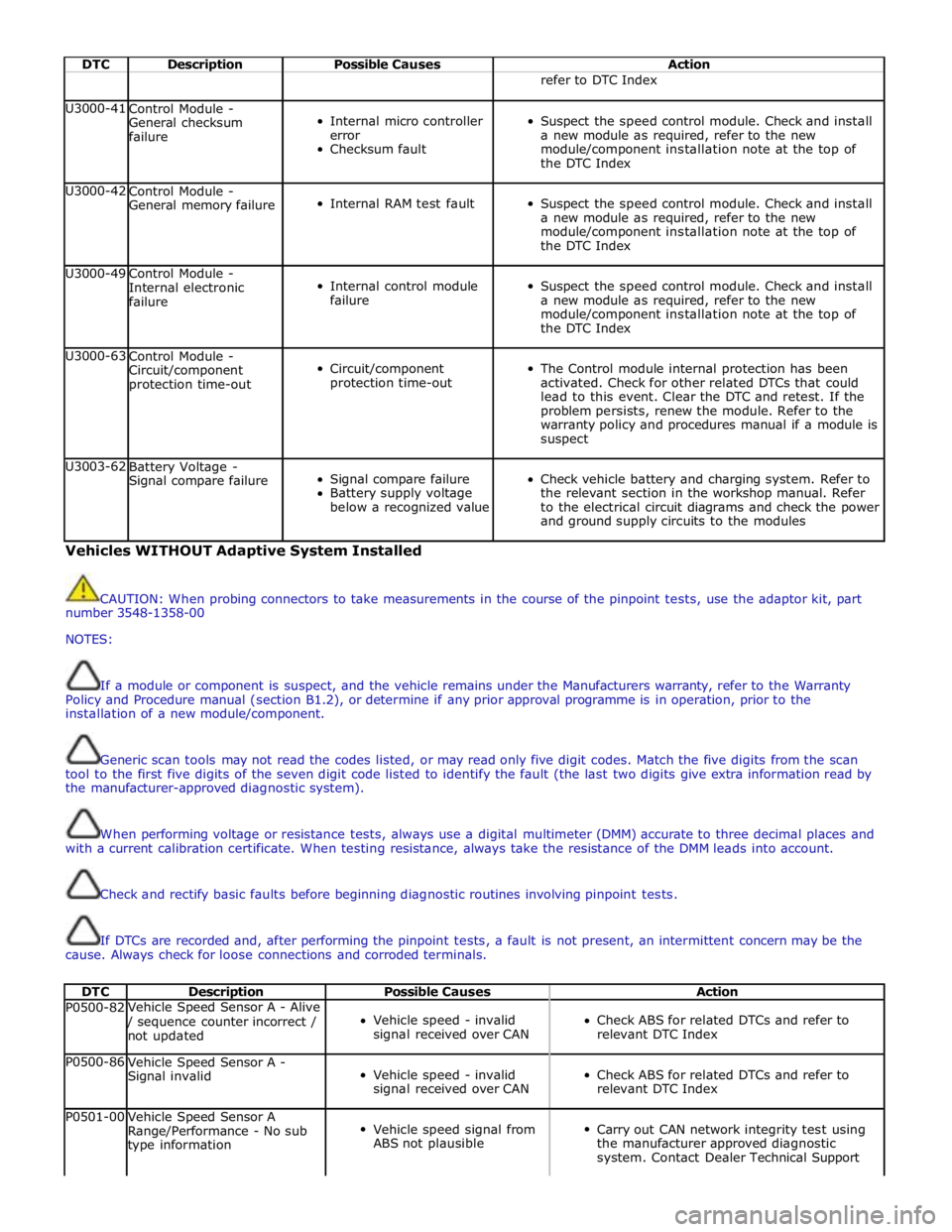
DTC Description Possible Causes Action refer to DTC Index U3000-41
Control Module -
General checksum
failure
Internal micro controller
error
Checksum fault
Suspect the speed control module. Check and install
a new module as required, refer to the new
module/component installation note at the top of
the DTC Index U3000-42
Control Module -
General memory failure
Internal RAM test fault
Suspect the speed control module. Check and install
a new module as required, refer to the new
module/component installation note at the top of
the DTC Index U3000-49
Control Module -
Internal electronic
failure
Internal control module
failure
Suspect the speed control module. Check and install
a new module as required, refer to the new
module/component installation note at the top of
the DTC Index U3000-63
Control Module -
Circuit/component
protection time-out
Circuit/component
protection time-out
The Control module internal protection has been
activated. Check for other related DTCs that could
lead to this event. Clear the DTC and retest. If the
problem persists, renew the module. Refer to the
warranty policy and procedures manual if a module is
suspect U3003-62
Battery Voltage -
Signal compare failure
Signal compare failure
Battery supply voltage
below a recognized value
Check vehicle battery and charging system. Refer to
the relevant section in the workshop manual. Refer
to the electrical circuit diagrams and check the power
and ground supply circuits to the modules Vehicles WITHOUT Adaptive System Installed
CAUTION: When probing connectors to take measurements in the course of the pinpoint tests, use the adaptor kit, part
number 3548-1358-00
NOTES:
If a module or component is suspect, and the vehicle remains under the Manufacturers warranty, refer to the Warranty
Policy and Procedure manual (section B1.2), or determine if any prior approval programme is in operation, prior to the
installation of a new module/component.
Generic scan tools may not read the codes listed, or may read only five digit codes. Match the five digits from the scan
tool to the first five digits of the seven digit code listed to identify the fault (the last two digits give extra information read by
the manufacturer-approved diagnostic system).
When performing voltage or resistance tests, always use a digital multimeter (DMM) accurate to three decimal places and
with a current calibration certificate. When testing resistance, always take the resistance of the DMM leads into account.
Check and rectify basic faults before beginning diagnostic routines involving pinpoint tests.
If DTCs are recorded and, after performing the pinpoint tests, a fault is not present, an intermittent concern may be the
cause. Always check for loose connections and corroded terminals.
DTC Description Possible Causes Action P0500-82 Vehicle Speed Sensor A - Alive / sequence counter incorrect /
not updated
Vehicle speed - invalid
signal received over CAN
Check ABS for related DTCs and refer to
relevant DTC Index P0500-86
Vehicle Speed Sensor A -
Signal invalid
Vehicle speed - invalid
signal received over CAN
Check ABS for related DTCs and refer to
relevant DTC Index P0501-00
Vehicle Speed Sensor A
Range/Performance - No sub
type information
Vehicle speed signal from
ABS not plausible
Carry out CAN network integrity test using
the manufacturer approved diagnostic
system. Contact Dealer Technical Support
Page 1806 of 3039

DTC Description Possible Cause Action U300046 Control Module
Calibration/parameter memory
failure Suspect the instrument cluster, check and install a new
instrument cluster as required, refer to the new
module/component installation note at the top of the DTC
Index U300049 Control Module
Internal electronic failure Suspect the instrument cluster, check and install a new
instrument cluster as required, refer to the new
module/component installation note at the top of the DTC
Index U300055 Control Module
Incorrect car configuration
data received Re-configure the RJB using the manufacturer approved
diagnostic system. Clear DTC and re-test. If the DTC remains
suspect the instrument cluster. Check and install a new
instrument cluster as required, refer to the new
module/component installation note at the top of the DTC
Index U300087 Control Module
Missing message Re-configure the RJB using the manufacturer approved
diagnostic system. Check instrument cluster for additional
DTCs and refer to the DTC Index. Carry out CAN network
integrity tests using the manufacturer approved diagnostic
system. If DTC remains suspect the instrument cluster.
Check and install a new instrument cluster as required, refer
to the new module/component installation note at the top of
the DTC Index U300281
Vehicle
Identification
Number
Vehicle/component mis-match.
Corrupt VIN data being
transmitted, instrument
cluster previously installed to
other vehicle Check and install original/new instrument cluster as required,
refer to the new module/component installation note at the
top of the DTC Index U300316 Battery Voltage
Instrument cluster logic power
supply circuit - voltage below
threshold Carry out any pinpoint tests associated with this DTC using
the manufacturer approved diagnostic system. Refer to the
electrical circuit diagrams and check instrument cluster logic
power supply circuit for short to ground, open circuit U300317 Battery Voltage
Instrument cluster logic power
supply circuit - circuit voltage
above threshold Carry out any pinpoint tests associated with this DTC using
the manufacturer approved diagnostic system. Check
charging system for over charging condition U300362 Battery Voltage
Mis-match in battery voltage,
of 2 volts or more, between
instrument cluster and RJB Carry out any pinpoint tests associated with this DTC using
the manufacturer approved diagnostic system. Refer to the
electrical circuit diagrams and check instrument cluster logic
power supply circuit for short, open circuit
Page 1839 of 3039

DTC Description Possible Causes Action Refer to the electrical circuit diagrams and check the
left side harness between the left side mirror and left
hand module U023300
Lost
Communication
With Side Obstacle
Detection Control
Module - Right
CAN bus circuit fault
Harness fault between
right side mirror and right
side module
Refer to the electrical circuit diagrams and check the
power and ground connections to the module. Using
the manufacturer approved diagnostic system,
complete a CAN network integrity test. Refer to the
electrical circuit diagrams and check the CAN network
between the left Blind Spot Monitoring System Module
and the right Blind Spot Monitoring System Module
Refer to the electrical circuit diagrams and check the
right side harness between the right side mirror and
right hand module U030000
Internal Control
Module Software
Incompatibility
RJB car configuration data
is not compatible with the
Blindspot Monitoring
module Check RJB for related DTCs and refer to the relevant DTC
Index. Clear DTCs and re-test. If DTC still logged, re-configure
the RJB using the manufacturer approved diagnostic system.
Clear DTCs and re-test. If DTC still logged, re-configure the
Blindspot Monitoring module using the manufacturer approved
diagnostic system. Clear DTC and re-test, if still logged
suspect the Blindspot Monitoring module. Check and install a
new module as required, refer to the new module/component
installation note at the top of the DTC Index U041568
Invalid Data
Received From
Anti-Lock Brake
System Control
Module
Event information Check ABS module for related DTCs and correct function, refer
to the relevant DTC Index U042268
Invalid Data
Received From Body
Control Module
Event information Check CJB for related DTCs and correct function, refer to the
relevant DTC Index U042368
Invalid Data
Received From
Instrument Panel
Control Module
Event information Check instrument cluster for related DTCs and correct function,
refer to the relevant DTC Index U210000
Initial Configuration
Not Complete
No configuration has been
previously set Check RJB for related DTCs and refer to the relevant DTC
Index U210100
Control Module
Configuration
Incompatible
Data sent from RJB is
invalid Check RJB for related DTCs and refer to the relevant DTC
Index. Check/amend Car Configuration File using the
manufacturer approved diagnostic system U300044 Control Module
Data memory failure Cycle the ignition and check if the DTC is still logged. If DTC
remains suspect the module, refer to the new
module/component installation note at the top of the DTC
Index U300047 Control Module
Watchdog/safety Micro
controller failure Cycle the ignition and check if the DTC is still logged. If DTC
remains suspect the module, refer to the new
module/component installation note at the top of the DTC
Index U300049 Control Module
Internal electronic failure Clear DTC, cycle ignition and retest. If fault persists, check
and install a new Blindspot Monitoring module as required,
refer to the new module/component installation note at the top of the DTC Index U300281
Vehicle
Identification
Number
Vehicle/component mis-
match. Corrupt VIN
data being transmitted,
suspect module previously
installed to other vehicle Check RJB has not been previously installed to other vehicle.
Install original/new module as required, refer to the new
module/component installation note at the top of the DTC
Index. Check RJB for DTCs and refer to the relevant DTC Index U300362 Battery Voltage
Mis-match in battery
voltage, of 2 volts or
more, between Blindspot
Monitoring module and RJB Carry out any pinpoint tests associated with this DTC using
the manufacturer approved diagnostic system
Page 1935 of 3039
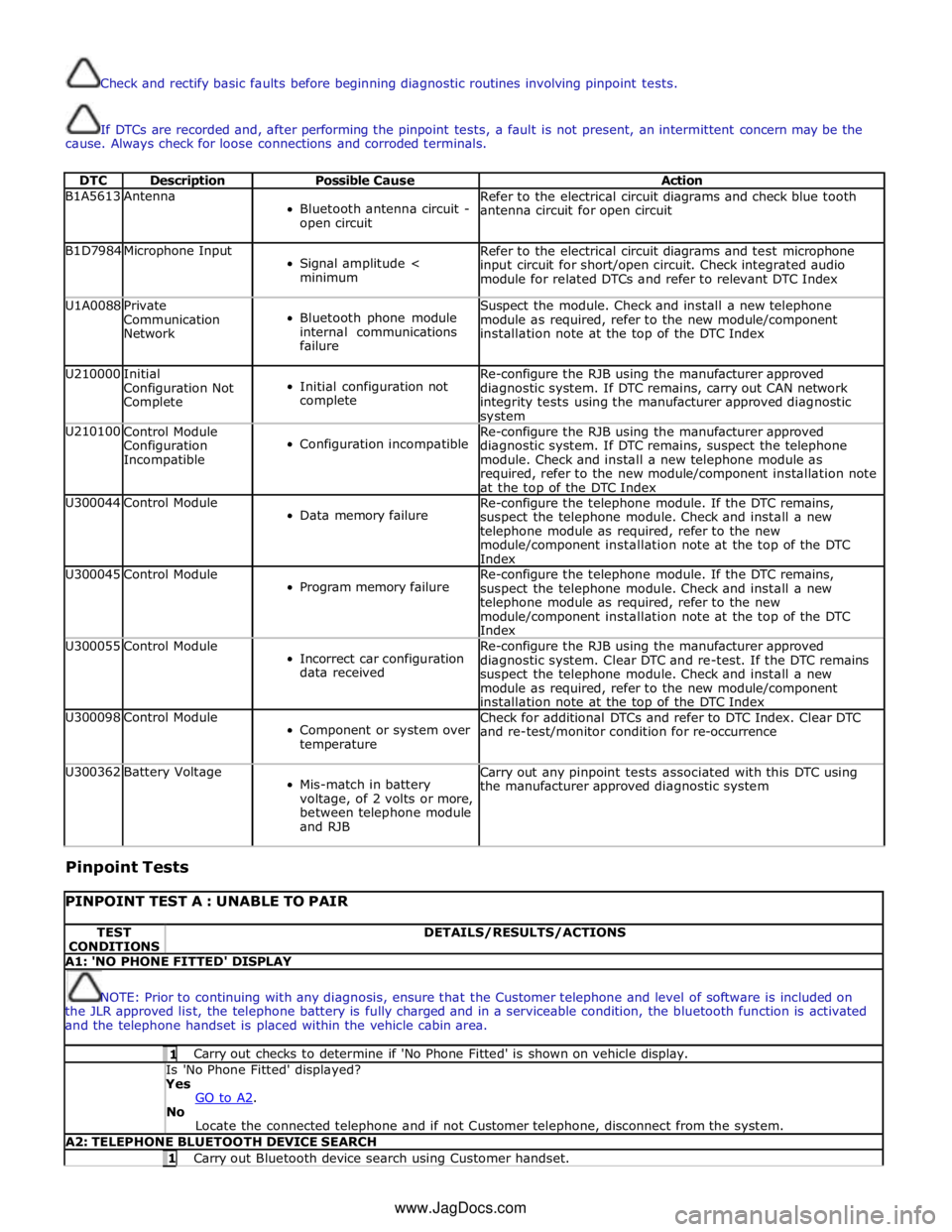
Check and rectify basic faults before beginning diagnostic routines involving pinpoint tests.
If DTCs are recorded and, after performing the pinpoint tests, a fault is not present, an intermittent concern may be the
cause. Always check for loose connections and corroded terminals.
DTC Description Possible Cause Action B1A5613 Antenna
Bluetooth antenna circuit -
open circuit Refer to the electrical circuit diagrams and check blue tooth
antenna circuit for open circuit B1D7984 Microphone Input
Signal amplitude <
minimum Refer to the electrical circuit diagrams and test microphone
input circuit for short/open circuit. Check integrated audio
module for related DTCs and refer to relevant DTC Index U1A0088
Private
Communication
Network
Bluetooth phone module
internal communications
failure Suspect the module. Check and install a new telephone
module as required, refer to the new module/component
installation note at the top of the DTC Index U210000
Initial
Configuration Not
Complete
Initial configuration not
complete Re-configure the RJB using the manufacturer approved
diagnostic system. If DTC remains, carry out CAN network
integrity tests using the manufacturer approved diagnostic system U210100
Control Module
Configuration
Incompatible
Configuration incompatible Re-configure the RJB using the manufacturer approved
diagnostic system. If DTC remains, suspect the telephone
module. Check and install a new telephone module as
required, refer to the new module/component installation note
at the top of the DTC Index U300044 Control Module
Data memory failure Re-configure the telephone module. If the DTC remains,
suspect the telephone module. Check and install a new
telephone module as required, refer to the new
module/component installation note at the top of the DTC
Index U300045 Control Module
Program memory failure Re-configure the telephone module. If the DTC remains,
suspect the telephone module. Check and install a new
telephone module as required, refer to the new
module/component installation note at the top of the DTC
Index U300055 Control Module
Incorrect car configuration
data received Re-configure the RJB using the manufacturer approved
diagnostic system. Clear DTC and re-test. If the DTC remains
suspect the telephone module. Check and install a new
module as required, refer to the new module/component
installation note at the top of the DTC Index U300098 Control Module
Component or system over
temperature Check for additional DTCs and refer to DTC Index. Clear DTC
and re-test/monitor condition for re-occurrence U300362 Battery Voltage
Mis-match in battery
voltage, of 2 volts or more,
between telephone module
and RJB Carry out any pinpoint tests associated with this DTC using
the manufacturer approved diagnostic system
Pinpoint Tests
PINPOINT TEST A : UNABLE TO PAIR TEST
CONDITIONS DETAILS/RESULTS/ACTIONS A1: 'NO PHONE FITTED' DISPLAY
NOTE: Prior to continuing with any diagnosis, ensure that the Customer telephone and level of software is included on
the JLR approved list, the telephone battery is fully charged and in a serviceable condition, the bluetooth function is activated
and the telephone handset is placed within the vehicle cabin area. 1 Carry out checks to determine if 'No Phone Fitted' is shown on vehicle display. Is 'No Phone Fitted' displayed? Yes
GO to A2. No
Locate the connected telephone and if not Customer telephone, disconnect from the system. A2: TELEPHONE BLUETOOTH DEVICE SEARCH 1 Carry out Bluetooth device search using Customer handset. www.JagDocs.com