2010 JAGUAR XFR key battery
[x] Cancel search: key batteryPage 191 of 3039

DTC Description Possible Causes Action B10A0-11
Wiper/ Washer Switch -
Circuit short to ground
Wash/wipe circuit - short to
ground
Refer to the electrical circuit diagrams and check
wash/wipe circuit for short to ground B10A0-15
Wiper/ Washer Switch -
Circuit short to battery
or open
Wash/wipe circuit - short to
power, open circuit
Carry out any pinpoint tests associated with this
DTC using the manufacturer approved diagnostic
system. Refer to the electrical circuit diagrams
and check wash/wipe circuit for short to power,
open circuit B10A6-11
Main Light Switch -
Circuit short to ground
Master lighting switch circuit
- short to ground
Refer to the electrical circuit diagrams and check
master lighting switch circuit for short to ground B10A6-15
Main Light Switch -
Circuit short to battery
or open
Master lighting switch circuit
- short to power, open
circuit
Carry out any pinpoint tests associated with this
DTC using the manufacturer approved diagnostic
system. Refer to the electrical circuit diagrams
and check master lighting switch circuit for short
to power, open circuit B112B-87
Steering Wheel Module -
Missing message
Steering wheel module
failure - slave node not
responding
Carry out any pinpoint tests associated with this
DTC using the manufacturer approved diagnostic
system. Refer to the electrical circuit diagrams
and check the clockspring LIN circuit for short,
open circuit. Suspect the clockspring, check and
install a new clockspring as required, refer to the
new module/component installation note at the
top of the DTC Index B115C-7A Transfer Fuel Pump -
Fluid leak or seal failure
Fuel pump system fault
Check for fuel system jet pump or jet pump fuel
level sensor fault B1A85-15
Ambient Light Sensor -
Circuit short to battery
or open
Autolamp sensor circuit -
short to power, open circuit
Carry out any pinpoint tests associated with this
DTC using the manufacturer approved diagnostic
system. Refer to the electrical circuit diagrams
and check autolamp sensor circuit for short to
power, open circuit B1B01-00
Key Transponder - No
sub type information
Operator only cycles one key
During transponder key
programming the instrument
cluster, smartcard docking
station or key loses
power/circuit failure
Faulty key during key
programming
Unable to program
transponder key due to
noise/EMC related error
Ensure all keys to be programmed are available.
Refer to electrical circuit diagrams and check
power and ground supply circuits to all relevant
modules. Replace faulty key and repeat key
programming. Check CAN network for
interference/EMC related issues B1B01-05
Key Transponder -
System programming
failures
Error following SCU
replacement
Smartcard docking station
power and ground supply
circuits - short, open circuit
LIN fault
Instrument cluster power
and ground supply circuits -
short, open circuit
Carry out any pinpoint tests associated with this
DTC using the manufacturer approved diagnostic
system. Perform the Immobilisation application
from the Set-up menu using the manufacturer
approved diagnostic system. Refer to the
electrical circuit diagrams and check smartcard
docking station power and ground supply circuits
for short, open circuit and instrument cluster
power and ground supply circuits for short, open
circuit. Check LIN communications between
smartcard docking station and instrument cluster B1B01-51
Key Transponder - Not
programmed
LIN fault
Instrument cluster power
and ground supply circuits -
short, open circuit
Key fault
Smartcard docking station
power and ground supply
circuits - short, open circuit
Attempted to program a non
Carry out any pinpoint tests associated with this
DTC using the manufacturer approved diagnostic
system. Check LIN communications between
smartcard docking station and instrument
cluster. Refer to the electrical circuit diagrams
and check smartcard docking station power and
ground supply circuits for short, open circuit and
instrument cluster power and ground supply
circuits for short, open circuit. Confirm www.JagDocs.com
Page 230 of 3039

DTC Description Possible Causes Action U0142-00
Lost Communication
With Body Control
Module "B" - No
subtype information
Missing message from
RJB
Carry out any pinpoint tests associated with this
DTC using the manufacturer approved diagnostic
system. Carry out CAN network integrity test using
the manufacturer approved diagnostic system. Refer
to the electrical circuit diagrams and check power
and ground supplies to RJB U0155-00
Lost Communication
With Instrument Panel
Cluster (IPC) Control
Module - No subtype
information
Missing message from
instrument cluster
Carry out any pinpoint tests associated with this
DTC using the manufacturer approved diagnostic
system. Carry out CAN network integrity test using
the manufacturer approved diagnostic system. Refer
to the electrical circuit diagrams and check power
and ground supplies to instrument cluster U0300-00
Internal Control
Module Software
Incompatibility - No
subtype information
Invalid configuration
message is received
Re-configure the RJB using the manufacturer
approved diagnostic system. Clear the DTC and
retest. If the DTC is still logged suspect the remote
keyless entry module, refer to the new module
installation note at the top of the DTC Index U201F-00
External Receiver - No
subtype information
No subtype information -
communication error
Suspect the RF receiver, check and install a new RF
receiver as required, refer to the new
module/component installation note at top of DTC
Index U201F-13
External Receiver -
Circuit open
Line open
Refer to the electrical circuit diagrams and test RF
receiver communication circuit to remote keyless
entry module for short to ground or open circuit U201F-87
External Receiver -
Missing message
Transmission error
Refer to the electrical circuit diagrams and check
the data line between the RF receiver and the
remote keyless entry module for short, open circuit.
Suspect the RF receiver or remote keyless entry
module, check and install a new RF receiver or
remote keyless entry module as required, refer to
the new module/component installation note at top
of DTC Index U2100-00
Initial Configuration
Not Complete - No
subtype information
No subtype information
Configure the Remote Keyless Entry module using
the manufacturer approved diagnostic system U2101-00
Control Module
Configuration
Incompatible - No subtype information
No subtype information
Re-configure the RJB using the manufacturer
approved diagnostic system U3000-49
Control Module -
Internal electronic
failure
Internal electronic failure
Install a new remote keyless entry module, refer to
the new module installation note at the top of the
DTC Index U3002-81
Vehicle Identification
Number - Invalid serial
data received
Vehicle/component
mis-match. Module
previously installed to
other vehicle
Install correct/new module to vehicle specification,
refer to the new module/component installation
note at the top of the DTC Index U3003-62
Battery Voltage -
Signal compare failure
Mis-match in battery
voltage, of 2 volts or
more, between remote
keyless entry module and
RJB
Carry out any pinpoint tests associated with this
DTC using the manufacturer approved diagnostic
system
Refer to the relevant section of the workshop
manual and test the battery and charging system
Page 243 of 3039

DTC Description Possible Causes Action check CAN Network B100D-87
Column Lock
Authorisation -
Missing message
Missing message
CAN fault
No response from
electric steering column
lock control module,
instrument cluster,
central junction box
Battery voltage at
electric steering column
lock control module too
low
Electric steering column
lock control module,
instrument cluster,
central junction box fault
NOTE: Prior to clearing this DTC, carry out the Vehicle
Functional Reset application using the manufacturer approved
diagnostic system
Clear DTC, repeatedly lock and unlock car using the key
fob and retest. Check for related DTCs and refer to the
relevant DTC index
If the fault is cleared, notify the customer that the
steering column lock may fail to unlock if the vehicle is
parked with a high steering angle or with the road wheel
against a curb. If the column lock is failing to disengage,
the customer may be able to rectify this by rotating the
steering wheel while pressing the engine start button
If fault persists, complete a CAN network integrity test
using the manufacturers approved diagnostic system.
Alternatively, refer to the electrical circuit diagrams and
check CAN circuits between the central junction box, the
instrument cluster and the electronic steering column
lock. Refer to the electrical circuit diagrams and check the
central junction box, the instrument cluster and the
electronic steering column lock power and ground supply
circuits for short circuit to ground, short circuit to power,
open circuit, high resistance. Repair circuit(s) as required.
Clear DTC, perform an on demand self-test and retest
If fault persists, check that the vehicle battery supply
voltage is between 9-16 volts. Rectify as required U0001-88
High Speed CAN
Communication
Bus - Bus off
Bus off
Refer to the electrical circuit diagrams and check the
power and ground connections to the module. Using the
manufacturer approved diagnostic system, complete a
CAN network integrity test. Refer to the electrical circuit
diagrams and check the CAN network U0300-00
Internal Control
Module Software
Incompatibility -
No sub type
information
No sub type information
Refer to network communication section of the workshop
manual. Clear the DTC and ensure the vehicle battery
supply voltage is between 9-16Volts. Using the
manufacturers approved diagnostic system, complete a
CAN integrity test. Perform an on demand self-test and
retest U3000-49
Control Module -
Internal electronic
failure
Internal electronic
failure detected during
self test or lock/unlock
operation
Refer to network communication section of the workshop
manual. Clear the DTC and ensure the vehicle battery
supply voltage is between 9-16Volts. Perform an on
demand self-test and if the DTC returns suspect the
electric steering column lock, refer to the warranty policy
and procedures manual if a module/component is suspect U3000-87
Control Module -
Missing message
Configuration message
not received
Refer to the electrical circuit diagrams and check the
power and ground connections to the module. Using the
manufacturer approved diagnostic system, complete a
CAN network integrity test. Refer to the electrical circuit
diagrams and check the CAN network. Check modules are
configured correctly using the manufacturer approved
diagnostic system U3002-81
Vehicle
Identification
Number - Invalid
serial data
received
Invalid vehicle
identification number
Confirm the correct VIN details are stored in Steering
Column Lock Module using the approved diagnostic
system
Page 1263 of 3039
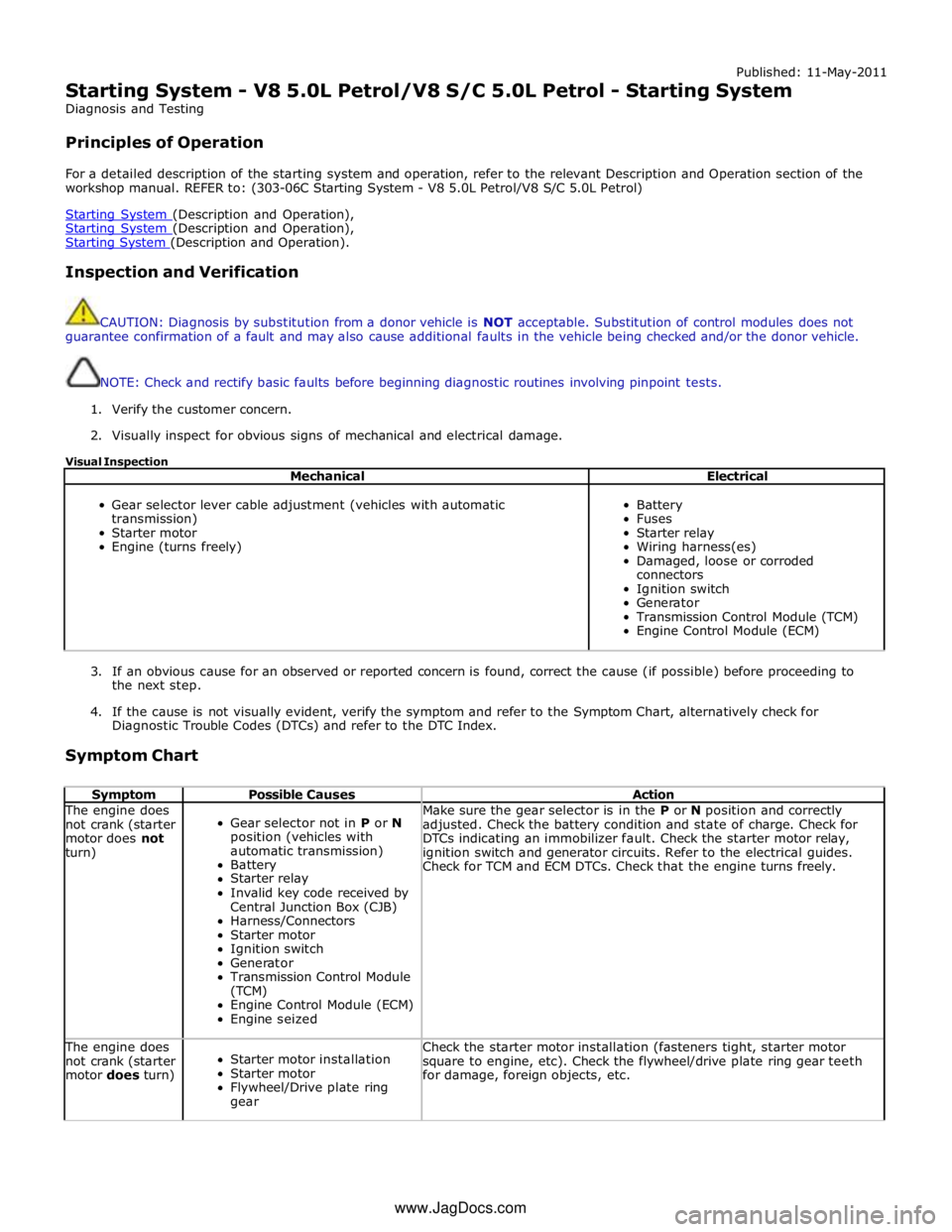
Published: 11-May-2011
Starting System - V8 5.0L Petrol/V8 S/C 5.0L Petrol - Starting System
Diagnosis and Testing
Principles of Operation
For a detailed description of the starting system and operation, refer to the relevant Description and Operation section of the
workshop manual. REFER to: (303-06C Starting System - V8 5.0L Petrol/V8 S/C 5.0L Petrol)
Starting System (Description and Operation), Starting System (Description and Operation), Starting System (Description and Operation).
Inspection and Verification
CAUTION: Diagnosis by substitution from a donor vehicle is NOT acceptable. Substitution of control modules does not
guarantee confirmation of a fault and may also cause additional faults in the vehicle being checked and/or the donor vehicle.
NOTE: Check and rectify basic faults before beginning diagnostic routines involving pinpoint tests.
1. Verify the customer concern.
2. Visually inspect for obvious signs of mechanical and electrical damage.
Visual Inspection
Mechanical Electrical
Gear selector lever cable adjustment (vehicles with automatic
transmission)
Starter motor
Engine (turns freely)
Battery
Fuses
Starter relay
Wiring harness(es)
Damaged, loose or corroded
connectors
Ignition switch
Generator
Transmission Control Module (TCM)
Engine Control Module (ECM)
3. If an obvious cause for an observed or reported concern is found, correct the cause (if possible) before proceeding to
the next step.
4. If the cause is not visually evident, verify the symptom and refer to the Symptom Chart, alternatively check for
Diagnostic Trouble Codes (DTCs) and refer to the DTC Index.
Symptom Chart
Symptom Possible Causes Action The engine does
not crank (starter
motor does not
turn)
Gear selector not in P or N
position (vehicles with
automatic transmission)
Battery
Starter relay
Invalid key code received by
Central Junction Box (CJB)
Harness/Connectors
Starter motor
Ignition switch
Generator
Transmission Control Module
(TCM)
Engine Control Module (ECM)
Engine seized Make sure the gear selector is in the P or N position and correctly
adjusted. Check the battery condition and state of charge. Check for
DTCs indicating an immobilizer fault. Check the starter motor relay,
ignition switch and generator circuits. Refer to the electrical guides.
Check for TCM and ECM DTCs. Check that the engine turns freely. The engine does
not crank (starter
motor does turn)
Starter motor installation
Starter motor
Flywheel/Drive plate ring
gear Check the starter motor installation (fasteners tight, starter motor
square to engine, etc). Check the flywheel/drive plate ring gear teeth
for damage, foreign objects, etc. www.JagDocs.com
Page 1266 of 3039
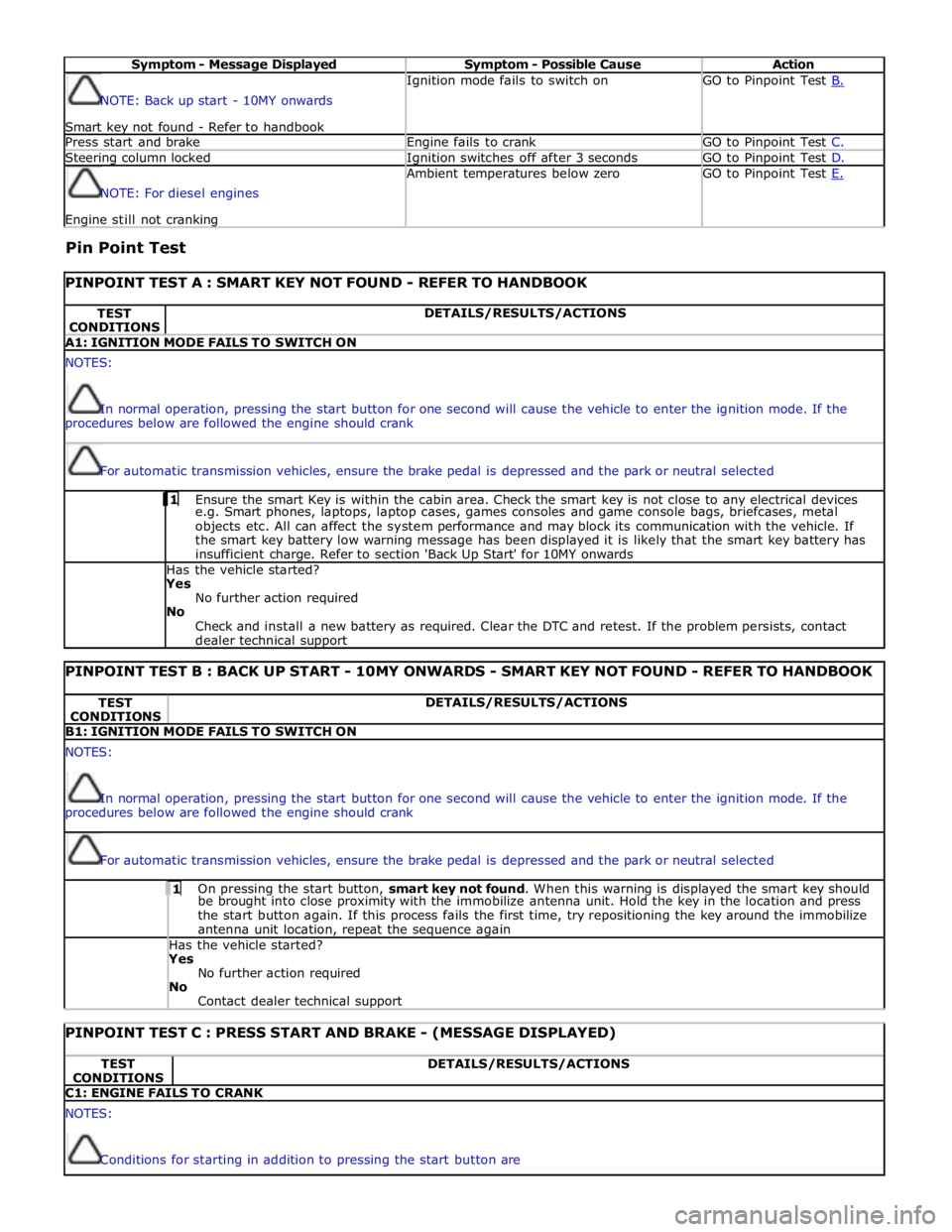
Symptom - Message Displayed Symptom - Possible Cause Action NOTE: Back up start - 10MY onwards
Smart key not found - Refer to handbook Ignition mode fails to switch on GO to Pinpoint Test B. Press start and brake Engine fails to crank GO to Pinpoint Test C. Steering column locked Ignition switches off after 3 seconds GO to Pinpoint Test D. NOTE: For diesel engines Engine still not cranking Ambient temperatures below zero GO to Pinpoint Test E.
Pin Point Test
PINPOINT TEST A : SMART KEY NOT FOUND - REFER TO HANDBOOK TEST
CONDITIONS DETAILS/RESULTS/ACTIONS A1: IGNITION MODE FAILS TO SWITCH ON NOTES:
In normal operation, pressing the start button for one second will cause the vehicle to enter the ignition mode. If the
procedures below are followed the engine should crank
For automatic transmission vehicles, ensure the brake pedal is depressed and the park or neutral selected 1 Ensure the smart Key is within the cabin area. Check the smart key is not close to any electrical devices e.g. Smart phones, laptops, laptop cases, games consoles and game console bags, briefcases, metal
objects etc. All can affect the system performance and may block its communication with the vehicle. If
the smart key battery low warning message has been displayed it is likely that the smart key battery has
insufficient charge. Refer to section 'Back Up Start' for 10MY onwards Has the vehicle started? Yes
No further action required
No
Check and install a new battery as required. Clear the DTC and retest. If the problem persists, contact
dealer technical support
PINPOINT TEST B : BACK UP START - 10MY ONWARDS - SMART KEY NOT FOUND - REFER TO HANDBOOK TEST
CONDITIONS DETAILS/RESULTS/ACTIONS B1: IGNITION MODE FAILS TO SWITCH ON NOTES:
In normal operation, pressing the start button for one second will cause the vehicle to enter the ignition mode. If the
procedures below are followed the engine should crank
For automatic transmission vehicles, ensure the brake pedal is depressed and the park or neutral selected 1 On pressing the start button, smart key not found. When this warning is displayed the smart key should be brought into close proximity with the immobilize antenna unit. Hold the key in the location and press
the start button again. If this process fails the first time, try repositioning the key around the immobilize
antenna unit location, repeat the sequence again Has the vehicle started? Yes
No further action required
No
Contact dealer technical support
PINPOINT TEST C : PRESS START AND BRAKE - (MESSAGE DISPLAYED) TEST
CONDITIONS DETAILS/RESULTS/ACTIONS C1: ENGINE FAILS TO CRANK NOTES:
Conditions for starting in addition to pressing the start button are
Page 1793 of 3039

. M–2
Benchmark noise against non-complaint
vehicle. . Trip (fuel) computer N–1
Check for consistent display (during test
drive) of valid 'Rolling Odometer' count in
Self-Diagnostic Mode/ETM test 24. Displays ---- , INV or 255 if message is not
received, or if received data is invalid. . N–2
Check that installed wheels and tires are
standard Jaguar fit. Confirm fitted wheel
size in IDS, 'ADD REMOVE ACCESSORY'
section. Non standard wheels and tires or incorrectly set
wheel size may lead to Odometer increment
inaccuracies. This will impact the distance
accumulators, which in turn affects the rolling
average, fuel economy and range values. Trip
distance accumulation will also be incorrect. . N–3
Consider noting odometer value and
resetting fuel computer system. Advise
customer to conduct brim-to-brim fuel
tank test. Use collected information to
determine if system accurate. . Column adjust O-1
Check with IDS for DTCs related to powered column system. . O-2
Check cluster battery supply voltage and
ground resistance. Check for loose
connections. . O-3
Check power column motors supply voltage. . O-4
Check power column switch for physical damage. . Passive Anti-Theft
System (PATS)
indicator P–1
Check for three second prove out when
vehicle start button is pressed. . . P–2
Check for loose connections/wiring continuity. . . P–3 Check ignition switch for physical damage. . Cluster illumination Q–1
Check for loose connections/wiring continuity. . . Q–2 Check dimmer switch operation. . Cluster backlight operation R–1
Is the backlight on other components inoperative. . . R–2 Check dimmer switch operation. . . R–3
Check for loose connections/wiring continuity. . Chime/tone operation S–1 Check vehicle configuration. . . S–2
Utilize lights ON, ignition OFF, door open warning to verify chime operation. . . S–3 Check appropriate sensing circuit. . Continuous chime/tone T–1 Check appropriate sensing circuit. . Unexpected chime operation U–1 Check vehicle configuration. . Message centre display illumination V–1
Is the backlight 'ON' and other components dim? . . V–2
Does the lighting level of other
components change when dimmer adjusted? . Message centre
display issue W–1
Perform Self-Diagnostic Mode test/ETM
tests 5 to 9, to prove out LCD display
function. . Message centre
missing lines X–1
Perform Self-Diagnostic Mode test/ETM
tests 5 to 9, to prove out LCD display
function. . Message centre
incorrect message Y–1 What is the message? . . Y–2
Check for open circuit/shorts in wiring to
related warning light trigger (module,
sensor, switch). . Cluster/connectivity Z–1 Check cluster battery and ignition wiring. . . Z–2 Check cluster grounds. . . Z–3 Disconnect/reconnect cluster. . . Z–4
Attempt to enter Self-Diagnostic
Mode/ETM to prove cluster response to inputs. . No crank AA–1
Check with IDS for presence of related
DTCs. . . AA–2
Is there a Passive Anti-Theft System (PATS) flash code? . . AA–3
Does the vehicle crank with the other passive key? .
Page 1794 of 3039

Area of
Concern/Symptom Diagnostic
Ref. No.
Actions
Notes . AA–4
Ensure only one key is in the vehicle, try
both keys in the Starter Control Unit (SCU). If this test starts the vehicle this tends to
indicate an issue with the keyless vehicle
module. . AA-5 Tried new key? . AA–6 Check battery voltage. . . AA–7 Diagnose non-start condition with IDS. . . AA–8 Attempt PATS key erase and re-learn.
Ensure keys are erased from current cluster if
replacing cluster. Crank but no-start AB–1 Diagnose non-start condition with IDS. Not usually caused by cluster issue. Incorrect configuration AC–1 Attempt to configure cluster. . . AC–2
Ensure battery voltage is maintained
above 12.5 volts if cluster re-configured. .
1. If the cause is not visually evident, verify the symptom and refer to the Self-Diagnostic Mode
Self-Diagnostic Mode
To place the cluster in engineering test mode (ETM) carry out the following steps
1. Press and hold the stalk trip cycle button, for more than five seconds but less than eight seconds, whilst briefly pressing the
vehicle START button. There is no initial display indication that the instrument cluster has entered ETM. If ETM has successfully
been entered then 'ENGINEERING TEST MODE' will be displayed in the Message Centre when the stalk trip button is released .
2. To navigate forward through the instrument cluster Self-Diagnostic Mode tests, press the stalk trip cycle button.
3. Each push of the stalk trip cycle button will advance one step through the ETM sequence. It is not possible to move
backward through the test sequence.
4. To exit the Self-Diagnostic Mode press and hold the stalk trip cycle button for more than three seconds.
5. The Self-Diagnostic Mode is also deactivated when the ignigition switch is turned to the 'OFF' position or low battery voltage
is detected.
6. If the Self-Diagnostic Mode cannot be accessed repeat the above paying particular care to the sequence timing.
7. The ETM text is not language configurable and will be displayed in English.
ETM Test/no. Message Center Display Gauge/Indicator/Display
Tested.
Range
Description 1 - Self-
diagnostic entry. ENGINEERING TEST
MODE. .
Not Applicable
(N/A). Establishes Self - Diagnostic mode. 2 - Gauge
sweep. GAUGE SWEEP.
Tachometer and speedometer.
Gauges display current values
after test. (N/A).
All gauges go through a full up and
down pointer sweep smoothness
check. 3- Warning
lamp LED's. TELL TALE TEST.
All internally controlled
lamps/LED's regardless of
software configuration. (N/A).
Illuminates all the LED warning
indicators that are controlled by the
instrument cluster. When this test is
exited current vehicle warning lamps
will remain illuminated. 4 - Version
information. PROGRAM VERSION.
ROM: XXXX
NVM: XXXX
REV: XXXX
DATE: XXXX Software Read only memory
(ROM) and Non volatile memory
(NVM) version and date. (N/A).
Display's the instrument cluster ROM
and NVM level version and date or
indication of ROM checksum fault. 5 - Message
Center display. LCD display in
WHITE. Message center LCD display. (N/A).
Activates all pixels of LCD display in
White. 6 - Message
Center display. LCD display in DARK
GREY. Message center LCD display. (N/A).
Activates all pixels of LCD display in
Dark Grey. 7 - Message
Center display. LCD display in LIGHT
GREY. Message center LCD display. (N/A).
Activates all pixels of LCD display in Light Grey. 8 - Message
Center display. LCD display in four
bands black to white, top to bottom. Message center LCD display. (N/A).
Activates all pixels of LCD in four
bands from black to white, from top
to bottom. 9 - Message
Center display. LCD display in four
bands dark to light
left to right. Message center LCD display. (N/A).
Activates all pixels of LCD in four
bands from dark to light, from left
to right. 10 - Digital
I/O. DIGITAL I/O.
A: XXXX
E:XXXX
B: XXXX
F:XXXX Cluster configuration settings. (N/A).
Display Hex coding of cluster
configuration settings ports A to H.
Not defined for diagnostic purpose.
Page 1799 of 3039

DTC Description Possible Cause Action B100C67
Column Lock
Supply
Authorisation
Instrument cluster power and
ground supply circuits - short,
open circuit
LS CAN fault
CJB power and ground supply
circuits - short, open circuit
Vehicle speed present when
attempting to power ESCL
Engine speed present when
attempting to power ESCL
PowerMode status > 4 when
attempting to perform lock
action Carry out any pinpoint tests associated with this DTC using
the manufacturer approved diagnostic system. Refer to the
electrical circuit diagrams and check CJB power and ground
supply circuits for short, open circuit and instrument cluster
power and ground supply circuits for short, open circuit.
Check CAN communications between CJB and instrument
cluster. Check for invalid vehicle speed signal from
ABS/instrument cluster gateway. Check for invalid engine
speed signal from ECM/instrument cluster gateway. Check for
invalid signal from CJB B100C87
Column Lock
Supply
Authorisation
Instrument cluster power and
ground supply circuits - short,
open circuit
LS CAN fault
CJB power and ground supply
circuits - short, open circuit Carry out any pinpoint tests associated with this DTC using
the manufacturer approved diagnostic system. Refer to the
electrical circuit diagrams and check CJB power and ground
supply circuits for short, open circuit and instrument cluster
power and ground supply circuits for short, open circuit.
Check CAN communications between CJB and instrument
cluster B100D62
Column Lock
Authorisation
CAN fault
ESCL power and ground supply
circuits - short, open circuit
Instrument cluster power and
ground supply circuits - short,
open circuit
Incorrect ESCL or instrument
cluster installed
Target SID synchronization
error following re-programming
Noise/EMC related error Carry out any pinpoint tests associated with this DTC using
the manufacturer approved diagnostic system. Check CAN
communication between Electronic Steering Column Lock and
instrument cluster. Refer to the electrical circuit diagrams
and check Electronic Steering Column Lock power and ground
supply circuits for short, open circuit and Instrument cluster
power and ground supply circuits for short, open circuit.
Check correct Electronic Steering Column Lock and instrument
cluster installed. Perform the Immobilisation application from
the Set-up menu using the manufacturer approved diagnostic
system. Check CAN network for interference/EMC related
issues B100D64
Column Lock
Authorisation
Algorithm based failure-signal
plausibility failure
CAN fault
ESCL power and ground supply
circuits - short, open circuit
Instrument cluster power and
ground supply circuits - short,
open circuit If the customer has not reported a non start issue, clear the
DTC and check vehicle starts correctly. If a non start issue
has been reported run the manufacturers approved
diagnostic system Start Authorisation Application and follow
the actions required for this DTC. Carry out any pinpoint
tests associated with this DTC using the manufacturer
approved diagnostic system. Check CAN communication
between Electronic Steering Column Lock and instrument
cluster (check transmission out speed, vehicle speed, engine
speed, gear position and powermode signals to Electronic
Steering Column Lock). Refer to the electrical circuit
diagrams and check Electronic Steering Column Lock power
and ground supply circuits for short, open circuit and
Instrument cluster power and ground supply circuits for
short, open circuit. B100D87
Column Lock
Authorisation -
Missing message
Missing message
CAN fault
No response from electric
steering column lock control
module, instrument cluster,
central junction box Battery
voltage at electric
steering column lock control
module too low
Electric steering column lock
control module, instrument
cluster, central junction box
fault
Clear DTC, repeatedly lock and unlock car using the
key fob and retest. Check for related DTCs and refer
to the relevant DTC index
If the fault is cleared, notify the customer that the
steering column lock may fail to unlock if the vehicle
is parked with a high steering angle or with the road
wheel against a curb. If the column lock is failing to
disengage, the customer may be able to rectify this
by rotating the steering wheel while pressing the
engine start button
If fault persists, complete a CAN network integrity
test using the manufacturers approved diagnostic
system. Alternatively, refer to the electrical circuit
diagrams and check CAN circuits between the central
junction box, the instrument cluster and the
electronic steering column lock. Refer to the electrical
circuit diagrams and check the central junction box,
the instrument cluster and the electronic steering
column lock power and ground supply circuits for short
circuit to ground, short circuit to power, open circuit,
high resistance. Repair circuit(s) as required. Clear
DTC, perform an on demand self-test and retest
If fault persists, check that the vehicle battery supply
voltage is between 9-16 volts. Rectify as required