2010 JAGUAR XFR Bumper
[x] Cancel search: BumperPage 210 of 3039

DTC Description Possible Causes Action signs of water ingress/corrosion. Exchange the
suspect sensor with another sensor within the
bumper that is not reporting a fault. Clear the DTC
and run the on demand self test to confirm if the
fault code now appears for the new position of the
suspect sensor. Renew the faulty sensor B1B46-12
Rear Right Inner
Sensor - Circuit short
to battery
Wiring harness fault
Refer to electrical wiring diagrams and check the rear
bumper harness for damage. Check sensor circuit for
short circuit to power. Repair or replace any wiring
harness as required
Check the connector for integrity and damage, then
re-connect sensor to confirm connection
Using the manufacturers approved diagnostic system
clear the DTC and run the on demand self test B1B46-96
Rear Right Inner
Sensor - Component
internal failure
Wiring harness fault
Rear Right Inner Sensor
- Component internal
failure
Refer to electrical wiring diagrams and check the rear
bumper harness for damage/corrosion. Check sensor
circuit for short circuit to ground, short circuit to
power, open circuit. Repair or replace any wiring
harness as required
Check the connector for integrity and damage, then
re-connect sensor to confirm connection
Using the manufacturers approved diagnostic system
clear the DTC and run the on demand self test
If the problem persists remove the suspect sensor
from the bumper. Inspect the sensor connector for
signs of water ingress/corrosion. Exchange the
suspect sensor with another sensor within the
bumper that is not reporting a fault. Clear the DTC
and run the on demand self test to confirm if the
fault code now appears for the new position of the
suspect sensor. Renew the faulty sensor B1B48-01 Rear Left Outer Sensor
- General electrical
failure
Wiring harness fault
Rear Left Outer Sensor -
Component internal
failure
Refer to electrical wiring diagrams and check the rear
bumper harness for damage/corrosion. Check sensor
circuit for short circuit to ground, short circuit to
power, open circuit. Repair or replace any wiring
harness as required
Check the connector for integrity and damage, then
re-connect sensor to confirm connection
Using the manufacturers approved diagnostic system
clear the DTC and run the on demand self test
If the problem persists remove the suspect sensor
from the bumper. Inspect the sensor connector for
signs of water ingress/corrosion. Exchange the
suspect sensor with another sensor within the
bumper that is not reporting a fault. Clear the DTC
and run the on demand self test to confirm if the
fault code now appears for the new position of the
suspect sensor. Renew the faulty sensor B1B48-12 Rear Left Outer Sensor
- Circuit short to
battery
Wiring harness fault
Refer to electrical wiring diagrams and check the rear
bumper harness for damage. Check sensor circuit for
short circuit to power. Repair or replace any wiring
harness as required
Check the connector for integrity and damage, then
re-connect sensor to confirm connection
Using the manufacturers approved diagnostic system
clear the DTC and run the on demand self test B1B48-96 Rear Left Outer Sensor
- Component internal
failure
Wiring harness fault
Rear Left Outer Sensor -
Component internal
failure
Refer to electrical wiring diagrams and check the rear
bumper harness for damage/corrosion. Check sensor
circuit for short circuit to ground, short circuit to
power, open circuit. Repair or replace any wiring
harness as required
Check the connector for integrity and damage, then
re-connect sensor to confirm connection
Using the manufacturers approved diagnostic system
clear the DTC and run the on demand self test
If the problem persists remove the suspect sensor
from the bumper. Inspect the sensor connector for
signs of water ingress/corrosion. Exchange the
suspect sensor with another sensor within the
Page 211 of 3039

DTC Description Possible Causes Action bumper that is not reporting a fault. Clear the DTC
and run the on demand self test to confirm if the
fault code now appears for the new position of the
suspect sensor. Renew the faulty sensor B1B50-01 Rear Left Inner Sensor
- General electrical
failure
Wiring harness fault
Rear Left Inner Sensor -
Component internal
failure
Refer to electrical wiring diagrams and check the rear
bumper harness for damage/corrosion. Check sensor
circuit for short circuit to ground, short circuit to
power, open circuit. Repair or replace any wiring
harness as required
Check the connector for integrity and damage, then
re-connect sensor to confirm connection
Using the manufacturers approved diagnostic system
clear the DTC and run the on demand self test
If the problem persists remove the suspect sensor
from the bumper. Inspect the sensor connector for
signs of water ingress/corrosion. Exchange the
suspect sensor with another sensor within the
bumper that is not reporting a fault. Clear the DTC
and run the on demand self test to confirm if the
fault code now appears for the new position of the
suspect sensor. Renew the faulty sensor B1B50-12 Rear Left Inner Sensor
- Circuit short to
battery
Wiring harness fault
Refer to electrical wiring diagrams and check the rear
bumper harness for damage. Check sensor circuit for
short circuit to power. Repair or replace any wiring
harness as required
Check the connector for integrity and damage, then
re-connect sensor to confirm connection
Using the manufacturers approved diagnostic system
clear the DTC and run the on demand self test B1B50-96 Rear Left Inner Sensor
- Component internal
failure
Wiring harness fault
Rear Left Inner Sensor -
Component internal
failure
Refer to electrical wiring diagrams and check the rear
bumper harness for damage/corrosion. Check sensor
circuit for short circuit to ground, short circuit to
power, open circuit. Repair or replace any wiring
harness as required
Check the connector for integrity and damage, then
re-connect sensor to confirm connection
Using the manufacturers approved diagnostic system
clear the DTC and run the on demand self test
If the problem persists remove the suspect sensor
from the bumper. Inspect the sensor connector for
signs of water ingress/corrosion. Exchange the
suspect sensor with another sensor within the
bumper that is not reporting a fault. Clear the DTC
and run the on demand self test to confirm if the
fault code now appears for the new position of the
suspect sensor. Renew the faulty sensor B1B54-11 Function LED - Park Aid
- Circuit short to
ground
Wiring harness fault
Switch/LED - Component
internal failure
Refer to electrical wiring diagrams and check the
parking aid LED circuit for short circuit to ground.
Repair or replace any wiring harness as required
Using the manufacturers approved diagnostic system
clear the DTC and run the on demand self test. If the
problem persists, suspect the switch/LED B1B54-12 Function LED - Park Aid
- Circuit short to
battery
Wiring harness fault
Switch/LED - Component
internal failure
Control Module -
Component internal
failure
Refer to electrical wiring diagrams and check the
parking aid LED circuit for short circuit to power.
Repair or replace any wiring harness as required
Using the manufacturers approved diagnostic system
clear the DTC and run the on demand self test. If the
problem persists, suspect the switch/LED B1B57-11
Front Sensors Power
Circuit- Circuit short to
ground
Wiring harness fault
Control Module -
Component internal
failure
Check front and rear bumper harness for signs of
damage and security of connections
Refer to electrical wiring diagrams and check the
parking assist front sensor power circuit and rear
sensor power circuit for short circuit to ground. Repair
or replace any wiring harness as required
Using the manufacturers approved diagnostic system
clear the DTC and run the on demand self test. If the
problem persists, suspect the control module www.JagDocs.com
Page 212 of 3039

DTC Description Possible Causes Action Cycle the ignition off, then on, to power up parking
aid system and check corrective action B1B58-11
Rear Sensors Power
Circuit - Circuit short
to ground
Wiring harness fault
Control Module -
Component internal
failure
Check rear and front (if front PDC fitted) bumper
harness for signs of damage and security of
connections
Refer to electrical wiring diagrams and check the
parking assist rear sensor power circuit and front
sensor power circuit (if front PDC fitted) for short
circuit to ground. Repair or replace any wiring harness
as required
Using the manufacturers approved diagnostic system
clear the DTC and run the on demand self test. If the
problem persists, suspect the control module
Cycle the ignition off, then on, to power up parking
aid system and check corrective action B1C30-73
Disable Switch -
Actuator stuck closed
Wiring harness fault
Control Switch -
Component internal
failure
Refer to electrical wiring diagrams and check the
parking assist switch and switch circuit. Repair or
replace any wiring harness as required
Using the manufacturers approved diagnostic system
clear the DTC and run the on demand self test. If the
problem persists, suspect the control switch
Check the switch function U0010-00
Medium Speed CAN
Communication Bus -
No sub type
information
Medium speed CAN
failure - bus off
Refer to the electrical circuit diagrams and check the
parking aid control module medium speed CAN bus
for short circuit to ground, short circuit to power,
open circuit, high resistance, or short circuit between
the paired CAN wires
Using the manufacturer approved diagnostic system,
complete a CAN network integrity test
Cycle the ignition off, then on, and check if the DTC
is still logged U0073-00
Control Module
Communication Bus
"A" Off - No sub type
information
Control module
communication Bus "A"
failure - bus off
Refer to the electrical circuit diagrams and check the
parking aid control module high speed CAN bus for
short circuit to ground, short circuit to power, open
circuit, high resistance, or short circuit between the
paired CAN wires
Using the manufacturer approved diagnostic system,
complete a CAN network integrity test
Cycle the ignition off, then on, and check if the DTC
is still logged U0140-00
Lost Communication
With Body Control
Module - No sub type
information
Loss of CAN
communication with
central junction box
Refer to the electrical circuit diagrams and check the
power and ground connections to the central junction
box. Clear DTC and retest
Using the manufacturer approved diagnostic system,
complete a CAN network integrity test. Refer to the
electrical circuit diagrams and check the CAN network
between the central junction box and the parking aid
control module U0142-00 Lost Communication
Loss of CAN
Refer to the electrical circuit diagrams and check the With Body Control Module "B" - No sub communication with power and ground connections to the auxiliary type information auxiliary junction box junction box. Clear DTC and retest Using the manufacturer approved diagnostic system, complete a CAN network integrity test. Refer to the electrical circuit diagrams and check the CAN network between the central junction box and the parking aid control module U0155-00
Lost Communication
With Instrument Panel
Cluster (IPC) Control
Module - No sub type
information
Loss of CAN
communication with
instrument cluster
Refer to the electrical circuit diagrams and check the
power and ground connections to the instrument
cluster. Clear DTC and retest
Using the manufacturer approved diagnostic system,
complete a CAN network integrity test. Refer to the
electrical circuit diagrams and check the CAN network
between the central junction box and the parking aid
control module
Page 1117 of 3039
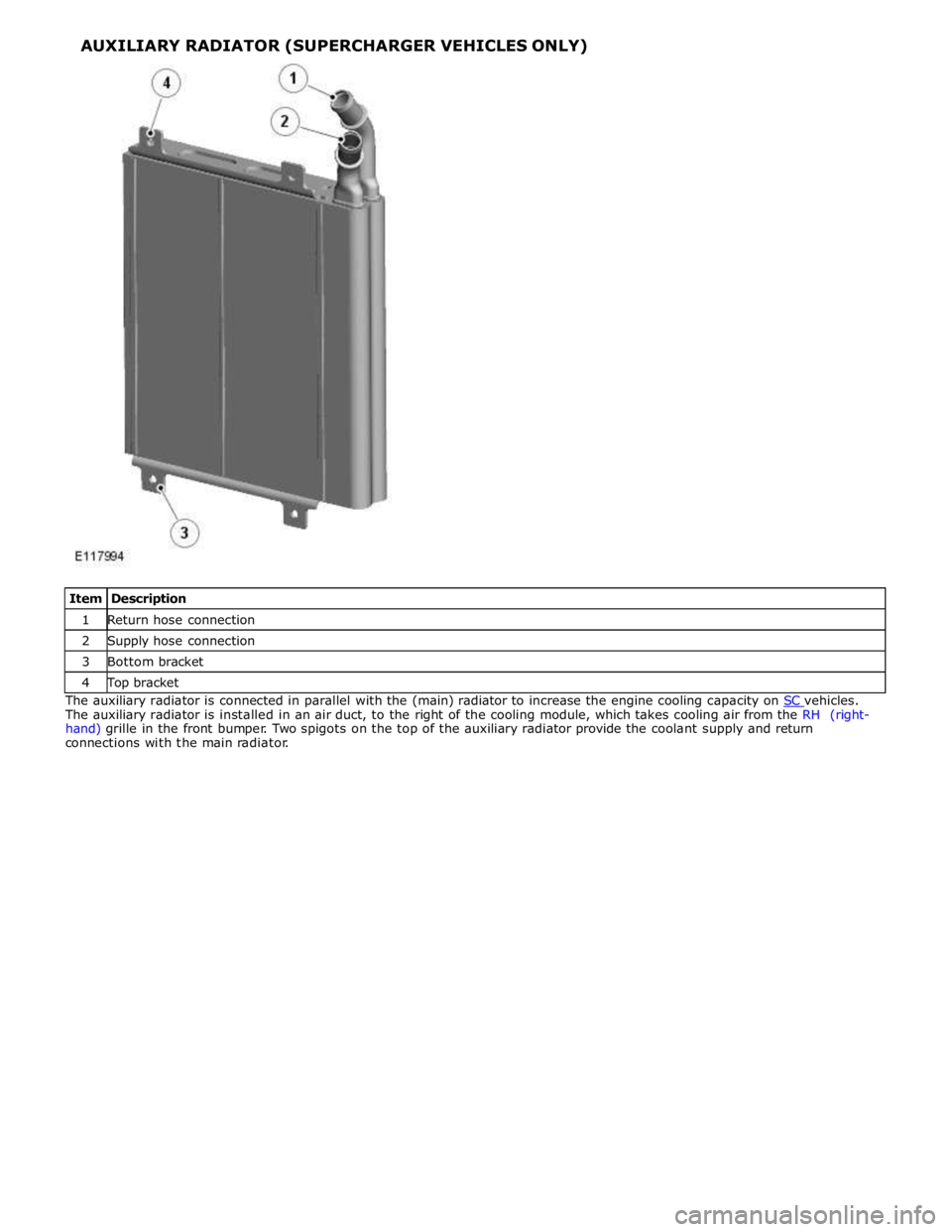
1 Return hose connection 2 Supply hose connection 3 Bottom bracket 4 Top bracket The auxiliary radiator is connected in parallel with the (main) radiator to increase the engine cooling capacity on SC vehicles. The auxiliary radiator is installed in an air duct, to the right of the cooling module, which takes cooling air from the RH (right-
hand) grille in the front bumper. Two spigots on the top of the auxiliary radiator provide the coolant supply and return
connections with the main radiator.
Page 1121 of 3039
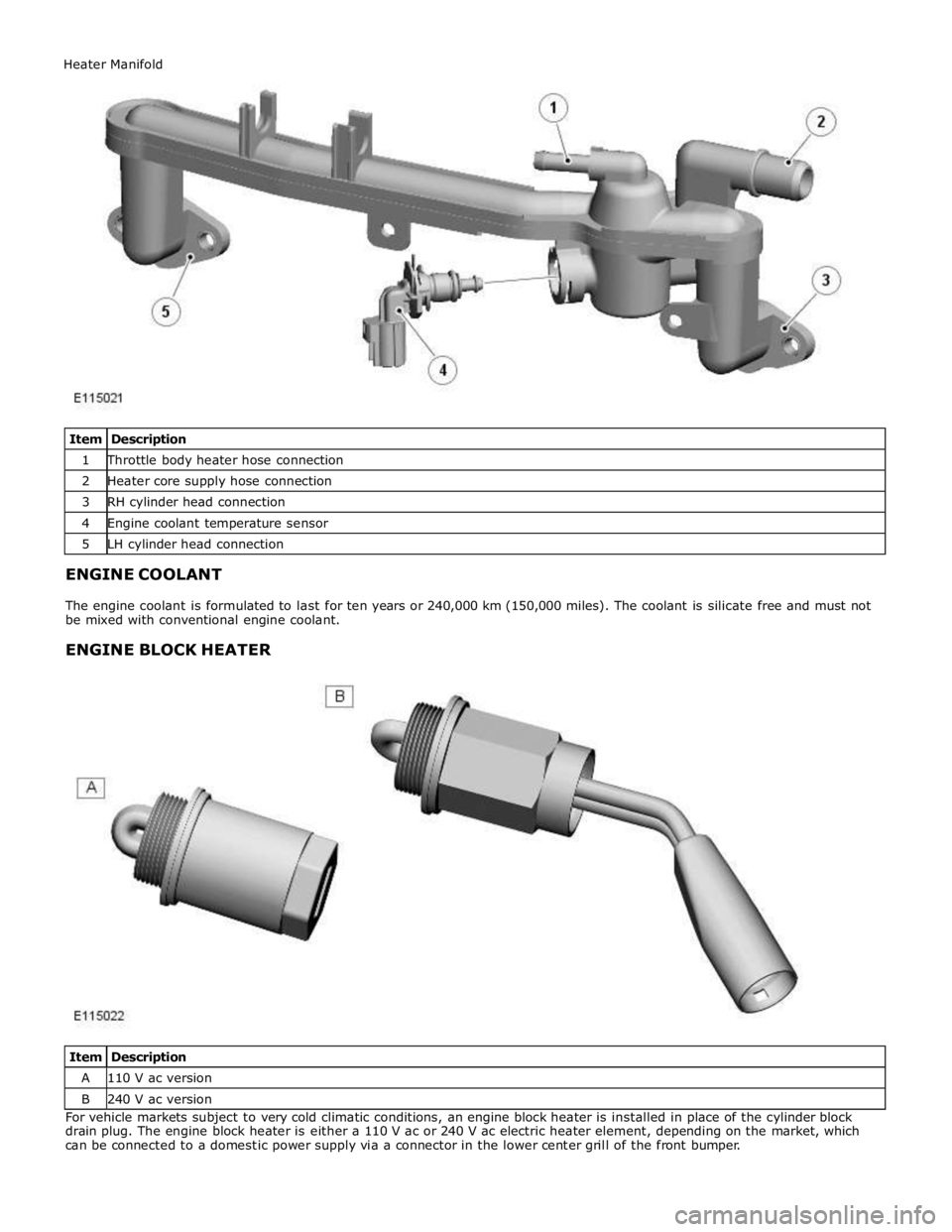
1 Throttle body heater hose connection 2 Heater core supply hose connection 3 RH cylinder head connection 4 Engine coolant temperature sensor 5 LH cylinder head connection
ENGINE COOLANT
The engine coolant is formulated to last for ten years or 240,000 km (150,000 miles). The coolant is silicate free and must not
be mixed with conventional engine coolant.
ENGINE BLOCK HEATER
Item Description A 110 V ac version B 240 V ac version For vehicle markets subject to very cold climatic conditions, an engine block heater is installed in place of the cylinder block
drain plug. The engine block heater is either a 110 V ac or 240 V ac electric heater element, depending on the market, which
can be connected to a domestic power supply via a connector in the lower center grill of the front bumper. Heater Manifold
Page 1644 of 3039
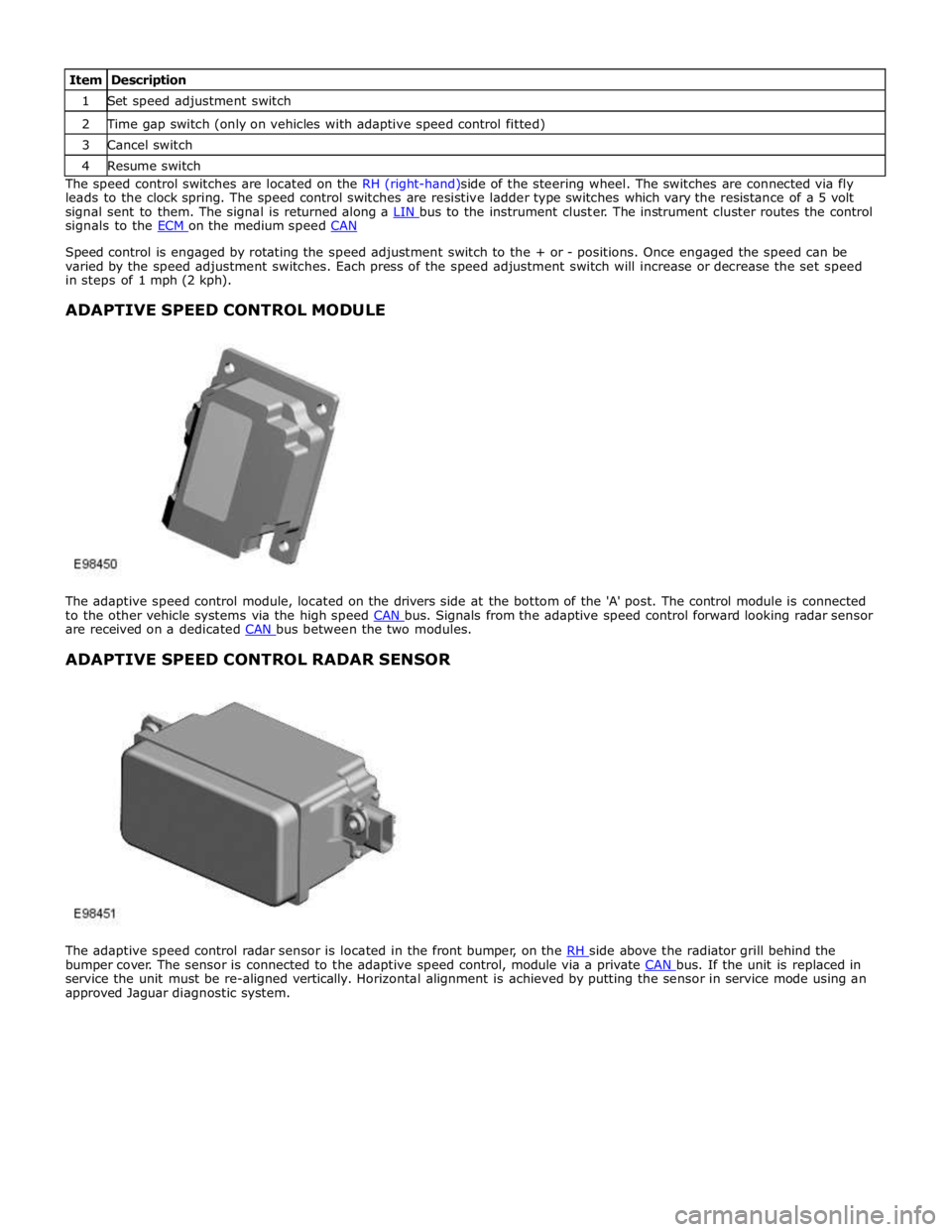
1 Set speed adjustment switch 2 Time gap switch (only on vehicles with adaptive speed control fitted) 3 Cancel switch 4 Resume switch The speed control switches are located on the RH (right-hand)side of the steering wheel. The switches are connected via fly
leads to the clock spring. The speed control switches are resistive ladder type switches which vary the resistance of a 5 volt
signal sent to them. The signal is returned along a LIN bus to the instrument cluster. The instrument cluster routes the control signals to the ECM on the medium speed CAN
Speed control is engaged by rotating the speed adjustment switch to the + or - positions. Once engaged the speed can be
varied by the speed adjustment switches. Each press of the speed adjustment switch will increase or decrease the set speed
in steps of 1 mph (2 kph).
ADAPTIVE SPEED CONTROL MODULE
The adaptive speed control module, located on the drivers side at the bottom of the 'A' post. The control module is connected
to the other vehicle systems via the high speed CAN bus. Signals from the adaptive speed control forward looking radar sensor are received on a dedicated CAN bus between the two modules.
ADAPTIVE SPEED CONTROL RADAR SENSOR
The adaptive speed control radar sensor is located in the front bumper, on the RH side above the radiator grill behind the bumper cover. The sensor is connected to the adaptive speed control, module via a private CAN bus. If the unit is replaced in service the unit must be re-aligned vertically. Horizontal alignment is achieved by putting the sensor in service mode using an
approved Jaguar diagnostic system.
Page 1832 of 3039
Warning Devices - Blindspot Monitoring System - Overview
Description and Operation
OVERVIEW Published: 11-May-2011
Eliminating blind spots is a major element in vehicle body design, but because of the structural requirements of B, C and D
posts, blind spots cannot be entirely eliminated. Statistics show that some accidents are directly attributable to drivers moving
across into the path of overtaking vehicles that have not been seen in conventional mirrors. New mirror designs have improved
the situation, but by remotely covering areas that cannot be seen either directly or by the vehicle mirrors, have led to the
introduction of a radar-based blind spot monitoring system.
The blind spot monitoring system comprises:
LH (left-hand) Blind spot monitoring sensor
RH (right-hand) Blind spot monitoring sensor
LH door mirror RH door mirror
The system uses two radar modules operating at a frequency of 24 GHz and each combining the radar face and electronic
module in a single unit. The modules are located behind the rear bumper surface, symmetrically, one on each side of the car
behind the rear wheels. They are side facing and inclined rearwards at an angle of 16 degrees, which is dictated by the shape
at the rear of the vehicle. Each module is calibrated to detect a vehicle in the driver’s blind spot. Once a vehicle is detected
the module illuminates an amber warning ‘alert icon’ LED (light emitting diode) in the relevant exterior door mirror. If there is a
fault or blockage with the blind spot monitoring system an amber warning indicator dot LED is displayed in the exterior mirror and the message ‘blind spot monitoring not available’ is displayed in the instrument cluster message center.
When the system initiates, it performs a self-check, during which the warning icons in the mirrors illuminate alternately for a
short period of time. Each module does a left/right determination check when the ignition is switched on. Each mirror has a
different circuit configuration so that the modules can determine which mirror they are connected to. If a module detects the
wrong mirror it will go into a fault condition.
The blind spot monitoring modules receive vehicle speed on the medium speed CAN (controller area network) and are inactive
until the vehicle reaches 16kph (10mph). Each blind spot monitor module emits a radar field greater than the blind spot area.
Each Blind Spot Monitor module emits a radar field greater than the blind spot area. The actual blind spot area is calibrated
into the module during its manufacture.
CAUTION: The blind spot monitoring system is designed as a driver aid not a safety device. The driver should always
exercise due care and attention whilst driving. www.JagDocs.com
Page 1836 of 3039
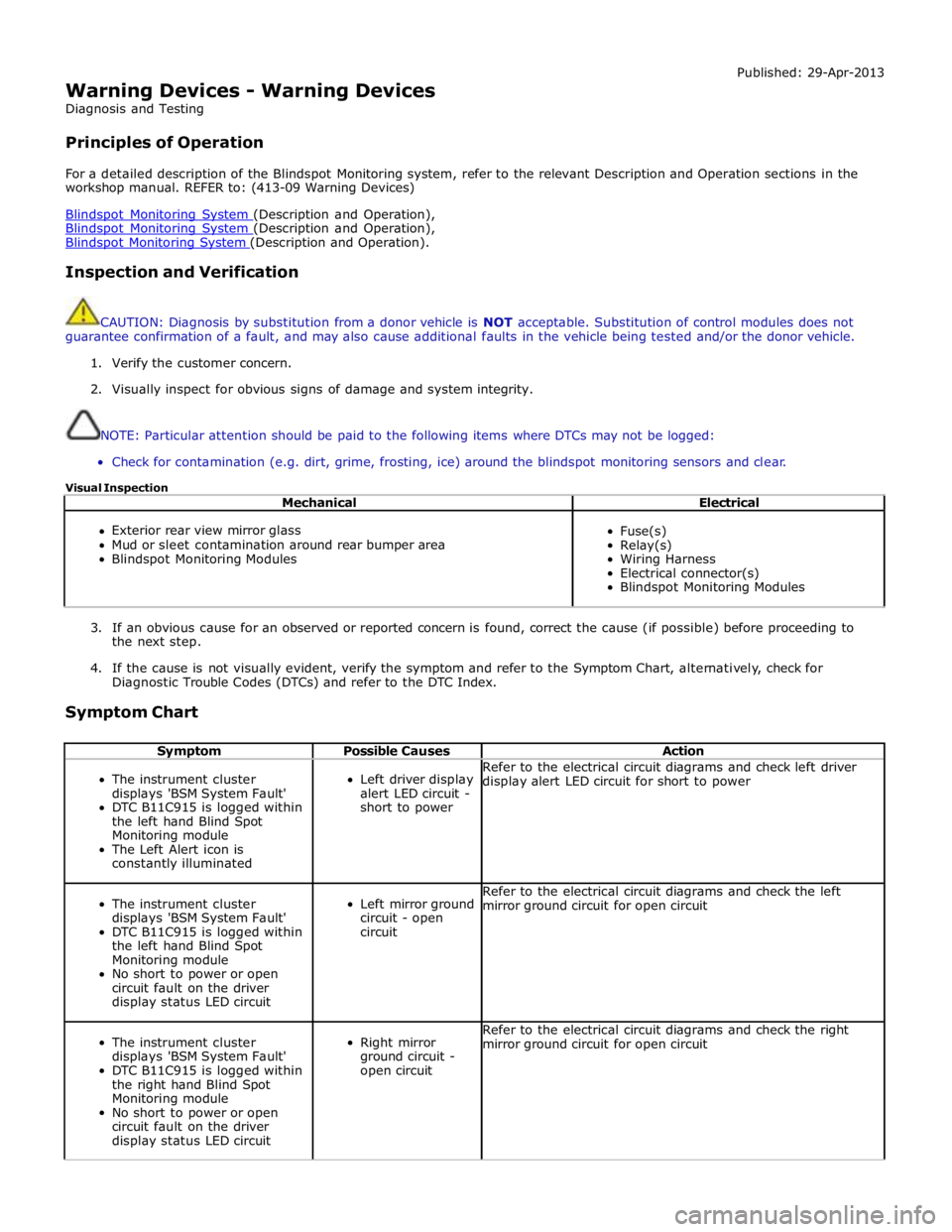
Warning Devices - Warning Devices
Diagnosis and Testing
Principles of Operation Published: 29-Apr-2013
For a detailed description of the Blindspot Monitoring system, refer to the relevant Description and Operation sections in the
workshop manual. REFER to: (413-09 Warning Devices)
Blindspot Monitoring System (Description and Operation), Blindspot Monitoring System (Description and Operation), Blindspot Monitoring System (Description and Operation).
Inspection and Verification
CAUTION: Diagnosis by substitution from a donor vehicle is NOT acceptable. Substitution of control modules does not
guarantee confirmation of a fault, and may also cause additional faults in the vehicle being tested and/or the donor vehicle.
1. Verify the customer concern.
2. Visually inspect for obvious signs of damage and system integrity.
NOTE: Particular attention should be paid to the following items where DTCs may not be logged:
Check for contamination (e.g. dirt, grime, frosting, ice) around the blindspot monitoring sensors and clear.
Visual Inspection
Mechanical Electrical
Exterior rear view mirror glass
Mud or sleet contamination around rear bumper area
Blindspot Monitoring Modules
Fuse(s)
Relay(s)
Wiring Harness
Electrical connector(s)
Blindspot Monitoring Modules
3. If an obvious cause for an observed or reported concern is found, correct the cause (if possible) before proceeding to
the next step.
4. If the cause is not visually evident, verify the symptom and refer to the Symptom Chart, alternatively, check for
Diagnostic Trouble Codes (DTCs) and refer to the DTC Index.
Symptom Chart
Symptom Possible Causes Action
The instrument cluster
displays 'BSM System Fault'
DTC B11C915 is logged within
the left hand Blind Spot
Monitoring module
The Left Alert icon is
constantly illuminated
Left driver display
alert LED circuit -
short to power Refer to the electrical circuit diagrams and check left driver
display alert LED circuit for short to power
The instrument cluster
displays 'BSM System Fault'
DTC B11C915 is logged within
the left hand Blind Spot
Monitoring module
No short to power or open
circuit fault on the driver
display status LED circuit
Left mirror ground
circuit - open
circuit Refer to the electrical circuit diagrams and check the left
mirror ground circuit for open circuit
The instrument cluster
displays 'BSM System Fault'
DTC B11C915 is logged within
the right hand Blind Spot
Monitoring module
No short to power or open
circuit fault on the driver
display status LED circuit
Right mirror
ground circuit -
open circuit Refer to the electrical circuit diagrams and check the right
mirror ground circuit for open circuit