Page 293 of 441

You can make calls using any phone
number or a name in the HFL
phonebook. You can also redial the
last number called.Press and release the HFL Talk
button bef ore a command.
Say ‘‘ ’’ or ‘‘ .’’
Follow the HFL prompts and say
the phone number you want to dial.
Follow the HFL prompts to
conf irm the number and say
‘‘ ’’ or ‘‘ .’’
Once connected, you will hear the
person you called through the audio
speakers.
Bluetooth is the wireless technology
that links your phone to HFL. HFL
uses a Class 2 Bluetooth, which
means the maximum range between
yourphoneandvehicleis30feet(10
meters).
During a call, HFL allows you to talk
up to 30 minutes af ter you remove
the key from the ignition switch.
However, this may weaken the
vehicle’s battery.
Select ‘‘ .’’
Press the INFO button, then select
‘‘ .’’
1. 2. 3.
1.2.
Making a Call
Call Dial
Call Dial Dial
Cellular Phonebook
BluetoothHandsFreeL ink
T o make a call using a phone number
(t alk but t on): T o make a call using a phone number
(navigat ion display):
278
Table of Contents
Page 305 of 441

�Î
�ÎIf you get into the vehicle while you
are on the phone, the call can be
automatically transferred to HFL
with the ignition switch in the
ACCESSORY (I) position.
Press and release the HFL Talk
button bef ore a command.
Say ‘‘ .’’
Press and release the HFL Talk
button bef ore a command.
Say ‘‘ .’’ Press and release the HFL Talk
button bef ore a command.
Say ‘‘ .’’
Follow the HFL prompts to
conf irm the number.
Follow the HFL prompts and say
the new 4-digit passcode.
Say ‘‘ ’’ af ter the
prompts.
The def ault setting is a ring tone.
Follow the HFL prompts and say
‘‘ ’’ or ‘‘ .’’ You
can also say ‘‘ ’’ f or no audible
incoming call notif ication.
Say ‘‘ ’’ af ter the
prompts.
HFL will let you know if auto
transf er is on or of f , depending on
the previous setting. Follow the
HFL prompts to change the
setting.
Say ‘‘ ’’ af ter the
prompts.
2. 3.
4.
1. 2. 3.
1. 2. 3.
1.
: System setup
System setup
System setup
Change passcode
Ring tone PromptOf f
Call notif ication
Auto transf er
T o change your securit y passcode: T o select eit her a ring t one or a prompt as t he incoming callnotification : To activate or deactivate the auto
transfer function:
BluetoothHandsFreeL ink
290
Table of Contents
Page 329 of 441
Apply the parking brake.
In cold weather, turn of f all
electrical accessories to reduce
the drain on the battery.Without touching the accelerator
pedal, turn the ignition key to the
START (III) position. Do not hold
the key in the START (III)
position f or more than 15 seconds
at a time. If the engine does not
start right away, pause for at least
10 seconds bef ore trying again.
Make sure the shif t lever is in
Park. Press on the brake pedal.
1. 2. 3.
4.
Starting the Engine
314
T he immobilizer system protects your
vehicle f rom thef t. If an improperly-
coded key (or other device) is used, the
engine’s f uel system is disabled. For
more inf ormation, see page .The engine is harder to start in cold
weather. Also, the thinner air f ound at
altitudes above 8,000 f eet (2,400
meters) adds to this problem.
83
Table of Contents
Page 330 of 441
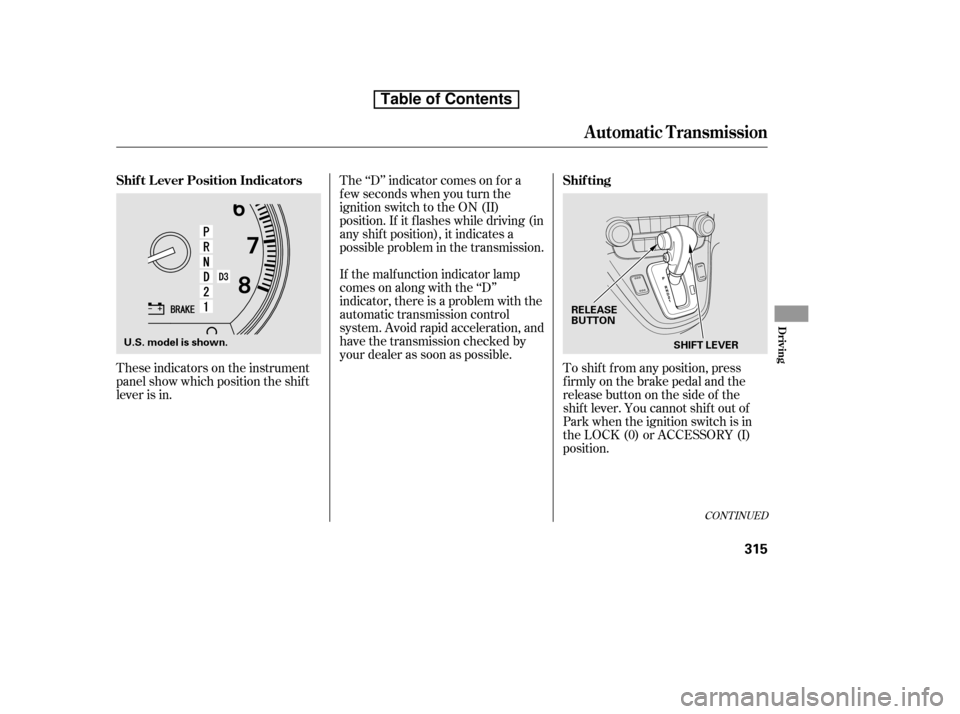
These indicators on the instrument
panel show which position the shif t
lever is in.The ‘‘D’’ indicator comes on f or a
f ew seconds when you turn the
ignition switch to the ON (II)
position. If it f lashes while driving (in
any shif t position), it indicates a
possible problem in the transmission.
If the malf unction indicator lamp
comes on along with the ‘‘D’’
indicator, there is a problem with the
automatic transmission control
system. Avoid rapid acceleration, and
have the transmission checked by
your dealer as soon as possible.
To shif t f rom any position, press
f irmly on the brake pedal and the
release button on the side of the
shiftlever.Youcannotshiftoutof
Park when the ignition switch is in
the LOCK (0) or ACCESSORY (I)
position.
CONT INUED
Shif t L ever Position Indicators Shif ting
Automatic Transmission
Driving
315
SHIFT LEVER
RELEASE
BUTTON
U.S. model is shown.
Table of Contents
Page 331 of 441

�µ�µ
If you have done all of the above and
still cannot move the lever out of
Park, see on
page . This position mechani-
cally locks the transmission. Use
Park whenever you are turning of f or
starting the engine. To shif t out of
Park, you must press on the brake
pedal and have your f oot of f the
accelerator pedal. Press the release
button on the side of the shift lever
to move it.
To avoid transmission damage, come
to a complete stop bef ore shif ting
into Park. You must also press the
release button to shift into Park. The
shif t lever must be in Park bef ore
you can remove the key f rom the
ignition switch. Press the brake
pedal and the release button on the
side of the shif t lever to shif t f rom
Park to reverse. To shif t f rom
reverse to neutral, come to a
completestopandthenshift.Press
the release button bef ore shif ting
into reverse f rom neutral.
319To shift from: PtoR
RtoP
NtoR Dto2 2to1
1to2
2toD
DtoN
NtoD RtoN
DtoD
DtoD Do this:
Press the brake pedal and
press the shift lever release
button.
Press the shift lever release
button.
Move the shift lever.
Press the D button.
3
3 3
Automatic Transmission
Shif t L ock Release
Park (P) Reverse (R)
316
Table of Contents
Page 332 of 441

�µ
�µ Use neutral if you
need to restart a stalled engine, or if
it is necessary to stop brief ly with
the engine idling. Shif t to the Park
position if you need to leave your
vehicle for any reason. Press on the
brake pedal when you are moving
the shift lever from neutral to
another gear.
Use this position f or
your normal driving. The
transmission automatically selects a
suitable gear (1 through 5) f or your
speed and acceleration. You may
notice the transmission shif ting up at
higher engine speeds when the
engine is cold. This helps the engine
warm up f aster. Press the D3 switch on the side of
the shif t lever to turn this mode on
or of f ; the D3 mode indicator comes
on whenever the D3 mode is
selected.
D3 mode can be turned on or of f
only when the ignition switch is in
the ON (II) position and the shif t
lever is in the D position.WhentheD3modeison,the
transmission selects only the f irst
three gears. Use D3 mode when
towing a trailer, or to provide engine
braking when going down a steep hill.
D3 mode can also keep the
transmission f rom cycling between
third and f ourth gears in stop-and-go
driving.
CONT INUED
Neutral (N)
Drive (D)
Automatic Transmission
D3 Mode
Driving
317
D3 MODE INDICATOR
D3 SWITCH
Table of Contents
Page 333 of 441

�µ�µ
Turning the ignition switch to the
LOCK (0) position turns this mode
of f . When you restart the engine,
select the D position and press the
D3 mode switch again to use this
mode.
TheD3modeindicatoralsocomes
on f or a f ew seconds when you turn
the ignition switch to the ON (II)
position. If you exceed the maximum speed
f or the gear you are in, the engine
speed will enter into the tachometer’s
red zone. If this occurs, you may f eel
the engine cut in and out. This is
caused by a limiter in the engine’s
computer controls. The engine will
run normally when you reduce the
rpm below the red zone.
Use second gear:
For more power when climbing.
To increase engine braking when
going down steep hills.
For starting out on a slippery
surf ace or in deep snow.
To help reduce wheel spin.
When driving downhill with a
trailer.
To shif t to second,
pressthereleasebuttonontheside
of the shif t lever. This position locks
the transmission in second gear. It
does not downshif t to f irst gear
when you come to a stop. To shif t f rom second to
first, press the release button on the
side of the shif t lever. This position
locks the transmission in f irst gear.
By upshif ting and downshif ting
through 1, 2, D , and D, you can
operate the transmission much like a
manual transmission without a
clutch pedal.
Shif ting out f rom the D position will
canceltheD3mode,andtheD3
indicator will go out. Selecting the D
position again will resume the D3
mode and the indicator comes on.
If you shif t into f irst gear when the
vehiclespeedisabove31mph(50
km/h), the transmission shif ts into
second gear f irst to avoid sudden
engine braking.
3
Automatic Transmission
Engine Speed L imiter
Second (2) First (1)
318
Table of Contents
Page 334 of 441

This allows you to move the shif t
lever out of Park if the normal
method of pushing on the brake
pedal and pressing the release
button does not work.Set the parking brake.
Remove the key from the ignition
switch.
Put a cloth on the edge of the shif t
lock release slot cover. Using a
small f lat-tipped screwdriver or
metal f ingernail f ile, caref ully pry
on the edge of the cover to remove
it. Insert the key in the shift lock
release slot.
Push down on the key while you
pressthereleasebuttononthe
shif t lever and move the shif t lever
out of Park to neutral.
If you need to use the shif t lock
release, it means your vehicle is
developing a problem. Have the
vehicle checked by your dealer.Remove the key from the shift
lock release slot, then reinstall the
cover. Make sure the notch on the
cover is on the right side. Insert
the key back into the ignition
switch, press the brake pedal, and
restart the engine.
6.
1. 2. 3.
4.5.
Automatic Transmission
Shif t L ock Release
Driving
319
SHIFT LOCK RELEASE SLOTRELEASE BUTTON
COVER
Table of Contents