Page 339 of 441

The vehicle stability assist (VSA)
system helps to stabilize the vehicle
during cornering if the vehicle turns
more or less than desired. It also
assists you in maintaining traction
while accelerating on loose or
slippery road surf aces. It does this
by regulating the engine’s output and
by selectively applying the brakes.
When VSA activates, you may notice
that the engine does not respond to
the accelerator in the same way it
does at other times. There may also
be some noise f rom the VSA
hydraulic system. You will also see
the VSA activation indicator blink.
The VSA system cannot enhance the
vehicle’s driving stability in all
situations and does not control your
vehicle’s entire braking system. It is
still your responsibility to drive and
corner at reasonable speeds and to
leave a sufficient margin of safety.The main f unction of the
VSA system is generally known as
Electronic Stability Control (ESC).
The system also includes a traction
control f unction.
When VSA activates, you will see the
VSA system indicator blink.
If this indicator comes on while
driving, pull to the side of the road
when it is saf e, and turn of f the
engine. Reset the system by
restarting the engine. If the VSA
system indicator stays on or comes
back on while driving, have the VSA
system inspected by your dealer.
If the indicator does not come on
when the ignition switch is turned to
the ON (II) position, there may be a
problem with the VSA system. Have
your dealer inspect your vehicle as
soon as possible.
When VSA is off, the VSA off
indicator comes on as a reminder.
If the low tire pressure indicator or
TPMS indicator comes on, the VSA
system automatically turns on even if
the VSA system is turned of f by
pressing the VSA OFF switch (see
page ). If this happens, you
cannot turn the VSA system of f by
pressing the VSA OFF switch again.
Without VSA, your vehicle will have
normal braking and cornering ability,
but it will not have VSA traction and
stability enhancement.325
Vehicle Stability Assist
(VSA ) System Indicator
VSA Of f Indicator
Vehicle St abilit y A ssist (VSA), aka Electronic Stability Control (ESC), System
324
NOTE:
Table of Contents
Page 349 of 441

Your vehicle can be towed behind a
motorhome at legal highway speeds
up to 65 mph (100 km/h). Do not
exceed 65 mph (100 km/h).
Otherwise, severe transmission
damage will occur. To avoid damage
to the 4WD system, your vehicle
must be towed with all f our wheels
on the ground (f lat towing).
When purchasing a tow bar, make
sure you select a reputable
manuf acturer and installer. Follow
the manufacturer’s attachment
instructions caref ully.
Perf orm the f ollowing procedure
every day immediately bef ore you
begin towing. Otherwise severe
automatic transmission damage will
occur.
Always drive slowly and have
someone guide you when backing up.
Grip the of the steering wheel,
then turn the wheel to the left to get
the trailer to move to the lef t, and
turn the wheel right to move the
trailer to the right.
Follow all normal precautions when
parking, including f irmly setting the
parking brake and putting the
transmission in Park. Also, place
wheel chocks at each of the trailer’s
tires.
Leave the ignition switch in the
ACCESSORY (I) position so the
steering wheel does not lock.
Make sure the radio and any items
plugged into the accessory power
sockets are turned of f so you do
not run down the battery.
Release the parking brake.
Shif t to D position and hold f or 5
seconds, then to N. Let the engine
runfor3minutes,thenturnitoff.
Press on the brake pedal. Move
the shif t lever through all its
positions.
Check the transmission f luid level
(see page ).
Start the engine.
355
bottom Do not overf ill.
T owing a T railer, T owing Your Vehicle Behind a Mot orhome
Towing Your Vehicle Behind a
MotorhomeBacking Up
Parking
334
Table of Contents
Page 350 of 441

If you tow more than 8 hours in one
day, you should repeat the above
procedure at least every 8 hours
(when you stop f or f uel, etc.)Only remove the fuse after you have
perf ormed the transmission shif ting
procedure, and the key is in the
ACCESSORY (I) position. Store the
f use in an obvious location (center
tray, coin pockets, etc) as a reminder
to re-install the fuse before drivingthe vehicle.
When towing your vehicle f or long
periods, remove the 7.5 A Accessory
Radio f use to reduce drain on battery.
This f use is located in the interior
f use box and is shown as number 34
below.
If you tow a CR-V behind a
motorhome, the transmission fluid
must be changed every 2 years or
30,000 miles (48,000 km), whichever
comes f irst.
Ext ended T owing
Towing Your Vehicle Behind a Motorhome
Driving
335
INTERIOR FUSE BOXACCESSORY RADIO FUSE
The steering system can be damaged if
the steering wheel is locked. Leave the
ignition switch in the ACCESSORY (I)
position, and make sure the steering
wheel turns f reely bef ore you begin
towing.
Failure to f ollow the recommended
instructions exactly will result in severe
automatic transmission damage. If you
cannot shif t the transmission or start
the engine, your vehicle must be
transported on a f lat-bed truck or
trailer. Severe transmission damage will occur
if the vehicle is shif ted f rom reverse to
neutral and then towed with the drive
wheels on the ground.
Table of Contents
Page 356 of 441
�µ
�µ �µ�µ�µ�µ�µ�µ�µ�µ �µ
�µ
CONT INUED
Calculated Engine Oil Lif e (%)
100 % 91 % 90 % 81 %
80 % 71 %
70 % 61 %
60 % 51 %
50 % 41 %
40 % 31 %
30 % 21 %
20 % 16 %
15 % 11 %10 % 6 % 5% 1% 0% Displayed
Engine Oil Lif e (%) 100 %90 %
80 %
70 %
60 %
50 %
40 %
30 %
20 %
15 %
10 %5%0%
The remaining engine oil lif e is
shownonthedisplayaccordingto
this table:
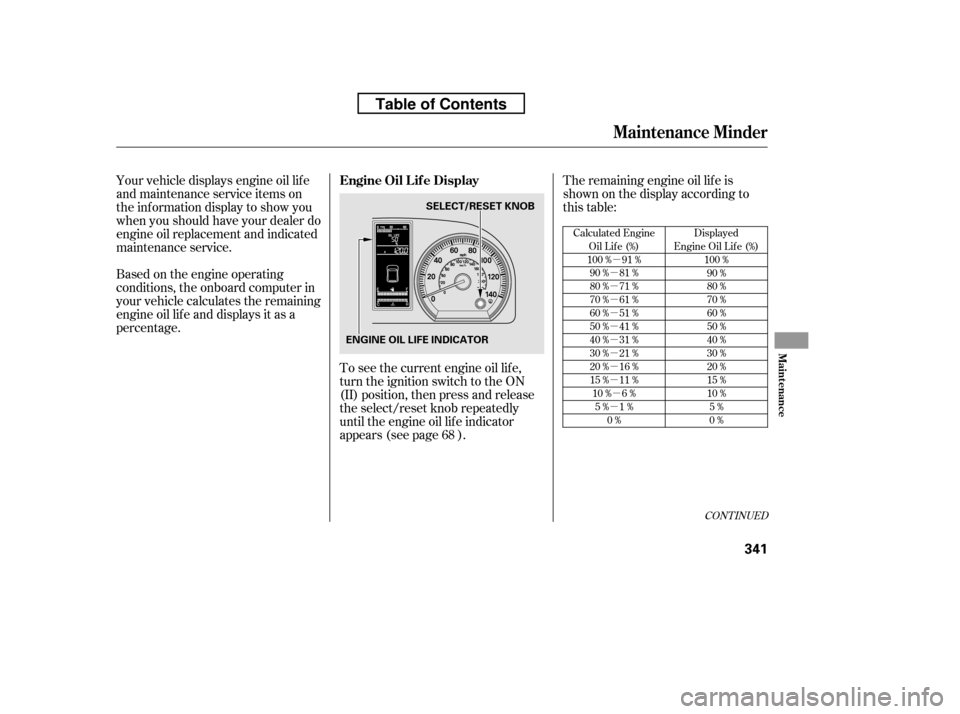
To see the current engine oil lif e,
turn the ignition switch to the ON
(II) position, then press and release
the select/reset knob repeatedly
until the engine oil lif e indicator
appears (see page ).
Your vehicle displays engine oil lif e
and maintenance service items on
the inf ormation display to show you
when you should have your dealer do
engine oil replacement and indicated
maintenance service.
Based on the engine operating
conditions, the onboard computer in
your vehicle calculates the remaining
engine oil lif e and displays it as a
percentage.
68
Maintenance Minder
Engine Oil L if e Display
Maint enance
341
SELECT/RESET KNOB
ENGINE OIL LIFE INDICATOR
Table of Contents
Page 357 of 441
When the remaining engine oil lif e is
5 to 1 percent, you will see a
‘‘SERVICE’’ message along with the
same maintenance item code(s),
everytimeyouturntheignition
switch to the ON (II) position.
If the remaining engine oil lif e is 15
to 6 percent, you will see the engine
oil lif e indicator every time you turn
the ignition switch to the ON (II)
position. The maintenance minder
indicator will also come on, and the
maintenance item code(s) for other
scheduled maintenance items
needing service will be displayed
below the engine oil lif e indicator. The 15 and 10 percent oil lif e
indicators remind you that your
vehicle will soon be due f or
scheduled maintenance.
Maintenance Minder
342
MAINTENANCE MINDER INDICATOR
ENGINE OIL LIFE
INDICATOR
MAINTENANCE ITEM CODE(S)
Table of Contents
Page 358 of 441

If you do not perf orm the indicated
maintenance, negative distance
traveled is displayed and begins to
blink af ter the vehicle has been
driven 10 miles (10 km) or more.
Negative distance traveled means
your vehicle has passed the
maintenance required point.
When the remaining engine oil lif e is
0 percent, the engine oil lif e indicator
will blink. The display comes on
everytimeyouturntheignition
switch to the ON (II) position. The
maintenance minder indicator
( ) also comes on and remains
on in the instrument panel. When
you see this message, immediately
have the indicated maintenance done
by your dealer.
The maintenance item code or codes
indicate the main and sub items
required at the time of the oil change
(see page ).
You can switch the information
display f rom the engine oil lif e
display to the odometer or the
average f uel mileage, press and
release the select/reset knob on the
instrument panel.
Whentheengineoillifeis15to1
percent, the maintenance minder
indicator ( ) comes on every
time you turn the ignition switch to
the ON (II) position, then it goes out
if you switch the inf ormation display.
When you see this message, have
the indicated maintenance
perf ormed by your dealer as soon as
possible.
Immediately have the indicated
maintenance done by your dealer.
347
CONT INUED
Maintenance Minder
Maint enance
343
NEGATIVE DISTANCE TRAVELED
Table of Contents
Page 359 of 441

Your dealer will reset the display
af ter completing the required
maintenance service. You will see
‘‘OIL LIFE 100%’’ on the inf ormation
display the next time you turn the
ignition switch to the ON (II)
position.
If maintenance service is done by
someone other than your dealer,
reset the maintenance minder as
f ollows:Turn the ignition switch to the ON
(II) position.
Press the select/reset knob
repeatedly until the engine oil lif e
is displayed.
All maintenance items displayed on
the inf ormation display are in code.
For an explanation of these
maintenance codes, see page .
To change the inf ormation display
f rom the engine oil lif e display to the
odometer or the average f uel
mileage, press and release the
select/reset knob.
Immediately have the service
perf ormed, and make sure to reset
the display as described as f ollows.
When the engine oil lif e is 0 percent
or negative distance traveled, the
maintenance minder indicator
( )remainsonevenif you
change the inf ormation display.
1. 2.
347
Maintenance Minder
Resetting the Engine Oil Lif e
Display
Maintenance Main Items and Sub
Items
344
MAIN ITEM SUB ITEM(S)
Table of Contents
Page 393 of 441

Leave the parking brake off. Put
the transmission in Park.
Block the rear wheels.
If the vehicle is to be stored f or a
longer period, it should be
supported on jackstands so the
tires are of f the ground.
Leave one window open slightly (if
the vehicle is being stored
indoors).
Disconnect the battery.
If your vehicle’s battery is
disconnected, or goes dead, the time
setting may be lost. To reset the time,
see page .
If your vehicle’s battery is
disconnected, or goes dead, the
audio system will disable itself . The
nexttimeyouturnontheradio,you
may see ‘‘ENTER CODE’’ in the
f requency display. Use the preset
buttons to enter the code (see page
).
The navigation system will also
disableitself.Thenexttimeyouturn
on the ignition switch, the system
will require you to enter a PIN
bef ore it can be used. Ref er to the
navigation system manual. Cleantheinterior.Makesurethe
carpeting, floor mats, etc., are
completely dry.
Wash and dry the exterior
completely.
Fill the f uel tank.
If you need to park your vehicle f or
an extended period (more than 1
month), there are several things you
should do to prepare it f or storage.
Proper preparation helps prevent
deterioration and makes it easier to
get your vehicle back on the road. If
possible, store your vehicle indoors.
259
258On vehicles without navigation system
On vehicles with navigation system
Checking the Battery, Vehicle Storage
Vehicle Storage
378
Table of Contents
