Page 142 of 441
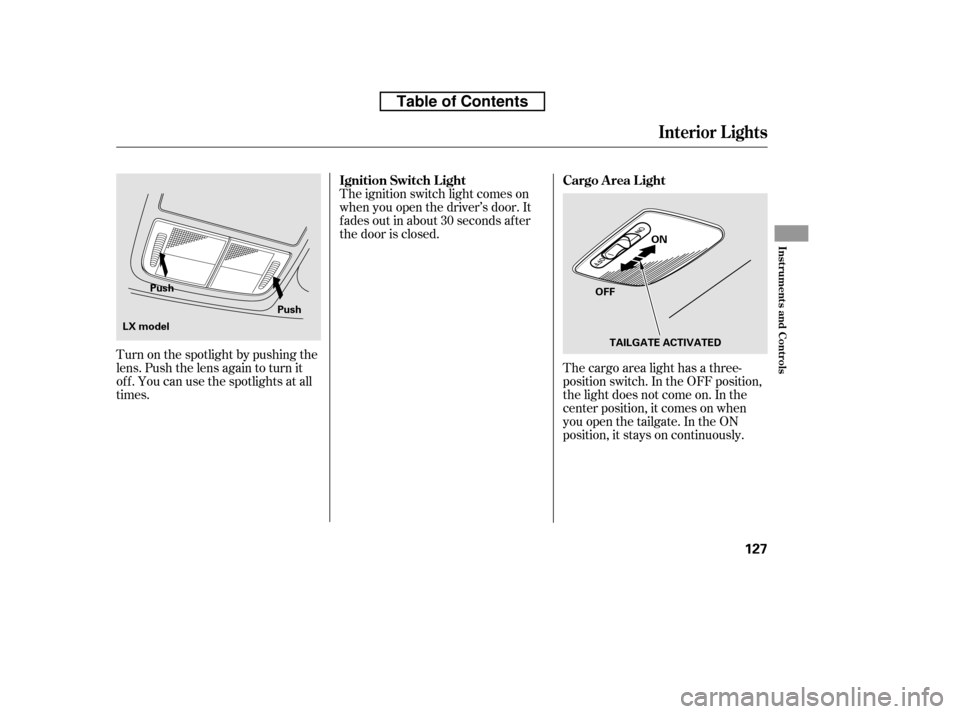
The cargo area light has a three-
position switch. In the OFF position,
the light does not come on. In the
center position, it comes on when
you open the tailgate. In the ON
position, it stays on continuously.
The ignition switch light comes on
when you open the driver’s door. It
f ades out in about 30 seconds af ter
the door is closed.
Turn on the spotlight by pushing the
lens. Push the lens again to turn it
of f . You can use the spotlights at all
times.
Interior Lights
Cargo Area Light
Ignition Switch L ight
Inst rument s and Cont rols
127
OFF ON
TAILGATE ACTIVATED
Push
Push
LX model
Table of Contents
Page 161 of 441

�µ�µ
�µ
You can use any of f ive methods to
f ind radio stations on the selected
band: tune, seek, scan, the preset
buttons, and auto select.
Use the TUNE knob to
tune the radio to a desired f requency.
Turn the knob to the right to tune to
a higher f requency, and turn it to the
lef t to tune to a lower f requency.
The ignition switch must be in the
ACCESSORY (I) or ON (II) position.
Turn the system on by pushing the
power/volume knob or the AM or
FM button. Adjust the volume by
turning the power/volume knob.
The scan f unction samples
all stations with strong signals on the
selected band. To activate it, press
the right side of the A. SEL/SCAN
bar, then release it. You will see
SCAN in the display. The system will
scan f or a station with a strong signal.
When it f inds one, it will stop and
play that station for about 10 seconds.
If you do nothing, the system will
then scan f or the next strong station
and play it f or 10 seconds. When it
plays a station you want to listen to,
press the SCAN side of the bar again.
The band and f requency that the
radio was last tuned to is displayed.
To change bands, press the AM or
FM button. On the FM band, ST will
be displayed if the station is broad-
castinginstereo.Stereo
reproduction on AM is not available.
The seek f unction
searches up and down f rom the
current f requency to f ind a station
with a strong signal. To activate it,
press the or side of the
SEEK bar, then release it.
To Select a Station
TUNE
To Play the AM/FM Radio
SCAN
SEEK /SK IP
Playing the AM/FM Radio (LX model)
146
Table of Contents
Page 165 of 441

�µ
�µ �µ
�µ
You operate the disc player with the
same controls used f or the radio. To
select the disc player, press the CD/
AUX button. You will see ‘‘CD’’ in the
display.
To load or play a disc, the ignition
switch must be in the ACCESSORY
(I) or ON (II) position.
The specif ications f or compatible
MP3 f iles are:
Sampling f requency:
32/44.1/48 kHz (MPEG1)
24/22.05/16 kHz (MPEG2)
Bitrate:
32/40/48/56/64/80/96/112/128/
160/192/224/256/320 kbps
(MPEG1)
8/16/24/32/40/48/56/64/80/96/
112/128/160 kbps (MPEG2)
Compatible with variable bitrate
and multi-session
Maximum layers
(including ROOT): 8 layers
This audio system can also play
CD-Rs and CD-RWs compressed in
MP3 or WMA f ormats. When
playing a disc in MP3, you will see
‘‘MP3’’ in the display. In WMA
f ormat, ‘‘WMA’’ will appear in the
display. You can select up to 99
f olders, or up to 255 tracks/f iles.
If a f ile on an MP3 or WMA disc is
protected by digital rights
management (DRM), the audio unit
displays FORMAT, and then skips to
the next f ile.
Video CDs and DVDs do not work in
this unit.
To Play a Disc
Playing a Disc (L X model)
150
NOTE:
Do not use discs with adhesive labels.
The label can curl up and cause the
disc to jam in the unit.
Table of Contents
Page 170 of 441
If you turn the system of f while a
disc is playing, either with the
power/volume knob or by turning
of f the ignition switch, the disc will
stay in the drive. When you turn the
system back on, the disc will begin
playing where it lef t of f .
For inf ormation on how to handle
and protect compact discs, see page.
Press the eject button ( ) to
remove the disc. If you eject the disc,
but do not remove it f rom the slot,
the system will automatically reload
the disc af ter 10 seconds and put it in
pause mode. To begin playing, press
the CD/AUX button.
You can also eject the disc when the
ignition switch is of f .
To play the radio when a disc is
playing, press the AM or FM button.
Press the CD/AUX button again to
switch back to the disc player.
252
Protecting Discs
To Stop Playing a Disc
Playing a Disc (L X model)
Features
155
Table of Contents
Page 173 of 441

�µ�µ�µ
You can use any of f ive methods to
f ind radio stations on the selected
band: tune, seek, scan, the preset
buttons, and auto select. Use the SEEK button to
tune to a desired f requency. Press
the button to tune to a higher
f requency, and the button to
tune to a lower f requency.
You can also operate the tune
f unction by using the VOL/SELECT
knob. Press the VOL/SELECT knob
and you will see ‘‘SEL’’ in the display.
Turn the knob right to tune to a
higher f requency, or lef t to tune to a
lower f requency. To turn it of f , press
the VOL/SELECT knob or button, or button.
The system will return to the normal
display about 10 seconds af ter you
stop adjusting the tune mode. The SEEK f unction
searches up and down f rom the
current f requency to f ind a station
with a strong signal. To activate it,
press and hold the or side
of the SEEK button until you hear a
beep, then release it.
The scan f unction samples
all stations with strong signals on the
selected band. To activate it, press
the SCAN button, then release it.
You will see SCAN in the display.
When the system finds a strong
signal, it will stop and play that
station f or about 10 seconds.
If you do nothing, the system will
then scan f or the next strong station
and play it f or 10 seconds. When it
plays a station you want to listen to,
press the SCAN button again.
The ignition switch must be in the
ACCESSORY (I) or ON (II) position.
Turn the system on by pushing the
FM or AM button. Adjust the volume
by turning the VOL/SELECT knob.
The band and f requency that the
radio was last tuned to are displayed.
To change bands, press the AM or
FM button. On the FM band, ST will
be displayed if the station is
broadcasting in stereo. Stereo
reproduction in AM is not available.
To Play the FM/AM Radio
To Select a Station T UNE SEEK
SCAN
Playing the FM/AM Radio (EX and EX-L models without navigation sys tem)
158
Table of Contents
Page 177 of 441

�µ�µ
�Û�Ý�µ
You may experience periods when
XM Radio does not transmit the
artist’s name and song title
inf ormation. If this happens, there is
nothing wrong with your system.
In channel mode, you can select all
of the available channels. In category
mode, such as Jazz, Rock, Classical,
etc., you can select all of the
channels within that category.
To listen to XM radio, turn the
ignition switch to the ACCESSORY
(I) or the ON (II) position. Push the
button to turn on the audio
system, and press the ‘‘XM’’ button.
Adjust the volume by turning the
VOL/SELECT knob. The last
channel you listened to will show in
the display. To switch between
channel mode and category mode,
press and hold the TITLE button
until the mode changes.
Each time you press and release the
TITLE button, the display changes in
the f ollowing sequence: channel
name, channel number, category,
artist name, and music title. Press the SEEK button to
change channel selections. Press
f or higher numbered channels
and f or lower numbered
channels. In the category mode, you
can only select channels within that
category.
In the
category mode, press either button
to select another category.
Operating the XM Radio MODE
TUNE
CAT EGORY ( or )
Playing t he XMRadio (EX-L model without navigation system)
162
Table of Contents
Page 180 of 441

Depending on where you drive, you
may experience reception problems.
Interf erence can be caused by any of
these conditions:Driving on the north side of a
large commercial truck on an
east/west road.
Driving in tunnels.
Driving on a road beside a vertical
wall, steep clif f , or hill to the south
of you.
Driving on the lower level of a
multi-tiered road.
Driving on a single lane road
alongside dense trees taller than
50 ft. (15 m) to the south of you.
Driving on the north side of an
east/west mountain road.
Large items carried on a roof rack.
There may be other geographic
situations that could af f ect XM Radio
reception. If your XM Radio service has expired
or you purchased your vehicle f rom
a previous owner, you can listen to a
sampling of the broadcasts available
on XM Radio. With the ignition
switch in the ACCESSORY (I) or ON
(II) position, push the button to
turn on the audio system and press
the XM button. A variety of music
types and styles will play.
After you’ve registered with XM
Radio, keep your audio system in the
XM radio mode while you wait f or
activation. This should take about 30
minutes.
If you decide to purchase XM Radio
service, contact XM Radio at ,orat
1-800-852-9696. In Canada, contact
XM CANADA
at , or
at 1-877-209-0079. You will need to
give them your radio I.D. number
and your credit card number. To get your radio I.D. number, press SEEK
until ‘‘CH000’’ appears in the display.
Your I.D. will appear in the display.
While waiting f or activation, make
sure your vehicle remains in an open
area with good reception. Once your
audio system is activated, you’ll be
able to listen to XM Radio broadcasts.
XM Radio will continue to send an
activation signal to your vehicle f or
at least 12 hours from the activation
request. If the service has not been
activated after 36 hours, contactXM
Radio. In Canada, contact XM
CANADA
.
As required by the FCC:
Changes or modif ications not expresslyapproved by the party responsible f or
compliance could void the user’sauthority to operate the equipment.
www.xmradio.com www.xmradio.ca
Receiving XM Radio Service
Playing t he XMRadio (EX-L model without navigation system)
Features
165
Table of Contents
Page 182 of 441
To load or play discs, the ignition
switch must be in the ACCESSORY
(I) or ON (II) position.
You operate the disc changer with
the same controls used f or the radio.
To select the disc changer, press the
CD button (CD/AUX button on
models with satellite radio), the disc
and track numbers are displayed.
The system will continuously play a
disc until you change modes.When there are more than 99 f olders
in a disc, the audio display only
shows two digits.
This audio system can also play
CD-Rs and CD-RWs compressed in
MP3 or WMA f ormats. The numbers
of the f older and track playing are
showninthedisplayonthedisc
player. A disc can support up to 255
folders, and each folder can hold up
to 255 playable f iles. A disc can hold
up to 999 f iles in total.
CONT INUED
To Play a Disc
Playing Discs (EX and EX-L models without navigation system)
Features
167
Do not use discs with adhesive labels.
The label can curl up and cause the
disc to jam in the unit.
Table of Contents