Page 1 of 441

CONT INUED
BatteryCharging System ...........................
Indicator . 62, 394
............................
Jump Starting . 390
..............................
Maintenance . 376
............................
Specif ications . 409
..............................
Bef ore Driving . 293
....................................
Belts,Seat .9,19
.........................
Beverage Holders . 119
......
Hands Free Link. 269
..................................
Booster Seats . 52
Brakes
...........
Anti-lock System (ABS) . 322 .............
Break-in, New Linings . 294
....................
Bulb Replacement . 363
...........................................
Fluid . 357
.........................................
Parking . 81
.................
System Indicator . 62, 396
..........................
System Design . 321
........................
Wear Indicators . 321
.............................
Braking System . 321
.................
Break-in, New Vehicle . 294
..
Brightness Control, Instruments . 79
Bulb Replacement
..........................
Back-up Lights . 363
..............................
Brake Lights . 363
................
Front Parking Lights . 362
........
Front Side Marker Lights . 362
.................................
Headlights . 359
.........
High-mount Brake Light . 364
.........
Rear Side Marker Lights . 363
............................
Specif ications . 409
............
Turn Signal Lights . 361, 363
..............................
Bulbs, Halogen . 359
....................................
Accessories . 302
ACCESSORY (Ignition Key
.......................................
Position) . 84
............
Accessory Power Sockets . 123
..................
Active Head Restraint . 103
....................
Additives, Engine Oil . 350
.......
Adjusting the Steering Wheel . 81
...........................
Advanced Airbags . 28
.............................
Airbag (SRS) . 10, 23
......
Air Conditioning System . 130, 135
.................................
Usage . 131, 136
.......................
Air Pressure, Tires . 371
.......................
Alcohol in Gasoline . 294
......................................
Antif reeze . 352
Anti-lock Brakes (ABS)
...............................
Indicator . 63, 322
...................................
Operation . 322
..............
Anti-thef t, Audio System . 258
.
Anti-thef t Steering Column Lock . 84
................................
Audio System . 143
.....
Auto Door Locking/Unlocking . 86
..........
Automatic Climate Control . 135
...
Automatic Seat Belt Tensioners . 21
.............
Automatic Speed Control . 266 ..............
Automatic Transmission . 315
..........................
Capacity, Fluid . 408
...............
Checking Fluid Level . 355
.....................................
D Mode . 317
.......................................
Shif ting . 315
Shif t Lever Position
...............................
Indicators . 315
................
Shif t Lever Positions . 316
....................
Shif t Lock Release . 319
......................
Auxiliary Input Jack . 257Bluetooth
3
Index
A
B
INDEX
I
Page 131 of 441
�Î
�Î
�Î�Î
�Î �Î
�Î �Î�Î
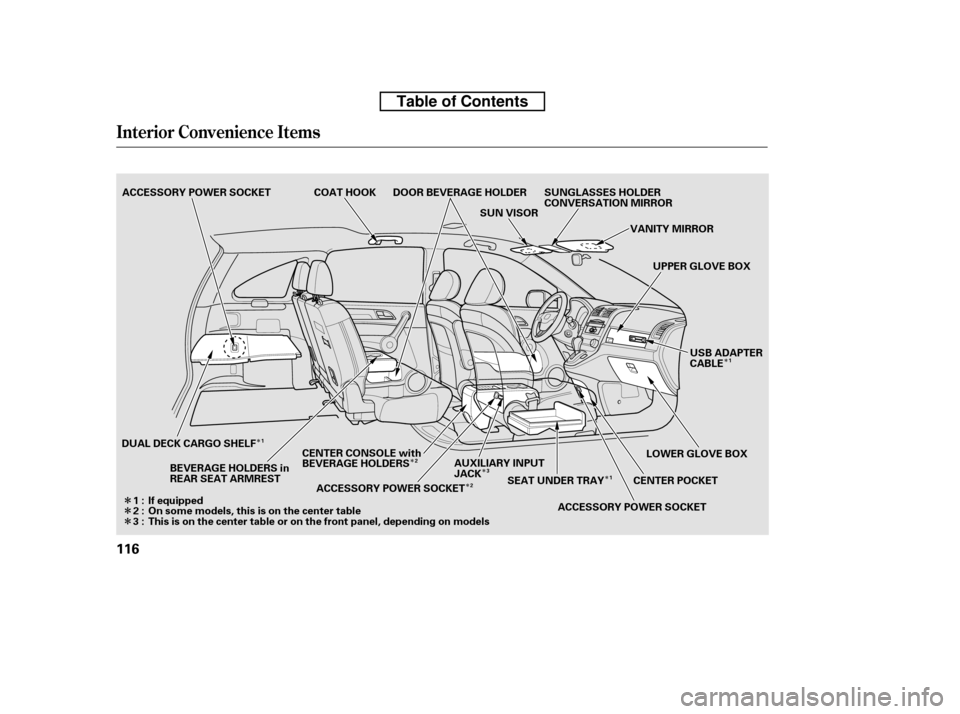
Interior Convenience Items
116
COAT HOOK SUN VISORVANITY MIRROR
ACCESSORY POWER SOCKET
UPPER GLOVE BOX
LOWER GLOVE BOX
CENTER POCKET
BEVERAGE HOLDERS in
REAR SEAT ARMREST SUNGLASSES HOLDER
CONVERSATION MIRROR
ACCESSORY POWER SOCKET
DUAL DECK CARGO SHELF
AUXILIARY INPUT
JACK
ACCESSORY POWER SOCKET
If equipped
On some models, this is on the center table
This is on the center table or on the front panel, depending on models SEAT UNDER TRAY
DOOR BEVERAGE HOLDER
CENTER CONSOLE with
BEVERAGE HOLDERS
1:2:3: USB ADAPTER
CABLE
2
1
31
2 1
Table of Contents
Page 164 of 441
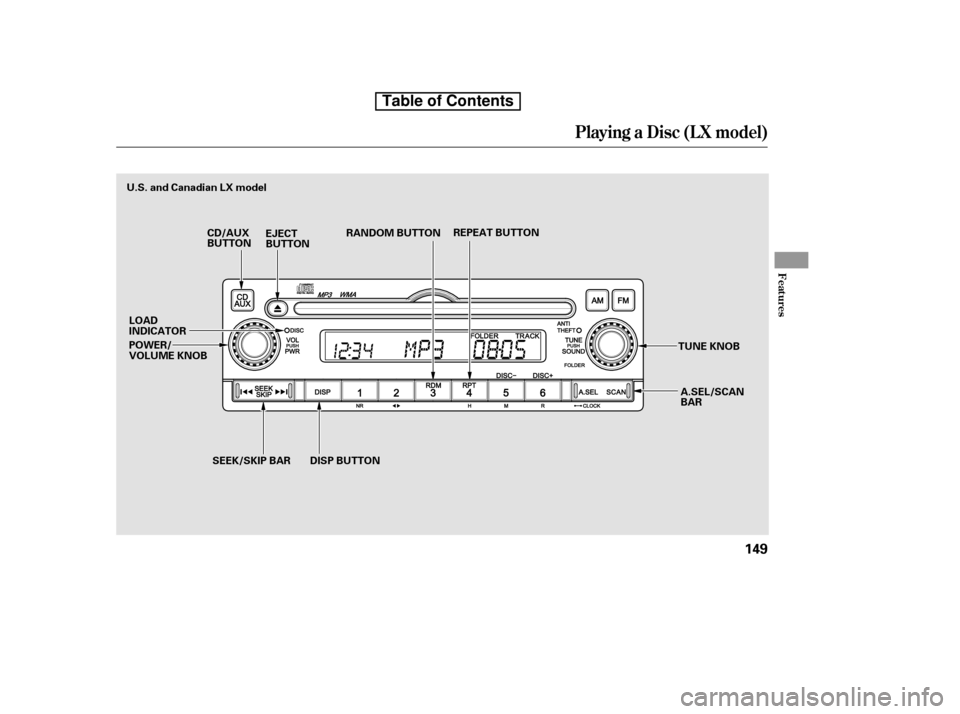
Playing a Disc (L X model)
Features
149
REPEAT BUTTON
EJECT
BUTTON RANDOM BUTTON
A.SEL/SCAN
BAR
CD/AUX
BUTTON
TUNE KNOB
POWER/
VOLUME KNOB
U.S. and Canadian LX model
LOAD
INDICATOR SEEK/SKIP BAR DISP BUTTON
Table of Contents
Page 165 of 441

�µ
�µ �µ
�µ
You operate the disc player with the
same controls used f or the radio. To
select the disc player, press the CD/
AUX button. You will see ‘‘CD’’ in the
display.
To load or play a disc, the ignition
switch must be in the ACCESSORY
(I) or ON (II) position.
The specif ications f or compatible
MP3 f iles are:
Sampling f requency:
32/44.1/48 kHz (MPEG1)
24/22.05/16 kHz (MPEG2)
Bitrate:
32/40/48/56/64/80/96/112/128/
160/192/224/256/320 kbps
(MPEG1)
8/16/24/32/40/48/56/64/80/96/
112/128/160 kbps (MPEG2)
Compatible with variable bitrate
and multi-session
Maximum layers
(including ROOT): 8 layers
This audio system can also play
CD-Rs and CD-RWs compressed in
MP3 or WMA f ormats. When
playing a disc in MP3, you will see
‘‘MP3’’ in the display. In WMA
f ormat, ‘‘WMA’’ will appear in the
display. You can select up to 99
f olders, or up to 255 tracks/f iles.
If a f ile on an MP3 or WMA disc is
protected by digital rights
management (DRM), the audio unit
displays FORMAT, and then skips to
the next f ile.
Video CDs and DVDs do not work in
this unit.
To Play a Disc
Playing a Disc (L X model)
150
NOTE:
Do not use discs with adhesive labels.
The label can curl up and cause the
disc to jam in the unit.
Table of Contents
Page 170 of 441
If you turn the system of f while a
disc is playing, either with the
power/volume knob or by turning
of f the ignition switch, the disc will
stay in the drive. When you turn the
system back on, the disc will begin
playing where it lef t of f .
For inf ormation on how to handle
and protect compact discs, see page.
Press the eject button ( ) to
remove the disc. If you eject the disc,
but do not remove it f rom the slot,
the system will automatically reload
the disc af ter 10 seconds and put it in
pause mode. To begin playing, press
the CD/AUX button.
You can also eject the disc when the
ignition switch is of f .
To play the radio when a disc is
playing, press the AM or FM button.
Press the CD/AUX button again to
switch back to the disc player.
252
Protecting Discs
To Stop Playing a Disc
Playing a Disc (L X model)
Features
155
Table of Contents
Page 181 of 441
Playing Discs (EX and EX-L models without navigation system)
166
SCAN
BUTTONSCAN
BUTTON
BUTTON
BUTTON
BUTTON
EX-L models
EX models
TITLE BUTTON
LOAD INDICATOR
SEEK
BUTTON SEEK
BUTTON REPEAT
BUTTON
DISCSLOT
LOAD
BUTTON RANDOM
BUTTON
LOAD
BUTTONLOAD INDICATOR
DISCSLOT
RANDOM
BUTTON
SEEK
BUTTON REPEAT
BUTTON
SEEK
BUTTON BUTTON
CD/AUX BUTTON
EJECT BUTTON EJECT BUTTON
CD BUTTON TITLE BUTTON
BUTTON
BUTTON PRESET BUTTONS
VOL/SELECT KNOB
PRESET BUTTONS
PRESET BUTTONS
PRESET BUTTONS
VOL/SELECT KNOB
Table of Contents
Page 182 of 441
To load or play discs, the ignition
switch must be in the ACCESSORY
(I) or ON (II) position.
You operate the disc changer with
the same controls used f or the radio.
To select the disc changer, press the
CD button (CD/AUX button on
models with satellite radio), the disc
and track numbers are displayed.
The system will continuously play a
disc until you change modes.When there are more than 99 f olders
in a disc, the audio display only
shows two digits.
This audio system can also play
CD-Rs and CD-RWs compressed in
MP3 or WMA f ormats. The numbers
of the f older and track playing are
showninthedisplayonthedisc
player. A disc can support up to 255
folders, and each folder can hold up
to 255 playable f iles. A disc can hold
up to 999 f iles in total.
CONT INUED
To Play a Disc
Playing Discs (EX and EX-L models without navigation system)
Features
167
Do not use discs with adhesive labels.
The label can curl up and cause the
disc to jam in the unit.
Table of Contents
Page 190 of 441

�Î
�Î
Press the AM, FM, AUX button, or
CD/AUX, XM button to switch to
the radio or satellite radio (U.S.
models), while a disc is playing.
Press the CD button again to play
the disc.
If you turn the system of f while a
disc is playing, either with the
( ) button or by turning of f the
ignition switch, the disc will stay in
the drive. When you turn the system
back on, the disc will begin playing
where it lef t of f . To remove a dif f erent disc f rom the
changer,firstselectitwiththe
appropriate preset button. When that
disc begins playing, press the eject
button. Continue pressing the eject
button to remove all the discs from
the changer.
You can also eject discs when the
ignition switch is of f . The disc that
was last selected is ejected f irst.
To remove the disc currently in play,
press the eject button. When a disc is
removed f rom a slot, the system
automatically begins the load
sequence so you can load another
disc in that position. If you do not
remove the disc f rom the changer
within 10 seconds, the disc will
reload into the slot. Then the system
returns to the previous mode (AM,
FM, or XM Radio ).
:OnU.S.EX-Lmodel
To Stop Playing a Disc Removing Discs f rom the In-dash
Disc Changer
Playing Discs (EX and EX-L models without navigation system)
Features
175
Table of Contents